All posts by Bradley M. Kuhn

Why Your Project Doesn’t Need a Contributor Licensing Agreement

Post Syndicated from Bradley M. Kuhn original http://ebb.org/bkuhn/blog/2014/06/09/do-not-need-cla.html

[ This is a version of an essay
that I originally
published on Conservancy’s blog
].

For nearly a decade, a battle has raged between two distinct camps
regarding something called Contributor Licensing Agreements
(CLAs).
I’ve
previously written a long treatise on the issue
. This article below is
a summary on the basics of why
CLA‘s aren’t
necessary.

In the most general sense, a
CLA is a formal
legal contract between a contributor to a
FLOSS
project and the “project”
itself0.
Ostensibly, this agreement seeks to assure the project, and/or its governing
legal entity, has the appropriate permissions to incorporate contributed
patches, changes, and/or improvements to the software and then distribute the
resulting larger work.

In practice, most CLAs in use today are deleterious overkill for that
purpose. CLAs simply shift legal blame for any patent infringement,
copyright infringement, or other bad acts from the project (or its
legal entity) back onto its contributors. Meanwhile, since vetting
every contribution for copyright and/or patent infringement is time-consuming
and expensive, no existing organization actually does that work; it’s
unfeasible to do so effectively. Thus, no one knows (in the general case) if
the contributors’ assurances in the CLA are valid. Indeed, since it’s so
difficult to determine if a given work of software infringes a patent, it’s
highly likely that any contributor submitting a patent-infringing patch did
so inadvertently and without any knowledge that the patent even existed
— even regarding patents controlled by their own
company1.

The undeniable benefit to CLAs relates to contributions from for-profit
companies who likely do hold patents that read on the software. It’s
useful to receive from such companies (whenever possible) a patent license
for any patents exercised in making, using or selling the FLOSS containing
that company’s contributions. I agree that such an assurance is nice to
have, and I might consider supporting CLAs if there was no other cost
associated with using them. However, maintenance of CLA-assent records
requires massive administrative overhead.

More disastrously, CLAs require the first interaction between a FLOSS
project and a new contributor to involve a complex legal negotiation and a
formal legal agreement. CLAs twist the empowering, community-oriented,
enjoyable experience of FLOSS contribution into an annoying exercise in
pointless bureaucracy, which (if handled properly) requires a
business-like, grating haggle between necessarily adverse parties. And,
that’s the best possible outcome. Admittedly, few contributors actually
bother to negotiate about the CLA. CLAs frankly rely on our “Don’t
Read & Click ‘Agree’” culture — thereby
tricking contributors into bearing legal risk. FLOSS project leaders
shouldn’t rely on “gotcha” fine print like car salespeople.

Thus, I encourage those considering a CLA to look past the “nice
assurances we’d like to have — all things being equal” and focus
on the “what legal assurances our FLOSS project actually needs to
assure its thrives”. I’ve spent years doing that
analysis; I’ve concluded quite simply: in this regard, all a project and its
legal home actually need is a clear statement and/or assent from the
contributor that they offer the contribution under the project’s known FLOSS
license. Long ago, the now famous Open Source lawyer Richard
Fontana dubbed
this legal policy with the name “inbound=outbound”
. It’s a
powerful concept that shows clearly the redundancy of CLAs.

Most importantly, “inbound=outbound” makes a strong and
correct statement about the FLOSS license the project chooses. FLOSS
licenses must contain all the legal terms that are necessary for a
project to thrive. If the project is unwilling to accept (inbound)
contribution of code under the terms of the license it chose, that’s a
clear indication that the project’s (outbound) license has serious
deficiencies that require immediate remedy. This is precisely why I urge
projects to select a copyleft license with a strong patent clause, such as
the GPLv3. With a
license like that, CLAs are unnecessary.

Meanwhile, the issue of requesting the contributors’ assent to the
projects’ license is orthogonal to the issue of CLAs. I do encourage use
of clear systems (either formal or informal) for that purpose. One popular
option is called the Developer Certificate of Origin
(DCO).
Originally designed for the Linux project and published by
the OSDL
under the CC-By-SA license
, the DCO is a mechanism to assure
contributors have confirmed their right to license their contribution under
the project’s license. Typically, developers indicate their agreement to
the DCO with a specially-formed tag in their
DVCS commit log.
Conservancy‘s Evergreen,
phpMyAdmin,
and Samba
projects all use modified versions of the DCO.

Conservancy’s Selenium
project uses a license assent mechanism
somewhat closer to a formal
CLA. In this method, the contributors must complete a special online form
wherein they formally assent to the license of the project. The project keeps
careful records of all assents separately from the code repository itself.
This mechanism is a bit heavy-weight, but ultimately simply formally
implements the same inbound=outbound concept.

However, most projects use the same time-honored and
successful mechanism used throughout the 35 year history of the Free
Software community. Simply, they publish clearly in their developer
documentation and/or other key places (such as mailing list subscription
notices) that submissions using the normal means to contribute to the
project — such as patches to the mailing list or pull and merge
requests — indicate the contributors’ assent for inclusion of that
software in the canonical version under the project’s license.

Ultimately, CLAs are much ado about nothing. Lawyers are trained to
zealously represent their clients, and as such they often seek to an
outcome that maximizes leverage of clients’ legal rights, but they
typically ignore the other important benefits that are outside of their
profession. The most ardent supporters of CLAs have yet to experience
first-hand the arduous daily work required to manage a queue of incoming
FLOSS contributions. Those of us who have done the latter easily see that
avoiding additional barriers to entry is paramount. While a beautifully
crafted CLA — jam-packed with legalese that artfully shifts all the
blame off to the contributors — may make some corporate attorneys
smile, but I’ve never seen such bring anything but a frown and a sigh from
FLOSS developers.


0Only rarely does an
unincorporated, unaffiliated project request CLAs. Typically, CLAs name a
corporate entity — a non-profit charity (like Conservancy), a trade
association (like OpenStack Foundation), or a for-profit company, as its
ultimate beneficiary. On rare occasions, the beneficiary of a CLA is a
single individual developer.

1I’ve yet to meet any FLOSS
developer who has read their own employer’s entire patent portfolio.

Why Your Project Doesn’t Need a Contributor Licensing Agreement

Post Syndicated from Bradley M. Kuhn original http://ebb.org/bkuhn/blog/2014/06/09/do-not-need-cla.html

[ This is a version of an essay
that I originally
published on Conservancy’s blog
].

For nearly a decade, a battle has raged between two distinct camps
regarding something called Contributor Licensing Agreements
(CLAs).
I’ve
previously written a long treatise on the issue
. This article below is
a summary on the basics of why
CLA‘s aren’t
necessary.

In the most general sense, a
CLA is a formal
legal contract between a contributor to a
FLOSS
project and the “project”
itself0.
Ostensibly, this agreement seeks to assure the project, and/or its governing
legal entity, has the appropriate permissions to incorporate contributed
patches, changes, and/or improvements to the software and then distribute the
resulting larger work.

In practice, most CLAs in use today are deleterious overkill for that
purpose. CLAs simply shift legal blame for any patent infringement,
copyright infringement, or other bad acts from the project (or its
legal entity) back onto its contributors. Meanwhile, since vetting
every contribution for copyright and/or patent infringement is time-consuming
and expensive, no existing organization actually does that work; it’s
unfeasible to do so effectively. Thus, no one knows (in the general case) if
the contributors’ assurances in the CLA are valid. Indeed, since it’s so
difficult to determine if a given work of software infringes a patent, it’s
highly likely that any contributor submitting a patent-infringing patch did
so inadvertently and without any knowledge that the patent even existed
— even regarding patents controlled by their own
company1.

The undeniable benefit to CLAs relates to contributions from for-profit
companies who likely do hold patents that read on the software. It’s
useful to receive from such companies (whenever possible) a patent license
for any patents exercised in making, using or selling the FLOSS containing
that company’s contributions. I agree that such an assurance is nice to
have, and I might consider supporting CLAs if there was no other cost
associated with using them. However, maintenance of CLA-assent records
requires massive administrative overhead.

More disastrously, CLAs require the first interaction between a FLOSS
project and a new contributor to involve a complex legal negotiation and a
formal legal agreement. CLAs twist the empowering, community-oriented,
enjoyable experience of FLOSS contribution into an annoying exercise in
pointless bureaucracy, which (if handled properly) requires a
business-like, grating haggle between necessarily adverse parties. And,
that’s the best possible outcome. Admittedly, few contributors actually
bother to negotiate about the CLA. CLAs frankly rely on our “Don’t
Read & Click ‘Agree’” culture — thereby
tricking contributors into bearing legal risk. FLOSS project leaders
shouldn’t rely on “gotcha” fine print like car salespeople.

Thus, I encourage those considering a CLA to look past the “nice
assurances we’d like to have — all things being equal” and focus
on the “what legal assurances our FLOSS project actually needs to
assure its thrives”. I’ve spent years doing that
analysis; I’ve concluded quite simply: in this regard, all a project and its
legal home actually need is a clear statement and/or assent from the
contributor that they offer the contribution under the project’s known FLOSS
license. Long ago, the now famous Open Source lawyer Richard
Fontana dubbed
this legal policy with the name “inbound=outbound”
. It’s a
powerful concept that shows clearly the redundancy of CLAs.

Most importantly, “inbound=outbound” makes a strong and
correct statement about the FLOSS license the project chooses. FLOSS
licenses must contain all the legal terms that are necessary for a
project to thrive. If the project is unwilling to accept (inbound)
contribution of code under the terms of the license it chose, that’s a
clear indication that the project’s (outbound) license has serious
deficiencies that require immediate remedy. This is precisely why I urge
projects to select a copyleft license with a strong patent clause, such as
the GPLv3. With a
license like that, CLAs are unnecessary.

Meanwhile, the issue of requesting the contributors’ assent to the
projects’ license is orthogonal to the issue of CLAs. I do encourage use
of clear systems (either formal or informal) for that purpose. One popular
option is called the Developer Certificate of Origin
(DCO).
Originally designed for the Linux project and published by
the OSDL
under the CC-By-SA license
, the DCO is a mechanism to assure
contributors have confirmed their right to license their contribution under
the project’s license. Typically, developers indicate their agreement to
the DCO with a specially-formed tag in their
DVCS commit log.
Conservancy‘s Evergreen,
phpMyAdmin,
and Samba
projects all use modified versions of the DCO.

Conservancy’s Selenium
project uses a license assent mechanism
somewhat closer to a formal
CLA. In this method, the contributors must complete a special online form
wherein they formally assent to the license of the project. The project keeps
careful records of all assents separately from the code repository itself.
This mechanism is a bit heavy-weight, but ultimately simply formally
implements the same inbound=outbound concept.

However, most projects use the same time-honored and
successful mechanism used throughout the 35 year history of the Free
Software community. Simply, they publish clearly in their developer
documentation and/or other key places (such as mailing list subscription
notices) that submissions using the normal means to contribute to the
project — such as patches to the mailing list or pull and merge
requests — indicate the contributors’ assent for inclusion of that
software in the canonical version under the project’s license.

Ultimately, CLAs are much ado about nothing. Lawyers are trained to
zealously represent their clients, and as such they often seek to an
outcome that maximizes leverage of clients’ legal rights, but they
typically ignore the other important benefits that are outside of their
profession. The most ardent supporters of CLAs have yet to experience
first-hand the arduous daily work required to manage a queue of incoming
FLOSS contributions. Those of us who have done the latter easily see that
avoiding additional barriers to entry is paramount. While a beautifully
crafted CLA — jam-packed with legalese that artfully shifts all the
blame off to the contributors — may make some corporate attorneys
smile, but I’ve never seen such bring anything but a frown and a sigh from
FLOSS developers.


0Only rarely does an
unincorporated, unaffiliated project request CLAs. Typically, CLAs name a
corporate entity — a non-profit charity (like Conservancy), a trade
association (like OpenStack Foundation), or a for-profit company, as its
ultimate beneficiary. On rare occasions, the beneficiary of a CLA is a
single individual developer.

1I’ve yet to meet any FLOSS
developer who has read their own employer’s entire patent portfolio.
Why Your Project Doesn’t Need a Contributor Licensing Agreement

Post Syndicated from Bradley M. Kuhn original http://ebb.org/bkuhn/blog/2014/06/09/do-not-need-cla.html

[ This is a version of an essay
that I originally
published on Conservancy’s blog
].

For nearly a decade, a battle has raged between two distinct camps
regarding something called Contributor Licensing Agreements
(CLAs).
I’ve
previously written a long treatise on the issue
. This article below is
a summary on the basics of why
CLA‘s aren’t
necessary.

In the most general sense, a
CLA is a formal
legal contract between a contributor to a
FLOSS
project and the “project”
itself0.
Ostensibly, this agreement seeks to assure the project, and/or its governing
legal entity, has the appropriate permissions to incorporate contributed
patches, changes, and/or improvements to the software and then distribute the
resulting larger work.

In practice, most CLAs in use today are deleterious overkill for that
purpose. CLAs simply shift legal blame for any patent infringement,
copyright infringement, or other bad acts from the project (or its
legal entity) back onto its contributors. Meanwhile, since vetting
every contribution for copyright and/or patent infringement is time-consuming
and expensive, no existing organization actually does that work; it’s
unfeasible to do so effectively. Thus, no one knows (in the general case) if
the contributors’ assurances in the CLA are valid. Indeed, since it’s so
difficult to determine if a given work of software infringes a patent, it’s
highly likely that any contributor submitting a patent-infringing patch did
so inadvertently and without any knowledge that the patent even existed
— even regarding patents controlled by their own
company1.

The undeniable benefit to CLAs relates to contributions from for-profit
companies who likely do hold patents that read on the software. It’s
useful to receive from such companies (whenever possible) a patent license
for any patents exercised in making, using or selling the FLOSS containing
that company’s contributions. I agree that such an assurance is nice to
have, and I might consider supporting CLAs if there was no other cost
associated with using them. However, maintenance of CLA-assent records
requires massive administrative overhead.

More disastrously, CLAs require the first interaction between a FLOSS
project and a new contributor to involve a complex legal negotiation and a
formal legal agreement. CLAs twist the empowering, community-oriented,
enjoyable experience of FLOSS contribution into an annoying exercise in
pointless bureaucracy, which (if handled properly) requires a
business-like, grating haggle between necessarily adverse parties. And,
that’s the best possible outcome. Admittedly, few contributors actually
bother to negotiate about the CLA. CLAs frankly rely on our “Don’t
Read & Click ‘Agree’” culture — thereby
tricking contributors into bearing legal risk. FLOSS project leaders
shouldn’t rely on “gotcha” fine print like car salespeople.

Thus, I encourage those considering a CLA to look past the “nice
assurances we’d like to have — all things being equal” and focus
on the “what legal assurances our FLOSS project actually needs to
assure its thrives”. I’ve spent years doing that
analysis; I’ve concluded quite simply: in this regard, all a project and its
legal home actually need is a clear statement and/or assent from the
contributor that they offer the contribution under the project’s known FLOSS
license. Long ago, the now famous Open Source lawyer Richard
Fontana dubbed
this legal policy with the name “inbound=outbound”
. It’s a
powerful concept that shows clearly the redundancy of CLAs.

Most importantly, “inbound=outbound” makes a strong and
correct statement about the FLOSS license the project chooses. FLOSS
licenses must contain all the legal terms that are necessary for a
project to thrive. If the project is unwilling to accept (inbound)
contribution of code under the terms of the license it chose, that’s a
clear indication that the project’s (outbound) license has serious
deficiencies that require immediate remedy. This is precisely why I urge
projects to select a copyleft license with a strong patent clause, such as
the GPLv3. With a
license like that, CLAs are unnecessary.

Meanwhile, the issue of requesting the contributors’ assent to the
projects’ license is orthogonal to the issue of CLAs. I do encourage use
of clear systems (either formal or informal) for that purpose. One popular
option is called the Developer Certificate of Origin
(DCO).
Originally designed for the Linux project and published by
the OSDL
under the CC-By-SA license
, the DCO is a mechanism to assure
contributors have confirmed their right to license their contribution under
the project’s license. Typically, developers indicate their agreement to
the DCO with a specially-formed tag in their
DVCS commit log.
Conservancy‘s Evergreen,
phpMyAdmin,
and Samba
projects all use modified versions of the DCO.

Conservancy’s Selenium
project uses a license assent mechanism
somewhat closer to a formal
CLA. In this method, the contributors must complete a special online form
wherein they formally assent to the license of the project. The project keeps
careful records of all assents separately from the code repository itself.
This mechanism is a bit heavy-weight, but ultimately simply formally
implements the same inbound=outbound concept.

However, most projects use the same time-honored and
successful mechanism used throughout the 35 year history of the Free
Software community. Simply, they publish clearly in their developer
documentation and/or other key places (such as mailing list subscription
notices) that submissions using the normal means to contribute to the
project — such as patches to the mailing list or pull and merge
requests — indicate the contributors’ assent for inclusion of that
software in the canonical version under the project’s license.

Ultimately, CLAs are much ado about nothing. Lawyers are trained to
zealously represent their clients, and as such they often seek to an
outcome that maximizes leverage of clients’ legal rights, but they
typically ignore the other important benefits that are outside of their
profession. The most ardent supporters of CLAs have yet to experience
first-hand the arduous daily work required to manage a queue of incoming
FLOSS contributions. Those of us who have done the latter easily see that
avoiding additional barriers to entry is paramount. While a beautifully
crafted CLA — jam-packed with legalese that artfully shifts all the
blame off to the contributors — may make some corporate attorneys
smile, but I’ve never seen such bring anything but a frown and a sigh from
FLOSS developers.


0Only rarely does an
unincorporated, unaffiliated project request CLAs. Typically, CLAs name a
corporate entity — a non-profit charity (like Conservancy), a trade
association (like OpenStack Foundation), or a for-profit company, as its
ultimate beneficiary. On rare occasions, the beneficiary of a CLA is a
single individual developer.

1I’ve yet to meet any FLOSS
developer who has read their own employer’s entire patent portfolio.

Why Your Project Doesn’t Need a Contributor Licensing Agreement

Post Syndicated from Bradley M. Kuhn original http://ebb.org/bkuhn/blog/2014/06/09/do-not-need-cla.html

[ This is a version of an essay
that I originally
published on Conservancy’s blog
].

For nearly a decade, a battle has raged between two distinct camps
regarding something called Contributor Licensing Agreements
(CLAs).
I’ve
previously written a long treatise on the issue
. This article below is
a summary on the basics of why
CLA‘s aren’t
necessary.

In the most general sense, a
CLA is a formal
legal contract between a contributor to a
FLOSS
project and the “project”
itself0.
Ostensibly, this agreement seeks to assure the project, and/or its governing
legal entity, has the appropriate permissions to incorporate contributed
patches, changes, and/or improvements to the software and then distribute the
resulting larger work.

In practice, most CLAs in use today are deleterious overkill for that
purpose. CLAs simply shift legal blame for any patent infringement,
copyright infringement, or other bad acts from the project (or its
legal entity) back onto its contributors. Meanwhile, since vetting
every contribution for copyright and/or patent infringement is time-consuming
and expensive, no existing organization actually does that work; it’s
unfeasible to do so effectively. Thus, no one knows (in the general case) if
the contributors’ assurances in the CLA are valid. Indeed, since it’s so
difficult to determine if a given work of software infringes a patent, it’s
highly likely that any contributor submitting a patent-infringing patch did
so inadvertently and without any knowledge that the patent even existed
— even regarding patents controlled by their own
company1.

The undeniable benefit to CLAs relates to contributions from for-profit
companies who likely do hold patents that read on the software. It’s
useful to receive from such companies (whenever possible) a patent license
for any patents exercised in making, using or selling the FLOSS containing
that company’s contributions. I agree that such an assurance is nice to
have, and I might consider supporting CLAs if there was no other cost
associated with using them. However, maintenance of CLA-assent records
requires massive administrative overhead.

More disastrously, CLAs require the first interaction between a FLOSS
project and a new contributor to involve a complex legal negotiation and a
formal legal agreement. CLAs twist the empowering, community-oriented,
enjoyable experience of FLOSS contribution into an annoying exercise in
pointless bureaucracy, which (if handled properly) requires a
business-like, grating haggle between necessarily adverse parties. And,
that’s the best possible outcome. Admittedly, few contributors actually
bother to negotiate about the CLA. CLAs frankly rely on our “Don’t
Read & Click ‘Agree’” culture — thereby
tricking contributors into bearing legal risk. FLOSS project leaders
shouldn’t rely on “gotcha” fine print like car salespeople.

Thus, I encourage those considering a CLA to look past the “nice
assurances we’d like to have — all things being equal” and focus
on the “what legal assurances our FLOSS project actually needs to
assure its thrives”. I’ve spent years doing that
analysis; I’ve concluded quite simply: in this regard, all a project and its
legal home actually need is a clear statement and/or assent from the
contributor that they offer the contribution under the project’s known FLOSS
license. Long ago, the now famous Open Source lawyer Richard
Fontana dubbed
this legal policy with the name “inbound=outbound”
. It’s a
powerful concept that shows clearly the redundancy of CLAs.

Most importantly, “inbound=outbound” makes a strong and
correct statement about the FLOSS license the project chooses. FLOSS
licenses must contain all the legal terms that are necessary for a
project to thrive. If the project is unwilling to accept (inbound)
contribution of code under the terms of the license it chose, that’s a
clear indication that the project’s (outbound) license has serious
deficiencies that require immediate remedy. This is precisely why I urge
projects to select a copyleft license with a strong patent clause, such as
the GPLv3. With a
license like that, CLAs are unnecessary.

Meanwhile, the issue of requesting the contributors’ assent to the
projects’ license is orthogonal to the issue of CLAs. I do encourage use
of clear systems (either formal or informal) for that purpose. One popular
option is called the Developer Certificate of Origin
(DCO).
Originally designed for the Linux project and published by
the OSDL
under the CC-By-SA license
, the DCO is a mechanism to assure
contributors have confirmed their right to license their contribution under
the project’s license. Typically, developers indicate their agreement to
the DCO with a specially-formed tag in their
DVCS commit log.
Conservancy‘s Evergreen,
phpMyAdmin,
and Samba
projects all use modified versions of the DCO.

Conservancy’s Selenium
project uses a license assent mechanism
somewhat closer to a formal
CLA. In this method, the contributors must complete a special online form
wherein they formally assent to the license of the project. The project keeps
careful records of all assents separately from the code repository itself.
This mechanism is a bit heavy-weight, but ultimately simply formally
implements the same inbound=outbound concept.

However, most projects use the same time-honored and
successful mechanism used throughout the 35 year history of the Free
Software community. Simply, they publish clearly in their developer
documentation and/or other key places (such as mailing list subscription
notices) that submissions using the normal means to contribute to the
project — such as patches to the mailing list or pull and merge
requests — indicate the contributors’ assent for inclusion of that
software in the canonical version under the project’s license.

Ultimately, CLAs are much ado about nothing. Lawyers are trained to
zealously represent their clients, and as such they often seek to an
outcome that maximizes leverage of clients’ legal rights, but they
typically ignore the other important benefits that are outside of their
profession. The most ardent supporters of CLAs have yet to experience
first-hand the arduous daily work required to manage a queue of incoming
FLOSS contributions. Those of us who have done the latter easily see that
avoiding additional barriers to entry is paramount. While a beautifully
crafted CLA — jam-packed with legalese that artfully shifts all the
blame off to the contributors — may make some corporate attorneys
smile, but I’ve never seen such bring anything but a frown and a sigh from
FLOSS developers.


0Only rarely does an
unincorporated, unaffiliated project request CLAs. Typically, CLAs name a
corporate entity — a non-profit charity (like Conservancy), a trade
association (like OpenStack Foundation), or a for-profit company, as its
ultimate beneficiary. On rare occasions, the beneficiary of a CLA is a
single individual developer.

1I’ve yet to meet any FLOSS
developer who has read their own employer’s entire patent portfolio.

Why Your Project Doesn’t Need a Contributor Licensing Agreement

Post Syndicated from Bradley M. Kuhn original http://ebb.org/bkuhn/blog/2014/06/09/do-not-need-cla.html

[ This is a version of an essay
that I originally
published on Conservancy’s blog
].

For nearly a decade, a battle has raged between two distinct camps
regarding something called Contributor Licensing Agreements
(CLAs).
I’ve
previously written a long treatise on the issue
. This article below is
a summary on the basics of why
CLA‘s aren’t
necessary.

In the most general sense, a
CLA is a formal
legal contract between a contributor to a
FLOSS
project and the “project”
itself0.
Ostensibly, this agreement seeks to assure the project, and/or its governing
legal entity, has the appropriate permissions to incorporate contributed
patches, changes, and/or improvements to the software and then distribute the
resulting larger work.

In practice, most CLAs in use today are deleterious overkill for that
purpose. CLAs simply shift legal blame for any patent infringement,
copyright infringement, or other bad acts from the project (or its
legal entity) back onto its contributors. Meanwhile, since vetting
every contribution for copyright and/or patent infringement is time-consuming
and expensive, no existing organization actually does that work; it’s
unfeasible to do so effectively. Thus, no one knows (in the general case) if
the contributors’ assurances in the CLA are valid. Indeed, since it’s so
difficult to determine if a given work of software infringes a patent, it’s
highly likely that any contributor submitting a patent-infringing patch did
so inadvertently and without any knowledge that the patent even existed
— even regarding patents controlled by their own
company1.

The undeniable benefit to CLAs relates to contributions from for-profit
companies who likely do hold patents that read on the software. It’s
useful to receive from such companies (whenever possible) a patent license
for any patents exercised in making, using or selling the FLOSS containing
that company’s contributions. I agree that such an assurance is nice to
have, and I might consider supporting CLAs if there was no other cost
associated with using them. However, maintenance of CLA-assent records
requires massive administrative overhead.

More disastrously, CLAs require the first interaction between a FLOSS
project and a new contributor to involve a complex legal negotiation and a
formal legal agreement. CLAs twist the empowering, community-oriented,
enjoyable experience of FLOSS contribution into an annoying exercise in
pointless bureaucracy, which (if handled properly) requires a
business-like, grating haggle between necessarily adverse parties. And,
that’s the best possible outcome. Admittedly, few contributors actually
bother to negotiate about the CLA. CLAs frankly rely on our “Don’t
Read & Click ‘Agree’” culture — thereby
tricking contributors into bearing legal risk. FLOSS project leaders
shouldn’t rely on “gotcha” fine print like car salespeople.

Thus, I encourage those considering a CLA to look past the “nice
assurances we’d like to have — all things being equal” and focus
on the “what legal assurances our FLOSS project actually needs to
assure its thrives”. I’ve spent years doing that
analysis; I’ve concluded quite simply: in this regard, all a project and its
legal home actually need is a clear statement and/or assent from the
contributor that they offer the contribution under the project’s known FLOSS
license. Long ago, the now famous Open Source lawyer Richard
Fontana dubbed
this legal policy with the name “inbound=outbound”
. It’s a
powerful concept that shows clearly the redundancy of CLAs.

Most importantly, “inbound=outbound” makes a strong and
correct statement about the FLOSS license the project chooses. FLOSS
licenses must contain all the legal terms that are necessary for a
project to thrive. If the project is unwilling to accept (inbound)
contribution of code under the terms of the license it chose, that’s a
clear indication that the project’s (outbound) license has serious
deficiencies that require immediate remedy. This is precisely why I urge
projects to select a copyleft license with a strong patent clause, such as
the GPLv3. With a
license like that, CLAs are unnecessary.

Meanwhile, the issue of requesting the contributors’ assent to the
projects’ license is orthogonal to the issue of CLAs. I do encourage use
of clear systems (either formal or informal) for that purpose. One popular
option is called the Developer Certificate of Origin
(DCO).
Originally designed for the Linux project and published by
the OSDL
under the CC-By-SA license
, the DCO is a mechanism to assure
contributors have confirmed their right to license their contribution under
the project’s license. Typically, developers indicate their agreement to
the DCO with a specially-formed tag in their
DVCS commit log.
Conservancy‘s Evergreen,
phpMyAdmin,
and Samba
projects all use modified versions of the DCO.

Conservancy’s Selenium
project uses a license assent mechanism
somewhat closer to a formal
CLA. In this method, the contributors must complete a special online form
wherein they formally assent to the license of the project. The project keeps
careful records of all assents separately from the code repository itself.
This mechanism is a bit heavy-weight, but ultimately simply formally
implements the same inbound=outbound concept.

However, most projects use the same time-honored and
successful mechanism used throughout the 35 year history of the Free
Software community. Simply, they publish clearly in their developer
documentation and/or other key places (such as mailing list subscription
notices) that submissions using the normal means to contribute to the
project — such as patches to the mailing list or pull and merge
requests — indicate the contributors’ assent for inclusion of that
software in the canonical version under the project’s license.

Ultimately, CLAs are much ado about nothing. Lawyers are trained to
zealously represent their clients, and as such they often seek to an
outcome that maximizes leverage of clients’ legal rights, but they
typically ignore the other important benefits that are outside of their
profession. The most ardent supporters of CLAs have yet to experience
first-hand the arduous daily work required to manage a queue of incoming
FLOSS contributions. Those of us who have done the latter easily see that
avoiding additional barriers to entry is paramount. While a beautifully
crafted CLA — jam-packed with legalese that artfully shifts all the
blame off to the contributors — may make some corporate attorneys
smile, but I’ve never seen such bring anything but a frown and a sigh from
FLOSS developers.


0Only rarely does an
unincorporated, unaffiliated project request CLAs. Typically, CLAs name a
corporate entity — a non-profit charity (like Conservancy), a trade
association (like OpenStack Foundation), or a for-profit company, as its
ultimate beneficiary. On rare occasions, the beneficiary of a CLA is a
single individual developer.

1I’ve yet to meet any FLOSS
developer who has read their own employer’s entire patent portfolio.

Why Your Project Doesn’t Need a Contributor Licensing Agreement

Post Syndicated from Bradley M. Kuhn original http://ebb.org/bkuhn/blog/2014/06/09/do-not-need-cla.html

[ This is a version of an essay
that I originally
published on Conservancy’s blog
].

For nearly a decade, a battle has raged between two distinct camps
regarding something called Contributor Licensing Agreements
(CLAs).
I’ve
previously written a long treatise on the issue
. This article below is
a summary on the basics of why
CLA‘s aren’t
necessary.

In the most general sense, a
CLA is a formal
legal contract between a contributor to a
FLOSS
project and the “project”
itself0.
Ostensibly, this agreement seeks to assure the project, and/or its governing
legal entity, has the appropriate permissions to incorporate contributed
patches, changes, and/or improvements to the software and then distribute the
resulting larger work.

In practice, most CLAs in use today are deleterious overkill for that
purpose. CLAs simply shift legal blame for any patent infringement,
copyright infringement, or other bad acts from the project (or its
legal entity) back onto its contributors. Meanwhile, since vetting
every contribution for copyright and/or patent infringement is time-consuming
and expensive, no existing organization actually does that work; it’s
unfeasible to do so effectively. Thus, no one knows (in the general case) if
the contributors’ assurances in the CLA are valid. Indeed, since it’s so
difficult to determine if a given work of software infringes a patent, it’s
highly likely that any contributor submitting a patent-infringing patch did
so inadvertently and without any knowledge that the patent even existed
— even regarding patents controlled by their own
company1.

The undeniable benefit to CLAs relates to contributions from for-profit
companies who likely do hold patents that read on the software. It’s
useful to receive from such companies (whenever possible) a patent license
for any patents exercised in making, using or selling the FLOSS containing
that company’s contributions. I agree that such an assurance is nice to
have, and I might consider supporting CLAs if there was no other cost
associated with using them. However, maintenance of CLA-assent records
requires massive administrative overhead.

More disastrously, CLAs require the first interaction between a FLOSS
project and a new contributor to involve a complex legal negotiation and a
formal legal agreement. CLAs twist the empowering, community-oriented,
enjoyable experience of FLOSS contribution into an annoying exercise in
pointless bureaucracy, which (if handled properly) requires a
business-like, grating haggle between necessarily adverse parties. And,
that’s the best possible outcome. Admittedly, few contributors actually
bother to negotiate about the CLA. CLAs frankly rely on our “Don’t
Read & Click ‘Agree’” culture — thereby
tricking contributors into bearing legal risk. FLOSS project leaders
shouldn’t rely on “gotcha” fine print like car salespeople.

Thus, I encourage those considering a CLA to look past the “nice
assurances we’d like to have — all things being equal” and focus
on the “what legal assurances our FLOSS project actually needs to
assure its thrives”. I’ve spent years doing that
analysis; I’ve concluded quite simply: in this regard, all a project and its
legal home actually need is a clear statement and/or assent from the
contributor that they offer the contribution under the project’s known FLOSS
license. Long ago, the now famous Open Source lawyer Richard
Fontana dubbed
this legal policy with the name “inbound=outbound”
. It’s a
powerful concept that shows clearly the redundancy of CLAs.

Most importantly, “inbound=outbound” makes a strong and
correct statement about the FLOSS license the project chooses. FLOSS
licenses must contain all the legal terms that are necessary for a
project to thrive. If the project is unwilling to accept (inbound)
contribution of code under the terms of the license it chose, that’s a
clear indication that the project’s (outbound) license has serious
deficiencies that require immediate remedy. This is precisely why I urge
projects to select a copyleft license with a strong patent clause, such as
the GPLv3. With a
license like that, CLAs are unnecessary.

Meanwhile, the issue of requesting the contributors’ assent to the
projects’ license is orthogonal to the issue of CLAs. I do encourage use
of clear systems (either formal or informal) for that purpose. One popular
option is called the Developer Certificate of Origin
(DCO).
Originally designed for the Linux project and published by
the OSDL
under the CC-By-SA license
, the DCO is a mechanism to assure
contributors have confirmed their right to license their contribution under
the project’s license. Typically, developers indicate their agreement to
the DCO with a specially-formed tag in their
DVCS commit log.
Conservancy‘s Evergreen,
phpMyAdmin,
and Samba
projects all use modified versions of the DCO.

Conservancy’s Selenium
project uses a license assent mechanism
somewhat closer to a formal
CLA. In this method, the contributors must complete a special online form
wherein they formally assent to the license of the project. The project keeps
careful records of all assents separately from the code repository itself.
This mechanism is a bit heavy-weight, but ultimately simply formally
implements the same inbound=outbound concept.

However, most projects use the same time-honored and
successful mechanism used throughout the 35 year history of the Free
Software community. Simply, they publish clearly in their developer
documentation and/or other key places (such as mailing list subscription
notices) that submissions using the normal means to contribute to the
project — such as patches to the mailing list or pull and merge
requests — indicate the contributors’ assent for inclusion of that
software in the canonical version under the project’s license.

Ultimately, CLAs are much ado about nothing. Lawyers are trained to
zealously represent their clients, and as such they often seek to an
outcome that maximizes leverage of clients’ legal rights, but they
typically ignore the other important benefits that are outside of their
profession. The most ardent supporters of CLAs have yet to experience
first-hand the arduous daily work required to manage a queue of incoming
FLOSS contributions. Those of us who have done the latter easily see that
avoiding additional barriers to entry is paramount. While a beautifully
crafted CLA — jam-packed with legalese that artfully shifts all the
blame off to the contributors — may make some corporate attorneys
smile, but I’ve never seen such bring anything but a frown and a sigh from
FLOSS developers.


0Only rarely does an
unincorporated, unaffiliated project request CLAs. Typically, CLAs name a
corporate entity — a non-profit charity (like Conservancy), a trade
association (like OpenStack Foundation), or a for-profit company, as its
ultimate beneficiary. On rare occasions, the beneficiary of a CLA is a
single individual developer.

1I’ve yet to meet any FLOSS
developer who has read their own employer’s entire patent portfolio.

Why Your Project Doesn’t Need a Contributor Licensing Agreement

Post Syndicated from Bradley M. Kuhn original http://ebb.org/bkuhn/blog/2014/06/09/do-not-need-cla.html

[ This is a version of an essay
that I originally
published on Conservancy’s blog
].

For nearly a decade, a battle has raged between two distinct camps
regarding something called Contributor Licensing Agreements
(CLAs).
I’ve
previously written a long treatise on the issue
. This article below is
a summary on the basics of why
CLA‘s aren’t
necessary.

In the most general sense, a
CLA is a formal
legal contract between a contributor to a
FLOSS
project and the “project”
itself0.
Ostensibly, this agreement seeks to assure the project, and/or its governing
legal entity, has the appropriate permissions to incorporate contributed
patches, changes, and/or improvements to the software and then distribute the
resulting larger work.

In practice, most CLAs in use today are deleterious overkill for that
purpose. CLAs simply shift legal blame for any patent infringement,
copyright infringement, or other bad acts from the project (or its
legal entity) back onto its contributors. Meanwhile, since vetting
every contribution for copyright and/or patent infringement is time-consuming
and expensive, no existing organization actually does that work; it’s
unfeasible to do so effectively. Thus, no one knows (in the general case) if
the contributors’ assurances in the CLA are valid. Indeed, since it’s so
difficult to determine if a given work of software infringes a patent, it’s
highly likely that any contributor submitting a patent-infringing patch did
so inadvertently and without any knowledge that the patent even existed
— even regarding patents controlled by their own
company1.

The undeniable benefit to CLAs relates to contributions from for-profit
companies who likely do hold patents that read on the software. It’s
useful to receive from such companies (whenever possible) a patent license
for any patents exercised in making, using or selling the FLOSS containing
that company’s contributions. I agree that such an assurance is nice to
have, and I might consider supporting CLAs if there was no other cost
associated with using them. However, maintenance of CLA-assent records
requires massive administrative overhead.

More disastrously, CLAs require the first interaction between a FLOSS
project and a new contributor to involve a complex legal negotiation and a
formal legal agreement. CLAs twist the empowering, community-oriented,
enjoyable experience of FLOSS contribution into an annoying exercise in
pointless bureaucracy, which (if handled properly) requires a
business-like, grating haggle between necessarily adverse parties. And,
that’s the best possible outcome. Admittedly, few contributors actually
bother to negotiate about the CLA. CLAs frankly rely on our “Don’t
Read & Click ‘Agree’” culture — thereby
tricking contributors into bearing legal risk. FLOSS project leaders
shouldn’t rely on “gotcha” fine print like car salespeople.

Thus, I encourage those considering a CLA to look past the “nice
assurances we’d like to have — all things being equal” and focus
on the “what legal assurances our FLOSS project actually needs to
assure its thrives”. I’ve spent years doing that
analysis; I’ve concluded quite simply: in this regard, all a project and its
legal home actually need is a clear statement and/or assent from the
contributor that they offer the contribution under the project’s known FLOSS
license. Long ago, the now famous Open Source lawyer Richard
Fontana dubbed
this legal policy with the name “inbound=outbound”
. It’s a
powerful concept that shows clearly the redundancy of CLAs.

Most importantly, “inbound=outbound” makes a strong and
correct statement about the FLOSS license the project chooses. FLOSS
licenses must contain all the legal terms that are necessary for a
project to thrive. If the project is unwilling to accept (inbound)
contribution of code under the terms of the license it chose, that’s a
clear indication that the project’s (outbound) license has serious
deficiencies that require immediate remedy. This is precisely why I urge
projects to select a copyleft license with a strong patent clause, such as
the GPLv3. With a
license like that, CLAs are unnecessary.

Meanwhile, the issue of requesting the contributors’ assent to the
projects’ license is orthogonal to the issue of CLAs. I do encourage use
of clear systems (either formal or informal) for that purpose. One popular
option is called the Developer Certificate of Origin
(DCO).
Originally designed for the Linux project and published by
the OSDL
under the CC-By-SA license
, the DCO is a mechanism to assure
contributors have confirmed their right to license their contribution under
the project’s license. Typically, developers indicate their agreement to
the DCO with a specially-formed tag in their
DVCS commit log.
Conservancy‘s Evergreen,
phpMyAdmin,
and Samba
projects all use modified versions of the DCO.

Conservancy’s Selenium
project uses a license assent mechanism
somewhat closer to a formal
CLA. In this method, the contributors must complete a special online form
wherein they formally assent to the license of the project. The project keeps
careful records of all assents separately from the code repository itself.
This mechanism is a bit heavy-weight, but ultimately simply formally
implements the same inbound=outbound concept.

However, most projects use the same time-honored and
successful mechanism used throughout the 35 year history of the Free
Software community. Simply, they publish clearly in their developer
documentation and/or other key places (such as mailing list subscription
notices) that submissions using the normal means to contribute to the
project — such as patches to the mailing list or pull and merge
requests — indicate the contributors’ assent for inclusion of that
software in the canonical version under the project’s license.

Ultimately, CLAs are much ado about nothing. Lawyers are trained to
zealously represent their clients, and as such they often seek to an
outcome that maximizes leverage of clients’ legal rights, but they
typically ignore the other important benefits that are outside of their
profession. The most ardent supporters of CLAs have yet to experience
first-hand the arduous daily work required to manage a queue of incoming
FLOSS contributions. Those of us who have done the latter easily see that
avoiding additional barriers to entry is paramount. While a beautifully
crafted CLA — jam-packed with legalese that artfully shifts all the
blame off to the contributors — may make some corporate attorneys
smile, but I’ve never seen such bring anything but a frown and a sigh from
FLOSS developers.


0Only rarely does an
unincorporated, unaffiliated project request CLAs. Typically, CLAs name a
corporate entity — a non-profit charity (like Conservancy), a trade
association (like OpenStack Foundation), or a for-profit company, as its
ultimate beneficiary. On rare occasions, the beneficiary of a CLA is a
single individual developer.

1I’ve yet to meet any FLOSS
developer who has read their own employer’s entire patent portfolio.

Why Your Project Doesn’t Need a Contributor Licensing Agreement

Post Syndicated from Bradley M. Kuhn original http://ebb.org/bkuhn/blog/2014/06/09/do-not-need-cla.html

[ This is a version of an essay
that I originally
published on Conservancy’s blog
].

For nearly a decade, a battle has raged between two distinct camps
regarding something called Contributor Licensing Agreements
(CLAs).
I’ve
previously written a long treatise on the issue
. This article below is
a summary on the basics of why
CLA‘s aren’t
necessary.

In the most general sense, a
CLA is a formal
legal contract between a contributor to a
FLOSS
project and the “project”
itself0.
Ostensibly, this agreement seeks to assure the project, and/or its governing
legal entity, has the appropriate permissions to incorporate contributed
patches, changes, and/or improvements to the software and then distribute the
resulting larger work.

In practice, most CLAs in use today are deleterious overkill for that
purpose. CLAs simply shift legal blame for any patent infringement,
copyright infringement, or other bad acts from the project (or its
legal entity) back onto its contributors. Meanwhile, since vetting
every contribution for copyright and/or patent infringement is time-consuming
and expensive, no existing organization actually does that work; it’s
unfeasible to do so effectively. Thus, no one knows (in the general case) if
the contributors’ assurances in the CLA are valid. Indeed, since it’s so
difficult to determine if a given work of software infringes a patent, it’s
highly likely that any contributor submitting a patent-infringing patch did
so inadvertently and without any knowledge that the patent even existed
— even regarding patents controlled by their own
company1.

The undeniable benefit to CLAs relates to contributions from for-profit
companies who likely do hold patents that read on the software. It’s
useful to receive from such companies (whenever possible) a patent license
for any patents exercised in making, using or selling the FLOSS containing
that company’s contributions. I agree that such an assurance is nice to
have, and I might consider supporting CLAs if there was no other cost
associated with using them. However, maintenance of CLA-assent records
requires massive administrative overhead.

More disastrously, CLAs require the first interaction between a FLOSS
project and a new contributor to involve a complex legal negotiation and a
formal legal agreement. CLAs twist the empowering, community-oriented,
enjoyable experience of FLOSS contribution into an annoying exercise in
pointless bureaucracy, which (if handled properly) requires a
business-like, grating haggle between necessarily adverse parties. And,
that’s the best possible outcome. Admittedly, few contributors actually
bother to negotiate about the CLA. CLAs frankly rely on our “Don’t
Read & Click ‘Agree’” culture — thereby
tricking contributors into bearing legal risk. FLOSS project leaders
shouldn’t rely on “gotcha” fine print like car salespeople.

Thus, I encourage those considering a CLA to look past the “nice
assurances we’d like to have — all things being equal” and focus
on the “what legal assurances our FLOSS project actually needs to
assure its thrives”. I’ve spent years doing that
analysis; I’ve concluded quite simply: in this regard, all a project and its
legal home actually need is a clear statement and/or assent from the
contributor that they offer the contribution under the project’s known FLOSS
license. Long ago, the now famous Open Source lawyer Richard
Fontana dubbed
this legal policy with the name “inbound=outbound”
. It’s a
powerful concept that shows clearly the redundancy of CLAs.

Most importantly, “inbound=outbound” makes a strong and
correct statement about the FLOSS license the project chooses. FLOSS
licenses must contain all the legal terms that are necessary for a
project to thrive. If the project is unwilling to accept (inbound)
contribution of code under the terms of the license it chose, that’s a
clear indication that the project’s (outbound) license has serious
deficiencies that require immediate remedy. This is precisely why I urge
projects to select a copyleft license with a strong patent clause, such as
the GPLv3. With a
license like that, CLAs are unnecessary.

Meanwhile, the issue of requesting the contributors’ assent to the
projects’ license is orthogonal to the issue of CLAs. I do encourage use
of clear systems (either formal or informal) for that purpose. One popular
option is called the Developer Certificate of Origin
(DCO).
Originally designed for the Linux project and published by
the OSDL
under the CC-By-SA license
, the DCO is a mechanism to assure
contributors have confirmed their right to license their contribution under
the project’s license. Typically, developers indicate their agreement to
the DCO with a specially-formed tag in their
DVCS commit log.
Conservancy‘s Evergreen,
phpMyAdmin,
and Samba
projects all use modified versions of the DCO.

Conservancy’s Selenium
project uses a license assent mechanism
somewhat closer to a formal
CLA. In this method, the contributors must complete a special online form
wherein they formally assent to the license of the project. The project keeps
careful records of all assents separately from the code repository itself.
This mechanism is a bit heavy-weight, but ultimately simply formally
implements the same inbound=outbound concept.

However, most projects use the same time-honored and
successful mechanism used throughout the 35 year history of the Free
Software community. Simply, they publish clearly in their developer
documentation and/or other key places (such as mailing list subscription
notices) that submissions using the normal means to contribute to the
project — such as patches to the mailing list or pull and merge
requests — indicate the contributors’ assent for inclusion of that
software in the canonical version under the project’s license.

Ultimately, CLAs are much ado about nothing. Lawyers are trained to
zealously represent their clients, and as such they often seek to an
outcome that maximizes leverage of clients’ legal rights, but they
typically ignore the other important benefits that are outside of their
profession. The most ardent supporters of CLAs have yet to experience
first-hand the arduous daily work required to manage a queue of incoming
FLOSS contributions. Those of us who have done the latter easily see that
avoiding additional barriers to entry is paramount. While a beautifully
crafted CLA — jam-packed with legalese that artfully shifts all the
blame off to the contributors — may make some corporate attorneys
smile, but I’ve never seen such bring anything but a frown and a sigh from
FLOSS developers.


0Only rarely does an
unincorporated, unaffiliated project request CLAs. Typically, CLAs name a
corporate entity — a non-profit charity (like Conservancy), a trade
association (like OpenStack Foundation), or a for-profit company, as its
ultimate beneficiary. On rare occasions, the beneficiary of a CLA is a
single individual developer.

1I’ve yet to meet any FLOSS
developer who has read their own employer’s entire patent portfolio.

Why Your Project Doesn’t Need a Contributor Licensing Agreement

Post Syndicated from Bradley M. Kuhn original http://ebb.org/bkuhn/blog/2014/06/09/do-not-need-cla.html

[ This is a version of an essay
that I originally
published on Conservancy’s blog
].

For nearly a decade, a battle has raged between two distinct camps
regarding something called Contributor Licensing Agreements
(CLAs).
I’ve
previously written a long treatise on the issue
. This article below is
a summary on the basics of why
CLA‘s aren’t
necessary.

In the most general sense, a
CLA is a formal
legal contract between a contributor to a
FLOSS
project and the “project”
itself0.
Ostensibly, this agreement seeks to assure the project, and/or its governing
legal entity, has the appropriate permissions to incorporate contributed
patches, changes, and/or improvements to the software and then distribute the
resulting larger work.

In practice, most CLAs in use today are deleterious overkill for that
purpose. CLAs simply shift legal blame for any patent infringement,
copyright infringement, or other bad acts from the project (or its
legal entity) back onto its contributors. Meanwhile, since vetting
every contribution for copyright and/or patent infringement is time-consuming
and expensive, no existing organization actually does that work; it’s
unfeasible to do so effectively. Thus, no one knows (in the general case) if
the contributors’ assurances in the CLA are valid. Indeed, since it’s so
difficult to determine if a given work of software infringes a patent, it’s
highly likely that any contributor submitting a patent-infringing patch did
so inadvertently and without any knowledge that the patent even existed
— even regarding patents controlled by their own
company1.

The undeniable benefit to CLAs relates to contributions from for-profit
companies who likely do hold patents that read on the software. It’s
useful to receive from such companies (whenever possible) a patent license
for any patents exercised in making, using or selling the FLOSS containing
that company’s contributions. I agree that such an assurance is nice to
have, and I might consider supporting CLAs if there was no other cost
associated with using them. However, maintenance of CLA-assent records
requires massive administrative overhead.

More disastrously, CLAs require the first interaction between a FLOSS
project and a new contributor to involve a complex legal negotiation and a
formal legal agreement. CLAs twist the empowering, community-oriented,
enjoyable experience of FLOSS contribution into an annoying exercise in
pointless bureaucracy, which (if handled properly) requires a
business-like, grating haggle between necessarily adverse parties. And,
that’s the best possible outcome. Admittedly, few contributors actually
bother to negotiate about the CLA. CLAs frankly rely on our “Don’t
Read & Click ‘Agree’” culture — thereby
tricking contributors into bearing legal risk. FLOSS project leaders
shouldn’t rely on “gotcha” fine print like car salespeople.

Thus, I encourage those considering a CLA to look past the “nice
assurances we’d like to have — all things being equal” and focus
on the “what legal assurances our FLOSS project actually needs to
assure its thrives”. I’ve spent years doing that
analysis; I’ve concluded quite simply: in this regard, all a project and its
legal home actually need is a clear statement and/or assent from the
contributor that they offer the contribution under the project’s known FLOSS
license. Long ago, the now famous Open Source lawyer Richard
Fontana dubbed
this legal policy with the name “inbound=outbound”
. It’s a
powerful concept that shows clearly the redundancy of CLAs.

Most importantly, “inbound=outbound” makes a strong and
correct statement about the FLOSS license the project chooses. FLOSS
licenses must contain all the legal terms that are necessary for a
project to thrive. If the project is unwilling to accept (inbound)
contribution of code under the terms of the license it chose, that’s a
clear indication that the project’s (outbound) license has serious
deficiencies that require immediate remedy. This is precisely why I urge
projects to select a copyleft license with a strong patent clause, such as
the GPLv3. With a
license like that, CLAs are unnecessary.

Meanwhile, the issue of requesting the contributors’ assent to the
projects’ license is orthogonal to the issue of CLAs. I do encourage use
of clear systems (either formal or informal) for that purpose. One popular
option is called the Developer Certificate of Origin
(DCO).
Originally designed for the Linux project and published by
the OSDL
under the CC-By-SA license
, the DCO is a mechanism to assure
contributors have confirmed their right to license their contribution under
the project’s license. Typically, developers indicate their agreement to
the DCO with a specially-formed tag in their
DVCS commit log.
Conservancy‘s Evergreen,
phpMyAdmin,
and Samba
projects all use modified versions of the DCO.

Conservancy’s Selenium
project uses a license assent mechanism
somewhat closer to a formal
CLA. In this method, the contributors must complete a special online form
wherein they formally assent to the license of the project. The project keeps
careful records of all assents separately from the code repository itself.
This mechanism is a bit heavy-weight, but ultimately simply formally
implements the same inbound=outbound concept.

However, most projects use the same time-honored and
successful mechanism used throughout the 35 year history of the Free
Software community. Simply, they publish clearly in their developer
documentation and/or other key places (such as mailing list subscription
notices) that submissions using the normal means to contribute to the
project — such as patches to the mailing list or pull and merge
requests — indicate the contributors’ assent for inclusion of that
software in the canonical version under the project’s license.

Ultimately, CLAs are much ado about nothing. Lawyers are trained to
zealously represent their clients, and as such they often seek to an
outcome that maximizes leverage of clients’ legal rights, but they
typically ignore the other important benefits that are outside of their
profession. The most ardent supporters of CLAs have yet to experience
first-hand the arduous daily work required to manage a queue of incoming
FLOSS contributions. Those of us who have done the latter easily see that
avoiding additional barriers to entry is paramount. While a beautifully
crafted CLA — jam-packed with legalese that artfully shifts all the
blame off to the contributors — may make some corporate attorneys
smile, but I’ve never seen such bring anything but a frown and a sigh from
FLOSS developers.


0Only rarely does an
unincorporated, unaffiliated project request CLAs. Typically, CLAs name a
corporate entity — a non-profit charity (like Conservancy), a trade
association (like OpenStack Foundation), or a for-profit company, as its
ultimate beneficiary. On rare occasions, the beneficiary of a CLA is a
single individual developer.

1I’ve yet to meet any FLOSS
developer who has read their own employer’s entire patent portfolio.

Resolving Weirdness In Thinkpad T60 Hotkeys

Post Syndicated from Bradley M. Kuhn original http://ebb.org/bkuhn/blog/2014/06/08/volume-hotkeys-thinkpad-t60.html

In keeping with my tendency to write a blog post about any technical issue
I find that takes me more than five minutes to figure out when searching
the Internet, I include below a resolution to a problem that took me,
embarrassingly, nearly two and half hours across two different tries to
figure out.

The problem appeared when I took Debian 7 (wheezy) laptop hard drive out
of an Lenovo Thinkpad T61 that I was using that failed and into Lenovo
Thinkpad T60. (I’ve been trying to switch fully to the T60 for everything
because it is supported by Coreboot.)

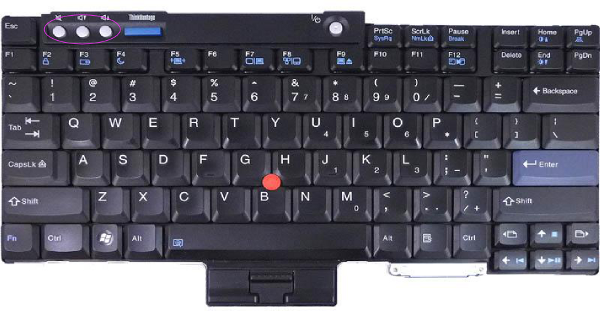
image of a Lenovo T60 Thinkpad keyboard with volume buttons circled in purple.

When I switched, everything was working fine, except the volume buttons on
the Thinkpad T60 (those three buttons in the top left hand corner of the
keyboard, shown circled in purple in the image on the right) no longer did
what I expected. I expected they would ultimately control PulseAudio volume,
which does the equivalent of pactl set-sink-mute 0 0 and
appropriate pactl set-sink-volume 0 commands for my sound card.
I noticed this because when PulseAudio is running, and you type those
commands on the command line, all functions properly with the
volume, and, when running under X, I see the popup windows coming
from my desktop environment showing the volume changes. So, I knew nothing
was wrong with the sound configuration when I switched the hard drive to a
new machine, since the command line tools worked and did the right things.
Somehow, the buttons weren’t sending the same commands in whatever manner
they were used to.

I assumed at first that the buttons simply generated X events. It turns
out they do, but the story there is a bit more complex. When I
ran xev I saw those buttons did not, in fact, generate any X
events. So, that makes it clear that nothing from X windows
“up” (i.e, to the desktop software) had anything to do with the
situation.

So, I first proceed to research whether these volume keys were supposed to
generate X events. I discovered that there were indeed XF86VolumeUp,
XF86VolumeDown and XF86VolumeMute key events (I’d seen those before, in
fact, doing similar research years ago). However, the advice online was
highly conflicting whether or not the best way to solve this is to have
them generate X events. Most of the discussions I found assumed the keys
were already generating X events and had advice about how to bind those
keys to scripts or to your desktop setup of
choice0.

I found various old documentation about the thinkpad_acpi
daemon, which I quickly found quickly was out of date since long ago that
had been incorporated into Linux’s ACPI directly and didn’t require
additional daemons. This led me to just begin poking around about how the
ACPI subsystem for ACPI keys worked.

I quickly found the xev equivalent for
acpi: acpi_listen. This was the breakthrough I needed to
solve this problem. I ran acpi_listen and discovered that
while other Thinkpad key sequences, such as Fn-Home (to
increase brightness), generated output like:

        video/brightnessup BRTUP 00000086 00000000 K
        video/brightnessup BRTUP 00000086 00000000
        

but the volume up, down, and mute keys generated no output. Therefore, it’s
pretty clear at this point that the problem is something related to
configuration of ACPI in some way. I had a feeling this would be hard to
find a solution for.

That’s when I started poking around in /proc, and found
that /proc/acpi/ibm/volume was changing each time I
hit a these keys. So, Linux clearly was receiving notice that these keys
were pressed. So, why wasn’t the acpi subsystem notifying anything else,
including whatever interface acpi_listen talks to?

Well, this was a hard one to find an answer to. I have to admit that I
found the answer through pure serendipity. I had already
loaded this
old bug report for an GNU/Linux distribution waning in popularity
and
found that someone resolved the ticket with the command:

        cp /sys/devices/platform/thinkpad_acpi/hotkey_all_mask /sys/devices/platform/thinkpad_acpi/hotkey_mask


This command:

        # cat /sys/devices/platform/thinkpad_acpi/hotkey_all_mask /sys/devices/platform/thinkpad_acpi/hotkey_mask 
        0x00ffffff
        0x008dffff


quickly showed that that the masks didn’t match. So I did:

        # cat /sys/devices/platform/thinkpad_acpi/hotkey_all_mask > /sys/devices/platform/thinkpad_acpi/hotkey_mask 


and that single change caused the buttons to work again as expected,
including causing the popup notifications of volume changes and the like.

Additional searching
show this
hotkey issue is documented in Linux, in its Thinkpad ACPI
documentation
, which states:

The hot key bit mask allows some control over which hot keys generate events.
If a key is “masked” (bit set to 0 in the mask), the firmware will handle it.
If it is “unmasked”, it signals the firmware that thinkpad-acpi would prefer
to handle it, if the firmware would be so kind to allow it (and it often
doesn’t!).

I note that on my system, running the command the document recommends to
reset to defaults yields me back to the wrong state:

        # cat /proc/acpi/ibm/hotkey 
        status:         enabled
        mask:           0x00ffffff
        commands:       enable, disable, reset, <mask>
        # echo reset > /proc/acpi/ibm/hotkey 
        # cat /proc/acpi/ibm/hotkey 
        status:         enabled
        mask:           0x008dffff
        commands:       enable, disable, reset, <mask>
        # echo 0xffffffff > /proc/acpi/ibm/hotkey
        

So, I added that last command above to restore it to enabled Linux’s control
of all the ACPI hot keys, which I suspect is what I want. I’ll update the
post if doing that causes other problems that I hadn’t seen before. I’ll
also update the post to note whether this setting is saved over reboots, as
I haven’t rebooted the machine since I did this. 🙂


0Interestingly, as has
happened to me often recently, much of the most useful information that I
find about any complex topic regarding how things work in modern GNU/Linux
distributions is found on the Arch or Crunchbang online fora and wikis. It’s
quite interesting to me that these two distributions appear to be the primary
place where the types of information that every distribution once needed to
provide are kept. Their wikis are becoming the canonical references of how a
distribution is constructed, since much of the information found therein
applies to all distributions, but distributions like Fedora and Debian
attempt to make it less complex for the users to change the
configuration.

Resolving Weirdness In Thinkpad T60 Hotkeys

Post Syndicated from Bradley M. Kuhn original http://ebb.org/bkuhn/blog/2014/06/08/volume-hotkeys-thinkpad-t60.html

In keeping with my tendency to write a blog post about any technical issue
I find that takes me more than five minutes to figure out when searching
the Internet, I include below a resolution to a problem that took me,
embarrassingly, nearly two and half hours across two different tries to
figure out.

The problem appeared when I took Debian 7 (wheezy) laptop hard drive out
of an Lenovo Thinkpad T61 that I was using that failed and into Lenovo
Thinkpad T60. (I’ve been trying to switch fully to the T60 for everything
because it is supported by Coreboot.)

image of a Lenovo T60 Thinkpad keyboard with volume buttons circled in purple.

When I switched, everything was working fine, except the volume buttons on
the Thinkpad T60 (those three buttons in the top left hand corner of the
keyboard, shown circled in purple in the image on the right) no longer did
what I expected. I expected they would ultimately control PulseAudio volume,
which does the equivalent of pactl set-sink-mute 0 0 and
appropriate pactl set-sink-volume 0 commands for my sound card.
I noticed this because when PulseAudio is running, and you type those
commands on the command line, all functions properly with the
volume, and, when running under X, I see the popup windows coming
from my desktop environment showing the volume changes. So, I knew nothing
was wrong with the sound configuration when I switched the hard drive to a
new machine, since the command line tools worked and did the right things.
Somehow, the buttons weren’t sending the same commands in whatever manner
they were used to.

I assumed at first that the buttons simply generated X events. It turns
out they do, but the story there is a bit more complex. When I
ran xev I saw those buttons did not, in fact, generate any X
events. So, that makes it clear that nothing from X windows
“up” (i.e, to the desktop software) had anything to do with the
situation.

So, I first proceed to research whether these volume keys were supposed to
generate X events. I discovered that there were indeed XF86VolumeUp,
XF86VolumeDown and XF86VolumeMute key events (I’d seen those before, in
fact, doing similar research years ago). However, the advice online was
highly conflicting whether or not the best way to solve this is to have
them generate X events. Most of the discussions I found assumed the keys
were already generating X events and had advice about how to bind those
keys to scripts or to your desktop setup of
choice0.

I found various old documentation about the thinkpad_acpi
daemon, which I quickly found quickly was out of date since long ago that
had been incorporated into Linux’s ACPI directly and didn’t require
additional daemons. This led me to just begin poking around about how the
ACPI subsystem for ACPI keys worked.

I quickly found the xev equivalent for
acpi: acpi_listen. This was the breakthrough I needed to
solve this problem. I ran acpi_listen and discovered that
while other Thinkpad key sequences, such as Fn-Home (to
increase brightness), generated output like:

        video/brightnessup BRTUP 00000086 00000000 K
        video/brightnessup BRTUP 00000086 00000000
        

but the volume up, down, and mute keys generated no output. Therefore, it’s
pretty clear at this point that the problem is something related to
configuration of ACPI in some way. I had a feeling this would be hard to
find a solution for.

That’s when I started poking around in /proc, and found
that /proc/acpi/ibm/volume was changing each time I
hit a these keys. So, Linux clearly was receiving notice that these keys
were pressed. So, why wasn’t the acpi subsystem notifying anything else,
including whatever interface acpi_listen talks to?

Well, this was a hard one to find an answer to. I have to admit that I
found the answer through pure serendipity. I had already
loaded this
old bug report for an GNU/Linux distribution waning in popularity
and
found that someone resolved the ticket with the command:

        cp /sys/devices/platform/thinkpad_acpi/hotkey_all_mask /sys/devices/platform/thinkpad_acpi/hotkey_mask


This command:

        # cat /sys/devices/platform/thinkpad_acpi/hotkey_all_mask /sys/devices/platform/thinkpad_acpi/hotkey_mask 
        0x00ffffff
        0x008dffff


quickly showed that that the masks didn’t match. So I did:

        # cat /sys/devices/platform/thinkpad_acpi/hotkey_all_mask > /sys/devices/platform/thinkpad_acpi/hotkey_mask 


and that single change caused the buttons to work again as expected,
including causing the popup notifications of volume changes and the like.

Additional searching
show this
hotkey issue is documented in Linux, in its Thinkpad ACPI
documentation
, which states:

The hot key bit mask allows some control over which hot keys generate events.
If a key is “masked” (bit set to 0 in the mask), the firmware will handle it.
If it is “unmasked”, it signals the firmware that thinkpad-acpi would prefer
to handle it, if the firmware would be so kind to allow it (and it often
doesn’t!).

I note that on my system, running the command the document recommends to
reset to defaults yields me back to the wrong state:

        # cat /proc/acpi/ibm/hotkey 
        status:         enabled
        mask:           0x00ffffff
        commands:       enable, disable, reset, <mask>
        # echo reset > /proc/acpi/ibm/hotkey 
        # cat /proc/acpi/ibm/hotkey 
        status:         enabled
        mask:           0x008dffff
        commands:       enable, disable, reset, <mask>
        # echo 0xffffffff > /proc/acpi/ibm/hotkey
        

So, I added that last command above to restore it to enabled Linux’s control
of all the ACPI hot keys, which I suspect is what I want. I’ll update the
post if doing that causes other problems that I hadn’t seen before. I’ll
also update the post to note whether this setting is saved over reboots, as
I haven’t rebooted the machine since I did this. 🙂


0Interestingly, as has
happened to me often recently, much of the most useful information that I
find about any complex topic regarding how things work in modern GNU/Linux
distributions is found on the Arch or Crunchbang online fora and wikis. It’s
quite interesting to me that these two distributions appear to be the primary
place where the types of information that every distribution once needed to
provide are kept. Their wikis are becoming the canonical references of how a
distribution is constructed, since much of the information found therein
applies to all distributions, but distributions like Fedora and Debian
attempt to make it less complex for the users to change the
configuration.

Resolving Weirdness In Thinkpad T60 Hotkeys

Post Syndicated from Bradley M. Kuhn original http://ebb.org/bkuhn/blog/2014/06/08/volume-hotkeys-thinkpad-t60.html

In keeping with my tendency to write a blog post about any technical issue
I find that takes me more than five minutes to figure out when searching
the Internet, I include below a resolution to a problem that took me,
embarrassingly, nearly two and half hours across two different tries to
figure out.

The problem appeared when I took Debian 7 (wheezy) laptop hard drive out
of an Lenovo Thinkpad T61 that I was using that failed and into Lenovo
Thinkpad T60. (I’ve been trying to switch fully to the T60 for everything
because it is supported by Coreboot.)

image of a Lenovo T60 Thinkpad keyboard with volume buttons circled in purple.

When I switched, everything was working fine, except the volume buttons on
the Thinkpad T60 (those three buttons in the top left hand corner of the
keyboard, shown circled in purple in the image on the right) no longer did
what I expected. I expected they would ultimately control PulseAudio volume,
which does the equivalent of pactl set-sink-mute 0 0 and
appropriate pactl set-sink-volume 0 commands for my sound card.
I noticed this because when PulseAudio is running, and you type those
commands on the command line, all functions properly with the
volume, and, when running under X, I see the popup windows coming
from my desktop environment showing the volume changes. So, I knew nothing
was wrong with the sound configuration when I switched the hard drive to a
new machine, since the command line tools worked and did the right things.
Somehow, the buttons weren’t sending the same commands in whatever manner
they were used to.

I assumed at first that the buttons simply generated X events. It turns
out they do, but the story there is a bit more complex. When I
ran xev I saw those buttons did not, in fact, generate any X
events. So, that makes it clear that nothing from X windows
“up” (i.e, to the desktop software) had anything to do with the
situation.

So, I first proceed to research whether these volume keys were supposed to
generate X events. I discovered that there were indeed XF86VolumeUp,
XF86VolumeDown and XF86VolumeMute key events (I’d seen those before, in
fact, doing similar research years ago). However, the advice online was
highly conflicting whether or not the best way to solve this is to have
them generate X events. Most of the discussions I found assumed the keys
were already generating X events and had advice about how to bind those
keys to scripts or to your desktop setup of
choice0.

I found various old documentation about the thinkpad_acpi
daemon, which I quickly found quickly was out of date since long ago that
had been incorporated into Linux’s ACPI directly and didn’t require
additional daemons. This led me to just begin poking around about how the
ACPI subsystem for ACPI keys worked.

I quickly found the xev equivalent for
acpi: acpi_listen. This was the breakthrough I needed to
solve this problem. I ran acpi_listen and discovered that
while other Thinkpad key sequences, such as Fn-Home (to
increase brightness), generated output like:

        video/brightnessup BRTUP 00000086 00000000 K
        video/brightnessup BRTUP 00000086 00000000
        

but the volume up, down, and mute keys generated no output. Therefore, it’s
pretty clear at this point that the problem is something related to
configuration of ACPI in some way. I had a feeling this would be hard to
find a solution for.

That’s when I started poking around in /proc, and found
that /proc/acpi/ibm/volume was changing each time I
hit a these keys. So, Linux clearly was receiving notice that these keys
were pressed. So, why wasn’t the acpi subsystem notifying anything else,
including whatever interface acpi_listen talks to?

Well, this was a hard one to find an answer to. I have to admit that I
found the answer through pure serendipity. I had already
loaded this
old bug report for an GNU/Linux distribution waning in popularity
and
found that someone resolved the ticket with the command:

        cp /sys/devices/platform/thinkpad_acpi/hotkey_all_mask /sys/devices/platform/thinkpad_acpi/hotkey_mask


This command:

        # cat /sys/devices/platform/thinkpad_acpi/hotkey_all_mask /sys/devices/platform/thinkpad_acpi/hotkey_mask 
        0x00ffffff
        0x008dffff


quickly showed that that the masks didn’t match. So I did:

        # cat /sys/devices/platform/thinkpad_acpi/hotkey_all_mask > /sys/devices/platform/thinkpad_acpi/hotkey_mask 


and that single change caused the buttons to work again as expected,
including causing the popup notifications of volume changes and the like.

Additional searching
show this
hotkey issue is documented in Linux, in its Thinkpad ACPI
documentation
, which states:

The hot key bit mask allows some control over which hot keys generate events.
If a key is “masked” (bit set to 0 in the mask), the firmware will handle it.
If it is “unmasked”, it signals the firmware that thinkpad-acpi would prefer
to handle it, if the firmware would be so kind to allow it (and it often
doesn’t!).

I note that on my system, running the command the document recommends to
reset to defaults yields me back to the wrong state:

        # cat /proc/acpi/ibm/hotkey 
        status:         enabled
        mask:           0x00ffffff
        commands:       enable, disable, reset, <mask>
        # echo reset > /proc/acpi/ibm/hotkey 
        # cat /proc/acpi/ibm/hotkey 
        status:         enabled
        mask:           0x008dffff
        commands:       enable, disable, reset, <mask>
        # echo 0xffffffff > /proc/acpi/ibm/hotkey
        

So, I added that last command above to restore it to enabled Linux’s control
of all the ACPI hot keys, which I suspect is what I want. I’ll update the
post if doing that causes other problems that I hadn’t seen before. I’ll
also update the post to note whether this setting is saved over reboots, as
I haven’t rebooted the machine since I did this. 🙂


0Interestingly, as has
happened to me often recently, much of the most useful information that I
find about any complex topic regarding how things work in modern GNU/Linux
distributions is found on the Arch or Crunchbang online fora and wikis. It’s
quite interesting to me that these two distributions appear to be the primary
place where the types of information that every distribution once needed to
provide are kept. Their wikis are becoming the canonical references of how a
distribution is constructed, since much of the information found therein
applies to all distributions, but distributions like Fedora and Debian
attempt to make it less complex for the users to change the
configuration.

Resolving Weirdness In Thinkpad T60 Hotkeys

Post Syndicated from Bradley M. Kuhn original http://ebb.org/bkuhn/blog/2014/06/08/volume-hotkeys-thinkpad-t60.html

In keeping with my tendency to write a blog post about any technical issue
I find that takes me more than five minutes to figure out when searching
the Internet, I include below a resolution to a problem that took me,
embarrassingly, nearly two and half hours across two different tries to
figure out.

The problem appeared when I took Debian 7 (wheezy) laptop hard drive out
of an Lenovo Thinkpad T61 that I was using that failed and into Lenovo
Thinkpad T60. (I’ve been trying to switch fully to the T60 for everything
because it is supported by Coreboot.)

image of a Lenovo T60 Thinkpad keyboard with volume buttons circled in purple.

When I switched, everything was working fine, except the volume buttons on
the Thinkpad T60 (those three buttons in the top left hand corner of the
keyboard, shown circled in purple in the image on the right) no longer did
what I expected. I expected they would ultimately control PulseAudio volume,
which does the equivalent of pactl set-sink-mute 0 0 and
appropriate pactl set-sink-volume 0 commands for my sound card.
I noticed this because when PulseAudio is running, and you type those
commands on the command line, all functions properly with the
volume, and, when running under X, I see the popup windows coming
from my desktop environment showing the volume changes. So, I knew nothing
was wrong with the sound configuration when I switched the hard drive to a
new machine, since the command line tools worked and did the right things.
Somehow, the buttons weren’t sending the same commands in whatever manner
they were used to.

I assumed at first that the buttons simply generated X events. It turns
out they do, but the story there is a bit more complex. When I
ran xev I saw those buttons did not, in fact, generate any X
events. So, that makes it clear that nothing from X windows
“up” (i.e, to the desktop software) had anything to do with the
situation.

So, I first proceed to research whether these volume keys were supposed to
generate X events. I discovered that there were indeed XF86VolumeUp,
XF86VolumeDown and XF86VolumeMute key events (I’d seen those before, in
fact, doing similar research years ago). However, the advice online was
highly conflicting whether or not the best way to solve this is to have
them generate X events. Most of the discussions I found assumed the keys
were already generating X events and had advice about how to bind those
keys to scripts or to your desktop setup of
choice0.

I found various old documentation about the thinkpad_acpi
daemon, which I quickly found quickly was out of date since long ago that
had been incorporated into Linux’s ACPI directly and didn’t require
additional daemons. This led me to just begin poking around about how the
ACPI subsystem for ACPI keys worked.

I quickly found the xev equivalent for
acpi: acpi_listen. This was the breakthrough I needed to
solve this problem. I ran acpi_listen and discovered that
while other Thinkpad key sequences, such as Fn-Home (to
increase brightness), generated output like:

        video/brightnessup BRTUP 00000086 00000000 K
        video/brightnessup BRTUP 00000086 00000000
        

but the volume up, down, and mute keys generated no output. Therefore, it’s
pretty clear at this point that the problem is something related to
configuration of ACPI in some way. I had a feeling this would be hard to
find a solution for.

That’s when I started poking around in /proc, and found
that /proc/acpi/ibm/volume was changing each time I
hit a these keys. So, Linux clearly was receiving notice that these keys
were pressed. So, why wasn’t the acpi subsystem notifying anything else,
including whatever interface acpi_listen talks to?

Well, this was a hard one to find an answer to. I have to admit that I
found the answer through pure serendipity. I had already
loaded this
old bug report for an GNU/Linux distribution waning in popularity
and
found that someone resolved the ticket with the command:

        cp /sys/devices/platform/thinkpad_acpi/hotkey_all_mask /sys/devices/platform/thinkpad_acpi/hotkey_mask


This command:

        # cat /sys/devices/platform/thinkpad_acpi/hotkey_all_mask /sys/devices/platform/thinkpad_acpi/hotkey_mask 
        0x00ffffff
        0x008dffff


quickly showed that that the masks didn’t match. So I did:

        # cat /sys/devices/platform/thinkpad_acpi/hotkey_all_mask > /sys/devices/platform/thinkpad_acpi/hotkey_mask 


and that single change caused the buttons to work again as expected,
including causing the popup notifications of volume changes and the like.

Additional searching
show this
hotkey issue is documented in Linux, in its Thinkpad ACPI
documentation
, which states:

The hot key bit mask allows some control over which hot keys generate events.
If a key is “masked” (bit set to 0 in the mask), the firmware will handle it.
If it is “unmasked”, it signals the firmware that thinkpad-acpi would prefer
to handle it, if the firmware would be so kind to allow it (and it often
doesn’t!).

I note that on my system, running the command the document recommends to
reset to defaults yields me back to the wrong state:

        # cat /proc/acpi/ibm/hotkey 
        status:         enabled
        mask:           0x00ffffff
        commands:       enable, disable, reset, <mask>
        # echo reset > /proc/acpi/ibm/hotkey 
        # cat /proc/acpi/ibm/hotkey 
        status:         enabled
        mask:           0x008dffff
        commands:       enable, disable, reset, <mask>
        # echo 0xffffffff > /proc/acpi/ibm/hotkey
        

So, I added that last command above to restore it to enabled Linux’s control
of all the ACPI hot keys, which I suspect is what I want. I’ll update the
post if doing that causes other problems that I hadn’t seen before. I’ll
also update the post to note whether this setting is saved over reboots, as
I haven’t rebooted the machine since I did this. 🙂


0Interestingly, as has
happened to me often recently, much of the most useful information that I
find about any complex topic regarding how things work in modern GNU/Linux
distributions is found on the Arch or Crunchbang online fora and wikis. It’s
quite interesting to me that these two distributions appear to be the primary
place where the types of information that every distribution once needed to
provide are kept. Their wikis are becoming the canonical references of how a
distribution is constructed, since much of the information found therein
applies to all distributions, but distributions like Fedora and Debian
attempt to make it less complex for the users to change the
configuration.

Resolving Weirdness In Thinkpad T60 Hotkeys

Post Syndicated from Bradley M. Kuhn original http://ebb.org/bkuhn/blog/2014/06/08/volume-hotkeys-thinkpad-t60.html

In keeping with my tendency to write a blog post about any technical issue
I find that takes me more than five minutes to figure out when searching
the Internet, I include below a resolution to a problem that took me,
embarrassingly, nearly two and half hours across two different tries to
figure out.

The problem appeared when I took Debian 7 (wheezy) laptop hard drive out
of an Lenovo Thinkpad T61 that I was using that failed and into Lenovo
Thinkpad T60. (I’ve been trying to switch fully to the T60 for everything
because it is supported by Coreboot.)

image of a Lenovo T60 Thinkpad keyboard with volume buttons circled in purple.

When I switched, everything was working fine, except the volume buttons on
the Thinkpad T60 (those three buttons in the top left hand corner of the
keyboard, shown circled in purple in the image on the right) no longer did
what I expected. I expected they would ultimately control PulseAudio volume,
which does the equivalent of pactl set-sink-mute 0 0 and
appropriate pactl set-sink-volume 0 commands for my sound card.
I noticed this because when PulseAudio is running, and you type those
commands on the command line, all functions properly with the
volume, and, when running under X, I see the popup windows coming
from my desktop environment showing the volume changes. So, I knew nothing
was wrong with the sound configuration when I switched the hard drive to a
new machine, since the command line tools worked and did the right things.
Somehow, the buttons weren’t sending the same commands in whatever manner
they were used to.

I assumed at first that the buttons simply generated X events. It turns
out they do, but the story there is a bit more complex. When I
ran xev I saw those buttons did not, in fact, generate any X
events. So, that makes it clear that nothing from X windows
“up” (i.e, to the desktop software) had anything to do with the
situation.

So, I first proceed to research whether these volume keys were supposed to
generate X events. I discovered that there were indeed XF86VolumeUp,
XF86VolumeDown and XF86VolumeMute key events (I’d seen those before, in
fact, doing similar research years ago). However, the advice online was
highly conflicting whether or not the best way to solve this is to have
them generate X events. Most of the discussions I found assumed the keys
were already generating X events and had advice about how to bind those
keys to scripts or to your desktop setup of
choice0.

I found various old documentation about the thinkpad_acpi
daemon, which I quickly found quickly was out of date since long ago that
had been incorporated into Linux’s ACPI directly and didn’t require
additional daemons. This led me to just begin poking around about how the
ACPI subsystem for ACPI keys worked.

I quickly found the xev equivalent for
acpi: acpi_listen. This was the breakthrough I needed to
solve this problem. I ran acpi_listen and discovered that
while other Thinkpad key sequences, such as Fn-Home (to
increase brightness), generated output like:

        video/brightnessup BRTUP 00000086 00000000 K
        video/brightnessup BRTUP 00000086 00000000
        

but the volume up, down, and mute keys generated no output. Therefore, it’s
pretty clear at this point that the problem is something related to
configuration of ACPI in some way. I had a feeling this would be hard to
find a solution for.

That’s when I started poking around in /proc, and found
that /proc/acpi/ibm/volume was changing each time I
hit a these keys. So, Linux clearly was receiving notice that these keys
were pressed. So, why wasn’t the acpi subsystem notifying anything else,
including whatever interface acpi_listen talks to?

Well, this was a hard one to find an answer to. I have to admit that I
found the answer through pure serendipity. I had already
loaded this
old bug report for an GNU/Linux distribution waning in popularity
and
found that someone resolved the ticket with the command:

        cp /sys/devices/platform/thinkpad_acpi/hotkey_all_mask /sys/devices/platform/thinkpad_acpi/hotkey_mask


This command:

        # cat /sys/devices/platform/thinkpad_acpi/hotkey_all_mask /sys/devices/platform/thinkpad_acpi/hotkey_mask 
        0x00ffffff
        0x008dffff


quickly showed that that the masks didn’t match. So I did:

        # cat /sys/devices/platform/thinkpad_acpi/hotkey_all_mask > /sys/devices/platform/thinkpad_acpi/hotkey_mask 


and that single change caused the buttons to work again as expected,
including causing the popup notifications of volume changes and the like.

Additional searching
show this
hotkey issue is documented in Linux, in its Thinkpad ACPI
documentation
, which states:

The hot key bit mask allows some control over which hot keys generate events.
If a key is “masked” (bit set to 0 in the mask), the firmware will handle it.
If it is “unmasked”, it signals the firmware that thinkpad-acpi would prefer
to handle it, if the firmware would be so kind to allow it (and it often
doesn’t!).

I note that on my system, running the command the document recommends to
reset to defaults yields me back to the wrong state:

        # cat /proc/acpi/ibm/hotkey 
        status:         enabled
        mask:           0x00ffffff
        commands:       enable, disable, reset, <mask>
        # echo reset > /proc/acpi/ibm/hotkey 
        # cat /proc/acpi/ibm/hotkey 
        status:         enabled
        mask:           0x008dffff
        commands:       enable, disable, reset, <mask>
        # echo 0xffffffff > /proc/acpi/ibm/hotkey
        

So, I added that last command above to restore it to enabled Linux’s control
of all the ACPI hot keys, which I suspect is what I want. I’ll update the
post if doing that causes other problems that I hadn’t seen before. I’ll
also update the post to note whether this setting is saved over reboots, as
I haven’t rebooted the machine since I did this. 🙂


0Interestingly, as has
happened to me often recently, much of the most useful information that I
find about any complex topic regarding how things work in modern GNU/Linux
distributions is found on the Arch or Crunchbang online fora and wikis. It’s
quite interesting to me that these two distributions appear to be the primary
place where the types of information that every distribution once needed to
provide are kept. Their wikis are becoming the canonical references of how a
distribution is constructed, since much of the information found therein
applies to all distributions, but distributions like Fedora and Debian
attempt to make it less complex for the users to change the
configuration.

Resolving Weirdness In Thinkpad T60 Hotkeys

Post Syndicated from Bradley M. Kuhn original http://ebb.org/bkuhn/blog/2014/06/08/volume-hotkeys-thinkpad-t60.html

In keeping with my tendency to write a blog post about any technical issue
I find that takes me more than five minutes to figure out when searching
the Internet, I include below a resolution to a problem that took me,
embarrassingly, nearly two and half hours across two different tries to
figure out.

The problem appeared when I took Debian 7 (wheezy) laptop hard drive out
of an Lenovo Thinkpad T61 that I was using that failed and into Lenovo
Thinkpad T60. (I’ve been trying to switch fully to the T60 for everything
because it is supported by Coreboot.)

image of a Lenovo T60 Thinkpad keyboard with volume buttons circled in purple.

When I switched, everything was working fine, except the volume buttons on
the Thinkpad T60 (those three buttons in the top left hand corner of the
keyboard, shown circled in purple in the image on the right) no longer did
what I expected. I expected they would ultimately control PulseAudio volume,
which does the equivalent of pactl set-sink-mute 0 0 and
appropriate pactl set-sink-volume 0 commands for my sound card.
I noticed this because when PulseAudio is running, and you type those
commands on the command line, all functions properly with the
volume, and, when running under X, I see the popup windows coming
from my desktop environment showing the volume changes. So, I knew nothing
was wrong with the sound configuration when I switched the hard drive to a
new machine, since the command line tools worked and did the right things.
Somehow, the buttons weren’t sending the same commands in whatever manner
they were used to.

I assumed at first that the buttons simply generated X events. It turns
out they do, but the story there is a bit more complex. When I
ran xev I saw those buttons did not, in fact, generate any X
events. So, that makes it clear that nothing from X windows
“up” (i.e, to the desktop software) had anything to do with the
situation.

So, I first proceed to research whether these volume keys were supposed to
generate X events. I discovered that there were indeed XF86VolumeUp,
XF86VolumeDown and XF86VolumeMute key events (I’d seen those before, in
fact, doing similar research years ago). However, the advice online was
highly conflicting whether or not the best way to solve this is to have
them generate X events. Most of the discussions I found assumed the keys
were already generating X events and had advice about how to bind those
keys to scripts or to your desktop setup of
choice0.

I found various old documentation about the thinkpad_acpi
daemon, which I quickly found quickly was out of date since long ago that
had been incorporated into Linux’s ACPI directly and didn’t require
additional daemons. This led me to just begin poking around about how the
ACPI subsystem for ACPI keys worked.

I quickly found the xev equivalent for
acpi: acpi_listen. This was the breakthrough I needed to
solve this problem. I ran acpi_listen and discovered that
while other Thinkpad key sequences, such as Fn-Home (to
increase brightness), generated output like:

        video/brightnessup BRTUP 00000086 00000000 K
        video/brightnessup BRTUP 00000086 00000000
        

but the volume up, down, and mute keys generated no output. Therefore, it’s
pretty clear at this point that the problem is something related to
configuration of ACPI in some way. I had a feeling this would be hard to
find a solution for.

That’s when I started poking around in /proc, and found
that /proc/acpi/ibm/volume was changing each time I
hit a these keys. So, Linux clearly was receiving notice that these keys
were pressed. So, why wasn’t the acpi subsystem notifying anything else,
including whatever interface acpi_listen talks to?

Well, this was a hard one to find an answer to. I have to admit that I
found the answer through pure serendipity. I had already
loaded this
old bug report for an GNU/Linux distribution waning in popularity
and
found that someone resolved the ticket with the command:

        cp /sys/devices/platform/thinkpad_acpi/hotkey_all_mask /sys/devices/platform/thinkpad_acpi/hotkey_mask


This command:

        # cat /sys/devices/platform/thinkpad_acpi/hotkey_all_mask /sys/devices/platform/thinkpad_acpi/hotkey_mask 
        0x00ffffff
        0x008dffff


quickly showed that that the masks didn’t match. So I did:

        # cat /sys/devices/platform/thinkpad_acpi/hotkey_all_mask > /sys/devices/platform/thinkpad_acpi/hotkey_mask 


and that single change caused the buttons to work again as expected,
including causing the popup notifications of volume changes and the like.

Additional searching
show this
hotkey issue is documented in Linux, in its Thinkpad ACPI
documentation
, which states:

The hot key bit mask allows some control over which hot keys generate events.
If a key is “masked” (bit set to 0 in the mask), the firmware will handle it.
If it is “unmasked”, it signals the firmware that thinkpad-acpi would prefer
to handle it, if the firmware would be so kind to allow it (and it often
doesn’t!).

I note that on my system, running the command the document recommends to
reset to defaults yields me back to the wrong state:

        # cat /proc/acpi/ibm/hotkey 
        status:         enabled
        mask:           0x00ffffff
        commands:       enable, disable, reset, <mask>
        # echo reset > /proc/acpi/ibm/hotkey 
        # cat /proc/acpi/ibm/hotkey 
        status:         enabled
        mask:           0x008dffff
        commands:       enable, disable, reset, <mask>
        # echo 0xffffffff > /proc/acpi/ibm/hotkey
        

So, I added that last command above to restore it to enabled Linux’s control
of all the ACPI hot keys, which I suspect is what I want. I’ll update the
post if doing that causes other problems that I hadn’t seen before. I’ll
also update the post to note whether this setting is saved over reboots, as
I haven’t rebooted the machine since I did this. 🙂


0Interestingly, as has
happened to me often recently, much of the most useful information that I
find about any complex topic regarding how things work in modern GNU/Linux
distributions is found on the Arch or Crunchbang online fora and wikis. It’s
quite interesting to me that these two distributions appear to be the primary
place where the types of information that every distribution once needed to
provide are kept. Their wikis are becoming the canonical references of how a
distribution is constructed, since much of the information found therein
applies to all distributions, but distributions like Fedora and Debian
attempt to make it less complex for the users to change the
configuration.

Resolving Weirdness In Thinkpad T60 Hotkeys

Post Syndicated from Bradley M. Kuhn original http://ebb.org/bkuhn/blog/2014/06/08/volume-hotkeys-thinkpad-t60.html

In keeping with my tendency to write a blog post about any technical issue
I find that takes me more than five minutes to figure out when searching
the Internet, I include below a resolution to a problem that took me,
embarrassingly, nearly two and half hours across two different tries to
figure out.

The problem appeared when I took Debian 7 (wheezy) laptop hard drive out
of an Lenovo Thinkpad T61 that I was using that failed and into Lenovo
Thinkpad T60. (I’ve been trying to switch fully to the T60 for everything
because it is supported by Coreboot.)

image of a Lenovo T60 Thinkpad keyboard with volume buttons circled in purple.

When I switched, everything was working fine, except the volume buttons on
the Thinkpad T60 (those three buttons in the top left hand corner of the
keyboard, shown circled in purple in the image on the right) no longer did
what I expected. I expected they would ultimately control PulseAudio volume,
which does the equivalent of pactl set-sink-mute 0 0 and
appropriate pactl set-sink-volume 0 commands for my sound card.
I noticed this because when PulseAudio is running, and you type those
commands on the command line, all functions properly with the
volume, and, when running under X, I see the popup windows coming
from my desktop environment showing the volume changes. So, I knew nothing
was wrong with the sound configuration when I switched the hard drive to a
new machine, since the command line tools worked and did the right things.
Somehow, the buttons weren’t sending the same commands in whatever manner
they were used to.

I assumed at first that the buttons simply generated X events. It turns
out they do, but the story there is a bit more complex. When I
ran xev I saw those buttons did not, in fact, generate any X
events. So, that makes it clear that nothing from X windows
“up” (i.e, to the desktop software) had anything to do with the
situation.

So, I first proceed to research whether these volume keys were supposed to
generate X events. I discovered that there were indeed XF86VolumeUp,
XF86VolumeDown and XF86VolumeMute key events (I’d seen those before, in
fact, doing similar research years ago). However, the advice online was
highly conflicting whether or not the best way to solve this is to have
them generate X events. Most of the discussions I found assumed the keys
were already generating X events and had advice about how to bind those
keys to scripts or to your desktop setup of
choice0.

I found various old documentation about the thinkpad_acpi
daemon, which I quickly found quickly was out of date since long ago that
had been incorporated into Linux’s ACPI directly and didn’t require
additional daemons. This led me to just begin poking around about how the
ACPI subsystem for ACPI keys worked.

I quickly found the xev equivalent for
acpi: acpi_listen. This was the breakthrough I needed to
solve this problem. I ran acpi_listen and discovered that
while other Thinkpad key sequences, such as Fn-Home (to
increase brightness), generated output like:

        video/brightnessup BRTUP 00000086 00000000 K
        video/brightnessup BRTUP 00000086 00000000
        

but the volume up, down, and mute keys generated no output. Therefore, it’s
pretty clear at this point that the problem is something related to
configuration of ACPI in some way. I had a feeling this would be hard to
find a solution for.

That’s when I started poking around in /proc, and found
that /proc/acpi/ibm/volume was changing each time I
hit a these keys. So, Linux clearly was receiving notice that these keys
were pressed. So, why wasn’t the acpi subsystem notifying anything else,
including whatever interface acpi_listen talks to?

Well, this was a hard one to find an answer to. I have to admit that I
found the answer through pure serendipity. I had already
loaded this
old bug report for an GNU/Linux distribution waning in popularity
and
found that someone resolved the ticket with the command:

        cp /sys/devices/platform/thinkpad_acpi/hotkey_all_mask /sys/devices/platform/thinkpad_acpi/hotkey_mask


This command:

        # cat /sys/devices/platform/thinkpad_acpi/hotkey_all_mask /sys/devices/platform/thinkpad_acpi/hotkey_mask 
        0x00ffffff
        0x008dffff


quickly showed that that the masks didn’t match. So I did:

        # cat /sys/devices/platform/thinkpad_acpi/hotkey_all_mask > /sys/devices/platform/thinkpad_acpi/hotkey_mask 


and that single change caused the buttons to work again as expected,
including causing the popup notifications of volume changes and the like.

Additional searching
show this
hotkey issue is documented in Linux, in its Thinkpad ACPI
documentation
, which states:

The hot key bit mask allows some control over which hot keys generate events.
If a key is “masked” (bit set to 0 in the mask), the firmware will handle it.
If it is “unmasked”, it signals the firmware that thinkpad-acpi would prefer
to handle it, if the firmware would be so kind to allow it (and it often
doesn’t!).

I note that on my system, running the command the document recommends to
reset to defaults yields me back to the wrong state:

        # cat /proc/acpi/ibm/hotkey 
        status:         enabled
        mask:           0x00ffffff
        commands:       enable, disable, reset, <mask>
        # echo reset > /proc/acpi/ibm/hotkey 
        # cat /proc/acpi/ibm/hotkey 
        status:         enabled
        mask:           0x008dffff
        commands:       enable, disable, reset, <mask>
        # echo 0xffffffff > /proc/acpi/ibm/hotkey
        

So, I added that last command above to restore it to enabled Linux’s control
of all the ACPI hot keys, which I suspect is what I want. I’ll update the
post if doing that causes other problems that I hadn’t seen before. I’ll
also update the post to note whether this setting is saved over reboots, as
I haven’t rebooted the machine since I did this. 🙂


0Interestingly, as has
happened to me often recently, much of the most useful information that I
find about any complex topic regarding how things work in modern GNU/Linux
distributions is found on the Arch or Crunchbang online fora and wikis. It’s
quite interesting to me that these two distributions appear to be the primary
place where the types of information that every distribution once needed to
provide are kept. Their wikis are becoming the canonical references of how a
distribution is constructed, since much of the information found therein
applies to all distributions, but distributions like Fedora and Debian
attempt to make it less complex for the users to change the
configuration.

Resolving Weirdness In Thinkpad T60 Hotkeys

Post Syndicated from Bradley M. Kuhn original http://ebb.org/bkuhn/blog/2014/06/08/volume-hotkeys-thinkpad-t60.html

In keeping with my tendency to write a blog post about any technical issue
I find that takes me more than five minutes to figure out when searching
the Internet, I include below a resolution to a problem that took me,
embarrassingly, nearly two and half hours across two different tries to
figure out.

The problem appeared when I took Debian 7 (wheezy) laptop hard drive out
of an Lenovo Thinkpad T61 that I was using that failed and into Lenovo
Thinkpad T60. (I’ve been trying to switch fully to the T60 for everything
because it is supported by Coreboot.)

image of a Lenovo T60 Thinkpad keyboard with volume buttons circled in purple.

When I switched, everything was working fine, except the volume buttons on
the Thinkpad T60 (those three buttons in the top left hand corner of the
keyboard, shown circled in purple in the image on the right) no longer did
what I expected. I expected they would ultimately control PulseAudio volume,
which does the equivalent of pactl set-sink-mute 0 0 and
appropriate pactl set-sink-volume 0 commands for my sound card.
I noticed this because when PulseAudio is running, and you type those
commands on the command line, all functions properly with the
volume, and, when running under X, I see the popup windows coming
from my desktop environment showing the volume changes. So, I knew nothing
was wrong with the sound configuration when I switched the hard drive to a
new machine, since the command line tools worked and did the right things.
Somehow, the buttons weren’t sending the same commands in whatever manner
they were used to.

I assumed at first that the buttons simply generated X events. It turns
out they do, but the story there is a bit more complex. When I
ran xev I saw those buttons did not, in fact, generate any X
events. So, that makes it clear that nothing from X windows
“up” (i.e, to the desktop software) had anything to do with the
situation.

So, I first proceed to research whether these volume keys were supposed to
generate X events. I discovered that there were indeed XF86VolumeUp,
XF86VolumeDown and XF86VolumeMute key events (I’d seen those before, in
fact, doing similar research years ago). However, the advice online was
highly conflicting whether or not the best way to solve this is to have
them generate X events. Most of the discussions I found assumed the keys
were already generating X events and had advice about how to bind those
keys to scripts or to your desktop setup of
choice0.

I found various old documentation about the thinkpad_acpi
daemon, which I quickly found quickly was out of date since long ago that
had been incorporated into Linux’s ACPI directly and didn’t require
additional daemons. This led me to just begin poking around about how the
ACPI subsystem for ACPI keys worked.

I quickly found the xev equivalent for
acpi: acpi_listen. This was the breakthrough I needed to
solve this problem. I ran acpi_listen and discovered that
while other Thinkpad key sequences, such as Fn-Home (to
increase brightness), generated output like:

        video/brightnessup BRTUP 00000086 00000000 K
        video/brightnessup BRTUP 00000086 00000000
        

but the volume up, down, and mute keys generated no output. Therefore, it’s
pretty clear at this point that the problem is something related to
configuration of ACPI in some way. I had a feeling this would be hard to
find a solution for.

That’s when I started poking around in /proc, and found
that /proc/acpi/ibm/volume was changing each time I
hit a these keys. So, Linux clearly was receiving notice that these keys
were pressed. So, why wasn’t the acpi subsystem notifying anything else,
including whatever interface acpi_listen talks to?

Well, this was a hard one to find an answer to. I have to admit that I
found the answer through pure serendipity. I had already
loaded this
old bug report for an GNU/Linux distribution waning in popularity
and
found that someone resolved the ticket with the command:

        cp /sys/devices/platform/thinkpad_acpi/hotkey_all_mask /sys/devices/platform/thinkpad_acpi/hotkey_mask


This command:

        # cat /sys/devices/platform/thinkpad_acpi/hotkey_all_mask /sys/devices/platform/thinkpad_acpi/hotkey_mask 
        0x00ffffff
        0x008dffff


quickly showed that that the masks didn’t match. So I did:

        # cat /sys/devices/platform/thinkpad_acpi/hotkey_all_mask > /sys/devices/platform/thinkpad_acpi/hotkey_mask 


and that single change caused the buttons to work again as expected,
including causing the popup notifications of volume changes and the like.

Additional searching
show this
hotkey issue is documented in Linux, in its Thinkpad ACPI
documentation
, which states:

The hot key bit mask allows some control over which hot keys generate events.
If a key is “masked” (bit set to 0 in the mask), the firmware will handle it.
If it is “unmasked”, it signals the firmware that thinkpad-acpi would prefer
to handle it, if the firmware would be so kind to allow it (and it often
doesn’t!).

I note that on my system, running the command the document recommends to
reset to defaults yields me back to the wrong state:

        # cat /proc/acpi/ibm/hotkey 
        status:         enabled
        mask:           0x00ffffff
        commands:       enable, disable, reset, <mask>
        # echo reset > /proc/acpi/ibm/hotkey 
        # cat /proc/acpi/ibm/hotkey 
        status:         enabled
        mask:           0x008dffff
        commands:       enable, disable, reset, <mask>
        # echo 0xffffffff > /proc/acpi/ibm/hotkey
        

So, I added that last command above to restore it to enabled Linux’s control
of all the ACPI hot keys, which I suspect is what I want. I’ll update the
post if doing that causes other problems that I hadn’t seen before. I’ll
also update the post to note whether this setting is saved over reboots, as
I haven’t rebooted the machine since I did this. 🙂


0Interestingly, as has
happened to me often recently, much of the most useful information that I
find about any complex topic regarding how things work in modern GNU/Linux
distributions is found on the Arch or Crunchbang online fora and wikis. It’s
quite interesting to me that these two distributions appear to be the primary
place where the types of information that every distribution once needed to
provide are kept. Their wikis are becoming the canonical references of how a
distribution is constructed, since much of the information found therein
applies to all distributions, but distributions like Fedora and Debian
attempt to make it less complex for the users to change the
configuration.

Resolving Weirdness In Thinkpad T60 Hotkeys

Post Syndicated from Bradley M. Kuhn original http://ebb.org/bkuhn/blog/2014/06/08/volume-hotkeys-thinkpad-t60.html

In keeping with my tendency to write a blog post about any technical issue
I find that takes me more than five minutes to figure out when searching
the Internet, I include below a resolution to a problem that took me,
embarrassingly, nearly two and half hours across two different tries to
figure out.

The problem appeared when I took Debian 7 (wheezy) laptop hard drive out
of an Lenovo Thinkpad T61 that I was using that failed and into Lenovo
Thinkpad T60. (I’ve been trying to switch fully to the T60 for everything
because it is supported by Coreboot.)

image of a Lenovo T60 Thinkpad keyboard with volume buttons circled in purple.

When I switched, everything was working fine, except the volume buttons on
the Thinkpad T60 (those three buttons in the top left hand corner of the
keyboard, shown circled in purple in the image on the right) no longer did
what I expected. I expected they would ultimately control PulseAudio volume,
which does the equivalent of pactl set-sink-mute 0 0 and
appropriate pactl set-sink-volume 0 commands for my sound card.
I noticed this because when PulseAudio is running, and you type those
commands on the command line, all functions properly with the
volume, and, when running under X, I see the popup windows coming
from my desktop environment showing the volume changes. So, I knew nothing
was wrong with the sound configuration when I switched the hard drive to a
new machine, since the command line tools worked and did the right things.
Somehow, the buttons weren’t sending the same commands in whatever manner
they were used to.

I assumed at first that the buttons simply generated X events. It turns
out they do, but the story there is a bit more complex. When I
ran xev I saw those buttons did not, in fact, generate any X
events. So, that makes it clear that nothing from X windows
“up” (i.e, to the desktop software) had anything to do with the
situation.

So, I first proceed to research whether these volume keys were supposed to
generate X events. I discovered that there were indeed XF86VolumeUp,
XF86VolumeDown and XF86VolumeMute key events (I’d seen those before, in
fact, doing similar research years ago). However, the advice online was
highly conflicting whether or not the best way to solve this is to have
them generate X events. Most of the discussions I found assumed the keys
were already generating X events and had advice about how to bind those
keys to scripts or to your desktop setup of
choice0.

I found various old documentation about the thinkpad_acpi
daemon, which I quickly found quickly was out of date since long ago that
had been incorporated into Linux’s ACPI directly and didn’t require
additional daemons. This led me to just begin poking around about how the
ACPI subsystem for ACPI keys worked.

I quickly found the xev equivalent for
acpi: acpi_listen. This was the breakthrough I needed to
solve this problem. I ran acpi_listen and discovered that
while other Thinkpad key sequences, such as Fn-Home (to
increase brightness), generated output like:

        video/brightnessup BRTUP 00000086 00000000 K
        video/brightnessup BRTUP 00000086 00000000
        

but the volume up, down, and mute keys generated no output. Therefore, it’s
pretty clear at this point that the problem is something related to
configuration of ACPI in some way. I had a feeling this would be hard to
find a solution for.

That’s when I started poking around in /proc, and found
that /proc/acpi/ibm/volume was changing each time I
hit a these keys. So, Linux clearly was receiving notice that these keys
were pressed. So, why wasn’t the acpi subsystem notifying anything else,
including whatever interface acpi_listen talks to?

Well, this was a hard one to find an answer to. I have to admit that I
found the answer through pure serendipity. I had already
loaded this
old bug report for an GNU/Linux distribution waning in popularity
and
found that someone resolved the ticket with the command:

        cp /sys/devices/platform/thinkpad_acpi/hotkey_all_mask /sys/devices/platform/thinkpad_acpi/hotkey_mask


This command:

        # cat /sys/devices/platform/thinkpad_acpi/hotkey_all_mask /sys/devices/platform/thinkpad_acpi/hotkey_mask 
        0x00ffffff
        0x008dffff


quickly showed that that the masks didn’t match. So I did:

        # cat /sys/devices/platform/thinkpad_acpi/hotkey_all_mask > /sys/devices/platform/thinkpad_acpi/hotkey_mask 


and that single change caused the buttons to work again as expected,
including causing the popup notifications of volume changes and the like.

Additional searching
show this
hotkey issue is documented in Linux, in its Thinkpad ACPI
documentation
, which states:

The hot key bit mask allows some control over which hot keys generate events.
If a key is “masked” (bit set to 0 in the mask), the firmware will handle it.
If it is “unmasked”, it signals the firmware that thinkpad-acpi would prefer
to handle it, if the firmware would be so kind to allow it (and it often
doesn’t!).

I note that on my system, running the command the document recommends to
reset to defaults yields me back to the wrong state:

        # cat /proc/acpi/ibm/hotkey 
        status:         enabled
        mask:           0x00ffffff
        commands:       enable, disable, reset, <mask>
        # echo reset > /proc/acpi/ibm/hotkey 
        # cat /proc/acpi/ibm/hotkey 
        status:         enabled
        mask:           0x008dffff
        commands:       enable, disable, reset, <mask>
        # echo 0xffffffff > /proc/acpi/ibm/hotkey
        

So, I added that last command above to restore it to enabled Linux’s control
of all the ACPI hot keys, which I suspect is what I want. I’ll update the
post if doing that causes other problems that I hadn’t seen before. I’ll
also update the post to note whether this setting is saved over reboots, as
I haven’t rebooted the machine since I did this. 🙂


0Interestingly, as has
happened to me often recently, much of the most useful information that I
find about any complex topic regarding how things work in modern GNU/Linux
distributions is found on the Arch or Crunchbang online fora and wikis. It’s
quite interesting to me that these two distributions appear to be the primary
place where the types of information that every distribution once needed to
provide are kept. Their wikis are becoming the canonical references of how a
distribution is constructed, since much of the information found therein
applies to all distributions, but distributions like Fedora and Debian
attempt to make it less complex for the users to change the
configuration.

Resolving Weirdness In Thinkpad T60 Hotkeys

Post Syndicated from Bradley M. Kuhn original http://ebb.org/bkuhn/blog/2014/06/08/volume-hotkeys-thinkpad-t60.html

In keeping with my tendency to write a blog post about any technical issue
I find that takes me more than five minutes to figure out when searching
the Internet, I include below a resolution to a problem that took me,
embarrassingly, nearly two and half hours across two different tries to
figure out.

The problem appeared when I took Debian 7 (wheezy) laptop hard drive out
of an Lenovo Thinkpad T61 that I was using that failed and into Lenovo
Thinkpad T60. (I’ve been trying to switch fully to the T60 for everything
because it is supported by Coreboot.)

image of a Lenovo T60 Thinkpad keyboard with volume buttons circled in purple.

When I switched, everything was working fine, except the volume buttons on
the Thinkpad T60 (those three buttons in the top left hand corner of the
keyboard, shown circled in purple in the image on the right) no longer did
what I expected. I expected they would ultimately control PulseAudio volume,
which does the equivalent of pactl set-sink-mute 0 0 and
appropriate pactl set-sink-volume 0 commands for my sound card.
I noticed this because when PulseAudio is running, and you type those
commands on the command line, all functions properly with the
volume, and, when running under X, I see the popup windows coming
from my desktop environment showing the volume changes. So, I knew nothing
was wrong with the sound configuration when I switched the hard drive to a
new machine, since the command line tools worked and did the right things.
Somehow, the buttons weren’t sending the same commands in whatever manner
they were used to.

I assumed at first that the buttons simply generated X events. It turns
out they do, but the story there is a bit more complex. When I
ran xev I saw those buttons did not, in fact, generate any X
events. So, that makes it clear that nothing from X windows
“up” (i.e, to the desktop software) had anything to do with the
situation.

So, I first proceed to research whether these volume keys were supposed to
generate X events. I discovered that there were indeed XF86VolumeUp,
XF86VolumeDown and XF86VolumeMute key events (I’d seen those before, in
fact, doing similar research years ago). However, the advice online was
highly conflicting whether or not the best way to solve this is to have
them generate X events. Most of the discussions I found assumed the keys
were already generating X events and had advice about how to bind those
keys to scripts or to your desktop setup of
choice0.

I found various old documentation about the thinkpad_acpi
daemon, which I quickly found quickly was out of date since long ago that
had been incorporated into Linux’s ACPI directly and didn’t require
additional daemons. This led me to just begin poking around about how the
ACPI subsystem for ACPI keys worked.

I quickly found the xev equivalent for
acpi: acpi_listen. This was the breakthrough I needed to
solve this problem. I ran acpi_listen and discovered that
while other Thinkpad key sequences, such as Fn-Home (to
increase brightness), generated output like:

        video/brightnessup BRTUP 00000086 00000000 K
        video/brightnessup BRTUP 00000086 00000000
        

but the volume up, down, and mute keys generated no output. Therefore, it’s
pretty clear at this point that the problem is something related to
configuration of ACPI in some way. I had a feeling this would be hard to
find a solution for.

That’s when I started poking around in /proc, and found
that /proc/acpi/ibm/volume was changing each time I
hit a these keys. So, Linux clearly was receiving notice that these keys
were pressed. So, why wasn’t the acpi subsystem notifying anything else,
including whatever interface acpi_listen talks to?

Well, this was a hard one to find an answer to. I have to admit that I
found the answer through pure serendipity. I had already
loaded this
old bug report for an GNU/Linux distribution waning in popularity
and
found that someone resolved the ticket with the command:

        cp /sys/devices/platform/thinkpad_acpi/hotkey_all_mask /sys/devices/platform/thinkpad_acpi/hotkey_mask


This command:

        # cat /sys/devices/platform/thinkpad_acpi/hotkey_all_mask /sys/devices/platform/thinkpad_acpi/hotkey_mask 
        0x00ffffff
        0x008dffff


quickly showed that that the masks didn’t match. So I did:

        # cat /sys/devices/platform/thinkpad_acpi/hotkey_all_mask > /sys/devices/platform/thinkpad_acpi/hotkey_mask 


and that single change caused the buttons to work again as expected,
including causing the popup notifications of volume changes and the like.

Additional searching
show this
hotkey issue is documented in Linux, in its Thinkpad ACPI
documentation
, which states:

The hot key bit mask allows some control over which hot keys generate events.
If a key is “masked” (bit set to 0 in the mask), the firmware will handle it.
If it is “unmasked”, it signals the firmware that thinkpad-acpi would prefer
to handle it, if the firmware would be so kind to allow it (and it often
doesn’t!).

I note that on my system, running the command the document recommends to
reset to defaults yields me back to the wrong state:

        # cat /proc/acpi/ibm/hotkey 
        status:         enabled
        mask:           0x00ffffff
        commands:       enable, disable, reset, <mask>
        # echo reset > /proc/acpi/ibm/hotkey 
        # cat /proc/acpi/ibm/hotkey 
        status:         enabled
        mask:           0x008dffff
        commands:       enable, disable, reset, <mask>
        # echo 0xffffffff > /proc/acpi/ibm/hotkey
        

So, I added that last command above to restore it to enabled Linux’s control
of all the ACPI hot keys, which I suspect is what I want. I’ll update the
post if doing that causes other problems that I hadn’t seen before. I’ll
also update the post to note whether this setting is saved over reboots, as
I haven’t rebooted the machine since I did this. 🙂


0Interestingly, as has
happened to me often recently, much of the most useful information that I
find about any complex topic regarding how things work in modern GNU/Linux
distributions is found on the Arch or Crunchbang online fora and wikis. It’s
quite interesting to me that these two distributions appear to be the primary
place where the types of information that every distribution once needed to
provide are kept. Their wikis are becoming the canonical references of how a
distribution is constructed, since much of the information found therein
applies to all distributions, but distributions like Fedora and Debian
attempt to make it less complex for the users to change the
configuration.

Resolving Weirdness In Thinkpad T60 Hotkeys

Post Syndicated from Bradley M. Kuhn original http://ebb.org/bkuhn/blog/2014/06/08/volume-hotkeys-thinkpad-t60.html

In keeping with my tendency to write a blog post about any technical issue
I find that takes me more than five minutes to figure out when searching
the Internet, I include below a resolution to a problem that took me,
embarrassingly, nearly two and half hours across two different tries to
figure out.

The problem appeared when I took Debian 7 (wheezy) laptop hard drive out
of an Lenovo Thinkpad T61 that I was using that failed and into Lenovo
Thinkpad T60. (I’ve been trying to switch fully to the T60 for everything
because it is supported by Coreboot.)

image of a Lenovo T60 Thinkpad keyboard with volume buttons circled in purple.

When I switched, everything was working fine, except the volume buttons on
the Thinkpad T60 (those three buttons in the top left hand corner of the
keyboard, shown circled in purple in the image on the right) no longer did
what I expected. I expected they would ultimately control PulseAudio volume,
which does the equivalent of pactl set-sink-mute 0 0 and
appropriate pactl set-sink-volume 0 commands for my sound card.
I noticed this because when PulseAudio is running, and you type those
commands on the command line, all functions properly with the
volume, and, when running under X, I see the popup windows coming
from my desktop environment showing the volume changes. So, I knew nothing
was wrong with the sound configuration when I switched the hard drive to a
new machine, since the command line tools worked and did the right things.
Somehow, the buttons weren’t sending the same commands in whatever manner
they were used to.

I assumed at first that the buttons simply generated X events. It turns
out they do, but the story there is a bit more complex. When I
ran xev I saw those buttons did not, in fact, generate any X
events. So, that makes it clear that nothing from X windows
“up” (i.e, to the desktop software) had anything to do with the
situation.

So, I first proceed to research whether these volume keys were supposed to
generate X events. I discovered that there were indeed XF86VolumeUp,
XF86VolumeDown and XF86VolumeMute key events (I’d seen those before, in
fact, doing similar research years ago). However, the advice online was
highly conflicting whether or not the best way to solve this is to have
them generate X events. Most of the discussions I found assumed the keys
were already generating X events and had advice about how to bind those
keys to scripts or to your desktop setup of
choice0.

I found various old documentation about the thinkpad_acpi
daemon, which I quickly found quickly was out of date since long ago that
had been incorporated into Linux’s ACPI directly and didn’t require
additional daemons. This led me to just begin poking around about how the
ACPI subsystem for ACPI keys worked.

I quickly found the xev equivalent for
acpi: acpi_listen. This was the breakthrough I needed to
solve this problem. I ran acpi_listen and discovered that
while other Thinkpad key sequences, such as Fn-Home (to
increase brightness), generated output like:

        video/brightnessup BRTUP 00000086 00000000 K
        video/brightnessup BRTUP 00000086 00000000
        

but the volume up, down, and mute keys generated no output. Therefore, it’s
pretty clear at this point that the problem is something related to
configuration of ACPI in some way. I had a feeling this would be hard to
find a solution for.

That’s when I started poking around in /proc, and found
that /proc/acpi/ibm/volume was changing each time I
hit a these keys. So, Linux clearly was receiving notice that these keys
were pressed. So, why wasn’t the acpi subsystem notifying anything else,
including whatever interface acpi_listen talks to?

Well, this was a hard one to find an answer to. I have to admit that I
found the answer through pure serendipity. I had already
loaded this
old bug report for an GNU/Linux distribution waning in popularity
and
found that someone resolved the ticket with the command:

        cp /sys/devices/platform/thinkpad_acpi/hotkey_all_mask /sys/devices/platform/thinkpad_acpi/hotkey_mask


This command:

        # cat /sys/devices/platform/thinkpad_acpi/hotkey_all_mask /sys/devices/platform/thinkpad_acpi/hotkey_mask 
        0x00ffffff
        0x008dffff


quickly showed that that the masks didn’t match. So I did:

        # cat /sys/devices/platform/thinkpad_acpi/hotkey_all_mask > /sys/devices/platform/thinkpad_acpi/hotkey_mask 


and that single change caused the buttons to work again as expected,
including causing the popup notifications of volume changes and the like.

Additional searching
show this
hotkey issue is documented in Linux, in its Thinkpad ACPI
documentation
, which states:

The hot key bit mask allows some control over which hot keys generate events.
If a key is “masked” (bit set to 0 in the mask), the firmware will handle it.
If it is “unmasked”, it signals the firmware that thinkpad-acpi would prefer
to handle it, if the firmware would be so kind to allow it (and it often
doesn’t!).

I note that on my system, running the command the document recommends to
reset to defaults yields me back to the wrong state:

        # cat /proc/acpi/ibm/hotkey 
        status:         enabled
        mask:           0x00ffffff
        commands:       enable, disable, reset, <mask>
        # echo reset > /proc/acpi/ibm/hotkey 
        # cat /proc/acpi/ibm/hotkey 
        status:         enabled
        mask:           0x008dffff
        commands:       enable, disable, reset, <mask>
        # echo 0xffffffff > /proc/acpi/ibm/hotkey
        

So, I added that last command above to restore it to enabled Linux’s control
of all the ACPI hot keys, which I suspect is what I want. I’ll update the
post if doing that causes other problems that I hadn’t seen before. I’ll
also update the post to note whether this setting is saved over reboots, as
I haven’t rebooted the machine since I did this. 🙂


0Interestingly, as has
happened to me often recently, much of the most useful information that I
find about any complex topic regarding how things work in modern GNU/Linux
distributions is found on the Arch or Crunchbang online fora and wikis. It’s
quite interesting to me that these two distributions appear to be the primary
place where the types of information that every distribution once needed to
provide are kept. Their wikis are becoming the canonical references of how a
distribution is constructed, since much of the information found therein
applies to all distributions, but distributions like Fedora and Debian
attempt to make it less complex for the users to change the
configuration.