Organizations subject to PCI DSS have long asked for a comprehensive reference that bridges the gap between general AWS security best practices and the specific technical and organizational controls required to achieve and maintain PCI DSS compliance. This guide answers that need by showing how AWS SRA patterns address PCI DSS intent from account scoping and network segmentation to encryption, logging, and access control.
What is the AWS SRA PCI DSS Deep Dive?
The AWS SRA is a holistic, prescriptive security architecture guide that describes how AWS security services fit together across a multi-account AWS environment. It’s built around a modular, three-tier web architecture and is intentionally designed to be adapted as needed. Not every workload needs every service, but the AWS SRA provides the full range of options and their architectural relationships.
This PCI DSS deep dive doesn’t replace the AWS SRA, it extends it:
Mapping AWS SRA account types to PCI DSS scoping boundaries showing which accounts are in scope, connected-to or security-impacting, or out-of-scope in a typical payment architecture.
Layering PCI-specific controls onto existing AWS SRA service configurations. For example, additional logging granularity, encryption requirements, or network restrictions that go beyond the AWS SRA baseline.
The architectural patterns and controls described in this guide apply equally to merchants and service providers.
Who should use the guide
The guide is intended for:
Security architects designing or extending an AWS multi-account landing zone for workloads under PCI DSS scope.
Compliance engineers mapping AWS controls to PCI DSS requirements during assessment.
Cloud platform teams building shared security services that must accommodate a cardholder data environment (CDE).
Qualified Security Assessors (QSAs) and Internal Security Assessors (ISAs) who want to understand how AWS SRA patterns address PCI DSS intent.
Key AWS SRA design principles for PCI DSS
The guide applies six foundational AWS SRA design principles that are particularly relevant to PCI DSS compliance:
Implement a strong identity foundation: Enforce least privilege, separation of duties, and centralized identity management. Eliminate reliance on long-term static credentials.
Enable traceability: Monitor, alert, and audit actions in real time. Integrate log and metric collection with automated investigation and response systems.
Apply security at all layers: Defense-in-depth with preventive and detective controls at edge, virtual private cloud (VPC), load balancing, compute, OS, application, and code layers.
Protect data in transit and at rest: Classify data by sensitivity and apply encryption, tokenization, and access control mechanisms.
Keep people away from data: Reduce or eliminate direct access to cardholder data through automation and tooling.
Prepare for security events: Establish incident management processes, run simulations, and implement automated detection and recovery.
How to use the guide
The AWS SRA PCI DSS deep dive can be consumed in two ways:
As a narrative: Read the guide from beginning to end, starting with the PCI DSS primer, through the architecture and account scoping model, to the detailed requirement mappings. This approach gives you a complete understanding of how AWS SRA and PCI DSS intersect.
As a reference: Navigate directly to specific PCI DSS requirements or AWS SRA account types relevant to your current project. The guide includes architecture diagrams, requirement mapping tables, and service-specific configurations that you can use independently.
The guide includes downloadable architecture diagrams and detailed control mapping tables that complement the narrative content, making it straightforward to reference during security reviews and PCI DSS assessments.
Next steps
Security is a journey, not a destination. Review the AWS SRA PCI DSS Deep Dive guide and begin mapping its patterns to your own cardholder data environment and then validate existing environments against SRA best practices using SRA verify.
If you need assistance, contact AWS Professional Services, your AWS account team, or the AWS Partner Network, who can work with you to translate the reference architecture into a customized AWS environment that you can then operate.
If you have feedback about this post, submit comments in the Comments section below. If you need assistance architecting or implementing a PCI DSS-compliant AWS environment, contact the AWS Security Assurance Services team.
AWS Lambda now supports a 90-minute function timeout for asynchronous and event source mapping (ESM) invocations on AWS Lambda Managed Instances (LMI), a capability of AWS Lambda. This is a 6x increase from the previous 15-minute limit. Customers running data processing, media transcoding, financial calculations, AI inference, and batch workloads can now use Lambda functions for jobs that require longer continuous execution, without re-architecting their applications. This also applies to invocations within Lambda durable functions, which use checkpoints to track progress and automatically recover from failures through replay, skipping completed work. When invoked asynchronously, a multi-step durable execution can run for up to 1 year.
Evolution of function timeout on Lambda
Lambda’s function timeout has increased over time, from 5 minutes at launch in 2014 to 15 minutes in 2018. As customers sought to use the simplicity of Lambda for data-intensive workloads, the 15-minute timeout limit forced architectural tradeoffs for applications where customers needed longer continuous execution time. Several patterns emerged:
Media processing: Speech-to-text transcription and video transcoding that routinely need longer than 15 minutes of continuous execution.
Financial calculations: Monte Carlo simulations, bond pricing, and portfolio risk analysis that are memory-intensive and often require longer than 15 minutes.
Data processing and ETL pipelines: Batch jobs processing multi-gigabyte datasets or aggregating data from external sources that exceed 15 minutes during peak volumes.
AI inference: Model testing and inference jobs (for example, reasoning tasks) that fit Lambda’s memory and CPU profile but exceed its timeout.
Web scraping and file transfer: Crawling external sites or pulling large file sets from vendors that exceed 15 minutes when sources respond slowly.
In each case, customers preferred Lambda’s simplicity but had to re-architect when jobs hit the 15-minute limit.
Fast forward to 2026, Lambda supports two form factors: functions (event-driven, 15-minute timeout), and MicroVMs for user or AI-generated just-in-time code (HTTP-driven, 8-hour duration). To allow customers to benefit from the simplicity of serverless compute with the flexibility and pricing model of EC2 for steady-state workloads, we extended the on-demand capacity mode of Lambda to add Lambda Managed Instances (LMI). With Lambda Managed Instances, you can process multiple concurrent requests per instance, access specialized compute configurations, and drive cost efficiency through EC2 pricing advantages, without managing infrastructure.
We also support Lambda durable functions (powered by the durable execution SDK) on both on-demand and LMI capacity modes. Durable functions provide application-level checkpointing and workflow-as-code: your code saves execution state using step() and wait() operations, and gracefully recovers from infrastructure failures by resuming from the last checkpoint rather than restarting from scratch. While a durable execution (the complete lifecycle of a durable function) can run for up to a year, each invocation was still limited to 15 minutes.
As customers onboard more workloads to serverless compute to benefit from its simplicity, they need longer continuous execution for data-intensive use cases like AI inference, media transcoding, scientific modeling, and financial calculations that do not fit Lambda’s 15-minute duration constraints. Today, we are extending the function timeout on Lambda Managed Instances to 90 minutes for asynchronous and ESM invocations. This includes invocations within a durable function, where a multi-step application can continue to run for up to 1 year when invoked asynchronously.
Activating 90-minute function timeout
You can now configure any Lambda function running on a Managed Instance with a timeout of up to 90 minutes (5,400 seconds) for async and ESM invocations. Synchronous invocations retain the existing 15-minute maximum. The function executes exactly as before: same runtime, same handler, same IAM execution role, same virtual private cloud (VPC) configuration. The only difference is that your function now supports longer continuous execution. Your initialization code (Init phase) is still limited to 15 minutes on Lambda Managed Instances.
To set the timeout, update your function configuration using the AWS CLI:
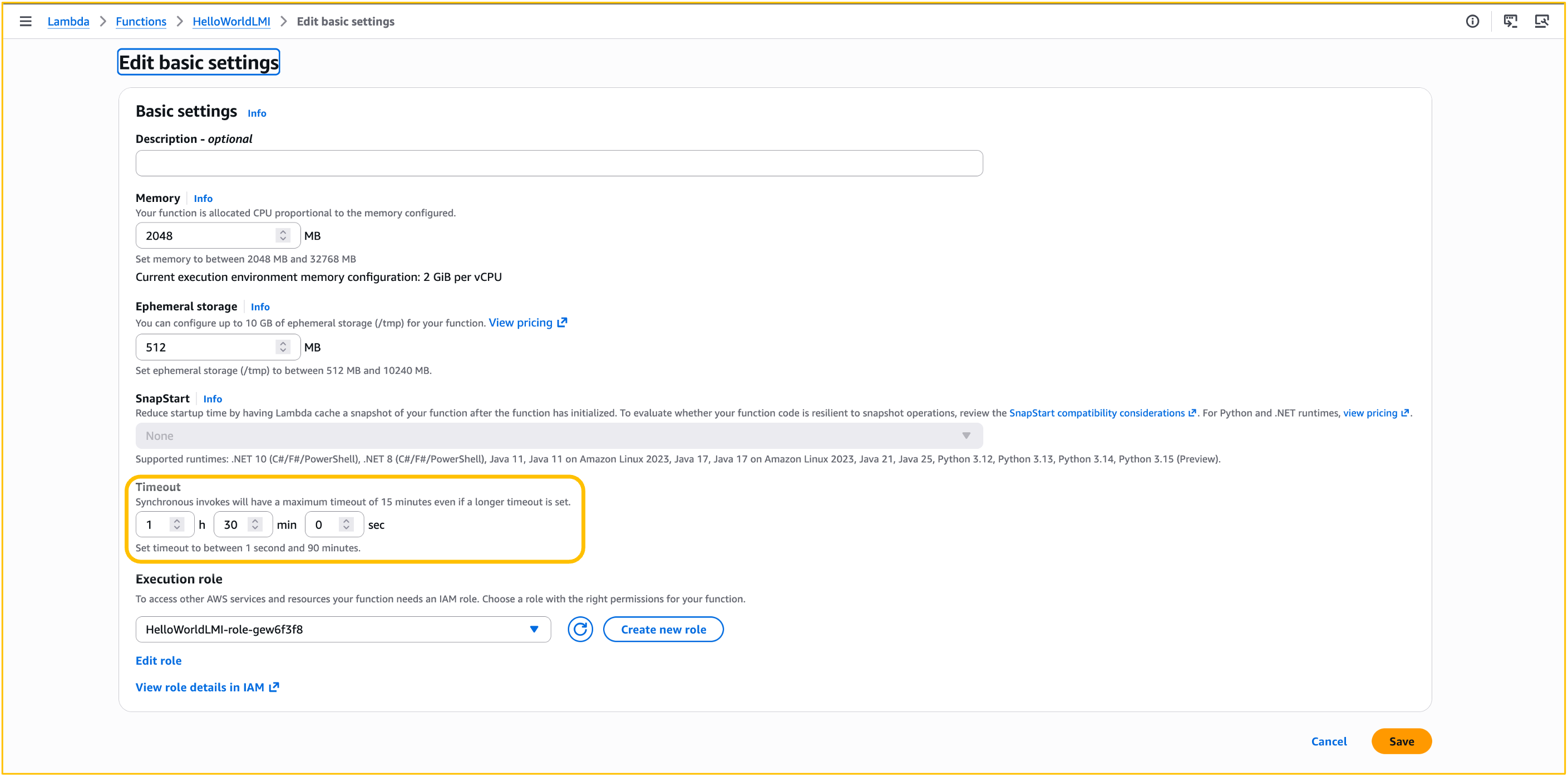
You do not need to change any code. You can also update the timeout from the Lambda console under Configuration > General Configuration (Figure 1), or configure it through natural language prompts in your AI coding assistants (like Claude Code or Kiro) by installing the Agent Toolkit for AWS.
Figure 1: Configuring Lambda function timeout
The change takes effect on subsequent invocations after the function timeout is updated. For event source mappings, allow a few minutes for the new configuration to propagate. Your existing observability setup continues to work as expected: Amazon CloudWatch metrics, AWS CloudTrail, and AWS X-Ray capture the full invocation lifecycle without any changes. For details, see monitoring Lambda functions and monitoring durable functions.
The 90-minute function timeout and durable functions are complementary. The function timeout (--timeout) controls how long each individual invocation can run, while the durable execution timeout (ExecutionTimeout in --durable-config) controls the total elapsed time from execution start to completion. Durable functions use checkpoints to track progress and automatically recover from failures through replay, re-executing from the beginning while skipping completed work. With today’s launch, each asynchronous invocation in a durable function running on a Managed Instance can now execute for up to 90 minutes continuously, while the corresponding durable execution can run for up to 1 year. For synchronous and event source mapping invocations, both the invocation and the corresponding durable execution are limited to 90 minutes.
For idempotent jobs (for example, an ETL pipeline step triggered by SQS), the extended timeout alone might be sufficient. If the host fails, the message returns to the queue and a fresh invocation starts. For jobs where re-execution is expensive (for example, a 40-minute inference run already 30 minutes in), combine both. Enable durable functions to checkpoint periodically, so a failure at minute 35 resumes from the last checkpoint rather than restarting from zero.
Invocation behavior: asynchronous, event source mappings, and synchronous
Asynchronous invocations (up to 90 minutes): If the function fails or times out, Lambda applies your configured retry policy (up to two retries by default) and routes failed events to your dead-letter queue or on-failure destination.
Event source mappings (up to 90 minutes): For SQS, configure your queue’s visibility timeout to be at least six times the function timeout. This gives Lambda enough time to retry if a function is throttled while processing a previous batch. Lambda validates this at event source mapping creation time, but does not prevent subsequent changes to queue or function settings that might create a mismatch.
If your batch contains multiple records and you want to avoid re-processing the entire batch when one record fails, enable partial batch failure reporting. This is available for SQS, Kinesis, DynamoDB Streams, Amazon Managed Streaming for Apache Kafka (Amazon MSK), and self-managed Apache Kafka event source mappings. With partial batch failures enabled, only the failed records are retried, not the entire batch.
Synchronous invocations (15 minutes maximum): Synchronous invocations retain the existing 15-minute maximum timeout. If you set your function timeout to greater than 15 minutes and invoke it synchronously, Lambda continues to apply the 15-minute timeout. The GetFunctionConfiguration API reports the configured timeout value.
To see which event sources invoke Lambda functions synchronously or asynchronously, refer to Lambda documentation.
Considerations and best practices
Because your functions now support longer continuous execution, consider these best practices for components that might be ephemeral in nature, such as network connections and credentials.
Networking: Make sure idle connection timeouts on downstream services (RDS, Amazon ElastiCache, external APIs) accommodate the full function duration. If your function routes traffic through a NAT Gateway, send keep-alive packets to prevent idle connections from being dropped (350-second idle timeout). Respect DNS TTL values for external hostname resolution. The AWS SDK handles this automatically, but custom HTTP clients might cache DNS records beyond their TTL.
Credentials: If your function acquires temporary credentials or tokens, verify they remain valid for the full execution duration or refresh them in the background.
Idempotency: Lambda does not guarantee exactly-once processing. With longer-running functions, the window for retries and duplicate deliveries increases. You can use Powertools for AWS Lambda to implement idempotency in your function code so that operations like payments or database writes produce the same result even if executed more than once. If you use Lambda durable functions, steps have at-least-once execution semantics by default. The SDK skips completed steps during replay, but steps that fail before checkpointing may re-execute. You can use execution names as idempotency keys for durable functions.
Conclusion
The 90-minute function timeout on Lambda Managed Instances addresses one of the most common customer needs for building data-intensive applications on AWS Lambda. Data processing, media transcoding, AI inference, and financial computation workloads that exceed 15 minutes can now run on Lambda without code changes or architectural workarounds. We look forward to hearing from you if you need a longer timeout for synchronous invocations, or for the on-demand capacity mode, on our AWS Lambda Roadmap GitHub page.
The Association of Banks in Singapore (ABS) established the Guidelines on Control Objectives and Procedures for Outsourced Service Providers (ABS Guidelines) to set out baseline control criteria for outsourced service providers (OSPs) operating in Singapore. These guidelines cover key areas such as cyber hygiene, technology risk management, business continuity, data security, cryptography, and software application development and management, drawing on regulatory direction from the Monetary Authority of Singapore (MAS).
This year’s certification cycle broadens the scope with five additional services, covering the 167 AWS services within the AWS Asia Pacific (Singapore) Region. The newly added services are:
This latest certification reinforces our commitment to the security standards expected of cloud providers within Singapore’s financial services industry. For customers, OSPAR offers a way to ease due diligence efforts typically associated with compliance reviews.
We remain committed to expanding the OSPAR program’s scope over time, guided by customer architectural and regulatory needs. For any questions regarding the OSPAR report, reach out to your AWS account team.
If you have feedback about this post, submit comments in the Comments section below.
After talking with enterprise security leaders over the past year, one thing has become clear: the rise of autonomous AI agents is the most significant shift in security posture since the move to cloud. Organizations across every industry are adopting AI agents that authenticate on behalf of users, execute multistep workflows, and make decisions across infrastructure, often without waiting for human approval. Security operations need to keep pace.
At Amazon Web Services (AWS), we believe security should evolve ahead of AI adoption, not behind it. That belief drove our team to collaborate with the SANS Institute on a new chapter in the 2026 Cloud Security Exchange eBook, where we lay out a practical framework for securing agentic workloads at enterprise scale.
The challenge: Threats now move at machine speed
Traditional security was built for deterministic systems with predictable inputs and outputs. Agentic workloads break those assumptions. The same prompt can produce a compliant response on one request and a policy-violating response on the next. Agents adapt their behavior over time as they interact with users, data, and tools and operate with genuine autonomy: connecting to APIs, chaining actions together, and making independent decisions.
These properties mean that security controls designed for one-time assessments no longer suffice. Detection and response need to operate continuously and at machine speed.
What makes this urgent is the gap between adoption velocity and security maturity. Although 80% of organizations have adopted AI, only 10% govern it. Agents are being built by an expanding population of developers—including those using low-code tools—creating governance challenges that existing security programs must be extended to address.
Extending what already works
The good news, agentic security isn’t a blank slate. It builds on the same principles security teams already apply: identity governance, least privilege, defense in depth, and backup and recovery. What changes is how those principles are implemented when workloads are autonomous and probabilistic. In our eBook chapter, we cover four foundational areas:
Agent identity and governance: Every agent needs its own identity with temporary, scoped credentials rather than persistent, broad access. This extends zero trust principles to AI agents, where every request is authenticated and authorized independently, and every action has a traceable authorization chain. When a single agent combines access to sensitive data, the ability to communicate externally, and exposure to untrusted content, the risk profile changes significantly. Design patterns that prevent any single component from combining all three reduce that risk substantially.
Evolving detection for agentic workloads: Static, rule-based detection designed for human activity patterns can’t keep up with agent behavior. Organizations need continuous behavioral monitoring, living baselines that adapt as agents evolve, and instrumented observation that surfaces anomalies in real time. Amazon GuardDuty delivers this today, analyzing security signals continuously to detect threats as they emerge.
Response that balances speed with precision: When threats move at machine speed, response must be automated and tiered: some agent behaviors should be contained immediately, others require human judgment. The response framework we outline distinguishes between actions that can be automated safely and those that need escalation.
From single agents to multiagent ecosystems: Agents are already composing into teams, delegating subtasks, negotiating access, and coordinating across organizational boundaries. Each stage of this evolution inherits every security requirement that came before it, meaning organizations securing today’s basic chat agents are already laying the foundation for tomorrow’s multiagent ecosystems.
Security as an enabler of agentic AI adoption
The security leaders I speak with aren’t asking whether to adopt AI agents. They’re asking how to adopt them responsibly, at speed, and without slowing down the business.
AWS approaches this challenge by building security into the platform at every layer. Agentic AI built on AWS inherits nearly two decades of experience securing mission-critical workloads. Amazon GuardDuty, Amazon Inspector, and AWS Security Hub work together to provide continuous threat detection, vulnerability management, and unified security operations, all adapting to the unique characteristics of agentic workloads.
This isn’t about building new security from scratch. It’s about extending the security foundations your teams already trust into an environment where AI operates with increasing autonomy.
Read the full framework
Our chapter in the 2026 Cloud Security Exchange eBook goes deeper on each of these areas, with specific architectural patterns, implementation guidance, and frameworks for security teams at every stage of agentic AI maturity, whether you’re evaluating, piloting, or operating at scale.
You can learn more about AWS security services at AWS Cloud Security, or explore our AI Security Framework for a comprehensive view of how AWS secures AI workloads with the right controls, at the right layers, at the right phases.
If you have feedback about this post, submit comments in the Comments section below.
Search is the front door of many applications, yet most teams struggle to answer a deceptively simple question: “Is my search actually returning relevant results?” Query logs tell you what users typed, not what they saw, what they selected, or why they left. When search feels broken, the culprit is rarely the engine. It’s the lack of deliberate signal collection, measurement, and a feedback loop to act on it.
You can close this gap on Amazon OpenSearch Service using User Behavior Insights (UBI), an open schema standard for capturing search behavior, and Search Relevance Workbench (SRW), a toolkit for measuring and evaluating search quality. Your application generates the UBI-formatted records. Together, UBI and SRW give you a repeatable framework: collect signals, turn them into relevance judgments, and validate every change before it ships.
In this post, we show you how to capture UBI data on an Amazon OpenSearch Service domain and use those signals to evaluate search quality. This is the first post in a two-part series. We build the foundation here, and Part 2 covers automating the workflow end to end.
The challenge: You can’t improve what you can’t measure
Consider a shopper searching for “handbag” on an ecommerce site. The catalog has 16 products (tote bags, duffel bags, laptop bags), but every title only says “bag.” The search returns zero results. Most shoppers leave. A patient one retries with “bag” and finds what they were looking for.
Your server log recorded that first query as a clean sub-second response: no error, no alert, no signal. What it missed entirely was a customer with purchase intent. That customer hit a vocabulary gap between how they search and how you write your catalog. Zoom out and apply this lens to misspelled queries, poor handling of long-tail searches, and abandoned sessions. The blind spot is larger than you think.
There’s a second problem: click signals are position biased. Users select the first result far more than the fifth, regardless of relevance, so raw click counts reflect where results appeared, not whether they deserved to be there. Any judgment derived from clicks must correct for this bias. We return to it when generating judgments.
Capturing behavioral data with UBI
UBI defines two indices. The ubi_queries index holds one record per executed query: the text the user typed, the full query that ran (filters and facets included), and the IDs of the documents returned. The ubi_events index holds every subsequent user action: impressions, hovers, clicks, add-to-carts, each stamped with the result position and the product’s business identifier (object_id). A shared query_id links every event back to the query that triggered it. Two additional identifiers complete the picture: client_id tracks the browser across visits, and session_id scopes events to a single visit.
A query record captures what the user asked and which document IDs the engine returned, including zero-result cases like the handbag search, which appears as a record with an empty result list. Here’s the shopper’s follow-up search for “bag”:
The event record captures what the user did next. For each result rendered, emit an impression event. When the user selects a result, emit a click event. Here is the impression event for the first result of the bag search:
event_attributes also accepts custom fields of your own alongside the standard position and object structures. The action_name attribute is critical: The judgment model you use later consumes only impression and click events. Treat a paginated results page as the same logical query: reuse the query_id and record absolute positions. The UBI events schema reference documents the complete event schema.
Collecting UBI data on Amazon OpenSearch Service
Behavioral data (what results ranked, what users saw, what they selected) exists only in the application layer. Your application owns the records, and Amazon OpenSearch Ingestion (OSI), a fully managed, serverless data collector powered by Data Prepper, provides the managed delivery path. Your application sends the records as SigV4-signed HTTP POST requests to the OSI pipeline endpoints. Route browser events through your backend for signing. One thing to understand before you write any code: Your application generates and owns the query_id attribute. The application creates the ID when it runs a search and stamps it on every subsequent event the user produces, until the user issues a new search or the session ends.
Prerequisites
To follow along, you need an Amazon OpenSearch Service domain running OpenSearch 3.5 or later with the OpenSearch UI application, permissions to create OpenSearch Ingestion pipelines with an AWS Identity and Access Management (IAM) pipeline role, and a search application you can instrument to emit behavioral records.
Create the UBI indices
Before you start collecting user metrics, you need the two indices in place with the right mappings. Field types matter here: query_id as keyword supports exact joins between queries and events, timestamp as date supports time-range queries, and event_attributes as dynamic means you can extend events with custom fields without schema changes.
Create ubi_queries first in Dev Tools. It holds the query-side records. We abbreviated the mappings here. Refer to the published queries-mapping.json file for the complete version:
With both indices created, the next step is routing data into them. You can deliver UBI data to your domain in several ways. This post uses OSI pipelines, shown end to end in the diagram that follows the setup.
Set up the OSI pipelines
Create two OSI pipelines: one for queries and another for events. Each pipeline exposes an HTTP source endpoint that your application writes to (shown on each pipeline’s console page) and sinks data to the corresponding index. The following configuration defines the events pipeline:
Note: the queries pipeline follows the same pattern, with /ubi/queries as the path and ubi_queries as the sink index and S3 prefix. Create the pipeline role yourself or let OpenSearch Ingestion create it. If your domain uses fine-grained access control, also map the pipeline role to a backend role so the domain accepts the pipeline’s writes. Refer to the tutorial Collecting UBI-formatted data in Amazon OpenSearch Service for detailed steps.
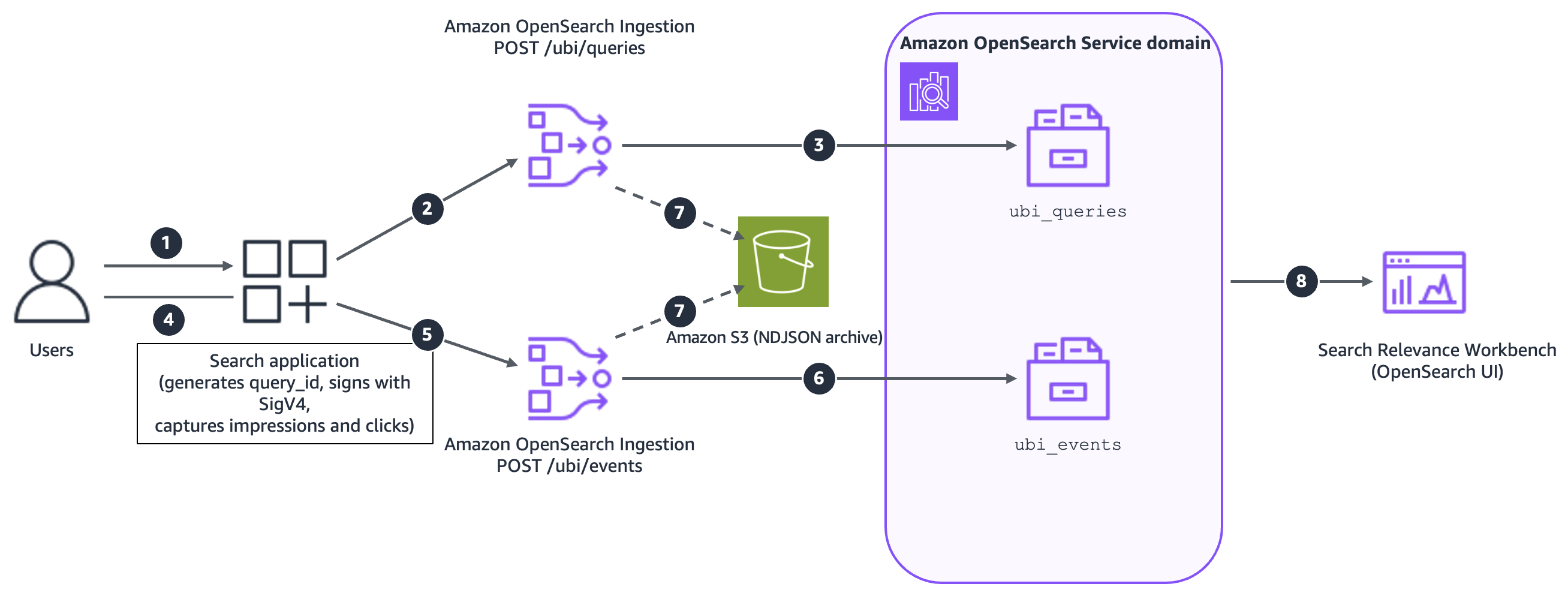
With the pipelines running, your application can start sending data. The following diagram illustrates the end-to-end flow:
Figure 1: The UBI collection pattern on Amazon OpenSearch Service
The workflow consists of the following steps:
Users interact with your search application.
The application sends signed query records to the OSI HTTP endpoint.
OSI writes queries to the ubi_queries index.
Users interact with the results, viewing and selecting documents.
The application sends signed event records, carrying the same query_id, to the OSI HTTP endpoint.
OSI writes events to the ubi_events index.
Optionally, both pipelines archive records to Amazon Simple Storage Service (Amazon S3).
Search Relevance Workbench (OpenSearch UI) works with the collected data in the ubi_queries and ubi_events indices.
Note: if you’re already collecting site analytics through an existing third-party tool, you don’t need to replace it. Map your search-related events (queries, clicks, and conversions) into the UBI schema and store them in OpenSearch. That’s enough to unlock the out-of-the-box evaluation framework, implicit judgment generation, and the full SRW metrics pipeline, without defining a single custom metric from scratch.
Visualize the data collected
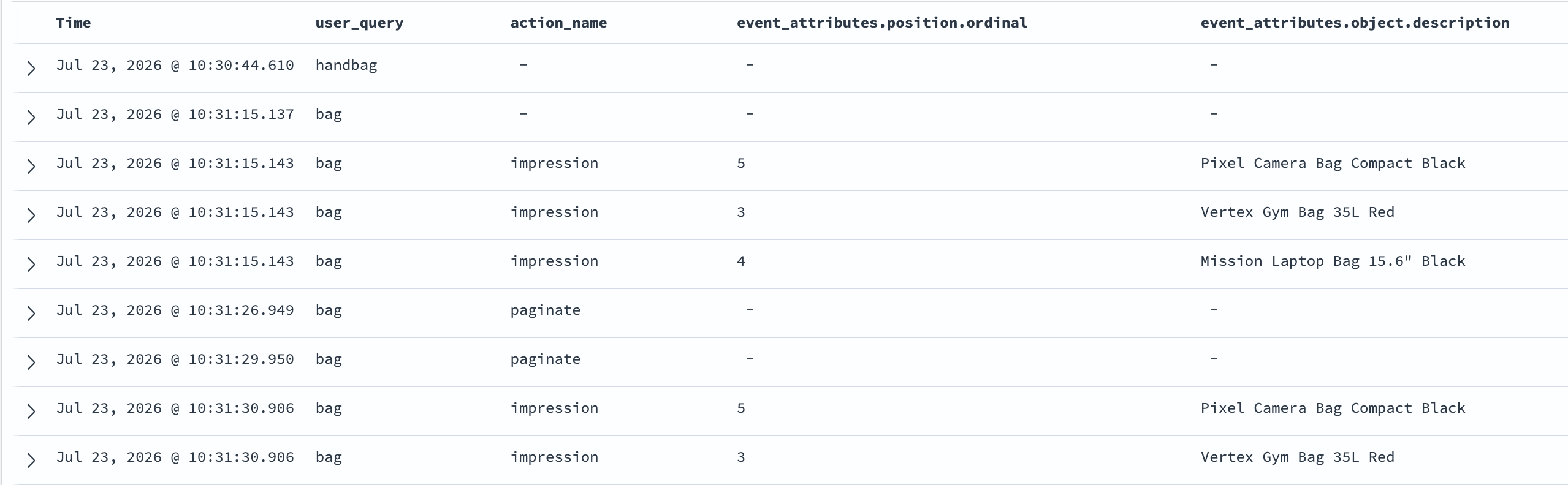
After the UBI behavior metrics start to trickle in, you can review the data in the Discover tab on the OpenSearch UI dashboard. Filtering ubi_queries for empty result lists ranks your vocabulary gaps. You can also visualize the data collected through the sample User Behavior Insights (UBI) dashboards in OpenSearch.
Figure 2: UBI records in Discover, showing the zero-result handbag query and the follow-up bag query with its impressions and pagination events
With data flowing into your indices, keep these things in mind as you scale to production:
Keep telemetry off the search critical path – Queue records and forward them asynchronously. Losing a fraction of behavioral data is statistically harmless. Blocking users isn’t.
Manage volume deliberately – Batch impression events, and if you sample, sample whole queries rather than individual events to preserve the click-through ratios that drive judgments.
Isolate analytical load for larger deployments – Route pipelines to a separate analysis domain with the same engine version, mappings, and analyzers as production. This keeps behavioral writes from touching live search latency.
Plan for retention and integrity – Register the UBI mappings as an index template and apply an Index State Management (ISM) retention policy as your indices grow. You should validate and rate-limit the event write path, and cover query text and client identifiers with your data retention policy.
Evaluating search quality with Search Relevance Workbench
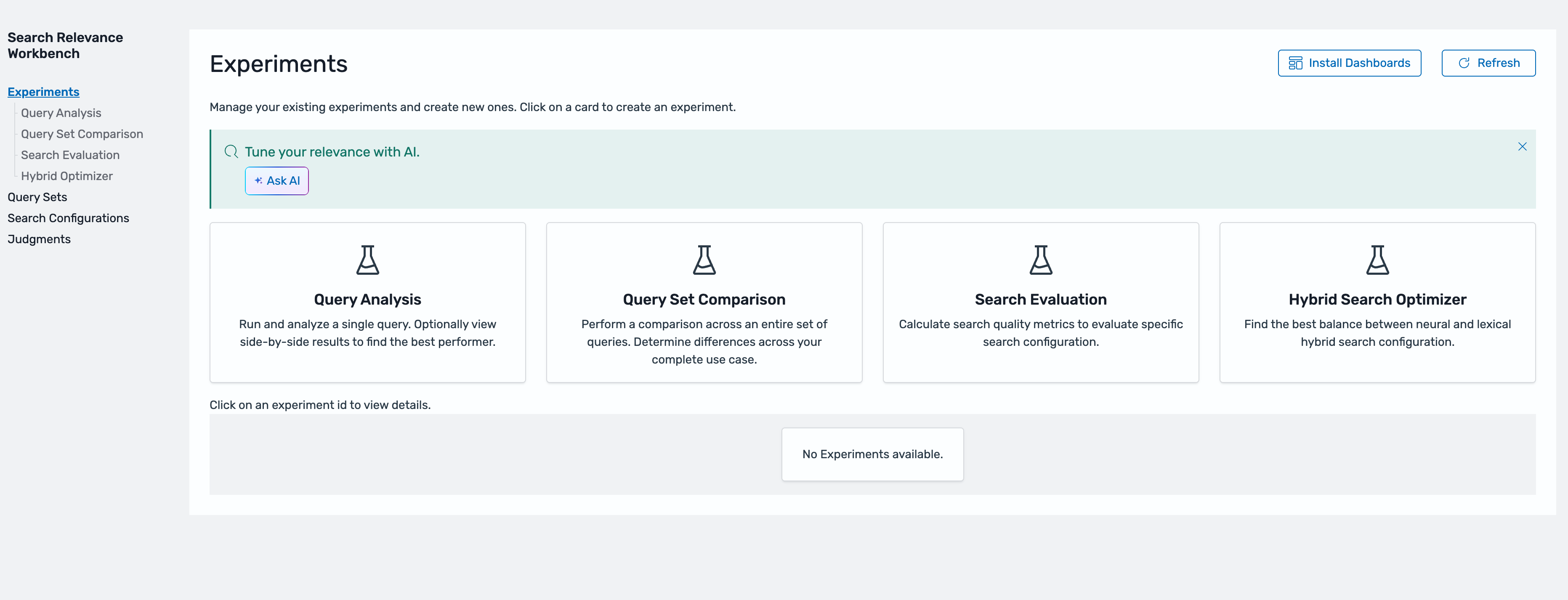
With ubi_queries and ubi_events collecting data, you now have the signals needed to evaluate search quality. Search Relevance Workbench, generally available in the OpenSearch UI from Amazon OpenSearch Service 3.5, turns those signals into structured experiments: comparing query configurations, scoring results against relevance judgments, and surfacing metrics that guide iterative tuning.
Figure 3: Search Relevance Workbench in the OpenSearch UI
SRW experiments rely on three components. You set them up once, then reuse them across every experiment you run: a query set (the fixed queries you evaluate against), search configurations (the query structures you want to compare), and a judgment list (the relevance ground truth). The following sections walk through each one.
Step 1: Create a query set
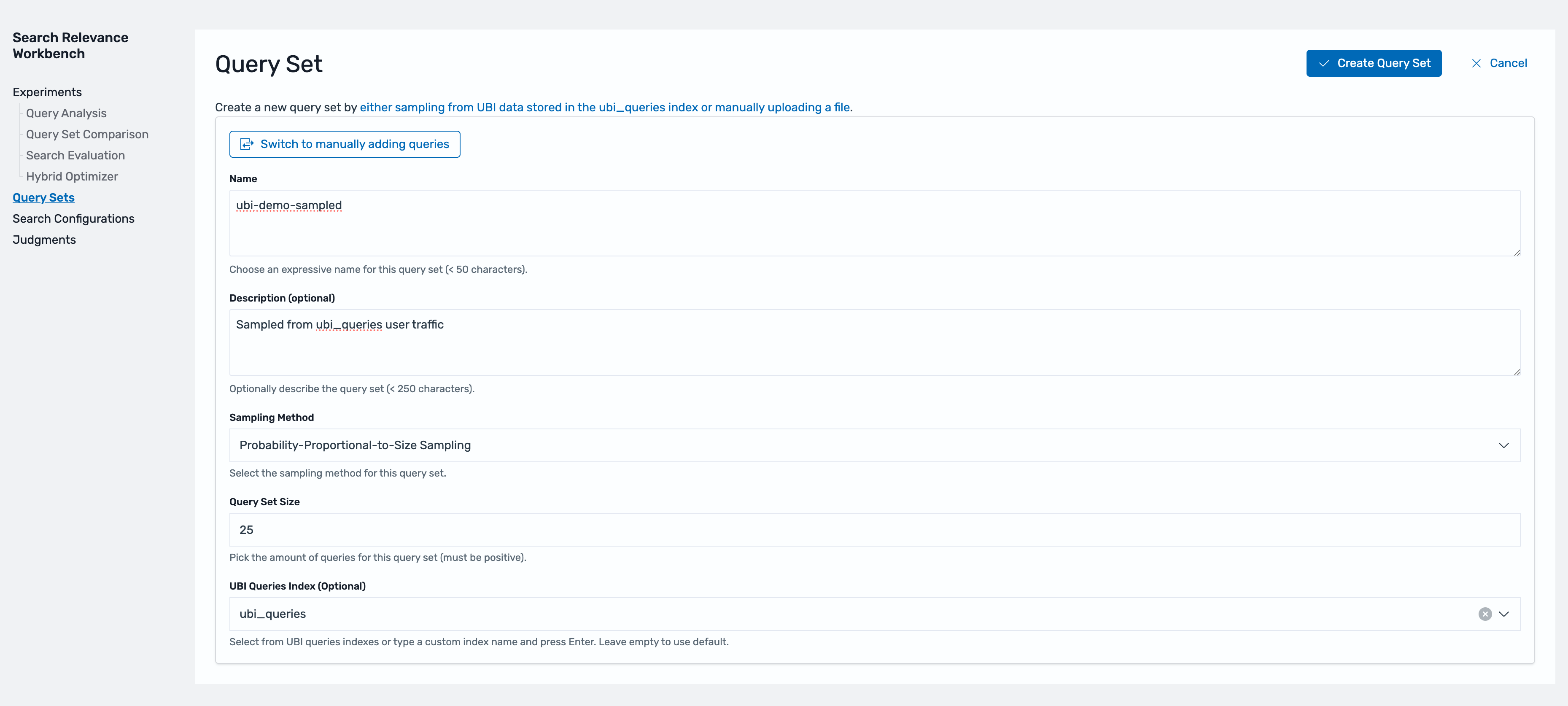
A query set is the fixed collection of queries you evaluate against. Keeping it fixed makes results comparable across experiments. Effective query sets reflect real traffic, not intuition. You can seed one from your top queries, a random sample, or a hand-picked mix that includes long-tail and low-performing queries. Alternatively, SRW can sample directly from ubi_queries using Probability-Proportional-to-Size (PPS) sampling, which selects queries in proportion to how often users issue them. This approach represents frequent queries like “bag”, so your metrics reflect search quality as users experience it.
Figure 4: Creating a query set sampled from real traffic in ubi_queries
Step 2: Define search configurations
A search configuration defines how a search executes: the index, the query structure, and a %SearchText% placeholder that SRW replaces with each query in your set. Creating two configurations and running them against the same query set and judgment list is how you validate a change before any user sees it.
As an example, here we define two configurations: a baseline multi_match query (retail_query) and a variant that boosts title matches (retail_boosted_query), so we can measure whether the boost actually helps ranking.
Configurations go beyond query variants: a candidate can be an entirely different retrieval strategy, like hybrid search combining keyword and neural retrieval. You can use judgments to rate query-document pairs independently of your retrieval approach. You can test a semantic or hybrid approach offline against your existing traffic before shipping it.
Step 3: Create the judgment list
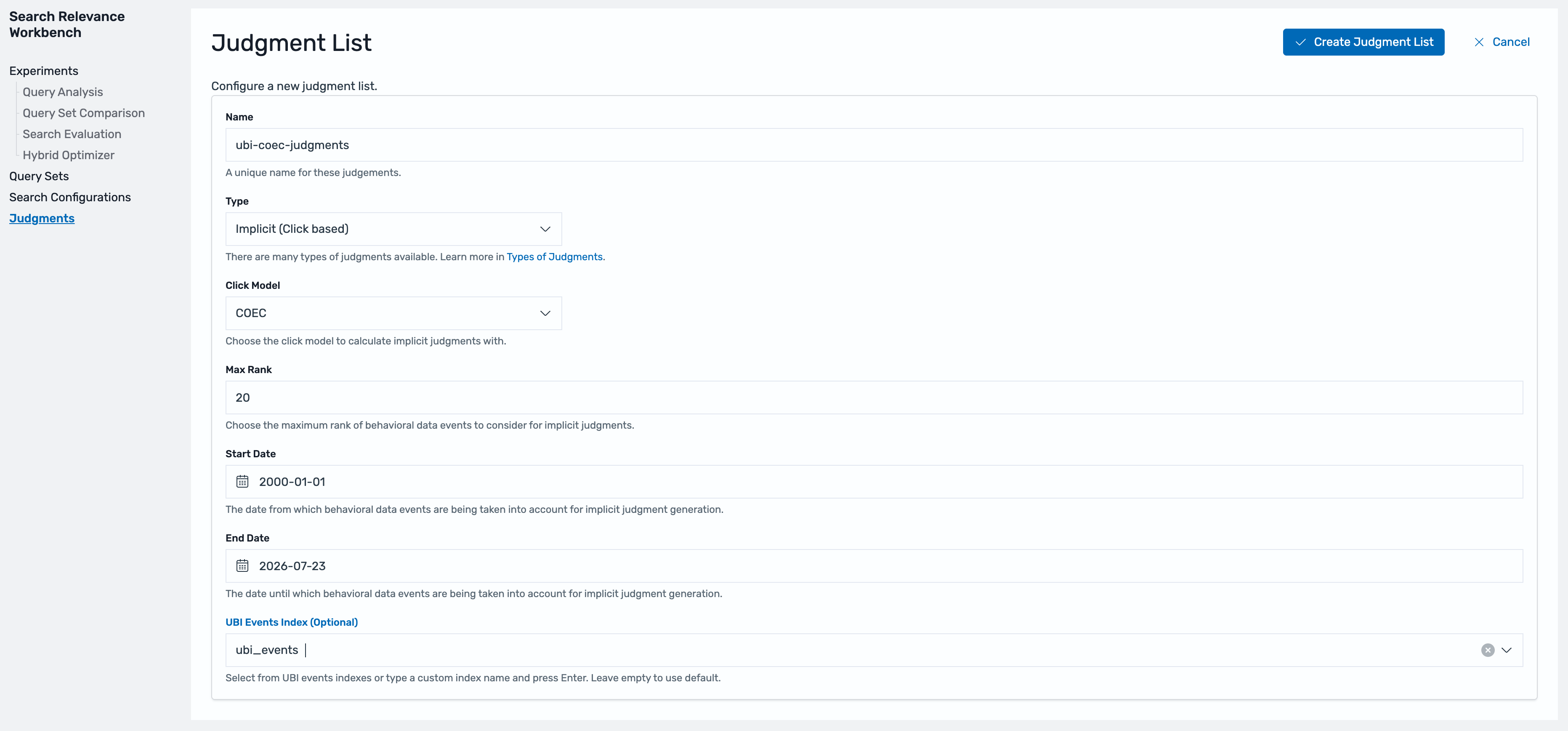
A judgment is a relevance rating for a query-document pair: the ground truth that quality metrics measure against. You can create judgments that are explicit (from stakeholders or a large language model acting as judge), imported, or implicit (derived from behavior). Here we use implicit judgments derived from UBI selection behavior, scored using the Clicks Over Expected Clicks (COEC) model. The COEC model helps correct position bias by comparing each document’s actual click rate against the expected rate for its rank position. Documents that outperform their position score as relevant. Those that users select because they ranked first score near average.
Figure 5: Creating an implicit judgment list with the Implicit (Click based) type and the COEC click model
Three things to get right before you run experiments:
object_id in your events must match the document _id from your product catalog. The search configurations you define return this _id, which lets SRW join judgments to results.
Implicit judgments are statistical. They need volume and query coverage. As a working rule of thumb, aim for hundreds to thousands of real sessions per query to separate signal from noise.
Max Rank controls how deep in the result list events count. If users paginate, set it beyond a single page. We use 20 here.
Step 4: Run experiments
This post uses three SRW capabilities: Query Analysis, Query Set Comparison, and Search Evaluation. Query Analysis is a quick eyeball check: compare two configurations side by side for a specific query to see exactly what changed and why the metrics moved. The other two answer harder questions with numbers: how good a configuration is, and how two configurations compare against real relevance signals.
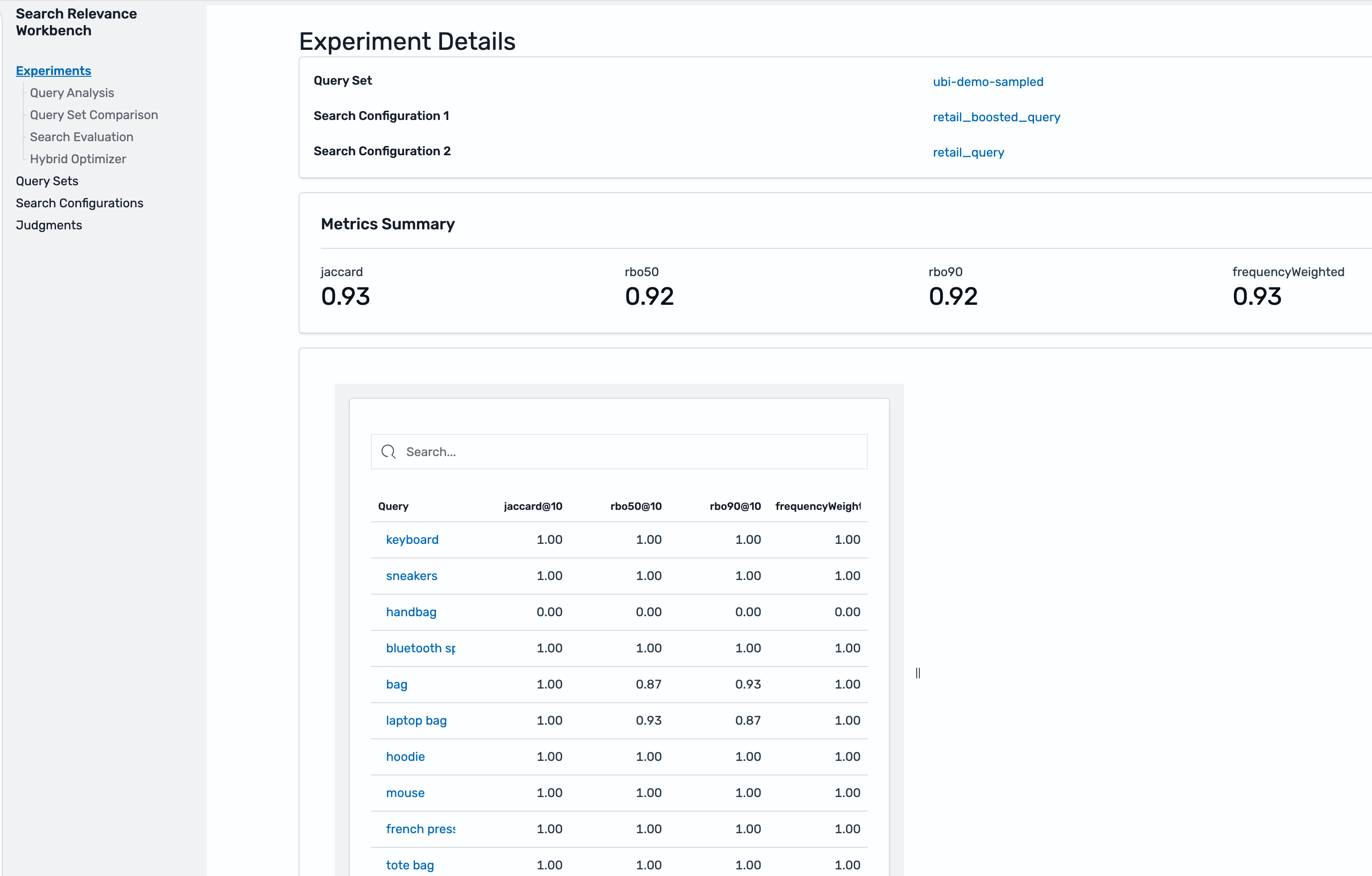
Query Set Comparison (also called pairwise comparison) takes two configurations and computes ranking similarity. Jaccard overlap measures how much the two result lists share, while Rank-Biased Overlap (RBO) weights agreement at the top of the list more heavily. Near-identical scores mean the change will barely register with users. Low overlap means a real ranking shift worth reviewing carefully before shipping. In this run, the two configurations score 0.93 Jaccard and 0.92 RBO, a modest but real shift. SRW cannot score zero-result queries like “handbag”: They show zero similarity in a comparison and Failed in an evaluation, a signal they need a different fix than ranking adjustments.
Figure 6: Query Set Comparison showing Jaccard and Rank-Biased Overlap between the two configurations
Search Evaluation (also called pointwise evaluation) scores one configuration against your query set and judgment list across four metrics, each computed over the top k results (k=10 by default):
Metric
What it measures
What it tells you
Coverage@k
Proportion of returned documents that have judgments
How much to trust the other three metrics. Low Coverage means many results were never judged
Precision@k
Fraction of the top k results that are relevant
How many irrelevant results appear on the first page
MAP@k (Mean Average Precision)
Precision averaged across ranks, rewarding relevant documents placed early
Whether relevant results appear early, even when Precision ties
NDCG@k (Normalized Discounted Cumulative Gain)
Graded judgment values, discounted by position (rank 1 counts more than rank 9)
Whether the best results appear first. The primary comparison metric
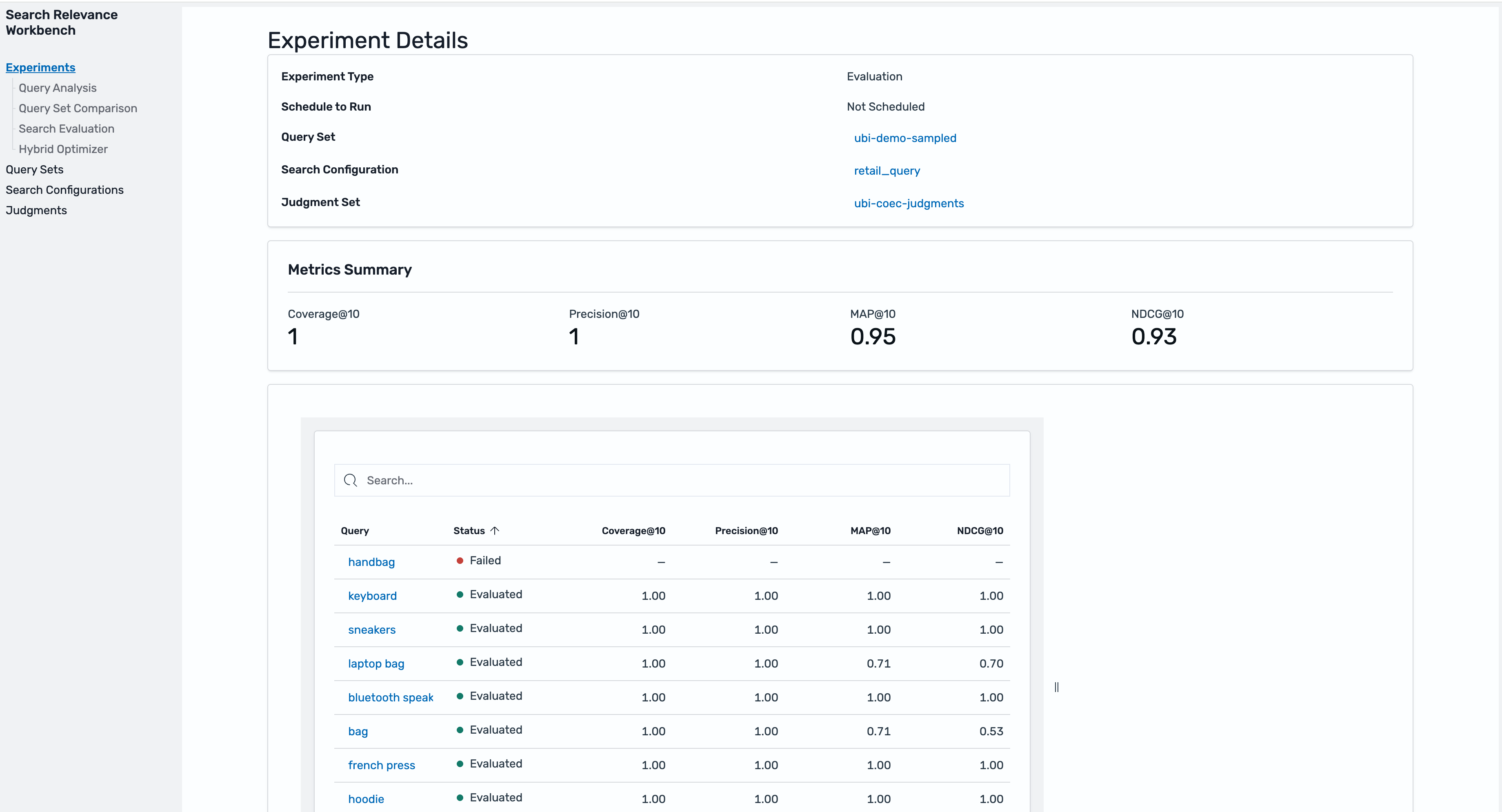
Each pointwise experiment evaluates one configuration. To compare candidates, run one experiment per configuration and compare the results. In this run, the baseline (retail_query) scores Coverage@10 of 1.0, Precision@10 of 1.0, MAP@10 of 0.95, and NDCG@10 of 0.93, with the zero-result “handbag” query showing as Failed in the per-query detail.
Figure 7: Search evaluation results for one configuration: Coverage, Precision, MAP, and NDCG at 10, with per-query detail
From measurement to improvement
The preceding experiments are the harness. The following are common levers to test with it. Express each as a new search configuration, evaluate it against the same query set and judgment list, and adopt it only if the metrics move:
Synonyms – One option for addressing known vocabulary gaps is to build synonyms. A search-time synonym token filter treats “handbag” and “bag” as equivalent, and with Amazon OpenSearch Service, you can hot deploy custom synonym packages without reindexing.
Field weights – Adjust the fields and boosts in a multi_match query, like the title^2 variant tested earlier.
Semantic retrieval – A hybrid query combines keyword and neural scores, addressing vocabulary mismatch as a class rather than term by term. Judgments evaluate it offline exactly like a lexical candidate.
Reranking – A rerank processor in a search pipeline reorders the top results using a cross-encoder model.
Clean up
To avoid future charges, delete the resources you created for this walkthrough:
If you configured the optional Amazon S3 archive, delete the archived objects (or the bucket).
If you keep the domain, optionally delete the ubi_queries and ubi_events indices and the query sets, judgment lists, and experiments you created. These live on the domain and incur no separate charges.
If you created the domain specifically for this post, delete it to remove everything, including the resources in the previous step. Deleting a domain is irreversible. Don’t delete a domain that serves other workloads.
Conclusion
UBI collects the evidence, COEC turns it into judgments, and SRW experiments deliver the verdict: Coverage, Precision, MAP, and NDCG in place of guesswork. Ship the winning configuration, keep collecting, and the next round of judgments shows whether the improvement holds with real behavior. Where there used to be an opinion, there is now a number.
Everything here follows a repeatable pattern, and repeatable patterns lend themselves to automation. Part 2 walks through the Search Relevance Agent, available through the AI Assistant chat (the Ask AI button) in the OpenSearch UI. The agent analyzes your UBI signals, generates tuning hypotheses, and validates them offline before recommending changes. The pipeline you built in this post is the foundation. Stay tuned for Part 2.
When customers keep pointing you to a solution that overlaps with parts of your own offering, you have a choice to make. This post is about the choice we made with Upwind, and why we’d make it again.
AWS Security Hub Extended exists because customers told us what was working for them in enterprise security and asked us to simplify adoption and integration. Upwind was one of the solutions customers kept naming, so we brought them in. Upwind didn’t only agree to participate, they committed fully to integration. They brought their full solution portfolio into Extended with aggressive pay-as-you-go pricing from day one. They got their field organization fully aligned on joint deal flow and have driven more customer activity and closed deals through Security Hub Extended than any other partner in the program.
Giving customers choice, even when it overlaps
Multiple best-of-breed options in cloud security—including one that overlaps with our own capabilities—are straightforward when you start with what customers need. Some will choose Security Hub Essentials for cloud security posture management and vulnerability scanning. Some will choose Upwind for runtime-first protection. Some will run both and get stronger outcomes from the combination. The customer decides, not us. That principle applies to every partner in Security Hub Extended. We listen to what’s working, and we simplify adoption through the same AWS relationship customers already have.
“Our customers run on AWS, and Security Hub is where their security operations live,” said Amiram Shachar, Co-Founder and CEO of Upwind. “Being inside Security Hub means customers get Upwind’s cloud workload protection with the same billing, the same support path, and the same operational model they already know. We’re here because it’s a better outcome for the customers we share.”
Who is Upwind?
Upwind is a cloud security company trusted by Siemens, Peloton, Roku, Wix, Nextdoor, and Nubank. Fast Company named them one of the Most Innovative Companies of 2026.
What makes them different is runtime. Most cloud security solutions scan configurations periodically and report what could be a risk based on static posture. Upwind deploys an eBPF-based sensor directly in the Linux kernel that sees what workloads are doing in real time, including process behavior, network connections, API calls, and container interactions. All observed continuously. That means Upwind can tell you not only what could theoretically be exploited, but what is actively at risk right now. That distinction cuts alert noise dramatically and lets security teams focus on what genuinely matters.
Better together. Not only with AWS, but with each other
Now extend that to the rest of your security stack. If you’re already running other Security Hub Extended solutions, they work together without you building the integrations.
A customer running Chainguard for supply chain security, Upwind for runtime protection, and Splunk for security operations gets a connected experience. Chainguard helps ensure clean, malware-resistant dependencies at build time. Upwind validates workload behavior at runtime and enriches those findings with real-time context. Everything flows into Splunk through Security Hub for unified triage. One experience, one bill, no custom integration work. The security team sees the full lifecycle from build to production without stitching tools together.
That same pattern applies with 7AI, where AI-driven automation can triage and investigate Upwind’s runtime events alongside endpoint, identity, and network signals, all without manual pipeline work.
This is the multi-way partnership that Security Hub Extended was designed to enable. These solutions aren’t only easier to buy together, they’re building toward each other. The findings flow into Security Hub in OCSF (Open Cybersecurity Schema Framework), get correlated and prioritized together, and route to the downstream tools your team already uses. Your security stack gets stronger as a whole, not only solution by solution.
How it works commercially
This isn’t a paper partnership. We’re closing multi-million dollar deals together through Security Hub Extended. Upwind has engaged faster than any other partner in the program, bringing their own customer opportunities and joining AWS-originated deals to close them jointly. One enterprise customer recently replaced their incumbent CNAPP with Upwind through a Security Hub Extended Private Offer. The deciding factors were runtime visibility that their previous solution couldn’t deliver and a single predictable commercial model that replaced complex per-module pricing across multiple vendors. The commercial model has momentum, and it’s because Upwind invested not only in signing an agreement but in the engineering and go-to-market work that makes joint success real.
Upwind is available through Security Hub Extended with pay-as-you-go pricing, one AWS bill, and no required long-term commitment. For enterprises that prefer committed-pricing agreements, Security Hub Extended Private Offers are also available with deeper discounts and the ability to aggregate spend across partners. You choose the path that fits how you buy. If you’re already running Security Hub for posture management and vulnerability scanning, adding Upwind gives you runtime visibility alongside what you already see. No new tooling to stand up, no new workflow to learn. It shows up in your existing prioritized view of risk.
What Upwind is building next
Upwind continues to expand. AI workload protection that monitors model behavior and agent tool calls at runtime. Windows Server VM coverage across AWS, Azure, and GCP. Deeper integration with the Security Hub correlation engine so runtime context enriches attack-path intelligence automatically. The partnership deepens as both sides invest.
“We believe runtime context and AWS-native signals together produce stronger outcomes than either alone,” said Amiram Shachar, Co-Founder and CEO of Upwind. “As Security Hub deepens its correlation and Upwind extends its runtime fabric, customers who use both will have a view of risk that no single solution can replicate. That’s the future we’re building toward together.”
What this means for you
Security Hub Extended exists to give you access to the solutions your peers are already succeeding with through the AWS relationship you already have. Upwind is what that philosophy looks like when applied to a category where AWS has an existing offering. We listened to customers, saw what was working for them, and made it available with the same commercial model as everything else.
Enable Upwind through the AWS Security Hub console. Pay-as-you-go. No commitment required. If you want to understand what consolidation looks like with Security Hub Extended, talk to your AWS account team.
We’re just getting started, but the momentum is real.
If you have feedback about this post, submit comments in the Comments section below.
If you found time for a bit of vacation this summer, you might be in catch-up mode. Here’s a list to help: all the expert blog posts, new service capabilities, code samples, and workshops, in case you missed it, from July 2026.
AWS Security Blog post
This month’s AWS Security Blog posts covered AI agent security, supply chain protection, network firewall automation, DDoS mitigation, and compliance readiness. Read on for guidance on securing AI coding agents, implementing dependency cooldowns, choosing the right key management solution, and preparing for HIPAA Technical Safeguard requirements.
Balancing speed and safety: A control framework for AI coding agents Authors: Daniel Begimher, Danny Cortegaca | Published: July 30, 2026 Learn to implement an application security control framework for AI coding agents, with author-time controls that shape what agents produce and build-time controls that verify what reaches production.
The CISO’s guide to post-quantum mandates and migrations Author: Rushir Patel | Published: July 8, 2026 A strategic playbook for CISOs navigating post-quantum cryptography migration, covering regulatory timelines, dependency classification, cryptographic telemetry, and building crypto-agile organizations.
Secure your npm and pip package updates in Amazon Linux Author: Norbert Manthey | Published: July 29, 2026 Learn to implement a one-line dependency cooldown for npm and pip that skips packages published in the last 24 hours, protecting against supply chain events while still allowing urgent security patches.
Authenticate legitimate AI agent traffic with AWS WAF Bot Control Authors: Harith Gaddamanugu, Kaustubh Phatak | Published: July 14, 2026 Learn to use Web Bot Authentication (WBA) in AWS WAF Bot Control to cryptographically verify legitimate AI agent traffic using HTTP message signatures and ed25519 keys.
Accelerating AWS Network Firewall troubleshooting with AWS DevOps Agent Author: Salman Ahmed | Published: July 24, 2026 Learn to use AWS DevOps Agent to automate root cause analysis for AWS Network Firewall connectivity issues, including domain deny lists, stateless rule priority misconfigurations, and asymmetric cross-AZ routing drops.
Amazon identifies North Korean hacker group behind open-source supply chain attacks Author: CJ Moses | Published: July 29, 2026 Learn how Amazon Threat Intelligence linked the compromises of axios, debug, chalk, and typo-crypto NPM packages to a single DPRK-linked threat actor, and how attacker tradecraft is evolving with generative AI.
Extend Amazon Inspector SBOM Generator with plugins Authors: Michael Long, Anthony Verleysen, Charlie Bacon | Published: July 30, 2026 Learn to write custom Lua plugins for the Amazon Inspector SBOM Generator to inventory package ecosystems that aren’t supported out of the box, without modifying source code or waiting for an official release.
AWS designated as a critical third party to the UK financial sector Author: Michael Jefferson | Published: July 10, 2026 AWS has been designated as a critical third party to the UK financial sector by HM Treasury, establishing direct regulatory oversight by the Bank of England, PRA, and FCA.
New compliance guidance available: HITRUST i1 on AWS Authors: Abdul Javid, Shreya Singh | Published: July 13, 2026 AWS published new implementation guidance for HITRUST i1 certification, covering 11 technical control domains with AWS-specific controls for healthcare organizations seeking i1 assessment readiness.
HIPAA Security Rule on AWS – Technical Safeguards Implementation and Readiness Guidance Authors: Abdul Javid, Hector Rodriguez, Kapil Temghare, Shreya Singh | Published: July 31, 2026 New guidance helping covered entities and business associates implement and evidence compliance with HIPAA Security Rule Technical Safeguards (§164.312) on AWS, including 2025 NPRM proposed changes.
Identity
Introducing OAuth support for AWS MCP Server Authors: Vaibhav Chowla, Jaimin Bhatt, Ankur Joshi | Published: July 9, 2026 AWS MCP Server now supports OAuth 2.1 authorization through AWS Sign-In, enabling agents like Claude Code,Kiro, and Gemini CLI to connect using existing IAM credentials with browser-based authentication.
July Security Bulletins
In July 2026, AWS published 21 security bulletins (2026-049 through 2026-069) addressing vulnerabilities across open-source SDKs, MCP servers, and developer tools. Key themes include credential disclosure and SSRF, affecting HealthLake, HealthOmics, and API MCP servers, plus Strands Agents tools that could inadvertently expose secrets to unauthorized endpoints. Command and code injection impacted aws-cdk-lib, jsii-diff, Bedrock AgentCore SDK, and Amplify Codegen UI. The smithy-rs framework received three patches for denial-of-service via uncontrolled recursion and Slowloris issues.
Other notable issues include insecure file permissions in the AWS CLI, deserialization remote code execution in the Advanced JDBC Wrapper, SQL injection in mcp-gateway-registry, TLS 1.3 flaws in s2n-tls, and stored XSS in AWS Ops Wheel. A common thread: insufficient input validation in tools interacting with AI agents, reflecting the expanded surface area of LLM-integrated workflows. All patches are available, upgrade promptly. For more information, see AWS Security Bulletins.
AWS Samples
This month brings 14 new AWS samples spanning AI security, identity, data protection, governance, threat detection, and security posture management. From deploying governed AI agent platforms on Amazon Bedrock AgentCore to building data-residency-compliant chatbots and DevSecOps baselines for Kiro, these repositories help you implement security and governance best practices across your AWS environment.
AI Security
Lark MCP on AgentCore Learn to deploy a hosted remote MCP service on Amazon Bedrock AgentCore that lets AI agents operate Feishu/Lark through 450+ tools, with per-user identity isolation and smart multi-step orchestration via 20+ domain Skills.
Lark CLI MCP Wrapper on AgentCore Runtime and Identity Learn to securely wrap a CLI tool as an MCP server on AgentCore Runtime using a sidecar credential-isolation pattern, where the CLI process never holds real tokens and all secrets are resolved through AgentCore Identity’s Token Vault.
LiteLLM Bedrock Gateway on EKS Learn to deploy a production-grade LiteLLM proxy on Amazon EKS as a unified OpenAI/Anthropic-compatible gateway to Amazon Bedrock, with four progressive layers covering network isolation, cross-region inference profiles, and cross-account delegation.
Enterprise Agentic AI Platform Accelerator on AgentCore Learn to deploy a secure, governed foundation for production AI agents on Amazon Bedrock AgentCore with CDK stacks covering identity, gateway, memory, runtime, and observability; supporting multiple agent frameworks (Strands, LangGraph, Claude SDK) and opt-in security controls including VPC isolation, KMS encryption, Cedar policies, and Bedrock Guardrails.
FlowAMP: AI Agent Governance on AWS Learn to deploy a single-pane-of-glass agent management platform on Amazon Bedrock AgentCore that discovers, monitors, scores, controls, and cost-accounts AI agents across an AWS Organization with agentic discovery, compliance scanning (NIST AI RMF, ISO 27001, SOC 2), Responsible-AI scoring, FinOps via Cost Explorer, and Cedar-based policy enforcement.
Kiro SecOps Baseline Learn to deploy a DevSecOps security baseline for Kiro as a single Go CLI that installs global guardrails (permissions.yaml, steering, skills, a security-review agent) and per-project workspace hooks (fail-closed guard, PR/pipeline review gates, scanner configs for gitleaks, trivy, and checkov) with enterprise fleet distribution via MDM and Administration scope.
Identity
OAuth 2.0 Token Exchange with Amazon Cognito Learn to implement RFC 8693 OAuth 2.0 Token Exchange using Amazon Cognitowith a true delegation pattern, enabling services to act on behalf of users while maintaining distinct service identities and least-privilege access in microservices architectures.
Lark Identity on AgentCore — Gateway Interceptor Learn to implement enterprise identity pass-through on Amazon Bedrock AgentCore using a Gateway Request Interceptor that forwards the user’s identity and injects per-user credentials to downstream MCP tools, so the agent never holds a token and tools act only as the authenticated user against Lark.
Data-Residency Chatbot with Amazon Bedrock AgentCore Learn to build a data-residency-compliant natural-language chatbot on Amazon Bedrock AgentCore that keeps all data and AI inference within a single AWS Region, using governed text-to-SQL with whitelist-validated queries, Aurora PostgreSQL in private subnets, and AgentCore Gateway for secure tool access.
Governance and compliance
Video Compliance Agent Learn to build an end-to-end automated video compliance verification pipeline using Amazon Bedrock, ECS Fargate, and AWS Step Functions that processes videos shot-by-shot, extracting frames, audio transcripts, and OCR text, then flags potential broadcast guideline violations with structured per-shot reports.
Contract Compliance Search with Amazon OpenSearch Learn to build a contract compliance search system that combines semantic search with semantic highlighting using Amazon OpenSearchService, Amazon Titan V2 embeddings, and a SageMaker-hosted highlighting model to surface relevant clauses across contract documents.
Threat detection and incident response
Multicloud Security Posture Assessment Learn to deploy a centralized security assessment solution that scans AWS, Azure, Google Cloud Platform, and Oracle Cloud Infrastructure environments from a single AWS deployment using Prowler, with AWS CloudFormation templates for each provider and unified reporting in HTML, CSV, and JSON-OCSF formats.
Sentinel Harness — Production SecOps Agents as Configuration Learn to build production security-operations agents as pure configuration on Amazon Bedrock AgentCore Harness, declaring model, prompt, tools, skills, memory, and limits in YAML while AWS runs the agent loop with human-in-the-loop gates, detection-engineering tools, adversary emulation, and a self-improvement closed loop.
AWS Labs
This month brings 1 new AWS Labs repository focused on data protection, helping organizations build automated PII detection and redaction pipelines with AI-powered processing across documents and audio files.
Data Protection
PII Anonymizer Learn to build an automated PII detection and redaction pipeline using AWS Step Functions, Amazon Bedrock, Amazon Textract, and Amazon Transcribe; supporting PDFs, Word, Excel, images, and audio files with synthetic replacement or blackout modes, concurrency control, and customer-managed KMS encryption.
Conclusion
July 2026 provides guidance and examples for securing AI agent architectures at scale, from governed text-to-SQL with data residency controls and agent management platforms to DevSecOps baselines for AI coding tools. The posts and samples provide patterns for least-privilege authorization in multi-agent chains using Cedar, post-quantum migration planning, container-aware network firewall rules, and multicloud security posture management. Each resource includes deployment steps or runnable code so you can validate in your own environment before adopting. Subscribe to the AWS Security Blog RSS feed to receive updates as they publish, and revisit this digest monthly for a consolidated view of what changed and what to act on.
If you have feedback about this post, submit comments in the Comments section below.
Apache Kafka 4.0 officially removes ZooKeeper. If your Amazon Managed Streaming for Apache Kafka (Amazon MSK) Provisioned clusters still run in ZooKeeper metadata mode, now is the time to plan your migration. Amazon MSK now supports in-place upgrades from ZooKeeper to KRaft metadata mode, so you can modernize your existing cluster’s metadata management through the familiar version upgrade workflow.
For more than a decade, Apache ZooKeeper provided dependable metadata management for Kafka, including controller election, partition state, broker registration, and topic configuration. With Apache Kafka 4.0, ZooKeeper is officially removed in favor of KRaft, an embedded Raft-based consensus protocol that handles metadata management internally. It brings those responsibilities into Apache Kafka itself, creating a more streamlined foundation for the continued evolution of Kafka. Amazon MSK has supported KRaft-mode clusters since May 2024, and all Kafka 4.x versions on Amazon MSK use KRaft.
With the in-place upgrade, you can retain your cluster data and metadata while Amazon MSK manages the control-plane transition. Your cluster remains available for produce and consume traffic throughout the process, with no expected downtime if you’re following best practices. By using the existing version upgrade workflow, the move to KRaft becomes a natural step in your cluster’s lifecycle. This prepares your cluster for Kafka 4.x and future Kafka releases.
Prerequisites
Before initiating the upgrade, review the following requirements to confirm your cluster is ready for the transition.
Supported source versions
Clusters must be running Kafka 3.9.x in ZooKeeper mode to use the in-place upgrade. If your cluster is running an earlier version, such as 3.6.0, 3.7.x, or 3.8.x, first complete a standard in-place version upgrade to 3.9.x. You can then initiate the upgrade to 3.9.x.kraft.
Kafka 3.9 is the bridge release for this transition because it supports both ZooKeeper and KRaft modes. To support customers through this migration process, Amazon MSK provides extended support for 3.9.x for a minimum of 2 years from its April 2025 release.
Client compatibility
Requirement
Detail
Minimum client library
Apache Kafka client v3.0+
Recommended client version
v3.9 or above
Connection strings
Must use bootstrap.servers only. Any ZooKeeper connection strings (the --zookeeper flag) must be removed before upgrade.
The --zookeeper admin flag was deprecated in Kafka 2.5 and removed in 3.0. Before upgrading, update any remaining applications or tools that connect directly to ZooKeeper.
Pre-upgrade checklist
Before beginning the upgrade, confirm the following:
For Standard brokers, the cluster must be deployed across three Availability Zones. Express brokers provide this by default.
The cluster is running Kafka 3.9.x in ZooKeeper mode.
Standard brokers expose direct ZooKeeper access on ports 2181 (plaintext) and 2182 (TLS). Before upgrading, validate that you’ve disabled ZooKeeper access on the cluster and none of your applications rely on these connections.
Solutions using dynamic Kafka configurations that relied on ZooKeeper have been removed before attempting the upgrade operation.
If you previously configured custom domain names on a ZooKeeper-based deployment using the dynamic override (kafka-configs.sh --alter on advertised.listeners), be aware that KRaft does not support this dynamic configuration. If you attempt to upgrade your MSK cluster to KRaft with altered advertised.listeners, the upgrade operation fails.
If you’re implementing your custom domain name solution on MSK moving forward with KRaft, we recommend our coinciding MSK release for custom domain name support by statically configuring the custom.advertised.listeners property through the UpdateClusterConfiguration API.
The cluster has no under-replicated partitions.
The cluster is running within per-broker partition limits for standard or express broker clusters.
For clusters running above the KRaft brokers-per-cluster limit, you might need an additional quota increase. If you previously raised a quota increase for your ZooKeeper brokers-per-cluster, submit another quota increase for the KRaft limit before attempting the upgrade.
The cluster has enough reserve capacity to support rolling broker restarts while serving client traffic.
As a best practice, verify that monitoring is ready for the transition from ZooKeeper-specific metrics to KRaft controller metrics.
After the migration, ZooKeeper-specific Amazon CloudWatch metrics such as ZookeeperRequestLatencyMsMean and ZookeeperSessionState are no longer available.
If you use Open Monitoring, Kafka also stops publishing ZooKeeper metrics. Plan to update or retire related alerts and dashboards as part of your migration preparation.
How the upgrade works
When you initiate the upgrade, Amazon MSK performs a managed, multi-phase migration:
Controller quorum bootstrap: Amazon MSK provisions KRaft controller nodes alongside the existing ZooKeeper infrastructure. Both systems operate in parallel during this phase.
Metadata migration: The KRaft controller reads the cluster state from ZooKeeper and writes it to the internal KRaft metadata log.
Broker transition: Amazon MSK performs a rolling update and registers with the KRaft controller quorum. Data plane operations remain available during the transition.
Validation and bake period: Amazon MSK verifies cluster health under KRaft, including partition leadership, replication state, and controller responsiveness.
ZooKeeper decommissioning: After validation succeeds, Amazon MSK removes the ZooKeeper infrastructure and the cluster operates entirely in KRaft mode.
During the upgrade, the cluster enters UPDATING state. You can continue producing and consuming data, while Amazon MSK administrative API operations are temporarily unavailable until the cluster returns to ACTIVE.
Amazon MSK maintains a high bar for durability during the transition. It uses rigorous safety checks at each phase of the migration to protect customer metadata in both roll-forward and rollback scenarios.
Built-in recovery
Amazon MSK monitors cluster health throughout the upgrade. If it detects a condition that prevents the migration from completing, it automatically returns the cluster to its pre-migration state. No customer action is required during recovery.
The operation status changes to Reverting to pre-migration state while Amazon MSK restores the original Kafka version and reconnects ZooKeeper. After the cluster returns to ACTIVE, the describe-cluster-operation API provides error codes, failure reasons, and recommended remediation steps. You can use these to address the issue before starting the upgrade again.
How to perform the upgrade
The following steps walk you through the upgrade process using the Amazon MSK console. You can also perform these steps programmatically using the AWS Command Line Interface (AWS CLI) or SDK.
Note: This step applies only to Standard broker clusters. Express broker clusters don’t expose direct ZooKeeper access and can skip directly to Step 2.
Standard brokers expose direct ZooKeeper access on ports 2181 (plaintext) and 2182 (TLS). Before upgrading, validate that none of your applications rely on these connections.
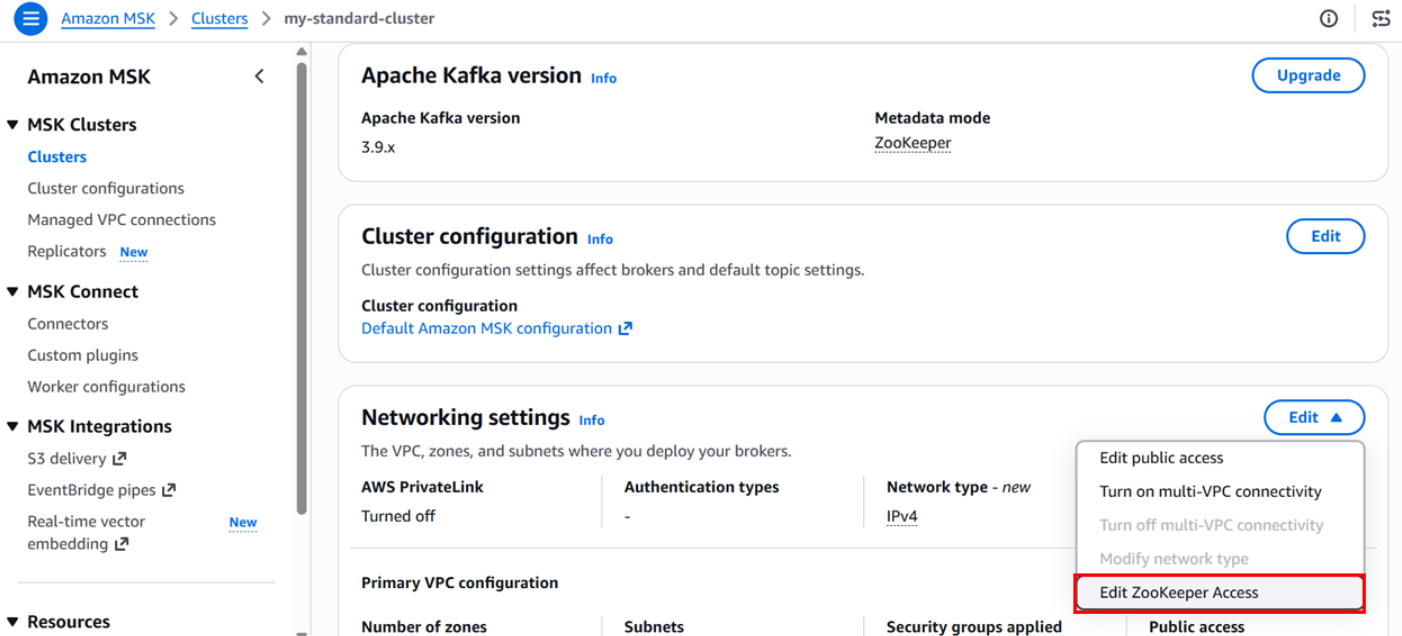
Navigate to your cluster’s Properties tab, choose Network settings, and then choose Edit ZooKeeper access.
Figure 1: Editing ZooKeeper access from the cluster network settings
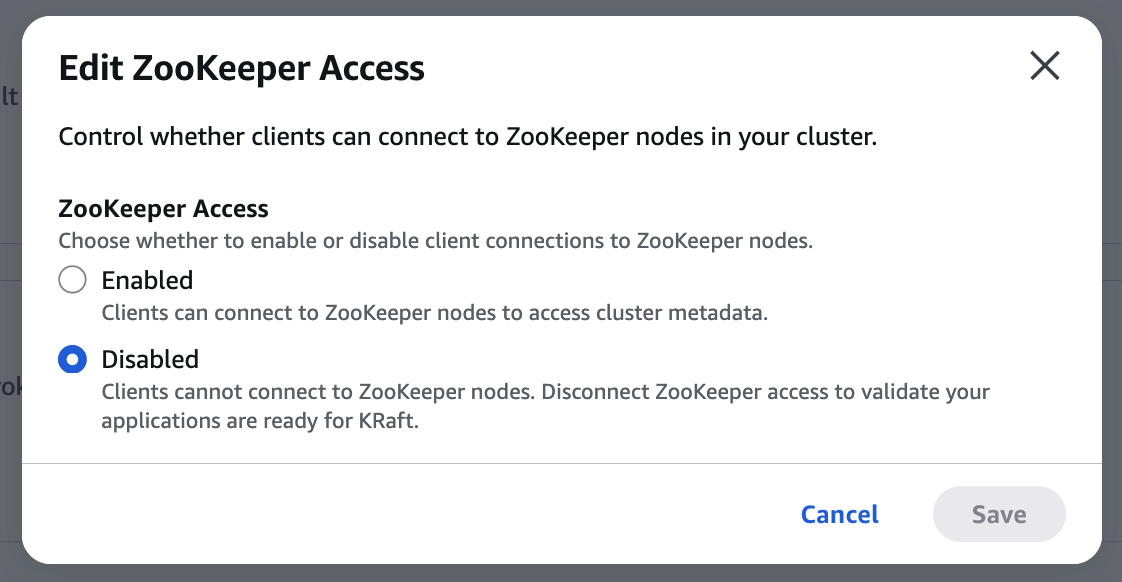
In the pop-up window, verify that ZooKeeper access is set to Disabled, and then choose Save.
Figure 2: Confirming ZooKeeper access is disabled
Confirm that producers, consumers, and admin tooling continue operating normally without ZooKeeper connectivity. This step is fully reversible. Re-enable ZooKeeper access immediately if anything breaks.
Figure 3: Verifying client traffic continues without ZooKeeper access
Step 2: Initiate the version upgrade
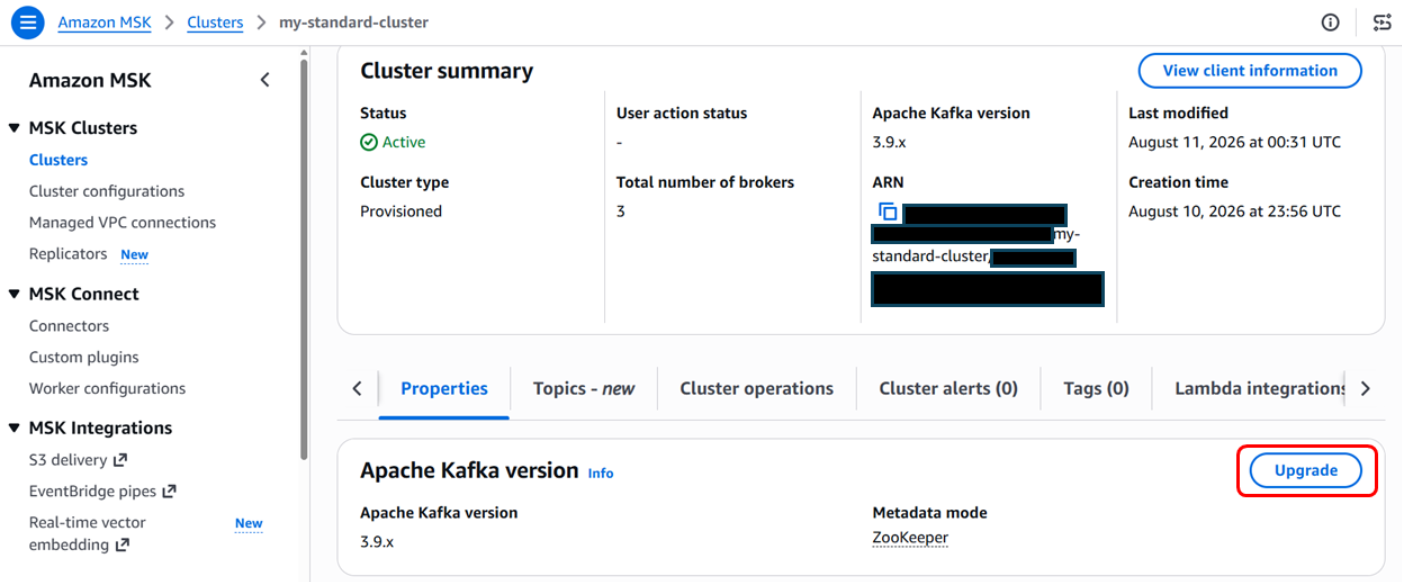
In the Amazon MSK console, under Properties, choose Upgrade in the Apache Kafka version section.
Figure 4: Starting a version upgrade from the Apache Kafka version section
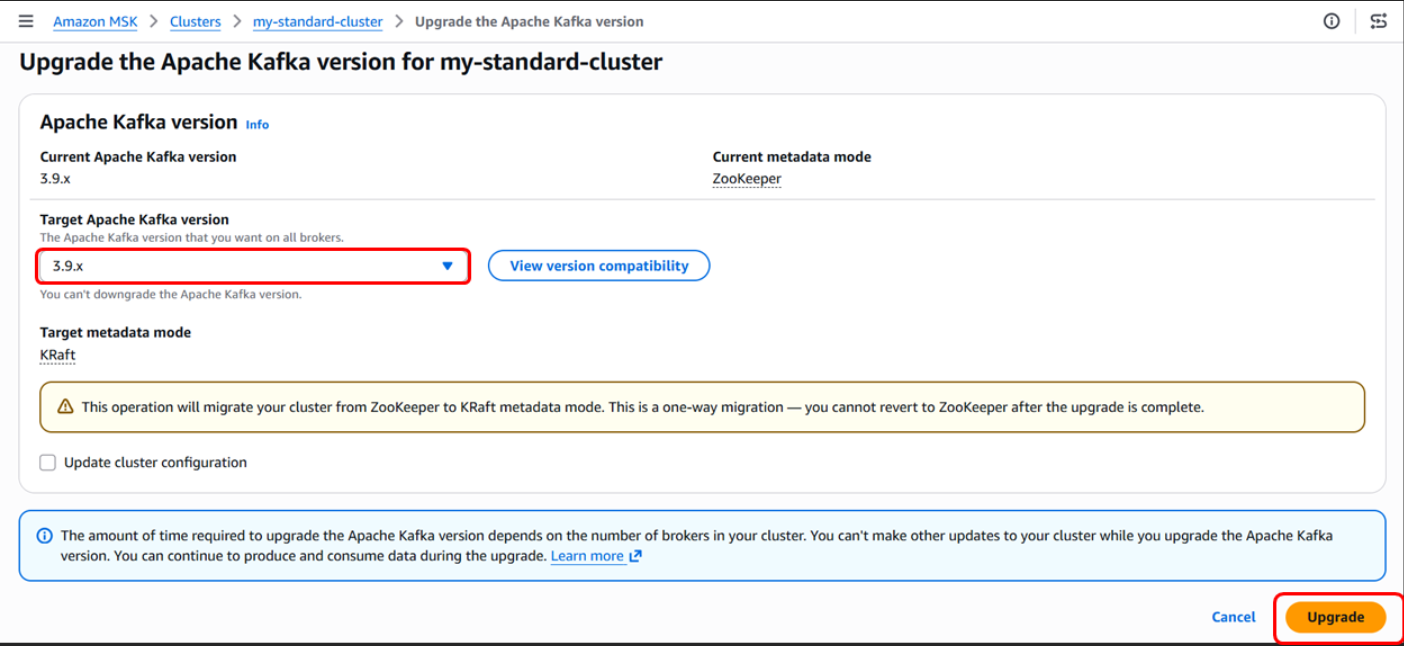
Select your cluster and start a version upgrade to 3.9.x with Target metadata mode set to KRaft. Choose Upgrade.
Figure 5: Selecting KRaft as the target metadata mode
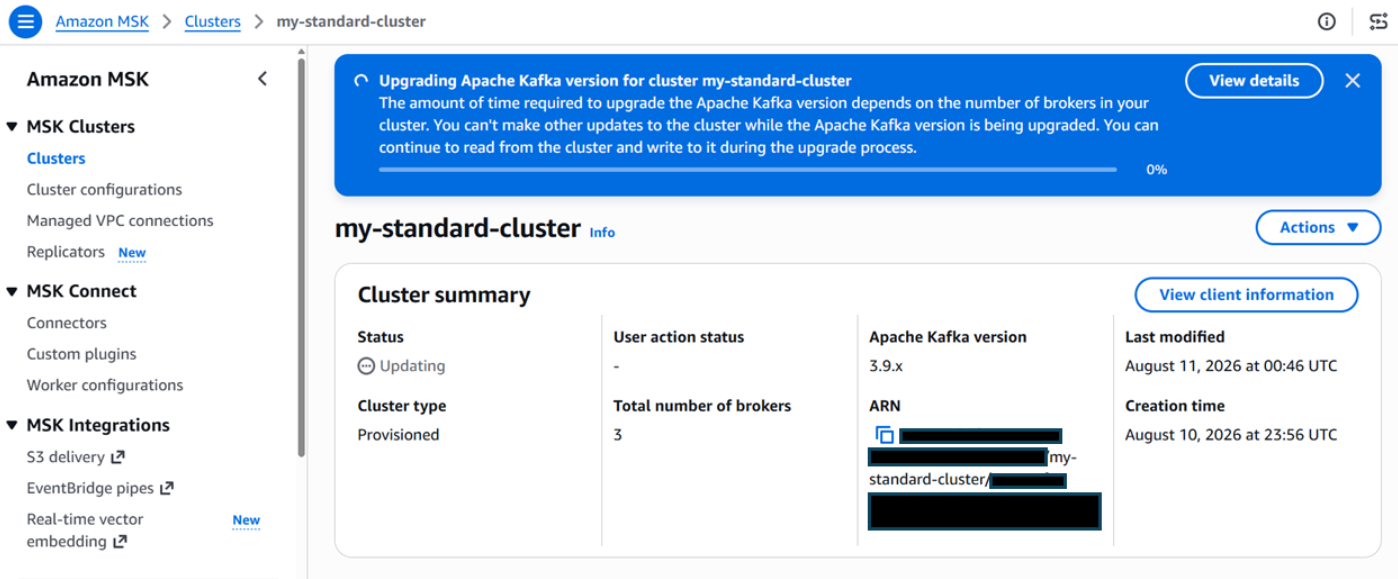
You can monitor your upgrade progress on the cluster properties page.
Figure 6: Monitoring upgrade progress on the cluster properties page
Step 3: Monitor upgrade progress
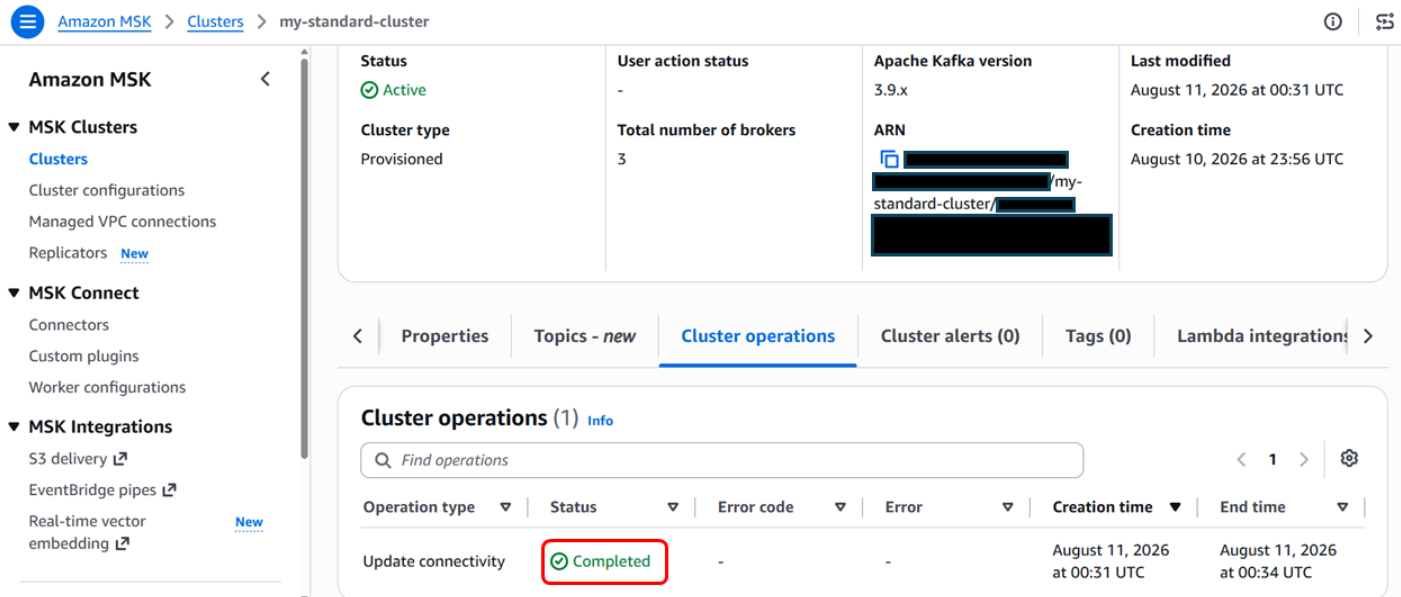
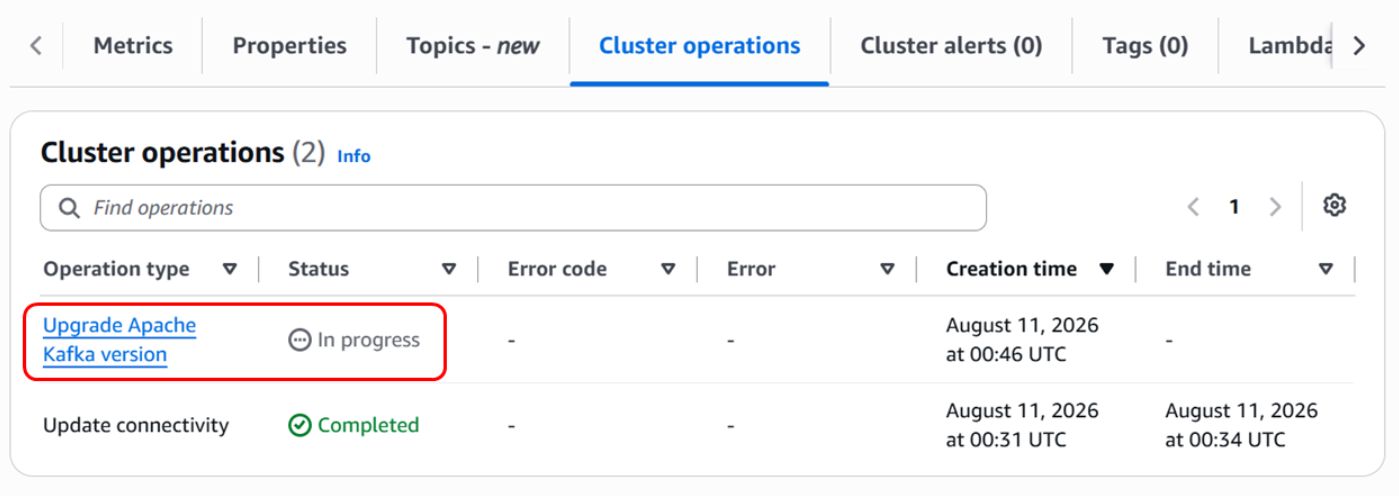
Track progress on the Cluster operations tab in the Amazon MSK console or with the describe-cluster-operation API.
Figure 7: Tracking the upgrade on the Cluster operations tab
Step 4: Validate the KRaft cluster
After the cluster returns to ACTIVE state in KRaft mode:
Verify that topics, partitions, and consumer groups are present.
Confirm producer and consumer throughput aligns with pre-migration baselines.
Update or disable any ZooKeeper-specific monitoring alerts.
Update operational documentation and runbooks to reflect KRaft mode.
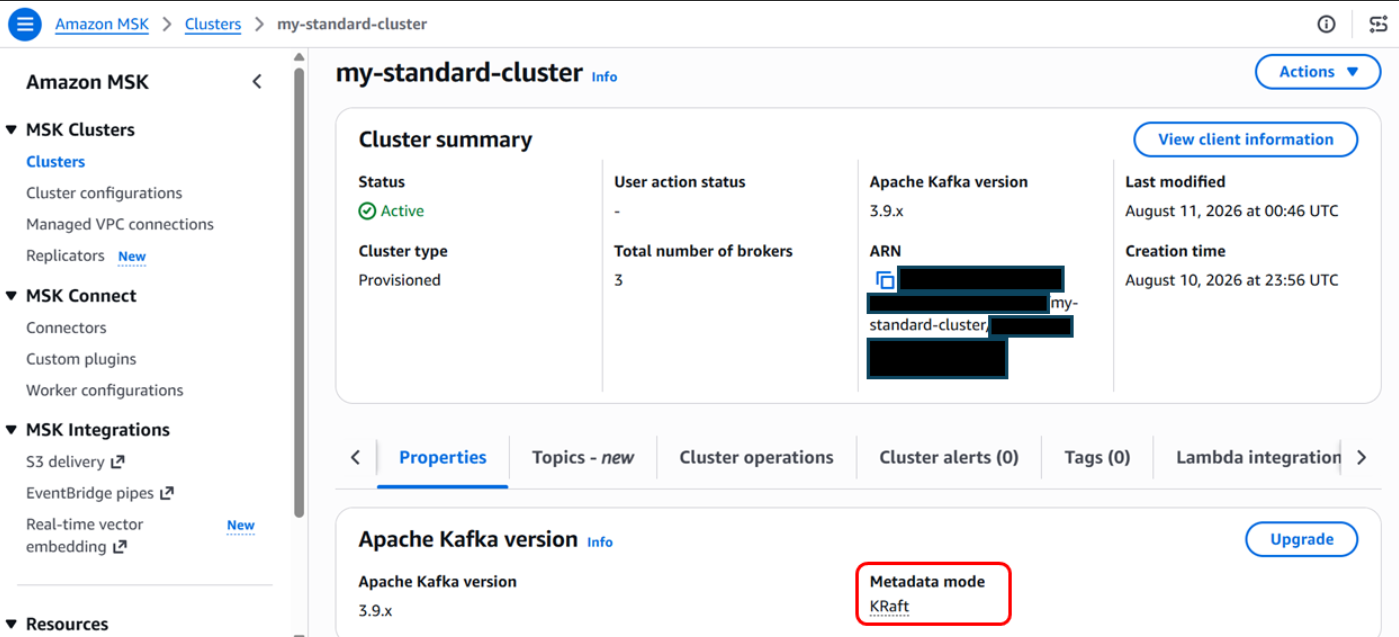
Figure 8: Cluster running in KRaft mode after the upgrade
After the upgrade completes, your cluster appears in an Active state with KRaft enabled as the metadata mode.
Get ready for the next generation of Kafka on Amazon MSK
The in-place ZooKeeper-to-KRaft mode upgrade makes it straightforward to prepare existing Amazon MSK clusters for the future of Apache Kafka. Beyond removing external metadata dependencies, KRaft delivers faster failover times and higher partition limits per cluster. Amazon MSK handles the entire metadata transition, rolling broker updates, validation, and recovery workflow for you. With the new in-place experience, you have a clear, streamlined path to upgrade on your schedule and unlock enhanced scalability and resilience.
Customers new to Amazon Managed Streaming for Apache Kafka (Amazon MSK) often ask how many partitions their topics need. Choosing the right partition count is one of the most impactful architectural decisions you make, because it directly affects throughput, scalability, and operational complexity.
In Apache Kafka, a topic is the fundamental unit for categorizing data streams, but to achieve high scalability and performance, Kafka divides topics into smaller, independent units called partitions.
In this post, we provide practical guidance for determining the ideal partition count for your use case.
Understanding Kafka partitions
In Apache Kafka, a partition is the unit of storage and parallelism. Each partition is an ordered, immutable log that can store records as they are produced to a topic. When you create a topic, Kafka distributes its partitions across the brokers in the cluster. Partitions allow Kafka to scale in three key ways:
Parallelism – Within a consumer group, each partition can be read by only one consumer at a time. Each partition maps to a dedicated log file in storage on the broker, and Kafka manages these logs through separate processing threads. This architecture allows more partitions to support more consumers processing data in parallel, with each partition’s log being independently managed for read and write operations.
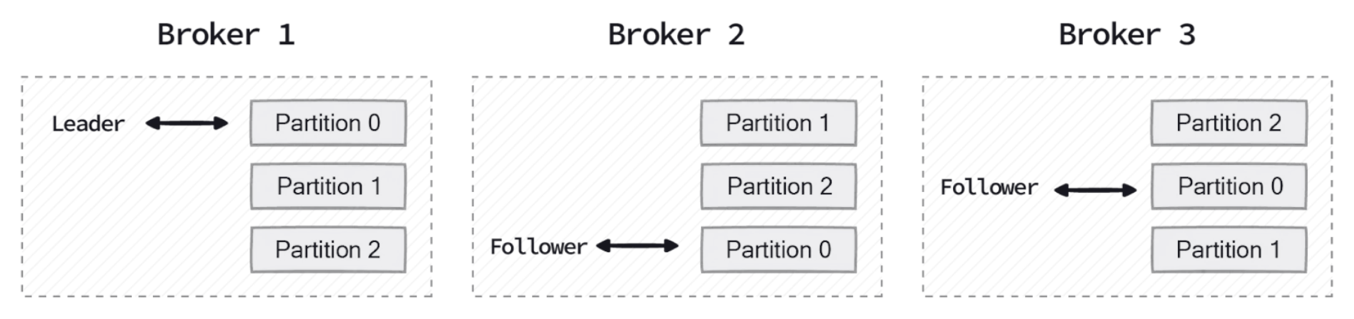
The following diagram shows how Kafka distributes partition replicas across a three-broker cluster, with each broker serving as a leader for some partitions and a follower for others.
Figure 1: Partition replicas distributed across a three-broker cluster
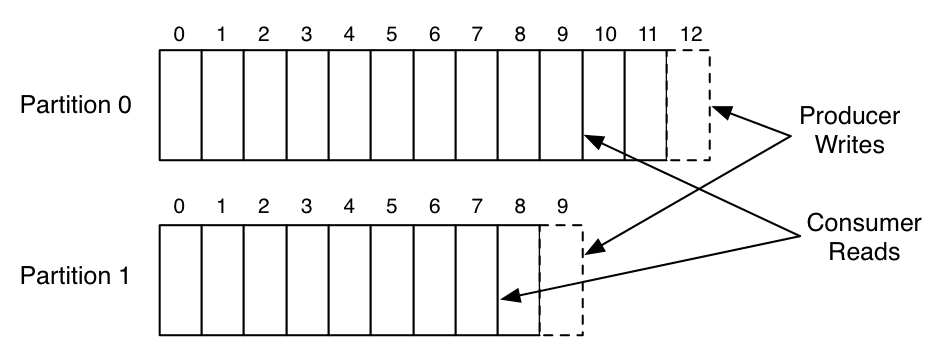
The following diagram illustrates how producers append new records to the end of a partition log, while consumers read sequentially from their current offset position.
Figure 2: Producer writes and consumer offset positions in two partition logs
Throughput – Producers and consumers can read and write data in parallel across partitions, increasing overall throughput.
Scalability – Partitions allow Kafka to spread data and load across multiple brokers instead of concentrating it on a single node.
However, increasing partitions comes with trade-offs. Each partition adds metadata overhead, consumes memory, and requires file handles on the broker. While more partitions improve throughput and parallelism, they also increase the operational burden on the cluster. Too many partitions can lead to longer leader election times during broker failures, increased end-to-end latency, and higher memory consumption for both producers and consumers managing connections to multiple partitions.
Trade-offs when choosing partition count
Choosing a partition count is a balancing act between parallelism and resource utilization.
Benefits of more partitions
Using more partitions can significantly improve throughput by allowing Kafka to distribute read and write traffic across more brokers. This is particularly useful for high-volume ingestion pipelines and real-time analytics workloads. More partitions also allow consumer groups to scale horizontally, because the maximum number of active consumers in a group is limited by the number of partitions. In addition, choosing a partition count that is evenly divisible by the number of brokers helps provide balanced leadership and replica distribution, reducing the risk of uneven load.
Operational costs of more partitions
However, higher partition counts also come with costs. When a broker fails or undergoes maintenance, Kafka must perform recovery operations for each affected partition. During recovery, Kafka elects new leaders for partitions that were hosted on the unavailable broker and replicates data from the remaining in-sync replicas to newly assigned brokers. This process involves copying partition data across the network to restore the replication factor, which can be resource intensive. As the number of partitions increases, these recovery operations take longer because each partition requires its own leader election and data replication cycle.
You might encounter clusters with very high partition counts that experience extended recovery times during rolling upgrades, even when overall traffic volumes are modest. Amazon MSK Express brokers address this challenge by recovering 90x faster and providing 180x faster elasticity when scaling out clusters. This significantly reduces the operational impact of high partition counts during maintenance windows and failure scenarios.
Infrastructure cost implications
Beyond operational complexity, more partitions can directly increase infrastructure costs. Amazon MSK publishes partition-per-broker limits that vary by instance type. When the total partition count (including replicas) exceeds what the current broker fleet can support, you must add brokers to stay within recommended limits, even if throughput alone does not warrant the additional capacity.
Amazon MSK partition-per-broker guidelines
Amazon MSK publishes recommended partition-per-broker guidelines to help you operate clusters reliably. These values are strict limits. Exceeding them can lead to operational challenges, particularly during broker replacement or rolling upgrades, and can block cluster operations such as configuration updates or scaling down.
Express brokers support up to 5x more partitions per broker compared to Standard brokers. For example, the largest Standard broker (kafka.m7g.16xlarge) supports a recommended maximum of 4,000 partitions per broker. The equivalent Express broker (express.m7g.16xlarge) supports up to 20,000 recommended partitions per broker. This higher partition density means partition-bound workloads can be hosted on fewer brokers, improving price-performance by up to 50% for such workloads.
There is no single formula that works for every Kafka workload. In practice, you typically combine several considerations when sizing partitions.
Start with throughput requirements – The first step is to determine your per-partition throughput capacity, which then informs how many partitions you need.
For Express brokers, use the per-broker throughput capacity as the primary means for sizing your cluster. Express brokers feature a fully managed storage layer, so you do not need to separately account for storage I/O constraints. The published per-broker limits represent the effective capacity available to your workload.
For Standard brokers, the achievable throughput depends on additional factors beyond the broker instance size. These factors include provisioned EBS storage throughput, the number of consumer groups reading from the broker, and how much data is served from memory versus disk. Storage I/O is consumed when producers write, when data replicates between brokers, and when consumers read data that is not in memory. For this reason, validate the effective per-partition throughput for Standard brokers through load testing in your environment.
Once you know your per-partition throughput, calculate the required number of partitions: Number of partitions = Peak throughput of the topic ÷ Throughput per partition
For example, if a topic must handle 40 MB/sec at peak and your testing shows each partition can sustain 5 MB/sec, you would need: 40 ÷ 5 = 8 partitions. Always validate these assumptions with load testing, as actual throughput varies based on your workload characteristics. For initial sizing estimates, refer to the Amazon MSK Sizing and Pricing worksheet and the Amazon MSK Best Practices documentation.
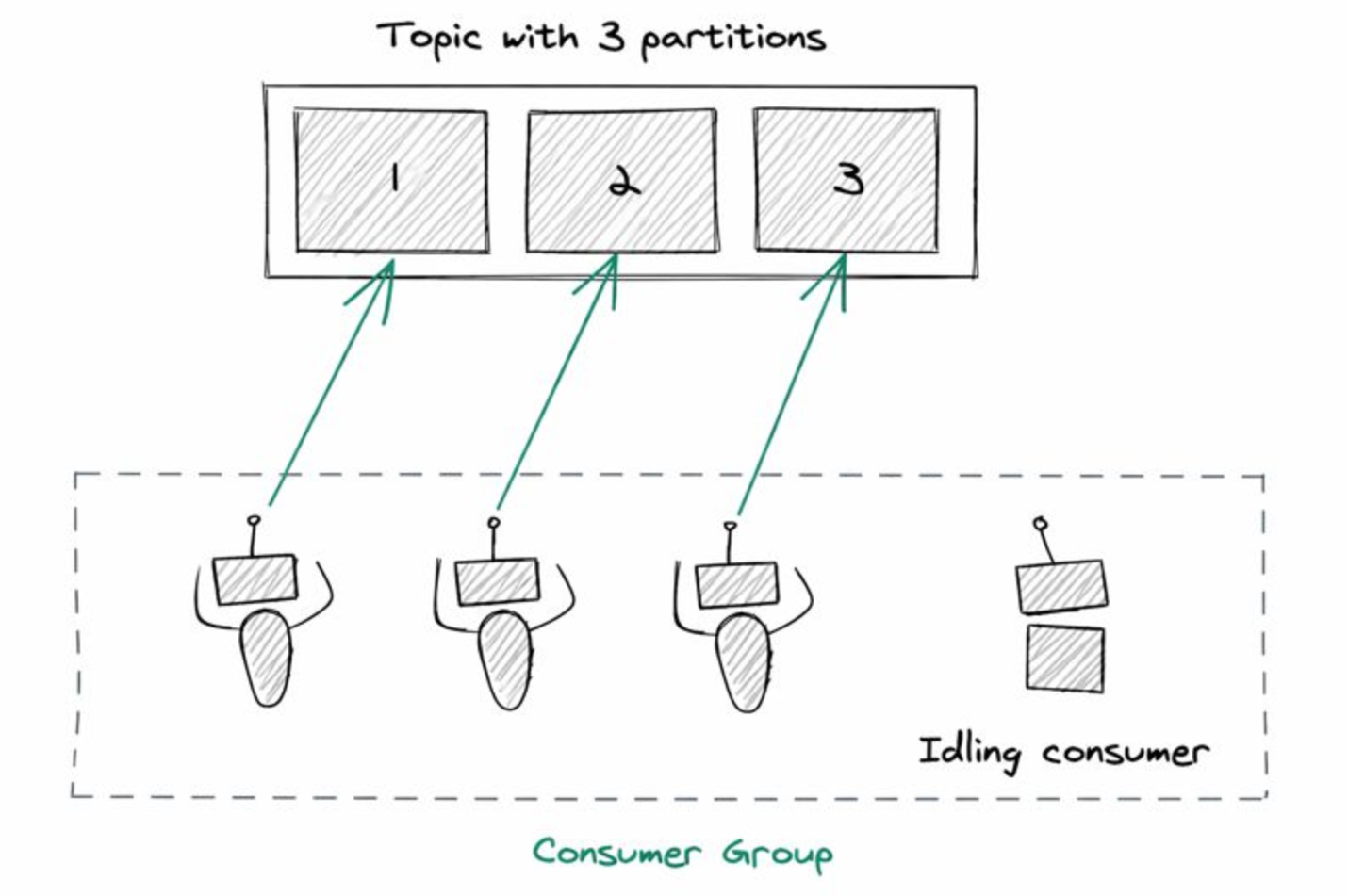
Consider your consumer parallelism needs – If you know the number of consumers required during peak processing times, use that as your partition count. We don’t recommend having more active consumers in a consumer group than partitions. For example, if you have 5 partitions, only 5 consumers can actively process data. Additional consumers remain idle. These idle consumers still maintain active TCP connections to the brokers, sending frequent heartbeats and group coordination requests. This might result in unnecessary overhead on broker resources and contribute to high CPU usage despite low egress traffic.
Figure 3: Idle consumers when a consumer group has more consumers than partitions
Producer throughput and partition keys – When sizing partitions, consider producer-side throughput in addition to consumer parallelism. If producers generate data faster than a single partition can handle, additional partitions can help distribute write traffic across brokers. Partition keys also play a critical role. Poorly distributed or low-cardinality keys can create hot partitions and limit throughput. In such cases, increasing the number of partitions alone does not improve throughput unless records are evenly distributed.
Plan for even distribution and future growth – Kafka works best when partitions can be spread evenly across brokers. Instead of focusing on specific numbers, aim for partition counts that divide reasonably well across your expected broker count. This reduces reassignment churn when brokers are added or replaced. But avoid excessive over-partitioning. It’s reasonable to leave some headroom for future growth. However, creating thousands of partitions “just in case” often causes more harm than good. Increasing partitions later is supported, but it can affect ordering guarantees and may require consumer changes. Start with a conservative number, monitor real traffic patterns, and scale gradually.
From an operational perspective, Amazon MSK provides recommended partition-per-broker guidelines based on broker instance type. Exceeding these guidelines increases operational risk and can block cluster operations such as version upgrades, scaling, or configuration changes. Large partition counts can also increase consumer group rebalance duration, temporarily pausing message processing and increasing end-to-end latency.
Keep in mind that partitioning improves scalability, but it does not address application-level bottlenecks such as slow consumers, inefficient processing logic, or downstream system constraints.
Conclusion
Determining the right number of partitions for an Amazon MSK topic is a foundational design decision. It affects throughput, scalability, failure recovery, and day-to-day operability of your Kafka cluster. Start by understanding your throughput and consumer parallelism needs, respect Amazon MSK partition-per-broker guidelines, avoid excessive over-partitioning, and validate assumptions through load testing. Most importantly, there is no universal “correct” number, only a number that fits your workload, operational goals, and cost.
This post announces the availability of a new independent assessment report available on AWS Artifact analyzing how Landing Zone Accelerator on AWS (LZA) can automatically deploy multi-account environments in Amazon Web Services (AWS) with Australian Government Information Security Manual (ISM) security controls coverage at scale. The report includes findings from an independent third-party analysis conducted by AWS Partner gwi.digital. In addition to the report, we talk about ISM compliance applicability to LZA and a new testing mechanism for measuring configuration drift, which together can provide Australian customers with a documented and validated foundation to accelerate IRAP assessment readiness.
Background
Australian organizations in public sector, defense, and critical infrastructure agencies must build cloud environments that meet (ISM requirements. The ISM defines 1,081 security control requirements across 22 guideline chapters. Demonstrating compliance is central to achieving an IRAP assessment outcome, but assessments typically require months of preparation, evidence gathering, and testing.
In October 2025, we introduced the LZA Universal Configuration and LZA Compliance Workbook. LZA provisions a multi-account security architecture that automates the deployment of nearly 200 security controls based on AWS Well-Architected pillars and AWS security best practices. The LZA Compliance Workbook, available on AWS Artifact, documents how the Universal Configuration (UC) maps to technical security requirements from 17 global compliance frameworks, with more being added. LZA is an ideal solution for customers with security and compliance obligations—both existing and anticipated—because the guardrails it deploys are applied automatically to new accounts as environments grow.
What’s in the report
To see how LZA can help customers in Australia we teamed up with AWS Partner gwi.digital to run LZA as a customer would. gwi.digital is a consultancy partner specializing in cybersecurity and governance, risk, and compliance (GRC) and has deep experience in IRAP assessments and the ISM framework. The team conducted an independent analysis and evaluation of LZA UC against 1,081 ISM controls. The assessment was conducted in a greenfield AWS environment hosted in the ap-southeast-2 (Sydney) AWS Region, positioned within Phase 2 of the ASD Cloud Security Assessment and Authorization Framework and focused on cloud consumers building on already-authorized AWS services. It builds on existing AWS IRAP foundations: Underlying AWS services were most recently independently assessed at the PROTECTED level by CyberCX last year. While this report does not constitute an official IRAP authorization, certification, or accreditation, it provides a professional evaluation of evidence based on what LZA delivers out of the box (and what it does not), so organizations can make informed decisions.
What the assessment found
Of the 1,081 ISM controls, 256 are within the addressable scope of LZA and include the technical infrastructure controls that a solution like LZA can meaningfully address. Of those 256, LZA achieves Full or Partial coverage for 234 (91%). The remaining 825 controls are outside the scope of LZA: physical security, personnel, organizational governance, and classification-level exclusions. A key contribution for the assessment was analysis of the shared responsibility model that goes beyond the traditional AWS/customer binary. It considers a three-tier view—AWS (provided), LZA (enabled), and Customer (responsibility)—and further categorizes the 825 out-of-scope controls into subcategories so customers can quickly determine which controls require their attention compared to which are already addressed at the infrastructure level. By combining automated deployment, ISM-specific compliance mappings, independent validation, and continuous evidence generation, Australian customers can reduce IRAP assessment timelines while achieving more reliable compliance outcomes.
Note: Results are based on the configuration as-provisioned based on the LZA version and during the time of this assessment. Results may vary depending on customer implementation and configuration choices.
Continuous validation with CATS
Confirming controls are implemented and operating effectively across your environment is complex and often lacks complete coverage. To simplify testing your LZA deployment, we developed the Controls Acceptance Testing Suite (CATS). CATS is an automated compliance validation engine that runs purpose-built tests against the security configuration baseline deployed by LZA UC. For the ISM assessment, CATS executed over 3,600 individual tests across six AWS accounts, evaluating account structure, identity and access, network configuration, logging, encryption, and backup. For Australian customers, CATS enables:
Automated evidence generation: Machine-readable results may replace weeks of manual evidence collection
ISM-enriched reporting: gwi-digital developed a conversion script that maps CATS output to ISM control references, enabling auditors to interpret results from an ISM perspective
Continuous drift detection: Repeatable execution identifies when configurations deviate from the validated baseline between assessment cycles
Note: CATS availability is limited and currently accessible only through AWS Professional Services as a private beta solution and may be subject to change. Availability, features, and pricing are subject to change without notice. Contact your AWS account representative or reach out to a member of the LZA team for questions about CATS, or to provide feedback on the LZA ISM report.
ISM-optimized configuration
Through the assessment, gwi-digital identified configuration adjustments that elevate specific control ratings from Partial to Full, with minimal effort; for example, increasing the default password length from 14 to 15 characters or adjusting log retention to align with Australian Federal Disposal Authority standards. These recommendations have been communicated to the LZA UC team for inclusion in a future ISM-specific guidance section in LZA GitHub documentation.
Getting started
In addition to the LZA ISM report, you can also find the LZA Compliance Workbook available on AWS Artifact. It maps related ISM requirement identifiers to security implementation statements, giving you a starting point from which you can customize and enhance your compliance documentation for your unique use cases after deploying LZA.
Use the LZA Implementation Guide to see use cases, review pre-deployment considerations and then follow deployment steps.
Set-up a security compliance chat agent. Consider creating a knowledge base with Amazon Bedrock using the LZA Compliance Workbook, LZA Implementation Guide, web crawlers to the LZA GitHub, and your custom resources to set up your own chat agent.
The combination of ISM mappings in the LZA Compliance Workbook, the gwi-digital analysis report, and CATS evidence gives Australian customers a head start on IRAP assessments.
Weeks saved on scoping: Pre-determined control applicability significantly reduces upfront scoping effort
Documentation ready: Implementation statements and control requirement alignment reduce the documentation burden
Independent assurance: A third-party report that customers and their assessors can reference directly
Continuous evidence: CATS generates repeatable security evidence between assessment cycles, replacing periodic manual audits with ongoing assurance
Acknowledgements
The Landing Zone Accelerator team would like to thank Baden Hughes, Henrik Melkonyan, Iain Lindsay-German, and Ian Roderick from gwi.digital for their professionalism and expertise in performing an incredibly thorough assessment, helping us to make LZA better for customers, and for their contributions to this blog post.
If you have feedback about this post, submit comments in the Comments section below.
Since February, we’ve grown AWS Security Hub Extended from 14 curated partners across 9 categories to 23 partners across 10. At Black Hat this month, 14 of those partners were at the Amazon Web Services (AWS) booth demoing live. Four of those partners delivered theater talks and ten were featured on SecurityLive streaming. We hosted a partner reception that brought our leadership together with partner executives to plan what comes next. These are companies investing real engineering and real go-to-market (GTM) alongside us, and increasingly with each other, because the model resonates with the customers they’re talking to every day. The most common question we heard at the booth was when Supply Chain Security was coming.
It’s here. And that’s the thing I want to spend the most time on today, because it’s the category customers keep asking us about.
Supply Chain Security: The category customers have been asking for
Software supply chain risk has moved from a security-team concern to a board-level conversation. SolarWinds showed what happens when a build system is compromised. Log4j showed what a single transitive dependency vulnerability can do at global scale. The xz utils backdoor showed the patience of a maintainer-compromise attack executed over years. Each demonstrated a different dimension of the same problem, and the pace is accelerating. Attackers know that a fast way into an enterprise is through the open source packages that enterprise unknowingly trust.
Every customer I talked to at Black Hat had this on their risk register. Most still hadn’t operationalized a solution, because doing so meant a standalone deployment, a new contract, a new console, and integration work their security team couldn’t prioritize. That’s the friction we aim to remove.
Security Hub Extended now offers Supply Chain Security with Chainguard and Socket as the curated partners. Supply Chain Security uses the same model as everything else in Extended. Every offering has pay-as-you-go pricing, one bill, no required long-term commitment. For enterprises that prefer to continue using the procurement process they always have, Security Hub Extended Private Offers are also available. These are committed term agreements with deeper discounts, the ability to aggregate spend across partners on a single AWS bill, and both monthly and annual payment options throughout the term. You pick the path that fits how you buy.
What Chainguard does
Chainguard gives you open source dependencies rebuilt from source in a hardened, verified build process, so what enters your environment is malware-resistant and provenance-backed. Their research shows that rebuilding from source would have stopped 98% of known malicious packages from ever reaching production. If you can’t verify the source, it never appears in the Chainguard repository. That’s the filter between the public registry and your developers.
What Socket does
Socket analyzes the actual behavior of open source packages to block malicious dependencies at the time of install. Not after a Common Vulnerability and Exposures (CVE) is published days or weeks later. At the moment the package tries to land in your environment, Socket flags it based on what it does, not what a database says about it. Its reachability analysis then tells you which vulnerabilities are exploitable from your code instead of drowning your team in noise. You pay for the distinct packages you check, not for how often your builds run.
Why they work together
Together, Chainguard and Socket cover the two questions that matter:
Can I trust what I’m pulling in?
Can I stop malicious components before they get built into my applications?
Chainguard helps secure the foundation your code is built on. Socket secures the packages you pull into it. Both help protect your software supply chain regardless of where you deploy—across clouds or on-premises. Activate both through Security Hub Extended and their findings flow into Security Hub in OCSF (Open Cybersecurity Schema Framework) alongside everything else, so a supply chain risk is correlated and prioritized next to your endpoint, identity, and cloud signals. From there, it routes out to the downstream tools you’ve already integrated, so it fits the pipeline your builders run today.
23 partners, 10 categories. Built on what customers asked for
Every partner in Security Hub Extended is here because customers told us they needed that capability and that specific solution was already working for them. We add categories because the threat landscape evolves, and we add partners because customers point us to who’s solving those problems well. The goal is straightforward: Simplify adopting the security solutions your peers are already succeeding with, through the AWS relationship you already have.
The full set today spans endpoint, identity, email, network, data, browser, cloud, AI, security operations, and now supply chain. The 23 curated partners are 7AI, Britive, Chainguard, CrowdStrike, Cyera, Island, LayerX, Native Security, Noma, Okta, Oligo, Opti, Palo Alto Networks, Proofpoint, SailPoint, SentinelOne, Socket, Splunk, Sublime, Upwind, Varonis, Zenity, and Zscaler.
Our focus now is deepening integrations and reducing activation friction so these solutions work together, not in isolation. That’s where the real value compounds.
What we’re building next
Everything I’ve described so far is the commercial model working: Customers buying best-of-breed security through one AWS relationship with the flexibility they expect. But the bigger vision is the integration layer that makes these tools genuinely better together, not just easier to buy together.
The integration we’re most focused on is cross-partner correlation, turning signals from an endpoint solution, an identity solution, and a cloud solution into one exposure and one attack path instead of three disconnected alerts. Right alongside that, we’re dramatically reducing the activation, deployment, and integration friction so customers go from subscribing to seeing value in hours rather than weeks. Both efforts enable the curated solutions you already trust to deliver stronger outcomes together than they do apart.
That’s the build we’re accelerating with our partners now, and you’ll hear more leading into re:Invent.
Explore what’s available
If you’re running open source in production and don’t yet have supply chain visibility, start there. Activate Chainguard and Socket through the Security Hub console today. If you’re managing multiple security vendor relationships and want to understand what consolidation looks like with Security Hub Extended, talk to your AWS account team. Pricing for every partner is published on our pricing page, no sales call required. And if you’re already using Security Hub for posture management and threat detection, the Extended plan is available in the same console you already use.
We’re just getting started.
If you have feedback about this post, submit comments in the Comments section below.
Today, AWS Lambda introduces public preview runtimes, a new way to try upcoming language versions on Lambda before their general availability (GA) release. Starting today, you can create and update Lambda functions using Node.js 26 and Python 3.15, the first runtimes available as public previews.
Previously, Lambda has always launched new runtimes as Generally Available (GA), giving you a production-ready experience from day one. But this means you couldn’t run your functions on Lambda using a pre-release language version, and we couldn’t hear your feedback while breaking changes were still possible. Public preview runtimes change that. By putting pre-GA runtimes in your hands months earlier, we can listen to your feedback and address it before GA, while we still have the opportunity to make breaking changes to improve the runtime.
Preview runtimes are available in all AWS commercial Regions, AWS GovCloud (US) Regions, and China Regions. They use the same runtime identifier as the eventual GA runtime, so your functions graduate automatically when the runtime reaches GA, with no action required.
Why public preview runtimes
When Lambda launches a new runtime as GA, that means it is ready for use in production workloads from day one. Historically, the Lambda team has validated new runtimes through internal testing and pre-release benchmarking. However, without real customer workloads running on the runtime, some issues only surface after the GA launch. And once the runtime is GA, the scope to address those issues is much reduced since we cannot risk breaking existing production workloads.
Public preview runtimes address this by opening up a pre-GA feedback window. During this period, you can deploy functions using the upcoming runtime, and the Lambda team can act on what you find, including making potentially breaking changes if necessary. In addition, because the upstream language is still in its pre-release phase, there’s also the opportunity that issues discovered during preview can be fixed in the runtime itself, not just worked around.
This benefits everyone involved. You get a runtime that’s been tested against a broader range of real workloads before it reaches GA. Third-party partners, including observability providers, infrastructure-as-code tools, and deployment frameworks, get time to validate compatibility. And upstream language communities get a signal from a major cloud platform while they can still act on it.
This is the first time we’re launching runtimes as public previews. As such, it’s an experiment. We hope to make public previews the default for all future runtime launches, depending on the success of this experiment and the feedback we receive.
What’s included in the preview runtimes
The Node.js 26 and Python 3.15 preview runtimes are built on the latest upstream pre-release of each language version. At launch, they are a straightforward version bump. There are no additional Lambda-specific enhancements beyond what the new language version itself provides. For details on what’s new in each language version, refer to the upstream release information:
Preview runtimes are available as both managed runtimes and base container images. The base images are published to the Lambda base image ECR repository with image tags starting with 3.15-preview (for Python) and 26-preview (for Node.js).
During the preview period, we may introduce additional features or enhancements to these runtimes. When we do, we’ll announce them on the same GitHub issue we use to collect your feedback:
Follow these issues to stay informed of any changes during the preview period.
What to expect during preview
Preview runtimes follow the same patching cadence as GA runtimes. When an update is released upstream, Lambda applies it to the preview runtime on the same schedule as any other supported runtime. All Lambda features supported by the current GA runtimes are available on the preview runtimes, including Lambda Managed Instances and durable functions.
The key difference is that the underlying language version has not yet reached its stable release. In addition, the Lambda team is still working on the runtimes to add features and optimize performance. This means breaking changes may occur during the preview period. A function that works today may require a fix after Lambda rolls out the next runtime update. This is by design: the preview period exists so that these issues can be found and resolved before GA, not after.
Because of this potential for breaking changes, preview runtimes are not covered by the AWS Lambda SLA or AWS technical support plans. We strongly recommend against using them for production workloads. Lambda emits a warning message to CloudWatch Logs on each cold start to make it clear when a function is running on a preview runtime:
WARNING: This is a preview runtime version and should not be used for production workloads. For further information and to provide feedback, see https://docs.aws.amazon.com/lambda/latest/dg/lambda-runtimes.html.
You may notice that, at launch, preview runtimes have slower performance than GA runtimes, in particular for cold starts. This is because of a combination of lack of optimization and less caching in internal Lambda sub-systems. We will benchmark and optimize performance during the preview period, prior to GA.
Functions that use preview runtimes are billed at standard Lambda rates. There is no additional cost or separate pricing.
Share your feedback
We want to hear from you during the preview period. We’ve created a dedicated GitHub issue for each preview runtime where you can share your experience:
Comment on these issues directly, or open a separate issue in the repository if you prefer.
We’re interested in all feedback, not just bug reports. If you see an opportunity to take advantage of a new language feature in the runtime, or a way to improve the Lambda programming model for that language, we want to hear about it. The preview period is when we can still make meaningful changes, so this is the best time to share your ideas.
Note that feedback should be scoped to the runtime itself: the execution environment, language integration, and programming model. For broader Lambda feature requests, refer to the AWS Lambda public roadmap.
Transition to GA
Both Node.js 26 and Python 3.15 are expected to reach their stable upstream releases in October 2026. Lambda GA for each runtime is targeted within two months following those releases. For the latest estimated GA dates, see Lambda documentation.
For Node.js, the GA timeline is tied to the Node.js “Active LTS” release, which is scheduled for October 2026. Only at that point is the release considered suitable for production workloads by the Node.js project, and only then is it sufficiently stable for Lambda’s automatic runtime patching in which patches are applied to your functions without action on your part. Lambda will not GA the Node.js 26 runtime until it reaches Active LTS.
When a preview runtime reaches GA, your functions graduate automatically. The runtime identifier does not change: nodejs26.x in preview is the same nodejs26.x at GA. You do not need to update your function configuration, templates, or code. The preview label is removed from the console and documentation, the runtime becomes covered by the Lambda SLA and AWS Support, and the GA performance and quality bar applies from that point forward.
If you have pinned your function to a specific runtime version using Runtime Management Controls during the preview period, it remains pinned. You can unpin at any time to move to the GA runtime. Functions pinned to a pre-GA runtime version are not covered by the Lambda SLA and AWS Support.
Getting started
You can start using the Node.js 26 and Python 3.15 preview runtimes today using the Lambda console, AWS Command Line Interface (AWS CLI), AWS CloudFormation, AWS Serverless Application Model (AWS SAM), or AWS Cloud Development Kit (AWS CDK).
Console
In the Lambda console, choose “Node.js 26 (Preview)” or “Python 3.15 (Preview)” from the runtime list when creating or updating a function.
AWS CLI
Create a function using the preview runtime with the standard runtime identifier:
When you run sam init, preview runtimes appear in the template list with a “(Preview)” label, so you can scaffold a new project directly.
AWS CDK
The AWS CDK does not yet include built-in enum members (such as Runtime.NODEJS_26_X). During the preview phase, you can use the public Runtime constructor to specify the runtime directly, for example:
import { Stack, StackProps } from "aws-cdk-lib";
import { Construct } from "constructs";
import { Function, Runtime, RuntimeFamily, Code } from "aws-cdk-lib/aws-lambda";
export class LambdaStack extends Stack {
constructor(scope: Construct, id: string, props?: StackProps) {
super(scope, id, props);
new Function(this, "MyFunction", {
runtime: new Runtime("nodejs26.x", RuntimeFamily.NODEJS),
handler: "index.handler",
code: Code.fromAsset("lambda"),
});
}
}
Or, for Python 3.15, replace new Runtime("nodejs26.x", RuntimeFamily.NODEJS) with new Runtime("python3.15", RuntimeFamily.PYTHON).
This synthesizes identical CloudFormation to what a built-in enum produces. When the runtime reaches GA, a corresponding enum member will be added. There is no functional difference in the meantime.
Conclusion
Public preview runtimes give you a seat at the table while Lambda’s next runtimes are still taking shape. Try using Node.js 26 or Python 3.15 today to deploy a function, run your test suite, and let us know what you find.
These GitHub issues are where we’ll post any enhancements or breaking changes during the preview period, so they’re worth watching even if you don’t have immediate feedback. The preview runtimes are available today in all AWS Regions, including AWS GovCloud (US), and the AWS China Regions. To learn more, see the Lambda runtimes documentation.
Today, we’re announcing that AWS Certificate Manager (ACM) will discontinue support for email-validated public certificates by September 30, 2027. If you use email validation for your ACM public certificates, you need to migrate to DNS validation before that date. This change aligns with the Certification Authority/Browser (CA/B) Forum’s industry-wide deprecation of email-based domain validation and gives you a full year to migrate ahead of the Forum’s March 2028 deadline.
In this blog post, we share the rationale for this change, the timeline, and the steps you can take to migrate your certificates to DNS validation.
Background
The CA/B Forum sets the standards that browsers and certificate authorities must follow for publicly trusted certificates. In November 2025, they voted to end support for email-based domain validation effective March 15, 2028. After that date, certificates validated through email won’t be trusted by browsers, regardless of which certificate authority issued them.
ACM will be deprecating its email validation in-line with the CA/B Forum’s requirements, by September 30, 2027. The ACM timeline gives customers one year to migrate before the CA/B Forum’s hard deadline.
Timelines for these changes
If you currently use email validation for certificates requested from ACM, there are a few important dates that you should be aware of:
January1, 2027: ACM will no longer offer email validation in new AWS Regions.
March 31, 2027: ACM will no longer offer email validation for new certificate requests in any Region.
September 30, 2027: ACM will no longer renew existing certificates that use email validation in any Region.
March 15, 2028: Per the CA/B Forum, public certificate authorities can no longer use email-based domain validation to issue or renew publicly trusted certificates. Certificates issued before this date remain valid until they expire.
Check for existing email validated certificates
If you have any ACM issued public certificates, you can check whether any of them are email validated by using the AWS Management Console for ACM or the AWS Command Line Interface (AWS CLI).
Identify email validated certificates using the ACM console
Use the following steps in the console to find email validated certificates.
Select the filters Validation method = Email and Type = Amazon Issued for a list of email validated certificates.
Any certificates listed are public email-validated certificates and should be migrated before September 30, 2027.
Figure 1: List of all public email validated certificates
Identify email-validated certificates using the AWS CLI
Use the following commands to find email validated certificates.
# Discover email validated public certificates
region="${1:-us-east-1}"
aws acm list-certificates --region "$region" \
--query "CertificateSummaryList[?Type=='AMAZON_ISSUED'].CertificateArn" --output text | tr '\t' '\n' | while read -r arn; do aws acm describe-certificate --region "$region" --certificate-arn "$arn" \
--query 'Certificate.[DomainName,Type,DomainValidationOptions[0].ValidationMethod]' \
--output text done | awk -F'\t' '$3 == "EMAIL"' | column -t
Usage:
chmod +x list-email-validated-certs.sh
./list-email-validated-certs.sh # default region, us-east-1
./list-email-validated-certs.sh us-west-2 # another region
Migrate existing email validated certificates
To assist you in this migration, ACM is updating the UpdateCertificateOptions API so you can switch a certificate’s validation method from email to DNS in place. This means the certificate Amazon Resource Name(ARN) will remain the same and no changes will be needed to your AWS resources that reference the certificate.
When you update a certificate to DNS validation, ACM provides a CNAME record to add to your DNS configuration, and you have 72 hours to add that record. During this window, the certificate continues to function normally on email validation. If the 72 hours elapse without a DNS update, the certificate stays active on email validation and you can retry when ready. After DNS validation is complete, ACM is designed to automatically renew your certificate before it expires without further manual intervention required. We recommend completing migration before September 30, 2027, so that ACM can keep your certificates up to date without interruption.
To migrate using the console
After you’ve identified a certificate that needs updating, open it and select Update validation method at the top of the page.
Figure 2: DNS Validation prompt when viewing an email validated public certificate.
After the update is triggered, you will see a View DNS records flashbar at the top of the certificate page.
Figure 3: View DNS validation records after updating validation method.
Select View DNS Records in the flashbar to open a dialog box from which you can download the CSV file for the CNAME records to export to other DNS providers.
Figure 4: Get DNS validation information from the dialog box
For Route 53 users, there is a Create records in Route 53 that makes the validation available as a one-click option.
Figure 5: Create DNS validation records into Route 53
Alternatives after email validation is no longer available
ACM supports two validation methods for new certificates going forward:
DNS validation – Add a CNAME record to your DNS configuration. ACM automatically renews DNS-validated certificates as long as the record remains in place. We recommend this method for most use cases.
HTTP validation forCloudFront – ACM provides a unique token that you host at a well-known URL path on your domain. This method is only available for certificates used with Amazon CloudFront.
Both methods remove the manual approval step required by email validation and let ACM renew your certificates automatically.
Conclusion
The deprecation of email validation and use of the new UpdateCertificateOptions API helps keep your certificates trusted and your applications running as industry standards evolve. The updated UpdateCertificateOptions API is designed to make this migration straightforward: switch your validation method in place, add the DNS record, and ACM is designed to handle renewals automatically from that point forward.
Organizations operating in Germany and across Europe increasingly need to demonstrate cloud security compliance under the Cloud Computing Compliance Criteria Catalogue (C5:2020), published by Germany’s Federal Office for Information Security (BSI). Last year, we introduced Landing Zone Accelerator on AWS support for digital sovereignty and today we’re announcing the availability of a new independent assessment report available on AWS Artifact which evaluates how the Landing Zone Accelerator (LZA) on AWS solution provides enhanced coverage for C5:2020 requirements by implementing nearly 200 native security controls. LZA is available using a standard multi-account configuration or as a container-based deployment option in the AWS European Sovereign Cloud, enabling customers with data residency requirements to use the same security configuration baseline.
How this accelerates your compliance journey
Security and compliance are a shared responsibility. LZA takes on part of this responsibility by defining a security architecture baseline and automatically provisioning your AWS environment that scales as your organization grows. Where AWS already provides C5 Type 2 attestation reports for “security of the cloud”, the LZA assessment report offers an independent opinion of how the security baseline LZA provisions aligns with C5:2020 criteria for “security in the cloud”. Instead of starting from scratch, you can deploy with LZA, evaluate the scope of coverage from the report, and use the LZA Compliance Workbook to build on and customize for your organization’s unique use case. These resources can help you reduce time in architecture design, evidence collection, and preparation for C5:2020 assessments. The free LZA Compliance Workbook available on AWS Artifact and open source Universal Configuration GitHub repository are also excellent sources to add to a knowledge base, enabling you to create a security compliance chat agent with Bedrock to assist your governance or assurance teams.
What’s in the report
AWS Partner Schellman, an independent third-party assessor, evaluated the LZA Universal Configuration architecture and security control baseline, which maps to C5:2020 controls in the LZA Compliance Workbook, to determine how the LZA infrastructure aligns to C5:2020 technical requirements. The report concluded that LZA can help implement 325 security controls in aggregate, aligning to technical requirements from eight C5:2020 control areas. It also describes the LZA architecture design, security best practices, and scoping considerations for C5:2020 assessments. This is the first installation of the independent C5 report for LZA, which will be updated in 2027 to evaluate coverage for the pending C5:2026 revision.
In addition to the LZA C5:2020 report, you can also find the LZA Compliance Workbook available on AWS Artifact. It maps C5:2020 requirement identifiers to security implementation statements, giving you a starting point from which you can customize and enhance your compliance documentation for your unique workloads or operational practices after deploying LZA.
Amazon Web Services (AWS) is pleased to announce that the Summer 2026 System and Organization Controls (SOC) 1 report is now available. The reports cover 185 services over the 12-month period from July 1, 2025–June 30, 2026, giving customers a full year of assurance. These reports demonstrate our continuous commitment to adhering to the heightened expectations of cloud service providers.
AWS strives to continuously bring services into the scope of its compliance programs to help customers meet their architectural and regulatory needs. You can view the current list of services in scope on our Services in Scope page. As an AWS customer, you can reach out to your AWS account team if you have any questions or feedback about SOC compliance.
The NHS DSPT is an assessment that allows organizations to measure their performance against the National Data Guardian’s 10 data security standards. All organizations that access NHS patient data and systems are expected to use the toolkit to demonstrate their compliance with safe data security standards. NHS DSPT covers standards regarding Personal Confidential Data, Continuity Planning, IT Protection, and more. AWS undergoes the assessment to provide customers with assurance that we are practicing good data security.
Security and compliance is a shared responsibility between AWS and the customer. When customers move their computer systems and data to the cloud, security responsibilities are shared between the customer and the cloud service provider. For more information, see the AWS Shared Security Responsibility Model.
We’re excited to announce that our Europe (London) AWS Region has renewed its accreditation for United Kingdom (UK) Police-Assured Secure Facilities (PASF) for Official-Sensitive data. Since 2017, the Amazon Web Services (AWS) Europe (London) Region has been accredited under the PASF program. This demonstrates our continuous commitment to adhere to the heightened expectations of customers with UK law enforcement workloads. Our UK law enforcement customers who require PASF can continue to run their applications in the PASF-accredited Europe (London) Region in confidence.
The PASF is a long-established assurance process, used by UK law enforcement, as a method for assuring the security of facilities such as data centers or other locations that house critical business applications that process or hold police data. PASF consists of a control set of security requirements, an on-site inspection, and an audit interview with representatives of the facility.
The Police Digital Service (PDS) confirmed the accreditation renewal for AWS on May 28, 2026. A confirmation letter can be found on AWS Artifact. The UK police force and law enforcement organizations can also obtain confirmation of the compliance status of AWS through the Police Digital Service.
We’re excited to announce that Amazon Web Services (AWS) has completed theCyberVadis assessment of its security posture with the highest score (Mature) in all assessed areas. This demonstrates our continued commitment to meet the heightened expectations for cloud service providers. Customers can now use the 2026 AWS CyberVadis report and scorecard to reduce their supplier due-diligence burden.
With the increasing adoption of cloud products and services across multiple sectors and industries, AWS is a critical component of customers’ third-party environments. Regulated customers, such as those in the financial services sector, are held to high standards by regulators and auditors when it comes to exercising effective due diligence on third parties.
Many customers use third-party risk management services such as CyberVadis to better manage risks from their evolving third-party environments and drive operational efficiencies. In support of these efforts, AWS has completed its annual CyberVadis security posture assessment, conducted by CyberVadis security analysts.
CyberVadis is a comprehensive third-party risk assessment process that combines the speed and scalability of automation with the certainty of analyst validation. CyberVadis assessments employ a dynamic and comprehensive approach to third-party risk assessment, replacing outdated static spreadsheets and the need for annual AWS assessment access requests. This cloud-based solution provides advanced capabilities by integrating AWS responses with analytics and sophisticated risk models to deliver an in-depth view of the security posture of AWS.
CyberVadis’s risk assessment methodology evaluates 20 topics covering the entire cybersecurity life cycle across four phases: Identify, Protect, Detect, and React. These topics include Data Privacy, Access Management, and Infrastructure Security. The assessment criteria are based on international information security standards, including ISO 2700x, NIST Cybersecurity Framework, Cybersecurity for ICS, PCI DSS, NIS2 and GDPR.
Customers can use CyberVadis results to map the assessment of AWS to commonly used industry frameworks and standards to instantly gain visibility into controls coverage.
AWS customers can download the complete 2026 AWS Assessment Report directly through CyberVadis’s portal using their own account, or through AWS Artifact.
To learn more about our other compliance and security programs, see AWS Compliance Programs.
As an AWS customer, you can reach out to your AWS account team if you have any questions or feedback.
If you have feedback about this post, submit comments in the Comments section below.
In November 2024, we announced Standard and Extended Support dates for legacy Elasticsearch versions (1.5 through 7.8) and OpenSearch versions (1.0 through 1.2, and 2.3 through 2.9) running on Amazon OpenSearch Service. At that time, Extended Support for these versions was set to end on November 7, 2026 (except Elasticsearch 5.6, for which Extended Support ends on November 7, 2028), after which domains would no longer receive security fixes or operating system patches.
Since that announcement, many customers have upgraded to newer versions. However, some customers need more time to plan and complete their migrations. To provide this flexibility, we are continuing security and operating system patch coverage for these versions for an additional 12 months, through November 7, 2027, at an updated support rate.
Today, we’re announcing two updates: Extended Support extension for present versions and End of Standard Support and Extended Support for additional versions.
Extended Support extension for present versions
We are continuing security and operating system patch coverage for Elasticsearch versions 1.5 through 7.8, OpenSearch versions 1.0 through 1.2, and OpenSearch versions 2.3 through 2.9 for an additional 12 months. Coverage will now continue through November 7, 2027, giving customers additional time to plan and execute their migrations to the latest OpenSearch versions.
From November 7, 2026, the Extended Support surcharge for these versions will effectively double your instance pricing for the extension period. Storage costs are not affected. Elasticsearch 5.6, for which existing Extended Support rates end on November 7, 2028, will continue at the standard Extended Support cost of $0.0065 per Normalized Instance Hour (NIH). During this period, these versions will continue to receive critical security patches and operating system updates.
See the following table for the updated Extended Support end dates.
Software version
End of Standard Support
Original End of Extended Support date
Updated End of Extended Support date
Elasticsearch versions 1.5 and 2.3
November 7, 2025
November 7, 2026
November 7, 2027
Elasticsearch versions 5.1 to 5.5
November 7, 2025
November 7, 2026
November 7, 2027
Elasticsearch version 5.6
November 7, 2025
November 7, 2028
No change
Elasticsearch versions 6.0 to 6.7
November 7, 2025
November 7, 2026
November 7, 2027
Elasticsearch versions 7.1 to 7.8
November 7, 2025
November 7, 2026
November 7, 2027
OpenSearch versions 1.0 to 1.2
November 7, 2025
November 7, 2026
November 7, 2027
OpenSearch versions 2.3 to 2.9
November 7, 2025
November 7, 2026
November 7, 2027
We recommend that you upgrade to the latest available OpenSearch version.
End of Standard Support and Extended Support for additional versions
Today we are announcing end of Standard and Extended Support dates for Elasticsearch versions 6.8, 7.9, and 7.10, OpenSearch version 1.3, and OpenSearch versions 2.11 to 2.19. For future updates on versions in Standard Support and Extended Support, follow supported versions.
For OpenSearch versions running on Amazon OpenSearch Service, we provide at least 12 months of Standard Support after the end-of-support date for the corresponding upstream open source OpenSearch version. Alternatively, we provide 12 months of Standard Support after the release of the next minor version on Amazon OpenSearch Service, whichever is longer. This aligns with the open source OpenSearch maintenance policy.
We categorize these versions into two groups:
The last versions of each major version family (ES 6.8, ES 7.10, OS 1.3, OS 2.19) will receive 3 years of Extended Support at the standard Extended Support charge of $0.0065 per NIH.
All other minor versions with clear upgrade paths within the same major family (ES 7.9, OS 2.11, OS 2.13, OS 2.15, OS 2.17) will receive 1 year of Extended Support at the same standard rate of $0.0065 per NIH.
After Extended Support ends for a version, domains running that version will not receive bug fixes or security updates. The following table shows the end of Standard Support and Extended Support dates for Elasticsearch and OpenSearch versions.
Elasticsearch versions
Software version
End of Standard Support
End of Extended Support
Elasticsearch version 6.8
November 7, 2027
November 7, 2030
Elasticsearch version 7.9
November 7, 2027
November 7, 2028
Elasticsearch version 7.10
November 7, 2027
November 7, 2030
OpenSearch versions
Software version
End of Standard Support
End of Extended Support
OpenSearch version 1.3
November 7, 2027
November 7, 2030
OpenSearch version 2.11
November 7, 2027
November 7, 2028
OpenSearch version 2.13
November 7, 2027
November 7, 2028
OpenSearch version 2.15
November 7, 2027
November 7, 2028
OpenSearch version 2.17
November 7, 2027
November 7, 2028
OpenSearch version 2.19
November 7, 2027
November 7, 2030
OpenSearch version 3.1 and above
Not announced
Not announced
Upgrading OpenSearch Service domains: We recommend that you upgrade your domains to the latest available OpenSearch version to derive maximum value out of Amazon OpenSearch Service. Minor version upgrades on OpenSearch don’t contain breaking changes. These version upgrades are typically non-disruptive. We recommend moving to the latest minor version. See Upgrading OpenSearch Service domains for detailed instructions. You can also use the Migration Assistant for Amazon OpenSearch Service for upgrading to newer versions.
New domain creation: New domain creation will be blocked after Extended Support ends for each version.
Calculating Extended Support charges
Amazon OpenSearch Service domains running versions under Extended Support will be charged a flat additional fee per NIH. NIH is computed as a factor of the instance size (for example, medium or large), and the number of instance hours.
Depending on which version you are on, the Extended Support charges are as follows:
Versions that have been on Extended Support (ES 1.5–7.8 (other than ES 5.6), OS 1.0–1.2, OS 2.3–2.9) from November 7, 2026: Extended Support cost will be equal to your instance price. This will be in addition to the standard instance pricing, effectively doubling the instance cost. Storage costs are not affected. Example (for versions that have been on Extended Support from November 7, 2026): If you are running an m7g.medium.search instance priced at $0.068/hr (on-demand) in US East (N. Virginia) for 24 hours, your standard instance cost is $1.632/day ($0.068×24). The Extended Support surcharge for the extension period will be equal to your instance cost ($1.632/day), doubling your instance pricing to ~$3.264/day. Storage costs remain unchanged.
New versions coming under Extended Support (ES 6.8, 7.9, 7.10, OS 1.3, OS 2.11–2.19): $0.0065 per NIH (standard Extended Support rate). See the pricing page for exact pricing by Region. Example (new versions — standard rate): If you are running an m7g.medium.search instance for 24 hours in the US East (N. Virginia) Region, priced at $0.068 per instance hour (on-demand), you will typically pay $1.632 ($0.068×24). If you are running a version that is in Extended Support, you will pay an additional $0.0065 per NIH. This is computed as $0.0065 × 24 (instance hours) × 2 (normalization factor for medium) = $0.312 for Extended Support for 24 hours. The total amount you will pay for 24 hours is $1.944 ($1.632 + $0.312, excluding storage cost).
The following table shows the normalization factor for various instance sizes in OpenSearch Service.
Instance size
Normalization Factor
nano
0.25
micro
0.5
small
1
medium
2
large
4
xlarge
8
2xlarge
16
4xlarge
32
8xlarge
64
9xlarge
72
10xlarge
80
12xlarge
96
16xlarge
128
18xlarge
144
24xlarge
192
32xlarge
256
Summary
The latest OpenSearch versions include new features, performance and resiliency improvements, and security enhancements. With today’s announcement, we are:
Continuing security and operating system patch coverage for present versions through November 7, 2027, giving customers additional time to complete their upgrades at a new Extended Support rate.
Announcing Standard and Extended Support timelines for the next set of versions (ES 6.8, 7.9, 7.10, OS 1.3, 2.11–2.19) with predictable cost visibility.
We recommend that you upgrade to the latest OpenSearch versions to get the most benefit out of OpenSearch Service. For any questions on Standard and Extended Support options, see the FAQs. For further questions, contact AWS Support.
Customers have access to models that are continuously getting better with each new generation bringing larger context windows, stronger reasoning, and lower token costs. Getting the strongest AI-powered security will come from tools that combine the most relevant models with deep knowledge of a customer’s specific environment.
AWS Continuum for code vulnerabilities (Preview) is built to be that tool to help secure your code at machine speed. Today, we’re announcing a partnership with Anthropic and OpenAI that extends AWS Continuum directly into the developer workflows where code is being written: Anthropic Claude Code, OpenAI Codex, and Kiro. Developers can use these integrations to discover vulnerabilities, contextually prioritize, validate, and remediate, within their existing workflows.
Models are getting smarter
AI models are advancing rapidly. Each generation brings new capabilities, and different models excel at different tasks. The latest frontier models can now identify vulnerabilities and reason through multi-step attack paths that would take a human security team weeks to trace manually.
This is a genuine breakthrough in detection, but it creates a new challenge for your security teams: more findings, more complexity, and the need to determine which ones matter most in your environment and how to address them. The next challenge customers face is building the correct harness and orchestration to turn these models into a single interface that goes from detection through remediation. This is what we set out to do when creating Continuum, which brings together many different models and uses the model that’s most effective for each part of the process.
We also partner with the Frontier Model Forum, an industry consortium developing shared safety standards, evaluation methods, and benchmarking to ensure we can evaluate these models effectively together. We’re also working with model providers on shared security performance benchmarking to make sure we’re using the best model for each task within Continuum and our other AWS security products.
The harness
An AI harness is the orchestration layer that wraps around a model to connect it to tools, guardrails, memory, and workflows, so it delivers outcomes. Think of the model as the engine and the harness as everything around it. You need both to have a high-performance car.
Harnesses are becoming increasingly complex. Teams are stitching together multiple models, agents that call agents, and dynamic workflows, and are dealing with constant change driven by innovations in models, agent frameworks, and tool integrations.
As a result of that complexity, customers are implementing shadow infrastructure to manage integration layers across models and tools. Every time the landscape shifts, security and governance controls potentially break, forcing teams to go back to revisit them and make updates.
These challenges extend beyond the model. They arise in the orchestration required to connect different models and developer environments with tools, context, controls, and workflows across a customer’s environment. At AWS, we see managing that complexity as heavy lifting that AWS should solve. We treat the harness as infrastructure and with the same rigor we apply to identity, discovery, policy enforcement, observability, and compliance of the core infrastructure at AWS.
Enter Continuum
AWS Continuum for code vulnerabilities discovers vulnerabilities, prioritizes them within the context of a customer’s business, validates them in a sandbox, and provides remediation at machine speed. Under the hood, Continuum is an agent-team loop architecture. A sophisticated harness that orchestrates all of it: selecting the right model, connecting to a customer environment, and delivering secure code that’s been validated in context. You never need to think about how the orchestration works, or what changed in the latest release.
Anthropic and OpenAI partnerships
Today we’re announcing partnerships with Anthropic and OpenAI to bring Continuum into the developer workflows where code is being written.
How it works:
Within Claude Code, Codex, and Kiro coding environments, on-demand vulnerability scans identify potential issues and send findings to Continuum. Continuum prioritizes them within the context of the customer’s AWS environment (configurations, AWS Identity and Access Management (IAM) policies, network topology, and exposure surfaces) and validates them in a sandbox. It then returns prioritized, contextual intelligence back to the coding assistant, which adjusts its recommendations accordingly.
This collapses what was traditionally a multi-step, multi-team process (write, scan, triage, prioritize, fix, rescan) into a single outcome: the code suggestion itself. Two modes, one outcome:
For existing code: Use Continuum for code vulnerabilities from AWS to discover, prioritize, validate, and remediate across your environment.
For greenfield code: Use the Continuum plugin within Codex, Claude Code, or Kiro to get security-validated suggestions in your development environment.
Early design partners are already seeing results.
“AWS Continuum connects source code with enterprise knowledge, allowing teams to accurately pinpoint security vulnerabilities and verify that flagged issues are truly meaningful. This shortens what really matters: timeline to fix serious vulnerabilities.” – Mike Johnson, CISO, Rivian
Next
AWS Continuum for code vulnerabilities is available in preview through AWS. Sign up to request access at AWS Continuum.
Continuum integrated into Claude Code, Codex, and Kiro workflows are coming soon.
If you have feedback about this post, submit comments in the Comments section below.
The collective thoughts of the interwebz
Manage Consent
To provide the best experiences, we use technologies like cookies to store and/or access device information. Consenting to these technologies will allow us to process data such as browsing behavior or unique IDs on this site. Not consenting or withdrawing consent, may adversely affect certain features and functions.
Functional
Always active
The technical storage or access is strictly necessary for the legitimate purpose of enabling the use of a specific service explicitly requested by the subscriber or user, or for the sole purpose of carrying out the transmission of a communication over an electronic communications network.
Preferences
The technical storage or access is necessary for the legitimate purpose of storing preferences that are not requested by the subscriber or user.
Statistics
The technical storage or access that is used exclusively for statistical purposes.The technical storage or access that is used exclusively for anonymous statistical purposes. Without a subpoena, voluntary compliance on the part of your Internet Service Provider, or additional records from a third party, information stored or retrieved for this purpose alone cannot usually be used to identify you.
Marketing
The technical storage or access is required to create user profiles to send advertising, or to track the user on a website or across several websites for similar marketing purposes.