Post Syndicated from Arik Yakir original https://aws.amazon.com/blogs/devops/enforcing-zero-trust-dependency-policies-in-aws-codebuild-with-jfrog-curation/
Software supply chain attacks are rising sharply. JFrog’s 2026 research recorded a 451% year-over-year increase in malicious npm packages, yet every application that pulls open source packages during a build is still taking the same fundamental risk. When a developer runs pip install or npm install, the build environment downloads dependencies directly from public registries with no verification that those packages are safe. A vulnerable or malicious package can slip into your container image, get pushed to a registry, and reach production before anyone notices. By the time a scanner flags a critical CVE, the damage is already done.
This is a familiar situation for teams building on any continuous integration and continuous delivery (CI/CD) platform, including AWS CodeBuild. A build completes successfully, tests pass, and the artifact ships. Days or weeks later, a security review reveals that one of dozens of transitive dependencies carried a known vulnerability, or worse, was a malicious package designed to exfiltrate secrets. The fix isn’t only patching. It’s rebuilding, re-testing, and redeploying, all while assessing the scope. What teams need is a way to enforce a zero-trust dependency policy: a gate that blocks risky packages at download time, before they ever enter the build. That is exactly what JFrog Curation provides. It evaluates every package at the moment it is downloaded. When a package violates policy, it returns an HTTP 403 (Access Denied) error, failing the build before a risky dependency enters your environment.
In this post, you’ll learn how to use JFrog Curation as a policy gate inside AWS CodeBuild to block vulnerable and malicious dependencies at download time, before they ever become an artifact.
The customer problem
Your team ships a container built from open source dependencies. Weeks later, a security scan surfaces a critical vulnerability in a transitive package you didn’t even choose. Now you’re scrambling to identify which images are affected, rebuild, re-test, and redeploy, all under time pressure and with no guarantee you’ve caught everything.
The root cause is that nothing enforces policy at the moment dependencies are downloaded. When a build runs pip, npm, or Maven, it pulls whatever the manifest declares directly from a public registry. Scanning catches problems after the artifact exists, but by then the vulnerable package is already in your image and potentially in production.
Solution overview
The pipeline is an ordinary container build with one decisive change: The only route to public package registries runs through JFrog Artifactory, and Curation sits on that route. A developer commit triggers CodeBuild, which runs a Docker build. Inside that build, pip install resolves through the Artifactory virtual repository. Approved packages flow through and the image is pushed to Amazon Elastic Container Registry (Amazon ECR). A blocked package fails the build before any image exists.
For this walkthrough, the policy is “Block Critical CVEs”, which rejects any package version with a Common Vulnerability Scoring System (CVSS) score of 9.0 or above. AWS CodeBuild is the orchestration layer that resolves dependencies, and JFrog Curation is the management layer that decides, package by package and in real time, what CodeBuild is allowed to pull. The result is an Amazon ECR repository that receives only images built from policy-compliant dependencies.
On failure, a small amount of post-build scripting (shown in detail in the post-build section) queries the Curation audit API (JFrog Curated Packages Audit Events service) and reports the blocked package, its CVE identifiers and CVSS scores, and any recommended fix versions.
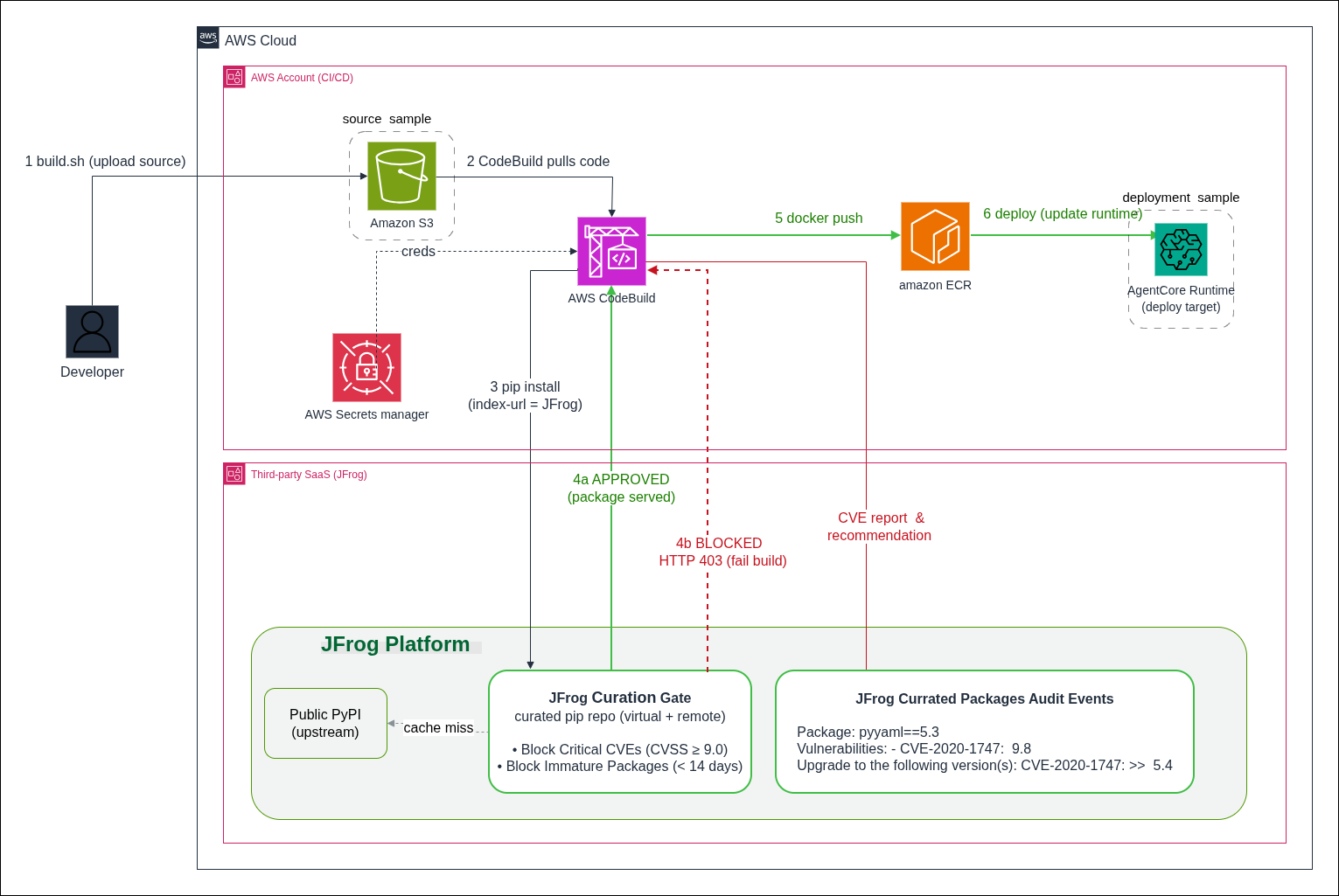
Figure 1: Deployment architecture for the AWS CodeBuild pipeline with JFrog Curation security gate
Prerequisites
Before starting the walkthrough, make sure you have the following accounts, tools, and permissions in place.
- An AWS account with permission to create CodeBuild projects, ECR repositories, and AWS Secrets Manager secrets.
- A JFrog Platform instance (SaaS or self-hosted) on a tier that includes JFrog Curation (Enterprise X or Enterprise+ with the Curation add-on).
- An Artifactory user or access token with deploy and read permissions on your virtual PyPI repository.
- Tools (installed locally or in your build environment):
- AWS Command Line Interface (AWS CLI) v2, configured with credentials for your target account.
- Docker Engine 20.10 or later.
- Git, to clone the sample repository.
- JFrog CLI (the walkthrough installs it during pre-build, but local testing requires it beforehand).
- JFrog Curation setup:
- In the JFrog Platform, create a remote PyPI repository that proxies
https://pypi.org. - Create a virtual PyPI repository that includes the remote repository you created earlier.
- Choose Curation, then Policies, and turn on a Block Critical CVEs policy scoped to the virtual repository.
- In the JFrog Platform, create a remote PyPI repository that proxies
- Clone the JFrog curation gate sample repository. All file paths referenced later are relative to the repository root.
- Accounts and subscriptions:
- An active AWS account with permissions to create AWS CodeBuild projects, Amazon ECR repositories, and AWS Secrets Manager secrets.
- A JFrog Platform subscription (SaaS or self-hosted) with access to JFrog Curation. If you need an account, JFrog offers a free trial.
Walking through the implementation
The pipeline is deliberately small. A handful of shell scripts are orchestrated by a CodeBuild buildspec.yml and a Dockerfile that does the dependency install. What makes it a security gate rather than a build is one design choice. Every pip install is forced to resolve through a curated JFrog repository instead of public PyPI and the build is only allowed to publish an image when Curation approves every package.
The following shows how the pieces fit together before we look at the code:
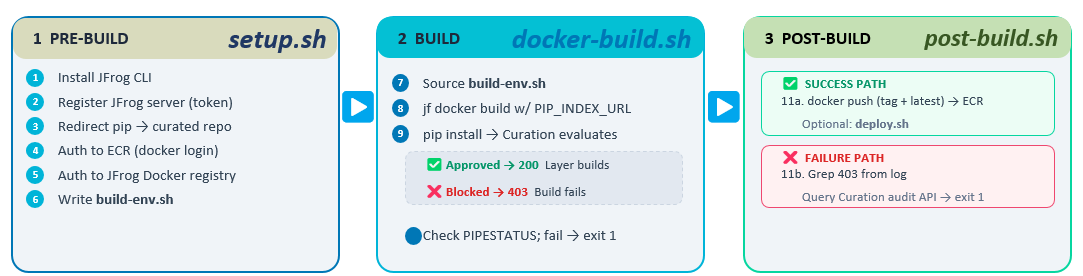
Figure 2: CodeBuild pipeline phases and script responsibilities
1. Project layout
| File | Role |
buildspec.yml |
CodeBuild entrypoint – wires the three phases together and sets shared env vars |
scripts/setup.sh |
Pre-build: installs the JFrog CLI, loads secrets, configures pip + Docker auth |
| Dockerfile | Defines the image. Its pip install is what actually gets curated |
| requirements.txt | The pinned dependency manifest that Curation evaluates, package by package |
scripts/docker-build.sh |
Runs the curated Docker build and captures the log |
scripts/post-build.sh |
The gate: conditional push to the registry, or extract-and-report the block reason |
2. buildspec.yml – the orchestrator
The buildspec keeps logic out of YAML and in versioned shell scripts to keep the pipeline testable locally and readable in review. Two details matter beyond the phase wiring:
shell: bashis set explicitly. CodeBuild defaults to sh, and the post-build gate relies on bash-only constructs like${PIPESTATUS[0]}.- Secrets come from AWS Secrets Manager, which stores the JFrog token encrypted with AWS Key Management Service (AWS KMS), controls access through IAM policies, records every retrieval in AWS CloudTrail, and supports rotation without changing the buildspec. CodeBuild injects the value at runtime and masks it in build logs.
3. Pre-build (scripts/setup.sh) – install tooling and redirect pip
This phase does three jobs: install the JFrog CLI, authenticate to both registries, and reconfigures pip so it resolves through Artifactory.
Importantly, jf pip-config writes a pip config that swaps the default index URL pypi.org for the JFrog virtual repo. From that point on, any pip install, including the ones inside the Docker build, asks Artifactory for packages. Artifactory serves approved packages from cache or fetches them from its PyPI remote, and returns an HTTP 403 (Access Denied) error for anything a Curation policy blocks. The application code never changes. The redirection is entirely in configuration.
4. The Dockerfile – where curation is actually enforced
The following is the full Dockerfile:
The gate is the pip install -r requirements.txt step and the mechanism is --index-url. During the build phase, docker-build.sh passes the curated JFrog index URL into the build as PIP_INDEX_URL. When that argument is present, pip resolves all dependencies in requirements.txt through the curated JFrog repository instead of public PyPI. JFrog evaluates each requested name==version against your Curation policies before it serves the package:
Approved packages are returned normally and the layer builds. Blocked packages get an HTTP 403 (Access Denied) error from JFrog. pip treats that as a failed download, the RUN instruction exits non-zero, and the entire docker build fails. The image is never produced, let alone pushed. The policy decision is made during the image build process at the precise moment pip resolves each dependency against the curated JFrog repository.
5. The post-build.sh – where data is collected and a fix is proposed
The post-build phase decides what happens with the build’s result. It branches on the CODEBUILD_BUILD_SUCCEEDING flag that CodeBuild sets, which is the mechanism that ties the registry push to Curation’s verdict:
Note the source /tmp/build-env.sh at the top. Each phase script runs in its own subshell, so values derived earlier (like ECR_URI) don’t survive across phases. The pre-build step writes them to a file that this script reads back in. If every dependency was approved, the script pushes the trusted image to ECR (both the build’s tag and latest) and triggers the downstream deploy stage. Configure it like so:
This is the only path that puts an image in the registry.
If curation blocked a package and pip only surfaced an HTTP 403 (Access Denied) error, the script reconstructs the reason in three steps. First, identify the package by grepping the failing 403 out of the captured build log. pip names the package in the download URL:
Second, ask the Curation audit API which policy fired for that package (the policy name, the matched condition, and the category):
Third, run jf curation-audit for a human-readable explanation and a recommended compliant version:
(That last step is also where any CVE detail comes from, but only when the remote repo has pass-through for Curation audit enabled.)
Finally, the script fails the build:
The logic is deliberate: the push is gated on the build succeeding, and the build only succeeds if Curation approved every dependency.
Seeing it in action
On the blocked path, the build declares pyyaml==5.3, which carries two CVSS 9.8 vulnerabilities. Curation returns HTTP 403 (Access Denied) and the build fails before an image is ever produced:
Nothing reached Amazon ECR. There is no vulnerable artifact to remediate, because it was never built.
Curation and scanning are complementary
JFrog Curation is the prevention layer at the gate, and JFrog Xray, a software composition analysis (SCA) tool, is the detection layer for what is already inside. Together they cover both new downloads and previously cached artifacts.
Making it your own
This pattern is workload-agnostic. The example builds a container, but the same gate applies equally to your AWS Lambda function, microservice, or front-end application that resolves dependencies during its build. Curation policy is configurable. For example, layer multiple thresholds to block at CVSS 9.0 and warn at 7.0. You can also add license-compliance and malicious-package policies. Supported package types include PyPI, npm, Maven, and Docker. The enforcement point stays constant: CodeBuild resolves through Artifactory, and Curation decides what is allowed through.
Cleaning up
To avoid ongoing charges, delete the resources you created for this walkthrough: the AWS CodeBuild project, the Amazon ECR repository and any images it holds, the AWS Secrets Manager secret storing the JFrog credentials, and any IAM roles created for the build. If you configured the repositories solely for this exercise, you can also remove the JFrog Artifactory virtual and remote repositories.
Conclusion
By moving dependency enforcement into the build itself, an image is not published to Amazon ECR unless every package it contains has passed your JFrog Curation policies. A blocked package fails the build, so no image is pushed. This walkthrough demonstrated the pattern with PyPI and pip, but as described in the previous section, you can apply the same three steps to any package ecosystem.
Without this gate, the cycle described at the start of this post repeats: a build pulls an unverified package, the image ships, and weeks later your team is rebuilding, re-testing, and redeploying under pressure. With JFrog Curation enforcing policy at the point of download, that cycle stops. Risky packages are blocked before they enter the build, so they are kept out of your registry and away from your customers. Instead of reacting to vulnerabilities after the fact, your pipeline prevents them by default.
To get started, visit the AWS CodeBuild detail page and the AWS CodeBuild documentation. You can also explore the accompanying GitHub repository for the complete source code used in this walkthrough.