All posts by Nina Chen

Production-Ready Autonomous Incident Resolution with AWS DevOps Agent (now GA) and Datadog MCP Server

Post Syndicated from Nina Chen original https://aws.amazon.com/blogs/devops/production-ready-autonomous-incident-resolution-with-aws-devops-agent-now-ga-and-datadog-mcp-server/

This post was co-written with Bharadwaj Tanikella (AI/ML Product Engineering Leader) and Mohammad Jama (Product Marketing Manager) from Datadog.

In December 2025, we showed how AWS DevOps Agent and Datadog MCP Server could work together to autonomously correlate monitoring data with the infrastructure deployed and configured on AWS to resolve incidents in minutes instead of hours. Since then, Datadog MCP Server has reached general availability as the standard way for AI agents to access Datadog’s monitoring platform. Today, AWS DevOps Agent is generally available, giving teams a production-ready path to autonomous incident resolution across AWS, multicloud and on-premises environments.

What’s New: From Preview to GA

As engineering teams adopt AI-powered tools and build services that leverage AI agents, they want to extend their AI capabilities to incorporate familiar observability data and workflows. AI agents, however, often struggle with traditional API endpoints, causing them to miss the very context they need to resolve incidents effectively. Datadog MCP Server solves this by acting as a bridge between your observability data in Datadog and any AI agent that supports the Model Context Protocol (MCP). Now generally available, the MCP Server ingests prompts from users and AI agents and maps them to the corresponding Datadog resources and data. Under the hood, it handles authentication, HTTP request routing, endpoint selection, and response formatting so that agents receive highly relevant context without the brittleness of direct API calls. It supports modular toolsets so you can connect only the capabilities you need, from core observability data (logs, metrics, traces, dashboards, monitors, incidents) to specialized domains like APM trace analysis, security scanning, database monitoring, and CI/CD pipeline visibility.

Even with reliable access to observability data, incident response remains a manual, reactive process. On-call engineers must piece together the root cause of the incident from multiple data sources, draft mitigation plans, coordinate across teams, and then repeat the cycle when similar issues recur. This reactive approach does not scale as applications grow more complex and distributed.

AWS DevOps Agent changes this by introducing autonomous, always-on incident triage and investigation to your operations. AWS DevOps Agent is your always-available operations teammate that resolves and proactively prevents incidents, optimizes application reliability and performance, and handles on-demand SRE (Site Reliability Engineer) tasks across AWS, multicloud, and on-prem environments. It learns your resources and their relationships, correlates telemetry, code, and deployment data across your environment, and drives systematic improvements that prevent future incidents. Now, this also has several new capabilities that were not available during preview. It coordinates incident response automatically through channels like Slack, PagerDuty, and ServiceNow, keeping the right people informed without manual effort. It also delivers proactive prevention recommendations that address root causes before they lead to repeat incidents. In addition, DevOps Agent now supports multicloud and on-premises environments, extending its reach beyond AWS-only workloads to meet teams wherever their infrastructure runs.

With its built-in Datadog MCP Server integration, AWS DevOps Agent can pull the right Datadog context during an investigation, such as searching error logs, analyzing span-level latency, and reviewing recent deployment events. Together, these new features give engineering teams a fully integrated, production-ready workflow for autonomous incident resolution across AWS and Datadog.

Setting Up and Using AWS DevOps Agent with Datadog

In this section, we will guide you through the steps required to enable Datadog MCP Server in your AWS DevOps Agent account and configure it for incident resolution.

Pre-requisites

For this walkthrough, you should have access to and understanding of the following:

  • An AWS account
    • Agent Space role – for basic service operations
    • Agent Space web app role – for using the Agent Space web app functionality
    • (Optional) Secondary source account roles if monitoring multiple AWS accounts. Refer to the DevOps Agent user guide for the details on setting up these roles.
  • A Datadog account
  • Access to Datadog MCP Server

Setting up Datadog in the AWS DevOps Agent Console

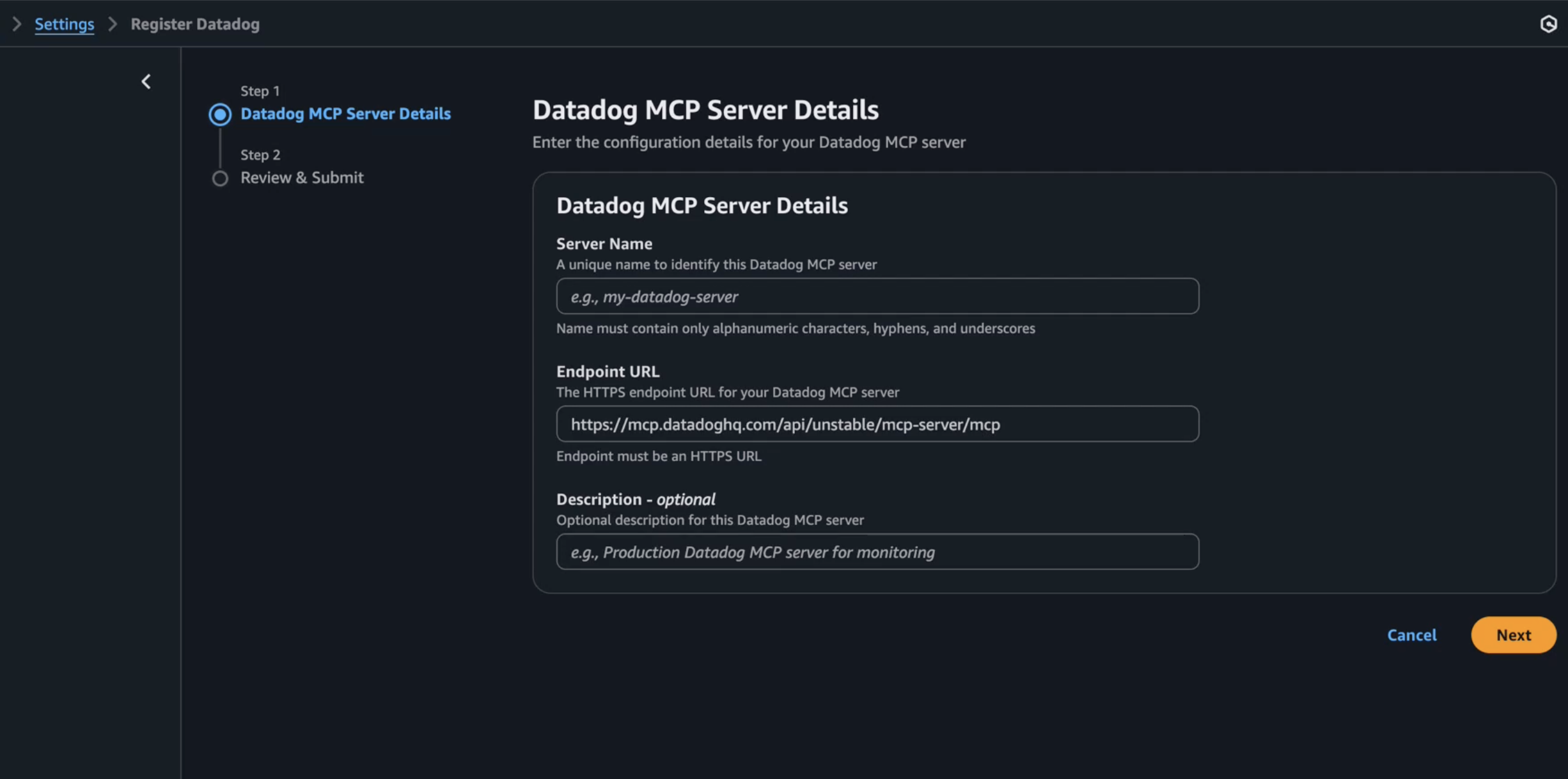
  1. Start in the AWS DevOps Agent console by connecting your Datadog account.
  2. Navigate to Capability Providers, select the Datadog integration panel and click Register button.
  3. Enter Server Name, Endpoint URL, an optional Description, and click the Next button.
  4. AWS DevOps Agent validates the connection and displays a confirmation message.
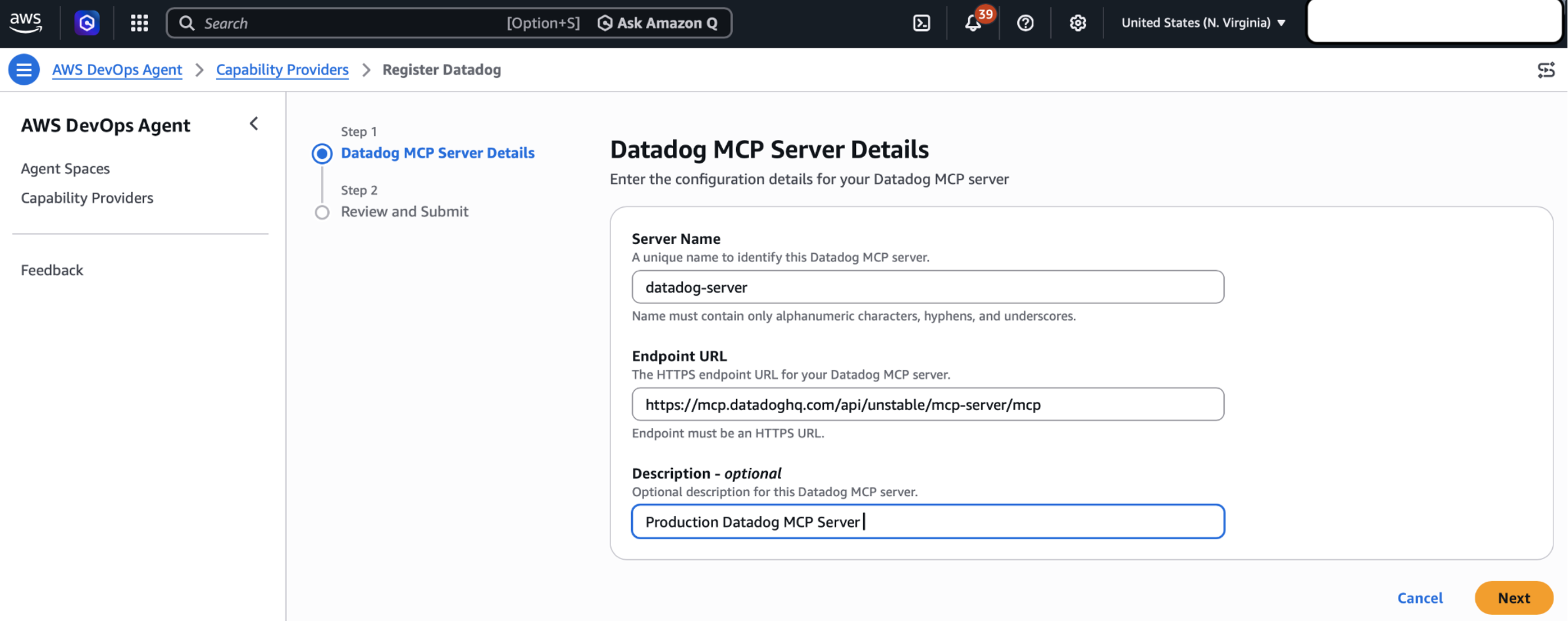
Inside the AWS DevOps Agent console showing the connection for Datadog MCP Server

Figure 1: Setting up Datadog MCP Server in AWS DevOps Agent Console

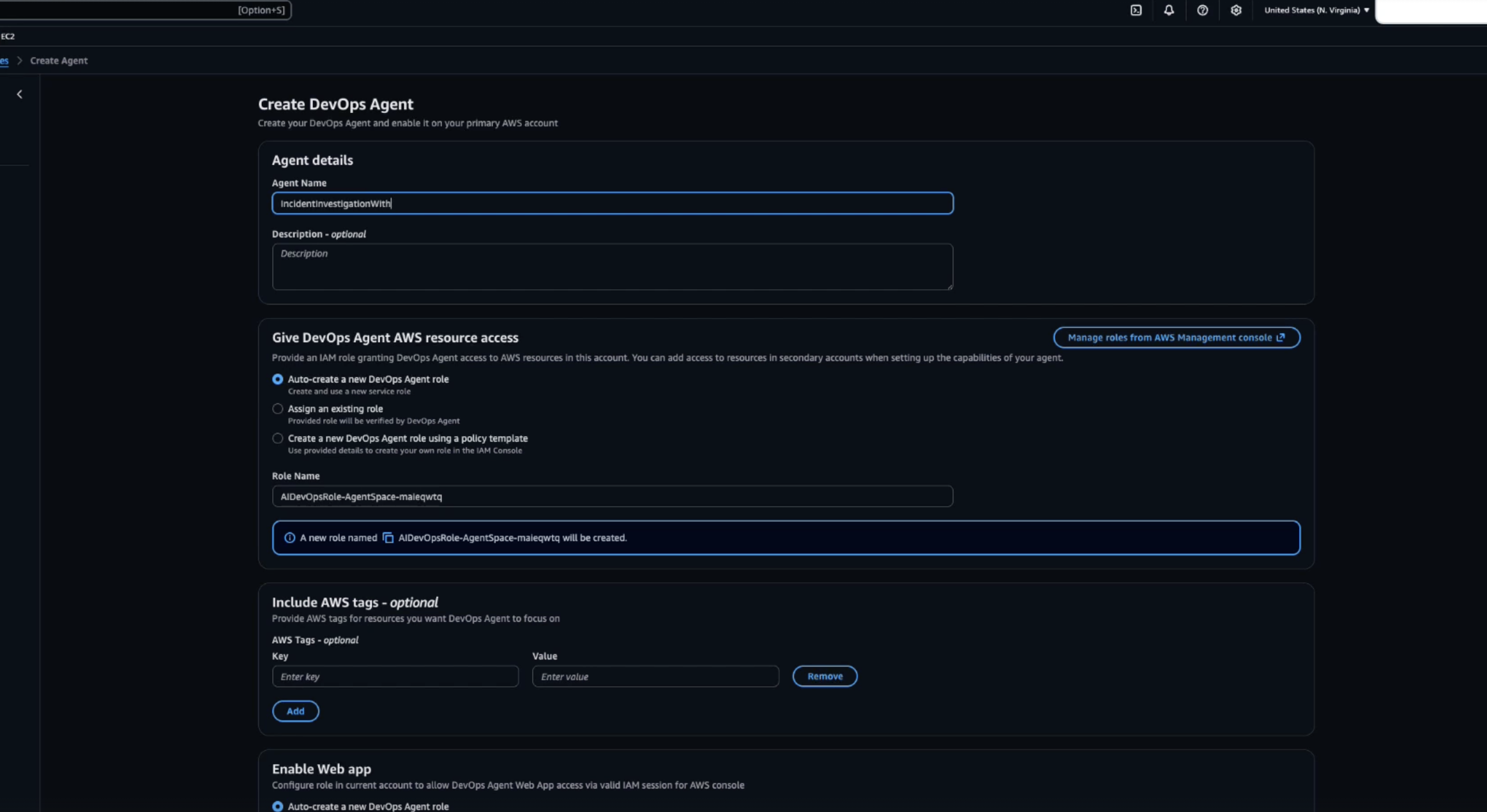
Create an AWS DevOps Agent Space

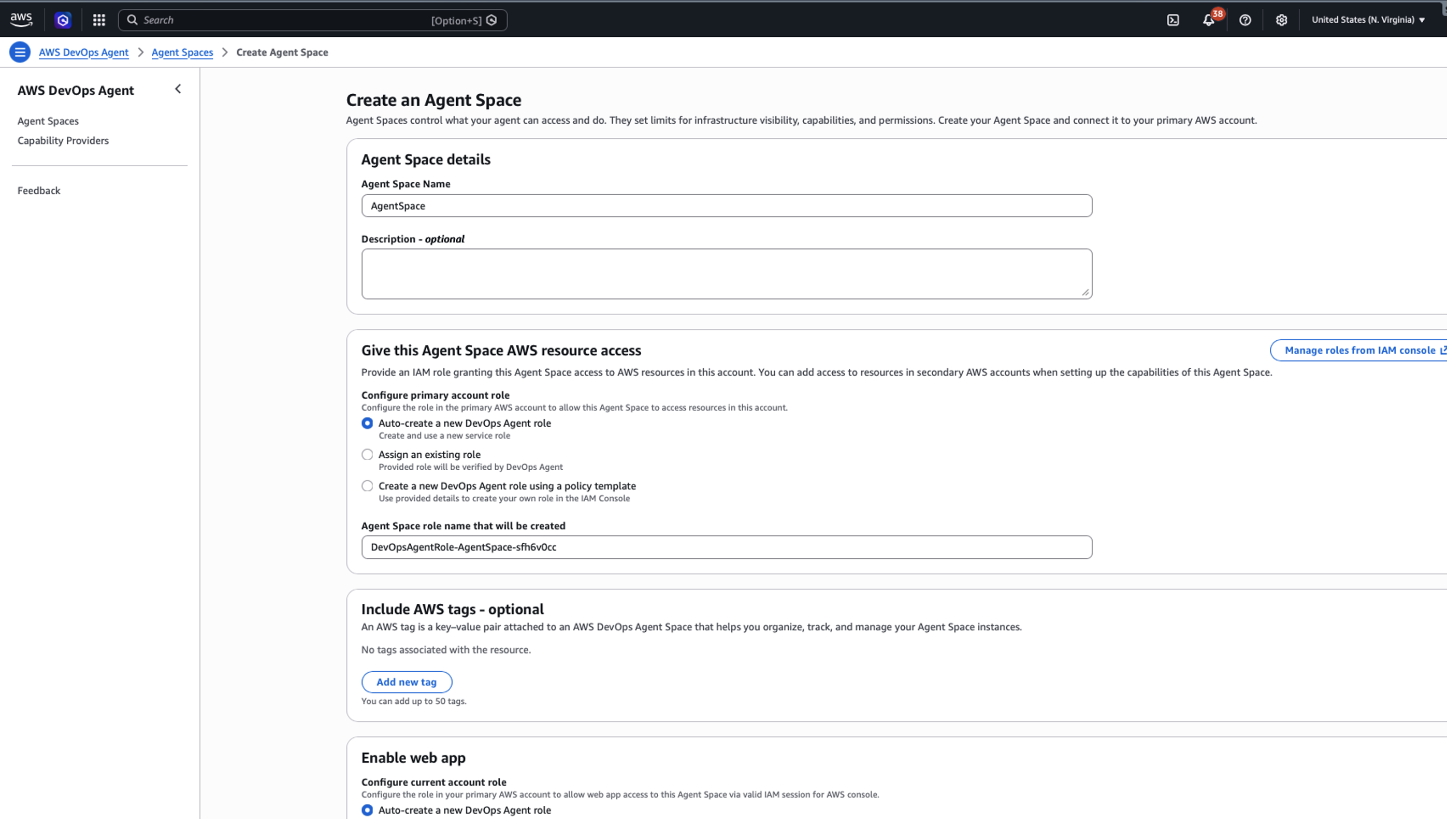
Create an Agent Space in your primary AWS account to serve as the operational hub for incident investigations.

  • Open the AWS DevOps Agent console in us-east-1.
  • Choose Create Agent Space and provide a meaningful name and description.
  • Configure the required IAM role that grants AWS DevOps Agent access to your AWS resources. You can use the automated role creation process or create the role manually.
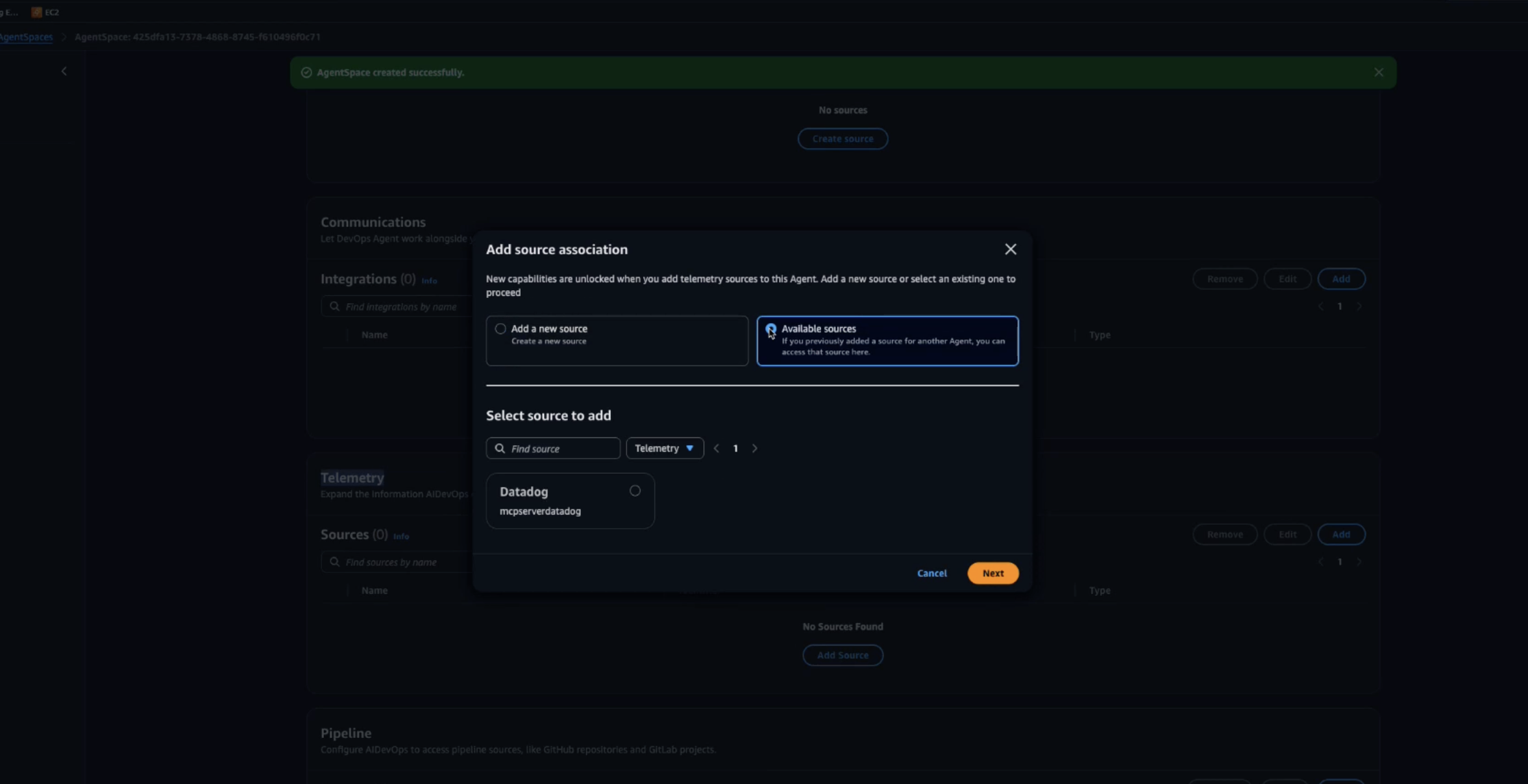
  • After your Agent Space is ready, add the Datadog MCP Server as a telemetry source to enable comprehensive incident investigation.
Creating an AWS DevOps Agent in Agent Space

Figure 2: Creating an AWS DevOps Agent in Agent Space

Real-World Example: Resolving Errors

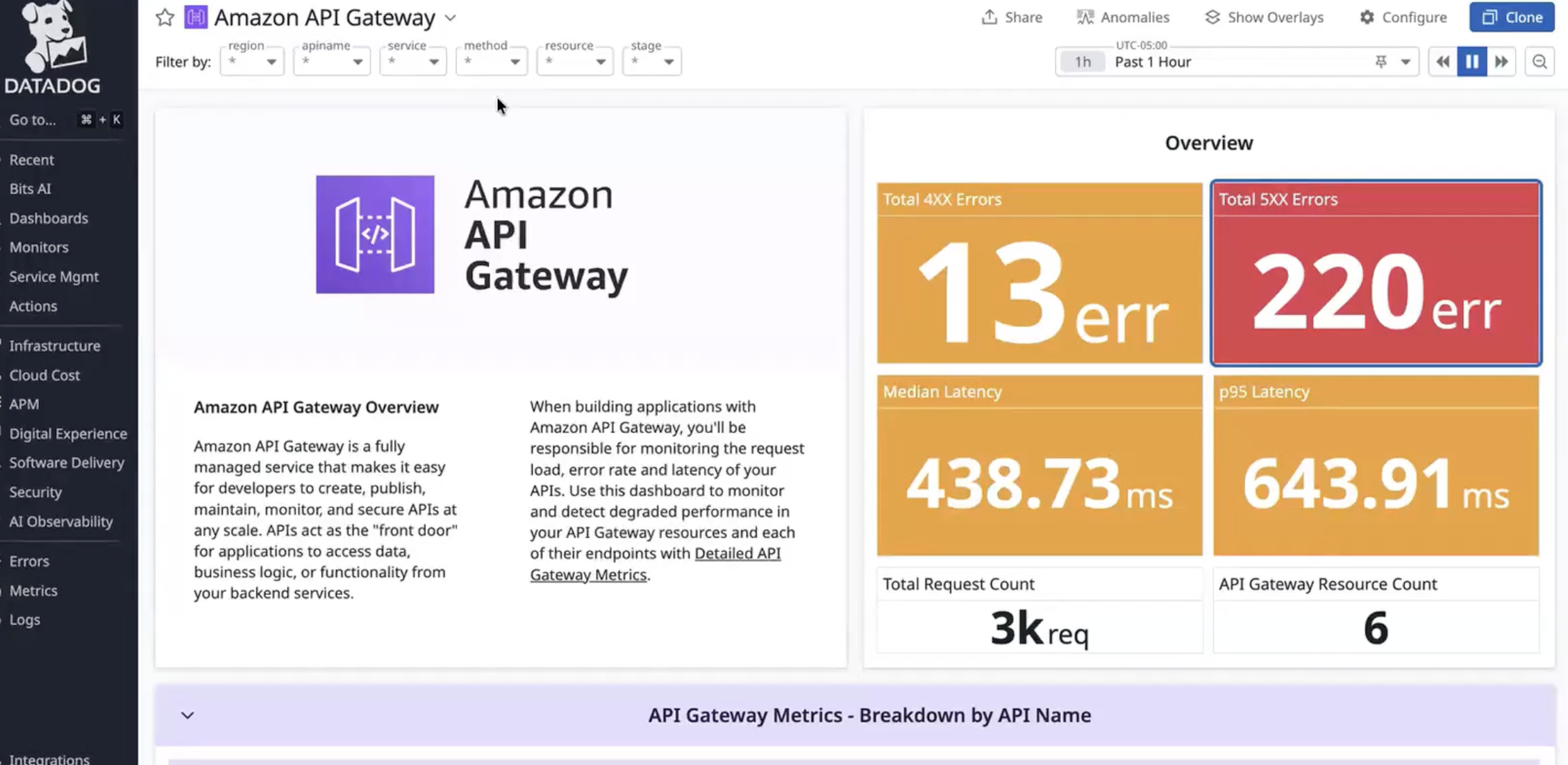
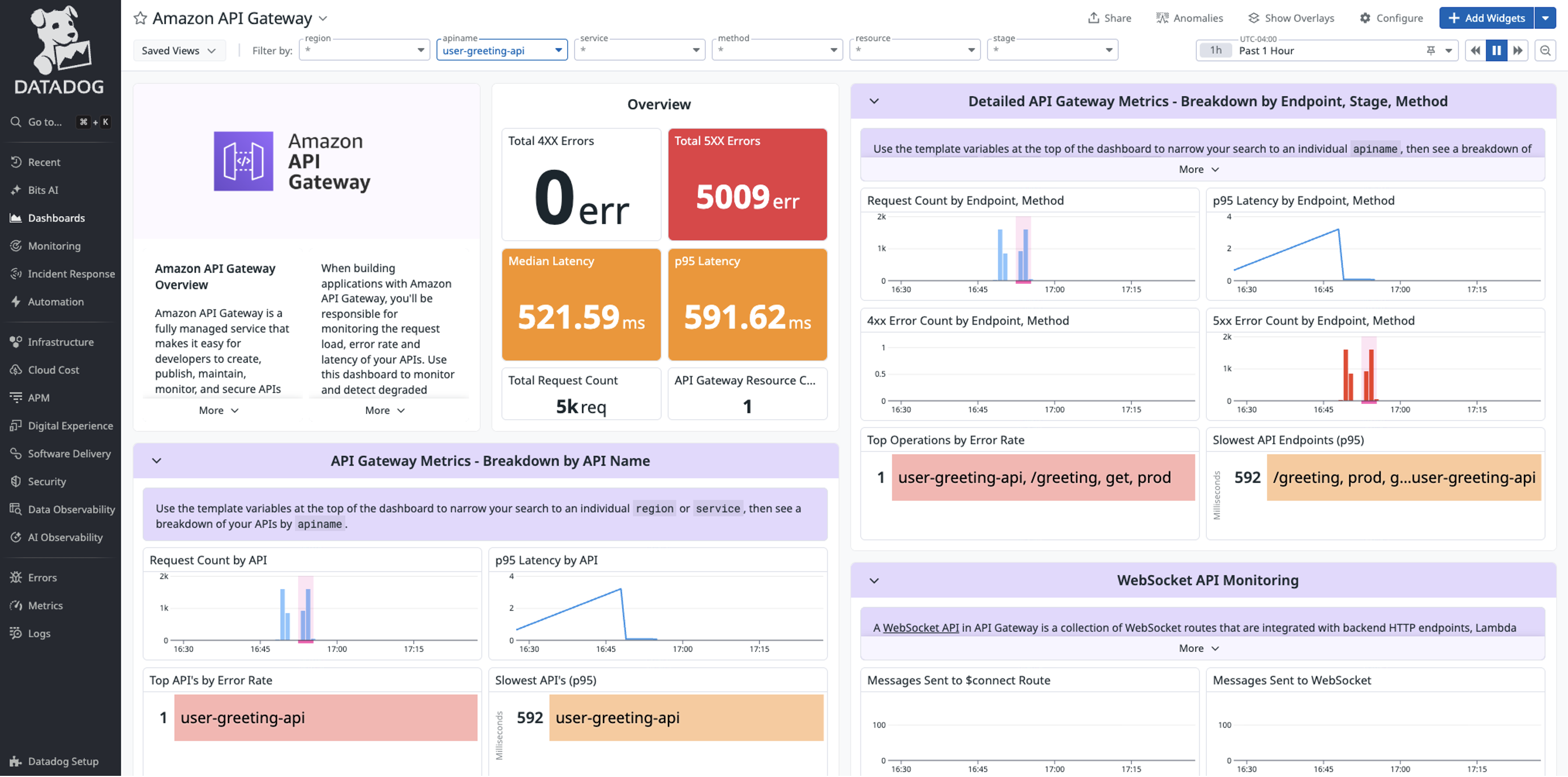
Let’s walk through how AWS DevOps Agent and Datadog work together to resolve a production incident. In this scenario, Datadog monitors detect a spike in Amazon API Gateway 5XX errors affecting downstream services.
Sample dashboard showing 5xx errors in Datadog

Figure 3: Sample 5xx errors in Datadog

Investigating errors from Incident with Datadog MCP Server and AWS DevOps Agent

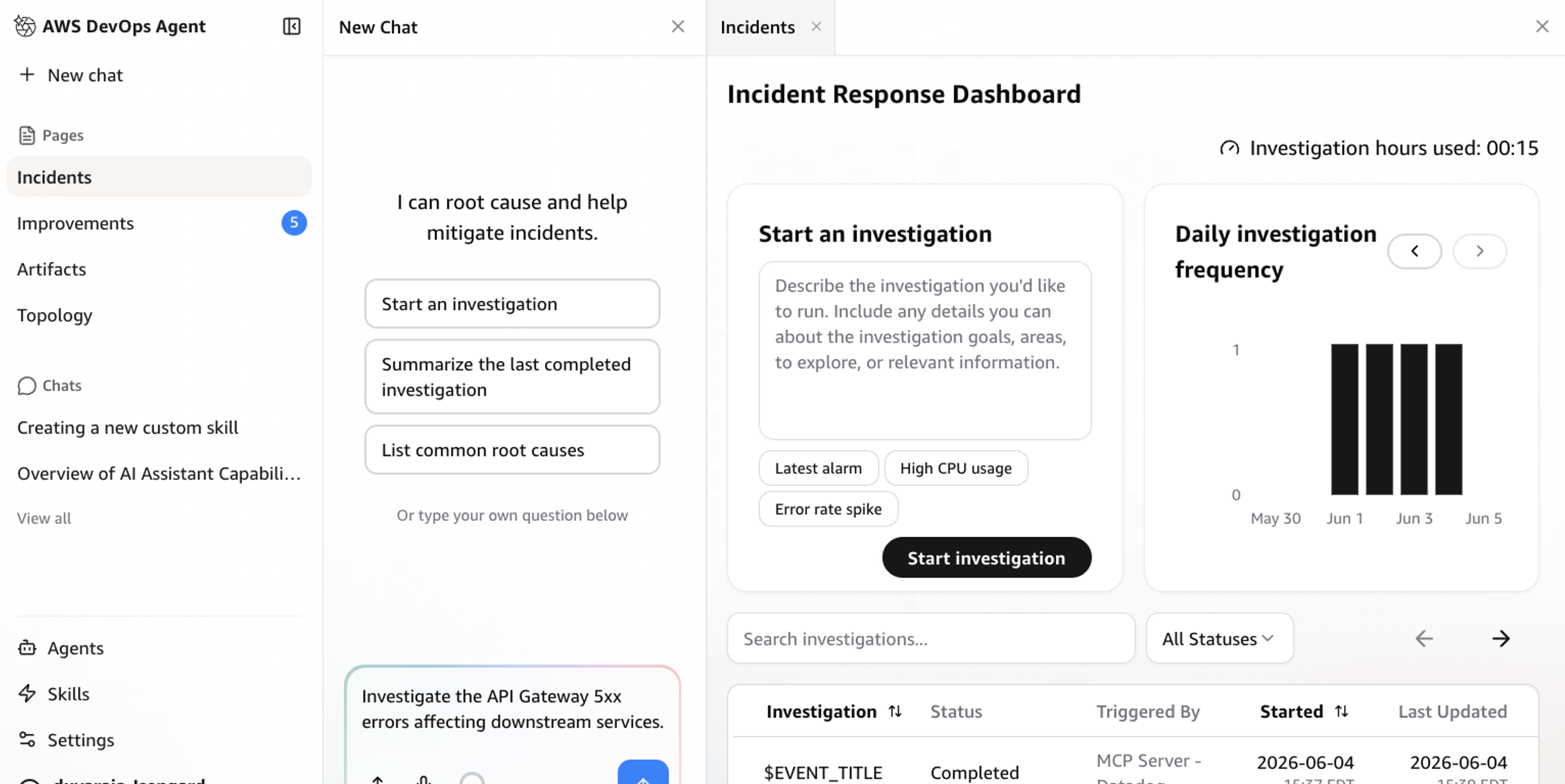
When the 5xx alert triggers, AWS DevOps Agent automatically analyzes the incident using both Datadog metrics and API Gateway logs. Through the investigation chat interface, an engineer guides AWS DevOps Agent to examine the API Gateway configuration. The agent correlates API Gateway and AWS Lambda execution logs, quickly identifying error patterns.
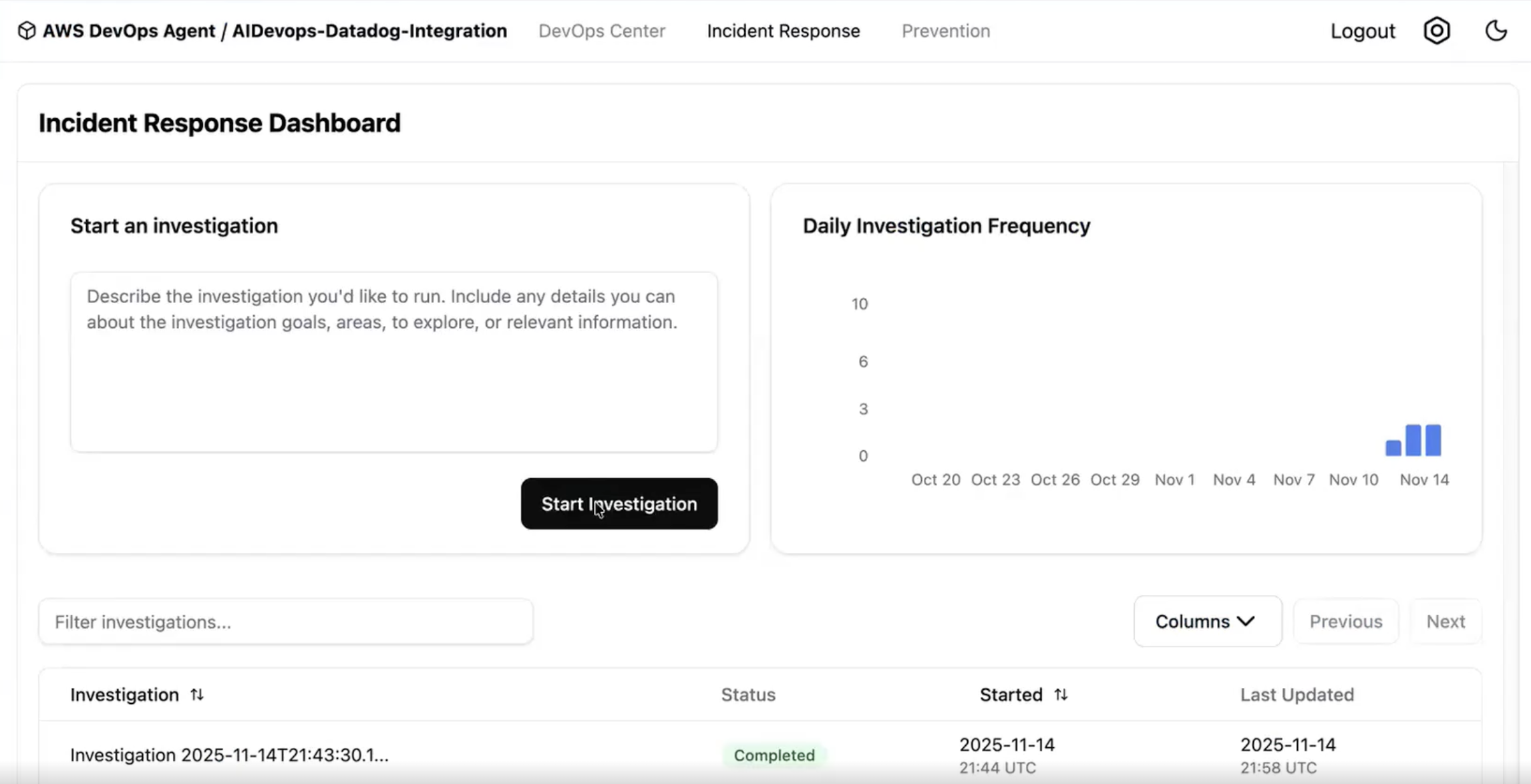
Inside the AWS DevOps Agent Console showing what the homepage looks like

Figure 4: Investigating an incident with AWS DevOps Agent and Datadog MCP Server

Resolving issue

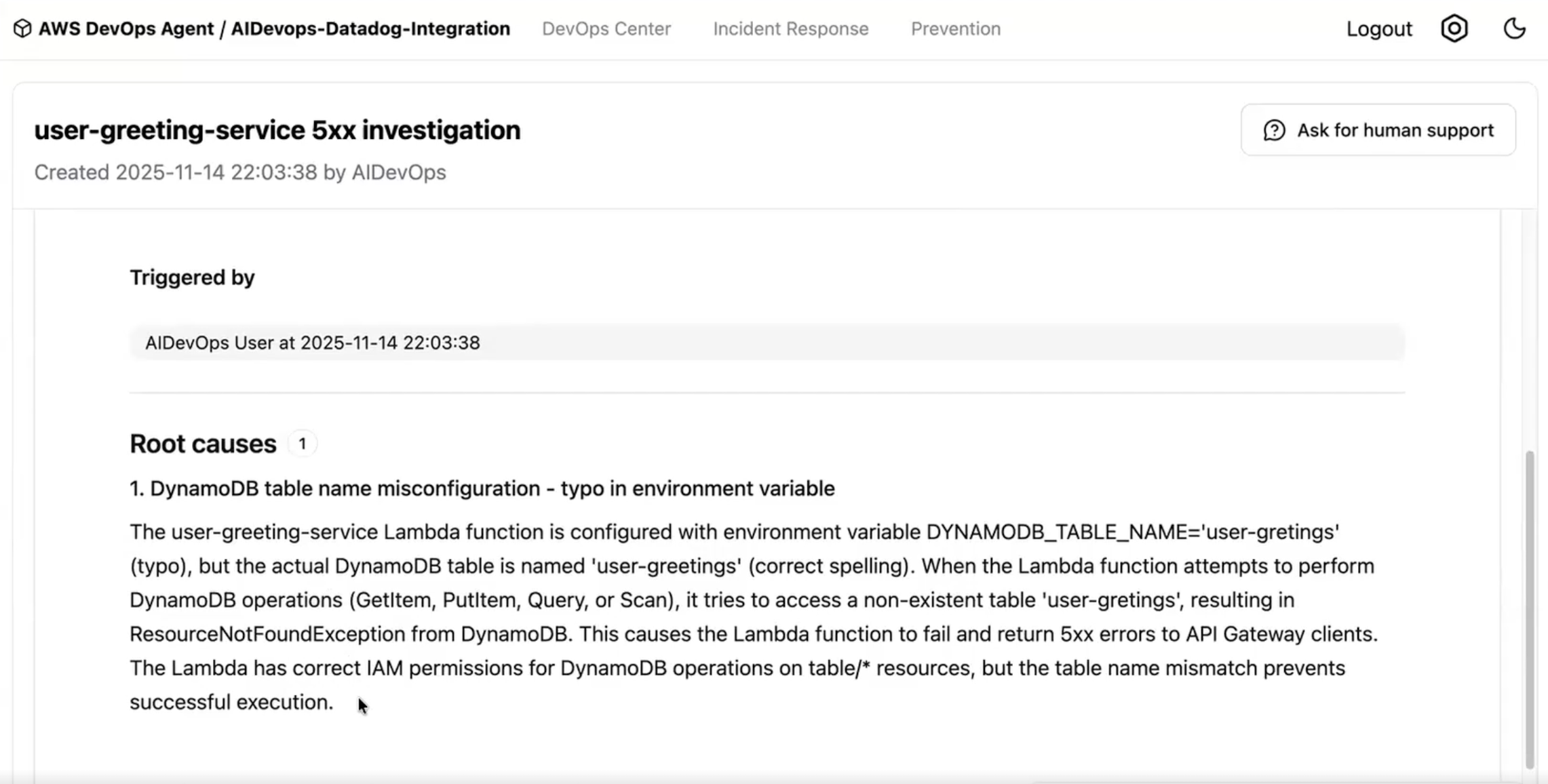
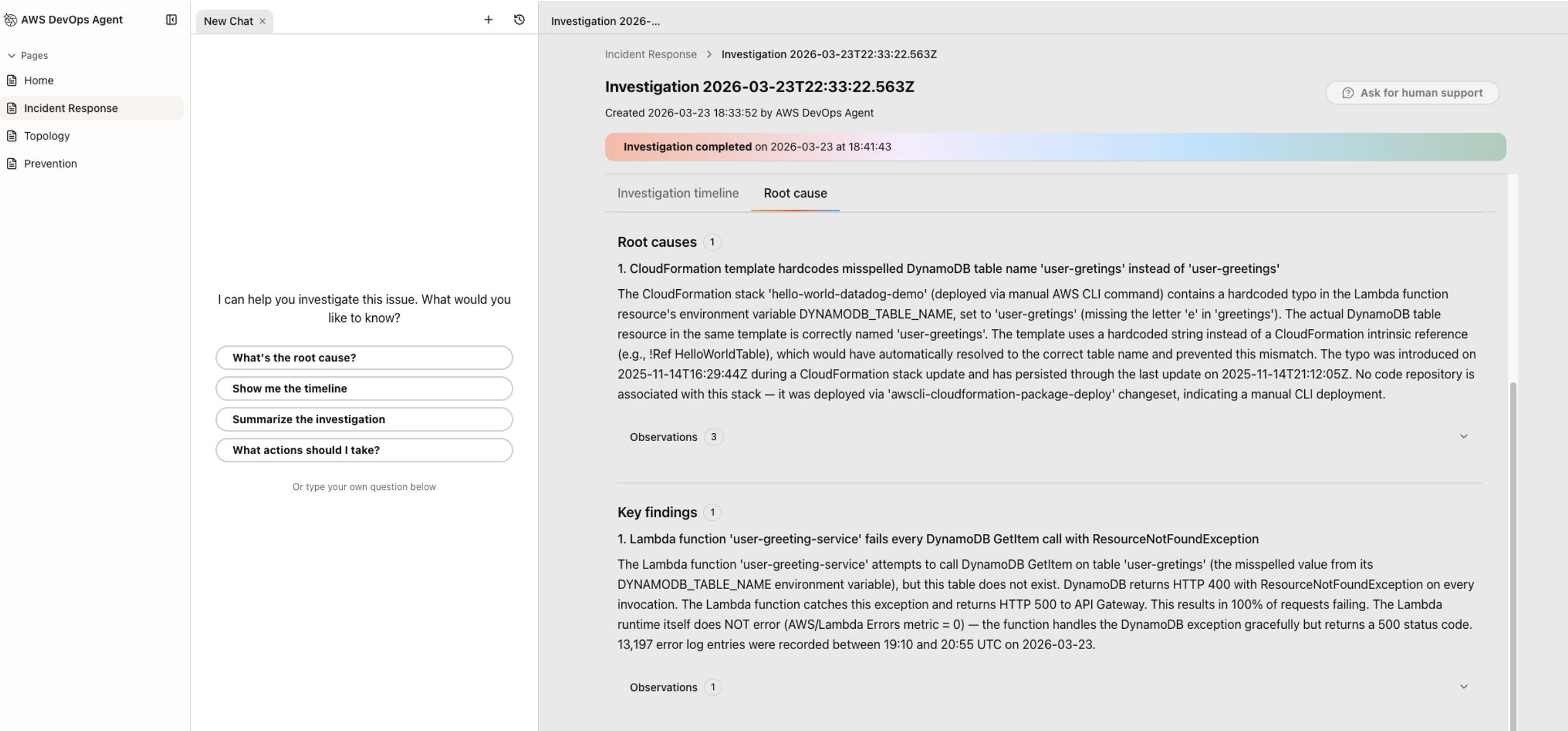
AWS DevOps Agent helps identify potential misconfigurations in the Lambda and Amazon DynamoDB integration and suggests immediate fixes. The agent documents all findings and actions in an incident investigation, backed by telemetry from both Datadog and AWS services. After resolution, AWS DevOps Agent generates a detailed analysis report with specific recommendations to prevent similar incidents.
Inside the AWS DevOps Agent Console showing an invigation in progress

Figure 5: Investigation summary produced by AWS DevOps Agent

Mitigation plans

After completing investigation, AWS DevOps Agent goes beyond identifying the root cause — it generates a detailed mitigation plan with step-by-step remediation guidance specific to the incident. Beyond immediate fixes, the plan includes longer-term prevention recommendations such as adding retry logic, implementing circuit breakers, or adjusting capacity thresholds to reduce the risk of recurrence.

This shifts the on-call experience from reactive to proactive. Instead of context-switching across multiple tools to build a remediation plan from scratch, engineers get a ready-to-execute plan they can review, refine, and route through existing change management workflows — keeping stakeholders informed as fixes are implemented. Over time, AWS DevOps Agent learns from resolved incidents across your environment, making its mitigation plans increasingly precise by recognizing patterns, referencing past resolutions, and surfacing preventive measures before similar issues repeat. AWS DevOps Agent also leverages its deep understanding of your environment, enabling you to dive deeper into your application environment, beyond just asking questions, to create, save, and share custom charts and reports.
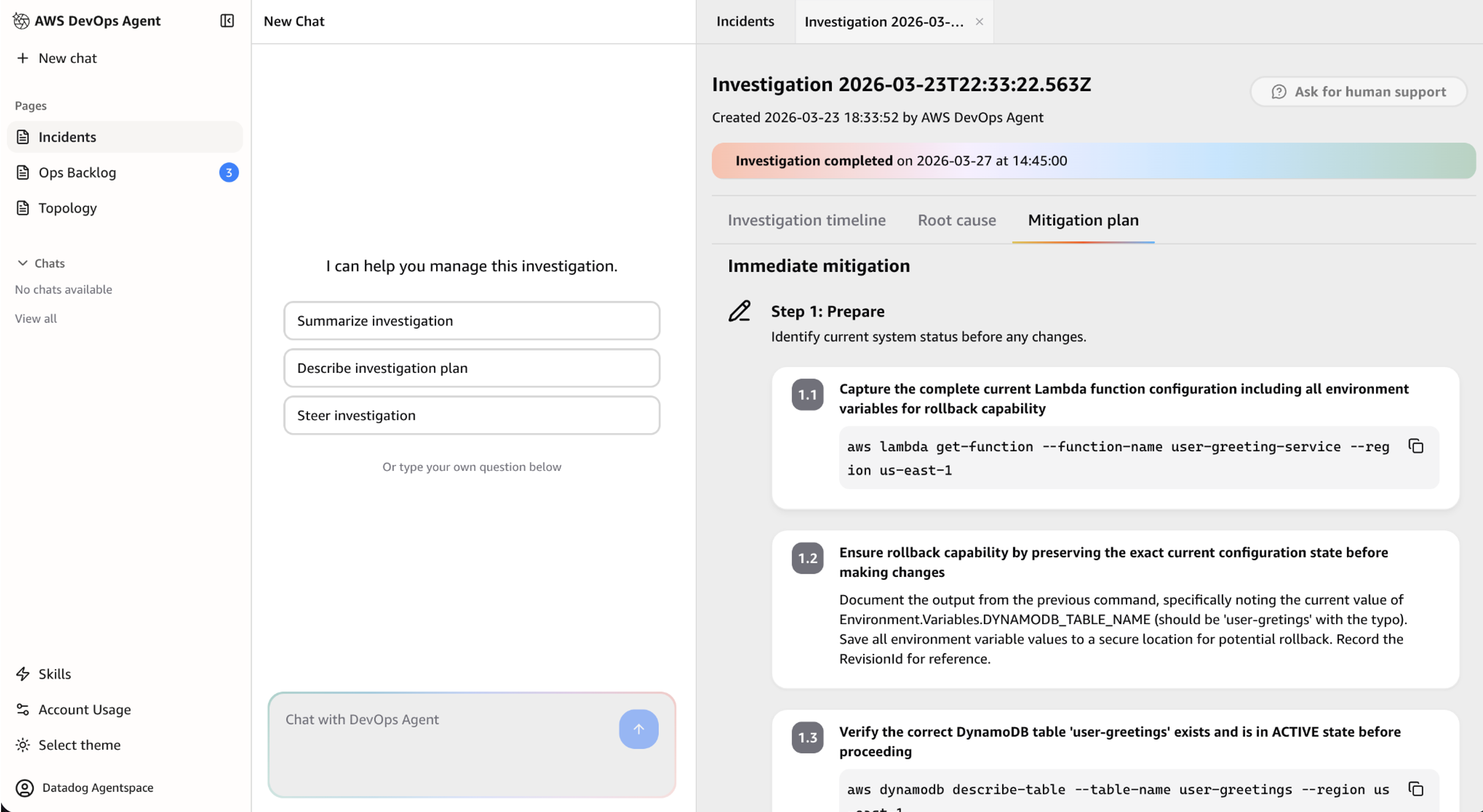
Inside the AWS DevOps Agent console showing the results of a completed investigation

Figure 6: Mitigation plan generated by AWS DevOps Agent

Prevention

AWS DevOps Agent can evaluate recent incidents to identify improvement opportunities that prevent future incidents and reduce Mean Time To Detection (MTTD) and Mean Time to Recovery (MTTR).

  1. Navigate to the Improvements page in the AWS DevOps Agent web app
  2. Click Run Now. Once its completed, it displays a personalized incident prevention recommendation, as displayed in Figure 7 below. Note: The “Run Now” button may not produce visible results immediately. Prevention analysis runs asynchronously in the background and results may take time to appear. This is expected since the feature is designed for production environments with longer incident histories.
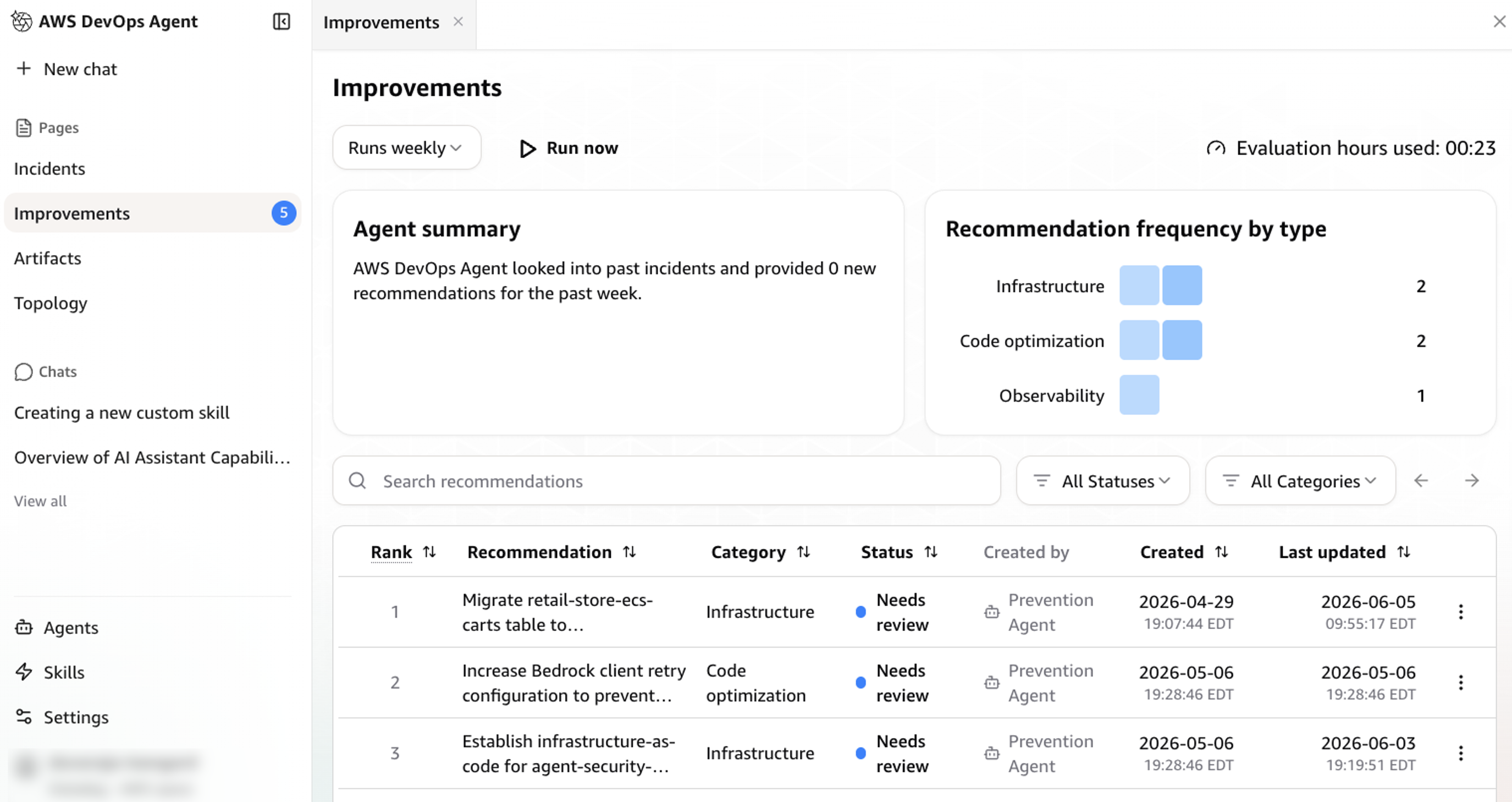
Personalized incident prevention recommendation from AWS DevOps Agent

Figure 7: Personalized incident prevention recommendation from AWS DevOps Agent

Cleanup

When you’re done using the integration, you can clean up your resources by following these steps:

  1. Delete your Agent Space from the AWS DevOps Agent console
  2. Remove the Datadog MCP Server connection from your Capability Providers
  3. Delete the IAM roles created for the Agent Space
  4. (Optional) If you created additional source account roles, remove those as well

Conclusion

With Datadog MCP Server and AWS DevOps Agent now generally available, this integration automatically correlates Datadog logs, metrics, and traces with AWS telemetry, code, and deployment data, giving teams an autonomous investigation that identifies root causes, delivers actionable mitigation plans, and recommends preventive improvements. Early adopters have seen resolution times drop from hours to minutes and deeper root cause analysis across AWS, multicloud and hybrid environments. To learn more, check out the AWS DevOps Agent.

Datadog is an AWS Specialization Partner and AWS Marketplace Seller that has been building integrations with AWS services for over a decade, amassing a growing catalog of 100+ AWS and 1000+ built-in integrations. This new AWS DevOps Agent and Datadog MCP Server integration builds upon Datadog’s strong track record of AWS partnership success. If you’re not already using Datadog, you can get started with a 14-day free trial via the AWS Marketplace.
Nina Chen

Nina Chen is a Customer Solutions Manager at AWS specializing in leading software companies to leverage the power of the AWS cloud to accelerate their product innovation and growth. With over 4 years of experience working in the strategic Independent Software Vendor (ISV) vertical, Nina enjoys guiding ISV partners through their cloud transformation journeys, helping them optimize their cloud infrastructure, driving product innovation, and delivering exceptional customer experiences.

DhilipVenkatesh Uvarajan

DhilipVenkatesh Uvarajan is as an Enterprise Support Lead TAM within AWS Enterprise Support, specializing in Independent Software Vendors (ISVs) across the United States. In this role, Dhilip provides strategic technical guidance to help customers innovate, optimize their AWS architecture, and ensure the seamless operation of their business-critical applications on the AWS cloud. Beyond his professional endeavors, Dhilip is passionate about AI and Robotics, often exploring innovative projects in his spare time.

Shashiraj (Raj) Jeripotula

Shashiraj Jeripotula (Raj) is a San Francisco-based Principal Partner Solutions Architect at AWS. He works with ISV partners to build deep integrations across observability, AI, and agentic development tooling — helping developers leverage AI agents, Model Context Protocol (MCP), and shift-left observability to build responsible, production-ready AI systems on AWS.

Sujatha Kuppuraju

Sujatha Kuppuraju is a Principal Solutions Architect at AWS, specializing in Cloud and, Generative AI Security. She collaborates with software companies’ leadership teams to architect secure, scalable solutions on AWS and guide strategic product development. Leveraging her expertise in cloud architecture and emerging technologies, Sujatha helps organizations optimize offerings, maintain robust security, and bring innovative products to market in an evolving tech landscape.

BT

Bharadwaj Tanikella

Bharadwaj Tanikella currently leads Datadog products Bits AI (Assistant), Datadog MCP Server, and Semantic Layer. His work focuses on harnessing vast datasets to foster innovation and streamline user experiences through cutting-edge analytics, machine learning, and artificial intelligence.

Mohammad Jama

Mohammad Jama is a Product Marketing Manager at Datadog. He leads go-to-market for Datadog’s AWS integrations, working closely with product, marketing, and sales to help companies observe and secure their hybrid and AWS environments.

Accelerate autonomous incident resolutions using the Datadog MCP server and AWS DevOps agent (in preview)

Post Syndicated from Nina Chen original https://aws.amazon.com/blogs/devops/accelerate-autonomous-incident-resolutions-using-the-datadog-mcp-server-and-aws-devops-agent-in-preview/

This post was co-written with Omri Sass (Director of Product Management), Cansu Berkem (Director of Product Management), and Mohammad Jama (Product Marketing Manager) from Datadog.

On-call engineers spend hours manually investigating incidents across multiple observability tools, logs, and monitoring systems. This process delays incident resolution and impacts business operations, especially when teams need to correlate data across different monitoring platforms. AWS DevOps Agent (in preview) is a frontier agent that resolves and proactively prevents incidents, continuously improving reliability and performance of applications in AWS, multicloud, and hybrid environments. Frontier agents represent a new class of AI agents that are autonomous, massively scalable, and work for hours or days without constant intervention. AWS DevOps Agent offers built-in integration with Datadog Model Context Protocol (MCP) Server, enabling you to access the untapped insights in your data by connecting directly to Datadog’s monitoring solutions. DevOps Agent maps your application resources and correlates telemetry, code, and deployment data to reduce MTTR (Mean Time To Resolution) and drive operational excellence.

You can use this integration to collect and analyze Datadog logs, metrics, and traces, correlating this data across AWS services. When incidents occur, AWS DevOps Agent identifies issues and provides mitigation plans which engineers can then implement. Engineers can monitor automated investigations through a central dashboard and engage with the agent through interactive chat at any time. Using this integration, engineers are able to reduce mean time to resolution (MTTR) from hours to minutes, while maintaining full visibility into automated actions.

How Datadog MCP and AWS DevOps Agent work together

The integration between Datadog MCP Server and AWS DevOps Agent connects your monitoring data with automated incident response. Datadog MCP Server acts as a central access point for your monitoring data. It securely connects to Datadog through a standardized protocol, allowing AWS DevOps Agent to query logs, metrics, and traces during investigations. The service uses OAuth 2.0 authentication and supports multiple regions to help maintain data sovereignty requirements.

AWS DevOps Agent learns your resources and relationships while correlating data from both AWS services and Datadog. It analyzes Amazon CloudWatch logs and metrics, deployment data, and code alongside Datadog telemetry to build a complete picture of the incident. This combined view helps identify root causes faster than examining each data source separately. Security considerations are built into every interaction. All interactions between AWS DevOps Agent and Datadog MCP Server uses authentication, authorization, encryption, and logging for audit purposes. While the service currently only runs in us-east-1, it can monitor and analyze applications deployed across any AWS Region in customer accounts globally.

Setting up and using AWS DevOps Agent with Datadog

In this section, we will guide you through the steps required to enable Datadog MCP Server in your AWS DevOps Agent account and configure it for incident resolution.

Pre-requisites

For this walkthrough, you should have access to and understanding of the following:

  • An AWS account with permissions to create AWS IAM (Identity and Access Management) roles:
    • Agent Space role – for basic service operations
    • Agent Space web app role – for using the Agent Space web app functionality
    •  (Optional) Secondary source account roles if monitoring multiple AWS accounts. Refer to the DevOps Agent user guide for the details on setting up these roles.
  • A Datadog account
  • Access to Datadog MCP Server (in preview)

Setting up Datadog in the AWS DevOps Agent console

Start the setup in the AWS DevOps Agent console by connecting your Datadog MCP Server. Navigate to Settings, select the Datadog integration panel, and choose “Register.” Enter your Datadog MCP Server details when prompted (you can learn more about requesting access to this server in their documentation). AWS DevOps Agent validates the connection and displays a confirmation message.

This is the configuration in AWS DevOps Agent for Datadog MCP Server Details with three input fields: Server Name (with example 'my-datadog-server'), Endpoint URL (showing 'https://mcp.datadog.com/api/unstable/mcp-server/mcp'), and an optional Description field. The form includes navigation steps at the top and Cancel/Next buttons at the bottom. The interface has a dark theme with blue accents.Figure 1: Setting up Datadog MCP Server in AWS DevOps Agent Console

Create an AWS DevOps Agent Agent Space

Next, create an Agent Space in your primary AWS account. This requires an AWS IAM role that grants AWS DevOps Agent access to your AWS resources. After creating your Agent Space, add Datadog MCP Server as a telemetry source to enable comprehensive incident investigation.

To create your Agent Space, start by accessing the AWS DevOps Agent console in us-east-1. Choose the “Create Agent Space” button and provide a meaningful name and description for your space. After submitting the form, you’ll need to configure the required IAM roles, which can be done through either the automated creation process or manual setup.

This is the configuration for creating an AWS DevOps Agent AgentSpace. The screen shows the option to create a DevOps Agents, with areas to give agent details, resource access, and more. The interface is dark blue theme. Figure 2: Creating a AWS DevOps Agent in Agent Space

Your Agent Space topology can be initialized using either AWS CloudFormation stacks or AWS Tags as starting points to identify your application components. Once the basic setup is complete, you can enhance your Agent Space configuration by adding Secondary source accounts for multi-account monitoring and configuring integrations with services like SIM ticketing system, Pipelines (where GitFarm packages and CloudFormation Stacks are located), Slack, and most importantly for our use case, Telemetry with the Datadog MCP Server.

This is a page that has options for adding telemetry source (datadog) in agent space. Here, there is a pop-up to add source association. The selected source here to add is Datadog. Figure 3: Add additional telemetry sources for AWS DevOps Agent to investigate

From here, we can launch the Agent Space web app to begin the investigation.

Real-World example: Resolving API Gateway errors

Let’s walk through how AWS DevOps Agent and Datadog work together to resolve a production incident. In this scenario, Datadog detects a spike in Amazon API Gateway 5XX errors affecting downstream services.

This is a sample monitor view of sample 5XX errors in Datadog. There is a monitor of Amazon API Gateway pulled up. On the right, there is a monitor showing "Your 5XX Errors" with over 220 errors. Figure 4: Sample API Gateway errors in Datadog

Investigating 5XX errors from API Gateway Incident with the Datadog MCP Server and AWS DevOps Agent

When the alert triggers, AWS DevOps Agent automatically analyzes both Datadog metrics and API Gateway logs. Through the investigation chat interface, an engineer guides AWS DevOps Agent to examine the API Gateway configuration. The agent correlates API Gateway and AWS Lambda execution logs, quickly identifying error patterns.

This is a view in AWS DevOps Agent to allow for investigating an incident with AWS DevOps Agent and Datadog MCPFigure 4: Investigating an incident with AWS DevOps Agent and Datadog MCP

Resolving and prevention

AWS DevOps Agent helps identify potential misconfigurations in the Lambda and Amazon DynamoDB integration and implements immediate fixes. The agent documents all findings and actions in an incident record, backed by telemetry from both Datadog and AWS services. After resolution, AWS DevOps Agent generates a detailed analysis report with specific recommendations to prevent similar incidents. Teams can review and implement these suggestions through the Prevention feature in the AWS DevOps Agent web app.

This view show the investigation summary produced by AWS DevOps Agent. Here, we see the root cause for this sample incident. The root cause head line states that "1. DynamoDB table name misconfiguration - typo in environment variable". There is a longer description explaining this under it. The background for this view is plain white. Figure 5: Investigation summary produced by AWS DevOps Agent

Clean up

When you’re done using the integration, you can clean up your resources by following these steps:

  1. Delete your Agent Space from the AWS DevOps Agent console
  2. Remove the Datadog MCP Server connection from your settings
  3. Delete the IAM roles created for the Agent Space
  4. (Optional) If you created additional source account roles, remove those as well

Conclusion

The integration between Datadog MCP Server and AWS DevOps Agent reduces incident resolution time by automatically correlating data across your monitoring tools. Instead of manually switching between Datadog and AWS dashboards during incidents, teams can now get an AI-powered investigation that identifies root causes and suggests fixes. Early adopters report significant improvements in their incident response. Resolution times drop from hours to minutes, while on-call teams spend less time gathering data. Teams also see more consistent incident responses and improved root cause analysis through comprehensive data correlation. To learn more, check out the AWS DevOps Agent product page.

Datadog is an AWS Specialization Partner and AWS Marketplace Seller that has been building integrations with AWS services for over a decade, amassing a growing catalog of 100+ AWS and 1000+ built-in integrations. This new AWS DevOps Agent and Datadog MCP Server integration builds upon Datadog’s strong track record of AWS partnership success. If you’re not already using Datadog, you can get started with a 14-day free trial via the AWS Marketplace.
Sujatha Kuppuraju

Sujatha Kuppuraju is a Principal Solutions Architect at AWS, specializing in Cloud and, Generative AI Security. She collaborates with software companies’ leadership teams to architect secure, scalable solutions on AWS and guide strategic product development. Leveraging her expertise in cloud architecture and emerging technologies, Sujatha helps organizations optimize offerings, maintain robust security, and bring innovative products to market in an evolving tech landscape.

DhilipVenkatesh Uvarajan

DhilipVenkatesh Uvarajan is as an Enterprise Support Lead TAM within AWS Enterprise Support, specializing in Independent Software Vendors (ISVs) across the United States. In this role, Dhilip provides strategic technical guidance to help customers innovate, optimize their AWS architecture, and ensure the seamless operation of their business-critical applications on the AWS cloud. Beyond his professional endeavors, Dhilip is passionate about AI and Robotics, often exploring innovative projects in his spare time.

Nina Chen

Nina Chen is a Customer Solutions Manager at AWS specializing in leading software companies to leverage the power of the AWS cloud to accelerate their product innovation and growth. With over 4 years of experience working in the strategic Independent Software Vendor (ISV) vertical, Nina enjoys guiding ISV partners through their cloud transformation journeys, helping them optimize their cloud infrastructure, driving product innovation, and delivering exceptional customer experiences.

Omri Sass

Omri Sass is a Director of Product Management at Datadog, where he’s overseen the development and launch of a multitude of products and capabilities including Bits AI SRE and updog.ai. He is a keen advocate for good user experience and doing what’s right by users.

Cansu Berkem

Cansu Berkem is a Director of Product Management at Datadog, overseeing the company’s end-to-end incident response experience, including Incident Management, On-Call, Automations, and Bits AI SRE. Her products help engineers resolve incidents faster through AI-driven workflows, powered by Bits AI SRE as an autonomous incident investigator and supported by integration-rich incident management and paging flows.

Mohammad Jama

Mohammad Jama is a Product Marketing Manager at Datadog. He leads go-to-market for Datadog’s AWS integrations, working closely with product, marketing, and sales to help companies observe and secure their hybrid and AWS environments.