Post Syndicated from Rahul Shandilya original https://aws.amazon.com/blogs/compute/improving-lambda-function-latency-with-scalable-network-bandwidth/
AWS Lambda now supports scalable network bandwidth for functions configured with 2,048 MB of memory or more, running outside of a virtual private cloud (VPC). Previously, sustained network throughput was capped at 625 Mbps regardless of your function’s memory configuration. Now, sustained throughput scales proportionally from 625 Mbps at configurations below 2,048 MB up to 3,000 Mbps at 10,240 MB, increasing the rate at which data moves to and from your execution environment.
In this post, you learn how to apply this new capability to latency-sensitive data processing workloads, helping reduce function execution times and per-invocation costs while improving the end-user experience through reduced latency. You also walk through a deployable implementation that demonstrates the performance improvements this capability unlocks.
Latency-sensitive data processing
Latency-sensitive data processing applications are data processing workloads that must be completed in a defined period of time. They often experience bursty, ad hoc traffic patterns while being required to download gigabytes or even terabytes of data from a data store, process it in a compute environment, and return a result to a waiting end user.
Latency-sensitive data processing is often highly parallelizable. Data can be divided into smaller pieces with each piece being individually processed before combining them together to obtain a result.
These workloads can be found in multiple industries and verticals. Examples include:
- Log querying engines – An end user initiates an on-demand search across terabytes of log data and expects results within seconds.
- Insurance underwriting – A prospective customer submits an application, triggering real-time evaluation of historical claims and risk data. The underwriting process determines what coverage and premiums to offer to the prospective customer.
- Financial ETL pipelines – An economic announcement triggers an unexpected burst of market data that must be ingested, transformed, and made available to downstream trading systems before the next market tick.
- Genomics platforms – A clinician orders a diagnostic test, requiring gigabytes of DNA or RNA sequencing data to pass through a bioinformatics pipeline and be compared against a reference genome while the patient awaits results.
These workloads are challenging to build on traditional compute clusters. Their spiky and unpredictable nature forces you to choose between under-provisioning compute to optimize costs (and risk missing your SLA) or over-provisioning and paying for idle capacity.
Why Lambda fits latency-sensitive data processing
Lambda eliminates this tradeoff. Instead of pre-provisioning a compute cluster, Lambda scales compute capacity in response to incoming requests, matching processing power to unpredictable traffic patterns. Because latency-sensitive data processing is highly parallelizable, the ability of Lambda to rapidly scale out execution environments makes it a natural fit. You can fan out across thousands of concurrent functions to process data in parallel, paying only for the compute you use.
However, as data volume and performance requirements grow, network bandwidth to and from the compute environment can become the limiting factor in minimizing workload latency.
Scalable network bandwidth directly addresses this limitation by raising the per-environment network throughput ceiling, improving the rate at which data can be transferred to and from the execution environment. Each execution environment can now drive up to 3,000 Mbps of sustained throughput when configured with 10,240 MB of memory, a 4.8x increase from the previous ceiling of 625 Mbps. Combined with the ability of Lambda to scale out at a rate of 1,000 execution environments every 10 seconds, you can download more than 3 TB of data in under 10 seconds.
New network throughput behavior for Lambda functions
Scalable network bandwidth applies to both data ingress to and egress from an execution environment for functions outside of a VPC. For functions configured with 2 GB of memory or more, network bandwidth scales by approximately 280 Mbps increments for every 1 GB of additional memory allocated.
The following table shows the maximum sustained bandwidth available to each execution environment at each memory configuration.
| Memory Configuration | Max Sustained Bandwidth |
| Less than 2,048 MB | 625 Mbps |
| 2,048 MB | 765 Mbps |
| 3,072 MB | 1,044 Mbps |
| 4,096 MB | 1,324 Mbps |
| 5,120 MB | 1,603 Mbps |
| 6,144 MB | 1,883 Mbps |
| 7,168 MB | 2,162 Mbps |
| 8,192 MB | 2,441 Mbps |
| 9,216 MB | 2,721 Mbps |
| 10,240 MB | 3,000 Mbps (4.8x increase) |
Table 1. Lambda sustained network bandwidth by memory configuration. Bandwidth scales at ~280 Mbps per additional GB of memory above 2 GB.
In the following section, you learn how scalable network bandwidth improves end-user latency by building an ETL pipeline that demonstrates it. You can find the source code in the GitHub repository.
Solution overview
Consider a SaaS analytics platform where users submit ad hoc queries against a data store. The application must extract the relevant data, apply a filter or transformation, and return an aggregate result while the user waits. In this example, the result needs to be returned in 8 seconds or less.
The following diagram illustrates the architecture of the solution.
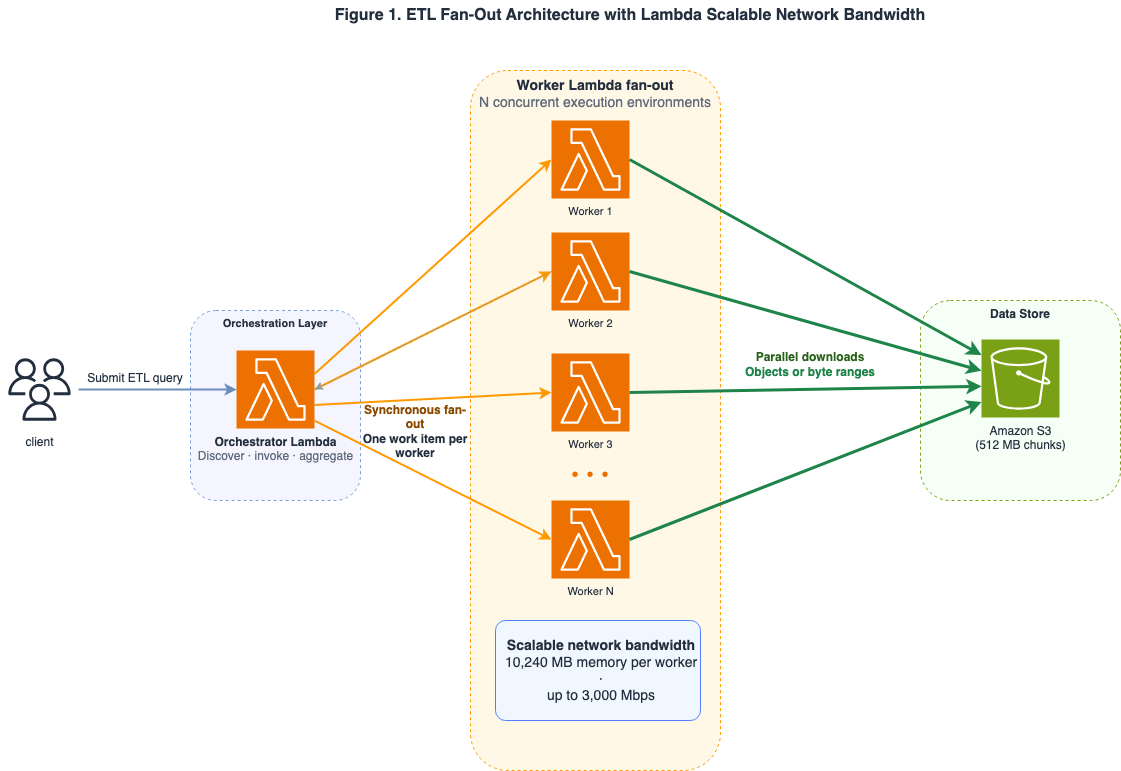
Figure 1. ETL fan-out pattern: an orchestrator Lambda function distributes work to multiple worker Lambda functions that read from Amazon S3 in parallel, with bandwidth scaling callouts per memory tier.
A client initiates an ad hoc query by calling the orchestrator Lambda function through the Lambda API. The orchestrator function determines how to split the work. To process the data in parallel, the orchestrator function uses a ThreadPoolExecutor to issue synchronous invoke requests to the Lambda worker function, fanning out the worker across multiple execution environments at the same time.
Each Lambda worker function is configured with 10,240 MB of memory, so it has access to up to 3,000 Mbps of sustained network throughput. After the data is processed, the aggregated result is returned to the client.
Prerequisites
Before you start the deployment process, make sure that you have completed the following steps:
- Install the AWS SAM CLI on your computer and confirm that you are running Python 3.12 or later.
- Have your AWS account credentials ready.
- Submit a request to AWS Service Quotas to turn on scalable network bandwidth for your Lambda functions. This quota is listed under Network bandwidth per execution environment.
Clone the source code from the GitHub repo and deploy the application within your AWS account. Creating the 10 GB test dataset and running the benchmark can incur charges to your AWS account.
After the AWS CloudFormation stack is deployed, record the DataBucketName and orchestrator function name from the stack outputs to use in subsequent commands.
To simulate data for the end user to query, the GitHub repo has a script that creates 10 GB of synthetic data and uploads it to your S3 bucket.
Mode 1: Processing pre-partitioned data
In Mode 1, the 10 GB of synthetic data is pre-partitioned. Pre-partitioned data is typically produced incrementally by many sources over a period of time, which can be the case with IoT data or access logs. The following command creates 10 GB of data divided into 20 partitions that are 512 MB each.
Turning on scalable network bandwidth does not, on its own, make your downloads faster. A single download request only opens one connection to Amazon S3, and one connection does not move data fast enough to fill all the bandwidth now available to your Lambda function. To actually use your full allotment of network bandwidth, the execution environment has to pull the data over several connections at once. It does this by preferring the AWS Common Runtime (CRT) transfer client, a high-performance download engine built into Boto3. When the worker calls download_fileobj, the CRT client automatically breaks the 512 MB object into smaller parts and downloads them in parallel across multiple Amazon S3 requests. Those parallel downloads are what let a single Lambda worker take advantage of its full network bandwidth.
The following command runs the benchmark on the pre-partitioned data.
Mode 2: Processing single large objects
Mode 2 generates 10 GB of data in one large object. This arrangement is more common when data is produced or delivered as one complete unit, such as database backups or genomic datasets. The following command creates 10 GB of data in a single large object.
In Mode 1, the CRT preference applies to Boto3 managed transfer methods such as download_file and download_fileobj. Mode 2 takes a different approach. Each worker reads a specific byte range of a single large object using get_object. The CRT preference setting has no effect on these calls. Instead, you can control concurrency by explicitly tuning the number of Lambda workers and using a bounded ThreadPoolExecutor to issue multiple byte-range requests at the same time.
When you run the following command, the orchestrator takes the single large object and divides it into consecutive byte ranges of 512 MB each. Each of the individual ranges is then processed by a Lambda worker execution environment in parallel.
The benchmark reports wall-clock duration, client-observed duration, aggregate throughput across workers, worker completion counts, and target compliance. When comparing memory configurations, keep the code, dataset, AWS Region, partition count, warm-up policy, and measurement count identical. You should run the benchmark multiple times in your account because placement, cold starts, concurrency, S3 behavior, and execution-environment reuse could affect results.
Results
To compare results, we ran the benchmark using a baseline configuration where the worker Lambda function is configured with only 1,024 MB of memory, well below the 2,048 MB threshold required for scalable network bandwidth to take effect. The 1,024 MB configuration limits network throughput to the previous sustained ceiling of 625 Mbps.
In our baseline test run, a worker downloaded and processed a single 512 MB partition with a 6.61-second download time at a 649.8 Mbps throughput (at p50). The 649.8 Mbps throughput exceeds the 625 Mbps ceiling because Lambda is capable of bursts in network throughput over a short period of time. Across twenty measured fan-out queries, the complete 10 GB query was completed with a 7.113-second wall-clock at p50. This fits within the 8-second SLA but leaves very little headroom.
To run our scalable network bandwidth benchmark, we re-deployed our worker Lambda function with a 10,240 MB memory configuration and re-ran the application. At a 10,240 MB memory configuration, each execution environment can now access up to 3,000 Mbps in sustained throughput. Direct 512 MB downloads achieved a 1.70-second download time and 2,521.3 Mbps throughput (both at p50). The complete 10 GB query was completed with a 2.640-second wall-clock at p50. That is 2.69 times faster, or 62.9% lower median latency, than the 1,024 MB configuration.
Table 2 summarizes the direct worker and end-to-end fan-out measurements for the same 10 GB dataset and 20 × 512 MB orchestration pattern. Aggregate throughput is the total data transfer rate across all twenty execution environments spun up to run the benchmark.
| Memory Configuration | Single 512 MB partition download time and throughput (p50) | 10 GB fan-out wall time (p50) | Aggregate throughput p50 |
| 1,024 MB baseline tier (sustained 625 Mbps) | 6.61s / 649.8 Mbps | 7.113s | 12.08 Gbps |
| 10,240 MB scalable tier (up to 3,000 Mbps) | 1.70s / 2,521.3 Mbps | 2.640s | 32.54 Gbps |
Table 2. Measured 1,024 MB baseline tier and 10,240 MB scalable bandwidth performance for a 10 GB fan-out ETL query.
Using scalable network bandwidth, the customer’s SLA headroom has improved by nearly 5 seconds. The Lambda function can now handle larger partitions within the same SLA window, reducing costs while still remaining comfortably within the customer’s SLA.
Clean up
To clean up the resources you created for the benchmark test, run the following commands:
Best practices
After scalable network bandwidth is turned on for your AWS account, the following practices help you get the most out of it.
Profiling and planning
- Test before you tune. Not every function is network-bound. Before increasing memory, profile your function to confirm that network I/O is the primary contributor to invocation duration and not CPU or application logic. Use Amazon CloudWatch Lambda Insights to inspect
rx_bytes,tx_bytes, and duration. Functions where network I/O dominates invocation time are prime candidates for tuning. - Design for parallelism. Break your data into parallelizable chunks that can be processed independently in a fan-out pattern across multiple execution environments. You can use Amazon S3 byte-range reads to split large files into independently downloadable partitions. For implementation details, see Downloading an object with part numbers in the Amazon S3 User Guide.
- Run AWS Lambda Power Tuning. Lambda Power Tuning is a state machine that helps you optimize your Lambda functions for cost and performance. Use Power Tuning to sweep memory configurations from 1,024 MB to 10,240 MB and identify the optimal cost-vs-latency point for your workload.
Implementation
- Check upstream and downstream limits. Check the throughput limits of your data sources. For example, a Lambda function running at 3,000 Mbps can exceed the throughput capacity of a single S3 prefix, which supports up to 5,500 GET requests per second. When this happens, you will see HTTP 503 (Slow Down) errors in your application logs. Distribute your S3 objects across multiple prefixes to parallelize reads and avoid per-prefix throttling.
- Balance bandwidth and CPU. Lambda allocates CPU proportionally to memory. For example, at a 1.7 GB memory configuration you are allocated 1 vCPU while a 10 GB memory configuration is allocated up to 6 vCPU. If your function processes data in parallel threads, the higher memory tiers give you both more network bandwidth and more CPU to process it. Use the concurrent.futures module in Python or worker_threads in
Node.jsto process data across parallel threads and maximize both CPU and network utilization. - Turn on Amazon S3 CRT for Boto3. If your function uses the Python runtime, initialize your Amazon S3 client with
preferred_transfer_client: 'crt'to maximize single-connection throughput. The AWS Common Runtime automatically parallelizes requests across multiple TCP connections, which matters because individual TCP connections have a throughput ceiling. - Use SnapStart for JVM workloads. If you use Lambda SnapStart for Java functions, scalable network bandwidth reduces
afterRestorehook latency. Network activity that occurs during function restore, such as pre-warming connections or pre-fetching configuration data, can complete faster.
Conclusion
Scalable network bandwidth raises the per-environment sustained throughput ceiling of AWS Lambda from 625 Mbps to 3,000 Mbps, directly reducing end-to-end latency for data-intensive workloads. Combined with the Lambda scaling rate, you can now move terabytes of data in seconds, without provisioning or managing infrastructure.
To get started, request the Network bandwidth per execution environment quota increase through AWS Service Quotas and deploy the sample application from the GitHub repository to see the improvement firsthand.