Hopefully My Voice Will Hold Out

Post Syndicated from Bradley M. Kuhn original http://ebb.org/bkuhn/blog/2011/04/29/lfnw.html

Those of you that follow me on
identi.ca
already know that I caught
a rhinovirus, and
was very sick while at
the 2011
Linux Collaboration Summit
(LCS). Unfortunately, the illness got worse
since I “worked through” it while at LCS, and I was too
sick to work the entire week afterward (the week of 2011-04-11).

I realized thereafter that, before the conference, I forgot to even
mention online that I was speaking and
chairing
the legal track at LCS
. I can’t blame that on the illness, since I
should have noted it on my blog the week before.

So, just barely, I’m posting ahead of time about my appearances this
weekend at LinuxFest Northwest (LFNW). I have been asked
to give four (!) talks in two days; and unfortunately three are
scheduled almost right in a row in one day (I begged the organizers to
fix it so I was giving two each day, but they’d already locked in the
schedule, and even though I told them within hours of the schedule going
up, they weren’t able to change it.)

It’s a rather amusing story how I ended up giving four talks. Most of
you that go to many conferences (and particularly those that speak at
them) know that the hardest part of speaking is preparing a new talk. I
learned in graduate school that you must practice talks to keep
the quality high, and if a talk is new, I usually try to practice
twice. That’s a pretty large time investment, not to mention the
research that has to go into a talk.

So, what I typically do is have between three and five talks that are
“active” on my playlist. I’ll keep a talk in rotation for
about ten to eighteen months and then discontinue it (unless there’s new
at least 40% new material that I can cycle into, which I sort of
consider more-or-less a new talk).

Often, I’ll submit up to four active talks to a given conference. I do
this for a couple of reasons. The first and foremost reason is to give
choice to the program chairs. If I’m prepared to speak on an array of
topics, I’d rather offer up what I can to the chairs so that they can
pick the best fit for the track they wish to construct. The second
reason is, quite frankly, is for when I really want to go to a
conference. My employer only funds my travel if I am speaking at a
conference, so sometimes, if I really want to go, I have to increase my
odds as much as possible that a talk will be accepted. Multiple
submissions usually help in this regard (although I can imagine it may
hurt one’s chances in some rare cases).

Now, something happened with LFNW that’s never happened to me before:
the organizers accepted three of my four talk submissions, and
wait-listed one of them! I wrote to them immediately telling them I was
honored they wanted so many of my talks, and that I was of course happy
to give all of them if they really wanted me to. Then, I happened to be
working on my talks last weekend when the LFWN organizers were updating
the schedule, and suddenly, I reloaded the page and saw they’d added the
fourth talk as well!

So, in the next two days, I’m giving four talks at LFNW! Most of them
are talks I’ve given before (or at least, given substantially similar
talks), so I am not worried about preparation (although I may have to
skip any social events on Saturday night to practice the three-in-row
for Sunday). What I’m worried about is that my voice has just
recovered in the last few days from that long-lasting illness, and I am
a bit afraid it won’t hold out through all four. So, if you’re at LFNW
and notice I’m more quiet than usual in the hallway conversations (I’m
not known for my silence, after all ;), it’s because I’m saving my voice
for my talks!

Anyway, here’s the run down of my LFWN talks:

If you’re not able to attend LFNW, I’ll try to live-dent as much as I
can (when I’m not speaking, which will actually be almost half the
conference ;). Watch my identi.ca stream for the #lfnw tag.
In particular, I’m really looking forward to Tom
“spot” Callaway
‘s
talk. I really want to
understand his reasoning for not signing the Chromium
CLA, since, as Fontana suggests
, it might illuminate the reasoning
why developers might oppose CLAs for permissively licensed projects.

By way of previews of what conferences I’ll be at soon (I’ll try to
blog more fully about them a week before they start), I’ll be giving
keynotes at both Samba
XP
and LinuxTag in
a few weeks (both about GPL compliance). I’ll also be speaking about
GPL compliance at OSCON in late July, and I might be on a panel
at the Desktop Summit. I hope to see many of you at one of these
events.

I should also apologize to the excellent folks who run RMLL (aka the
Libre Software Meeting) in France each year. When I came back so ill
from LCS and lost that whole week of work because of it, I took a hard
look at my 2011 travel schedule and I just had to cut something. I’m
sorry it had to be RMLL, but I hope to make it up to them in a future
year. (I actually had to do something similar to the LFNW guys in 2010,
which I’m about to make up for this weekend!)

Hopefully My Voice Will Hold Out

Post Syndicated from Bradley M. Kuhn original http://ebb.org/bkuhn/blog/2011/04/29/lfnw.html

Those of you that follow me on
identi.ca
already know that I caught
a rhinovirus, and
was very sick while at
the 2011
Linux Collaboration Summit
(LCS). Unfortunately, the illness got worse
since I “worked through” it while at LCS, and I was too
sick to work the entire week afterward (the week of 2011-04-11).

I realized thereafter that, before the conference, I forgot to even
mention online that I was speaking and
chairing
the legal track at LCS
. I can’t blame that on the illness, since I
should have noted it on my blog the week before.

So, just barely, I’m posting ahead of time about my appearances this
weekend at LinuxFest Northwest (LFNW). I have been asked
to give four (!) talks in two days; and unfortunately three are
scheduled almost right in a row in one day (I begged the organizers to
fix it so I was giving two each day, but they’d already locked in the
schedule, and even though I told them within hours of the schedule going
up, they weren’t able to change it.)

It’s a rather amusing story how I ended up giving four talks. Most of
you that go to many conferences (and particularly those that speak at
them) know that the hardest part of speaking is preparing a new talk. I
learned in graduate school that you must practice talks to keep
the quality high, and if a talk is new, I usually try to practice
twice. That’s a pretty large time investment, not to mention the
research that has to go into a talk.

So, what I typically do is have between three and five talks that are
“active” on my playlist. I’ll keep a talk in rotation for
about ten to eighteen months and then discontinue it (unless there’s new
at least 40% new material that I can cycle into, which I sort of
consider more-or-less a new talk).

Often, I’ll submit up to four active talks to a given conference. I do
this for a couple of reasons. The first and foremost reason is to give
choice to the program chairs. If I’m prepared to speak on an array of
topics, I’d rather offer up what I can to the chairs so that they can
pick the best fit for the track they wish to construct. The second
reason is, quite frankly, is for when I really want to go to a
conference. My employer only funds my travel if I am speaking at a
conference, so sometimes, if I really want to go, I have to increase my
odds as much as possible that a talk will be accepted. Multiple
submissions usually help in this regard (although I can imagine it may
hurt one’s chances in some rare cases).

Now, something happened with LFNW that’s never happened to me before:
the organizers accepted three of my four talk submissions, and
wait-listed one of them! I wrote to them immediately telling them I was
honored they wanted so many of my talks, and that I was of course happy
to give all of them if they really wanted me to. Then, I happened to be
working on my talks last weekend when the LFWN organizers were updating
the schedule, and suddenly, I reloaded the page and saw they’d added the
fourth talk as well!

So, in the next two days, I’m giving four talks at LFNW! Most of them
are talks I’ve given before (or at least, given substantially similar
talks), so I am not worried about preparation (although I may have to
skip any social events on Saturday night to practice the three-in-row
for Sunday). What I’m worried about is that my voice has just
recovered in the last few days from that long-lasting illness, and I am
a bit afraid it won’t hold out through all four. So, if you’re at LFNW
and notice I’m more quiet than usual in the hallway conversations (I’m
not known for my silence, after all ;), it’s because I’m saving my voice
for my talks!

Anyway, here’s the run down of my LFWN talks:

If you’re not able to attend LFNW, I’ll try to live-dent as much as I
can (when I’m not speaking, which will actually be almost half the
conference ;). Watch my identi.ca stream for the #lfnw tag.
In particular, I’m really looking forward to Tom
“spot” Callaway
‘s
talk. I really want to
understand his reasoning for not signing the Chromium
CLA, since, as Fontana suggests
, it might illuminate the reasoning
why developers might oppose CLAs for permissively licensed projects.

By way of previews of what conferences I’ll be at soon (I’ll try to
blog more fully about them a week before they start), I’ll be giving
keynotes at both Samba
XP
and LinuxTag in
a few weeks (both about GPL compliance). I’ll also be speaking about
GPL compliance at OSCON in late July, and I might be on a panel
at the Desktop Summit. I hope to see many of you at one of these
events.

I should also apologize to the excellent folks who run RMLL (aka the
Libre Software Meeting) in France each year. When I came back so ill
from LCS and lost that whole week of work because of it, I took a hard
look at my 2011 travel schedule and I just had to cut something. I’m
sorry it had to be RMLL, but I hope to make it up to them in a future
year. (I actually had to do something similar to the LFNW guys in 2010,
which I’m about to make up for this weekend!)

Why systemd?

Post Syndicated from Lennart Poettering original https://0pointer.net/blog/projects/why.html

systemd is
still a young project, but it is not a baby anymore. The initial
announcement
I posted precisely a year ago. Since then most of the
big distributions have decided to adopt it in one way or another, many
smaller distributions have already switched. The first big
distribution with systemd by default will be Fedora 15, due end of
May. It is expected that the others will follow the lead a bit later
(with one exception). Many
embedded developers have already adopted it too, and there’s even a company specializing on engineering and
consulting services for systemd
. In short: within one year
systemd became a really successful project.

However, there are still folks who we haven’t won over yet. If you
fall into one of the following categories, then please have a look on
the comparison of init systems below:

  • You are working on an embedded project and are wondering whether
    it should be based on systemd.
  • You are a user or administrator and wondering which distribution
    to pick, and are pondering whether it should be based on systemd or
    not.
  • You are a user or administrator and wondering why your favourite
    distribution has switched to systemd, if everything already worked so
    well before.
  • You are developing a distribution that hasn’t switched yet, and
    you are wondering whether to invest the work and go systemd.

And even if you don’t fall into any of these categories, you might still
find the comparison interesting.

We’ll be comparing the three most relevant init systems for Linux:
sysvinit, Upstart and systemd. Of course there are other init systems
in existance, but they play virtually no role in the big
picture. Unless you run Android (which is a completely different beast
anyway), you’ll almost definitely run one of these three init systems
on your Linux kernel. (OK, or busybox, but then you are basically not
running any init system at all.) Unless you have a soft spot for
exotic init systems there’s little need to look further. Also, I am
kinda lazy, and don’t want to spend the time on analyzing those other
systems in enough detail to be completely fair to them.

Speaking of fairness: I am of course one of the creators of
systemd. I will try my best to be fair to the other two contenders,
but in the end, take it with a grain of salt. I am sure though that
should I be grossly unfair or otherwise incorrect somebody will point
it out in the comments of this story, so consider having a look on
those, before you put too much trust in what I say.

We’ll look at the currently implemented features in a released
version. Grand plans don’t count.

General Features

sysvinit Upstart systemd
Interfacing via D-Bus no yes yes
Shell-free bootup no no yes
Modular C coded early boot services included no no yes
Read-Ahead no no[1] yes
Socket-based Activation no no[2] yes
Socket-based Activation: inetd compatibility no no[2] yes
Bus-based Activation no no[3] yes
Device-based Activation no no[4] yes
Configuration of device dependencies with udev rules no no yes
Path-based Activation (inotify) no no yes
Timer-based Activation no no yes
Mount handling no no[5] yes
fsck handling no no[5] yes
Quota handling no no yes
Automount handling no no yes
Swap handling no no yes
Snapshotting of system state no no yes
XDG_RUNTIME_DIR Support no no yes
Optionally kills remaining processes of users logging out no no yes
Linux Control Groups Integration no no yes
Audit record generation for started services no no yes
SELinux integration no no yes
PAM integration no no yes
Encrypted hard disk handling (LUKS) no no yes
SSL Certificate/LUKS Password handling, including Plymouth, Console, wall(1), TTY and GNOME agents no no yes
Network Loopback device handling no no yes
binfmt_misc handling no no yes
System-wide locale handling no no yes
Console and keyboard setup no no yes
Infrastructure for creating, removing, cleaning up of temporary and volatile files no no yes
Handling for /proc/sys sysctl no no yes
Plymouth integration no yes yes
Save/restore random seed no no yes
Static loading of kernel modules no no yes
Automatic serial console handling no no yes
Unique Machine ID handling no no yes
Dynamic host name and machine meta data handling no no yes
Reliable termination of services no no yes
Early boot /dev/log logging no no yes
Minimal kmsg-based syslog daemon for embedded use no no yes
Respawning on service crash without losing connectivity no no yes
Gapless service upgrades no no yes
Graphical UI no no yes
Built-In Profiling and Tools no no yes
Instantiated services no yes yes
PolicyKit integration no no yes
Remote access/Cluster support built into client tools no no yes
Can list all processes of a service no no yes
Can identify service of a process no no yes
Automatic per-service CPU cgroups to even out CPU usage between them no no yes
Automatic per-user cgroups no no yes
SysV compatibility yes yes yes
SysV services controllable like native services yes no yes
SysV-compatible /dev/initctl yes no yes
Reexecution with full serialization of state yes no yes
Interactive boot-up no[6] no[6] yes
Container support (as advanced chroot() replacement) no no yes
Dependency-based bootup no[7] no yes
Disabling of services without editing files yes no yes
Masking of services without editing files no no yes
Robust system shutdown within PID 1 no no yes
Built-in kexec support no no yes
Dynamic service generation no no yes
Upstream support in various other OS components yes no yes
Service files compatible between distributions no no yes
Signal delivery to services no no yes
Reliable termination of user sessions before shutdown no no yes
utmp/wtmp support yes yes yes
Easily writable, extensible and parseable service files, suitable for manipulation with enterprise management tools no no yes

[1] Read-Ahead implementation for Upstart available in separate package ureadahead, requires non-standard kernel patch.

[2] Socket activation implementation for Upstart available as preview, lacks parallelization support hence entirely misses the point of socket activation.

[3] Bus activation implementation for Upstart posted as patch, not merged.

[4] udev device event bridge implementation for Upstart available as preview, forwards entire udev database into Upstart, not practical.

[5] Mount handling utility mountall for Upstart available in separate package, covers only boot-time mounts, very limited dependency system.

[6] Some distributions offer this implemented in shell.

[7] LSB init scripts support this, if they are used.

Available Native Service Settings

sysvinit Upstart systemd
OOM Adjustment no yes[1] yes
Working Directory no yes yes
Root Directory (chroot()) no yes yes
Environment Variables no yes yes
Environment Variables from external file no no yes
Resource Limits no some[2] yes
umask no yes yes
User/Group/Supplementary Groups no no yes
IO Scheduling Class/Priority no no yes
CPU Scheduling Nice Value no yes yes
CPU Scheduling Policy/Priority no no yes
CPU Scheduling Reset on fork() control no no yes
CPU affinity no no yes
Timer Slack no no yes
Capabilities Control no no yes
Secure Bits Control no no yes
Control Group Control no no yes
High-level file system namespace control: making directories inacessible no no yes
High-level file system namespace control: making directories read-only no no yes
High-level file system namespace control: private /tmp no no yes
High-level file system namespace control: mount inheritance no no yes
Input on Console yes yes yes
Output on Syslog no no yes
Output on kmsg/dmesg no no yes
Output on arbitrary TTY no no yes
Kill signal control no no yes
Conditional execution: by identified CPU virtualization/container no no yes
Conditional execution: by file existance no no yes
Conditional execution: by security framework no no yes
Conditional execution: by kernel command line no no yes

[1] Upstart supports only the deprecated oom_score_adj mechanism, not the current oom_adj logic.

[2] Upstart lacks support for RLIMIT_RTTIME and RLIMIT_RTPRIO.

Note that some of these options are relatively easily added to SysV
init scripts, by editing the shell sources. The table above focusses
on easily accessible options that do not require source code
editing.

Miscellaneous

sysvinit Upstart systemd
Maturity > 15 years 6 years 1 year
Specialized professional consulting and engineering services available no no yes
SCM Subversion Bazaar git
Copyright-assignment-free contributing yes no yes

Summary

As the tables above hopefully show in all clarity systemd
has left behind both sysvinit and Upstart in almost every
aspect. With the exception of the project’s age/maturity systemd wins
in every category. At this point in time it will be very hard for
sysvinit and Upstart to catch up with the features systemd provides
today. In one year we managed to push systemd forward much further
than Upstart has been pushed in six.

It is our intention to drive forward the development of the Linux
platform with systemd. In the next release cycle we will focus more
strongly on providing the same features and speed improvement we
already offer for the system to the user login session. This will
bring much closer integration with the other parts of the OS and
applications, making the most of the features the service manager
provides, and making it available to login sessions. Certain
components such as ConsoleKit will be made redundant by these
upgrades, and services relying on them will be updated. The
burden for maintaining these then obsolete components
will be passed on the vendors who plan to continue to rely on
them.

If you are wondering whether or not to adopt systemd, then systemd
obviously wins when it comes to mere features. Of course that should
not be the only aspect to keep in mind. In the long run, sticking with
the existing infrastructure (such as ConsoleKit) comes at a price:
porting work needs to take place, and additional maintainance work for
bitrotting code needs to be done. Going it on your own means increased
workload.

That said, adopting systemd is also not free. Especially if you
made investments in the other two solutions adopting systemd means
work. The basic work to adopt systemd is relatively minimal for
porting over SysV systems (since compatibility is provided), but can
mean substantial work when coming from Upstart. If you plan to go for
a 100% systemd system without any SysV compatibility (recommended for
embedded, long run goal for the big distributions) you need to be
willing to invest some work to rewrite init scripts as simple systemd
unit files.

systemd is in the process of becoming a comprehensive, integrated
and modular platform providing everything needed to bootstrap and
maintain an operating system’s userspace. It includes C rewrites of
all basic early boot init scripts that are shipped with the various
distributions. Especially for the embedded case adopting systemd
provides you in one step with almost everything you need, and you can
pick the modules you want. The other two init systems are singular
individual components, which to be useful need a great number of
additional components with differing interfaces. The emphasis of
systemd to provide a platform instead of just a component allows for
closer integration, and cleaner APIs. Sooner or later this will
trickle up to the applications. Already, there are accepted XDG
specifications (e.g. XDG basedir spec, more specifically
XDG_RUNTIME_DIR) that are not supported on the other init systems.

systemd is also a big opportunity for Linux standardization. Since
it standardizes many interfaces of the system that previously have
been differing on every distribution, on every implementation,
adopting it helps to work against the balkanization of the Linux
interfaces. Choosing systemd means redefining more closely
what the Linux platform is about. This improves the lifes of
programmers, users and administrators alike.

I believe that momentum is clearly with systemd. We invite you to
join our community and be part of that momentum.

systemd for Administrators, Part VIII

Post Syndicated from Lennart Poettering original https://0pointer.net/blog/projects/the-new-configuration-files.html

Another episode of my
ongoing
series
on
systemd
for
Administrators:

The New Configuration Files

One of the formidable new features of systemd is
that it comes with a complete set of modular early-boot services that are
written in simple, fast, parallelizable and robust C, replacing the
shell “novels” the various distributions featured before. Our little
Project Zero Shell[1] has been a full success. We currently
cover pretty much everything most desktop and embedded
distributions should need, plus a big part of the server needs:

  • Checking and mounting of all file systems
  • Updating and enabling quota on all file systems
  • Setting the host name
  • Configuring the loopback network device
  • Loading the SELinux policy and relabelling /run and /dev as necessary on boot
  • Registering additional binary formats in the kernel, such as Java, Mono and WINE binaries
  • Setting the system locale
  • Setting up the console font and keyboard map
  • Creating, removing and cleaning up of temporary and volatile files and directories
  • Applying mount options from /etc/fstab to pre-mounted API VFS
  • Applying sysctl kernel settings
  • Collecting and replaying readahead information
  • Updating utmp boot and shutdown records
  • Loading and saving the random seed
  • Statically loading specific kernel modules
  • Setting up encrypted hard disks and partitions
  • Spawning automatic gettys on serial kernel consoles
  • Maintenance of Plymouth
  • Machine ID maintenance
  • Setting of the UTC distance for the system clock

On a standard Fedora 15 install, only a few legacy and storage
services still require shell scripts during early boot. If you don’t
need those, you can easily disable them end enjoy your shell-free boot
(like I do every day). The shell-less boot systemd offers you is a
unique feature on Linux.

Many of these small components are configured via configuration
files in /etc. Some of these are fairly standardized among
distributions and hence supporting them in the C implementations was
easy and obvious. Examples include: /etc/fstab,
/etc/crypttab or /etc/sysctl.conf. However, for
others no standardized file or directory existed which forced us to add
#ifdef orgies to our sources to deal with the different
places the distributions we want to support store these things. All
these configuration files have in common that they are dead-simple and
there is simply no good reason for distributions to distuingish
themselves with them: they all do the very same thing, just
a bit differently.

To improve the situation and benefit from the unifying force that
systemd is we thus decided to read the per-distribution configuration
files only as fallbacks — and to introduce new configuration
files as primary source of configuration wherever applicable. Of
course, where possible these standardized configuration files should
not be new inventions but rather just standardizations of the best
distribution-specific configuration files previously used. Here’s a
little overview over these new common configuration files systemd
supports on all distributions:

  • /etc/hostname:
    the host name for the system. One of the most basic and trivial
    system settings. Nonetheless previously all distributions used
    different files for this. Fedora used /etc/sysconfig/network,
    OpenSUSE /etc/HOSTNAME. We chose to standardize on the
    Debian configuration file /etc/hostname.
  • /etc/vconsole.conf:
    configuration of the default keyboard mapping and console font.
  • /etc/locale.conf:
    configuration of the system-wide locale.
  • /etc/modules-load.d/*.conf:
    a drop-in directory for kernel modules to statically load at
    boot (for the very few that still need this).
  • /etc/sysctl.d/*.conf:
    a drop-in directory for kernel sysctl parameters, extending what you
    can already do with /etc/sysctl.conf.
  • /etc/tmpfiles.d/*.conf:
    a drop-in directory for configuration of runtime files that need to be
    removed/created/cleaned up at boot and during uptime.
  • /etc/binfmt.d/*.conf:
    a drop-in directory for registration of additional binary formats for
    systems like Java, Mono and WINE.
  • /etc/os-release:
    a standardization of the various distribution ID files like
    /etc/fedora-release and similar. Really every distribution
    introduced their own file here; writing a simple tool that just prints
    out the name of the local distribution usually means including a
    database of release files to check. The LSB tried to standardize
    something like this with the lsb_release
    tool, but quite frankly the idea of employing a shell script in this
    is not the best choice the LSB folks ever made. To rectify this we
    just decided to generalize this, so that everybody can use the same
    file here.
  • /etc/machine-id:
    a machine ID file, superseding D-Bus’ machine ID file. This file is
    guaranteed to be existing and valid on a systemd system, covering also
    stateless boots. By moving this out of the D-Bus logic it is hopefully
    interesting for a lot of additional uses as a unique and stable
    machine identifier.
  • /etc/machine-info:
    a new information file encoding meta data about a host, like a pretty
    host name and an icon name, replacing stuff like
    /etc/favicon.png and suchlike. This is maintained by systemd-hostnamed.

It is our definite intention to convince you to use these new
configuration files in your configuration tools: if your
configuration frontend writes these files instead of the old ones, it
automatically becomes more portable between Linux distributions, and
you are helping standardizing Linux. This makes things simpler to
understand and more obvious for users and administrators. Of course,
right now, only systemd-based distributions read these files, but that
already covers all important distributions in one way or another, except for one. And it’s a bit of a
chicken-and-egg problem: a standard becomes a standard by being
used. In order to gently push everybody to standardize on these files
we also want to make clear that sooner or later we plan to drop the
fallback support for the old configuration files from
systemd. That means adoption of this new scheme can happen slowly and piece
by piece. But the final goal of only having one set of configuration
files must be clear.

Many of these configuration files are relevant not only for
configuration tools but also (and sometimes even primarily) in
upstream projects. For example, we invite projects like Mono, Java, or
WINE to install a drop-in file in /etc/binfmt.d/ from their
upstream build systems. Per-distribution downstream support for binary
formats would then no longer be necessary and your platform would work
the same on all distributions. Something similar applies to all
software which need creation/cleaning of certain runtime files and
directories at boot, for example beneath the /run hierarchy
(i.e. /var/run as it used to be known). These
projects should just drop in configuration files in
/etc/tmpfiles.d, also from the upstream build systems. This
also helps speeding up the boot process, as separate per-project SysV
shell scripts which implement trivial things like registering a binary
format or removing/creating temporary/volatile files at boot are no
longer necessary. Or another example, where upstream support would be
fantastic: projects like X11 could probably benefit from reading the
default keyboard mapping for its displays from
/etc/vconsole.conf.

Of course, I have no doubt that not everybody is happy with our
choice of names (and formats) for these configuration files. In the
end we had to pick something, and from all the choices these appeared
to be the most convincing. The file formats are as simple as they can
be, and usually easily written and read even from shell scripts. That
said, /etc/bikeshed.conf could of course also have been a
fantastic configuration file name!

So, help us standardizing Linux! Use the new configuration files!
Adopt them upstream, adopt them downstream, adopt them all across the
distributions!

Oh, and in case you are wondering: yes, all of these files were
discussed in one way or another with various folks from the various
distributions. And there has even been some push towards supporting
some of these files even outside of systemd systems.

Footnotes

[1] Our slogan: “The only shell that should get started
during boot is gnome-shell!
” — Yes, the slogan needs a bit of
work, but you get the idea.

systemd for Administrators, Part VII

Post Syndicated from Lennart Poettering original https://0pointer.net/blog/projects/blame-game.html

Here’s yet another installment of my ongoing
series
on
systemd
for
Administrators:

The Blame Game

Fedora 15[1] is the first Fedora release to sport systemd. Our
primary goal for F15 was to get everything integrated and working
well. One focus for Fedora 16 will be to further polish and speed up
what we have in the distribution now. To prepare for this cycle we
have implemented a few tools (which are already available in F15),
which can help us pinpoint where exactly the biggest problems in our
boot-up remain. With this blog story I hope to shed some light on how
to figure out what to blame for your slow boot-up, and what to do
about it. We want to allow you to put the blame where the blame
belongs: on the system component responsible.

The first utility is a very simple one: systemd will automatically
write a log message with the time it needed to syslog/kmsg when it
finished booting up.

systemd[1]: Startup finished in 2s 65ms 924us (kernel) + 2s 828ms 195us (initrd) + 11s 900ms 471us (userspace) = 16s 794ms 590us.

And here’s how you read this: 2s have been spent for kernel
initialization, until the time where the initial RAM disk (initrd,
i.e. dracut) was started. A bit less than 3s have then been spent in
the initrd. Finally, a bit less than 12s have been spent after the
actual system init daemon (systemd) has been invoked by the initrd to
bring up userspace. Summing this up the time that passed since the
boot loader jumped into the kernel code until systemd was finished
doing everything it needed to do at boot was a bit less than 17s. This
number is nice and simple to understand — and also easy to
misunderstand: it does not include the time that is spent initializing
your GNOME session, as that is outside of the scope of the init
system. Also, in many cases this is just where systemd finished doing
everything it needed to do. Very likely some daemons are still busy
doing whatever they need to do to finish startup when this time
is elapsed. Hence: while the time logged here is a good indication on
the general boot speed, it is not the time the user might feel
the boot actually takes.

Also, it is a pretty superficial value: it gives no insight which
system component systemd was waiting for all the time. To break this
up, we introduced the tool systemd-analyze blame:

$ systemd-analyze blame
  6207ms udev-settle.service
  5228ms cryptsetup@luks\x2d9899b85d\x2df790\x2d4d2a\x2da650\x2d8b7d2fb92cc3.service
   735ms NetworkManager.service
   642ms avahi-daemon.service
   600ms abrtd.service
   517ms rtkit-daemon.service
   478ms fedora-storage-init.service
   396ms dbus.service
   390ms rpcidmapd.service
   346ms systemd-tmpfiles-setup.service
   322ms fedora-sysinit-unhack.service
   316ms cups.service
   310ms console-kit-log-system-start.service
   309ms libvirtd.service
   303ms rpcbind.service
   298ms ksmtuned.service
   288ms lvm2-monitor.service
   281ms rpcgssd.service
   277ms sshd.service
   276ms livesys.service
   267ms iscsid.service
   236ms mdmonitor.service
   234ms nfslock.service
   223ms ksm.service
   218ms mcelog.service
...

This tool lists which systemd unit needed how much time to finish
initialization at boot, the worst offenders listed first. What we can
see here is that on this boot two services required more than 1s of
boot time: udev-settle.service and
cryptsetup@luks\x2d9899b85d\x2df790\x2d4d2a\x2da650\x2d8b7d2fb92cc3.service. This
tool’s output is easily misunderstood as well, it does not shed any
light on why the services in question actually need this much time, it
just determines that they did. Also note that the times listed here
might be spent “in parallel”, i.e. two services might be initializing
at the same time and thus the time spent to initialize them both is
much less than the sum of both individual times combined.

Let’s have a closer look at the worst offender on this boot: a
service by the name of udev-settle.service. So why does it
take that much time to initialize, and what can we do about it? This
service actually does very little: it just waits for the device
probing being done by udev to finish and then exits. Device probing
can be slow. In this instance for example, the reason for the device
probing to take more than 6s is the 3G modem built into the machine,
which when not having an inserted SIM card takes this long to respond
to software probe requests. The software probing is part of the logic
that makes ModemManager work and enables NetworkManager to offer easy
3G setup. An obvious reflex might now be to blame ModemManager for
having such a slow prober. But that’s actually ill-directed: hardware
probing quite frequently is this slow, and in the case of ModemManager
it’s a simple fact that the 3G hardware takes this long. It is an
essential requirement for a proper hardware probing solution that
individual probers can take this much time to finish probing. The
actual culprit is something else: the fact that we actually wait for
the probing, in other words: that udev-settle.service is part
of our boot process.

So, why is udev-settle.service part of our boot process?
Well, it actually doesn’t need to be. It is pulled in by the storage
setup logic of Fedora: to be precise, by the LVM, RAID and Multipath
setup script. These storage services have not been implemented in the
way hardware detection and probing work today: they expect to be
initialized at a point in time where “all devices have been probed”,
so that they can simply iterate through the list of available disks
and do their work on it. However, on modern machinery this is not how
things actually work: hardware can come and hardware can go all the
time, during boot and during runtime. For some technologies it is not
even possible to know when the device enumeration is complete
(example: USB, or iSCSI), thus waiting for all storage devices to show
up and be probed must necessarily include a fixed delay when it is
assumed that all devices that can show up have shown up, and got
probed. In this case all this shows very negatively in the boot time: the
storage scripts force us to delay bootup until all potential devices
have shown up and all devices that did got probed — and all that even
though we don’t actually need most devices for anything. In particular
since this machine actually does not make use of LVM, RAID or
Multipath![2]

Knowing what we know now we can go and disable
udev-settle.service for the next boots: since neither LVM,
RAID nor Multipath is used we can mask the services in question and
thus speed up our boot a little:

# ln -s /dev/null /etc/systemd/system/udev-settle.service
# ln -s /dev/null /etc/systemd/system/fedora-wait-storage.service
# ln -s /dev/null /etc/systemd/system/fedora-storage-init.service
# systemctl daemon-reload

After restarting we can measure that the boot is now about 1s
faster. Why just 1s? Well, the second worst offender is cryptsetup
here: the machine in question has an encrypted
/home directory. For testing purposes I have stored the
passphrase in a file on disk, so that the boot-up is not delayed
because I as the user am a slow typer. The cryptsetup tool
unfortunately still takes more han 5s to set up the encrypted
partition. Being lazy instead of trying to fix
cryptsetup[3] we’ll just tape over it here [4]:
systemd will normally wait for all file systems not marked with the
noauto option in /etc/fstab to show up, to be fscked and to
be mounted before proceeding bootup and starting the usual system
services. In the case of /home (unlike for example
/var) we know that it is needed only very late (i.e. when the
user actually logs in). An easy fix is hence to make the mount point
available already during boot, but not actually wait until cryptsetup,
fsck and mount finished running for it. You ask how we can make a
mount point available before actually mounting the file system behind
it? Well, systemd possesses magic powers, in form of the
comment=systemd.automount mount option in
/etc/fstab. If you specify it, systemd will create an
automount point at /home and when at the time of the first
access to the file system it still isn’t backed by a proper file
system systemd will wait for the device, fsck and mount it.

And here’s the result with this change to /etc/fstab
made:

systemd[1]: Startup finished in 2s 47ms 112us (kernel) + 2s 663ms 942us (initrd) + 5s 540ms 522us (userspace) = 10s 251ms 576us.

Nice! With a few fixes we took almost 7s off our boot-time. And
these two changes are only fixes for the two most superficial
problems. With a bit of love and detail work there’s a lot of
additional room for improvements. In fact, on a different machine, a
more than two year old X300 laptop (which even back then wasn’t the
fastest machine on earth) and a bit of decrufting we have boot times
of around 4s (total) now, with a resonably complete GNOME system. And there’s
still a lot of room in it.

systemd-analyze blame is a nice and simple tool for
tracking down slow services. However, it suffers by a big problem: it
does not visualize how the parallel execution of the services actually
diminishes the price one pays for slow starting services. For that we
have prepared systemd-analyize plot for you. Use it like
this:

$ systemd-analyze plot > plot.svg
$ eog plot.svg

It creates pretty graphs, showing the time services spent to start
up in relation to the other services. It currently doesn’t visualize
explicitly which services wait for which ones, but with a bit of guess
work this is easily seen nonetheless.

To see the effect of our two little optimizations here are two
graphs generated with systemd-analyze plot, the first before
and the other after our change:

Before After

(For the sake of completeness, here are the two complete outputs of
systemd-analyze blame for these two boots: before and after.)

The well-informed reader probably wonders how this relates to Michael Meeks’
bootchart
. This plot and bootchart do show similar graphs, that is
true. Bootchart is by far the more powerful tool. It plots in all
detail what is happening during the boot, how much CPU and IO is
used. systemd-analyze plot shows more high-level data: which
service took how much time to initialize, and what needed to wait for
it. If you use them both together you’ll have a wonderful toolset to
figure out why your boot is not as fast as it could be.

Now, before you now take these tools and start filing bugs against
the worst boot-up time offenders on your system: think twice. These
tools give you raw data, don’t misread it. As my optimization example
above hopefully shows, the blame for the slow bootup was not actually
with udev-settle.service, and not with the ModemManager
prober run by it either. It is with the subsystem that pulled this
service in in the first place. And that’s where the problem needs to
be fixed. So, file the bugs at the right places. Put the blame where
the blame belongs.

As mentioned, these three utilities are available on your Fedora 15
system out-of-the-box.

And here’s what to take home from this little blog story:

  • systemd-analyze is a wonderful tool and systemd comes
    with profiling built in.
  • Don’t misread the data these tools generate!
  • With two simple changes you might be able to speed up your system
    by 7s!
  • Fix your software if it can’t handle dynamic hardware
    properly!
  • The Fedora default of installing the OS on an enterprise-level
    storage managing system might be something to rethink.

And that’s all for now. Thank you for your interest.

Footnotes

[1] Also known as the greatest Free Software OS release
ever.

[2] The right fix here is to improve the services in
question to actively listen to hotplug events via libudev or similar
and act on the devices showing up as they show up, so that we can
continue with the bootup the instant everything we really need to go
on has shown up. To get a quick bootup we should wait for what we
actually need to proceed, not for everything. Also note that the
storage services are not the only services which do not cope well with
modern dynamic hardware, and assume that the device list is static and
stays unchanged. For example, in this example the reason the initrd is
actually as slow as it is is mostly due to the fact that Plymouth
expects to be executed when all video devices have shown up and have
been probed. For an unknown reason (at least unknown to me) loading
the video kernel modules for my Intel graphics cards takes multiple
seconds, and hence the entire boot is delayed unnecessarily. (Here too
I’d not put the blame on the probing but on the fact that we
wait for it to complete before going on.)

[3] Well, to be precise, I actually did try to get this
fixed. Most of the delay of crypsetup stems from the — in my eyes —
unnecessarily high default values for --iter-time in
cryptsetup. I tried to convince our cryptsetup maintainers that 100ms
as a default here are not really less secure than 1s, but well, I
failed.

[4] Of course, it’s usually not our style to just tape over
problems instead of fixing them, but this is such a nice occasion to
show off yet another cool systemd feature…

systemd for Administrators, Part VI

Post Syndicated from Lennart Poettering original https://0pointer.net/blog/projects/changing-roots.html

Here’s another installment of
my
ongoing
series
on
systemd for Administrators:

Changing Roots

As administrator or developer sooner or later you’ll ecounter chroot()
environments
. The chroot() system call simply shifts what
a process and all its children consider the root directory /, thus
limiting what the process can see of the file hierarchy to a subtree
of it. Primarily chroot() environments have two uses:

  1. For security purposes: In this use a specific isolated daemon is
    chroot()ed into a private subdirectory, so that when exploited the
    attacker can see only the subdirectory instead of the full OS
    hierarchy: he is trapped inside the chroot() jail.
  2. To set up and control a debugging, testing, building, installation
    or recovery image of an OS: For this a whole guest operating
    system hierarchy is mounted or bootstraped into a subdirectory of the
    host OS, and then a shell (or some other application) is started
    inside it, with this subdirectory turned into its /. To the shell it
    appears as if it was running inside a system that can differ greatly
    from the host OS. For example, it might run a different distribution
    or even a different architecture (Example: host x86_64, guest
    i386). The full hierarchy of the host OS it cannot see.

On a classic System-V-based operating system it is relatively easy
to use chroot() environments. For example, to start a specific daemon
for test or other reasons inside a chroot()-based guest OS tree, mount
/proc, /sys and a few other API file systems into
the tree, and then use chroot(1) to enter the chroot, and
finally run the SysV init script via /sbin/service from
inside the chroot.

On a systemd-based OS things are not that easy anymore. One of the
big advantages of systemd is that all daemons are guaranteed to be
invoked in a completely clean and independent context which is in no
way related to the context of the user asking for the service to be
started. While in sysvinit-based systems a large part of the execution
context (like resource limits, environment variables and suchlike) is
inherited from the user shell invoking the init skript, in systemd the
user just notifies the init daemon, and the init daemon will then fork
off the daemon in a sane, well-defined and pristine execution context
and no inheritance of the user context parameters takes place. While
this is a formidable feature it actually breaks traditional approaches
to invoke a service inside a chroot() environment: since the actual
daemon is always spawned off PID 1 and thus inherits the chroot()
settings from it, it is irrelevant whether the client which asked for
the daemon to start is chroot()ed or not. On top of that, since
systemd actually places its local communications sockets in
/run/systemd a process in a chroot() environment will not even
be able to talk to the init system (which however is probably a good thing, and the
daring can work around this of course by making use of bind
mounts.)

This of course opens the question how to use chroot()s properly in
a systemd environment. And here’s what we came up with for you, which
hopefully answers this question thoroughly and comprehensively:

Let’s cover the first usecase first: locking a daemon into a
chroot() jail for security purposes. To begin with, chroot() as a
security tool is actually quite dubious, since chroot() is not a
one-way street. It is relatively easy to escape a chroot()
environment, as even the
man page points out
. Only in combination with a few other
techniques it can be made somewhat secure. Due to that it usually
requires specific support in the applications to chroot() themselves
in a tamper-proof way. On top of that it usually requires a deep
understanding of the chroot()ed service to set up the chroot()
environment properly, for example to know which directories to bind mount from
the host tree, in order to make available all communication channels
in the chroot() the service actually needs. Putting this together,
chroot()ing software for security purposes is almost always done best
in the C code of the daemon itself. The developer knows best (or at
least should know best) how to properly secure down the
chroot(), and what the minimal set of files, file systems and
directories is the daemon will need inside the chroot(). These days a
number of daemons are capable of doing this, unfortunately however of
those running by default on a normal Fedora installation only two are
doing this: Avahi and
RealtimeKit. Both apparently written by the same really smart
dude. Chapeau! 😉 (Verify this easily by running ls -l
/proc/*/root
on your system.)

That all said, systemd of course does offer you a way to chroot()
specific daemons and manage them like any other with the usual
tools. This is supported via the RootDirectory= option in
systemd service files. Here’s an example:

[Unit]
Description=A chroot()ed Service

[Service]
RootDirectory=/srv/chroot/foobar
ExecStartPre=/usr/local/bin/setup-foobar-chroot.sh
ExecStart=/usr/bin/foobard
RootDirectoryStartOnly=yes

In this example, RootDirectory= configures where to
chroot() to before invoking the daemon binary specified with
ExecStart=. Note that the path specified in
ExecStart= needs to refer to the binary inside the chroot(),
it is not a path to the binary in the host tree (i.e. in this example
the binary executed is seen as
/srv/chroot/foobar/usr/bin/foobard from the host OS). Before
the daemon is started a shell script setup-foobar-chroot.sh
is invoked, whose purpose it is to set up the chroot environment as
necessary, i.e. mount /proc and similar file systems into it,
depending on what the service might need. With the
RootDirectoryStartOnly= switch we ensure that only the daemon
as specified in ExecStart= is chrooted, but not the
ExecStartPre= script which needs to have access to the full
OS hierarchy so that it can bind mount directories from there. (For
more information on these switches see the respective man
pages.)
If you place a unit file like this in
/etc/systemd/system/foobar.service you can start your
chroot()ed service by typing systemctl start
foobar.service
. You may then introspect it with systemctl
status foobar.service
. It is accessible to the administrator like
any other service, the fact that it is chroot()ed does — unlike on
SysV — not alter how your monitoring and control tools interact with
it.

Newer Linux kernels support file system namespaces. These are
similar to chroot() but a lot more powerful, and they do not
suffer by the same security problems as chroot(). systemd
exposes a subset of what you can do with file system namespaces right
in the unit files themselves. Often these are a useful and simpler
alternative to setting up full chroot() environment in a
subdirectory. With the switches ReadOnlyDirectories= and
InaccessibleDirectories= you may setup a file system
namespace jail for your service. Initially, it will be identical to
your host OS’ file system namespace. By listing directories in these
directives you may then mark certain directories or mount points of
the host OS as read-only or even completely inaccessible to the
daemon. Example:

[Unit]
Description=A Service With No Access to /home

[Service]
ExecStart=/usr/bin/foobard
InaccessibleDirectories=/home

This service will have access to the entire file system tree of the
host OS with one exception: /home will not be visible to it, thus
protecting the user’s data from potential exploiters. (See the
man page for details on these options.
)

File system namespaces are in fact a better replacement for
chroot()s in many many ways. Eventually Avahi and RealtimeKit
should probably be updated to make use of namespaces replacing
chroot()s.

So much about the security usecase. Now, let’s look at the other
use case: setting up and controlling OS images for debugging, testing,
building, installing or recovering.

chroot() environments are relatively simple things: they only
virtualize the file system hierarchy. By chroot()ing into a
subdirectory a process still has complete access to all system calls,
can kill all processes and shares about everything else with the host
it is running on. To run an OS (or a small part of an OS) inside a
chroot() is hence a dangerous affair: the isolation between host and
guest is limited to the file system, everything else can be freely
accessed from inside the chroot(). For example, if you upgrade a
distribution inside a chroot(), and the package scripts send a SIGTERM
to PID 1 to trigger a reexecution of the init system, this will
actually take place in the host OS! On top of that, SysV shared
memory, abstract namespace sockets and other IPC primitives are shared
between host and guest. While a completely secure isolation for
testing, debugging, building, installing or recovering an OS is
probably not necessary, a basic isolation to avoid accidental
modifications of the host OS from inside the chroot() environment is
desirable: you never know what code package scripts execute which
might interfere with the host OS.

To deal with chroot() setups for this use systemd offers you a
couple of features:

First of all, systemctl detects when it is run in a
chroot. If so, most of its operations will become NOPs, with the
exception of systemctl enable and systemctl
disable
. If a package installation script hence calls these two
commands, services will be enabled in the guest OS. However, should a
package installation script include a command like systemctl
restart
as part of the package upgrade process this will have no
effect at all when run in a chroot() environment.

More importantly however systemd comes out-of-the-box with the systemd-nspawn
tool which acts as chroot(1) on steroids: it makes use of file system
and PID namespaces to boot a simple lightweight container on a file
system tree. It can be used almost like chroot(1), except that the
isolation from the host OS is much more complete, a lot more secure
and even easier to use. In fact, systemd-nspawn is capable of
booting a complete systemd or sysvinit OS in container with a single
command. Since it virtualizes PIDs, the init system in the container
can act as PID 1 and thus do its job as normal. In contrast to
chroot(1) this tool will implicitly mount /proc,
/sys for you.

Here’s an example how in three commands you can boot a Debian OS on
your Fedora machine inside an nspawn container:

# yum install debootstrap
# debootstrap --arch=amd64 unstable debian-tree/
# systemd-nspawn -D debian-tree/

This will bootstrap the OS directory tree and then simply invoke a
shell in it. If you want to boot a full system in the container, use a
command like this:

# systemd-nspawn -D debian-tree/ /sbin/init

And after a quick bootup you should have a shell prompt, inside a
complete OS, booted in your container. The container will not be able
to see any of the processes outside of it. It will share the network
configuration, but not be able to modify it. (Expect a couple of
EPERMs during boot for that, which however should not be
fatal). Directories like /sys and /proc/sys are
available in the container, but mounted read-only in order to avoid
that the container can modify kernel or hardware configuration. Note
however that this protects the host OS only from accidental
changes of its parameters. A process in the container can manually
remount the file systems read-writeable and then change whatever it
wants to change.

So, what’s so great about systemd-nspawn again?

  1. It’s really easy to use. No need to manually mount /proc
    and /sys into your chroot() environment. The tool will do it
    for you and the kernel automatically cleans it up when the container
    terminates.
  2. The isolation is much more complete, protecting the host OS from
    accidental changes from inside the container.
  3. It’s so good that you can actually boot a full OS in the
    container, not just a single lonesome shell.
  4. It’s actually tiny and installed everywhere where systemd is
    installed. No complicated installation or setup.

systemd itself has been modified to work very well in such a
container. For example, when shutting down and detecting that it is
run in a container, it just calls exit(), instead of reboot() as last
step.

Note that systemd-nspawn is not a full container
solution. If you need that LXC is the better choice for
you. It uses the same underlying kernel technology but offers a lot
more, including network virtualization. If you so will,
systemd-nspawn is the GNOME 3 of container solutions:
slick and trivially easy to use — but with few configuration
options. LXC OTOH is more like KDE: more configuration options than lines of
code. I wrote systemd-nspawn specifically to cover testing,
debugging, building, installing, recovering. That’s what you should use
it for and what it is really good at, and where it is a much much nicer
alternative to chroot(1).

So, let’s get this finished, this was already long enough. Here’s what to take home from
this little blog story:

  1. Secure chroot()s are best done natively in the C sources of your program.
  2. ReadOnlyDirectories=, InaccessibleDirectories=
    might be suitable alternatives to a full chroot() environment.
  3. RootDirectory= is your friend if you want to chroot() a specific service.
  4. systemd-nspawn is made of awesome.
  5. chroot()s are lame, file system namespaces are totally l33t.

All of this is readily available on your Fedora 15 system.

And that’s it for today. See you again for the next installment.

GNOME 3.0 Is Out!

Post Syndicated from Lennart Poettering original https://0pointer.net/blog/projects/gnome3.html

The next generation desktop has arrived. I am running it as I type this, and so should you. So, go, get it!

If you are in Berlin on Friday you should also attend our GNOME
3.0 Release Party
. It’s at the world famous c-base, in the remains of an alien spaceship
that crashed into Berlin 4.5 billion years ago (no kidding!). We’ve got
Ubuntu’s Daniel Holbach as DJ, and a
few folks from the GNOME community will do a talk or two (including that
annoying dude who created Avahi, PulseAudio and systemd). We even got Mirko Boehm
from the KDE side to say a few things. And there are going to be GNOME 3
goodies! How awesome is that? See the
wiki page for further details.

And here’s your homework until Friday: Try out GNOME 3.0!

I am GNOME

BP Loses Personal Data

Post Syndicated from David original http://devilsadvocatesecurity.blogspot.com/2011/04/bp-loses-personal-data.html

The AP and other news sources are reporting that BP lost a laptop containing the personal information of 13,000 people who applied for compensation for damages. The laptop was unencrypted, but was password protected. BP has sent notification letters to those effected.

This is just another reminder that laptop encryption makes life easier…and may even cost less than notification letters!

The GNOME 3.0 Live CD

Post Syndicated from Lennart Poettering original https://0pointer.net/blog/projects/live-cd.html

The
Fedora GNOME 3.0 Live CD
is made of awesome. Not just because it showcases
the awesomeness that is GNOME 3, but also because it’s built on an awesome
systemd-based OS. Double awesome!

So, get it, play with it. It’s the future of computing: GNOME and systemd
and Linux. Triple awesome!

And did I mention that F15 is going the awesomest OS release ever?

Nope, there’s no April 1st joke in here. It’s really honestly just …
awesome!

Messages from the (purported) Comodo Hacker

Post Syndicated from David original http://devilsadvocatesecurity.blogspot.com/2011/03/messages-from-purported-comodo-hacker.html

The purported Comodo hacker has posted a number of documents on pastebin. The hacker claims to have used API access to generate the certificates mentioned in

Comodo has also recently announced that two additional resellers were also breached.

The documents are well worth a read to understand how web based infrastructure services might be breached, and where we might expect to see attacks in the future. API accessibility and vulnerable servers make for a nasty combination when a trust based infrastructure is in play.

Cryptonit

Post Syndicated from RealEnder original https://alex.stanev.org/blog/?p=279

След като преди време услугите на НАП се преработиха, за да са достъпни и под Linux и алтернативни на IE браузери (с едно единствено изключение), се оказа, че все пак има хора, които ги използват и по този начин. Сухата статистика показва 0.1 % Linux потребители на портала и 3.7 % с Firefox. Ако сте един от тези хора, сигурно вече ви е втръснало да конфигурирате openssl за подписване на изпращаните данни, а вероятно някои са си написали скриптчета за това.

Има разработено GUI приложение – Cryptonit, подобно да DSTool, което обаче отдавна не се поддържа от оригиналните разработчици – IDEALX/OpenTrust. В резултат, от доста време приложението крашва при старт на 64 bit платформа. Направил съм необходимите корекции и можете да намерите коригирана версия за Ubuntu/Debian в моето PPA. Настройването на приложението е тривиално.

Hadoop and Ganglia 3.1

Post Syndicated from Laurie Denness original https://laur.ie/blog/2011/03/hadoop-and-ganglia-3-1/

A quick note to anyone setting up a new Hadoop cluster and hoping to quickly use the built in Ganglia metrics collection (which you should! If it moves, graph it!): This works out of the box with Ganglia 3.0, but the protocol changed with Ganglia 3.1.

The official GangliaMetrics pages talks about this, and talks about patching (which is already available if you use the Cloudera releases) but doesn’t go into more detail than that. I recently set up a new cluster, and remembered there was something I had to change in the default config to make it work out of the box… After inquiring (and finding the comment I left in my old config file!) I remembered, you must change the default class to have “31” (e.g. Ganglia 3.1) on the end.

For example, the default config file: (Replacing @GANGLIA@ with your multicast address)

dfs.class=org.apache.hadoop.metrics.ganglia.GangliaContext
dfs.period=10
dfs.servers=@GANGLIA@:8649

mapred.class=org.apache.hadoop.metrics.ganglia.GangliaContext
mapred.period=10
mapred.servers=@GANGLIA@:8649

jvm.class=org.apache.hadoop.metrics.ganglia.GangliaContext
jvm.period=10
jvm.servers=@GANGLIA@:8649

rpc.class=org.apache.hadoop.metrics.ganglia.GangliaContext
rpc.period=10
rpc.servers=@GANGLIA@:8649

Is changed to this:

dfs.class=org.apache.hadoop.metrics.ganglia.GangliaContext31
dfs.period=10
dfs.servers=@GANGLIA@:8649

mapred.class=org.apache.hadoop.metrics.ganglia.GangliaContext31
mapred.period=10
mapred.servers=@GANGLIA@:8649

jvm.class=org.apache.hadoop.metrics.ganglia.GangliaContext31
jvm.period=10
jvm.servers=@GANGLIA@:8649

rpc.class=org.apache.hadoop.metrics.ganglia.GangliaContext31
rpc.period=10
rpc.servers=@GANGLIA@:8649

Restart the cluster, and the graphs will appear under each host in the Ganglia interface.

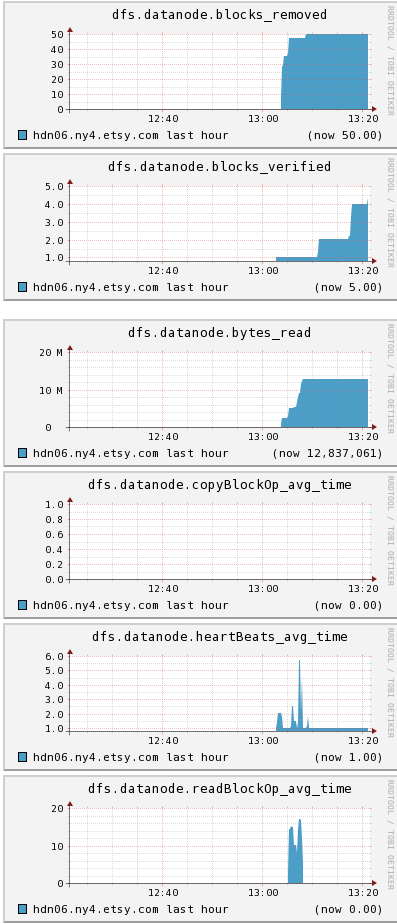
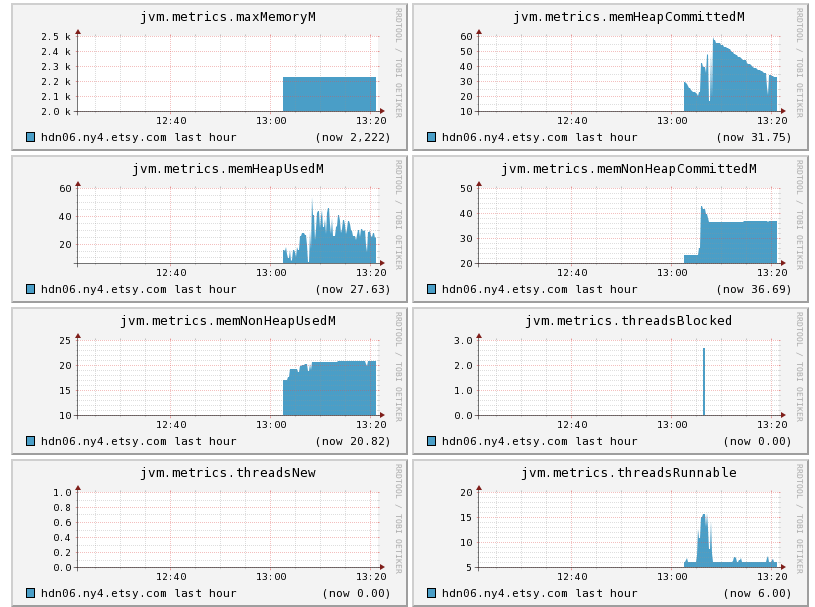
There is a LOT of detail in these graphs, with metrics ranging from DFS (things like bytes written, and how many operations were transferred from other nodes) to the JVM (monitor those heap memory sizes!)

This is probably old news to most people I’m sure, but I have a rule that if I didn’t find it within 30 minutes, maybe this will help someone in the same boat as me 🙂

Anatomy of a Scam – Secret Shoppers

Post Syndicated from David original http://devilsadvocatesecurity.blogspot.com/2011/03/anatomy-of-scam-secret-shoppers.html

Here’s a recent example of a secret shopper scam. Like many scams, this one attempts to lure people who think that accidentally receiving a secret shopper invitation is a way to free money. In the end, it is merely an attempt at identity theft – though it may also involve a fee scam as well!

If the recipient bothers to check who it is from, it purports to come from Dow Chemical, with an email address that is [email protected], with a cc to [email protected]. The hsbrv.net domain points back to a Betty Prevo, with an email address listing [email protected]. That sounds suspiciously like our david212 address as well. The whois results are below:

Administrative Contact:
Prevo, Betty [email protected]
1368 X W. Estes Ave
Chicago, Illinois 60626
United States

For those who are interested, that address points to an apartment building in Chicago. Interestingly, Betty Prevo apparently exists and does live in that area in Chicago, but she’d probably be interested to find out that she’s running various domains.

Blumail? Well, it’s a free email service that, “provides global e-mail accounts, educational content, employment needs, entrepreneurship, networking, story / experience sharing, mentoring and volunteering opportunities to youth and others who are coming online in developing countries.” In this case? It’s a great place for a scammer to get free email hosting. It’s also a well known 419 scam domain. Blumail is a legitimate service, unlike the hsbrv.net domain we first looked at.

Now, the actual scam letter:

Hello there,

My Name is David Anderson and I am your group regional Instructor from within the USA.Henceforth you will be working with me on the completion of your Mystery Shopper’s Position application. Like you already know, your weekly per assignment is $300:00 Flat for working with us and will come in payments of $300 each per assignment you complete for the company.

Note that the name actually somewhat matches the email address – that’s often a missed detail for our scammers.

PAYMENT TERMS:
Your payment would be sent ($300) per assignment , Also the company is in charge of providing you with all expense money for the shopping and other expenses incurred during the course of your assignment.All the tools you will needing would be provided to you with details every week you have an assignment.

JOB Description :
1} When an assignment is given to you,You would be provided with details to execute the assignment and in a timely fashion.
2} You would be asked to visit a company or store in your area and they are mostly our competitors as a secret shopper and shop with them to know more about their sales and stock , cost sales and more details as provided by the company then report back to us with details of whatever transpired a the store. But anything you buy at the shop belongs to you,all we want is an effective/quick job and reports.

Free money, and what sounds like a somewhat reasonable reason why the company would want you to do this. The grammar is even better than most letters of this type.

ASSIGNMENT PACKET :
Before any assignment we would provide you with the resources needed {cash}Mostly our company would send you a check which you can cash and use for the assignment. Included to the check would be your assignment packet .Then we would be providing you details on here. But you follow every single information given to you as a secret shopper .

It starts to fall apart here with lines like “Then we would be providing you details on here”.

And now for the meat of the scam:

KINDLY RECONFIRM YOUR INFORMATION BELOW TO PROCEED ON FIRST ASSIGNMENT:
Full Legal Name :
Full Physical Address :
City :
State :
Zip code :
Age:
Nationality :
Home and Cell # :
Present Occupation:
Email:

Thank you for reading.
Yours sincerely.
Contact Person: David Anderson
Time: 24 Hours daily by e-mail

And that’s the anatomy of a secret shopper scam. A simple way to hook the gullible into providing details for identity theft.

Final Reminder

Post Syndicated from Lennart Poettering original https://0pointer.net/blog/projects/final-reminder.html

Citizens! GNOMErs! Only two days are left and the GUADEC/Desktop Summit CFP
is over (end date is Friday). Submit your
presentation proposal now
, or it is too late. Read the CFP.

Oh, and regarding the need for a KDE identity account: due to limited
manpower we decided to reuse existing infrastucture instead of setting up a
completely new one. We do acknowledge that this is not ideal and we’d like to
ask for your understanding. (Creating a KDE identity account is unrestricted,
and you can easily create one even if you never had anything to do with KDE in
your life.)

Note that we are looking for both lightning talks and full-length
presentations. If you are interested in doing a lightning talk (and we can only
encourage you to), please use the same form to make your submission.

The collective thoughts of the interwebz