Post Syndicated from Arun Shanmugam original https://aws.amazon.com/blogs/big-data/beyond-json-blobs-implementing-the-variant-data-type-in-apache-iceberg-v3/
Apache Iceberg V3 introduces the VARIANT data type. VARIANT provides data engineers with a high-performance, native solution for managing semi-structured data within the data lake. Consider a massive fleet of IoT sensors: street-level temperature probes, air quality monitors, and vehicle telemetry. Each device emits data in unique JSON structures that constantly evolve with firmware updates.
Historically, engineers were forced to store these payloads as STRING blobs. This legacy approach mandates expensive CPU-intensive parsing at runtime and inflates storage costs with redundant raw text. VARIANT solves these inefficiencies by employing a shredded, binary-encoded format. This allows query engines to skip irrelevant data and access specific nested fields with columnar speed, effectively bridging the gap between the flexibility of JSON and the performance of a structured schema.
VARIANT is stored in Parquet as a three-part group: binary metadata (type and dictionary info), a binary value (the full variant for fallback), and a typed_value group where individual JSON fields are shredded into separate Parquet columns. When you query a specific field, Spark prunes the typed_value group to include only the requested sub-columns. It always retains metadata and the value fallback, so it avoids reading the entire document. This approach delivers two concrete benefits:
- Reduced query processing time: Queries access only the fields they need without deserializing entire JSON documents. This reduces the amount of data scanned and the time spent on deserialization.
- Lower storage footprint: Binary encoding compresses more efficiently than raw text, reducing storage costs.
Fields inside the JSON become individually accessible columns under the hood. A query that needs one value out of a deeply nested document no longer must read and deserialize the entire thing. You maintain schema flexibility while gaining the performance characteristics of structured columnar storage.
This post is part 1 of a two-part series. We walk through the basics: creating an Iceberg V3 table with a VARIANT column, inserting semi-structured data, and querying it with variant_get(). In Part 2, we scale to millions of rows and benchmark VARIANT against traditional string storage. We measure the difference in query performance and storage footprint.
Solution overview
This walkthrough demonstrates an end-to-end workflow for working with semi-structured data using the VARIANT data type in Apache Iceberg V3 on Amazon EMR Serverless. Raw JSON payloads are ingested and converted to binary VARIANT format using parse_json(). The data is stored in an Iceberg V3 table where the engine shreds the structure into columnar Parquet sub-columns. You can then query the data efficiently using variant_get() to extract specific fields without deserializing the entire document. AWS Glue Data Catalog manages the table metadata. Amazon Simple Storage Service (Amazon S3) provides the underlying storage.
Note: Check the Apache Iceberg documentation for the latest information on specification status and engine compatibility. Additionally, Fine-Grained Access Control (FGAC) through AWS Lake Formation is not currently supported for the VARIANT data type.
How VARIANT works
When you insert a JSON document into a VARIANT column, Spark converts it from a JSON string into the Variant binary format. During writes, the engine can shred the structure. It extracts individual fields and stores them as native Parquet-typed sub-columns within the VARIANT column’s typed_value group. Fields that are not shredded remain in the binary value column as a fallback. This is conceptually similar to how a columnar table stores each column independently. The difference is that the sub-columns live within a single VARIANT column, and the engine handles the shredding schema automatically.
At query time, when you ask for a specific field using variant_get(), Spark reads only the sub-column that contains that field. It does not need to load or parse the rest of the document. For workloads that repeatedly query a handful of fields out of large, complex JSON payloads, this can significantly reduce the amount of data scanned. It also reduces the time spent deserializing it.
The variant_get() function uses JSON path syntax to navigate the structure. You can extract scalar values with an explicit type (optional), access nested objects, and reach into arrays by index. The function signature is the following.
Where column is the VARIANT column name, the second argument is a JSON path expression, and the optional third argument specifies the expected return type (such as 'string', 'int', or 'double'). When the type argument is omitted, the function returns a VARIANT value that preserves the original encoding.
Running Iceberg V3 on Amazon EMR Serverless
Amazon EMR Serverless 8.0 ships with Apache Spark 4.0.1, which includes native support for Iceberg V3 and the VARIANT data type. You do not need to install additional libraries or configure custom JARs. Amazon EMR Serverless manages the compute infrastructure and scales resources up and down based on workload demand. You can focus on the data rather than the cluster.
While this post uses Amazon EMR Serverless, Iceberg V3 VARIANT support is also available on Amazon EMR on EC2 and Amazon EMR on EKS. You can choose the deployment model that fits your environment.
Getting started
The following walkthrough creates an Iceberg V3 table with a VARIANT column, inserts a set of IoT sensor events, and runs queries to extract fields from the semi-structured payload. Each step includes the code you need to run it on Amazon EMR Serverless.
Prerequisites
Before you begin, verify you have the following:
- An AWS account with permissions to create Amazon EMR Serverless applications and access Amazon Simple Storage Service (Amazon S3).
- An Amazon S3 bucket for storing Iceberg table data and scripts.
- AWS Glue Data Catalog configured for metadata management.
- An IAM execution role with permissions for Amazon EMR Serverless, Amazon S3, AWS Glue, and Amazon CloudWatch Logs.
- AWS Command Line Interface (AWS CLI) installed and configured.Note: Running this solution in your AWS account might incur charges for Amazon EMR Serverless, Amazon S3, and AWS Glue. Refer to the respective pricing pages for cost details.
Step 1: Initialize a Spark session with Iceberg V3
Start by creating a Spark session configured to use the Iceberg catalog backed by AWS Glue. The key settings are the Iceberg Spark extensions and the AWS Glue catalog implementation. Replace <YOUR_S3_BUCKET> with your bucket name.
When running on Amazon EMR Serverless, some Spark configurations might be set at the application or job level. The configuration shown here is included in the script for completeness. Depending on your Amazon EMR Serverless application settings, you might not need to specify all these properties in the script.
Step 2: Create an Iceberg V3 table with a VARIANT column
Create a namespace and table. The format version must be set to 3 for VARIANT data type support. The following table models IoT sensor events with a few standard columns and a VARIANT column for the semi-structured payload.
The event_data column is declared as VARIANT. Iceberg stores it in Parquet as a binary-encoded VARIANT structure (metadata, value, and optional shredded sub-columns) rather than as a plain text string.
Step 3: Insert semi-structured data
To insert JSON data into a VARIANT column, use the parse_json() function. This converts a JSON string into the binary VARIANT format at write time. The following example creates a small DataFrame of IoT events and appends them to the table.
The parse_json() call is the key step. It takes the raw JSON string and encodes it into the binary VARIANT format before writing to the Iceberg table.
Step 4: Query VARIANT data with variant_get()
Once the data is in the table, you can extract individual fields from the VARIANT column using variant_get(). The following queries demonstrate three common patterns: simple field extraction, deep nested access with filtering, and array element access.
The following queries are shown as raw SQL for readability. To run them in your PySpark script, wrap each query in a spark.sql() call. For example: spark.sql("SELECT ...").show().
Query 1: Simple field extraction
Extract top-level sensor readings from the payload.
This query reads only the temperature and humidity sub-columns from the VARIANT data. It does not parse or load the rest of the JSON document.
Query 2: Deep nested access with filtering
Reach into nested objects and filter on a value buried inside the structure.
The WHERE clause filters directly on a nested VARIANT field. Spark evaluates the predicate against the shredded sub-column without deserializing the full payload.
Query 3: Array element access
Access elements inside a JSON array stored within the VARIANT column.
Array indexing uses standard bracket notation in the JSON path. This query finds events where the first alert has critical severity and returns the alert details.
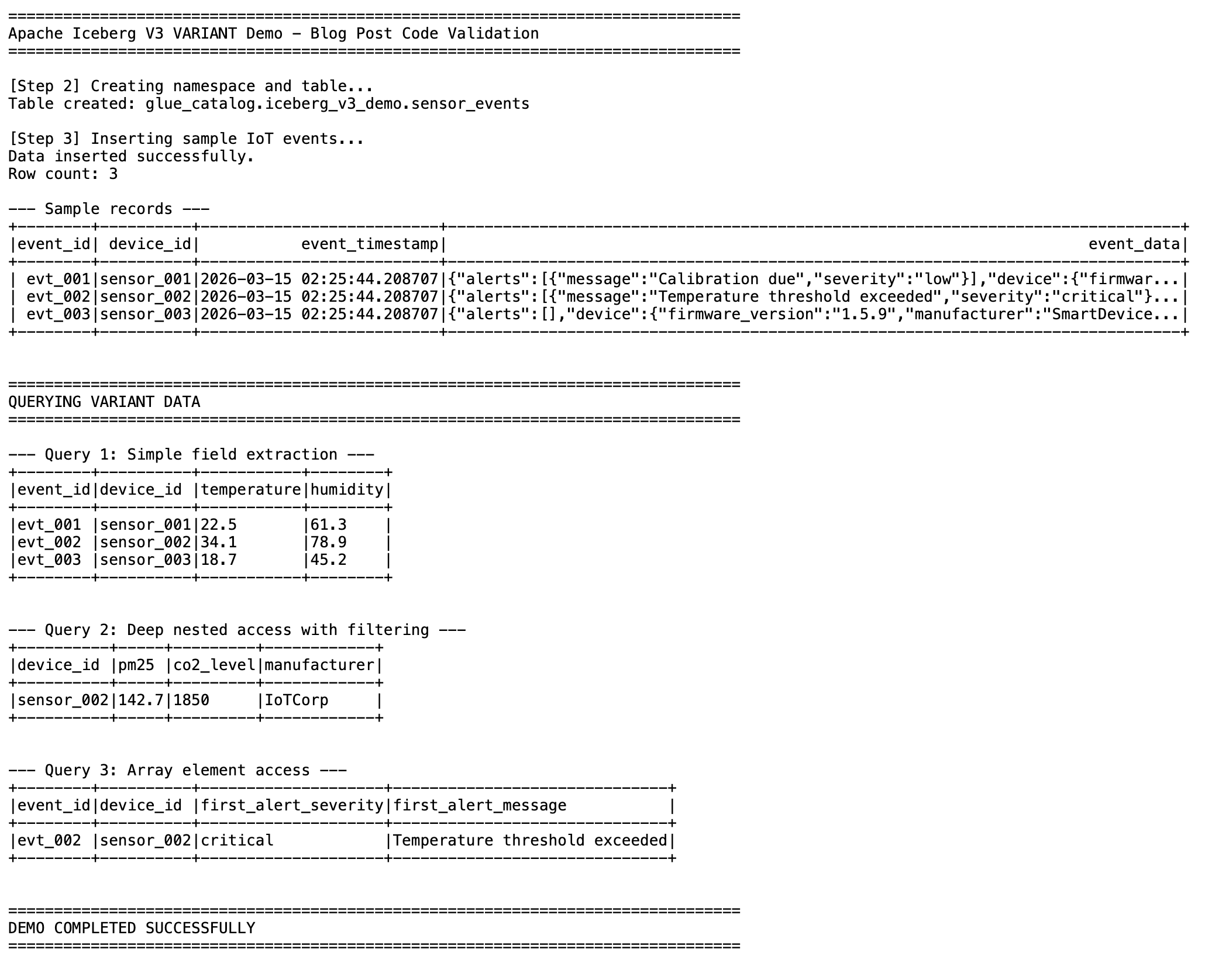
Figure 1: Query results showing simple field extraction, nested access with filtering, and array element access from the VARIANT column.
Submitting the job to Amazon EMR Serverless
To run this on Amazon EMR Serverless, save the preceding code as a single PySpark script (for example, iceberg_v3_variant_demo.py), upload it to Amazon S3, and submit it as a job. Replace the placeholder values with your own.
Before submitting the job, make sure you have created an Amazon EMR Serverless application. For instructions, see Getting started with Amazon EMR Serverless in the Amazon EMR documentation.
Use cases
VARIANT fits naturally into workloads where the data is semi-structured and the schema is not fully known in advance. Some use cases include the following:
- IoT and sensor data: Device fleets produce telemetry in varying JSON formats that evolve with firmware updates. VARIANT stores these payloads without requiring a fixed schema, and queries can extract specific readings without scanning the entire document.
- Clickstream analytics: User behavior events on websites and mobile apps carry different attributes depending on the action. Page views, clicks, form submissions, and purchases each have their own structure. VARIANT accommodates these data types in a single column.
- Log analytics: Application logs, infrastructure metrics, and audit trails often arrive as unstructured or loosely structured JSON. VARIANT lets you ingest them as is and query specific fields on demand, without defining a schema up front.
Clean up
To avoid ongoing charges, delete the resources you created:
- Drop the Iceberg table and namespace using Spark SQL.
- Stop and delete the Amazon EMR Serverless application.
- Delete the S3 objects and bucket used for table data, scripts, and logs.
Conclusion
Apache Iceberg V3’s VARIANT type provides an efficient way to store and query semi-structured data in your data lake. Columnar storage and shredding reduce storage costs, and direct field access through variant_get() removes the need to parse JSON strings at query time. On Amazon EMR Serverless, you get this capability without managing infrastructure.
In Part 2 of this series, we scale to millions of rows and benchmark VARIANT against traditional string storage. We measure query performance and storage footprint under realistic workloads.
To learn more about Apache Iceberg on AWS, see Apache Iceberg on AWS prescriptive guidance. For more information about Amazon EMR Serverless, see the Amazon EMR Serverless documentation.