Post Syndicated from Mohammad Sabeel original https://aws.amazon.com/blogs/big-data/autonomous-troubleshooting-for-medallion-architecture-with-aws-devops-agent-and-apache-spark-troubleshooting-agent/
Every minute of data processing pipeline downtime delays business decisions, stalls downstream analytics, drives revenue loss, and erodes stakeholder confidence. Teams that run Medallion Architecture pipelines—a common data lakehouse pattern where data flows through bronze, silver, and gold layers with increasing quality—face cascading failures that impact revenue-critical reporting and machine learning workloads. As you scale these multi-stage pipelines with Amazon Managed Workflows for Apache Airflow (MWAA), AWS Glue, and Amazon Redshift, troubleshooting failures becomes increasingly complex. When a mission-critical job fails, an engineer must sift through gigabytes of logs across interconnected systems. This means spending hours on incident investigations, examining execution timelines and resource metrics, and cross-referencing findings with Amazon CloudWatch and recent deployment changes to find the root cause. This requires deep familiarity with the underlying technologies, expertise not every team member has. When the right engineer is unavailable during off-hours, pipeline downtime extends and downstream consumers wait. The cycle of detect, investigate, fix, and repeat is costly and entirely reactive. A proactive operational model moves issue identification upstream, catching and addressing problems before they disrupt your data pipelines.
In this post, we show you how to diagnose multi-layer Medallion Architecture pipeline failures in minutes using AWS DevOps Agent with Apache Spark Troubleshooting Agent integrated as an MCP server.
What is AWS DevOps Agent and Apache Spark Troubleshooting Agent?
AWS DevOps Agent is an autonomous investigation agent powered by AI that automatically diagnoses operational issues across your AWS environment. When a failure occurs, the agent independently gathers evidence from logs, metrics, and configurations across interconnected services, identifies the root cause, and delivers actionable remediation steps, all without human intervention. It integrates with your existing workflows through webhooks and delivers findings directly to communication channels like Slack. With AWS DevOps Agent, you can replace the reactive cycle of detect, investigate, fix, and repeat with autonomous, proactive troubleshooting. The agent acts as your always-on, on-call engineer, starting its investigation the moment a failure occurs, whether during business hours or in the middle of the night.
Apache Spark Troubleshooting Agent is an AI-powered, fully managed Model Context Protocol (MCP) server that data engineers can use to diagnose Spark application failures across Amazon EMR, AWS Glue, and Amazon SageMaker AI Notebooks using natural language. It automatically correlates Spark History Server data, distributed executor logs, and configuration patterns to identify root causes and deliver actionable recommendations. This removes hours of manual investigation across multiple consoles and log files.
Use case
The following sections walk through a common Medallion Architecture failure scenario and show how autonomous troubleshooting resolves it.
The scenario
Consider this scenario: a gold layer AWS Glue job fails with “Missing data for not-null field.” The logs don’t reveal the actual problem. The root cause is a subtle data quality issue introduced upstream in the silver layer, a job that succeeded without errors. Without autonomous troubleshooting, you would manually trace data lineage across Amazon Simple Storage Service (Amazon S3), Amazon Redshift, and multiple AWS Glue job logs to find the source.
The solution
When integrated with the Apache Spark Troubleshooting Agent, AWS DevOps Agent identifies the gold layer Amazon Redshift write failure, traces it back to silver layer data corruption, and provides detailed root causes and actionable recommendations. The investigation typically completes within 3 to 5 minutes.
Solution overview
The following diagram shows the Medallion Architecture data flow across bronze, silver, and gold layers.
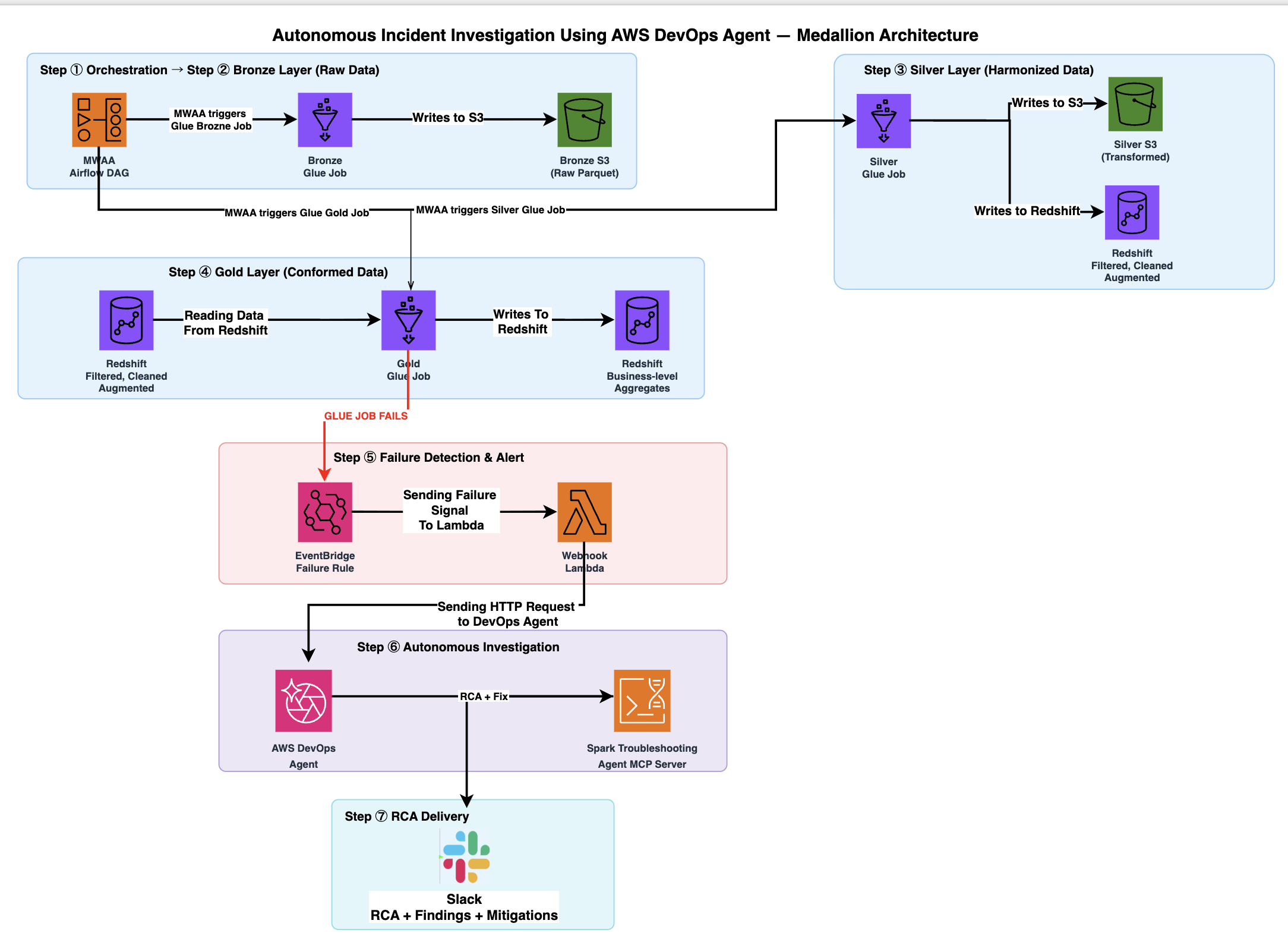
The architecture flow includes the following steps:
- Amazon MWAA triggers the Medallion pipeline directed acyclic graph (DAG), orchestrating three AWS Glue jobs sequentially: bronze layer, silver layer, and gold layer.
- The bronze layer job generates 50,000 synthetic ecommerce order records and writes raw Parquet files to Amazon S3.
- The silver layer job reads bronze data from Amazon S3, applies transformations, and writes the results to two destinations in parallel: Amazon S3, and Amazon Redshift (filtered, cleaned, and augmented data in the
silver_ecommercetable). This job silently introduces data corruption in approximately 8 percent oftotal_amountvalues. - The gold layer job reads from the Amazon Redshift
silver_ecommercetable, performs aggregation, and attempts to write business-level aggregates back to the Amazon Redshiftgold_ecommerce_summarytable. If upstream data corruption introducesNULLvalues, this job fails with “Missing data for not-null field” because thoseNULLvalues violate theNOT NULLconstraint. - When the gold layer job enters a FAILED state, Amazon EventBridge captures the AWS Glue Job State Change event and invokes an AWS Lambda function. The Lambda function retrieves webhook credentials from AWS Secrets Manager, constructs an HMAC-signed event payload containing the job name, run ID, and error details, and sends it to AWS DevOps Agent.
- AWS DevOps Agent receives the HTTP POST request to the webhook and starts an autonomous investigation. It authenticates with Amazon Cognito using the OAuth 2.0 client credentials flow, then sends an MCP request through Amazon Bedrock AgentCore Gateway. The AgentCore Gateway invokes a Signature Version 4 (SigV4) Proxy Lambda, which signs the request and forwards it to the Apache Spark Troubleshooting Agent MCP Server. The MCP Server analyzes Spark event logs, executor metrics, and error stack traces for the failed gold job.
- AWS DevOps Agent delivers the investigation to your configured Slack channel. The delivery includes root cause analysis, upstream data lineage back to the silver layer corruption, and step-by-step remediation recommendations.
Walkthrough
In the following sections, you deploy a three-layer Medallion Architecture pipeline that processes ecommerce order data. Complete the steps to get started with autonomous troubleshooting using AWS DevOps Agent.
Prerequisites
Before you begin, verify that you have the following:
- An AWS account. Your AWS Identity and Access Management (IAM) user or role must have the following permissions:
iam:CreateRole,iam:AttachRolePolicy,iam:PutRolePolicylambda:CreateFunction,lambda:AddPermissionglue:CreateJob,glue:StartJobRunredshift:CreateCluster,redshift:GetClusterCredentialsairflow:CreateEnvironmentevents:PutRule,events:PutTargetssqs:CreateQueuesecretsmanager:CreateSecretkms:CreateKeyec2:CreateVpc,ec2:CreateSubnet,ec2:CreateSecurityGroupcloudformation:CreateStack,cloudformation:DescribeStacks- Alternatively, you can use the
AdministratorAccessmanaged policy for simplicity in a dev/test environment.
- AWS Command Line Interface (AWS CLI) version 2.30.0 or later, installed and configured with appropriate credentials.
- (Optional) A Slack workspace if you want investigation results delivered to a channel.
Set up AWS DevOps Agent
In this section, you configure AWS DevOps Agent to receive and investigate pipeline failure events. This involves three tasks: creating an Agent Space (your investigation workspace), optionally connecting a Slack channel for notifications, and generating a webhook endpoint that your pipeline uses to send failure alerts to the agent.
Create an Agent Space
- Open the AWS DevOps Agent console.
- Choose Create Agent Space.
- Enter a name (for example,
medallion-troubleshooting). - Choose Create.
Connect Slack integration (optional)
If you use Slack for internal communication, you can configure it to receive investigation results.
- In the AWS DevOps Agent console, go to Agent Spaces, select medallion-troubleshooting and then Communications.
- Choose Add integration and choose Slack.
- Choose Next to allow AWS DevOps Agent to access your Slack workspace, and choose Allow.
- Provide the Slack workspace and the Channel ID where you want investigation results delivered, then choose Next.
- Enter the following command in your channel chat to complete the integration:
/invite @AWS DevOps Agent.- While running this command, when prompted, choose the correct region where the Agent Space is provisioned.
Create a webhook
- In your Agent Space, go to Webhooks.
- Choose Add webhook and choose Next on the two following pages.
- Choose Generate URL and secret key, and give the webhook a name (for example,
medallion-failure-webhook). - After creation, copy and save the Webhook URL (HTTPS endpoint) and Secret Key. You can also choose Download .csv to save this information to a secure location. Select the checkbox labeled I’ve saved and stored my URL and secret key, then choose Add.
Note the Webhook URL and Secret Key for later. You provide them as parameters when you create the AWS CloudFormation stack.
Deploy the AWS CloudFormation stack
The AWS CloudFormation template deploys the full Medallion Architecture pipeline. This includes an Amazon Virtual Private Cloud (Amazon VPC) with private subnets, an Amazon Redshift cluster (ra3.xlplus, single-node), and three AWS Glue jobs. It also creates an Amazon MWAA environment, Amazon EventBridge rules, AWS Lambda functions, and an AgentCore Gateway with Amazon Cognito OAuth authentication.
You can deploy the stack using one of two methods. Use Option A if you prefer a visual, guided experience through the AWS Management Console. Use Option B if you prefer working from the command line or need to integrate the deployment into a script or automation workflow.
Before you start, download the CloudFormation template from GitHub.
Option A: AWS Management Console (recommended)
- Open the AWS CloudFormation console and choose Create stack → With existing resources (import resources) or Upload a template file.
- Choose Choose file, select the downloaded
blog-medallion-stack.yaml, then choose Next. - For Stack name, enter
medallion-troubleshooting. - Fill in the parameters:
- For
WebhookUrl, enter your AWS DevOps Agent webhook URL (from Agent Space settings). - For
WebhookSecret, enter the webhook secret for authentication.
- For
- Choose Next, select I acknowledge that AWS CloudFormation might create IAM resources with custom names, then choose Submit.
Option B: AWS CLI
Replace the placeholder values:
YOUR-WEBHOOK-URL– Your AWS DevOps Agent webhook URL (from Agent Space settings).YOUR-WEBHOOK-SECRET– The webhook secret for authentication.YOUR-REGION– The AWS Region.
Wait for the stack status to show CREATE_COMPLETE. In our testing, this took approximately 30–40 minutes.
Retrieve Amazon Cognito client credentials
After the stack is deployed, it creates an Amazon Cognito user pool with an OAuth 2.0 client for AWS DevOps Agent authentication. Retrieve the client secret using the command below. The --user-pool-id and CognitoClientId needs to be copied from the stack outputs.
Replace YOUR-REGION with the actual AWS Region value, and save this value for the MCP Server registration in the following step.
Register the Spark Troubleshooting MCP Server
The Spark Troubleshooting MCP Server gives AWS DevOps Agent the ability to analyze Apache Spark event logs, executor metrics, and error stack traces from your AWS Glue jobs. By registering this server, you connect the agent to the diagnostic tooling it needs to autonomously investigate pipeline failures.
To register the MCP Server in AWS DevOps Agent, complete the following steps:
- In the AWS DevOps Agent console, go to Agent Spaces, select medallion-troubleshooting and then Capabilities.
- In the MCP Servers section, choose Add or Add Source.
- Find New MCP Server Registration and choose Register.
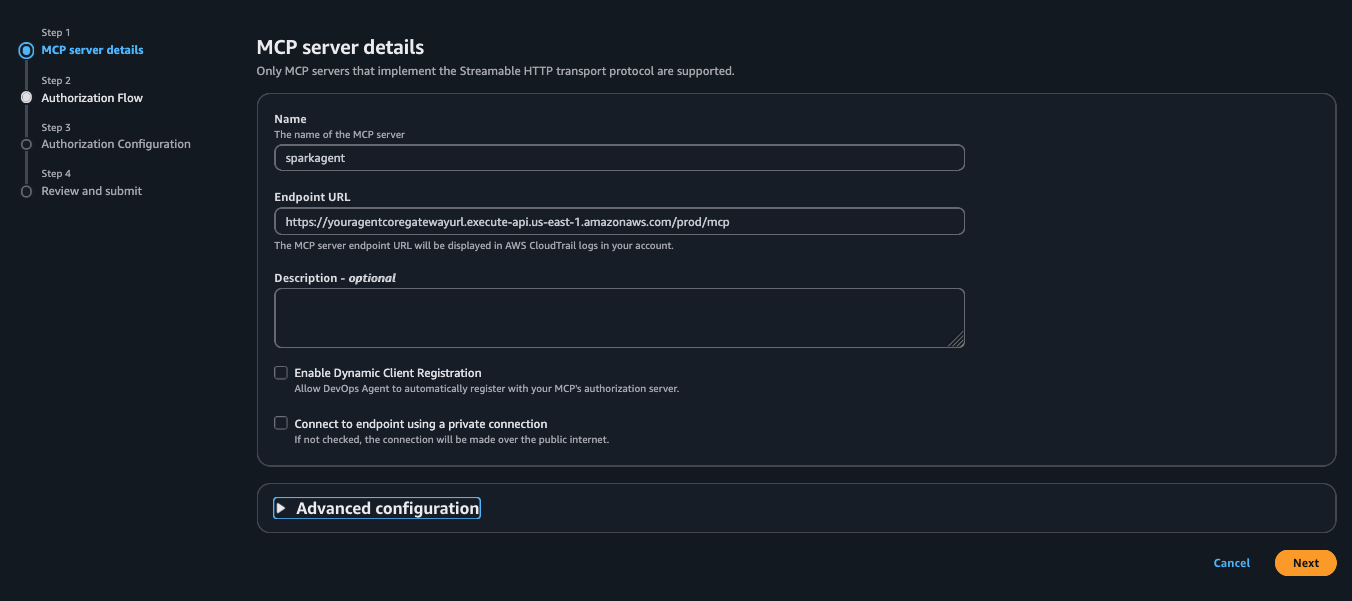
- For Name, enter
sparkagent. - For Endpoint URL, enter the
AgentCoreGatewayUrlvalue from the stack outputs. - For Description, enter
Apache Spark Troubleshooting MCP Server via AgentCore Gateway. - Leave Enable Dynamic Client Registration cleared.
- Leave Connect to endpoint using a private connection cleared, then choose Next.

- Under Authorization Flow, select OAuth Client Credentials, and choose Next.
- For Client ID, enter the
CognitoClientIdvalue from the stack outputs. - For Client Secret, enter the value you retrieved in the preceding step.
- For Exchange URL, enter the
CognitoTokenEndpointvalue from the stack outputs. - For Add Scope, enter
<stack-name>-mcp-proxy/invoke. For example,medallion-troubleshooting-mcp-proxy/invoke. - Choose Next, review your configuration, and choose Add.
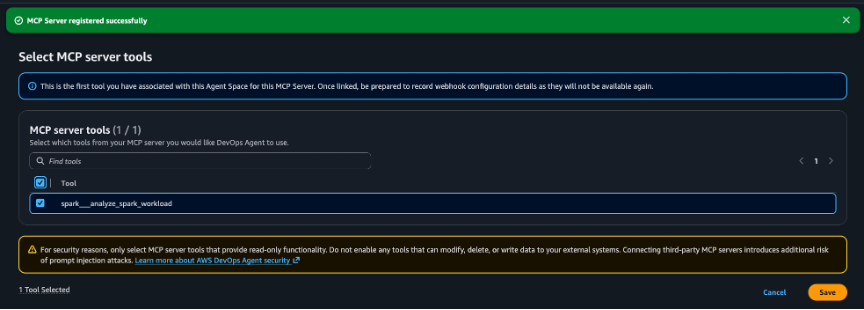
- Once you choose Add, on the following screen, click on the checkbox next to the
spark___analyze_spark_workload. This is the root cause analysis tool which provides detailed troubleshooting for failed Apache Spark workloads.

- Choose Save as a last step. You will see the MCP Server associated successfully message on the top.


See AWS DevOps Agent in action
Now that you have completed the prerequisites, you can see AWS DevOps Agent in action. Go to the Amazon MWAA Airflow Environments UI and click on Open Airflow UI under Airflow UI. It will open in a new browser tab. In the Airflow console, locate and manually trigger the medallion_architecture_pipeline DAG.
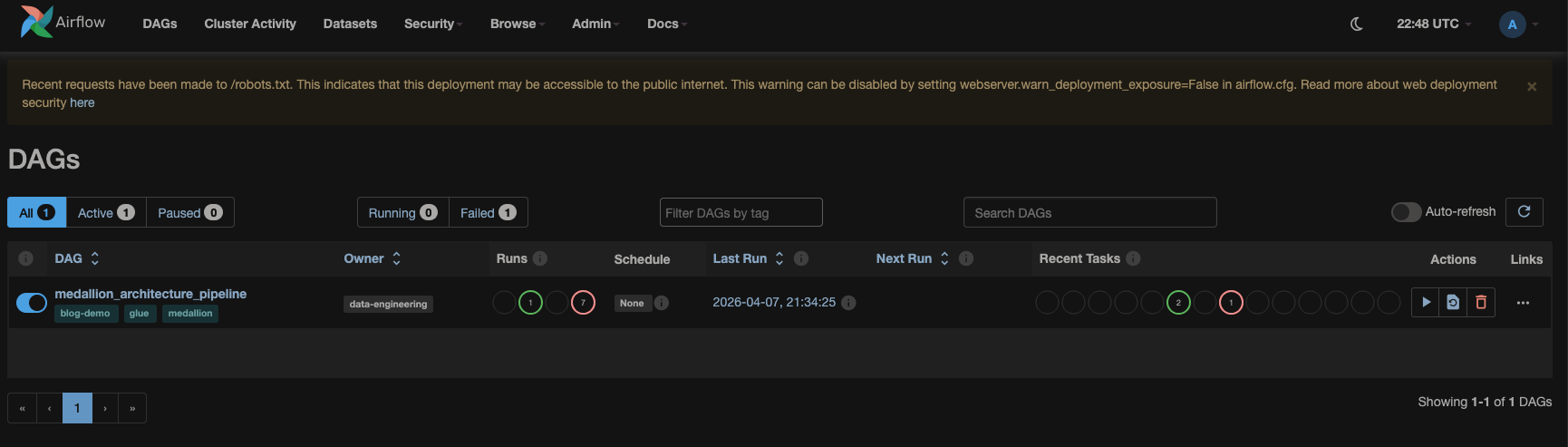
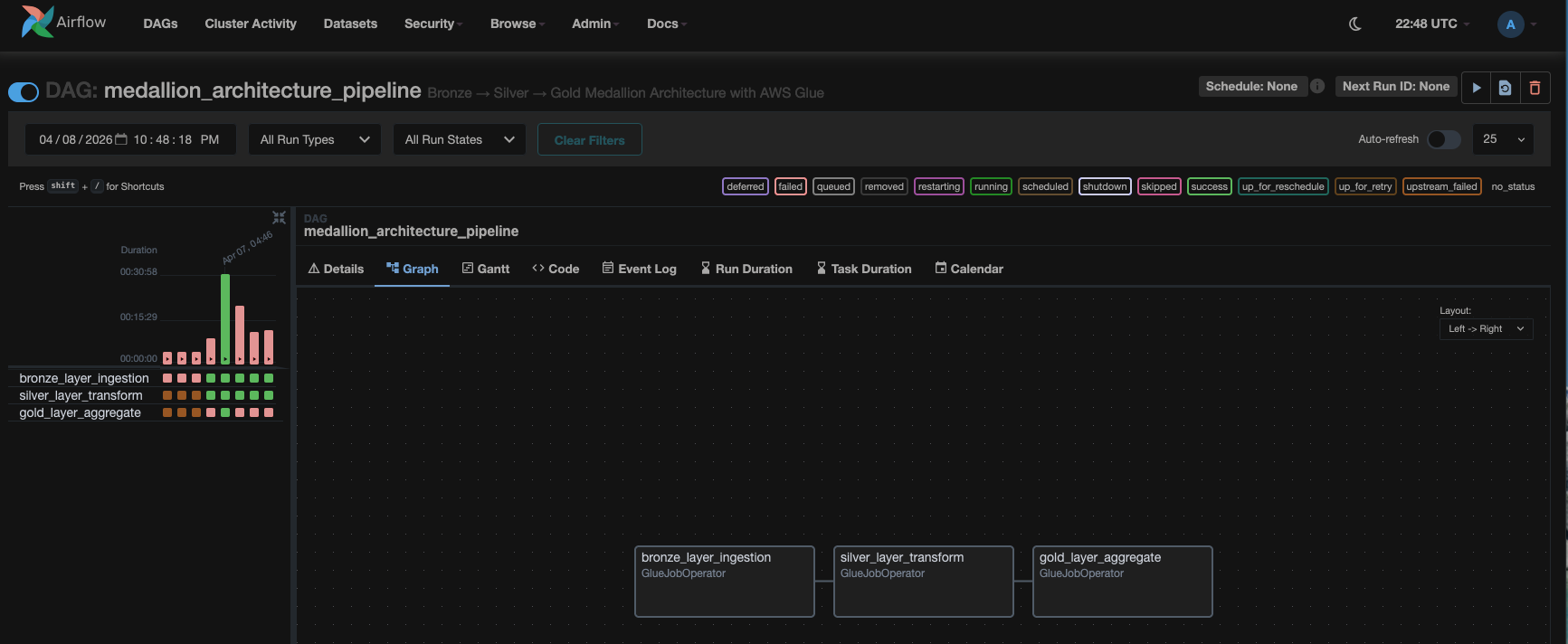
The DAG runs three AWS Glue jobs sequentially:
- Bronze layer – This job generates 50,000 ecommerce order records and writes them to Amazon S3 as Parquet files.
- Silver layer – This job applies transformations and loads the results to both Amazon S3 and Amazon Redshift. It also silently injects approximately 8 percent of
total_amountvalues with$prefix strings, introducing hidden data corruption. - Gold layer – This job reads from Amazon Redshift, casts
total_amountto numeric (producingNULLvalues for the$-prefixed strings), and attempts to write aggregated results to the Amazon Redshift target table. It fails because theNULLvalues violate theNOT NULLconstraint onrevenue_total.
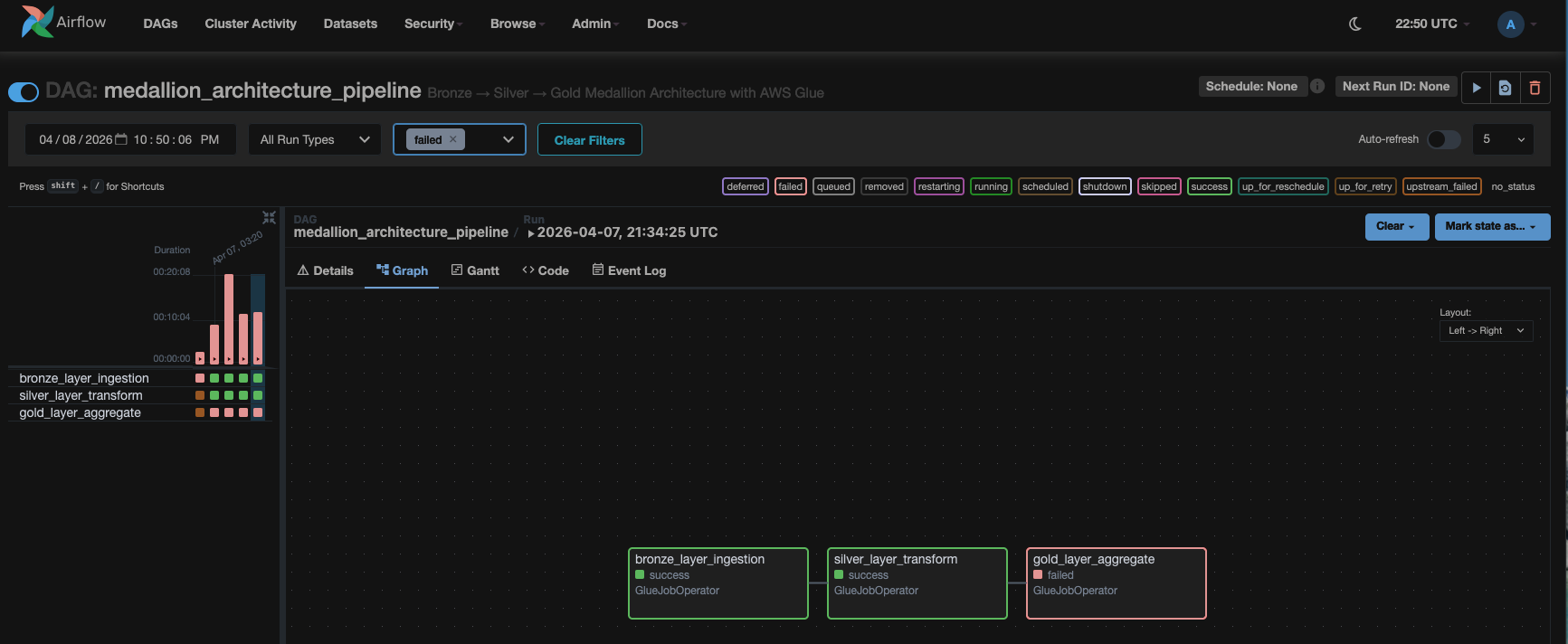
With the components deployed and connected, the autonomous troubleshooting pipeline is ready to respond to failures. In this walkthrough, the silver layer job deliberately introduces data corruption to simulate a real-world data quality issue. This causes the gold layer job to fail, giving you the opportunity to see how AWS DevOps Agent responds.
As soon as the gold layer job fails, AWS DevOps Agent starts an autonomous investigation and uses the Apache Spark Troubleshooting MCP Server where needed.
Go to the AWS DevOps Management console and choose the medallion-troubleshooting under Agent Spaces. Next, select the Operator Access button. This will redirect you to Operator Console where you will see that the incident investigation automatically started in 1-2 minutes post Gold layer job failure.
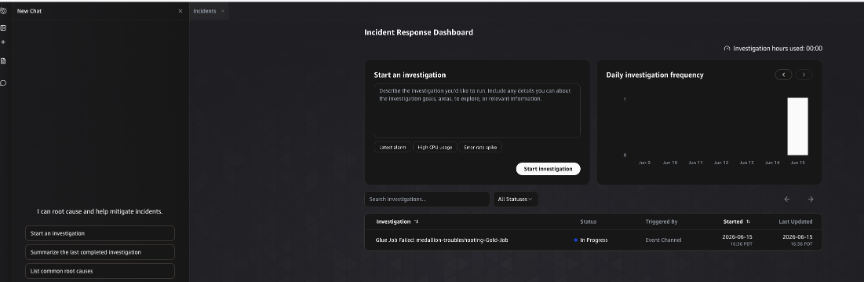
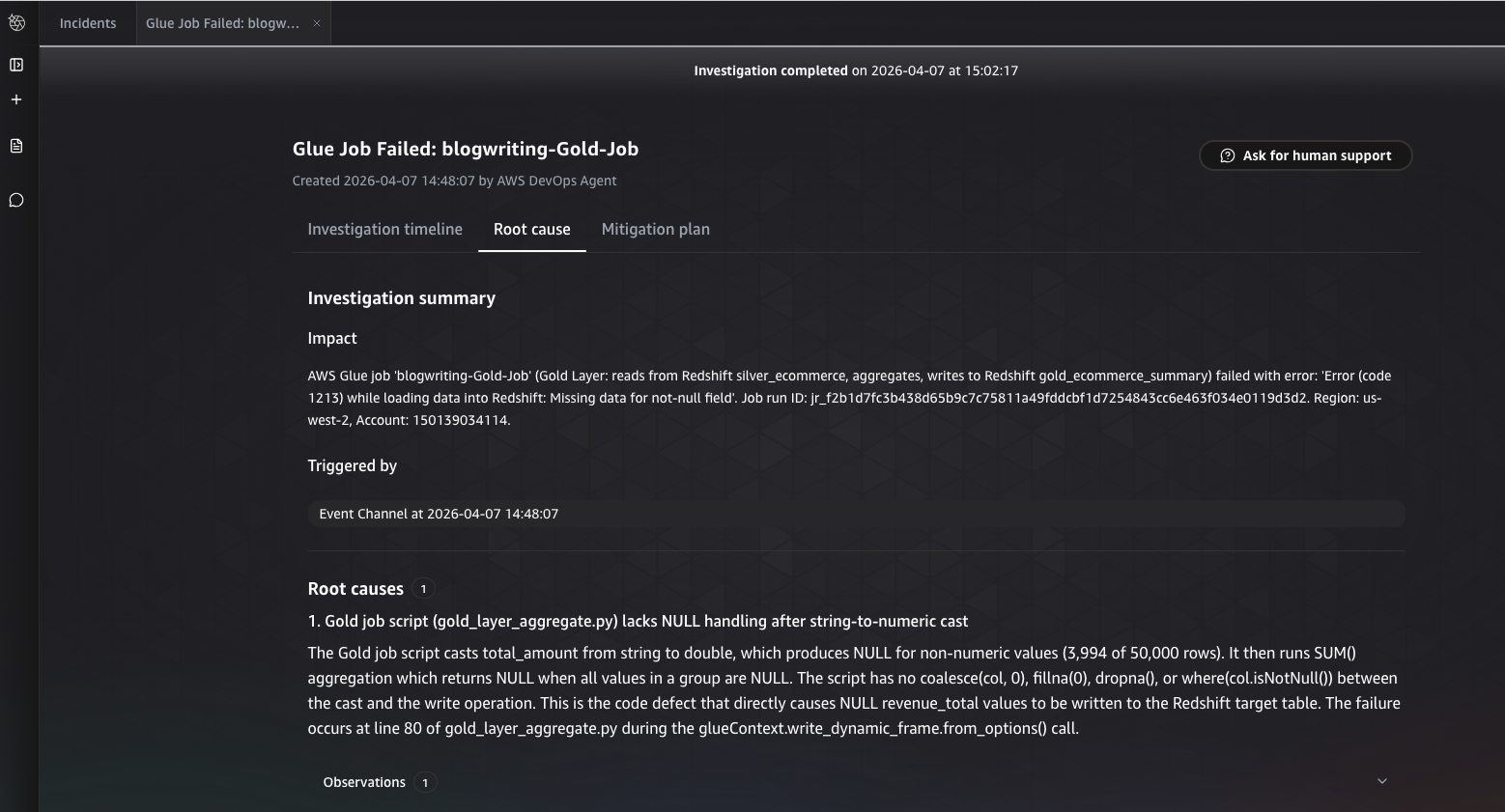
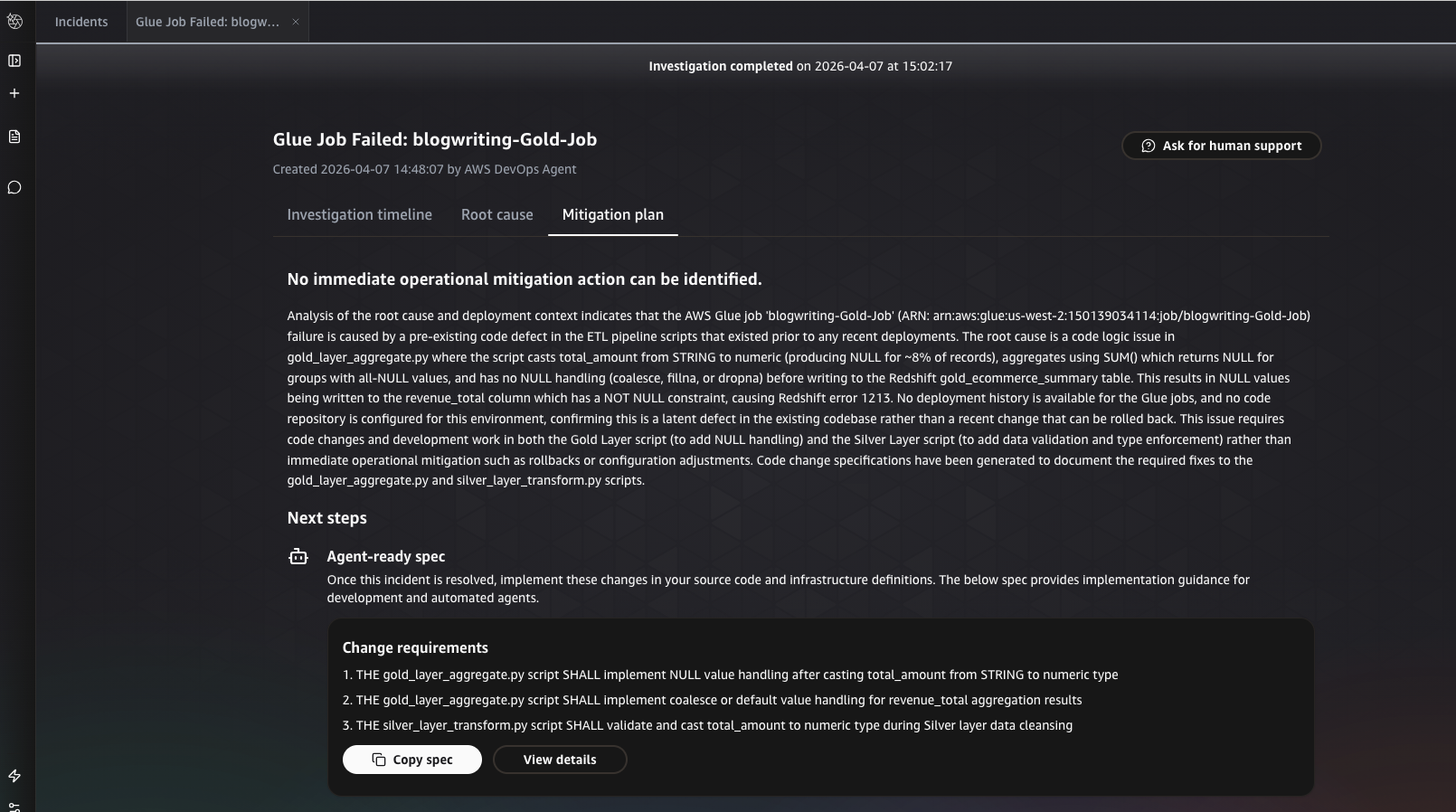
After the investigation completes, AWS DevOps Agent presents its findings within the incident analysis. The results are organized into two sections.
Root cause identified by AWS DevOps Agent
The agent identifies the underlying cause of the failure, tracing the gold layer write error back to data corruption introduced in the upstream silver layer AWS Glue job.
Mitigation plan generated by AWS DevOps Agent
On choosing Generate Mitigation Plan, the agent provides step-by-step remediation recommendations to resolve the issue and prevent recurrence.
AWS DevOps Agent sends a notification to Slack

Typically, within 3–5 minutes, the agent delivers a detailed investigation in Slack that includes root cause identification, upstream data lineage tracking, and an actionable recommendation.
You have deployed an autonomous troubleshooting pipeline for Medallion Architecture data pipelines. The pipeline runs using AWS Glue, Amazon Redshift, and Amazon MWAA, with AWS DevOps Agent providing autonomous investigation. The agent traced a gold layer Amazon Redshift write failure back to a silver layer data quality issue. This type of diagnosis would typically require hours of manual investigation by an engineer with deep expertise in Apache Spark, Amazon Redshift, and data pipeline architecture. AWS DevOps Agent completed it autonomously within minutes.
If you need human assistance, you can use the Ask for human support feature within AWS DevOps Agent to open a case with AWS Support, automatically populated with relevant investigation context.
Enhanced investigations with AWS DevOps Agent Skills
AWS DevOps Agent autonomously investigates failures out of the box. You can enhance its diagnostic depth using Skills, a feature that provides the agent with domain-specific guidance tailored to your environment.
For Medallion Architecture pipelines, you can create Skills that instruct the agent to check for data type mismatches between pipeline layers when Amazon Redshift COPY errors occur, cross-reference silver layer data quality metrics with gold layer aggregation failures, or follow your internal runbook for escalating data quality issues to the upstream data engineering team.
To configure Skills, go to your Agent Space in the AWS DevOps Agent console and choose the Skills tab.
Clean up
To avoid incurring future charges, delete the resources you created during this walkthrough promptly after you finish testing.
To clean up resources, complete the following steps:
- Deregister the MCP Server. In the AWS DevOps Agent console, go to your Agent Space and choose the Capabilities tab. In the MCP Servers section, choose the
sparkagentserver, then choose Deregister. - Delete the webhook. In your Agent Space, go to the Webhooks tab. Choose the
medallion-failure-webhook, then choose Delete. - Empty the Amazon S3 buckets. Open the Amazon S3 console. Locate the buckets created by the stack (their names start with
medallion-troubleshooting). For each bucket, choose Empty, enterpermanently deleteto confirm, and choose Empty. - Delete the AWS CloudFormation stack. Open the AWS CloudFormation console. Choose the
medallion-troubleshootingstack, then choose Delete. Alternatively, run the following command:
Wait for the stack deletion to complete.
- Delete any retained Amazon S3 buckets. Some Amazon S3 buckets might have a
DeletionPolicyofRetainand aren’t automatically deleted with the stack. Return to the Amazon S3 console, locate any remaining buckets created by the stack, empty them using the process in the preceding step, and then choose Delete for each bucket.
Conclusion
In this post, you deployed an autonomous troubleshooting pipeline for Medallion Architecture data pipelines using AWS Glue, Amazon Redshift, Amazon MWAA, and AWS DevOps Agent. The agent traced a gold layer Amazon Redshift write failure back to a silver layer data quality issue—a diagnosis that would typically require hours of manual investigation by an engineer with deep expertise across multiple services.
As your data pipelines grow in complexity, so does the challenge of diagnosing failures that span multiple layers and services. AWS DevOps Agent reduces your mean time to resolution by autonomously investigating incidents the moment they occur, whether during business hours or at 2 AM. Your on-call engineers spend less time sifting through logs and more time building reliable data infrastructure. By shifting from reactive firefighting to autonomous, proactive troubleshooting, you can improve pipeline reliability, protect downstream analytics and machine learning workloads, and maintain stakeholder confidence in your data platform.
To learn how to structure Agent Spaces for investigation accuracy, scope resource access, and use infrastructure as code to streamline deployment, see Best practices for deploying AWS DevOps Agent in production. To learn how to evaluate and choose the right lakehouse pattern for your needs, see Navigating architectural choices for a lakehouse using Amazon SageMaker. For more about Apache Spark Troubleshooting Agent, see Introducing the Apache Spark Troubleshooting Agent for Amazon EMR and AWS Glue.
Next steps
Now that you have set up autonomous troubleshooting for your Medallion Architecture pipeline, consider exploring the following:
- Escalate to AWS Support directly from an investigation. If the agent’s findings require human assistance, you can use the Ask for human support feature within AWS DevOps Agent. This opens a case with AWS Support that is automatically populated with the relevant investigation context, which reduces the time spent describing the issue. For more information, see Getting help from AWS Support through AWS DevOps Agent.
- Enhance investigations with Skills. Create custom Skills to give the agent domain-specific guidance tailored to your environment.
- Learn more about AWS DevOps Agent best practices, choosing the right lakehouse pattern, and the Apache Spark Troubleshooting Agent.
- Optimize your AWS DevOps Agent deployment. Learn how to structure Agent Spaces for investigation accuracy, scope resource access, and use infrastructure as code to streamline deployment. See Best practices for deploying AWS DevOps Agent in production.
- Choose the right lakehouse architecture. Evaluate and compare lakehouse patterns to find the best fit for your data platform. See Navigating architectural choices for a lakehouse using Amazon SageMaker.
- Explore the Apache Spark Troubleshooting Agent. Learn more about the diagnostic capabilities the agent uses to analyze Spark event logs, executor metrics, and error stack traces. See Introducing the Apache Spark Troubleshooting Agent for Amazon EMR and AWS Glue.