Post Syndicated from Sachin Saini original https://aws.amazon.com/blogs/compute/get-started-with-aws-lambda-snapstart-for-container-images/
AWS Lambda recently launched SnapStart for container image functions, reducing startup times from several seconds to as low as sub-second. Customers deploy Lambda functions with container images to align with their organization’s container-based deployment standards, or to package larger dependencies up to 10 GB. However, larger container images can experience startup times of several seconds as Lambda downloads image layers and initializes the runtime and application code. SnapStart addresses this by taking a snapshot of the initialized execution environment during function deployment, caching it, and resuming from it on invocation, instead of initializing from scratch.
In November 2022, Lambda launched SnapStart for Java, reducing startup latency by up to 10x. In November 2024, SnapStart expanded to Python and .NET managed runtimes, reducing cold start latency to as low as sub-second. These launches helped developers achieve faster startup time, but only for .zip file archives. By extending SnapStart support for container image functions, customers can improve startup times for latency-sensitive workloads such as ML inference and interactive APIs.
This post covers how SnapStart for container images works, how to enable it, and best practices and considerations for your workloads.
How SnapStart for container images works
When you deploy a Lambda function, you choose one of two deployment models: a .zip file archive or a container image. With managed runtimes we already support SnapStart for Python, .NET, and Java functions, and now we have extended this capability to container images. When you invoke the deployed function for the first time, or when a burst of traffic arrives, Lambda checks if there is an available execution environment. If none are available, Lambda creates a new one.
For container image functions, this means downloading and extracting image layers, bootstrapping the runtime, and running your initialization code. This process can take several seconds, which users experience as a cold start.
When you enable SnapStart and publish a function version, Lambda proactively creates an execution environment, initializes your function, and then takes a Firecracker microVM snapshot of the full memory and disk state. This snapshot is encrypted and cached for low latency access and remains cached until you delete the corresponding function version.
On invocation, Lambda resumes from the cached snapshot rather than initializing from scratch. With SnapStart, initialization happens once at deployment time rather than on every invocation, replacing the initialization phase with a faster restore phase that speeds up startup time to as low as sub-second.
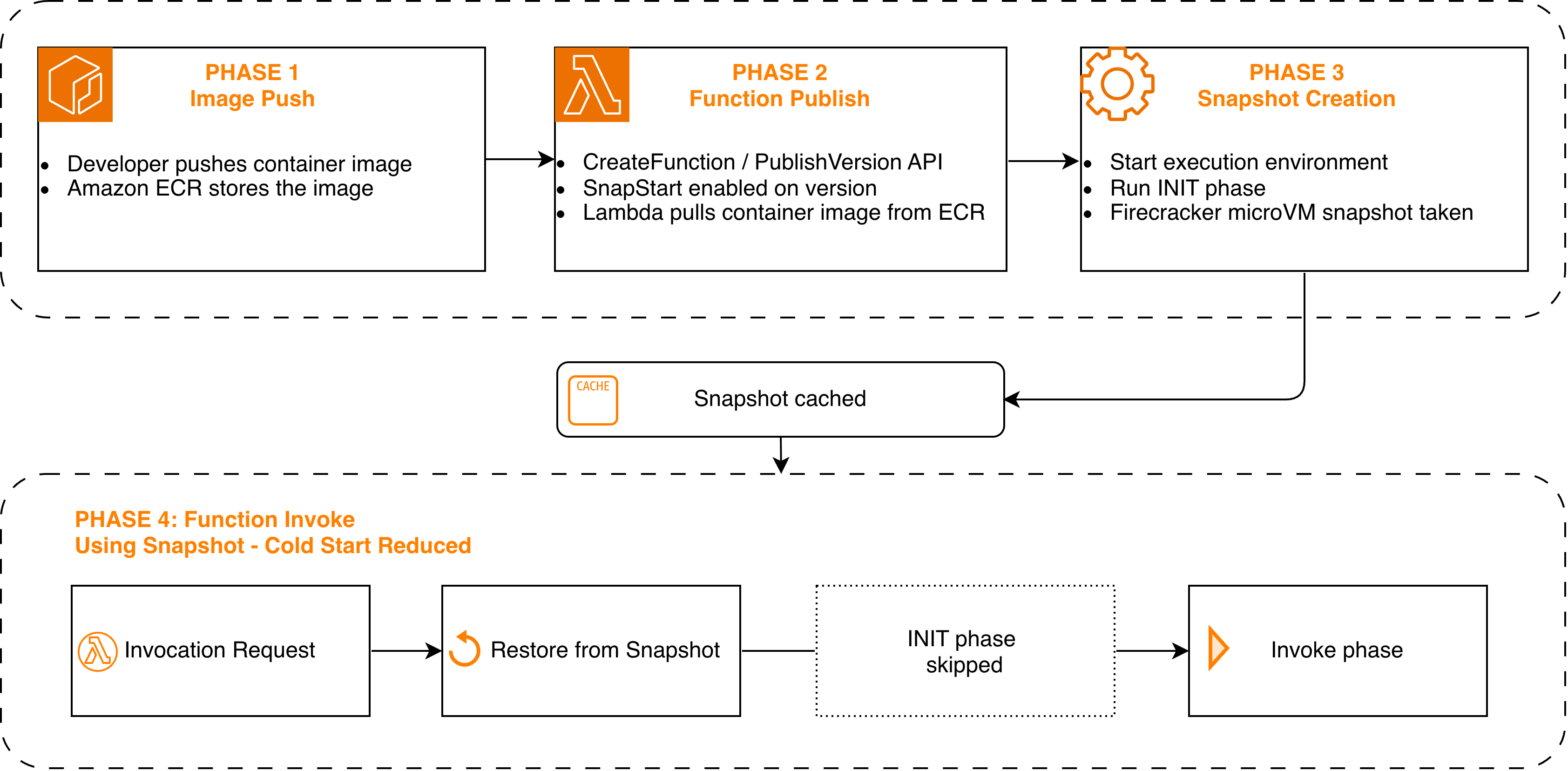
Figure 1: SnapStart for container images lifecycle, from image push to snapshot restore at invocation
Supported base images
For managed runtimes, you provide your code, and Lambda handles the runtime environment. For container image functions, you package your own runtime environment using Lambda-vended base images or your own custom base images. SnapStart for container images supports the following Lambda base images at launch. To learn about supported base images per runtime, see the Lambda SnapStart developer guide.
| Runtime | Base Image | Architecture |
| Java 11 and later | public.ecr.aws/lambda/java:11, :17, :21, :25 | x86_64, arm64 |
| Python 3.12 and later | public.ecr.aws/lambda/python:3.12, :3.13, :3.14 | x86_64, arm64 |
| .NET 8 and later | public.ecr.aws/lambda/dotnet:8, :9, :10 | x86_64, arm64 |
Regardless of which base image you use, there is an important consideration to understand before enabling SnapStart. When Lambda restores a function from a snapshot, any state captured during initialization is shared across all execution environments restored from that snapshot. This includes random number generators, unique IDs, cached credentials, and database connections. Your function needs to restore a unique state after each resume to avoid reusing the same random seed or an expired database connection across invocations. For more details on these considerations, see SnapStart uniqueness documentation.
To help you restore uniqueness for your application, Lambda provides runtime hooks for managed runtimes that let you run your own code at specific points in the snapshot-and-restore cycle. With SnapStart for container images, we are extending these same hooks to container image functions.
If your function uses one of the preceding Lambda-managed base images, Lambda offers runtime hooks for you to run your code (for example, to restore database connections). Lambda supports these runtime hooks for Java through CRaC, for Python through snapshot_restore_py, and for .NET through SnapshotRestore. To register your own before-snapshot and after-restore hooks for these runtimes, see SnapStart runtime hooks documentation.
If your function uses a base image without native SnapStart support (for example, a Node.js or Ruby base image), a custom Runtime Interface Client, or a custom runtime built on provided.al2023, review the documentation on implementing SnapStart hooks for container image functions and choose one of the following options.
- Option 1: Implement SnapStart runtime hooks. If you need to run custom logic when your function is snapshotted or restored, implement the /restore/next API in your container image as described in SnapStart runtime hooks documentation.
- Option 2: Opt in without hooks. If you do not need before-snapshot or after-restore hooks, add the following label to your Dockerfile (LABEL com.amazonaws.lambda.feature.snapstart=”Allow”)
For a reference implementation of SnapStart runtime hooks integration in a custom runtime, refer to the Lambda Rust Runtime repository, including its examples for both event-driven and HTTP functions to see how SnapStart and runtime hooks are implemented.
Getting started
To get started, you can use the AWS Management Console, AWS Command Line Interface (AWS CLI), AWS Software Development Kits (AWS SDKs), AWS CloudFormation, AWS Serverless Application Model (AWS SAM), or AWS Cloud Development Kit (AWS CDK) to activate, update, and delete SnapStart for container images. You can also use the Agent Toolkit for AWS to enable SnapStart as part of your agent-based workflows.
To use SnapStart with a container image function, your function must be deployed with PackageType Image, and the image must be pushed to an Amazon Elastic Container Registry (Amazon ECR) repository in the same AWS Region as your function. The examples in this section use a supported Lambda base image and us-east-1 as the AWS Region. Either set your default region or add –region to each command.
Activating SnapStart on an existing function
If you already have a container image function using a supported base image, activate SnapStart by updating the function configuration and publishing a version:
Creating a new function with SnapStart
Create an Amazon ECR repository:
Start with a Dockerfile using a supported base image. Here is an example for Python:
Build, push to Amazon ECR, and create the function with SnapStart in a single flow:
Verifying SnapStart is active
After publishing, check the function version configuration:
When SnapStart is active, the response shows:
Once the state is Active, invoke the published version:
Note that SnapStart applies only to published versions, not $LATEST. You must invoke a specific version number to use SnapStart.
Best practices and considerations
As SnapStart resumes your function from a point-in-time snapshot, here are some best practices to consider for resources initialized at snapshot time that may become stale when your function resumes, such as network connections, credentials, and unique IDs.
- Performance tuning: Preload dependencies and initialize resources in your init code rather than the handler. This moves heavy setup into the snapshot, where it’s captured once and reused across restores. For guidance on optimizing function startup latency, see the performance tuning section of the Lambda developer guide.
- Network connections: Since snapshots can persist over an extended period, connections established during initialization may no longer be valid after restore. Network connections established through an AWS SDK resume automatically. For connections your code manages directly, such as database connections, use after-restore hooks to re-establish them as described in the networking best practices section of the Lambda developer guide.
- Uniqueness: Avoid generating unique IDs, secrets, or random values during initialization, because these are shared across all execution environments restored from the same snapshot. Instead, generate them in the function handler or use after-restore hooks. Software that always gets random numbers from the operating system (for example, from /dev/random or /dev/urandom) does not need any updates to maintain randomness. Lambda always reseeds /dev/random and /dev/urandom when restoring a snapshot, so random numbers are not repeated even when multiple execution environments resume from the same snapshot. For more details on managing unique state across restores, see the handling uniqueness documentation for Lambda SnapStart.
- Ephemeral data: Cached credentials, timestamps, or other time-sensitive data captured during initialization may be stale by the time your function resumes from a snapshot. Use after-restore hooks to verify freshness and refresh any expired state before processing requests.
- Monitoring: Amazon CloudWatch logs include a RESTORE_REPORT line showing the time spent restoring the snapshot. The REPORT line includes Restore Duration, Billed Restore Duration, Duration, and Billed Duration. Note that InitDuration does not appear for SnapStart invocations because the function resumes from a snapshot rather than initializing. You can also use AWS X-Ray active tracing to capture real-time telemetry for extensions through the Telemetry API, and measure end-to-end latency with Amazon API Gateway and Lambda function URL metrics. To learn more about available monitoring options, visit the Lambda documentation on monitoring for SnapStart.
Limitations: Provisioned concurrency, Amazon Elastic File System (Amazon EFS), Amazon Simple Storage Service (Amazon S3) Files and ephemeral storage greater than 512 MB are not supported with SnapStart. Maximum container image size remains 10 GB. If you need any of the currently unsupported features, please reach out to us on the Lambda Roadmap GitHub page.
Pricing and availability
SnapStart for container images uses the same pricing dimensions as SnapStart for Python 3.12+ and .NET 8+. You pay for the cost of caching a snapshot per function version that you publish with SnapStart enabled, and the cost of restore each time a function is restored from a snapshot. To reduce your caching costs, delete unused function versions. Refer to the Lambda pricing page for more details.
Lambda SnapStart for container images is available in all commercial AWS Regions except Asia Pacific (New Zealand) and Asia Pacific (Taipei). For the latest list of supported Regions, see the Lambda SnapStart supported regions.
Cleanup
To avoid ongoing charges for the resources created in this walkthrough, delete them when you are done. Deleting a Lambda function version removes the associated cached snapshot and stops any related snapshot caching charges.
Delete the Lambda function. This removes all published versions and their cached snapshots:
Delete the container image and the Amazon ECR repository:
If you created an IAM execution role only for this walkthrough, delete it as well. For details, see deleting an IAM role.
Conclusion
In this post, we described how Lambda SnapStart for container images reduces cold start latency by snapshotting the initialized execution environment and resuming from it on subsequent invocations. We covered how SnapStart works, how to get started based on your base image type, best practices and considerations, and pricing and availability. We look forward to hearing from you about the future capabilities you need for SnapStart, on our Lambda Roadmap GitHub page.
Try SnapStart on your container image functions today. To learn more, visit the Lambda SnapStart documentation. For more serverless learning resources, visit Serverless Land.