Post Syndicated from Julian Wood original https://aws.amazon.com/blogs/compute/exploring-aws-lambda-web-functions-for-building-web-applications/
You can now run a standard Node.js web server on AWS Lambda with Lambda Web Functions, a new type of Lambda function. Deploy it with one command or AWS CloudFormation and get a public HTTPS endpoint with no adapter layer and no servers or load balancers to manage.
Lambda Web Functions suit server-side rendered web apps, REST and GraphQL APIs, streaming endpoints, and microservices. Building on the launch announcement, this post uses a sample application to show how one execution environment handles many requests at once and how the same app serves a global audience. See how active-CPU billing keeps the cost of waiting low while your code waits, with memory and requests billed separately.
Overview
Lambda launched in 2014 with a minimal model: upload your code, and the service handles everything else. For over a decade that code ran as an event handler, invoked once per event such as a batch of queue messages or an object landing in Amazon Simple Storage Service (Amazon S3). We now call this an Event Function and it remains the right choice for event-driven work.
Web Functions are a second type of Lambda function, running on the same Firecracker-based isolation as Event Functions. Instead of a handler that receives an event, your code runs as a standard HTTP server that listens on a port, which is what lets a web framework, or in this case a plain Node.js server, run unmodified.
A Web Function is made of three resources:
- Web Function is the top-level resource with a name and configuration.
- Revision is an immutable snapshot of your code and configuration which Lambda creates each time you deploy code or change revision configuration, so you can roll back by routing traffic to an earlier revision.
- Endpoint is a network entry point with a unique HTTPS domain, an authentication type, and the rules that route traffic to your revisions.
At launch, Web Functions run Node.js 24 on Arm64, with 2 vCPUs and 2 GB of memory per execution environment. Web Functions support Amazon Virtual Private Cloud (VPC) connectivity, allowing your function to access resources that exist within a VPC.
Walkthrough
Node.js frameworks that start an HTTP server, such as Express, Fastify, and Hono, run without adapters. Next.js in standalone mode needs a small index.js that sets its host and port. This post uses a plain Node.js server to stay dependency-free.
The full source is available in the Serverless Patterns collection along with other Web Functions patterns.
Prerequisites
You need an AWS account with the AWS Command Line Interface (AWS CLI) installed and configured and Node.js installed locally.
The pattern instructions show how to clone the repo and change to the pattern directory or download the pattern .zip file to run the example.
The app
The dashboard is a single Node.js HTTP server that streams live server metrics to the browser over server-sent events (SSE).
The runtime provides the address to listen on in the AWS_LAMBDA_HTTP_ENDPOINT environment variable, in host:port form. The server reads it and starts listening, exactly as it would anywhere else:
The runtime is nodejs24.x, and it loads index.js at the package root by default. To use a different entry file, set AWS_LAMBDA_NODEJS_ENTRYPOINT to its path.
Run locally
You can run the server locally with npm start.
Browse to http://localhost:3000/ to view the dashboard streaming from the local server.
Deploy
- Deploy using the single command:
For this example, you can also use
npm run deploydefined in thepackage.jsonfile.
The AWS CLI bundles your code, creates the function and an endpoint named dev with a live HTTPS URL. It also creates an execution role and a versioned S3 bucket, if one does not exist, that all CLI-deployed Web Functions in the Region share.
- Press Enter to create the resources.
The AWS CLI output shows the URL in the format: https://<id>.<shard>.lambda-web.<region>.on.aws
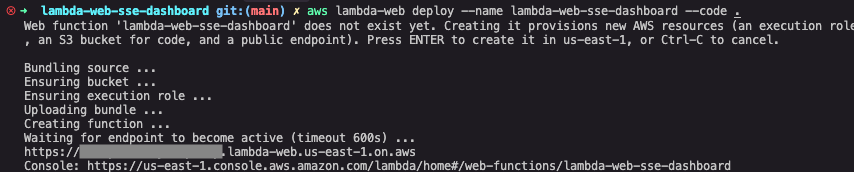
Figure 1: AWS CLI showing the aws lambda-web deploy command.
Browse to the URL and the dashboard loads, already streaming. This endpoint is public and the sample has no authentication, so use it for evaluation and delete it when you finish.
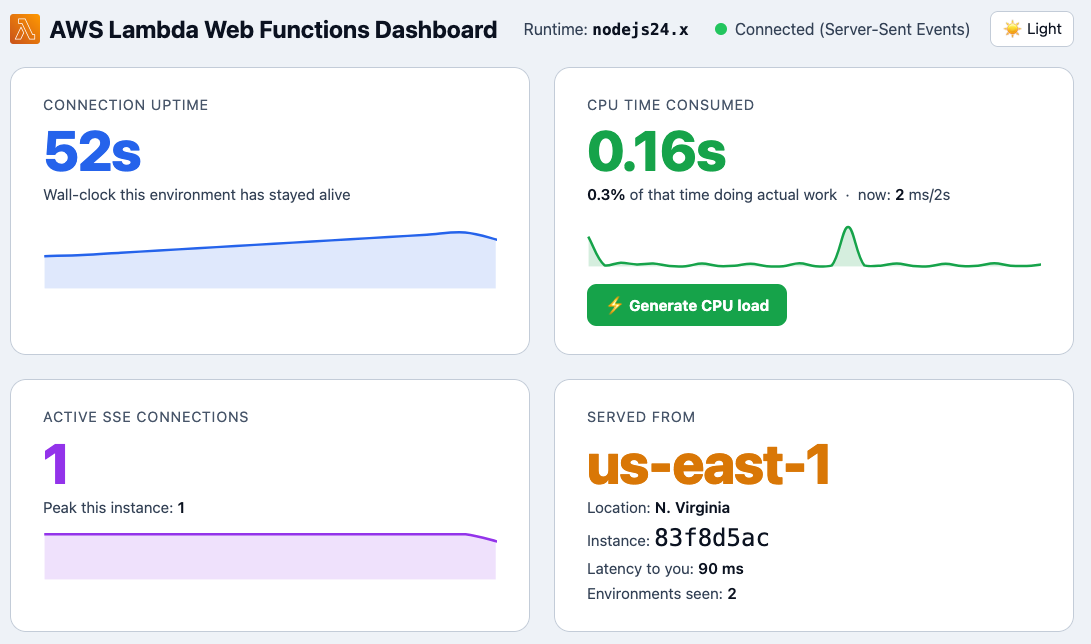
Figure 2: The app streaming dashboard showing function information.
The dashboard shows how long the execution environment has been alive and how many streaming connections it is holding open. It shows how much CPU it has used with a button to generate real CPU load on demand. The function runs in the US East (N. Virginia) Region (us-east-1). From my laptop in the United Kingdom, latency is 90 ms.
The dashboard updates every two seconds over a single HTTP streaming response. A Web Function environment is a long-lived process, so it keeps the connection open and keeps pushing data to the browser. The long-lived process can also run background tasks outside the main request path, such as emitting telemetry events.
An Event Function environment serves one request at a time. It can stream a response during an invocation, but each open stream occupies a whole environment. Lambda freezes the environment between invocations, so background work stops.
Active-CPU billing
If the environment stays alive for minutes at a time, what are you paying for? You pay for requests, consumed memory, and the CPU time the environment consumes. For this example, compare connection uptime with CPU time. The environment keeps running but uses only a fraction of a second of CPU.
Choose Generate CPU load, and the app runs a cryptographic hashing loop for about 1.5 seconds. CPU time climbs on the chart, then falls back to near zero when the work stops. When a request waits on a database, downstream API, or AI inference, your code uses little CPU, so the wait costs less than it would under wall-clock billing.
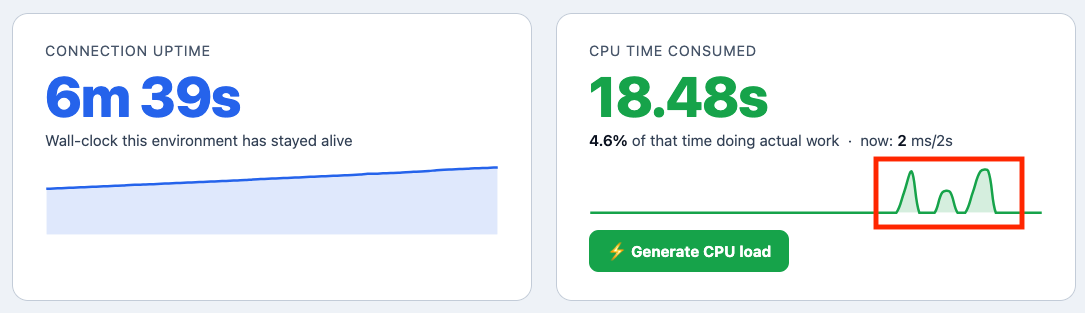
Figure 3: CPU chart mid-spike after choosing Generate CPU load.
For pricing details, read the AWS Lambda pricing page.
Concurrency and scale-out
With Web Functions, each execution environment handles many requests at once, not one at a time. As environments approach their concurrency limit, Lambda adds more environments and removes them again when traffic falls.
You can control how a Web Function scales. maxConcurrencyPerEnvironment sets the maximum number of requests each execution environment handles at once, up to 128, with a default of 64. On the endpoint, maxEnvironments caps the number of execution environments and rateLimit caps requests per second. You can use these two settings to protect downstream dependencies such as databases and external APIs. Both apply in each Region the endpoint serves and maxEnvironments applies to each revision. Requests above a limit receive HTTP 429 and are not queued.
Generate load on the app. Send 300 streaming requests to the /api/events endpoint, with up to 200 open at once, rather than a burst of quick responses.
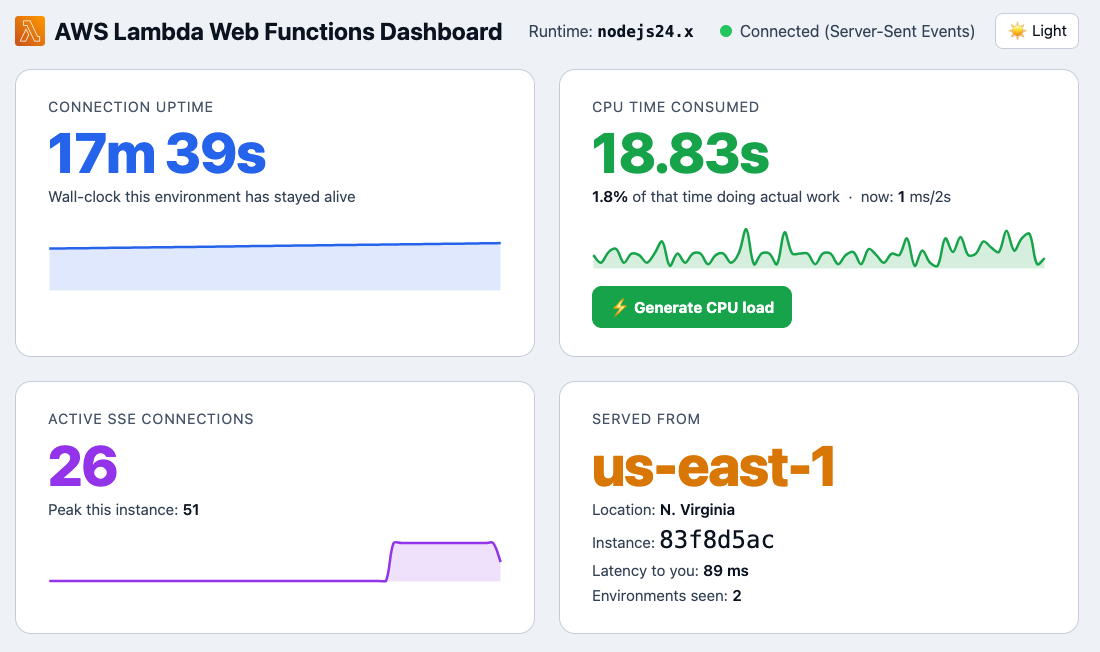
Figure 4: Concurrency showing increased connections in a single execution environment.
The dashboard updates to reflect the active SSE connections and peak for the currently connected execution environment.
The runtime also writes a per-environment summary record to Amazon CloudWatch Logs every minute with the instance ID, request count, peak concurrency, and CPU time. A CloudWatch Logs Insights query aggregates them across the fleet:
From a sample run of 300 streaming requests with up to 200 open at once, the logs showed the following:
- Execution environments used: 5.
- Total requests handled: 484.
- Peak concurrency on a single environment: 59.
- Total CPU consumed across the whole fleet: 4.75 seconds.
One environment peaked at 59 connections, near the default limit of 64. Lambda adds environments before existing ones reach their limit, so this load used five. Event Functions serve one request per environment, so 200 open streams would need up to 200 environments. Across 484 requests, the whole fleet used about 4.8 seconds of CPU.
Each environment reports only its own connections, because Lambda routes each request independently with no session affinity.
Going multi-Region
The same app can serve each caller from the Region with the lowest latency. Because an endpoint’s type and Regions are fixed when you create it, going global means adding a new endpoint:
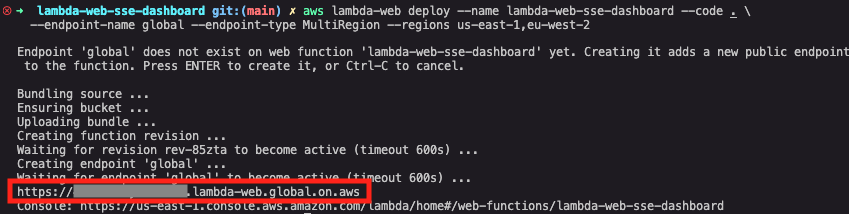
Figure 5: AWS CLI creating a global endpoint.
Lambda replicates your code and revision configuration, including environment variables, to each Region, and centralizes logs in the home Region. In this case, Lambda replicates to Europe (London) Region (eu-west-2). It provides a single global domain URL and uses Amazon Route 53 latency-based routing to send each request to the lowest-latency Region.
Browse to the new global URL which is now in the format: https://<domain>.lambda-web.global.on.aws
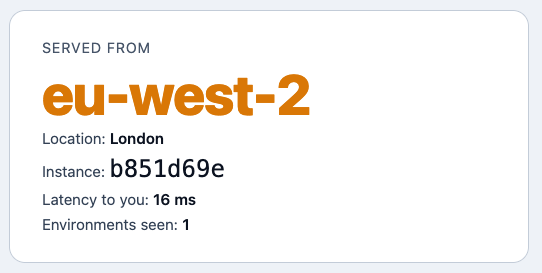
Figure 6: The app dashboard showing routing to the local Region.
From my laptop in the United Kingdom, the request routes to eu-west-2 (London) in 16 ms, where the single-Region endpoint in us-east-1 replied in 90 ms. These are single measurements from one location, not a benchmark. Each request goes to the Region with the lowest latency for the caller through the same URL. Lambda manages the DNS routing, so there are no load balancers or Route 53 records to configure.
Authentication and running behind Amazon CloudFront
Each endpoint has an authentication type that you can change without redeploying code.
With ApplicationManaged, the endpoint is public, and your code handles authentication (OAuth, JWT, a session cookie, or Amazon Cognito). Administrators can prevent public endpoints across an organization with a service control policy that uses the lambda:Request/WebFunctionAuthType condition key.
With IamAuth, Lambda validates each request with AWS Signature Version 4 (SigV4) for single-Region endpoints and SigV4a for multi-Region endpoints. Only callers with the lambda:InvokeWebFunctionEndpoint permission reach your app, which suits service-to-service APIs. Endpoints are always reachable over the public internet, and IamAuth controls who can invoke them.
Endpoints use a Lambda-provided domain. For a custom domain, edge caching, and AWS WAF, place Amazon CloudFront in front of the endpoint. Use IamAuth with origin access control so the Lambda domain cannot bypass CloudFront which still passes your application’s own Authorization header through to your code.
Build it with an agent
Because deployment is a single aws lambda-web deploy command and the code is an ordinary HTTP server, you can scaffold, build, and deploy an app from a prompt using AWS skills for coding agents. The Agent Toolkit for AWS includes Web Functions.
Clean up
To remove the default resources that the aws lambda-web deploy command created, see the cleanup instructions in the repo.
Conclusion
AWS Lambda Web Functions bring the serverless operating model to web applications without adapter layers. You write a standard Node.js HTTP server, deploy it with one command or CloudFormation, and get a scalable, pay-per-use HTTPS endpoint with global routing built in. Deploy the sample application from the Serverless Patterns collection along with other Web Functions patterns. Read the Lambda Web Functions documentation to go deeper and the Lambda roadmap.
For more serverless learning resources, visit Serverless Land.