Post Syndicated from Jonathan Tuliani original https://aws.amazon.com/blogs/compute/control-your-aws-lambda-runtimes-with-customer-managed-runtimes/
With AWS Lambda customer-managed runtimes for Lambda Event Functions (formerly called Lambda functions), you get full control over Lambda runtime contents, updates, access, and lifecycle. You package your runtime once, share it across your organization, and when you update it, Event Functions pick up the change automatically. You can test, schedule, stagger, and monitor the runtime update rollout. If necessary, you can roll back.
In this post, we will explain why you might use a customer-managed runtime, and the core concepts of Lambda runtime management. This includes the runtime publisher and consumer roles, resource model, and update process. We will also cover cross-organization runtime sharing, deletion guardrails, and pricing.
Lambda managed runtimes
Until now, AWS Lambda Event Functions (formerly Lambda functions) ran only on runtimes that Lambda manages. You choose a language, deploy your code, and Lambda takes care of the runtime, including patching and lifecycle management. This model works well, and remains the right choice for many Lambda customers, especially those who are new to serverless.
However, for more advanced customers managing thousands of Event Functions, the Lambda managed runtime can be restrictive. For example, suppose your organization has a standardized security or monitoring extension, enterprise certificates, or even wants to use Lambda with an additional language such as PHP. These components need to be included in each Event Function in an application or organization, in addition to the function code.
With Lambda managed runtimes, you have two options. You can use Lambda layers to distribute shared libraries. These must be deployed with every function, as shown in the diagram:
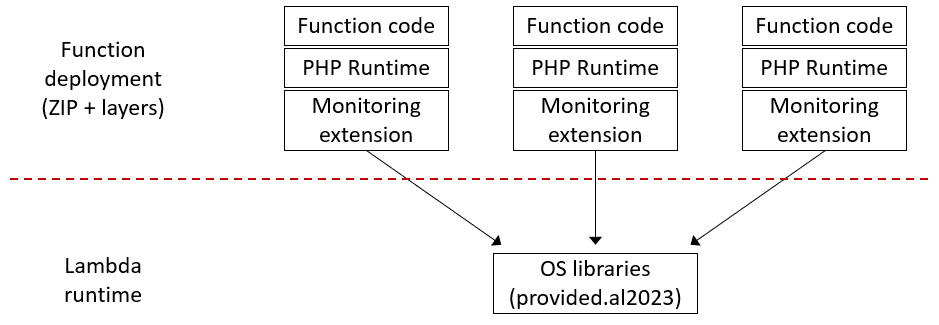
Figure 1: Using PHP and a monitoring extension with a Lambda managed runtime
Layers follow a pull model, so when you update a layer, you must redeploy every Event Function that uses it to pick up the change. Alternatively, you can use container image packaging to get full control over the runtime contents. But this shifts complexity to every developer on every team. Developers need to understand Dockerfiles, image registries, and container builds, and need to rebuild and redeploy every function to roll out a shared component update. You also lose the simplicity of .zip-based deployment and automatic runtime updates.
How customer-managed runtimes solve this
With customer-managed runtimes you can package your language runtime, certificates, security tools, and monitoring agents into a centrally managed runtime resource, shared by any number of functions.
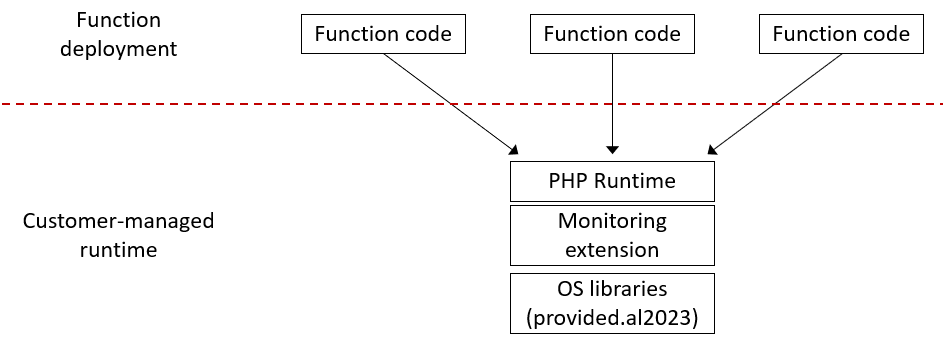
Figure 2: Using PHP and a monitoring extension with a customer-managed runtime
Application developers reference your runtime in their Event Function configuration, the same way they would reference a Lambda-managed runtime like python3.14. They deploy their code as .zip files, use the same AWS Command Line Interface (AWS CLI) and tools, and receive runtime updates automatically.
When you update the runtime, you update it once. Event Functions pick up the new version at their next cold start, with no per-function redeployments. You can stage the rollout across environments, roll out Region by Region, monitor function invocation success rates, and roll back if something goes wrong.
This model supports a range of scenarios:
- Standardize shared components at scale – Give teams in your organization a runtime with your approved security and monitoring tools built in. Update those tools centrally.
- Use languages Lambda doesn’t support – Package languages or runtimes such as PHP, Bun, R, or any other language into a customer-managed runtime. Developers use it with the same .zip deployment experience as Python or Node.js.
- Control your patching cadence – Apply runtime patches on your schedule, immediately for critical issues or during planned maintenance windows for routine updates. You can also stage the updates, for example across development, test, and production environments.
- Extend runtime lifetime – If Lambda deprecates a managed runtime before your organization is ready to migrate, fork it into a customer-managed runtime. Now you can apply your own security patches and deprecate on your own timeline.
Publishers and consumers
Customer-managed runtimes introduce two roles: runtime publisher and runtime consumer.
The runtime publisher owns the runtime. That includes its contents, updates, access control, and lifecycle. The publisher builds runtime images, publishes versions, rolls out updates, and decides who can use the runtime. In an enterprise, this could be a central cloud platform team. Alternatively, an application team could operate an application-specific runtime built on base images from their platform team, or from Lambda.
The runtime consumer is the function developer. Consumers reference the runtime in their Event Function configuration, deploy their code as .zip files, and receive updates automatically. They don’t use or manage the underlying container images. They only write application code.
This separation creates a clean boundary. The runtime publisher focuses on runtime management: patching, security tooling, and compliance. Developers consume the runtime and focus on their business logic.
Resource model
Customer-managed runtimes use three resource types that work together.
Runtime: The top-level resource representing the runtime as a whole, for example, a PHP 8 runtime for your organization. A runtime has a name, an Amazon Resource Name (ARN), and a description. You control access at the runtime level using a resource-based policy. To create a runtime:
Runtime version: Represents the contents of the runtime at a point in time. Each version is backed by a container image in Amazon Elastic Container Registry (Amazon ECR) and is immutable, so once created it can’t be changed. To update the runtime, you create a new version. To create a runtime version, reference the ECR image that defines the runtime contents:
Runtime images contain the operating system libraries, language support, a bootstrap script, and the runtime interface client (code that retrieves invoke requests from the Lambda service and calls your function handler). You must grant the Lambda service principal read access to your ECR repository. For details, refer to the runtime image building documentation.
Runtime alias: A named pointer to a runtime version. Event Functions consume the runtime through an alias. When you update an alias to point to a new version, functions using that alias pick up the change at their next cold start. To create a runtime alias:
How you structure your aliases depends on your release process, for example, separate aliases per environment (dev, test, prod), per release track (latest, stable), or semantic version (php8.3, php8.4). Refer to alias strategies in the documentation for common patterns.
Runtimes are Regional resources. You must create a runtime, its versions, and its aliases in each AWS Region where you need them. We recommend using consistent names across Regions so that ARNs differ only in the Region component. Use ECR cross-Region replication to distribute your images, and roll out alias updates one Region at a time to limit the impact of a faulty version.
Consuming a runtime
For function developers, the only change is how you specify the runtime source. In the Lambda console, specify whether the runtime is in the function’s account or shared from a different account, and provide the runtime alias ARN:
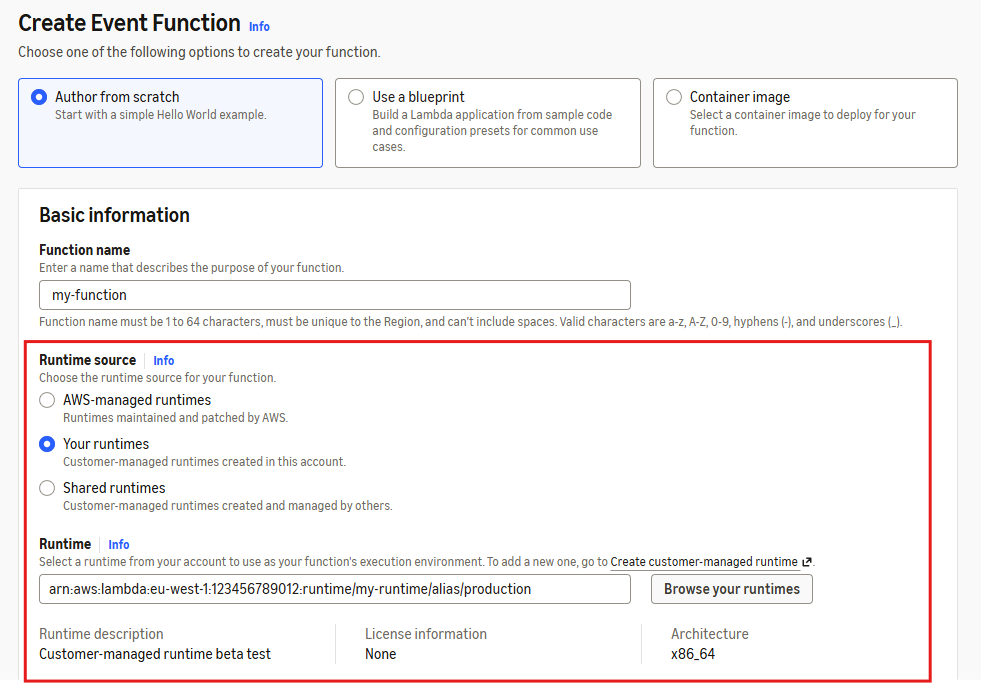
Figure 3: The Lambda console Create Event Function page with customer-managed runtime selection
In the AWS CLI (and similarly in AWS CloudFormation), instead of specifying a Lambda runtime identifier like python3.14, you set the runtime to custom and provide the runtime ARN and alias name:
Everything else works the same, including function configuration, invocation, logging, monitoring, layers, and infrastructure-as-code tools. Developers deploy .zip files, use the same CLI, and don’t need to learn containers or new tooling.
Runtime updates and monitoring
As a runtime publisher, you own the update process. Lambda doesn’t patch customer-managed runtimes for you. If you build your runtime from a Lambda base image, you get the operating system, language runtime, and Lambda runtime interface client as a starting point. AWS regularly updates the base images with security patches. You can also build your runtime image from scratch for maximum control.
To patch your runtime, first rebuild your runtime image from the updated base image. You then publish a new runtime version referencing the new image, test it, and roll out the new version by updating your runtime aliases. To create a new runtime version and update an alias:
Lambda publishes two Amazon CloudWatch metrics in the runtime publisher’s account: RuntimeInvocations (total invocations of functions using the runtime) and RuntimeInvocationErrors (invocations that result in errors). You can view these by runtime, runtime version, or runtime alias.
Your runtime updates need to be backward-compatible with existing functions. Lambda strives to provide backward-compatible updates to its base images, which you can use as your starting point. However, as with any change, there’s always the possibility of an unexpected compatibility issue. During a rollout, you can compare the error rate of the new runtime version against the previous version. If the new version shows a higher error rate under similar traffic, it’s a signal to pause or roll back by re-pointing the alias to the previous runtime version. You can also track rollout progress as Lambda replaces execution environments, shifting invocations from the old version to the new one. We recommend creating a CloudWatch alarm on the error rate of each alias and configuring your deployment pipeline to halt when an alarm fires.
Cross-account sharing and trust
For customer-managed runtimes, we expect most usage to be cross-account: the runtime publisher shares a runtime with runtime consumer accounts by applying a resource-based policy on the runtime. You can share with individual AWS accounts, an AWS Organizations organization or organizational unit, or publicly. Consumers in shared accounts also need an identity-based policy granting lambda:AssociateRuntimeAlias permission. Both the resource-based and identity-based policies must allow the action for cross-account access to work. To allow consumers to use runtime management controls to roll back a function to a specific runtime version, they also need lambda:AssociateRuntimeVersion permission. For details and example policies, refer to Sharing and controlling access to customer-managed runtimes.
A runtime publisher can push code into the execution environments of every function that uses their runtime. This is by design. It’s how runtime updates work. The runtime publisher can also ship updates that break your functions, or delete the runtime causing your functions to fail. This means you must trust the runtime publisher the same way you would trust anyone managing your application or running code with your permissions.
Organization administrators can use service control policies (SCPs) to govern which runtimes are allowed in their organization. For example, allowing only runtimes from specific trusted accounts, or blocking all external runtimes entirely. To consume a third-party runtime, you may wish to retain control by using their container images to build a customer-managed runtime that you manage. The image-centric model means you can use standard container tooling for vulnerability scanning, compliance checks, and supply chain security. These are the same tools you already use for your other container workloads.
Deletion guardrails
Deleting a runtime resource can break many functions, including functions in other accounts. Because of this, Lambda enforces built-in guardrails to help prevent and recover from accidental deletion:
- Deletion isn’t immediate. Lambda schedules the runtime, version, or alias for deletion with a waiting period you choose, from 7–30 days (default 30). During this period, you can restore the resource.
- You can’t delete a runtime version while an alias points to it.
- You can’t delete a runtime while it has versions or aliases that aren’t scheduled for deletion. You must delete aliases first, then versions, then the runtime.
When a runtime alias or version is deleted (or scheduled for deletion), functions that use it enter the Inactive state and invocations fail on cold start. If you restore the resource during the waiting period, functions recover automatically, with no redeployment needed.
Before deleting any runtime resource, check the RuntimeInvocations metric to verify usage. You can monitor runtime metrics during the scheduled for deletion window to check whether the pending deletion is causing function invocations to fail.
To manage the runtime lifecycle, you can set a release lifecycle stage (Preview, GenerallyAvailable, or Deprecated) and optionally block new function creation or function updates after a specified date. Refer to runtime lifecycle management in the documentation for details.
Pricing
There’s no additional charge for customer-managed runtimes. Event Functions that use a customer-managed runtime cost the same as functions that use a Lambda-managed runtime. There’s no charge for creating runtime versions or aliases. However, runtime publishers must keep the container image for each runtime version in Amazon ECR for as long as the version exists. Standard Amazon ECR storage pricing applies to these images.
Conclusion
With customer-managed runtimes, platform teams have central control over the Lambda runtimes used across their organization. As runtime publishers, they control the runtime contents, updates, access, and lifecycle. Alternatively, they can publish base images that application teams use to build and manage their own runtimes. Developers keep the .zip deployment experience they’re familiar with and receive runtime updates automatically.
To get started, visit the customer-managed runtimes documentation and the step-by-step tutorial. Customer-managed runtimes are available today across commercial AWS Regions through the Lambda console, AWS Command Line Interface, and AWS CloudFormation.
We would love to hear how you use customer-managed runtimes. Share your feedback in the comments, in the Lambda public roadmap, or reach out through AWS re:Post.