Post Syndicated from Avichay Marciano original https://aws.amazon.com/blogs/big-data/serverless-analytics-pipelines-using-the-apache-spark-engine-in-amazon-athena/
Building and maintaining clusters for data processing with Apache Spark has long been a pain point for organizations of all sizes. Traditional deployments require significant operational overhead and present multiple challenges that slow down time-to-insight and increase total cost of ownership. In this post, we will demonstrate three integration patterns that let data teams focus on analytics instead of infrastructure management.
Consider the typical experience of data teams working with self-managed Spark clusters:
- Infrastructure complexity – Teams must manage Amazon Elastic Compute Cloud (Amazon EC2) instances, networking, security groups, and cluster configurations across development, staging, and production environments.
- Cost unpredictability – Idle clusters continue consuming resources and generating bills, while automatic scaling policies often lag behind actual demand patterns.
- Operational burden – DevOps teams spend significant time patching, monitoring, and troubleshooting cluster health issues.
- Development friction – Data scientists and engineers must wait for cluster provisioning before they can begin exploratory analysis, slowing down iterative development cycles.
- Interactive workload challenges – Managing interactive Spark workloads typically requires additional components, exposing specific ports, and complex network configurations.
These challenges become especially pronounced when organizations need to support multiple concurrent workloads: notebooks for data scientists, scheduled pipelines for data engineers, and ad hoc queries for analysts. The traditional approach encourages teams to choose between maintaining multiple clusters (expensive) or sharing resources (contentious) while maintaining fixed endpoint connectivity for interactive workloads (usually exposing JDBC ports for the Thrift protocol).
The Apache Spark engine in Amazon Athena addresses these operational challenges by providing a fully managed, serverless Spark execution environment. Built on Firecracker micro-VMs (AWS’s lightweight virtualization technology) and running the AWS-optimized Spark 3.5.6 engine with Spark Connect support, Athena with Apache Spark launches and scales in seconds, reducing costs for unpredictable workloads and infrastructure operational overhead.
Athena with Apache Spark is already integrated as a compute engine within Amazon SageMaker Unified Studio notebooks, providing rapid startup and scaling, making it ideal for ad hoc data exploration and transformations.
This post shows how developers, data engineers, and analysts can connect to a secure Spark Connect endpoint in Athena with Apache Spark. You can use your preferred tools, such as Jupyter notebooks, VS Code, or dbt with Apache Airflow, without managing cluster lifecycle or scaling.
Solution overview
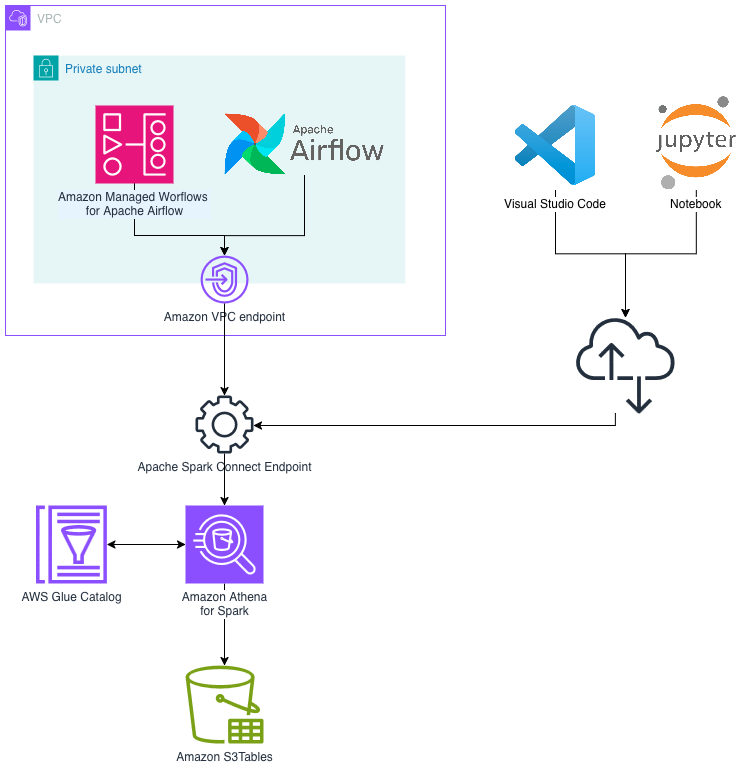
We explore three integration patterns that demonstrate how the flexibility of Athena with Apache Spark can reduce operational overhead and accelerate innovation with on-demand resource readiness:
- Pattern A: Interactive analysis with Jupyter notebooks – Data scientists connect notebooks directly to Athena with Apache Spark for exploratory analysis and feature engineering.
- Pattern B: Local development with VS Code – Software engineers develop Spark applications in their preferred IDE (integrated development environment) while executing on serverless compute.
- Pattern C: Scheduled pipelines with dbt + Apache Airflow – Data engineers run production transformation pipelines with proper orchestration and session lifecycle management.
The following diagram illustrates the high-level architecture for connecting to Athena with Apache Spark using Spark Connect.
What’s new in the Apache Spark engine in Amazon Athena
In November 2025, the Apache Spark engine in Amazon Athena released a significant update with rapid session creation times and capabilities that weren’t possible with previous iterations:
- Secure Spark Connect – Adds Spark Connect as a fully managed, authenticated, and authorized AWS endpoint for remote connectivity from Spark-compatible tools. For more information, see Spark Connect support.
- Session-level cost attribution – Track costs per interactive session in AWS Cost Explorer or Cost and Usage Reports for granular chargeback and budgeting. For more information, see Session level cost attribution.
- Advanced debugging capabilities – Live Spark UI and Spark History Server support for debugging workloads from both APIs and notebooks. For more information, see Accessing the Spark UI.
- AWS Lake Formation integration – Access AWS Glue Data Catalog tables secured by AWS Lake Formation. For more information, see Using Lake Formation with Athena for Spark workgroups.
Prerequisites
To implement this solution, you need the following:
- An AWS account with permissions for Amazon Athena, Amazon Simple Storage Service (Amazon S3), and AWS Glue.
- An Athena with Apache Spark workgroup configured with the latest Spark 3.5.6 engine.
- Python 3.9+ installed locally.
- AWS credentials configured.
Note: This tutorial creates AWS resources that incur charges, including Athena sessions (charged per DPU-hour), Amazon S3 storage, and data transfer. Athena sessions are charged while active, even if idle within the timeout period. Follow the cleanup instructions at the end of this post to avoid ongoing charges.
Provisioning workflow overview
The workflow for using the Apache Spark engine in Amazon Athena with Spark Connect follows these steps:
- Create the session – Use the AWS API (start_session) to initialize a Spark session. The Spark driver is immediately ready to process requests (no JVM startup time).
- Get the Spark Connect endpoint – Retrieve the endpoint URL and authentication token using get_session_endpoint.
- Configure Your Tools – Set the
SPARK_REMOTEenvironment variable or configure your tool with the Spark Connect URL. - Run Processing Steps – Run your Spark code as you normally would, but in a fully serverless environment that scales automatically based on your needs.
- Monitor via Spark UI – Access the live Spark UI for debugging and performance monitoring using get_resource_dashboard.
- Terminate the session – Clean up resources when finished using terminate_session.
By default, the session is configured with autoscaling using Spark Dynamic Resource Allocation up to 60 workers and an idle timeout of 20 minutes. You can change the default configuration at the workgroup level when creating it (create_work_group API) or when creating the session (start_session API).
Pattern A: Interactive analysis with Jupyter notebooks
The Jupyter notebook integration provides an interactive environment for exploratory data analysis, feature engineering, and model preparation. Notebooks connect directly to Athena with Apache Spark sessions for rapid iteration without cluster management.
Set up the environment
Create and activate a Python virtual environment, then install the required dependencies and start JupyterLab:
Create an Athena with Apache Spark workgroup
Before connecting, create an Athena with Apache Spark workgroup on the AWS Management Console:
- Navigate to Amazon Athena → Workgroups → Create workgroup.
- Select Apache Spark as the analytics engine.
- Choose the Spark 3.5.6 engine version.
- Configure the IAM role for the workgroup.
- Configure the Amazon S3 output location.
Note: If you used Athena with Apache Spark previously, you need to create a new workgroup to use the latest version with Spark Connect support.
Create a session and connect
In your Jupyter notebook, use boto3 to create a session and establish the Spark Connect connection:
Run queries and observe automatic scaling
Generate a larger dataset to trigger executor scaling. You can monitor the scaling behavior through the Spark UI:
Access the Spark UI
Each session comes with a secure URL serving the Spark UI, to monitor and debug applications:
Pattern B: Local development with VS Code
VS Code integration lets you develop Spark applications locally in your preferred IDE while executing on Amazon Athena with Apache Spark compute. This pattern is ideal for building reusable libraries, testing transformations, and developing production-ready code.
Set up the environment
Create a virtual environment and install dependencies:
Connect from VS Code
The workflow is identical to Pattern A. You start a session with boto3, build the Spark Connect URL, and create a SparkSession. The key difference is setting the SPARK_REMOTE environment variable, which allows SparkSession.builder.getOrCreate() to connect automatically:
Note: The SPARK_REMOTE URL contains a short-lived authentication token that expires with the session. For production workloads, retrieve the token on demand using get_session_endpoint() rather than storing it persistently. Avoid logging or persisting this value.
This same pattern works with most Spark-compatible development environments. AI coding assistants like Claude Code, Cursor, and Kiro benefit particularly well from this approach. The ability to spin up a fresh Athena with Apache Spark session in seconds means developers can rapidly iterate on generated code and test transformations immediately. They can tear down sessions when done, without maintaining a persistent cluster between coding sessions.
Pattern C: Scheduled pipelines with dbt + Airflow
For production data pipelines, combining dbt (data build tool) with Apache Airflow orchestration provides a robust, version-controlled approach to managing complex transformation workflows. Athena with Apache Spark executes the dbt models with serverless compute, eliminating cluster management overhead.
Install dependencies
The key dependencies for dbt with Athena with Apache Spark must be installed in the correct order:
Important: Install pyspark[connect]==3.5.6 first to make sure dbt uses the compatible PySpark version.
Configure dbt profile
Configure dbt to use Spark Connect with a session-based connection. Create a profiles.yml file:
The method: session configuration uses a local Spark session. When pyspark[connect]==3.5.6 is installed and the SPARK_REMOTE environment variable is set, dbt automatically connects through Spark Connect.
Create a dbt model
Create a dbt model that writes to Apache Iceberg format (models/bucketed_data.sql):
Integrate with Airflow
For production deployments, integrate with Apache Airflow (or Amazon Managed Workflows for Apache Airflow (Amazon MWAA)) to orchestrate dbt runs with proper session lifecycle management.
The DAG follows this pattern:
- setup_athena_session – A
PythonOperatorthat starts the session and pushesspark_remote_urlto XCom. - run_dbt – A
BashOperatorthat setsSPARK_REMOTEfrom XCom and runs dbt. - terminate_athena_session – A
PythonOperatorwithtrigger_rule=ALL_DONEto make sure cleanup runs even on failure.
Security and best practices
When you connect to Athena with Apache Spark, follow these practices to protect your data and credentials.
Spark Connect security
Athena with Apache Spark uses Spark Connect to securely transmit queries and receive results. All communication is encrypted end-to-end using TLS 1.2+. Session tokens are short-lived and automatically rotated.
Recommendations:
- Use IAM roles for authentication rather than long-lived credentials.
- Session tokens have a limited lifetime, so refresh them for long-running operations.
- Monitor Spark Connect activity in AWS CloudTrail for audit compliance.
IAM permissions
Implement least-privilege IAM policies. At minimum, the following permissions are required:
athena:StartSession,athena:TerminateSession,athena:GetSession,athena:GetSessionEndpoint, andathena:GetResourceDashboardon your workgroup.- Amazon S3 permissions for your data buckets.
- AWS Glue Data Catalog permissions for your database and table access.
Clean up
To avoid ongoing charges, remove the resources created during this walkthrough:
- Terminate any active Athena sessions:
- Delete the Athena workgroup you created for this tutorial using the Amazon Athena console or the DeleteWorkGroup API.
- Remove Amazon S3 objects created during testing, including query results and Iceberg table data at your configured output location. Data written to Amazon S3 persists after session termination and continues to incur storage costs.
- Delete any IAM roles created specifically for this walkthrough.
- Remove any AWS Glue Data Catalog databases and tables created during testing.
Conclusion
The Apache Spark engine in Amazon Athena with Spark Connect support transforms how teams build and operate Spark workloads. By eliminating cluster management overhead and providing near-instant, serverless compute, data teams can focus on delivering insights rather than managing infrastructure.
The three patterns covered in this post demonstrate the flexibility of Athena with Apache Spark:
- Pattern A (Jupyter notebooks) – Ideal for data scientists doing exploratory analysis and feature engineering.
- Pattern B (VS Code) – Well-suited for software engineers building production-ready Spark applications.
- Pattern C (dbt + Airflow) – Well-suited for data engineers running scheduled, version-controlled transformation pipelines.
With rapid session creation, automatic scaling, and pay-per-use pricing, Athena with Apache Spark provides a compelling alternative to self-managed Spark clusters.