Post Syndicated from Daniel Gray original https://aws.amazon.com/blogs/devops/accelerating-as-400-business-rule-extraction-with-kiro-step-by-step-guide/
AS/400 business rule extraction no longer requires months of manual effort. With Kiro, an agentic AI-powered development environment (spanning IDE, CLI, web, and mobile surfaces, along with the Kiro Crew workspace), you can compress the process into days. This step-by-step guide walks through the approach. Organizations face a common challenge: critical business logic embedded in extensive RPG and COBOL code bases, often maintained by a declining number of developers and subject matter experts (SMEs) with RPG expertise. The fulfillment rules and shipping logic are scattered across interconnected programs that no single person fully understands.
In this post, we walk you through a step-by-step approach for using Kiro to extract business rules from AS/400 RPG and COBOL programs, generate technical specifications, and produce modernization-ready documentation.
Extraction process challenges
Before this engagement, one of our customers faced several challenges with their existing business rules extraction process. They were planning to modernize their AS/400 order fulfillment workflow, which handled inventory validation, shipping document generation, and warehouse operations.
- Significant consulting costs for specialized AS/400 consultants.
- Time-intensive manual analysis, typically 4–6 weeks of dedicated effort.
- Documentation that becomes outdated before the team finishes writing it.
- Risk of overlooking critical business logic during modernization.
The following is the sample system flow considered to walk through the step-by-step guide.
Each program has embedded business rules, including order validation and stock allocation with warehouse priority. These programs also handle shipping weight calculations, character encoding conversion, and integration with external carrier systems. Traditional analysis would have taken 4–6 weeks per system. The effort required across consultants, technical writers, and reviewers would have been 40–80 person-hours per system.
Solution
With Kiro, an agentic AI-powered development environment, you can extract comprehensive business rules, generate technical specifications, and create modernization-ready documentation in hours, not months (as detailed in the Outcomes section).
Working autonomously across your code base, Kiro analyzes dependencies, traces execution paths, and produces detailed documentation.
The approach relies on two core Kiro capabilities:
- Steering files: Persistent instructions that guide the AI’s behavior, including project context, naming conventions, analysis standards. Configure them once and they apply to all subsequent sessions. Steering files can reference documentation templates that define the exact output format. Each subsequent analysis follows the same repeatable structure.
- Specs: A structured way to define requirements, design, and implementation tasks. Kiro executes tasks autonomously with progress tracking. Spec tasks tell Kiro which templates to use and where to save the output.
The workflow has three phases:
Phase 1 – Configure steering files to define project context, directory structure, and technical standards. Examples include “extract 10–20 lines of code context around business rules” and “map abbreviated DDS field names to business terms.” Create documentation templates that the steering files reference. These templates specify the exact output format for business rules with code snippets, pseudocode equivalents, DDS field mappings, and integration specifications.
Figure 1: Steering files provide persistent instructions that guide the analysis behavior of Kiro across sessions, configured once and applied to subsequent analyses
Phase 2 – Build a Kiro Spec with discrete, actionable tasks: analyze source files, parse DDS definitions, extract business rules, generate pseudocode, create consolidated documentation using the templates, and verify business rules against source code.
Figure 2: The Kiro Spec, showing discrete tasks that Kiro executes autonomously with progress tracking
Phase 3 – Execute the Spec and let Kiro work autonomously. Monitor progress as tasks complete, then review the generated documentation.
Important: AI-extracted rules should be reviewed by an AS/400 SME. Automated extraction might occasionally misinterpret complex or ambiguous business logic, so human validation remains essential before acting on extracted rules.
Here’s an example of what Kiro produces. Given this RPG subroutine that validates orders against the master file, Kiro generates a plain-language business rule and its pseudocode equivalent:
Rule 1.3.16: Stock Allocation
Category: Processing Subroutine: ALLCST (lines 3820-3960) Description: Allocates stock from warehouse inventory. Looks up inventory by item key, verifies sufficient available quantity, then decrements available quantity and increments reserved quantity by the order amount. Updates the inventory record.
Source Code (lines 3820-3960):
Pseudocode:
Figure 3: Kiro extracts business rules with original RPG code, pseudocode equivalents, and plain-English descriptions
The following is the DDS field mapping that translates abbreviated AS/400 field names into business terms:
1.1 ORDERMST — Order Master
| Field | Type | Length | Dec | TEXT (Business Term) | COLHDG | VALUES | Used By |
| ZIORCD | A | 8 | — | Order Code | Order / Code | — | PROG001, PROG002, PROG003, PROG004 |
| ZIPERD | P | 6 | 0 | Fulfillment Period | Fulfill / Period | — | PROG001 |
| CURPER | P | 6 | 0 | Current Period | Current / Period | — | PROG001 |
| STATUS | A | 1 | — | Order Status | Order / Status | ‘A’ ‘H’ ‘C’ ‘X’ ’ ’ | PROG001, PROG002 |
| CUSTNAME | A | 40 | — | Customer Name | Customer / Name | — | PROG001, PROG002, PROG003, PROG004 |
| WHSCD | A | 4 | — | Warehouse Code | Warehouse / Code | — | PROG001, PROG002, PROG003, PROG004 |
| ORDDTE | P | 8 | 0 | Order Date | Order / Date | — | PROG001 |
| ORDQTY | P | 7 | 0 | Order Quantity | Order / Quantity | — | PROG001 |
| SHPTYP | A | 2 | — | Shipment Type | Shipment / Type | — | PROG001 |
| PRIORT | A | 1 | — | Priority Code | Priority | ‘1’ ‘2’ ‘3’ | PROG001 |
Record Format: ORDERMST — TEXT(‘Order Master Record’)
Key: ZIORCD (unique)
STATUS Values: A = Active, H = Hold, C = Complete, X = Canceled, ’ ’ = New/Blank
PRIORT Values: 1 = High (requires MGR session), 2 = Medium, 3 = Low
1.2 INVSTOCK — Inventory Stock Levels
| Field | Type | Length | Dec | TEXT (Business Term) | COLHDG | VALUES | Used By |
| ITEMCD | A | 10 | — | Item Code | Item / Code | — | PROG001, PROG004 |
| WHSCD | A | 4 | — | Warehouse Code | Warehouse / Code | — | PROG001, PROG004 |
| QTYOH | P | 9 | 0 | Quantity On Hand | Qty / On Hand | — | PROG001 |
| QTYAV | P | 9 | 0 | Quantity Available | Qty / Available | — | PROG001 |
| QTYRS | P | 9 | 0 | Quantity Reserved | Qty / Reserved | — | PROG001 |
| UNITWT | P | 7 | 2 | Unit Weight KG | Unit / Weight | — | PROG001, PROG004 |
| UNITLN | P | 5 | 2 | Unit Length CM | Unit / Length | — | PROG001, PROG004 |
Figure 4: DDS field mapping translates abbreviated AS/400 field names into business terms
This mapping is essential for modernization. Without it, developers building the replacement system are guessing at what Z1ORDCD means.
Deployment
The following steps walk you through setting up and running the extraction workflow.
Prerequisites
Before you begin, make sure that you have the following in place:
- Kiro installed on your workstation (download from https://kiro.dev/).
- Access to the AS/400 source code you plan to analyze (RPG/RPGLE, CL/CLLE, and DDS definitions), exported as text files.
- Optionally, DB2 configuration tables exported to CSV for configuration-driven behavior analysis.
- Familiarity with your organization’s business domain, plus access to an AS/400 SME to validate the extracted rules.
- A local project directory where Kiro can read the source files and write generated documentation.
The complete setup is available in the companion GitHub repository listed in the Resources section. This includes steering files, templates, sample AS/400 source code, and Spec definitions.
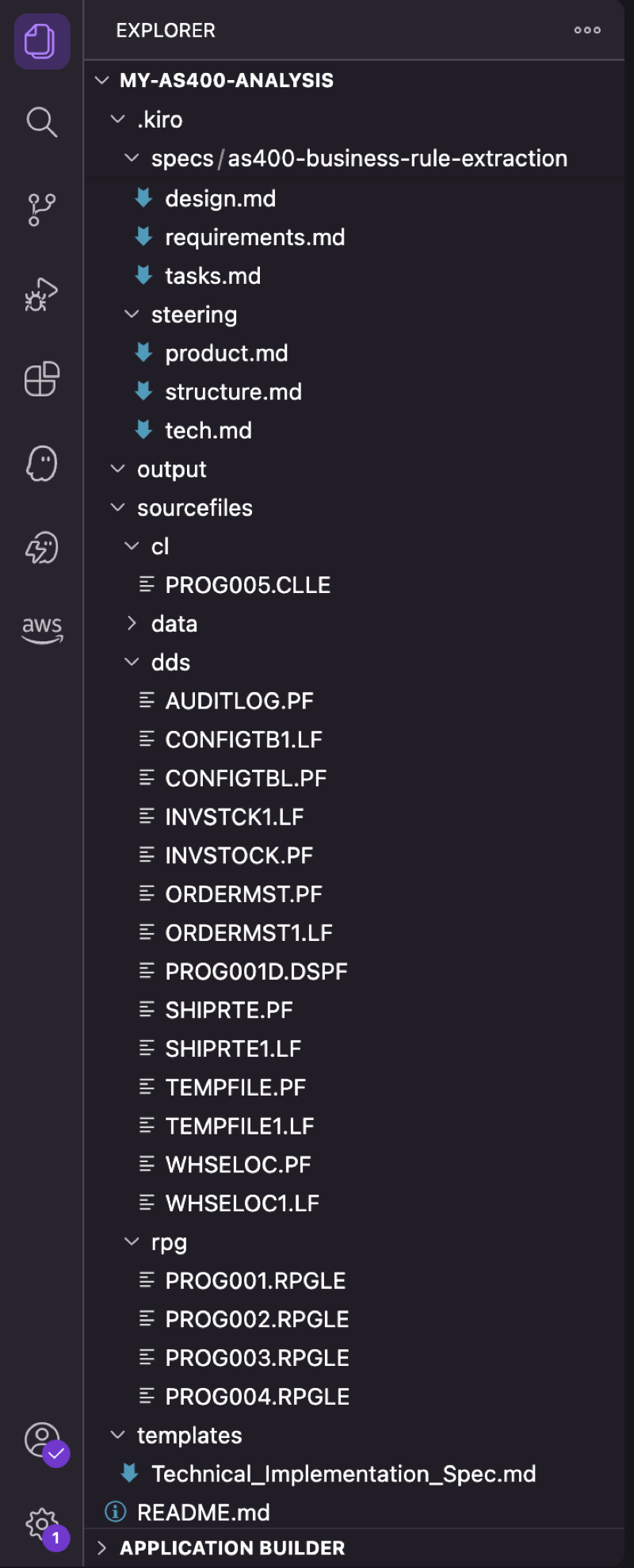
Figure 5: Project structure in Kiro, showing source files, steering configuration, templates, and output directory
The setup has five steps:
Step 1: Project setup
Create the directories that you will be working from for source files, data, output, and other artifacts:
Step 2: Configure steering files
Create steering files to define your analysis standards. For example, .kiro/steering/product.md:
Step 3: Add your source files
Copy your AS/400 source code into the sourcefiles/ subdirectories: RPGLE files in rpg/, CLLE files in cl/, and DDS definitions in dds/. Optionally, export DB2 tables to CSV in sourcefiles/data/ for configuration table analysis if you have programs with conditional logic that use those tables to hold runtime configuration options.
Step 4: Create a Kiro Spec
In Kiro, use the command palette: Create New Spec. Define tasks like:
Example Spec definition:
Step 5: Execute
- Open the Spec in Kiro, choose Start, and monitor progress as tasks complete autonomously. Review the generated documentation in the output/ directory.
- For detailed instructions, templates, and example outputs, see the GitHub repository.
What the workflow looks like
Figure 6: Kiro executing the Spec, with real-time progress as each task completes
When you execute the Spec, Kiro processes tasks in sequence with real-time progress tracking. Here is what happens during execution:
- Opening the Spec with all tasks listed.
- Kiro autonomously reading RPG source files and DDS definitions.
- Business rules being extracted with code snippets and pseudocode.
- DDS field names being mapped to business terms.
- The final consolidated documentation in the output directory.
Outcomes
This section summarizes the measured results from the customer engagement described earlier in this post (a five-program AS/400 order fulfillment system with approximately 40,000 lines of RPG/COBOL). Traditional estimates sourced from the customer’s prior modernization planning documents. Results vary by code base complexity.
Time and effort savings
Using Kiro reduced both elapsed time and total person-hours by an order of magnitude compared to the customer’s traditional manual approach. The following table compares the two approaches:
| Metric | Traditional Approach | Kiro-Assisted | Savings |
| Total effort | 40-80 person-hours | 12 person-hours | 70-85% reduction (measured against the customer’s planning estimates) |
| Timeline | 4-6 weeks | 3 days | ~90% reduction (measured against the customer’s planning estimates) |
Breakdown of Kiro-assisted effort
The 12-hour total breaks down as follows, showing that most of the time is spent on human review rather than setup or execution:
- Setup (steering + templates + spec): 2 hours.
- Kiro autonomous execution: 30 minutes.
- Review and validation: 9.5 hours (reflective of iterative refinement of steering, template, spec, and execution).
- Total: approximately 12 hours per system of 5 programs with approximately 40,000 lines of code (measured during the customer engagement described earlier in this post).
What Kiro produced
Kiro autonomously generated a complete documentation package for the five-program system, including:
- Business rules catalog with original RPG code snippets and pseudocode equivalents.
- DDS field-to-business-term mappings across seven physical files.
- File dependencies matrix showing which programs access which files.
- Inter-program parameter passing documentation.
- Configuration-to-behavior mapping (tracing DB2 config table values to RPG subroutine invocations).
- Integration specifications for the external carrier gateway (CCSID conversion, transmission parameters).
- Over 50 pages of structured, template-aligned documentation (measured output from this engagement).
Multiplier effect
The setup cost (templates, steering, Specs) is one-time and is not repeated for additional systems. The following projections extrapolate the per-system effort (approximately 10 hours) from the single-system measured results and add the one-time setup only once:
| Scale | Traditional | Kiro-Assisted | Savings |
| 1 system | 40-80 hrs / 4-6 weeks | 12 hrs / 3 days | 28-68 hrs |
| 10 systems | 400-800 hrs / 40-60 weeks | 102 hrs / 30 days | 298-698 hrs |
Key quality improvements
- Consistent, template-driven output across every system analyzed.
- Exact line number references back to source code for every business rule.
- Cross-referencing between DDS definitions and RPG program usage alleviates guesswork.
- Reusable templates and Specs can often be reused for similar systems with minimal reconfiguration.
Conclusion
Legacy AS/400 business rule extraction doesn’t need to take months. With the steering files and Specs in Kiro, you can extract business logic from RPG code bases and produce developer-ready documentation in days.
You still need AS/400 knowledge, business context, and architectural judgment to validate, prioritize, and plan the modernization. But you don’t need to spend months manually reading code and writing specifications. With Kiro handling extraction, you can focus on strategy and decision-making.
To get started, download Kiro, clone the companion repository, and try it on a legacy system this week. For more on AS/400 modernization patterns, refer to the AWS Mainframe Modernization documentation.
If you have questions or want to share your experience, leave a comment on this post. If you’re an AWS customer working on AS/400 or mainframe modernization, reach out through your AWS account team.