Post Syndicated from Dirk Fröhner original https://aws.amazon.com/blogs/big-data/reduce-the-complexity-and-cost-of-real-time-processing-with-queues-in-amazon-kinesis-data-streams/
Teams use Amazon Kinesis Data Streams to ingest data once and make it available to every application that needs to consume it in real time. Some of those applications process related records in sequence, building each result on the records before it. Others process each record independently.
Consider an online store that writes every order event to a stream. One application processes the orders in sequence to catch possible fraud. Its state is a count of each customer’s recent orders. It updates that count with every order and flags any customer who places an unusual number in a short time (stateful processing). The fulfillment application processes each order independently, reserving inventory and starting the shipment. It treats every record as a self-contained unit of work that it can process and retry by itself (stateless processing).
Kinesis Data Streams and the Amazon Kinesis Client Library (KCL) are built for the first job. The KCL assigns each shard to one consumer instance at a time, using a lease table in Amazon DynamoDB. The records for a customer reach the same instance in the order they were written. The application saves its progress as a checkpoint, a position in the shard, so after a restart it resumes from where it left off instead of starting over. Applications that read the stream directly this way are called stream consumers in this post. For the fraud check described earlier, each of these mechanics is what keeps its counts accurate.
The fulfillment application doesn’t need orders in sequence, but because it reads shards, it still gets one consumer instance per shard. An on-demand stream sizes its shards for throughput, not for processing time. With 10 shards, at most 10 instances process orders, no matter how far the application falls behind. A checkpoint is a single position in the shard, so the application can’t mark one order as failed and the next one as done. Teams build that per-record tracking, retries, and failure handling themselves. An order that keeps failing either holds up every order behind it in the shard or is skipped, unless their code sets it aside. They still run the lease table and per-shard custom metrics in Amazon CloudWatch to coordinate and monitor their instances. Other teams copy the records into an Amazon Simple Queue Service (Amazon SQS) queue to get per-record tracking without building it. This means ingesting the same data twice and running a relay in between.
Today, AWS introduced queues in Amazon Kinesis Data Streams. A queue delivers the records of an on-demand data stream to your application and tracks the delivery state of each record. The application acknowledges each record when it’s done instead of checkpointing a position. Consumer instances don’t lease shards, so you add instances to process more records in parallel. The queue redelivers any record that isn’t acknowledged in time, and sets aside records that keep failing as dead-letter records. A record that repeatedly fails stops wasting consumer resources and can be inspected and triaged separately. Because the queue does this tracking and publishes its own metrics, your consumer no longer needs a lease table or per-shard custom metrics. This also lowers what it costs to run. You ingest your data once, and the same stream feeds stream consumers, queues, and managed delivery to streaming tables or Amazon Simple Storage Service (Amazon S3) for batch processing. There’s no relay or second copy of the data. Figure 1 illustrates these three consumption and delivery options.
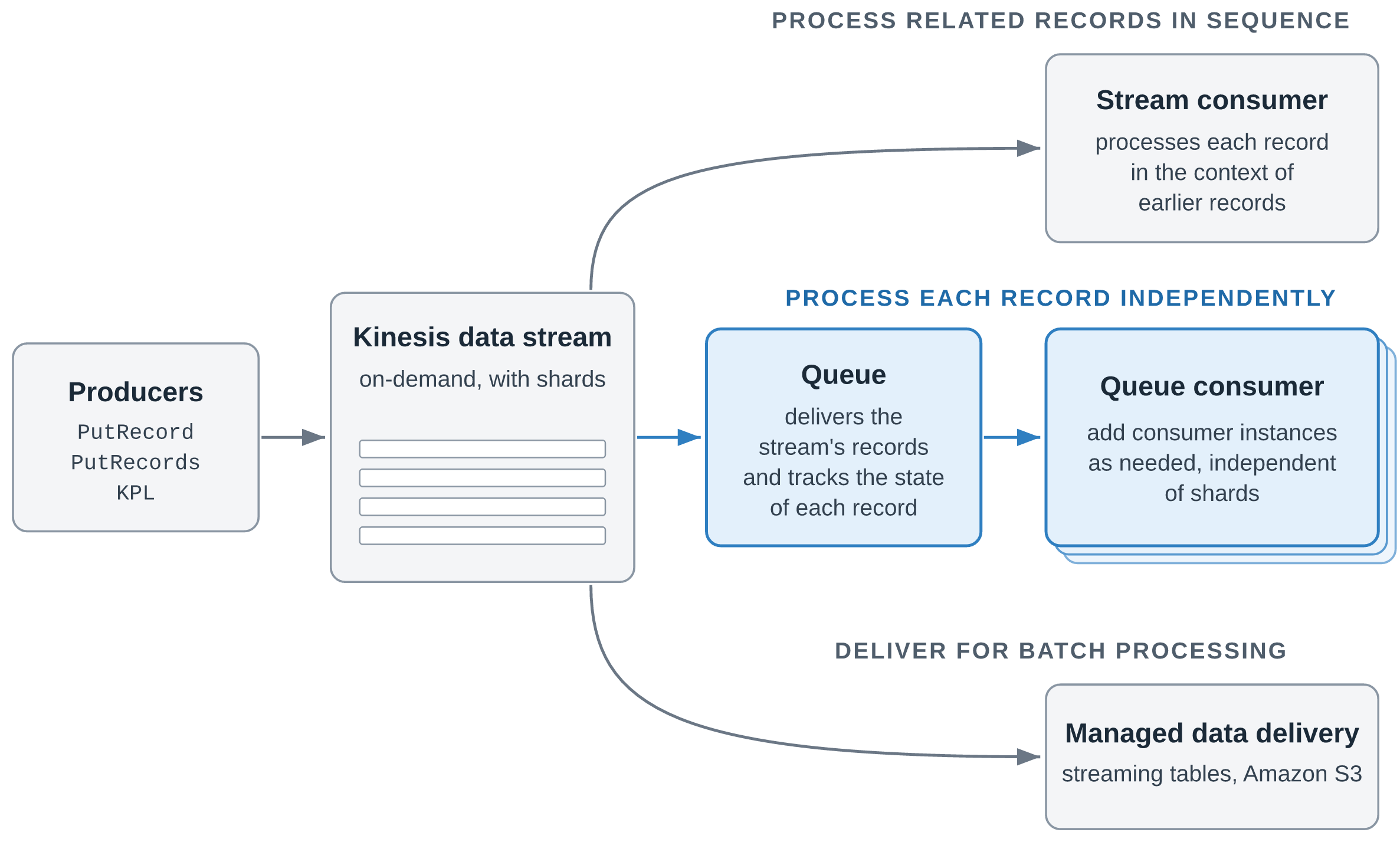
Figure 1: One stream, three ways to consume and deliver its records
Receiving records through a queue is priced at the same rate as data retrieval from the stream. The cost difference comes from the DynamoDB and CloudWatch charges you no longer pay and from compute you use more efficiently. Each consumer instance can run as many parallel threads as it needs to use its CPU fully. Kinesis Data Streams consumers can reduce the cost of processing data by up to 43 percent by using queues instead of the Kinesis Client Library. Actual savings depend on your workload and configuration.
In this post, we walk through how queues work, explain when to use a queue and when to read the stream directly, show where the saving comes from and how AWS measured it, and introduce a sample repository with working code for the main scenarios.
How queues work
A queue is a Kinesis resource that you create for an existing on-demand stream with CreateQueue. Your consumer application, called a queue consumer in this post, then reads records from the queue instead of from shards. Each running copy of the application is a consumer instance. A queue consumer works in three steps:
- Receive – Your application polls the queue with
ReceiveQueueRecordsand gets a batch of up to 10 records. Each record it receives is hidden from other consumer instances for a period called the visibility timeout, so two consumer instances don’t process the same record at the same time. - Process – Your application does the work that the record represents, such as reserving inventory for one order.
- Acknowledge – When it finishes, your application calls
AcknowledgeQueueRecords, and the queue doesn’t deliver the record again. If the consumer instance fails before it acknowledges, the visibility timeout expires and any consumer instance can receive the record again.
Consumer instances compete for records: each receives the next available records, so you add instances when the backlog grows. Delivery is at least once, and ordering is best effort.
Where a queue starts and what it tracks
You can create several queues for a stream, one for each consuming application. Queues count toward the stream’s limit on registered consumers, which they share with enhanced fan-out consumers: 50 for an On-demand Advantage stream and 20 for an On-demand Standard stream. A queue’s receive throughput is virtually unlimited, and adding a queue doesn’t change anything for your producers or your existing stream consumers. Each queue also tracks its own delivery state: acknowledging a record in one queue doesn’t affect other queues or the record in the stream.
When you create a queue, you choose where in the stream it starts delivering records:
| Starting position | The queue delivers |
LATEST (default) |
Records that arrive after the queue is created |
TRIM_HORIZON |
All records still in the stream, starting with the oldest |
AT_TIMESTAMP |
Records from a point in time that you choose |
With TRIM_HORIZON or AT_TIMESTAMP, a new application starts with data that’s already in the stream.
The lifecycle of a record
Figure 2 shows the states of a record in a queue and the operations that move it between them.
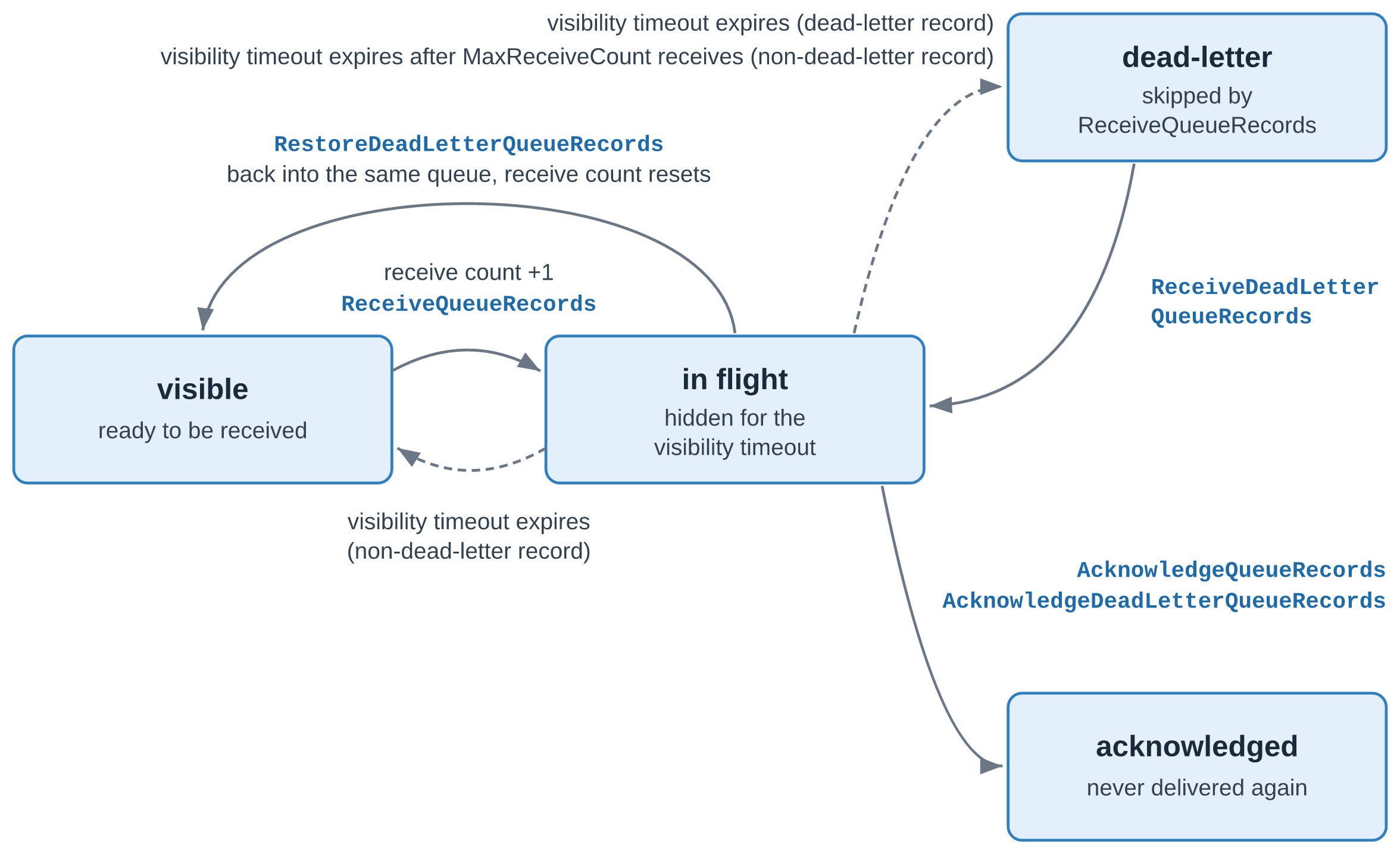
Figure 2: The lifecycle of a record in a queue
A record that a consumer instance receives is in flight and hidden from other consumer instances until its visibility timeout expires. The timeout defaults to 30 seconds and can be set up to 12 hours. A consumer instance can extend it with UpdateQueueRecordsVisibility, or set it to 0 to release the record immediately. If the timeout expires before an acknowledgment, the record becomes visible again and its receive count goes up by one.
Handle records that keep failing
A record can keep failing because of its content, for example a malformed payload or an order for a product that no longer exists. It can also fail because of a problem on your side, such as an unavailable downstream service or a bug in your consumer. Dead-letter handling, enabled by default, moves a record to the dead-letter state after MaxReceiveCount receives without an acknowledgment (six by default), so that it stops taking capacity from your consumer instances. You can change the count or disable dead-letter handling with CreateQueue or UpdateQueue, or by using the console. With dead-letter handling disabled, failing records keep returning until their retention period in the stream ends.
You work with dead-letter records through a separate set of operations: ReceiveDeadLetterQueueRecords to receive them, RestoreDeadLetterQueueRecords to return them to the normal receive path with a reset receive count, and AcknowledgeDeadLetterQueueRecords to discard them. These operations have their own AWS Identity and Access Management (IAM) actions, so an operator role can handle dead-letter records without changing your consumer’s permissions. The queue also publishes dead-letter metrics such as VisibleDeadLetterQueueRecords, so you can alarm on them. Acknowledge records that can never succeed to discard them. For records that failed because of a broken dependency or a consumer bug, fix the cause first, then restore them. Like any other record, a dead-letter record expires when its retention period in the stream ends.
Design consumers for at-least-once delivery
A consumer instance can receive a record more than once: after a visibility timeout expires, after a restore, or on rare occasions even after an acknowledgment. Because delivery is at least once, make your processing idempotent. Each record carries a RecordId that stays the same across redeliveries and across queues on the stream. A producer retry, however, writes the same data to the stream a second time, and the duplicate arrives as a new record with a different RecordId. Key your side effects on a business ID, such as the order ID, for example with a conditional write. Where records carry no business ID or you don’t control the producers, fall back to RecordId. Size the visibility timeout to your processing time, and extend it for the occasional long-running record. AcknowledgeQueueRecords returns HTTP 200 with separate Successful and Failed lists, so check the Failed list on every call.
Monitoring a queue
Each queue publishes its own metrics to CloudWatch, including VisibleQueueRecords for records ready to be received, InFlightQueueRecords for records that are received but not yet acknowledged, and matching metrics for dead-letter records. Scale your consumer instances on VisibleQueueRecords, and alarm on VisibleDeadLetterQueueRecords so that you notice failing records early.
Choosing between a queue and a stream consumer
With the addition of queues, Kinesis Data Streams now offers two ways to process a stream’s records in real time, and each application can use the one that fits its work:
- Read the stream directly with a stream consumer when handling a record depends on the records before it, as the fraud check’s running counts do.
- Receive records through a queue with a queue consumer when each record can be handled on its own, without strict ordering requirements, as reserving inventory for one order can.
The following table compares the two:
| Stream consumer | Queue consumer | |
| Typical work | Aggregations, windowed analytics, fraud and anomaly detection | Order fulfillment, per-record inference, record enrichment, search indexing |
| Ordering | In order for each partition key | Best effort |
| Parallelism | Each shard is read by one sticky consumer instance of an application at a time | Add consumer instances as needed, independently of the shard count |
| Progress tracking | The application stores its read position, for example in the KCL lease table | The queue tracks the delivery state of every record |
| Failed records | Retried in place, which holds up the shard, or skipped and tracked by your code | Redelivered individually, then set aside as dead-letter records |
| Tooling | KCL, Amazon Managed Service for Apache Flink | AWS SDK |
What consuming with a queue costs
Besides the DynamoDB and CloudWatch charges, the saving comes from compute. A KCL consumer instance processes each shard’s records one batch after another, so with I/O-bound processing it spends much of its time waiting. The load also depends on partition keys: if most records share one partition key, that shard is processed in sequence while the instances that lease other shards sit idle. A queue consumer instance can run as many parallel threads as it needs to use its CPU fully, so fewer instances handle the same throughput.
An AWS benchmark measured the saving with a synthetic workload, not a real-world customer workload, for which AWS specified the record size, rate, partition-key distribution, and handler cost. A KCL 3.5.3 fleet and a queue fleet consumed the same On-demand Advantage stream at the same time, at a sustained throughput of 25 MB/s with a warm throughput of 100 MB/s. Each fleet was sized to process 99 percent of records within 10 seconds. The comparison covers data retrieval or queue consumption, DynamoDB, CloudWatch, and Amazon Elastic Compute Cloud (Amazon EC2) at US East (Ohio) prices. It excludes ingestion, which costs the same for both. The benchmark tested one handler profile, with 1 ms of CPU and 10 ms of wait per record. This I/O-bound profile is the most favorable condition for the compute part of the saving, and a CPU-bound handler narrows it. Of the $15.09 saving per TiB, $11.55 comes from DynamoDB and CloudWatch, which don’t depend on the handler. Even with no compute advantage, the saving would still be 33 percent. The KCL fleet ran with its default configuration, including detailed metrics with the shard dimension, which produced 1,580 metric series at 190 shards. If you reduce KCL metrics to the summary level without the shard dimension, this part of the saving shrinks, at the cost of per-shard observability.
How queues in Kinesis Data Streams relate to Amazon SQS
Queues in Kinesis Data Streams are powered by Amazon SQS. Built on that foundation, they use familiar queue concepts such as visibility timeouts, acknowledgments, and dead-letter handling. They’re a capability of Kinesis Data Streams, and you work with them through the Kinesis Data Streams APIs.
Amazon SQS continues to be the place to start for point-to-point messaging between application components, such as buffering requests, decoupling services, and background jobs, where no other application needs the same data.
Choose queues in Kinesis Data Streams when the same records are needed by more than one application. There’s no dual ingest and no relay to operate. Applications that process each record independently receive and acknowledge each record through the AWS SDK, with no KCL, lease table, or shards to manage.
Explore the sample repository
The GitHub repo contains working code for six scenarios, written in TypeScript, with Java for the KCL consumers, and deployed with the AWS Cloud Development Kit (AWS CDK). Each scenario builds on a quickstart with an on-demand stream, an order producer, and a KCL consumer on AWS Fargate, and the README lists the prerequisites and the cleanup steps. The scenarios are the following:
- Build your first queue consumer – A receive, process, and acknowledge loop on the AWS SDK alone, with long polling. Shown in TypeScript, and it works the same in any language with an AWS SDK.
- Process records safely – An idempotent handler keyed on the order ID, which any at-least-once consumer needs, KCL applications included.
- Scale out independently of shards – More consumer instances on Amazon Elastic Container Service (Amazon ECS) than the stream has shards, scaled on the backlog metric.
- Handle failures and dead-letter records – A transient error that succeeds on redelivery, and a malformed record that an operator restores or discards.
- Consume one stream in more than one way – The fraud check and a fulfillment queue on the same stream, plus a second queue that starts at
AT_TIMESTAMP. - Migrate an existing consumer – From a stateless KCL application, and from a relay into an SQS queue.
In the KCL migration, a receive and acknowledge loop replaces the KCL, its lease table, and custom metrics, and the processing logic stays. When the SQS queue behind a relay carries only records from the stream, a queue in Kinesis Data Streams replaces both the relay and the SQS queue. If other applications also send messages to that SQS queue, keep it. The consumer’s API calls map as follows:
| Amazon SQS | Kinesis queue |
ReceiveMessage |
ReceiveQueueRecords |
DeleteMessage, DeleteMessageBatch |
AcknowledgeQueueRecords |
ChangeMessageVisibility, ChangeMessageVisibilityBatch |
UpdateQueueRecordsVisibility |
| Dead-letter queue with a redrive policy | Dead-letter state in the same queue, restored with RestoreDeadLetterQueueRecords |
Both migrations pick a starting position that skips no records, and tolerate duplicates while old and new consumers overlap.
Conclusion
Queues in Kinesis Data Streams are built for work where each record stands on its own. They scale with your backlog instead of your shard count, track every record for you, and set failing records aside so that they don’t hold up the rest. Stream consumers remain the right choice for work that depends on the order of records. Kinesis queues are powered by Amazon SQS and use familiar queue concepts such as visibility timeouts, acknowledgments, and dead-letter handling. You ingest your data once, and stream consumers, queues, and delivery to Amazon S3 all read from the same stream. If you run stateless KCL consumers, moving them to a queue can also lower your processing cost.
For Regional availability, see Supported AWS Regions. For pricing, see Amazon Kinesis Data Streams pricing. To get started, create a queue for an on-demand stream on the Kinesis console or with CreateQueue, and run the scenarios in the GitHub repo. For more information, refer to Consume records from a stream with queues in the Amazon Kinesis Data Streams Developer Guide. For help with your use case, contact your AWS representative.