Post Syndicated from Frank Scarfo original https://aws.amazon.com/blogs/compute/adding-custom-domains-to-aws-lambda-microvms-with-application-load-balancer/
AWS Lambda MicroVMs is a serverless compute building block that provides VM-level isolation, near-instant startup performance, and state retention. You can now give each user or job their own execution environment to securely run just-in-time code, whether user or AI-generated. You do this without managing virtualization infrastructure or choosing between isolation, speed, and state retention. Lambda MicroVMs are powered by Firecracker virtualization, the technology underpinning AWS Lambda.
When you run a workload on AWS Lambda MicroVMs, each MicroVM is reachable at a service-generated endpoint that looks like 92cfc7f9-….lambda-microvm-….on.aws. That works, but many teams want to expose their MicroVMs under a domain they own, such as 92cfc7f9-….microvms.example.com. When a browser is the client, they also want to satisfy cross-origin resource sharing (CORS) without changing the application inside the MicroVM.
Both are achievable today, entirely from load-balancing and networking primitives. There is no Amazon CloudFront distribution and no compute in the request path. All you need is an Application Load Balancer (ALB) that terminates TLS with your AWS Certificate Manager (ACM) certificate, rewrites the Host header, and forwards the request over AWS PrivateLink. In this post you’ll deploy that pattern with the AWS Cloud Development Kit (AWS CDK), map a wildcard of custom domains onto your MicroVMs, and let the ALB handle CORS for you.
The complete, deployable example is available as a pattern on Serverless Land. This walkthrough centers on the reusable networking pattern. The sample also includes a small demo application that provisions a MicroVM and mints an access token, which we reference but do not detail here.
What you’ll build
By the end you’ll have:
- A wildcard custom domain like
*.microvms.example.com, where each<uuid>.microvms.example.commaps transparently to the corresponding MicroVM. - An internet-facing ALB that rewrites the incoming request’s
Hostheader to the real MicroVM endpoint and forwards requests to it privately over PrivateLink. - CORS preflight and response headers handled at the ALB, with no change to the code running in the MicroVM.
Calling https://<uuid>.microvms.example.com/<path> (with the MicroVM access headers described later) reaches the right MicroVM, with your domain intact end to end.
Solution overview
The request flow looks like this:
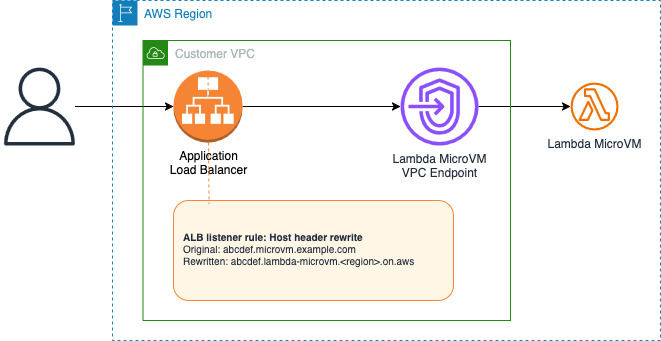
The key component is the ALB host header rewrite, introduced in URL and host header rewrite for Application Load Balancers. A listener rule matches the incoming custom host with a regex condition, captures the MicroVM ID from the left-most label, and a host-header-rewrite transform rewrites the Host header to <uuid>.lambda-microvm.<region>.on.aws before forwarding. Because the MicroVM service front-end routes on the Host header, the request lands on the correct MicroVM, while the customer’s domain stays in the browser’s address bar the whole time.
Why not CloudFront? Why not an ALB redirect?
- CloudFront can also rewrite
Host/SNI toward the origin, but a single distribution has static origins. Mapping a wildcard of MicroVM IDs through one distribution would require a CloudFront Function to compute the origin per request. The ALB transform performs the same rewrite for the entire wildcard with zero code. - An ALB redirect action only issues an
HTTP 301 Moved Permanently/302 Foundresponse. The browser would follow it, and the address bar would then show the.on.awsURL, which breaks our design as it is not a real custom domain. The transform (not a redirect) is what makes the custom domain transparent.
Walkthrough
The example is an AWS CDK application. Configuration lives under the microvm-custom-domains key in cdk.json (hosted zone, wildcard base, the endpoint base to rewrite to, the PrivateLink service name, and the CORS origin). Set those values, then deploy. The sections below explain what the stack creates and why.
Prerequisites
- An AWS account.
- An existing Amazon Route 53 public hosted zone for your domain (for example,
example.com). The stack imports it and adds a wildcard record. Node.jsv22 or higher and the AWS CDK v2.- Credentials for the target account with permission to create Lambda, Amazon Virtual Private Cloud (VPC), Elastic Load Balancing, AWS Certificate Manager (ACM), and Route 53 resources through AWS CloudFormation.
1. Create the network and the PrivateLink endpoint
A small VPC (two Availability Zones, which is the minimum for an internet-facing ALB) hosts the ALB and an interface VPC endpoint to the AWS managed MicroVM service. There are no NAT gateways, because nothing here needs egress, which keeps the footprint lean.
2. Discover the endpoint’s private IP addresses at deploy time
An ALB IP target group needs the private ENI IP addresses of the interface endpoint (one per Availability Zone). CloudFormation does not expose those IPs as a usable attribute, so the stack resolves them during deployment with an AwsCustomResource that reads the endpoint’s own ENIs by ID (DescribeNetworkInterfaces on vpcEndpointNetworkInterfaceIds).
This is the only compute the package deploys, it runs only during cdk deploy, and it is never in the request path.
3. Request a wildcard TLS certificate
ACM issues a DNS-validated wildcard certificate for *.microvms.example.com, validated through the hosted zone you imported. The ALB presents this certificate for every custom domain under the wildcard.
4. Create the ALB and the MicroVM target group
The internet-facing ALB has an HTTPS:443 listener using the wildcard certificate. The target group holds the endpoint ENI IPs as IP targets, reached over HTTPS:443.
- Encrypted in transit. A customer-provided AWS Certificate Manager (ACM) certificate is used to securely terminate encryption between the client and the ALB. The ALB re-originates TLS to the MicroVM service so traffic stays encrypted through the network.
- IP-based targets. The target group uses IP-based targets with the local IP addresses of the VPC endpoints.
- Health check matcher
200,403,404. The load balancer’s health probes are unauthenticated, so the MicroVM endpoint answers them with403. A403here means “endpoint is reachable,” not “auth is broken,” so the matcher treats it as healthy.
5. Add the host-header rewrite rule
A listener rule matches <uuid>.microvms.example.com with a regex condition and rewrites the Host header to <uuid>.lambda-microvm.<region>.on.aws with a host-header-rewrite transform. The regex captures the left-most label (the MicroVM ID) and reuses it in the replacement.
At the time of writing, the CDK L2 constructs don’t yet model regex host conditions or transforms, so the example reaches the underlying CfnListenerRule to set them:
6. Point Route 53 at the ALB
Wildcard A and AAAA alias records (*.microvms.example.com) target the ALB, so every MicroVM custom subdomain resolves to it.
7. Deploy
Run the following commands to install the dependencies and then deploy the application.
Handling CORS at the ALB
If your clients are browsers calling the MicroVM from another origin, CORS is handled entirely at the ALB, with no change to the application inside the MicroVM.
The listener uses ALB header-modification attributes to insert the Access-Control-Allow-* headers on every response. A higher-priority rule answers OPTIONS preflight requests at the edge with a fast 204 response. Otherwise, preflight requests would reach the origin and be rejected without an access token.
Because the ALB adds those headers to both the preflight 204 and the forwarded MicroVM response, a browser’s cross-origin call succeeds without any application change. Set corsAllowOrigin to * for quick testing, and pin it to your own site for anything beyond a demo.
Test it end to end
First, launch a Lambda MicroVM and mint an access token (follow Create your first Lambda MicroVM). When it’s running, the service gives you a generated endpoint that looks like:
To get the custom-domain equivalent, replace the endpoint suffix (.lambda-microvm.<region>.on.aws) with your wildcard base: .microvms.example.com. Everything ahead of that suffix is preserved exactly:
The ALB’s rewrite rule captures whatever precedes the suffix and re-attaches it to the real endpoint base, so the mapping holds for the entire wildcard. You never register anything per-MicroVM.
With your token in hand, call the custom domain you derived:
The request travels to the ALB, which terminates TLS, rewrites the host header, and forwards over PrivateLink to the MicroVM. The response comes back under your domain.
The reference architecture also includes a single-page demo and a POST /api/provision endpoint that runs or reuses a MicroVM and mints a short-lived token. With it, you can try the flow without wiring up token creation yourself. It even performs this suffix swap for you and hands back a ready-to-click custom-domain URL. See the repository for that piece.
Important considerations
- Authentication is still the client’s job. This pattern only rewrites
Host. The client must still supply a valid, unexpired access token inX-aws-proxy-auth. This is deliberate. MicroVM tokens are per-MicroVM and short-lived, so baking them into infrastructure would be fragile and insecure. - Region pinning. PrivateLink is regional, so the ALB, the endpoint, and the MicroVM service must all be in the same Region.
- Production hardening. If you adapt the sample’s provisioning endpoint, put authentication and rate limiting in front of it, pin CORS to your origin, and scope IAM to the minimum. The sample’s provisioning path is intentionally open for demonstration and is not production-safe as written.
- Cost. You pay for the ALB and the interface endpoint (hourly plus data processing) in addition to the Lambda MicroVM usage. There is no CloudFront distribution and no per-request compute in the data path.
Clean up
Run the following command in the same directory where you deployed the application from.
This removes the ALB, target groups, endpoint, certificate, VPC, and Route 53 records created by the stack.
Conclusion
You can front AWS Lambda MicroVMs with customer-owned wildcard custom domains using an Application Load Balancer and AWS PrivateLink. The key is the ALB’s host-header rewrite. Because the MicroVM service routes requests based on the Host header, a single rewrite rule can transparently map an entire wildcard of custom domains onto your MicroVMs. CORS is handled at the edge as well. The whole setup relies only on networking primitives, with no CloudFront distribution and no compute in the request path.
To try it yourself, deploy the reference architecture and review the ALB URL and host header rewrite launch post for more on the transform feature.