Post Syndicated from Ganesh Natarajan original https://aws.amazon.com/blogs/big-data/introducing-amazon-opensearch-memory-persistent-memory-for-ai-agents/
Today, we are announcing the general availability of Amazon OpenSearch Memory, a new capability built on Amazon OpenSearch Serverless for adding persistent memory to AI agents. OpenSearch Memory stores agent interactions as searchable events, derives useful memories, and retrieves relevant context across sessions. You can give agents long-term memory without provisioning infrastructure or building separate extraction, indexing, consolidation, and retrieval systems.
AI agents need memory when an interaction depends on information from an earlier session. A support agent might recall a customer’s open case and product configuration, a coding agent needs repository conventions and prior decisions, and a personal assistant keeps a user’s preferences. An agent that restarts or hands off a conversation also needs the exact turns that came before. Passing the complete conversation history to the model becomes slower and more expensive as that history grows, and the relevant information can be difficult to find.
Building a memory system requires more than storing transcripts. You must capture events, extract facts and summaries, generate embeddings, reconcile new information with existing memories, retrieve the right context, isolate data, and enforce retention and deletion policies. You must also operate the infrastructure and evaluate whether the retrieved memories improve agent responses.
OpenSearch Memory manages these functions as one serverless capability. Your application writes conversation events after each turn and searches for relevant memories and events before generating a response. OpenSearch Memory stores the original events verbatim, makes them searchable within seconds, and asynchronously derives structured memories. It handles extraction, embedding, indexing, consolidation, retrieval, data isolation, and retention.
How OpenSearch Memory works
The architecture has two boundaries: your application and OpenSearch Memory. Your AI agent connects through an AWS SDK, an AWS Model Context Protocol (MCP) server, a hook, or a supported framework integration. The following diagram shows how your application writes events to a space, how OpenSearch Memory derives memories using an Amazon Bedrock model that you choose, and how your application retrieves context. Extraction and embedding costs are included in OpenSearch Memory pricing. For details, see Amazon OpenSearch Service pricing.
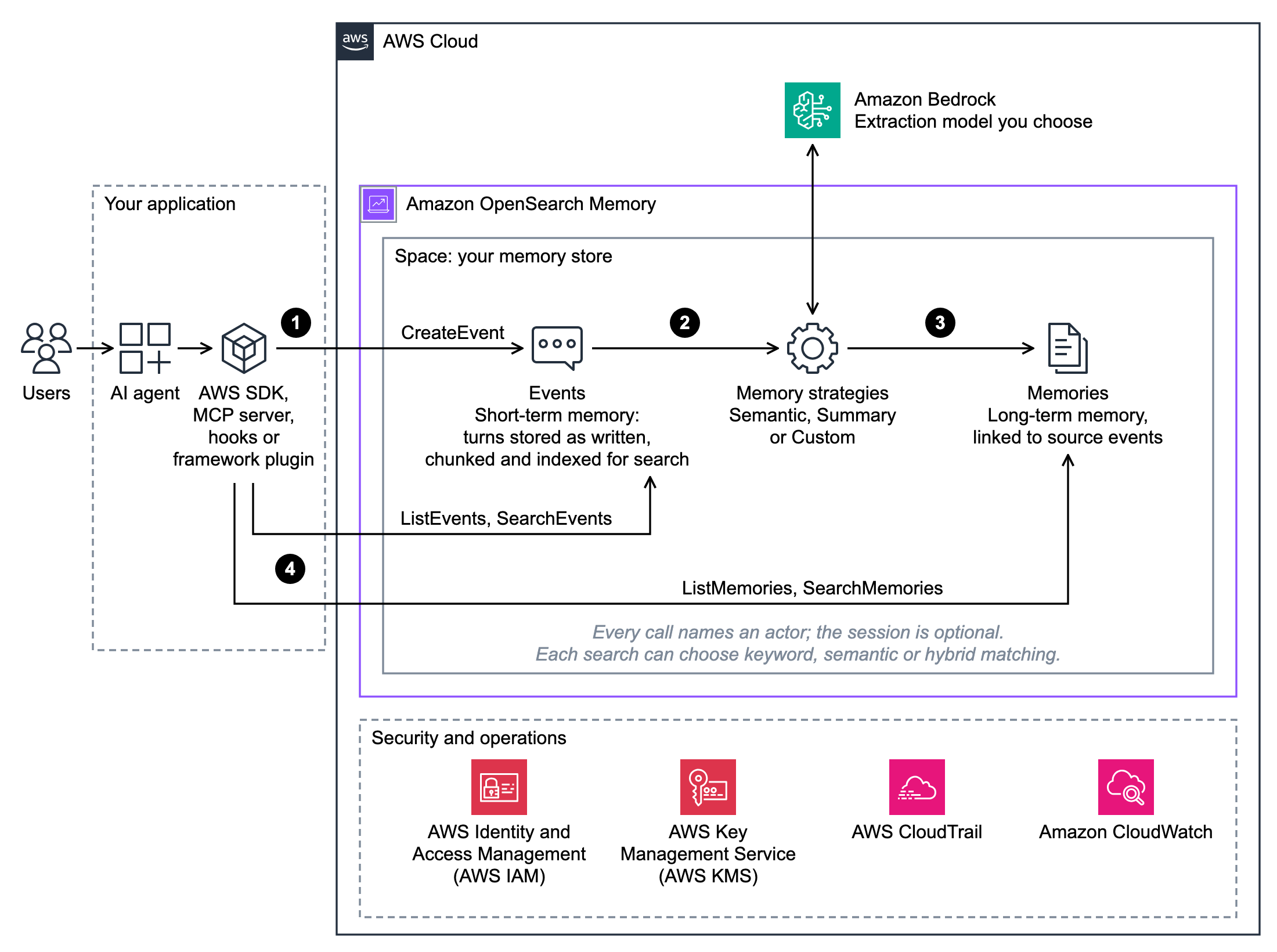
Figure 1: How an application writes events to an Amazon OpenSearch Memory space, derives memories with an Amazon Bedrock model, and retrieves context
OpenSearch Memory organizes data in a space, the AWS resource that serves as a memory store. A space contains the following:
- Events, which are the original interactions written by your application.
- Memories, which are facts, preferences, and summaries derived from those events.
Every request names an actor, the end user the data belongs to. An optional session ID groups events from one conversation. A condition key on the agent’s AWS Identity and Access Management (IAM) role can limit which actors the agent can act for, and event reads and searches can be limited to one session. Data in a space is encrypted with AWS Key Management Service (AWS KMS), and you can use your own customer managed key. AWS CloudTrail logs API calls to a space, and Amazon CloudWatch reports its metrics.
The write and retrieval paths operate independently:
- After each interaction, your application writes the conversation turn to a space as an event. OpenSearch Memory stores the event verbatim (
CreateEvent) and indexes it for keyword, semantic, and hybrid search. Events are available to read immediately and become searchable within seconds. - In the background, the memory strategies configured on the space extract memories from these events.
- OpenSearch Memory compares each new memory with the existing ones and adds, updates, or skips it, so stored memories stay current.
- Before the agent responds, your application retrieves context: memories about the user from past conversations, the exact turns of the current or earlier conversations, or both. Your application adds the retrieved context to the model’s prompt.
Benchmarking OpenSearch Memory with LongMemEval
In this evaluation, the configured OpenSearch Memory workflow gave the answering model about one-twelfth as many input tokens as the full conversation history (about 13,500 compared with 167,000 per question). It preserved most of its answer accuracy: 93.0% compared with 95.2%.
We used LongMemEval-S to evaluate whether a complete memory workflow could help an AI assistant answer questions that depend on earlier conversations. The public benchmark contains 500 questions about information distributed across approximately 50 chat sessions for one user (Wu et al., ICLR 2025). It evaluates the final answers produced using retrieved memories, rather than memory extraction alone.
For this evaluation, we configured the OpenSearch Memory workflow as follows:
- We wrote the benchmark conversations to OpenSearch Memory as events.
- The space’s default memory strategies, for facts and session summaries, derived and consolidated memories from those events.
- For each question, the answering model received the top 30 memories and events from hybrid search.
- Claude Opus 5.5 answered each question from those results and, in a separate call, graded each answer against the benchmark’s reference answer.
Claude Haiku 5.5 extracted memories, and Amazon Titan Text Embeddings created the embeddings. Each result comes from one run, with a 95% confidence range of 2 to 3 points either way. To limit grading bias, Opus 5.5 graded each answer in a separate call that saw only the question, the reference answer, and the answer.
We compared the OpenSearch Memory workflow with two baselines: retrieving raw conversation turns with BM25 keyword search, and supplying the complete conversation history to the answering model. Claude Opus 5.5 answered and graded all three.
| Context supplied to the answering model | What the comparison measures | Answer accuracy | Context tokens per question |
| OpenSearch Memory: top 30 results from memories and events | The configured extraction, consolidation, and hybrid retrieval workflow | 93.0% | Approximately 13,500 |
| BM25: top 30 raw conversation turns | Keyword retrieval without memory extraction or consolidation | 88.6% | Approximately 22,700 |
| Full conversation history | Answering with all conversation turns | 95.2% | Approximately 167,000 |
For agents with long-running conversations, this approach can reduce model input costs and preserve room in the context window without discarding information from earlier sessions. The workflow also scored 4.4 percentage points higher than BM25 retrieval over raw conversation turns. These results reflect the tested setup, including its memory strategies, models, and retrieval settings, and do not represent every possible OpenSearch Memory configuration.
Getting started with Amazon OpenSearch Memory
You can create your first space from the Amazon OpenSearch Service console or the AWS SDK. The following sections walk through both.
Launch OpenSearch Memory from the console
You can create a space and inspect its events and memories in the Amazon OpenSearch Service console. The following video shows the steps.
- In the Amazon OpenSearch Service console, under Memory, choose Spaces, and then choose Create Space.
- Choose Easy create, enter a space name, and choose Create Space. Easy create adds a Semantic and a Summary strategy and uses service defaults for encryption and expiry. Choose Standard create to set these yourself.
- Wait for the status to change from Creating to Active. The Memory strategies tab shows the strategies on the space.
- After your agent writes events, open the Events tab and enter an actor ID to see each conversation. The Memories tab shows the memories extracted from those events.
Walkthrough with the AWS SDK
This walkthrough adds memory to a customer support agent. The agent needs to remember account details, prior case history, and user preferences across sessions.
Prerequisites
To follow this walkthrough, you need the following:
- An AWS account with permissions to create and use OpenSearch Memory spaces.
- Python 3.10 or later and the AWS SDK for Python (Boto3) 1.44.4 or later.
- One of the supported AWS Regions: US East (N. Virginia), US West (Oregon), Asia Pacific (Tokyo), or Europe (Frankfurt).
1. Create a space
You start by creating a space for the support agent. This is a one-time setup. The space defines what the service extracts, how long it keeps data, and how it encrypts it.
2. Write events after each turn
After each agent turn, you write an event. The call returns after the event is stored, and extraction runs in the background.
Extraction freshness: Memories appear after the service processes the events in the background, so for a brand-new user, a memory search (step 3) can return nothing at first. Events don’t wait. They are readable as soon as the write returns and searchable within seconds. An agent that restarts or hands off the conversation can resume the session from its events right away. Use ListEvents to find the session’s recent events, and BatchGetEvent or GetEvent to read them. By default, ListEvents returns a session’s events newest first, so the following slice reads the most recent turns. Pass the sort parameter to return them oldest first instead.
Writing memories directly: You can also write a memory directly with CreateMemory. Use it to import what you already know, such as preferences from an existing customer relationship management (CRM) system, or to let the agent save its own findings. The service embeds and stores the memory under the strategy that you name.
The added metadata here keeps a record of which memories the agent wrote, so you can audit them later. Agent-written memories persist across sessions and feed later prompts, so review or correct them, for example by filtering on the writtenBy metadata, before you rely on them.
3. Search memories before each response
Before generating a response, you search the space for memories about this user and add them to the agent’s system prompt.
In this support scenario, the keyword half of the query surfaces the exact case number from a prior session. The semantic half retrieves related context, such as the user’s preferred contact method and what the case is waiting on. The user doesn’t need to repeat themselves. Each turn adds two calls to your agent loop: one search before it responds, one write after.
Each result also carries sourceEventIds, the events the memory was derived from, so you can trace any fact back to the conversation that produced it.
Search the conversation itself: Memories capture what a conversation means. Events keep the conversation itself: every turn, verbatim, with who said it. To find an exact phrase, such as a commitment the agent made earlier in the conversation, search the events:
4. Let consolidation keep facts current
Users’ facts change. Consolidation handles the change without extra code.
Consolidation is on by default for every strategy. To keep an append-only history instead, set consolidationEnabled to False in the strategy’s configuration:
Clean up
To avoid incurring future charges, delete the space when you no longer need it. Deletion is permanent.
Get started today
Amazon OpenSearch Memory is generally available today in four AWS Regions: US East (N. Virginia), US West (Oregon), Asia Pacific (Tokyo), and Europe (Frankfurt). For pricing, including storage, retrieval, and extraction, see Amazon OpenSearch Service pricing. To start building, use the AWS SDK, the MCP server, or the OpenSearch Memory skills for Kiro, Claude Code, and Codex.
With OpenSearch Memory, your agents keep context across sessions without you building or operating a memory system.
To learn more, see OpenSearch Memory in the Amazon OpenSearch Service Developer Guide.