All posts by Nidhi Nayak

Long-term system tables retention in Amazon Redshift with Amazon S3 Tables

Post Syndicated from Nidhi Nayak original https://aws.amazon.com/blogs/big-data/long-term-system-tables-retention-in-amazon-redshift-with-amazon-s3-tables/

Amazon Redshift system tables capture a continuous stream of operational signals: every query that runs, every connection that is made. This data powers observability, performance analysis, and compliance auditing across your data warehouses. Until now, the system tables retained this critical data for only 7 days, making long-term compliance and auditing difficult without custom workarounds.

Amazon Redshift system table integration with Amazon S3 Tables, a capability of Amazon Simple Storage Service (Amazon S3), automatically delivers your system table logs data to Amazon S3 Tables and stores them in Apache Iceberg format. You can configure retention periods for Amazon Redshift system table beyond the current 7-day limit, giving you extended compliance, auditing, and cross-warehouse observability without custom ETL pipelines or cluster resource consumption. Your data is open, durable, and queryable from Amazon Redshift, Amazon Athena, AWS Glue, Amazon EMR, or other Apache Iceberg-compatible engines.

In this post, we walk through how the Amazon Redshift system table integration delivers log data to Amazon S3 Tables. This feature is supported on RA3 and RG provisioned clusters and Amazon Redshift Serverless workgroups.

The challenge

If you run Amazon Redshift, you often face operational challenges driven by the 7-day system table retention limit:

  1. Limited query trend visibility: You want to compare how the same query performed 30 days ago compared to today. When performance shifts gradually, extended baselines enable data-driven root cause analysis rather than reactive troubleshooting.
  2. Enable before-and-after comparisons: When you add a new workload, change instance type, or adjust Workload Management (WLM) queues, you want to measure the impact precisely. Extended retention preserves the baseline data you need.
  3. Unlock seasonal capacity planning: Month-end spikes, quarter-close surges, and annual peaks require months of historical data to identify and plan. Extended retention reveals seasonal patterns across months and years.
  4. Custom ETL pipeline overhead: To work around the retention limit, teams build custom pipelines that copy system table data hourly/daily into persistent tables within Amazon Redshift Managed Storage. These pipelines consume cluster resources, compete with production workloads, and require ongoing engineering maintenance. When Amazon Redshift updates system table schemas and data sharing configurations, these pipelines require manual intervention and create gaps in records.
  5. Compliance requirements: Regulated industries are required to maintain audit trails spanning months or years. The 7-day limit requires custom infrastructure to meet these requirements. Amazon S3 Tables integration for Amazon Redshift system tables now addresses this.

How it works

Amazon Redshift system tables integration with Amazon S3 Tables is a fully managed capability that automatically writes Amazon Redshift system table data to Amazon S3 tables in Apache Iceberg format. AWS handles partitioning, compression, and retention management automatically. The log writing process runs in an isolated background process that alleviates resource contention with production workloads. AWS manages the pipelines for you.

The feature supports over 25 system views at launch – see the supported system views documentation.

Setting up

Follow these steps to enable system table integration with Amazon S3 Tables from the Amazon Redshift console:

  1. Open the Amazon Redshift console and navigate to the System table integrations page. You can also access this from the detail page of your provisioned cluster or Serverless workgroup.
  2. Choose Create System table integration. This launches the configuration wizard.
  3. Select the Amazon Redshift Provisioned cluster or Amazon Redshift Serverless workgroup that you want to enable the feature on.

    Amazon Redshift console data warehouse selection step in the create System table integration wizard

    Figure 1: Selecting the Amazon Redshift data warehouse in the System table integration wizard

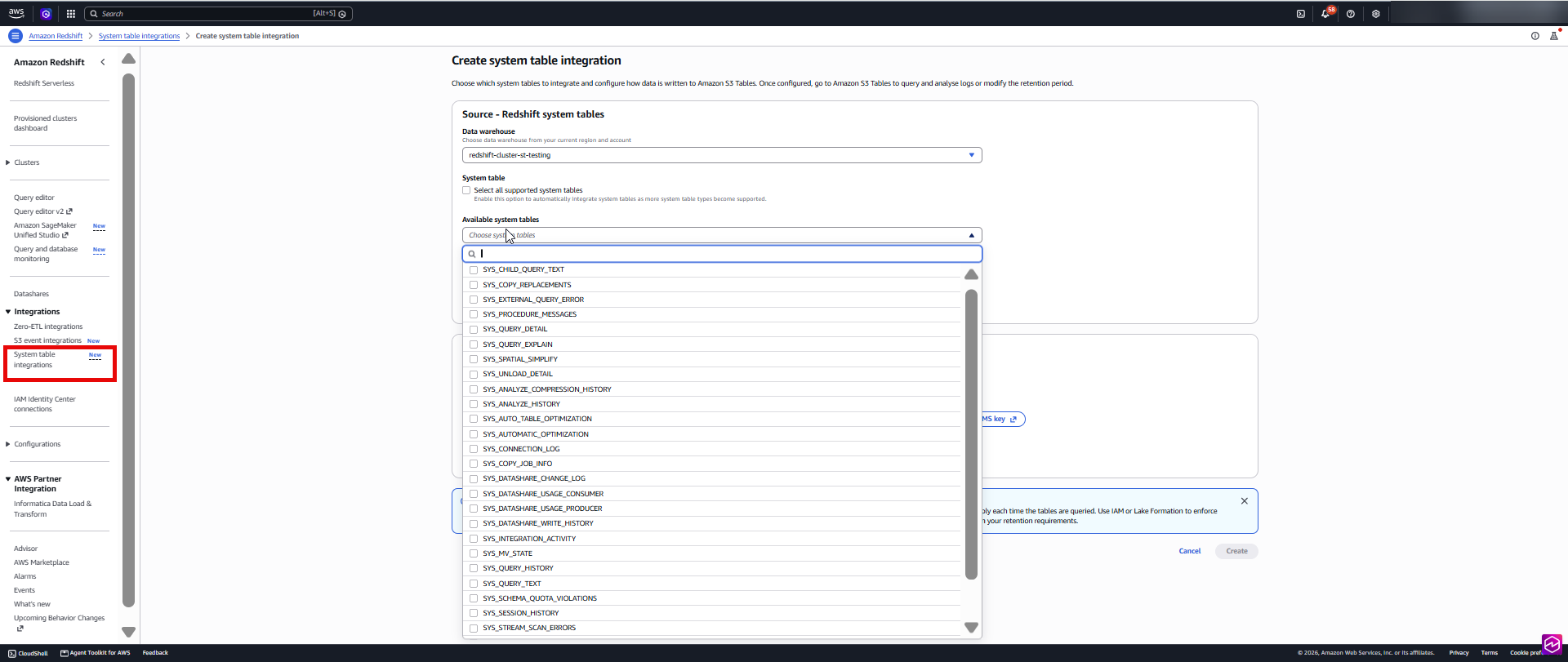
  4. Choose the system views to publish from the Available system tables list. Select individual SYS_* views, or choose Select all supported system tables to publish all current and future supported views. If you select all, new views added in the future are automatically included without requiring a configuration change.

    Available system tables list in the System table integration wizard with SYS views selected for publishing

    Figure 2: Choosing the system views to publish from the Available system tables list

  5. Select the deployment model. Choose how data is organized in Amazon S3 Tables:
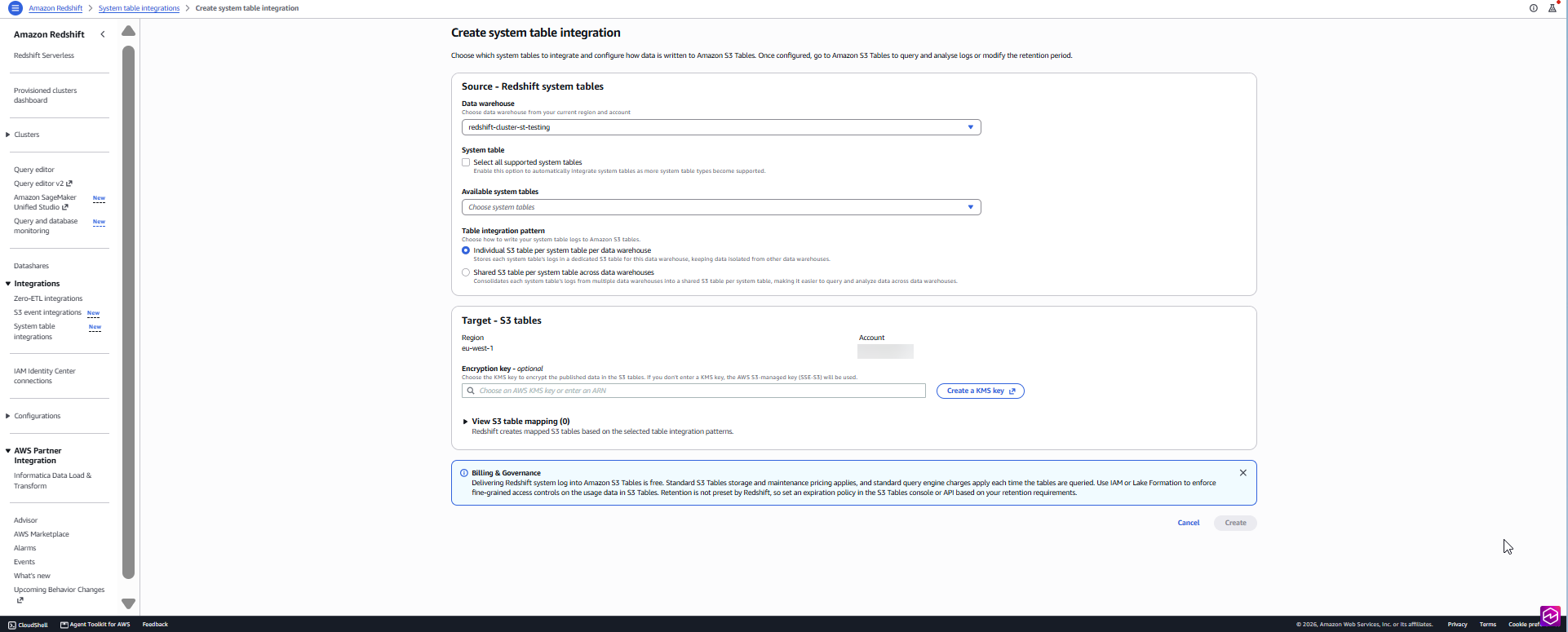
  • Individual S3 table per system table per data warehouse to keep this warehouse’s data in its own set of tables.
  • Shared S3 table per system table across data warehouses to consolidate data from multiple warehouses in the account into a shared set of tables.
  1. Optionally configure encryption with an AWS Key Management Service (AWS KMS) customer managed key. By default, data is encrypted with Amazon S3-managed key (SSE-S3) encryption.
  2. Save your changes. Amazon Redshift begins publishing the selected views to Amazon S3 Tables and continues adding new records on a fixed frequency.

To verify the integration is active:

  • Navigate to your cluster or workgroup detail page.
  • Check the integration status and the last ingestion time for each view.
  • You can also view the published data from the Amazon S3 Tables console.

After it’s enabled, Amazon Redshift writes log data to Amazon S3 tables periodically through an isolated background process, separate from production workloads. To start querying the retained logs, you will need to perform a one-time setup that connects your Amazon Redshift environment to Amazon S3 Tables data through AWS Glue Catalog. Complete the following steps:

  1. Set up an AWS Identity and Access Management (IAM) role with the necessary permissions for AWS Glue Data Catalog and Amazon S3 Tables access, then associate it with your Amazon Redshift cluster or Amazon Redshift serverless namespace.
  2. In AWS Glue Data Catalog, create a resource link that points to the Amazon S3 Tables database where your logs reside.
  3. In Amazon Redshift, create an external schema that references the resource link:
    CREATE EXTERNAL SCHEMA <schema_name>
    FROM DATA CATALOG
    DATABASE '<resource_link_database>'
    IAM_ROLE '<iam_role_arn>';

  4. With this in place, you can query your historical system table data using familiar 2-part notation:
    SELECT * FROM <schema_name>.<table_name>;

Because access to Amazon S3 Tables is read-only, the integrity of your audit trails is inherently preserved.

For detailed setup instructions including IAM policy examples, see Registering the S3 Tables bucket with AWS Glue Data Catalog.

Your data is now in Apache Iceberg

Your system table data is stored in Apache Iceberg, an open table format, so you have the freedom to choose a compatible query engine. Your observability and auditing data works with the tool you already use.

You can analyze your operational data using:

  1. Amazon Redshift: After the S3 table bucket is integrated with AWS Glue Data Catalog, create an external schema in Amazon Redshift pointing at the resource link to query the retained tables.
  2. Amazon Athena: Run serverless SQL queries against historical logs with zero infrastructure provisioning.
  3. AWS Glue: Build automated data processing and transformation jobs on top of your operational data.
  4. Amazon EMR: Run Spark-based analytics at scale for complex cross-warehouse analysis.

Because the data is stored in open Apache Iceberg format in Amazon S3 Tables, you can query it with Amazon Redshift, Amazon Athena, AI agent skills for natural-language queries, Amazon SageMaker Unified Studio, an Iceberg-compatible engine, business intelligence (BI) tools, and observability systems.

Cost efficiency

Log delivery from Amazon Redshift to Amazon S3 Tables incurs no additional cost. You only pay for Amazon S3 Tables storage, maintenance, and querying the data with the engine of your choice.

Solution overview

The following scenarios illustrate how Amazon Redshift system tables integration with Amazon S3 Tables addresses common operational, compliance, and observability challenges across your Amazon Redshift environment. We also built a dedicated skill, querying-aws-redshift, for this feature and embedded it into the AWS MCP Server so you can query Amazon Redshift system tables from Amazon S3 Tables.

With months or years of SYS_QUERY_HISTORY data retained, you can trace how individual queries perform over extended periods. You can compare execution time, queue time, and resource consumption for a query across days, weeks, or months.

You can pinpoint exactly when performance started degrading and correlate it with what changed: a new schema, a spike in data volume, or an additional concurrent workload. Extended retention turns troubleshooting into proactive, data-driven root cause analysis.

Scenario 2: Assess workload impact before and after changes

Every workload change affects your system: a new ETL pipeline, an instance type change, a Workload Management (WLM) queue adjustment, or a new team of analysts running ad hoc queries. The question is always: how did this change affect performance?

With Amazon S3 Tables integration for Amazon Redshift system table, you can make data-driven decisions with confidence. Query SYS_QUERY_HISTORY to compare execution times, queue wait durations, and concurrency scaling events from the weeks before a change versus the weeks after. If you onboarded a new reporting workload two weeks ago and want to understand its effect on existing queries, the data to confirm that is already there, with zero custom pipeline required.

Scenario 3: Build observability dashboards

Your system table data is stored in Apache Iceberg and cataloged in AWS Glue, which means an observability or business intelligence (BI) tool that reads Apache Iceberg can connect directly to it. Visualize workload distribution trends in Amazon Quick Sight for executive reporting. Use Amazon SageMaker Unified Studio for deeper analytical exploration or to power AI-driven insights from your operational data. Beyond AWS services, connect your preferred third-party observability systems and BI tools to track query volumes, monitor connection patterns, set up alerts for anomalies, or correlate Amazon Redshift operational data alongside application-level logs.

Your observability and auditing data works with tools that you already use. Direct access to durable, structured operational data, with a tool you prefer.

Scenario 4: Plan capacity with seasonal context

Workload demand varies throughout the year. Month-end close, quarter-end reporting, annual planning cycles, and promotional events all create predictable usage spikes, but only if you have enough historical data to see the pattern.

With extended retention, you can analyze utilization trends across multiple business cycles. Identify when you consistently approach capacity limits, measure how demand shifts quarter over quarter, and validate whether your provisioned resources align with actual usage.

Scenario 5: Maintain compliance audit trails

For regulated industries, extended retention delivers a fully managed audit trail with built-in integrity.

SYS_CONNECTION_LOG records every authentication attempt. SYS_USERLOG captures user account changes. SYS_QUERY_HISTORY documents every query executed against your warehouse.

Configure retention to match your organization’s data retention policies: whether that is 90 days, one year, or multiple years. The read-only access policy helps prevent records from being altered after they are written, including by administrators.

Scenario 6: Centralize fleet observability across your warehouse

If you run multiple Amazon Redshift warehouses, you benefit from a unified view of operational data. The feature supports two deployment patterns to match your organizational structure:

  1. Individual tables per warehouse: Each warehouse writes to its own dedicated Amazon S3 tables, providing complete data isolation for compliance-sensitive environments. To query multiple warehouses, a UNION operation is required.
  2. Shared tables: Warehouses across the same account and same AWS Region write to a single shared set of Amazon S3 tables, with data distinguished by the warehouse_name column. Filter by warehouse for instant cross-cluster analysis.

Best practices

  1. Identify warehouses with logs requiring isolation for privacy reasons and select the individual table per warehouse option for those. For the remaining warehouses, use the Shared tables (consolidated) option for ease of management.
  2. Align retention duration with your compliance requirements. Configure the minimum retention period that satisfies your compliance requirements to reduce storage costs.
  3. When querying retained system tables, filter on metadata columns such as warehouse_account_id, warehouse_region_name, warehouse_namespace_arn, warehouse_name, and s3_tables_ingestion_time to reduce scan scope and improve performance. This is particularly important when querying large volumes of historical data across multiple warehouses.
  4. Rely on the built-in read-only access for audit trail integrity. Use the Amazon S3 Tables configuration APIs to manage retention and encryption settings.
  5. Plan your encryption strategy early. Choose your encryption key carefully at setup, as changes require recreating the integration. If you anticipate consolidating warehouses in the future, choose a shared AWS KMS key from the start.

Conclusion

Amazon Redshift system table integration with Amazon S3 Tables replaces custom ETL pipelines with a fully managed solution to preserve your Amazon Redshift operational data. With automatic Apache Iceberg-based storage, open format queryability, and built-in audit integrity, you get months or years of observability data, fully managed. You can enable it through the AWS Management Console, AWS Command Line Interface (AWS CLI), or AWS SDKs.

To learn more, visit the Amazon Redshift system tables documentation.


About the authors

Nidhi Nayak

Nidhi Nayak

Nidhi is a Senior Technical Account Manager with AWS, she helps enterprise customers build scalable, high-performance cloud applications and optimize cloud operations. With over a decade of experience in Data Analytics, Nidhi currently focuses on Redshift & Generative AI integration with Redshift.

Raza Hafeez

Raza Hafeez

Raza is a Senior Product Manager, Technical at Amazon Redshift. He has 15+ years of experience building and optimizing enterprise data warehouses and is passionate about making cloud analytics accessible and cost-effective for customers of all sizes.

Shubham Purwar

Shubham is an AWS Analytics Specialist Solution Architect. He helps organizations unlock the full potential of their data by designing and implementing scalable, secure, and high-performance analytics solutions on the AWS platform. With deep expertise in AWS analytics services, he collaborates with customers to uncover their distinct business requirements and create customized solutions that deliver actionable insights and drive business growth. In his free time, Shubham loves to spend time with his family and travel around the world.

Amrita Singh

Amrita Singh

Amrita is a Senior Technical Account Manager at AWS, based in Salt Lake City, USA. She specializes in Amazon Redshift, helping enterprise customers optimize their data warehouse environments for performance, scalability, and cost efficiency. Amrita works directly with AWS customers to provide guidance and technical assistance on their cloud journeys, helping them achieve higher flexibility, scale, and resiliency with AWS services.

Optimize your Tableau integration with Amazon Redshift Serverless

Post Syndicated from Nidhi Nayak original https://aws.amazon.com/blogs/big-data/optimize-your-tableau-integration-with-amazon-redshift-serverless/

This is a guest blog post co-written by Adiascar Cisneros, from Tableau at Salesforce.

Integrating Tableau with Amazon Redshift Serverless gives you high-performance analytics with serverless scaling and minimal capacity planning. Although automatic scaling handles warehouse management for you, optimization requires a strategic approach to data modeling, security, and query management.

In this post, we provide a guide to help you use Tableau’s Relationships and Amazon Redshift Serverless architecture to deliver sub-second insights while maximizing every Redshift Processing Unit (RPU). We also provide guidance on five key areas: data model architecture for optimal query performance, security configuration and access control, performance optimization through smart configuration, cost management strategies, and query and join optimization techniques.

Prerequisites

Before implementing these optimization strategies, make sure you have:

  • Tableau Desktop (version 2022.1 or later) or Tableau Server deployed.
  • An active Amazon Redshift Serverless workspace.
  • AWS Identity and Access Management (IAM) permissions to configure authentication and access controls.
  • Network connectivity configured between your Tableau environment and Amazon Redshift Serverless.
  • The native Amazon Redshift driver installed.

Building the foundation

The success of any analytics system begins with its data model. True scalability starts with the end-user experience. Your data model is more than a storage structure. It’s the foundation of dashboard responsiveness. By aligning your database design in Amazon Redshift with your analytical requirements, you empower Tableau to generate highly efficient queries, reducing costs and keeping your users engaged with the data.

When connecting to Amazon Redshift, we recommend using Tableau’s logical data model, specifically Relationships. With Relationship, you can preserve the native level of detail for each table, so Tableau can perform join culling and dynamically query only the specific tables needed for a particular visualization.

When designing your Amazon Redshift schema, implement a well-structured star or snowflake schema, or one big denormalized table where appropriate. This allows Tableau to optimize query execution automatically. Modern Amazon Redshift deployments benefit significantly from Automatic Table Optimization (ATO), which uses AI and machine learning (ML) to continuously monitor and adjust sort keys and distribution keys. To take advantage of ATO, keep sort keys and distribution styles at their default AUTO setting when you create tables. ATO then continuously monitors workload patterns and adjusts keys to improve query performance.

Start by implementing Relationships in your existing workbooks to take advantage of join culling and improved query performance.

Securing your connection

Native database drivers provide enhanced security features and better integration with Amazon Redshift capabilities compared to generic ODBC or JDBC alternatives.

The integrity of your analytics relies on the quality of the connection between your platforms. Use the native Amazon Redshift driver rather than generic ODBC or JDBC alternatives. The native driver is specifically engineered to use the advanced capabilities of Amazon Redshift and supports modern security protocols, such as AWS IAM Identity Center, out of the box. By prioritizing the native driver, you verify that your connection uses the latest security patches and performance optimizations, establishing a hardened and efficient entry point for your data. For more information, see Integrate Tableau and Okta with Amazon Redshift using AWS IAM Identity Center.

Connection stability for high-scale environments

In Amazon Redshift, cursors are used to retrieve a result set from a query and process the data row-by-row or in smaller chunks rather than loading the entire set into memory at once. For high-scale environments, stable connections depend on how you handle large result sets. In some high-volume scenarios, Amazon Redshift cursors can introduce resource overhead that impacts user concurrency. Monitor your workload and, if necessary, fine-tune your connection configurations using Tableau Data Customization (TDC) files. TDC files are XML configuration files that customize how Tableau connects to your database. Specifically, validate whether disabling cursors improves throughput.

Important: This configuration loads the entire dataset into memory. For large datasets, this might cause performance degradation or out-of-memory errors. Evaluate your dataset size and business requirements before you turn on this setting. This is a key step in tuning your deployment, helping verify that your Amazon Redshift resources remain available and responsive for secure, ad-hoc analysis.

Security best practices

Follow security best practices while deploying Amazon Redshift Serverless. Configure security groups to control inbound access from Tableau Server and Desktop IP ranges. IAM authentication must be the primary method, complemented by SSL/TLS encryption for all connections.

Role-based access control (RBAC) forms the backbone of your security framework:

For authorization, implement a layered security model:

  • Apply explicit GRANT statements.
  • Create distinct database roles aligned with business functions.
  • Use Amazon Redshift system-defined roles judiciously.
  • Apply dynamic data masking for sensitive data.
  • Conduct regular security audits to support ongoing protection.

Audit your current connection types and migrate to the native Amazon Redshift driver if you’re using ODBC or JDBC connections.

Enhancing performance through smart configuration

Smart configuration spans how much data you query, where you push complex logic, how you design dashboards, and how you tune connections. The following sections cover each area.

Managing data volume

To maximize workbook efficiency, start by rigorously managing your data volume. Although Amazon Redshift handles large datasets well, your dashboard should query only what is strictly necessary. Use Tableau Hyper Extracts for production environments to provide a consistent, high-speed cache that offloads repetitive query processing from Amazon Redshift. If a live connection is required, strictly limit your data intake by using Data Source Filters and hiding all unused fields. This helps verify that Tableau generates leaner queries, significantly reducing network latency and processing time.

Shifting complexity to the database

Next, shift the burden of complexity away from the visualization layer. Materialize calculations within your extracts or push complex logic (especially row-level string manipulations and regex) directly down to the Amazon Redshift database level. By pre-calculating these values before the user ever loads the dashboard, you eliminate expensive runtime processing.

Simplify your logic within Tableau by using native features like CASE statements or Sets rather than complex IF/THEN statements. Testing shows these methods perform significantly faster for grouping dimensions.

Streamlining dashboard design

Additionally, optimize the rendering process by streamlining your dashboard design:

  • Limit the number of visualizations per dashboard.
  • Prioritize fixed-size dashboards to maximize server-side caching effectiveness.
  • Avoid high-cardinality filters (fields with thousands of unique values).
  • Don’t use the ‘Show Only Relevant Values’ setting on large datasets, because it forces the system to run extra background queries that slow down your dashboard.

Connection and parameter tuning

Optimize Tableau’s performance by enabling connection pooling tailored to your concurrent user count. Configure datetime handling and parallel query execution settings to match your workload patterns.

You can enhance the automatic resource management of Amazon Redshift Serverless through parameter optimization. Key parameters include:

Choosing between extracts and live queries is a foundational architectural decision. We recommend a hybrid approach tailored to specific use cases rather than a one-size-fits-all policy.

When to use live queries

Live queries are best for real-time analytics. They use Amazon Redshift Serverless automatic scaling to query massive datasets in place. Use this approach for:

  • Up-to-the-minute data requirements.
  • Datasets too massive for extracts.
  • Scenarios requiring database-level row security.
  • Integration with Amazon Redshift Spectrum for Amazon Simple Storage Service (Amazon S3) data.

Keep in mind that live connections rely entirely on the database’s performance, so optimizing your Amazon Redshift tables and using materialization techniques within the database is important for maintaining interactivity.

When to use extracts

For scenarios when data is static or where query performance is critical, Tableau Hyper Extracts provide a high-speed cache that shifts the processing load from Amazon Redshift to Tableau’s data engine. This is valuable for dashboards with complex calculations (such as row-level string manipulations or heavy aggregations) where an extract can pre-materialize results, effectively baking in the logic before the user ever loads the view. By using extracts for these heavy workloads, you reduce the compute load on Amazon Redshift, lowering costs while delivering sub-second response times to end users.

Right-sizing your extracts

To maximize efficiency, right-size your extracts for your dashboard’s specific needs:

  • Avoid the SELECT * mentality.
  • Use data source filters to limit rows.
  • Hide unused fields to remove redundant columns.
  • For higher-level analysis, aggregate your data during the extract process. For example, summarize daily transactions into monthly trends to significantly reduce file size and query time.
  • Schedule refreshes during off-peak hours.
  • Use incremental updates to add only new rows, minimizing Amazon Redshift RPU usage and network overhead.

Balance performance and cost by aligning your connection choice with business freshness requirements and data complexity. Monitor usage patterns to refine this balance over time.

Star schema query and join optimization

Optimize your star schema joins and queries to reduce execution time and compute costs by using Tableau Relationships. Relationships keep tables separate, allowing Tableau to automatically query only the necessary tables for the fields in the view. Relationships are more flexible and often perform better than joins because they don’t force a row-level merge on all fields.

Inefficient joins and poorly optimized queries force Amazon Redshift to scan unnecessary data, increasing both query execution time and compute costs.

Query optimization best practices

Avoid Custom SQL, which forces Tableau to wrap queries in complex sub-selects. Instead, connect directly to tables or views to let the database optimizer function effectively.

Define primary and foreign keys in your Amazon Redshift schema to allow Tableau to assume referential integrity.

Important: Amazon Redshift does not enforce primary or foreign key constraints. They are informational only, and the query optimizer uses them to generate more efficient execution plans. You’re responsible for data integrity at the application or ETL layer. For more information, see Defining constraints. Assume Referential Integrity is a Tableau setting that tells the engine to trust defined key relationships without validating them at query time, reducing query complexity.

Use Materialized Views to pre-compute heavy aggregations, which reduces execution time for frequently accessed data patterns. For example, create materialized views for common date-based aggregations or customer-level summaries.

Optimize Amazon Redshift Serverless by denormalizing data to minimize complex joins. After you apply these changes, use Tableau’s Performance Recorder to regularly validate your query speeds and identify bottlenecks.

Cost optimization and monitoring

Amazon Redshift Serverless charges in RPU-hours on a per-second basis (60-second minimum), so you only pay for the workloads you run.

Optimizing query volumes and resource usage helps you control Amazon Redshift Serverless costs and maintain predictable spending. To help control compute costs, optimize Tableau queries before they reach Amazon Redshift by using Data Source Filters and ‘Hide All Unused Fields.’ This forces the generation of lean SELECT statements that scan only the necessary rows and columns. Because Amazon Redshift Serverless scales resources based on workload, reducing data volume and complexity at the Tableau source layer can help lower RPU consumption and costs.

For more information, see Amazon Redshift Serverless billing.

Using extracts as a cost buffer

Tableau Hyper Extracts act as a cost buffer for high-traffic dashboards. By extracting data into Tableau’s in-memory engine, database costs are typically incurred during scheduled refreshes rather than for every individual user interaction. For live connections, maximize Tableau’s caching architecture by setting server cache policies to “Refresh less often,” ensuring that repetitive dashboard views are served instantly from memory and avoid redundant, billable queries.

Monitoring and alerting

Monitor RPU usage patterns and set billing alerts to maintain cost control:

  • Combine query result caching with strategic scheduling for resource-intensive tasks.
  • Use scaling event data and query patterns to define thresholds.
  • Set up Amazon CloudWatch alarms for RPU consumption spikes.
  • Review Amazon Redshift query monitoring metrics weekly to identify optimization opportunities.

Clean up

To avoid incurring ongoing charges, delete the resources you created while testing the configurations described in this post.

  • Delete the Amazon Redshift Serverless workgroup and namespace if they were created for testing.
  • Remove any IAM roles, policies, and users created specifically for Tableau connectivity.
  • Delete security groups configured for Tableau Server or Desktop IP access.
  • Remove any materialized views, tables, or schemas created during testing.
  • Cancel any scheduled Tableau extract refreshes connected to test workgroups.
  • Delete Tableau data sources and workbooks that reference test environments.
  • Remove any CloudWatch alarms or CloudTrail configurations set up for monitoring test resources.

For more information about managing Amazon Redshift Serverless resources, see Billing for Amazon Redshift Serverless.

Conclusion

This post covered key optimization strategies for Tableau and Amazon Redshift Serverless integration: data model architecture using Relationships, security configuration with native drivers and AWS IAM, performance optimization through extracts and smart configuration, cost management with RPU monitoring, and query optimization techniques.

As AI-driven optimization evolves, staying informed about Amazon Redshift AI features and best practices, including Tableau Pulse, is key. Regularly review your configuration, performance, and security to verify that your Tableau and Amazon Redshift Serverless integration remains secure, cost-effective, and high-performing.

Optimization is an ongoing, iterative process. To keep your environment optimized, regularly review your settings, monitor performance, and adapt as workload patterns evolve. This approach maintains a cost-effective analytics environment that scales with your organization.

Ready to build a secure, high-performance analytics solution that delivers both speed and cost efficiency? Visit the Salesforce and AWS partnership webpage to start scaling your insights today.


About the authors

Nidhi Nayak

Nidhi Nayak

Nidhi is a Senior Technical Account Manager with AWS, she helps enterprise customers build scalable, high-performance cloud applications and optimize cloud operations. With over a decade of experience in Data Analytics, Nidhi currently focuses on Redshift & Generative AI integration with Redshift.

Nita Shah

Nita Shah

Nita is a Sr. Analytics Specialist Solutions Architect at AWS based out of New York. She has been building enterprise data platforms, data warehousing, and analytics solutions for over 20 years and specializes in Amazon Redshift. She is focused on helping customers design and build enterprise-scale well-architected analytics and decision support platforms

Bill Tarr

Bill Tarr

Bill is a Principal Partner Solutions Architect at AWS, specializing in Business Applications including Salesforce, MuleSoft, and agentic AI interoperability. From software builder to architect, he has 20+ years of experience shaping SaaS technology strategies from startup to enterprise. Bill has delivered 12+ sessions at AWS re:Invent and produced 71 episodes of “Building SaaS on AWS.

Adiascar Cisneros

Adiascar Cisneros

Adiascar is a Tableau at Salesforce Sr. Product Manager. Adiascar manages the Tableau technical relationship with Amazon Web Services, coordinating roadmap prioritization, connector improvements, customer events, and publications. Adiascar joined Tableau in 2018 and is based in Atlanta GA.

Unlock cost savings with incremental snapshot billing for Amazon Redshift Serverless and Amazon Redshift RG

Post Syndicated from Nidhi Nayak original https://aws.amazon.com/blogs/big-data/unlock-cost-savings-with-incremental-snapshot-billing-for-amazon-redshift-serverless-and-amazon-redshift-rg/

Amazon Redshift customers rely heavily on snapshots, which are point-in-time backups of their data, for disaster recovery, compliance retention, and data portability across AWS Regions. Amazon Redshift supports two types of snapshots: automated and manual. For provisioned clusters, automated snapshots are enabled by default and retained for up to 35 days; manual snapshots persist until you delete them. For serverless workgroups, Amazon Redshift automatically creates recovery points that are retained for 24 hours, and you can also create manual snapshots with a configurable retention period. For details on snapshot creation and backup storage pricing, you can refer to Amazon Redshift pricing for more details.

Starting June 8, 2026, Amazon Redshift is introducing an incremental snapshot billing model for Amazon Redshift Serverless and Amazon Redshift RG (provisioned instances powered by AWS Graviton). With this enhancement, you pay only for the unique data blocks across your active manual snapshots within your account. This delivers significant cost savings for customers who have multiple snapshots that contain largely identical data blocks.

In this post, you will learn how the new incremental snapshot billing model works, the customer use cases it addresses, and how it helps you optimize costs while improving your Recovery Point Objective (RPO).

Incremental snapshot billing

With this new billing model, Amazon Redshift bills manual snapshots based on unique data blocks. When you take multiple manual snapshots of the same workgroup or cluster, much of the data remains unchanged between snapshots. The billing model recognizes this overlap and charges only for the unique data blocks across your active snapshots. Data that has not changed between snapshots is counted once.

Consider a 10 TB data warehouse with three manual snapshots:

  • Snapshot 1 (Day 1): Full backup, 10 TB of unique data blocks
  • Snapshot 2 (seconds later): Nothing changed, shares data blocks with Snapshot 1, no additional charge
  • Snapshot 3 (two days later): 1 TB of new unique data blocks created from changes
  • Total billed: 11 TB of unique data blocks

Using this example, customers pay for the 10 TB of unique data blocks in Snapshot 1 plus the 1 TB of new unique data block in Snapshot 3. Snapshot 2 shares its blocks with Snapshot 1, so it adds zero cost. Hence, total 11 TB of unique data blocks are billed.

Key billing model details

With the new incremental snapshot billing model, you are charged only for the unique data blocks at the existing snapshot rates. Following are the key details of the new feature:

  • Scope: Amazon Redshift Serverless and Amazon Redshift RG instances. Amazon Redshift RA3 instances retains the current tiered S3 billing.
  • Rate: Based on the existing snapshot pricing for your Region.
  • Deduplication level: Account-level for Amazon Redshift Serverless and RG.
  • Automated snapshots: Unchanged, still available at no additional cost (35 days for Provisioned, 1 day for Serverless).
  • Existing snapshots: Automatically transition to the incremental snapshot billing model. No action required.

This model is especially valuable for customers needing backup retention beyond the automated snapshot windows available at no additional cost. Serverless customers needing backup beyond 24 hours can now take manual snapshots knowing they pay for a unique data block, making extended retention more practical and affordable.

Benefits

With the incremental snapshot billing model, customer can adopt stronger data protection strategies at optimized costs:

Compliance-driven long-term retention

Regulated industries (financial services, healthcare, government, and life sciences) must often retain backups for 90 days to 5+ years. Since this billing model charges only for unique data blocks, retention policies become significantly more affordable as snapshots accumulate.

How this feature helps: You can now maintain backup retention (90-day, 1-year, 7-year) on Amazon Redshift Serverless and RG at optimized cost. A 10 TB warehouse with 5% daily change rate retaining 90 days of daily snapshots pays for ~14.5 TB of unique data blocks total across all snapshots.

Disaster recovery with better Recovery Point and Time Objectives (RPO/ RTO)

Many customers want more frequent snapshots (hourly instead of daily) for tighter recovery objectives. Because each additional snapshot is billed only for its new unique data blocks, frequent backups are practical and affordable.

How this feature helps: You can take hourly snapshots where each one adds only ~0.2% in new unique data (assuming 5% daily change rate). More snapshots mean more recovery points and less data loss in a failure scenario, all at optimized cost.

Cross-Region disaster recovery at lower cost

Snapshots copied to another region for disaster recovery are also billed based on unique data blocks. Organizations maintaining multi-Region disaster recovery (DR) strategies pay proportionally to actual data changes, making geographic redundancy affordable.

How this feature helps: If you are running active-passive or active-active multi-Region architectures, you can copy snapshots across Regions more frequently, improving cross-Region RPO while keeping DR costs proportional to actual data changes rather than full dataset size.

Affordable extended backups

With the incremental snapshot billing model, extended manual backups are more affordable for customers, regardless of their workload size. Even retention policies (7-day, 14-day) cost proportionally to actual data changes, for enhanced data protection posture across the board.

How this feature helps: Customers no longer need to choose between data protection and budget. This billing model helps make extended retention cost effective for workloads of varying sizes.

Pricing example

For example, you have an Amazon Redshift Serverless workgroup with 10 TB of active data in US East (Ohio). You take daily manual snapshots with 7-day retention. Your data changes at 5% per day (0.5 TB/day).

Component Calculation Monthly Cost
Active data 10 TB × 1,024 GB/TB × $0.023 $235.52
Unique snapshot blocks (after deduplication) 13 TB × 1,024 GB/TB × $0.023 $306.18
Total $541.70

Because shared blocks across snapshots are counted only once. You pay for 13 TB of unique snapshot data rather than the full cumulative size of all seven daily snapshots.

Compounding savings on Amazon Redshift RG

If you are evaluating migrating from RA3 to RG, the savings stack significantly. Some of the compounding savings on RG include:

  • RG instances are priced at 30% discount as compared to RA3 instances.
  • Reserved Instances (RI) pricing is available for RG which provide further compute savings.
  • Incremental billing alleviates duplicate snapshot charges for backup storage.
  • Data lake queries are included in RG compute pricing, thereby avoiding the per-terabyte scanning charges of Amazon Redshift Spectrum.

The combined effect of these options for RG can deliver an aggregate greater than 30% cost reduction over RA3. You can lock in RI pricing on RG clusters for predictable, long-term savings on top of the incremental snapshot benefit.

Getting started

No action is required on your end. Your existing manual snapshots automatically transition to the incremental snapshot billing model on June 8, 2026.

To maximize the benefit:

  1. Review your current snapshot usage in the AWS Billing and Cost Management console.
  2. Increase snapshot frequency. More frequent snapshots now cost proportionally less since each additional snapshot only adds its unique data blocks to your bill.
  3. Extend retention policies. Compliance driven retention (90-day, 1-year, 7-year) is now significantly more affordable.
  4. Evaluate RA3 to RG migration. Consider the 30% compute savings, combined with RI eligibility during RG evaluation for migrating from RA3.
  5. Explore Serverless. The enhanced billing model makes Serverless a cost-effective option for customers who need backup retention beyond the 24-hour automated recovery point window.

Conclusion

The incremental snapshot billing model for Amazon Redshift Serverless and Amazon Redshift RG charges only for unique data blocks across your snapshots. This supports more frequent snapshots for better disaster recovery, affordable long-term compliance retention, and a compelling path to Amazon Redshift Serverless adoption. Combined with Amazon Redshift RG’s 30% compute discount and Reserved Instances, this delivers meaningful total cost savings across your entire Amazon Redshift spend.

Review your snapshot strategy today and share your feedback on AWS re:Post. For full pricing details, visit the Amazon Redshift pricing page.


About the authors

Nidhi Nayak
Nidhi is a Senior Technical Account Manager with AWS, she helps enterprise customers build scalable, high-performance cloud applications and optimize cloud operations. With over a decade of experience in Data Analytics, Nidhi currently focuses on Redshift & Generative AI integration with Redshift.

Raza Hafeez
Raza is a Senior Product Manager, Technical at Amazon Redshift. He has 15+ years of experience building and optimizing enterprise data warehouses and is passionate about making cloud analytics accessible and cost-effective for customers of all sizes.

Sushmita Barthakur
Sushmita is a Senior Data Solutions Architect at AWS, supporting Strategic customers architect their data workloads on AWS. With a background in data analytics, she has extensive experience helping customers architect and build enterprise data lakes, ETL workloads, data warehouses and data analytics solutions, both on-premises and the cloud. Sushmita is based in Florida and enjoys traveling, reading and playing tennis.

Amy Huang
Amy is a Senior Financial Analyst at AWS and a CPA with over 7 years of progressive experience across Strategic Finance, Banking, and Auditing. She specializes in pricing, financial modeling and valuation, and data-driven analysis. Outside of work, she enjoys yoga and hiking.

Standardize Amazon Redshift operations using Templates

Post Syndicated from Nidhi Nayak original https://aws.amazon.com/blogs/big-data/standardize-amazon-redshift-operations-using-templates/

Over the past year, Amazon Redshift has introduced capabilities that simplify operations and enhance productivity. Building on this momentum, we’re addressing another common operational challenge that data engineers face daily: managing repetitive data loading operations with similar parameters across multiple data sources. This intermediate-level post introduces AWS Redshift Templates, a new feature that you can use to create reusable command patterns for the COPY command, reducing redundancy and improving consistency across your data operations.

The challenge: Managing repetitive data operations at scale

Meet AnyCompany, a fictional data aggregation company that processes customer transaction data from over 50 retail clients. Each client sends daily delimited text files with similar structures:

customer transactions | product catalogs | inventory updates

While the data format is largely consistent across clients (pipe-delimited files with headers, UTF-8 encoding), the sheer volume of COPY commands required to load this data has become a development and maintenance overhead.

Their data engineering team faces several pain points:

  • Repetitive parameter specification: Each COPY command requires specifying the same parameters for delimiter, encoding, error handling, and compression settings
  • Inconsistency risks: With multiple team members writing COPY commands, slight variations in parameters lead to data ingestion failures
  • Maintenance overhead: When they need to adjust error thresholds or encoding settings, they must update hundreds of individual COPY commands across their extract, transform, and load (ETL) pipelines
  • Onboarding complexity: New team members struggle to remember all the required parameters and their optimal values

Additionally, a few clients send data in slightly different formats. Some use comma delimiters instead of pipes or have different header configurations. The team needs flexibility to handle these exceptions without completely rewriting their data loading logic.

Introducing Redshift Templates

You can address these challenges by using Redshift Templates to store commonly used parameters for COPY commands as reusable database objects. Think of templates as blueprints for your data operations where you can define your parameters once, then reference them across multiple COPY commands.

Template management best practices

Before exploring implementation scenarios, let’s establish best practices for template management to ensure your templates remain maintainable and secure.

  1. Use descriptive names that indicate purpose:
    CREATE TEMPLATE analytics.csv_client_data_load;
    CREATE TEMPLATE analytics.json_retail_data_load;

  2. Implement least privilege access:
    -- Grant specific permissions to roles
    GRANT USAGE FOR TEMPLATES IN SCHEMA analytics TO ROLE data_engineers;
    GRANT ALTER FOR TEMPLATES IN SCHEMA reporting TO ROLE senior_analysts;
    -- Revoke broad permissions
    REVOKE ALL ON TEMPLATE analytics.csv_load FROM PUBLIC;

  3. Query the system view to track template usage:
    SELECT database_name, schema_name, template_name, 
           create_time, last_modified_time
    FROM sys_redshift_template;

  4. Document each template, including:
    • Purpose and use cases
    • Parameter explanations
    • Ownership and contact information
    • Change history

Solution overview

Let’s explore how AnyCompany uses Redshift Templates to streamline their data loading operations.

Scenario 1: Standardizing client data ingestion

AnyCompany receives transaction files from multiple retail clients with consistent formatting. They create a template that encapsulates their standard loading parameters:

-- Create a reusable template for standard client data loads
CREATE TEMPLATE data_ingestion.standard_client_load
FOR COPY
AS
DELIMITER '|'
IGNOREHEADER 1
ENCODING UTF8
MAXERROR 100
COMPUPDATE OFF
STATUPDATE ON
ACCEPTINVCHARS
TRUNCATECOLUMNS;

This template defines their standard approach:

  • DELIMITER '|' specifies pipe-delimited files
  • IGNOREHEADER 1 skips the header row
  • ENCODING UTF8 facilitates proper character encoding
  • MAXERROR 100 allows up to 100 errors before failing, providing resilience for minor data quality issues
  • COMPUPDATE OFF helps prevent automatic compression analysis during loading for faster performance
  • STATUPDATE ON keeps table statistics current for query optimization
  • ACCEPTINVCHARS replaces invalid UTF-8 characters rather than failing
  • TRUNCATECOLUMNS truncates data that exceeds column width rather than failing

Now, loading data from a standard client becomes remarkably straightforward:

-- Load transaction data from Client A
COPY transactions_client_a
FROM 's3://amzn-s3-demo-bucket/client-a/transactions/'
IAM_ROLE default
USING TEMPLATE data_ingestion.standard_client_load;
-- Load transaction data from Client B
COPY transactions_client_b
FROM 's3://amzn-s3-demo-bucket/client-b/transactions/'
IAM_ROLE default
USING TEMPLATE data_ingestion.standard_client_load;
-- Load product catalog from Client C
COPY products_client_c
FROM 's3:// amzn-s3-demo-bucket/client-c/products/'
IAM_ROLE default
USING TEMPLATE data_ingestion.standard_client_load;

Notice how clean and maintainable these commands are. Each COPY statement specifies only:

  1. The target table
  2. The Amazon Simple Storage Service (Amazon S3) source location
  3. The default AWS Identity and Access Management (IAM) role for authentication
  4. The template reference

The complex formatting and error handling parameters are neatly encapsulated in the template, facilitating consistency across the data loads.

Scenario 2: Handling client-specific variations with parameter overrides

AnyCompany has two clients (Client D, and E) who send comma-delimited files instead of pipe-delimited files. Rather than creating an entirely separate template, they can override specific parameters while still using the template’s other settings:

-- Load data from Client D with comma delimiter (overriding template)
COPY transactions_client_d
FROM 's3://amzn-s3-demo-bucket/client-d/transactions/'
IAM_ROLE default
DELIMITER ','  -- Override the template's pipe delimiter
USING TEMPLATE data_ingestion.standard_client_load;
-- Load data from Client E with comma delimiter and no header
COPY transactions_client_e
FROM 's3://amzn-s3-demo-bucket/client-e/transactions/'
IAM_ROLE default
DELIMITER ','      -- Override delimiter
IGNOREHEADER 0     -- Override header setting
USING TEMPLATE data_ingestion.standard_client_load;

This demonstrates the Redshift Templates parameter hierarchy:

  1. Command-specific parameters (highest priority): Parameters explicitly specified in your COPY command take precedence
  2. Template parameters (medium priority): Parameters defined in the template are used when not overridden
  3. Amazon Redshift default parameters (lowest priority): Default values apply when neither command nor template specifies a value

This three-tier approach provides the perfect balance between standardization and flexibility. You maintain consistency where it matters while retaining the ability to handle exceptions gracefully.

Scenario 3: Simplified template maintenance

Six months after implementing templates, AnyCompany’s data quality team recommends increasing the error threshold from 100 to 500 to better handle occasional data quality issues from upstream systems. With templates, this change is trivial:

-- Update the template to increase error tolerance
ALTER TEMPLATE data_ingestion.standard_client_load
SET MAXERROR TO 500;

This single command instantly updates the error handling behavior for the future COPY operations using this template without needing to hunt through hundreds of ETL scripts or risking missing updates in some pipelines. They can also add new parameters as their requirements evolve:

-- Add compression parameter to improve load performance
ALTER TEMPLATE data_ingestion.standard_client_load
ADD GZIP;

To remove a template when it’s no longer needed:

DROP TEMPLATE data_ingestion.standard_client_load;

Scenario 4: Environment-specific templates for development and production

AnyCompany maintains separate templates for development and production environments, with different error tolerance levels:

-- Development template with lenient error handling
CREATE TEMPLATE data_ingestion.dev_client_load
FOR COPY
AS
DELIMITER '|'
IGNOREHEADER 1
ENCODING UTF8
MAXERROR 1000        -- More lenient for testing
COMPUPDATE OFF
STATUPDATE OFF;      -- Skip stats updates in dev
-- Production template with strict error handling
CREATE TEMPLATE data_ingestion.prod_client_load
FOR COPY
AS
DELIMITER '|'
IGNOREHEADER 1
ENCODING UTF8
MAXERROR 50          -- Stricter for production
COMPUPDATE OFF
STATUPDATE ON;       -- Keep stats current in prod

This approach helps ensure that data quality issues are caught early in production while allowing flexibility during development and testing.

Key benefits

The key benefits of using templates include:

  • Consistency and standardization: Templates help maintain consistency across different operations by making sure that the same set of parameters and configurations are used every time. This is particularly valuable in large organizations where multiple users work on the same data pipelines.
  • Ease of use and timesaving: Instead of manually specifying the parameters for each command execution, users can reference a pre-defined template. This saves time and reduces the chances of errors caused by manual input.
  • Flexibility with parameter overrides: While templates provide standardization, they don’t sacrifice flexibility. You can override a template parameter directly in your COPY command when handling exceptions or special cases.
  • Simplified maintenance: When changes need to be made to parameters or configurations, updating the corresponding template propagates the changes across the instances where the template is used. This significantly reduces maintenance effort compared to manually updating each command individually.
  • Collaboration and knowledge sharing: Templates serve as a knowledge base, capturing best practices and optimized configurations developed by experienced users. This facilitates knowledge sharing and onboarding of new team members, reducing the learning curve and facilitating consistent usage of proven configurations.

Additional use cases across industries

Templates can be used across industries.

Financial services: Standardizing regulatory data loads

A financial institution needs to load transaction data from multiple branches with consistent formatting requirements:

-- Create template for branch transaction loads
CREATE TEMPLATE compliance.branch_transaction_load
FOR COPY
AS
FORMAT CSV
DELIMITER ','
IGNOREHEADER 1
ENCODING UTF8
DATEFORMAT 'YYYY-MM-DD'
TIMEFORMAT 'YYYY-MM-DD HH:MI:SS'
MAXERROR 0           -- Zero tolerance for compliance data
COMPUPDATE OFF;
-- Load data from different branches
COPY branch_transactions_east
FROM 's3://amzn-s3-demo-source-bucket/east-branch/transactions/'
IAM_ROLE default
USING TEMPLATE compliance.branch_transaction_load;
COPY branch_transactions_west
FROM 's3://amzn-s3-demo-source-bucket/west-branch/transactions/'
IAM_ROLE default
USING TEMPLATE compliance.branch_transaction_load;

Healthcare: Loading patient data with strict standards

A healthcare analytics company standardizes their patient data ingestion across multiple hospital systems:

-- Create template for HIPAA-compliant data loads
CREATE TEMPLATE healthcare.patient_data_load
FOR COPY
AS
FORMAT CSV
DELIMITER '|'
IGNOREHEADER 1
ENCODING UTF8
ACCEPTINVCHARS
TRUNCATECOLUMNS
MAXERROR 10
COMPUPDATE OFF;
-- Apply to different hospital systems
COPY hospital_a_patients
FROM 's3://amzn-s3-demo-destination-bucket/hospital-a/patients/'
IAM_ROLE default
USING TEMPLATE healthcare.patient_data_load;
COPY hospital_b_patients
FROM 's3://amzn-s3-demo-destination-bucket/hospital-b/patients/'
IAM_ROLE default
USING TEMPLATE healthcare.patient_data_load;

Retail: JSON data loading standardization

A retail company processes JSON-formatted product catalogs from various suppliers:

-- Create template for JSON product data
CREATE TEMPLATE retail.json_product_load
FOR COPY
AS
FORMAT JSON 'auto'
TIMEFORMAT 'auto'
ENCODING UTF8
MAXERROR 100
COMPUPDATE OFF;
-- Load from different suppliers
COPY products_supplier_a
FROM 's3://amzn-s3-demo-logging-bucket/supplier-a/products/'
IAM_ROLE default
USING TEMPLATE retail.json_product_load;
COPY products_supplier_b
FROM 's3://amzn-s3-demo-logging-bucket/supplier-b/products/'
IAM_ROLE default
USING TEMPLATE retail.json_product_load;

Conclusion

In this post, we introduced Redshift Templates and showed examples of how they can standardize and simplify your data loading operations across different scenarios. By encapsulating common COPY command parameters into reusable database objects, templates help remove repetitive parameter specifications, facilitate consistency across teams, and centralize maintenance. When requirements evolve, a single template update propagates quickly across the operations, reducing operational overhead while maintaining flexibility to override parameters for use cases.

Start using Redshift Templates to transform your data ingestion workflows. Create your first template for your most common data loading pattern, then gradually expand coverage across your pipelines. Your team will immediately benefit from cleaner code, faster onboarding, and simplified maintenance. To learn more about Redshift Templates and explore additional configuration options, see the Amazon Redshift documentation.