Post Syndicated from Lennart Poettering original https://0pointer.net/blog/projects/pulse-news.html
Thanks to Marc-Andre Lureau there’s now a jhbuild file
for PulseAudio. And there is this (little bit chaotic)
Wiki page in GNOME Live! about the relation of PulseAudio and
GNOME.
A few weeks ago I wrote a new page for our Wiki where I tried to
describe the steps necessary to get the most out of PulseAudio. It’s
called the Perfect
Setup.
A few minutes ago I released PulseAudio 0.9.5 and new versions of the auxiliary tools. The changelog:
- Add module-hal-detect, a module that detects all local sound hardware using HAL and loads the necessary modules. Handles hot-plug and hot-removal of audio devices. (Contributed by Shahms E. King)
- Add shared memory transfer method for local clients
- Update module-volume-restore to automatically restore the output device last used by an application in addition to the volume it last used
- Add a new module module-rescue-streams for automatically moving streams to another sink/source if the sink/source they are connected to dies
- Add support for moving streams “hot” between sinks/sources
- Reduce memory consumption and CPU load as result of Valgrind/Massif profiling
- Add new module module-gconf for reading additional configuration statements from GConf
- Fix module-tunnel to work with the latest protocol
- Miscellaneous fixes
One of the nicest new features of PulseAudio 0.9.5 is HAL
integration (which has been contributed by Shahms King). PulseAudio will
now automatically detect all available sound devices and will make
use of them. It supports both hot-plug and hot-remove.
Another nice feature is the GConf integration which allowed us to add another nice application to the PulseAudio toolset: the PulseAudio Preferences utility:
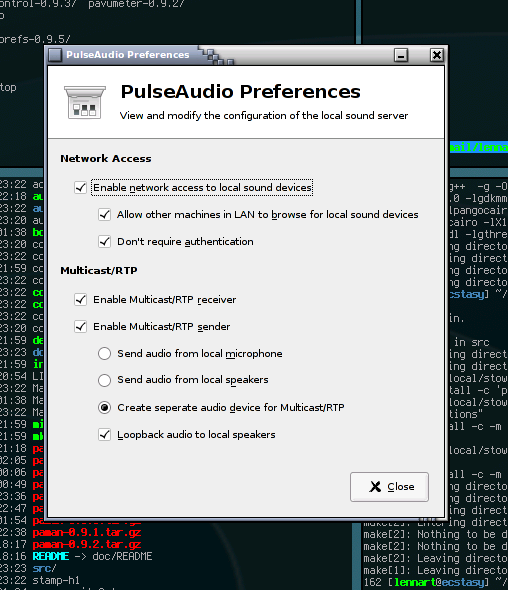
The idea is to have a simple, nice configuration dialog that allows
configuration of the more exotic features of PulseAudio which we do
not enable by default due to security considerations or to not
confuse the user. Right now a lot of features are hidden behind
non-trivial configuration file statements. This preferences tool shall
make them available for the users which are not so keen on editing
configuration files.
Playing around with Valgrind‘s
Massif tool and KCachegrind I did a little bit of memory and perfomance profiling of
the PulseAudio daemon. The 0.9.5 release contains a lot of
optimizations which are result of this work.
Before:

After:

These plots show the memory consumption against the time, from
starting the server, to playing stream, to stopping the stream and
shutting down the server again. The major improvement was actually an
update to libsamplerate done
by its maintainer to improve the memory handling of that library. (He
didn’t release an updated version of his library containing the
changes shown in the plots yet).
PulseAudio had the nice feature of remembering the playback volume of every
application for quite a while. Starting with 0.9.5 PulseAudio it also remembers
the output device for every application. Together with an updated Volume
Control tool which now allows moving streams between sinks while they are
played this can be used to configure a ruleset like “Ekiga always on the USB
headset, Rhytmbox always on the external speakers” very intuitively and easily:

And here’s a final screenshot showing all the tools we currently have for PulseAudio 0.9.5.
