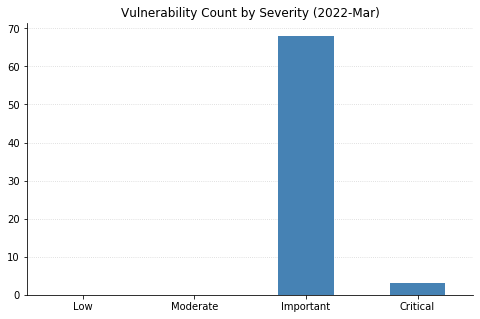
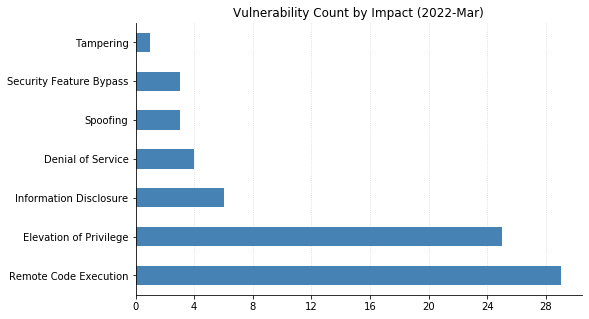
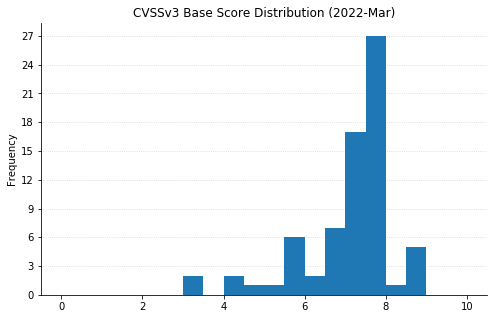
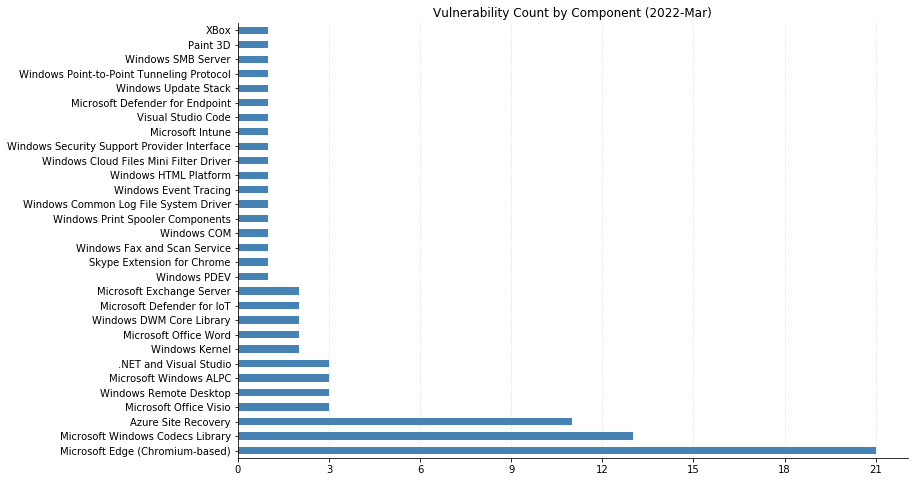
Microsoft’s March 2022 updates include fixes for 92 CVEs (including 21 from the Chromium project, which is used by their Edge web browser). None of them have been seen exploited in the wild, but three have been previously disclosed. CVE-2022-24512, affecting .NET and Visual Studio, and CVE-2022-21990, affecting Remote Desktop Client, both allow RCE (Remote Code Execution). CVE-2022-24459 is an LPE (local privilege escalation) vulnerability in the Windows Fax and Scan service. All three publicly disclosed vulnerabilities are rated Important – organizations should remediate at their regular patch cadence.
Three CVEs this month are rated Critical. CVE-2022-22006 and CVE-2022-24501 both affect video codecs. In most cases, these will update automatically via the Microsoft Store. However, any organizations with automatic updates disabled should be sure to push out updates. The vulnerability most likely to raise eyebrows this month is CVE-2022-23277, a Critical RCE affecting Exchange Server. Thankfully, this is a post-authentication vulnerability, meaning attackers need credentials to exploit it. Although passwords can be obtained via phishing and other means, this one shouldn’t be as rampantly exploited as the deluge of Exchange vulnerabilities we saw throughout 2021. Exchange administrators should still patch as soon as reasonably possible.
SharePoint administrators get a break this month, though on the client side, a handful of Office vulnerabilities were fixed. ThreeseparateRCEs in Visio, Tampering and Security Feature Bypass vulnerabilities in Word, and Information Disclosure in the Skype Extension for Chrome all got patched.
CVE-2022-24508 is an RCE affecting Windows SMBv3, which has potential for widespread exploitation, assuming an attacker can put together a suitable exploit. Luckily, like this month’s Exchange vulnerabilities, this too requires authentication.
Organizations using Microsoft’s Azure Site Recovery service should be aware that 11 CVEs were fixed with today’s updates, split between RCEs and LPEs. They are all specific to the scenario where an on-premise VMware deployment is set up to use Azure for disaster recovery.
To provide the best experiences, we use technologies like cookies to store and/or access device information. Consenting to these technologies will allow us to process data such as browsing behavior or unique IDs on this site. Not consenting or withdrawing consent, may adversely affect certain features and functions.
Functional
Always active
The technical storage or access is strictly necessary for the legitimate purpose of enabling the use of a specific service explicitly requested by the subscriber or user, or for the sole purpose of carrying out the transmission of a communication over an electronic communications network.
Preferences
The technical storage or access is necessary for the legitimate purpose of storing preferences that are not requested by the subscriber or user.
Statistics
The technical storage or access that is used exclusively for statistical purposes.The technical storage or access that is used exclusively for anonymous statistical purposes. Without a subpoena, voluntary compliance on the part of your Internet Service Provider, or additional records from a third party, information stored or retrieved for this purpose alone cannot usually be used to identify you.
Marketing
The technical storage or access is required to create user profiles to send advertising, or to track the user on a website or across several websites for similar marketing purposes.