Post Syndicated from Rennay Dorasamy original https://aws.amazon.com/blogs/architecture/secure-multi-tenant-rag-with-amazon-bedrock-and-verified-permissions/
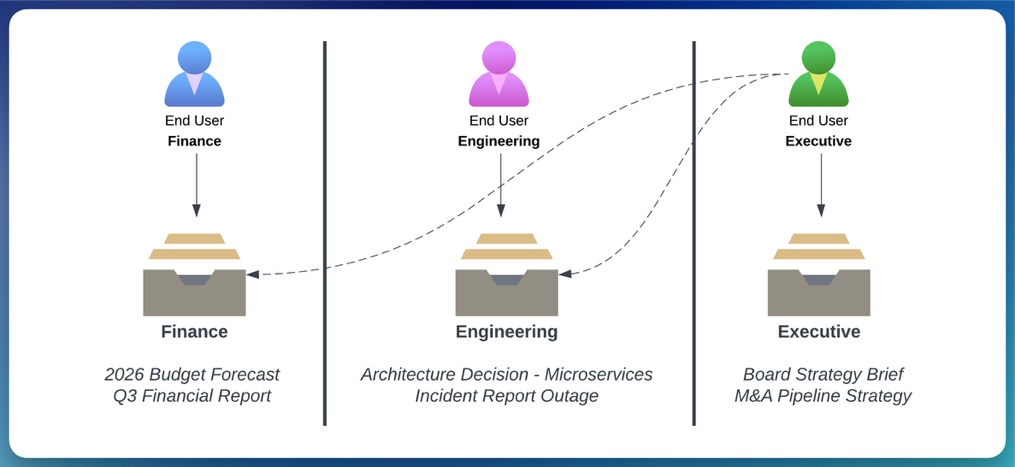
Large organizations building internal generative AI applications face a recurring challenge: controlling which teams or departments can access which documents, without duplicating infrastructure for each group. Within a single tenant, employees from a specific department should only access material assigned to that department. However, executives, with a wider span of control, will require access to material across multiple departments. Retrieval Augmented Generation (RAG) is one of several complementary techniques, including fine-tuning and continued pre-training, for customizing generative AI application responses with your data.
In an enterprise context, with fast-moving data and many users, RAG provides a middle ground between cost and performance. This post shows you how to use a single, shared Knowledge Base (KB) instance to reduce the cost and complexity of separate instances. You can update access rules in minutes without redeploying code and maintain a detailed audit trail of every authorization decision. You run a single RAG application that serves multiple departments, with document access evaluated at retrieval time.
Figure 1 illustrates the requirement.
A previous post, Multi-tenancy in RAG applications in a single Amazon Bedrock knowledge base with metadata filtering, demonstrates how to use Amazon Simple Storage Service (Amazon S3) folder structures and metadata filtering to segregate data between tenants within a single knowledge base. That pattern works well for broad, tenant-level boundaries where the filter value is known at design time and embedded in application code. However, within a single tenant, different departments or roles often need different document visibility and executives may need cross-cutting access that spans multiple boundaries. This post extends that foundation by externalizing the filter selection logic into Cedar policies managed by Amazon Verified Permissions, allowing dynamic, runtime-evaluated authorization decisions.
This pattern lets a single RAG application serve many departments while keeping each department’s documents isolated, without standing up a knowledge base per team. It builds on metadata filtering in Amazon Bedrock Knowledge Bases, a fully managed RAG capability that handles ingestion, retrieval, and prompt augmentation through a single API. Metadata filtering is a strong foundation, but it creates a gap. Filter selection logic has no external governance, and changing the rules requires a code redeployment.
When authorization logic lives inside code, rules can become inconsistent over time and require a full deployment cycle to change. Amazon Verified Permissions addresses this by providing scalable, fine-grained authorization and permissions management for custom applications. Externalized Cedar policies in Verified Permissions are auditable, version-controlled, and updatable at runtime.
This post walks you through a two-layer, defense-in-depth authorization pattern for granular, intra-tenant access control in RAG applications. Defense in depth is a security strategy that uses multiple independent layers of protection. Each layer operates independently. If one layer is misconfigured, the other layer still enforces access control. The pattern runs on Amazon Bedrock, a fully managed service that offers a choice of high-performing foundation models (FMs) from Amazon and AI companies through a single API, along with a broad set of capabilities you need to build generative AI applications with security, privacy, and responsible AI.
In this post, you learn how to:
- Enforce fine-grained, document-level access control at retrieval time using a single Amazon Bedrock Knowledge Bases instance.
- Evaluate Cedar policies at runtime to dynamically construct the metadata filter passed to the RetrieveAndGenerate API.
- Update authorization rules without changing application code or triggering a deployment.
- Design a deny-by-default authorization system intended to deny access when the authorization service is unavailable.
Isolation model and scope
This pattern provides filter-level (logical) isolation, not IAM-enforced (infrastructure) isolation. Metadata filters control which documents are returned at retrieval time, but the underlying knowledge base remains a shared resource. If the middleware logic that constructs the filter were to fail open, documents from other groups would be exposed.
This pattern is designed for granular access control within a single tenant. For example, controlling which departments, teams, or roles within one organization can access which documents. It is not a substitute for hard tenant isolation in a multi-tenant SaaS product. For cross-tenant isolation where a compliance boundary is required between separate customers or organizations, provision a dedicated knowledge base per tenant with IAM-enforced resource boundaries. Within each tenant’s knowledge base, you can then layer this filter-based pattern for finer-grained access control.
Use this pattern when:
- You need to control document access across departments, teams, or roles within a single organization.
- Access rules change frequently and you want to update them without code redeployment.
- You want a single knowledge base instance to reduce cost and operational overhead for intra-tenant document segregation.
Do not use this pattern when:
- You require hard isolation between separate customers or organizations (use a knowledge base per tenant with IAM boundaries instead).
- Your compliance or audit requirements mandate infrastructure-level separation between data sets.
- A failure of the filter mechanism would constitute a regulatory breach (filter-level isolation is a logical boundary, not a physical one).
Residual risk, ingestion race condition: A brief window exists between document upload and sidecar creation. The ingestion safeguard (Step 1) reduces this by excluding documents without sidecars. However, if you modify the ingestion schedule to run continuously or with short intervals, verify that the batching window in Amazon Simple Queue Service (Amazon SQS) (default 30 seconds) provides sufficient time for the tagging Lambda to complete before the next ingestion cycle.
Prerequisites
Before implementing this pattern, you need:
- Familiarity with Python, AWS Lambda, and infrastructure as code concepts.
- An AWS account with AWS Identity and Access Management (AWS IAM) permissions to create AWS Lambda functions, an Amazon API Gateway REST API, Amazon Cognito user pools, Verified Permissions policy stores, and Amazon Bedrock Knowledge Bases.
- Amazon Cognito configured with department-based user groups (such as dept-a, dept-b, dept-c) and cognito:groups included in the JSON Web Token (JWT) issued to clients.
- Amazon Bedrock model access for the FMs you plan to use (such as Anthropic Claude 3 Haiku, and Amazon Nova Lite 2).
- A Verified Permissions policy store created and the Cedar schema defined (principals, resources, actions) before deployment.
- AWS Cloud Development Kit (AWS CDK) or AWS CloudFormation to deploy the infrastructure described in this walkthrough.
- Sample documents prepared with department prefixes (such as docs/dept-a/report.pdf) for upload to Amazon S3.
Important: Implementing this pattern creates billable AWS resources, including Amazon Bedrock Knowledge Bases, AWS Lambda functions, Amazon API Gateway, Amazon S3, Amazon Cognito, Amazon Verified Permissions, Amazon EventBridge, Amazon SQS, Amazon DynamoDB, AWS WAF, and Amazon CloudFront. Costs vary based on usage volume and AWS Region. Review AWS Pricing for each service before deploying and see the Cleaning up section at the end of this post to remove resources when testing is complete.
Solution overview
Serving many departments from one application shouldn’t mean giving every department access to every document. This solution keeps each department’s documents isolated inside a single Amazon Bedrock Knowledge Bases instance, so you avoid the cost and operational overhead of a knowledge base per team within that tenant. Metadata tags logically separate documents, and Verified Permissions acts as an externalized policy enforcement point, deciding which documents a user’s group or role is authorized to see on every request.
A key objective is to serve multiple departments within a single tenant from one Knowledge Base instance. If you had to provision a separate instance per department, it would multiply the infrastructure: separate data sources, ingestion pipelines and management overhead. A single knowledge base with metadata filtered access avoids this duplication while providing logical document isolation within the tenant boundary. Documents are logically separated by their metadata tags, and Verified Permissions provides a reliable, externalized policy enforcement point to determine which tags a user, in a specific group or role, is authorized to access.
The ingestion pipeline tags documents with department metadata. Verified Permissions evaluates Cedar policies at query time to determine which department tags you are permitted to see. A middleware service (implemented as an AWS Lambda function) converts that policy decision into a metadata filter and uses this in the Amazon Bedrock RetrieveAndGenerate API. This API combines the retrieval and generation steps, returning a grounded response based on the filtered document set. The FM only processes documents that passed the filter.
Two independent layers enforce authorization:
- Layer 1 (API access): A Lambda Authorizer on Amazon API Gateway calls Verified Permissions to decide whether you can invoke the API at all.
- Layer 2 (document access): A middleware Lambda, used to orchestrate the call to the Knowledge Base, also calls Verified Permissions to determine which Knowledge Base resources your department is permitted to query, then constructs a metadata filter accordingly.
Neither layer depends on the other for correctness. If Layer 1 were bypassed then Layer 2 is designed to enforce document-level isolation at the KB metadata filter.
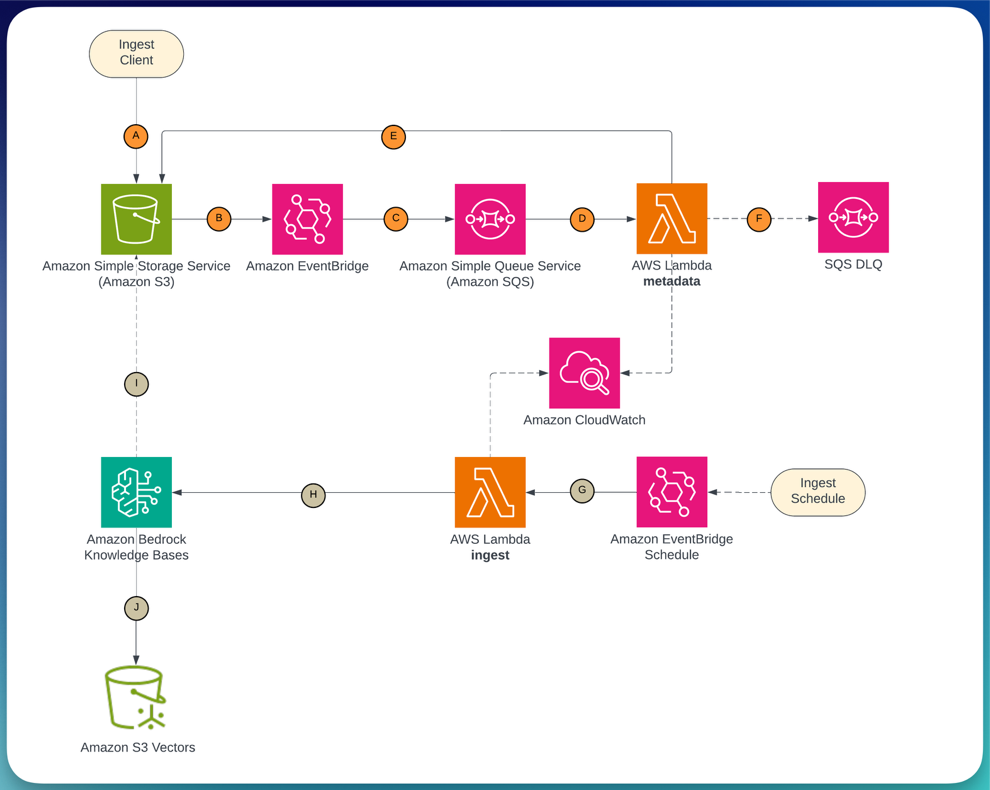
Figure 2 shows the ingestion pipeline: documents uploaded to Amazon Simple Storage Service (Amazon S3) trigger Amazon EventBridge, which routes through Amazon Simple Queue Service (Amazon SQS) to an AWS Lambda function that writes metadata. A scheduled Lambda then triggers the Amazon Bedrock Knowledge Bases ingestion job.
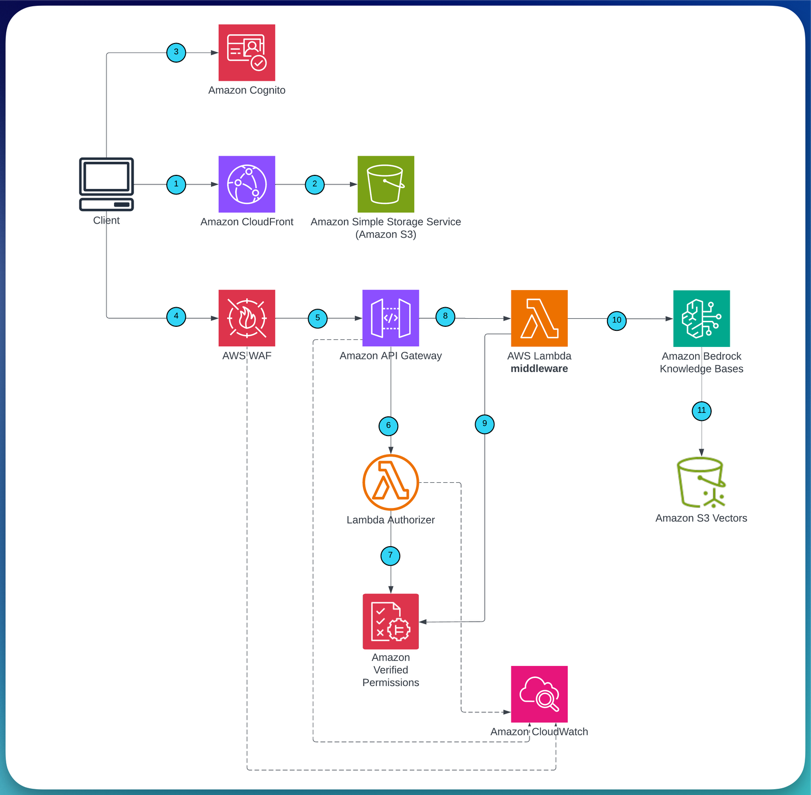
Figure 3 shows the query flow: a user request passes through Amazon CloudFront and AWS WAF to Amazon API Gateway, where the Lambda Authorizer evaluates Layer 1 (API-level) authorization against Verified Permissions. If permitted, the middleware Lambda evaluates Layer 2 (document-level) authorization, constructs the metadata filter, and calls RetrieveAndGenerate.
Authorization decision flow
| Step | Component | Decision | On deny |
| 1 | AWS WAF | Rate limit and rule check | Request blocked |
| 2 | Lambda Authorizer (Layer 1) | Can you invoke the API? | 403 returned |
| 3 | Middleware Lambda (Layer 2) | Which departments can you access? | Empty result set |
| 4 | Amazon Bedrock Knowledge Bases | Metadata filter applied to retrieval | Unauthorized docs excluded |
| 5 | Guardrails for Amazon Bedrock | Response grounded in retrieved context? | Response blocked or modified |
Key AWS services
| Layer | Service | Role |
| Identity layer | Amazon Cognito | Issues JWTs with department group claims (cognito:groups) from the user pool |
| API security layer | AWS WAF | Applies rate limiting, IP filtering, and managed rule evaluation at the edge |
| Layer 1 authorization | Amazon Verified Permissions | Evaluates Cedar policies for API-level access decisions in the Lambda Authorizer |
| Layer 2 authorization | Amazon Verified Permissions | Evaluates Cedar policies for document-level access and drives metadata filter construction |
| RAG retrieval and FM invocation layer | Amazon Bedrock Knowledge Bases | Fully managed RAG capability that handles retrieval with metadata filtering and FM generation in a single API call |
| Ingestion layer | Amazon EventBridge, Amazon SQS | Event-driven pipeline for metadata sidecar tagging; Amazon SQS buffers upload spikes and routes failures to a dead-letter queue |
Technical implementation
The walkthrough presents ingestion pipeline first to tag and index your documents. You then move on to the Query Flow which contains the core authorization pattern. Each section following maps to a distinct component in the architecture.
Step 1: Set up the event-driven ingestion pipeline with metadata tagging
For the metadata filter to work at query time, documents need to be tagged with their department before they are indexed. The ingestion pipeline handles this in two phases.
Phase 1 (event-driven): When a document is uploaded to Amazon S3 under a department prefix (such as docs/dept-a/report.pdf), Amazon EventBridge fires an ObjectCreated event. The event routes through Amazon SQS to an AWS Lambda function that writes a .metadata.json sidecar file alongside the document.
The Amazon SQS queue buffers bulk uploads and routes failed tagging attempts to a dead-letter queue for retry.
Phase 2 (scheduled): An Amazon EventBridge schedule triggers an ingestion Lambda every five minutes, which calls the StartIngestionJob API on the Amazon Bedrock Knowledge Bases data source. Amazon Bedrock reads the documents and their sidecars from Amazon S3, chunks them, generates embeddings, and indexes the vectors with the department attribute.
Tamper detection for metadata sidecars: Enable S3 Versioning on the document bucket and configure AWS CloudTrail S3 data events to log PutObject and DeleteObject calls. Create an Amazon CloudWatch Alarms metric filter that alerts when a PutObject to a .metadata.json key originates from principals other than the tagging Lambda role. For workloads with strict compliance requirements, consider S3 Object Lock in compliance mode to make sidecars immutable after creation – noting that document re-classification would then require a deliberate workflow to create a new version.
Upload prefix enforcement: The metadata tagging Lambda derives the department label from the S3 key prefix (for example, docs/dept-a/ → department: dept-a). To help prevent a user or process from uploading documents under another department’s prefix, scope upload permissions using an IAM policy condition:
Each upload principal (whether a user role, CI/CD pipeline, or application) should carry a department tag that matches its permitted prefix. This helps prevent the tagging Lambda from being tricked into mislabeling a document by an upload to the wrong path.
Ingestion safeguard: Before triggering the ingestion job, the scheduling Lambda lists objects under each department prefix and verifies that every document has a corresponding .metadata.json sidecar. Documents without a sidecar are excluded from the ingestion scope and logged to CloudWatch as untagged. This helps prevent an untagged document from being indexed without a department attribute, which could cause it to bypass metadata filters at query time. If your workload requires stricter guarantees, move untagged documents to a quarantine prefix and alert via Amazon Simple Notification Service (Amazon SNS).
S3 write restriction: Restrict s3:PutObject permission on the document bucket to the metadata tagging Lambda’s IAM execution role. All other principals – including application roles, CI/CD pipelines, and human operators should have at most s3:GetObject and s3:ListBucket. This helps prevent accidental or malicious modification of .metadata.json sidecar files, which could re-tag a document under a different department and expose it to unauthorized users on the next ingestion cycle. Use a bucket policy with an explicit deny for s3:PutObject that exempts only the tagging Lambda’s role ARN:
A 30-second batching window on the Amazon SQS event source means bulk uploads are processed together rather than one document per Lambda invocation. The two-phase separation helps confirm that department metadata sidecars are written before the ingestion job runs, reducing the risk of a race condition where a document might be indexed without a department tag.
Implementation note: Deploy this as the handler for your metadata tagging AWS Lambda function (Python 3.12 runtime). Set the BUCKET environment variable. The function’s IAM execution role requires s3:PutObject permission on the document bucket.
Step 2: Configure Amazon Bedrock Knowledge Bases
With Amazon Bedrock Knowledge Bases, you configure document chunking, embedding model selection, vector indexing, and metadata filtering without managing the underlying infrastructure. You configure a data source backed by the same Amazon S3 bucket as the ingestion pipeline.
Amazon Bedrock Knowledge Bases chunks documents at 300 tokens with 20% overlap (the default, which works well for structured enterprise documents). An embedding model, such as Amazon Titan Text Embeddings V2, generates the embeddings. The metadata attributes defined in the .metadata.json sidecar files are indexed alongside the vectors, making them available as pre-filters on the RetrieveAndGenerate call.
Step 3: Define the Cedar schema and policies in Amazon Verified Permissions
Verified Permissions provides fine-grained authorization through Cedar, a purpose-built policy language. The Cedar schema defines three entity types for this solution:
- Principal: GenAIApp::UserGroup (the department group extracted from the JWT)
- Action: query (retrieves documents from a knowledge base) and invokeModel (calls an FM)
- Resource: GenAIApp::KnowledgeBase and GenAIApp::Model
The namespace GenAIApp is a custom prefix you define when creating the Cedar schema. You can replace it with your own application namespace (such as MyCompany or RAGApp).
The following six policies cover the three departments used in this walkthrough. Department C has a cross-department access grant that covers each Knowledge Base resource, which suits a leadership or executive group:
// dept-a: query own knowledge base + use Claude 3 Haiku
permit(
    principal in GenAIApp::UserGroup::"dept-a",
    action == GenAIApp::Action::"query",
    resource == GenAIApp::KnowledgeBase::"dept-a"
);

permit(
    principal in GenAIApp::UserGroup::"dept-a",
    action == GenAIApp::Action::"invokeModel",
    resource == GenAIApp::Model::"anthropic.claude-3-haiku-20240307-v1:0"
);

// dept-b: query own knowledge base + use Claude 3 Haiku
permit(
    principal in GenAIApp::UserGroup::"dept-b",
    action == GenAIApp::Action::"query",
    resource == GenAIApp::KnowledgeBase::"dept-b"
);

permit(
    principal in GenAIApp::UserGroup::"dept-b",
    action == GenAIApp::Action::"invokeModel",
    resource == GenAIApp::Model::"anthropic.claude-3-haiku-20240307-v1:0"
);

// dept-c: cross-department access + use Amazon Nova Lite 2
permit(
    principal in GenAIApp::UserGroup::"dept-c",
    action == GenAIApp::Action::"query",
    resource
);

permit(
    principal in GenAIApp::UserGroup::"dept-c",
    action == GenAIApp::Action::"invokeModel",
    resource == GenAIApp::Model::"amazon.nova-2-lite-v1:0"
);
To adapt these policies for your organization, replace the department identifiers (dept-a, dept-b, dept-c) with your own group names. The pattern supports multiple access models: per-team, per-project, or hierarchical. For temporary access grants, add a Cedar policy with a when condition that evaluates a time-based attribute, and remove the policy when access should expire.
Policy changes take effect on the next API call. You do not need a Lambda redeployment or AWS CDK update.
Policy governance: Because Cedar policy changes take effect immediately, restrict who can modify policies in production. Apply IAM conditions on verifiedpermissions:CreatePolicy, UpdatePolicy, and DeletePolicy so that only a dedicated CI/CD pipeline role or a small set of authorized administrators can mutate the policy store. Enable AWS CloudTrail logging for Verified Permissions API calls and create a CloudWatch Alarm that triggers when policy mutation events occur outside your change management workflow. For production deployments, validate Cedar policies against test scenarios in a non-production policy store before promoting them. Treat policy changes with the same rigor as application code deployments.
Step 4: Configure Layer 1: API-level authorization (Lambda Authorizer)
When a request arrives at Amazon API Gateway, the Lambda Authorizer runs before your application logic. It validates the JWT signature against the Amazon Cognito JSON Web Key Set (JWKS) endpoint, then calls Verified Permissions IsAuthorized with your group membership. This is the traditional “authorization/access level” check: it verifies that you are allowed to invoke the API, not which documents you can access.
The authorizer denies access by default. If Verified Permissions is unavailable, the function raises an exception and Amazon API Gateway returns a 403.
Implementation note: Deploy this as a Lambda Authorizer (TOKEN type) on your Amazon API Gateway REST API. Set the TTL on the authorizer cache to 0 during testing so that policy changes take effect immediately.
Production cache TTL: In production, the API Gateway authorizer cache TTL controls how quickly policy revocations take effect. A TTL of 0 means every request triggers a fresh Verified Permissions evaluation. Revocations are immediate but latency increases. A TTL of 300 seconds (the API Gateway default) improves latency but means a revoked policy could continue to permit access for up to 5 minutes. For workloads where timely revocation matters (for example an employee offboarding or incident response), set the TTL to 0 or a deliberately short value (for example, 30–60 seconds) and accept the additional Verified Permissions API calls. The claim that “policy changes take effect on the next API call” holds true only when the authorizer cache TTL is zero or the cached entry has expired.
Multi-group membership: A user may belong to more than one Cognito group. For example, an employee who is a member of both dept-a and a cross-functional leadership group. The authorizer evaluates the group memberships present in the JWT and permits the API call if a group has a matching Cedar permit policy. This helps prevent arbitrary access restrictions based on the order in which groups appear in the token. Document-level access is then determined independently at Layer 2, where the middleware evaluates each department resource against the user’s groups to construct the appropriate metadata filter.
For error handling patterns, implement exponential backoff with jitter on the Verified Permissions API call. Log authorization decisions to Amazon CloudWatch for monitoring and auditing.
Step 5: Configure Layer 2: Document-level authorization (middleware Lambda)
Once a request passes Layer 1, the middleware Lambda runs a second, independent Verified Permissions evaluation. This time, it checks which KB resources you are permitted to query based on your group membership, then translates the decision directly into a metadata filter on the RetrieveAndGenerate call.
Amazon Bedrock Knowledge Bases applies the metadata filter before the vector similarity search runs. This means the FM processes only documents you are authorized to access. The filter helps prevent unauthorized documents from appearing in the retrieval set.
Department access model
| Group | Foundation model | Knowledge base access |
| dept-a | Claude 3 Haiku | Department A documents only |
| dept-b | Claude 3 Haiku | Department B documents only |
| dept-c | Amazon Nova Lite 2 | Multiple departments (A, B, and C) |
Implementation note: Deploy this as the handler for your middleware AWS Lambda function (Python 3.12 runtime). Set environment variables POLICY_STORE_ID and KB_ID. The function’s IAM execution role requires verifiedpermissions:IsAuthorized and bedrock:RetrieveAndGenerate permissions.
The FM selection uses the same Verified Permissions policy store. Cedar policies that grant invokeModel access determine which model ID the middleware passes to Amazon Bedrock, so model access control is driven by the same externalized policies as document access.
Security note: The metadata filter excludes unauthorized documents from the retrieval set before the FM processes them. If a user queries for another department’s data, the request returns no relevant results. To monitor for unexpected retrieval behavior, use Amazon CloudWatch logging on the middleware AWS Lambda function.
Benefits of two independent authorization layers
| Layer 1 (API Gateway) | Layer 2 (Middleware Lambda) | |
| Question answered | Can you invoke the API? | Which documents can your department access? |
| Enforcement point | Before application logic runs | At Amazon Bedrock Knowledge Bases metadata filter |
| Failure mode | 403 returned to you | Empty or filtered result set |
Availability trade-off: Both layers depend on Amazon Verified Permissions. If the service is throttled or unavailable, the deny-by-default design means users are denied access. This is the correct and intended secure behavior. For most workloads, a brief period of denial is preferable to failing open. If your application has strict availability requirements, consider implementing exponential backoff with jitter on all IsAuthorized calls (in both the Lambda Authorizer and the middleware Lambda) to handle transient throttling gracefully. A circuit-breaker that falls back to cached last-known-good authorization decisions can improve availability, but introduces a window where revoked access may still be honored. Document this trade-off explicitly if you adopt it, and make sure cached decisions expire on a short TTL.
Step 6: Add Guardrails for Amazon Bedrock as an output safety layer
Guardrails for Amazon Bedrock applies contextual source fidelity checks and content filtering as a complementary safety layer. Where Verified Permissions controls which documents the FM accesses, Guardrails evaluates the FM’s response before it’s returned to you.
Contextual source fidelity checks help confirm that the response stays faithful to the retrieved documents rather than drawing from the FM’s pre-training data. Combine this with the metadata filter from Layer 2 for a complete defense in depth approach: authorization restricts the retrieval set, and Guardrails validates the generated output.
The Guardrail configuration in the RetrieveAndGenerate call applies two checks:
- Contextual grounding: Helps limit responses that extrapolate beyond the retrieved context. This supports factual accuracy tied to your documents.
- Content filtering: Blocks responses containing harmful or inappropriate content based on your configured thresholds.
You apply the Guardrail in the RetrieveAndGenerate call by passing the guardrailConfiguration parameter with your Guardrail ID and version. Contextual grounding helps mitigate prompt injection by limiting responses to the retrieved context but does not eliminate all injection vectors. For additional defense, validate input length and sanitize queries before passing them to RetrieveAndGenerate. For more information, see the Guardrails for Amazon Bedrock documentation.
Step 7: Test the end-to-end authorization flow
With the solution deployed, here is what happens when a dept-a user submits a query:
- A user submits a query using a web application with Authorization: Bearer through Amazon CloudFront to AWS WAF.
- AWS WAF applies rate limiting and managed rules, then forwards clean traffic to Amazon API Gateway.
- The Lambda Authorizer validates the JWT and calls Verified Permissions. The dept-a group has a query permit policy, so the call is allowed.
- The middleware Lambda calls Verified Permissions for each Knowledge Base resource. Only dept-a is permitted, so the filter {“equals”: {“key”: “department”, “value”: “dept-a”}} is constructed.
- The middleware calls RetrieveAndGenerate with the metadata filter applied. Amazon Bedrock Knowledge Bases filters the document set before running the vector similarity search.
- Department B and C documents are excluded from the search space. The FM generates a response that stays grounded only in Department A documents.
- The response is checked by Guardrails for Amazon Bedrock before it is returned.
To test, use the following curl command with a valid JWT from Amazon Cognito:
A successful dept-a request returns a response grounded in Department A documents only. If authorization fails at Layer 1, you receive a 403 response. If Layer 2 finds no permitted resources, the function returns a PermissionError.
Monitor authorization decisions in Amazon CloudWatch Logs for both the Lambda Authorizer and middleware functions. Set up CloudWatch metric filters and alarms for the following:
- Authorization deny rate (Layer 1 and Layer 2) – a spike may indicate credential probing, misconfigured clients, or a policy error.
- Verified Permissions latency – sustained increases may signal throttling.
- SQS dead-letter queue message count – messages in the DLQ indicate failed metadata tagging events that need attention.
- Ingestion job failure rate – alerts you to documents that were not indexed.
AWS CloudTrail automatically logs Verified Permissions IsAuthorized calls, providing an audit trail of every authorization decision without additional configuration.
To observe the live policy update behavior, grant a dept-a Cedar policy that allows access to dept-b resources, then immediately resubmit the query. The next API call reflects the change. Revoke the policy and the restriction is restored on the following call.
Single knowledge base with metadata isolation
Adding a department requires adding a Cedar policy and tagging new documents. You do not need to provision additional infrastructure, deploy new stacks, or manage separate ingestion pipelines. The FM is presented with only the authorized document subset based on the applied metadata pre-filter.
For session management, use an Amazon DynamoDB table with a session TTL to maintain conversation context across requests. The RetrieveAndGenerate API accepts a sessionId parameter that manages multi-turn context automatically. Generate session IDs using a cryptographically random value (for example, uuid4) and bind each session to the authenticated user’s identity and group at creation time.
On every subsequent request, validate that the bearer token’s subject and group claims match the session owner before continuing the conversation. Invalidate sessions when a user’s group membership changes or their token is revoked and set a TTL appropriate to your use case (for example, 30 minutes of inactivity).
Cleaning up
If you deployed resources individually, delete them in the following order to avoid dependency errors:
- Amazon CloudFront distribution and AWS WAF web ACL.
- Amazon API Gateway REST API (this also removes the Lambda Authorizer association).
- AWS Lambda functions (metadata tagging, authorizer, middleware).
- Amazon Bedrock Knowledge Base and its associated data source.
- Amazon S3 bucket — empty the bucket first. If versioning is enabled, delete all object versions and delete markers before removing the bucket.
- Amazon EventBridge rule and Amazon SQS queue.
- Amazon DynamoDB table.
- Amazon Verified Permissions policy store.
- Amazon Cognito user pool (if created specifically for this pattern).
- IAM roles and policies created for the Lambda functions and API Gateway.
- Amazon CloudWatch log groups for each Lambda function.
Warning: Deleting these resources is irreversible. Back up any documents in S3, DynamoDB data, or Verified Permissions policies you may need before proceeding.
Conclusion
You now have a working defense-in-depth authorization pattern for granular, intra-tenant document access control in RAG applications that you built on Amazon Bedrock. With this approach, you can: change access policies at runtime without redeploying code, maintain logical document-level isolation that remains effective even if the API layer is misconfigured, and audit every authorization decision from a single Verified Permissions policy store.
Key takeaways
- Updates without redeployment. Cedar policies in Verified Permissions are human-readable, version-controlled outside your Lambda code, and take effect on the next API call. You can revoke a department’s access or grant cross-department access to an executive group by updating a policy in the Verified Permissions console.
- Cost-effective document isolation without infrastructure duplication. A single Amazon Bedrock Knowledge Bases instance with metadata pre-filtering delivers logical isolation between departments within a tenant, at a fraction of the cost and operational overhead of separate instances. Note that this is filter-level isolation, not infrastructure-level isolation – for hard tenant boundaries, use a dedicated knowledge base per tenant.
- Independent enforcement layers help reduce the risk of a single point of failure. Layer 1 (Lambda Authorizer) and Layer 2 (middleware Lambda) enforce independent policy checks. Both call Verified Permissions separately, and both fail closed (deny by default).
Next steps
To extend this pattern further:
- Recommended first step: Test with your own documents. Replace the sample department documents with your own content, upload them under the appropriate prefix, and verify that the metadata filter isolates them correctly.
- Add a fourth department. Create a new Cedar policy, add a user group in Amazon Cognito, and upload tagged documents to validate that the pattern scales without code changes.
- Extend to agent tool authorization with Amazon Bedrock AgentCore. The Policy feature uses the same Cedar language to enforce fine-grained authorization on agent tool calls and gateways.
- Add attribute-based access control (ABAC). Extend Cedar policies to evaluate user attributes beyond group membership, such as project assignment, clearance level, or geographic location.
- Integrate with your identity provider. Replace Amazon Cognito with your enterprise identity provider (such as Okta or Microsoft Entra ID) by configuring a Verified Permissions identity source.
- Automate policy testing. Build a Continuous Integration/Continuous Deployment (CI/CD) pipeline that validates Cedar policies against test scenarios before deploying them to the policy store.
Related resources
- Multi-tenancy in RAG applications in a single Amazon Bedrock knowledge base with metadata filtering (AWS Machine Learning Blog, April 2025)
- Amazon Verified Permissions documentation
- Amazon Bedrock Knowledge Bases documentation
- Amazon Bedrock Knowledge Bases with metadata filtering (AWS Machine Learning Blog, July 2024)
- Design secure generative AI application workflows with Amazon Verified Permissions and Amazon Bedrock Agents (AWS Machine Learning Blog, October 2024)
- Authorizing access to data with RAG implementations (AWS Security Blog, September 2025)
- Cedar policy language documentation