Post Syndicated from Bharav Patel original https://aws.amazon.com/blogs/big-data/cut-costs-and-simplify-operations-with-writable-warm-storage-in-amazon-opensearch-service/
Managing petabytes of search data means making tough choices: keep everything fast and expensive, or make it affordable but read-only. UltraWarm is a proven, cost-effective solution for read-heavy historical data. However, some workloads occasionally need to update historical records, such as late-arriving data or compliance corrections. With UltraWarm, you must migrate those indices back to hot, perform the update, and migrate back. What if you could write directly to your cost-effective warm storage instead?
In this post, I show you how writable warm storage removes the costly migration cycle. You can reduce your infrastructure costs by up to 48 percent and update historical data in seconds instead of hours. I walk through a real-world cost comparison and performance benchmarks, and help you decide when to use writable warm versus UltraWarm.
The challenge with tiered storage
Amazon OpenSearch Service handles data-intensive search and analytics workloads, from real-time log analytics and application monitoring to security event detection. As your data volumes grow from terabytes to petabytes, you face a fundamental question: how do you keep recent data fast while making earlier data affordable?
OpenSearch Service addresses this with a tiered storage architecture:
- Hot – Highest performance for active indexing and search using instance-attached storage.
- UltraWarm – Cost-effective, read-only tier backed by Amazon Simple Storage Service (Amazon S3) with local caching for less frequently queried data.
- Cold – Fully detached from the cluster, with the lowest cost for rarely accessed data. Cold indices must be migrated back to UltraWarm or hot before any reads or writes can be performed.
For immutable log data, this model works well. However, a specific class of workloads hits its limitations when they occasionally need to write to earlier data, and read-only becomes a bottleneck.
Prerequisites
To use writable warm storage, you need the following:
- An Amazon OpenSearch Service domain running version 3.3 or later.
- OpenSearch Optimized (OI2) instance family support in your AWS Region.
- Workloads with a minimum 5-second refresh interval.
- Data nodes using the OpenSearch Optimized instance family (OR2 for hot, OI2 for warm).
Note: Writable warm doesn’t currently support the cold storage tier.
The UltraWarm bottleneck
With UltraWarm, updating even a single document requires migrating the index back to hot, performing the write, and migrating it back. This round trip involves a force merge (consolidating index segments), snapshot creation, and shard relocation. These operations consume significant CPU, memory, and disk space on your hot nodes, and they take approximately 130 minutes per 100 GB index. This time was measured on a domain with 3 × r6g.2xlarge hot nodes, 3 × ultrawarm1.large warm nodes, and 3 dedicated leader nodes (US East, N. Virginia), using a single-shard index with one replica. Actual times vary based on domain configuration, shard count, segment count, hot node utilization, and migration queue depth. The result is that you over-provision hot nodes, build complex pipelines, or keep data in hot longer than necessary, which increases cost and complexity.
Introducing writable warm storage
OpenSearch Service now offers writable warm nodes that use OpenSearch Optimized (OI2) instances, the same instance family that powers durable, Amazon S3-backed storage on hot nodes. Because data is already persisted on Amazon S3, tier transitions become a lightweight shard relocation rather than a resource-intensive migration. The Lucene engine, which is OpenSearch’s underlying search library, operates identically on both tiers. As a result, writable warm nodes support active writes, background merges, and periodic refreshes, just like hot nodes.
Late-arriving data, compliance backfills, and corrections that previously required a warm-to-hot-to-warm round trip now resolve with a direct write in seconds. There is no force merge, no snapshot, no shard relocation, and no hot node resource consumption.
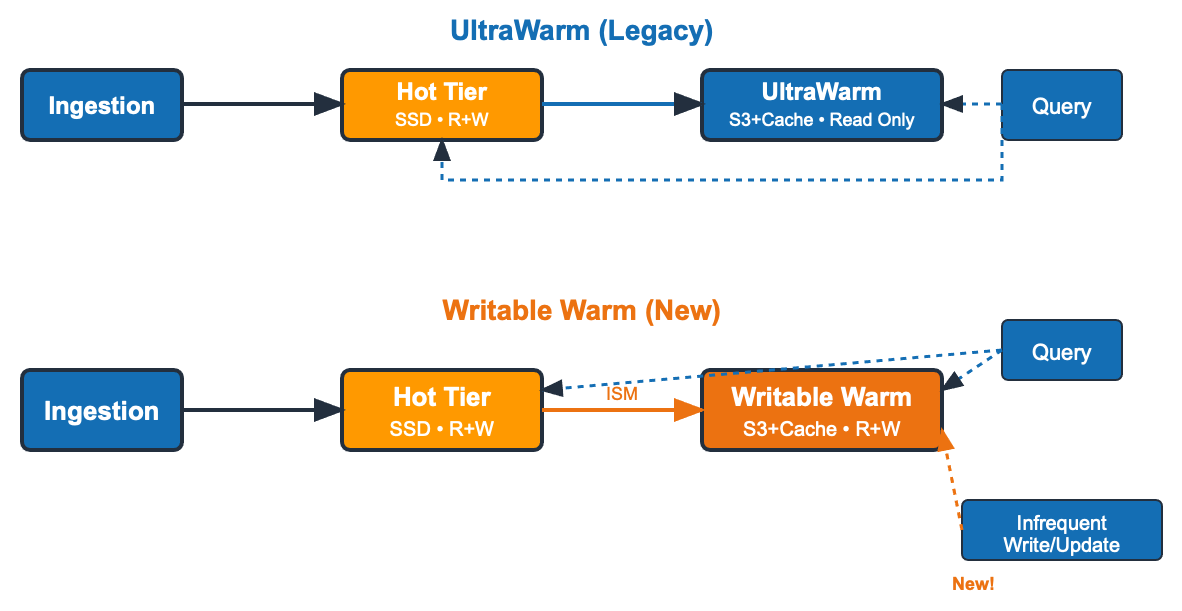
UltraWarm (legacy) data flow: Data is ingested into the hot tier (SSD, read and write). Index State Management (ISM) policies migrate indices to UltraWarm (Amazon S3-backed, read-only). Any update requires migrating the index back to hot (dashed arrow), writing, then migrating back.
Writable warm (new) data flow: Same ingestion path through hot, with ISM transitioning indices to writable warm. The key difference is that writable warm supports both reads and writes. Late-arriving updates go directly to warm, with no migration back to hot. Because both tiers use Amazon S3 as durable storage through OpenSearch Optimized instances, transitions are lightweight shard relocations, not resource-intensive migrations.
The benefits: cost, operations, and flexibility
Writable warm delivers advantages in three areas: cost, operational simplicity, and flexibility.
Cost
Unlike UltraWarm, which only offers on-demand pricing, OI2 instances support Reserved Instance (RI) pricing, a commitment-based discount model. By committing to a 1-year or 3-year Reserved Instance, you can save 31–52 percent compared to UltraWarm nodes. This makes writable warm significantly more cost-effective for predictable, long-running workloads. The newly introduced Database savings plan for OpenSearch Service provides savings of around 22 percent over UltraWarm instances. Both tiers use Amazon S3 for durable storage, so node failure means only temporary unavailability, not data loss. For cost-sensitive workloads that can tolerate brief downtime during node recovery, you can configure zero replicas on warm indices to reduce costs further.
Real-world cost comparison
Consider a workload ingesting 2 TB/day with 210 days total retention, where updates can arrive at any point. With UltraWarm’s read-only constraint, you must keep data in hot for 30 days before migrating to warm. With writable warm, updates happen directly on warm, so hot retention drops to only 7 days.
At small scale, the hot tier reduction benefit is modest. Writable warm is still cost-effective if you need write capability on warm data, can commit to RI pricing, or value the operational simplicity of eliminating migration pipelines. For purely immutable data with short retention, UltraWarm on-demand might still be cheaper. Use the AWS Pricing Calculator to model your specific scenario.
The following table shows estimated monthly costs using on-demand and All Upfront Reserved Instance (AURI) pricing in the US East (N. Virginia) Region as of March 2026. For the latest pricing, see Amazon OpenSearch Service pricing on the AWS website.
| Component | Hot + UltraWarm (30d hot / 180d warm) | Hot + writable warm (7d hot / 203d warm) |
| Hot data nodes | $12,264 (21 × or2.2xlarge) | $12,264 (21 × or2.2xlarge) |
| Hot EBS cost | $10,212.84 (21 * 3986 GB) | $2,636 |
| Hot remote storage | $2,008.28 | $518 |
| Warm data nodes | $39,128 (20× ultrawarm1.large) | $50,409 (15× oi2.8xlarge) |
| Amazon S3 storage | $9,504 | $1,070 |
| Leader nodes | $1,307 (3 × m8g.2xlarge) | $1,307 (3 × m8g.2xlarge) |
| On-demand total | $74,427 | $69,297 |
| 1-year AURI | $69,674 | $43,918 (~36% less) |
| 3-year AURI | $67,367 | $34,939 (~48% less) |
| Database savings plan | $71,708 | $55,406 (~22%) |
Operations
Reclaim hot node capacity. Writable warm removes two common causes of hot node over-provisioning: reserving 35 percent of disk space for force merge operations, and maintaining extra capacity to temporarily move data back to hot for writes. You can run your hot tier at higher utilization, which reduces the number of hot nodes you need.
Simpler migrations. UltraWarm migrations are multi-step operations (force merge, snapshot, and shard relocation) that need careful scheduling during low-traffic windows, and they are limited to 10 queued at a time. Writable warm simplifies this to a lightweight shard relocation, with more straightforward ISM policies and no scheduling constraints.
Flexibility
UltraWarm offers only two instance sizes: ultrawarm1.medium (1.5 TiB) and ultrawarm1.large (20 TiB). Writable warm with OI2 instances offers a full range from oi2.large to oi2.16xlarge. Each size addresses up to 5× its local cache size, so you can right-size warm capacity precisely to your workload.
Search performance
We benchmarked search latency using the NYC Taxis workload, comparing writable warm (oi2.large) against UltraWarm nodes. All measurements are P90 latencies.
On the NYC_TAXIS benchmark, writable warm matched or beat UltraWarm on 6 of 7 query types at P90, including lightweight filters, ranges, sorts, and time-histogram aggregations. For most real-world search patterns, writable warm delivers comparable or better performance than UltraWarm, plus the ability to write directly to the tier.
Search performance: writable warm compared to UltraWarm
| Task | Writable warm node latency in ms | UltraWarm latency in ms | UltraWarm vs. writable warm diff % |
| NYC_TAXIS workload type | ** ** | ** ** | ** ** |
| default (P90) | 21.287 | 23.857 | 12.07223 |
| range (P90) | 21.23 | 21.016 | -1.00718 |
| distance_amount_agg (P90) | 5,069 | 3929.23 | -22.48406 |
| autohisto_agg (P90) | 21.076 | 22.002 | 4.39348 |
| date_histogram_agg (P90) | 21.363 | 21.792 | 2.01031 |
| desc_sort_tip_amount (P90) | 23.224 | 23.797 | 2.46636 |
| asc_sort_tip_amount (P90) | 22.483 | 22.482 | -0.00445 |
When to choose what
Should you switch from UltraWarm to writable warm? It depends on your workload.
| Requirement | Writable Warm | UltraWarm |
| Write enabled | ✓ | Read-only |
| Reserved Instance pricing | ✓ | ✗ |
| Instance size flexibility | Wide range (large–8xlarge) | 2 options only |
| Cold tier support | ✗ | ✓ |
| Need for OpenSearch Optimized instance families | ✗ | ✓ |
| Concurrent tier transitions | ✓ | ✗ (sequential) |
| Hot node impact during migration | Minimal | High (CPU/memory) |
Clean up resources
If you created a test domain to evaluate writable warm storage, delete it to avoid ongoing charges. In the OpenSearch Service console, select your domain and choose Delete. This removes all nodes and stops Amazon S3 storage charges for that domain.
Summary
In this post, I showed you how writable warm storage eliminates the costly migration cycle that UltraWarm’s read-only limitation creates. You get up to 36 percent cost savings with 1-year Reserved Instances, faster search performance, and a simpler operational model. Writable warm also removes data transitions between tiers, and Reserved Instance pricing becomes available for warm storage for the first time.
Writable warm requires OpenSearch Service version 3.3 or later with OI2 instances. For domains needing cold tier support, earlier OpenSearch Service versions, or non-optimized instance families, UltraWarm remains the right choice.
Next steps: Start by analyzing your current hot and warm split. How many days of data do you keep in hot only to accommodate occasional updates? Use the AWS Pricing Calculator to model your potential savings, and enable writable warm on a test domain in minutes. At the time of this post, writable warm is supported on OpenSearch Service version 3.3. For step-by-step instructions, see Migrating to writable warm storage in the OpenSearch Service documentation.
Have you tried writable warm storage? I’d love to hear about your experience and any questions you have in the comments.