Post Syndicated from Doug Perkes original https://aws.amazon.com/blogs/compute/introducing-self-managed-amazon-s3-buckets-for-aws-lambda-function-code/
If you manage Lambda functions at scale, you’ve likely hit the 75 GB code storage limit or explained to your security team why deployment artifacts live in an S3 bucket you don’t control. Today, we’re announcing self-managed Amazon S3 buckets for AWS Lambda deployment packages. Lambda reads your code directly from your bucket, eliminating quota pressure and giving you full security control.
Previously, the default AWS-managed code storage created three challenges at scale. First, all copies count toward your 75 GB code storage quota. Second, you cannot apply your own encryption, access controls, or compliance tags to the internal bucket. Third, the copy cannot be incorporated into your disaster recovery strategies.
With self-managed S3 buckets, Lambda reads your function code directly from your bucket. No copy, no duplication. Your S3 object becomes the single source of truth for your functions. Deployment packages no longer count against your account’s code storage limit. You manage the bucket’s security and compliance posture: choosing the encryption, defining the access policies, managing lifecycle transitions, and maintaining the audit trail. And because you own the bucket, you can use S3 Cross-Region Replication to maintain fallback copies of your code in a secondary Region, so that your functions remain deployable even if your primary Region experiences an issue. Using self-managed S3 buckets also results in a faster time to first invoke for new functions and after function updates, because Lambda no longer needs to copy your zip package to a Lambda-managed S3 bucket.
You can use this feature today in all AWS standard regions where Lambda is available, at no additional charge beyond your standard Amazon S3 storage and request costs. Let’s look at some use cases, how it works, and how to use it at scale.
Use cases
Here are a few patterns where owning your deployment bucket makes a real difference.
CI/CD pipelines and artifact management
With self-managed storage, your CI/CD pipeline uploads once, and Lambda references the same object. One set of lifecycle rules and access controls covers all artifacts, and rollbacks mean pointing the function to a previous S3 object version.
Multi-account and multi-team architectures
Organizations using AWS Organizations often separate workloads into multiple accounts: a development account, a staging account, and a production account. They centralize shared resources in a tooling or shared-services account.
Self-managed buckets integrate naturally with this pattern:
- Store all deployment artifacts in a central “artifact account” bucket.
- Grant cross-account
s3:GetObjectaccess to Lambda execution roles in each workload account through bucket policies. - Maintain a single inventory of what code is deployed where, managed by your platform or DevOps team.
- Enforce consistent encryption, versioning, and retention policies from one place.
Disaster recovery and business continuity
Because your deployment artifacts live in a bucket you own, you can use the built-in replication features of S3, Cross-Region Replication (CRR) or Same-Region Replication (SRR), to maintain copies of your code artifacts in backup locations. Combined with S3 Versioning and Object Lock, this gives you a durable, tamper-proof code archive that supports rapid recovery if a deployment is accidentally corrupted or deleted.
How it worked before
When you deploy a Lambda function using a .zip deployment package stored in Amazon S3, the process has traditionally worked like this:
- You upload your .zip deployment package to your S3 bucket.
- You call
CreateFunctionorUpdateFunctionCode, specifying the S3 bucket and S3 key. - Lambda copies the .zip artifact from your bucket into an internal, service-managed bucket.
- Lambda uses this copy to create the optimized version of your function that runs at invocation time.
- The copied artifact counts toward your account’s 75 GB code storage quota.
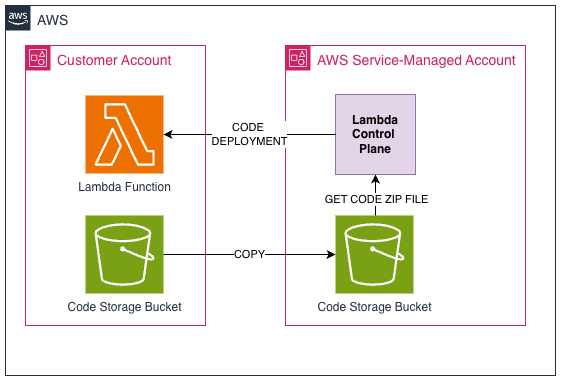
Figure 1 — Standard Lambda deployment
This model is straightforward and works well for most workloads. However, it creates three friction points at scale:
- Storage quota pressure: Every deployment package copy counts toward your account’s 75 GB total code storage limit. Organizations with hundreds of functions and multiple published versions can exhaust this quota.
- No control over stored artifacts: You cannot configure encryption (beyond the service default), access logging, lifecycle policies, Object Lock, or compliance tags on the internal bucket.
- Redundant storage: Your original artifact remains in your bucket while a copy lives in the Lambda bucket used for provisioning new instances of your Lambda function.
What’s new: REFERENCE mode
This launch introduced a new function configuration setting, S3ObjectStorageMode. The default value is COPY, which provides the existing behavior described in the preceding section. To enable self-managed S3 buckets, set S3ObjectStorageMode to REFERENCE when creating or updating a function. In this mode, Lambda no longer copies your deployment package. Instead, it stores a reference to your S3 object and reads the code directly from your bucket when needed. If you do not specify S3ObjectStorageMode, Lambda still takes a copy by default.
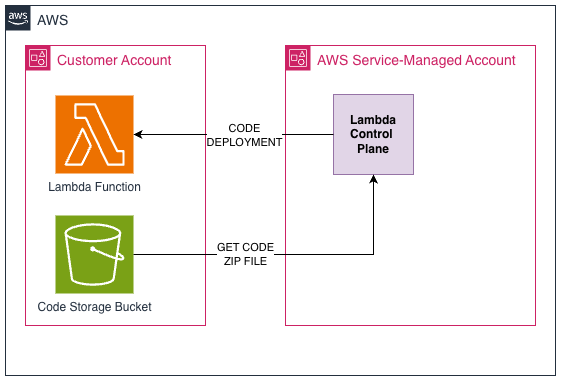
Figure 2 — Lambda deployment with self-managed storage
This gives you:
- No quota consumption. Deployment packages in your bucket don’t count against the 75 GB Function and layer storage account limit.
- Improved performance. Lambda no longer copies the code to an internal bucket, so function creation and updates are faster.
- Full security and compliance control. Apply your own bucket policies, encryption, Object Lock, versioning, access logging, and compliance tags.
- Single source of truth. Your S3 object is the canonical artifact with no additional copies and no drift.
- Disaster recovery options. Use S3 Cross-Region Replication to maintain fallback copies in a secondary Region.
How it works
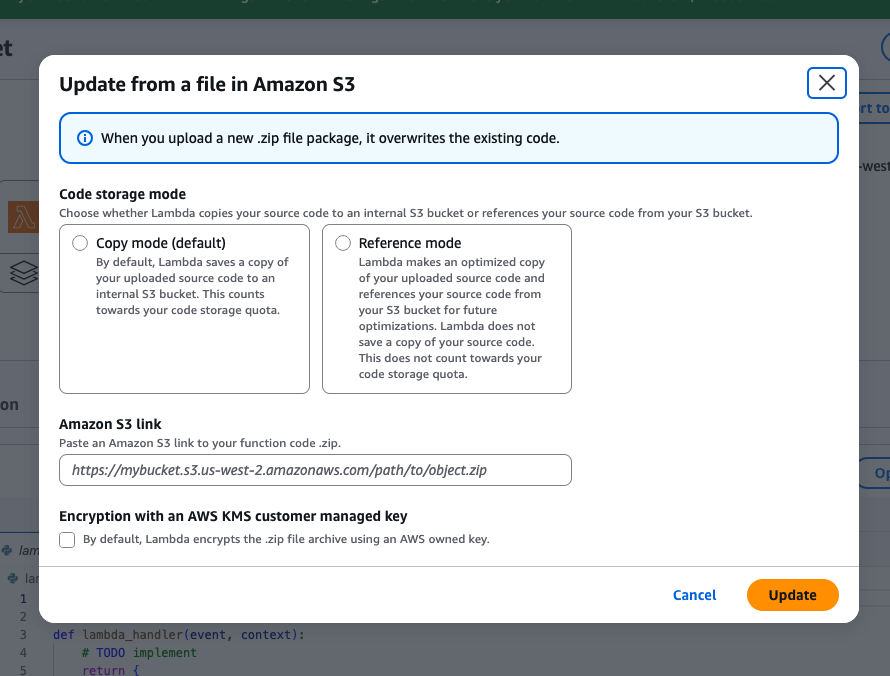
To use this feature, specify the S3ObjectStorageMode parameter when creating or updating your function.
Creating a new function (AWS CLI):
Updating an existing function:
AWS Identity and Access Management (IAM) permissions
Lambda needs permission to read the deployment package from your bucket. You can grant access through an S3 bucket policy.
S3 bucket policy
We recommend including the aws:SourceArn condition key scoped to your specific function ARN to allow for least-privileged access. Note the Resource is scoped to the exact S3 key rather than a wildcard prefix. This follows least-privilege and matches how the aws:SourceArn condition locks down which function can access which object.
Bucket requirements
Your S3 bucket must meet the following requirements:
- Versioning (required). You must enable S3 versioning to make sure that Lambda references a specific, immutable artifact and to protect against accidental overwrites.
- Encryption. The following encryption types are supported: SSE-S3, SSE-KMS (including customer-managed KMS keys), and DSSE-KMS. If you use SSE-KMS, the Lambda principal must have
kms:Decryptpermission on the key. - Object Lock. Supported. You can apply Object Lock in Compliance or Governance mode to prevent accidental deletion of deployment artifacts.
- Access logging. You can enable S3 server access logging or AWS CloudTrail data events to audit every time Lambda reads your code.
What happens when the object is unavailable
Lambda periodically accesses the source object from your S3 bucket to reoptimize your function code. You must maintain access to the source object for your function to remain active.
If Lambda loses access to the source object for a function, the function transitions to the Inactive state. To restore the function, restore access to the source object and then update the function.
Performance considerations
Lambda functions with self-managed code storage behave the same as standard Lambda functions with one difference during function creation and update. Lambda does not copy your deployment package to a Lambda-managed S3 bucket. In our testing with a 200MB Python 3.13 function, functions using self-managed storage showed function creation times approximately 5s less than the default COPY mode. Reading directly from your S3 bucket without an intermediate copy step can provide a modest advantage, particularly for larger deployment packages.
Getting started with infrastructure as code
Self-managed code storage can be implemented using infrastructure-as-code tooling with either the AWS CLI or AWS CloudFormation today.
AWS CLI
AWS CloudFormation
Using it at scale
Once you adopt self-managed S3 buckets for your Lambda deployment packages, your artifact bucket grows over time as you deploy new versions of your functions. This section covers strategies for managing that growth efficiently, keeping your versions organized, and planning for cross-Region deployments.
Managing artifact lifecycle with S3 lifecycle policies
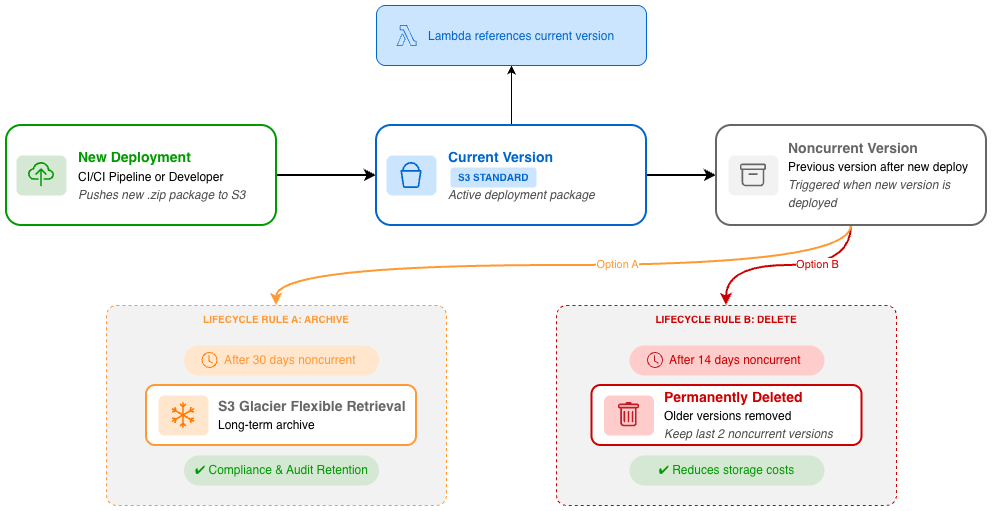
Every time you update a function’s code, S3 creates a new object version in your bucket. The previous objects don’t disappear. They accumulate. Without a cleanup strategy, your storage grows indefinitely and old artifacts clutter your bucket.
S3 Lifecycle policies let you automate this entirely. You define rules that transition or delete objects based on age, and S3 executes them on your behalf: no scripts, no cron jobs, no manual intervention.
Strategy 1: Archive old versions to Glacier
If compliance or audit requirements mandate that you retain all historical deployment packages, but you rarely need to access them, transition old object versions to a lower-cost storage class:
This rule transitions any non-current object version to S3 Glacier Flexible Retrieval after 30 days. Your active deployment packages remain in S3 Standard for fast access, while historical versions move to archival storage at a fraction of the cost.
For artifacts you need to retain for years but will rarely access again, consider a tiered approach: moving to Glacier Flexible Retrieval first, then to Deep Archive:
Strategy 2: Delete old versions you no longer need
If you don’t have a compliance requirement to retain every historical artifact, you can expire old versions outright:
This rule keeps the 2 most recent non-current versions of each object (giving you a rollback path) and deletes anything older than 14 days beyond that. This aligns well with a deployment strategy where you want the ability to quickly roll back to your previous one or two releases, but don’t need to retain anything older.
Tracking object and function versions
With REFERENCE mode, there is a direct relationship between your S3 object version and your Lambda function version. We recommend the following practices:
- Tag your objects with metadata from your CI/CD pipeline (commit SHA, build ID, pipeline run ID) so you can trace any deployed function back to the exact source that produced it.
- Document the mapping between Lambda function versions (or aliases) and S3 object version IDs. This makes rollbacks straightforward: update the function to reference the previous object version.
Cross-account considerations
How you organize your artifact buckets across AWS accounts depends on your operational model:
- Centralized artifact account: A single bucket in a shared-services or tooling account, with bucket policies granting cross-account
s3:GetObjectaccess to Lambda execution roles in workload accounts. This gives your platform team a single inventory of all deployment artifacts with consistent lifecycle, encryption, and access policies. - Per-account buckets: Each workload account owns its own artifact bucket. Requires less effort to set up, but harder to enforce consistent governance across many accounts.
Either pattern works with self-managed storage. Choose based on how your organization balances centralized control against team autonomy.
Cross-Region considerations
With REFERENCE mode, your S3 object is the authoritative copy for your function. Self-managed code storage supports cross-Region function creation within a partition for all default Regions (non-opt-in Regions). You can store your code packages in one Region and deploy your functions in another. This makes cross-Region planning critical. There are four factors to balance:
Disaster recovery
This is the most critical consideration. Because your S3 object is the single source of truth in REFERENCE mode, you do not want all your deployment artifacts in a single Region with no fallback. A recommended pattern:
- Primary Region: Your main artifact bucket where CI/CD pipelines deposit new deployment packages.
- Fallback Region: A secondary bucket populated via S3 Cross-Region Replication (CRR). If your primary Region becomes unavailable, you can update your Lambda functions to reference the replicated objects in the fallback Region.
Enable S3 Replication Time Control (RTC) if you need a guaranteed SLA (15 minutes) for replication completion.
Cost
Weigh replication + storage costs against per-deploy cross-Region data transfer. If you deploy frequently, storing replicated copies in each target Region is usually cheaper. For infrequent deployments, a one-time transfer may suffice.
Governance and data residency
Some organizations, particularly in regulated industries, have strict requirements about where code artifacts can reside. Before configuring cross-Region replication, confirm that your data is permitted to leave its current Region. Certain regulatory frameworks (for example, data sovereignty laws, FedRAMP boundaries) may restrict replication to specific Region pairs.
Performance
If your workload requires fast function creation and activation times, for example, in a CI/CD pipeline where deployment speed is critical, keep your S3 objects in the same Region where you are creating your Lambda functions. Cross-Region reads add latency to the initial code download, which directly impacts how quickly a new function version becomes active after deployment.
For workloads where creation speed is less critical (for example, batch processing functions that are updated infrequently), the latency of a cross-Region read might be acceptable and can simplify your architecture.
Things to know
Before adopting self-managed S3 buckets for your Lambda functions, keep the following in mind:
- Availability: You can use this feature today in all AWS standard regions where Lambda is supported.
- Pricing: There is no additional Lambda charge. You pay standard S3 costs for storage, and any cross-Region data transfer.
- Maximum deployment package size: The existing limits apply: 250 MB unzipped.
- Supported runtimes: All Lambda runtimes that support .zip deployment packages are compatible. Container image deployments are not affected by this feature.
- Migration: You can switch an existing function from service-managed to self-managed storage by calling
UpdateFunctionCodewith the--s3-object-storage-mode REFERENCEparameter. Lambda recreates the function by referencing the object in your S3 bucket and deletes the saved copy. - Reverting: You can switch back to service-managed storage at any time by updating the function with
--s3-object-storage-mode COPY. Lambda resumes copying the artifact to its internal bucket. - Object availability is your responsibility: In
REFERENCEmode, Lambda depends on your S3 object being accessible. If the object is deleted, the bucket policy changes, or the KMS key is disabled, new invocations requiring a cold start will fail.
Conclusion
In this post, we showed how self-managed S3 buckets for Lambda give you more capacity, more control, and simpler compliance, all without changing how you write or invoke your functions. Your deployment packages no longer count against account quotas, your security team can apply the same policies to code artifacts that they apply everywhere else, and your disaster recovery story is as strong as the replication capabilities of S3.
To get started:
- Read the Lambda Developer Guide: Self-managed S3 code storage for full documentation.
- Try it in the AWS Lambda Console. Choose Reference Mode under Code storage mode when creating your next function.
- Review S3 Lifecycle Configuration examples to plan your artifact retention strategy.
- Explore S3 Cross-Region Replication for disaster recovery planning.