Post Syndicated from Pallavi Jha original https://aws.amazon.com/blogs/big-data/best-practices-for-scaling-large-consumer-groups-on-amazon-msk/
When scaling large consumer groups on Amazon Managed Streaming for Apache Kafka (Amazon MSK), a common challenge is managing the size of internal metadata records. During rebalances, Kafka persists a metadata record to the internal __consumer_offsets topic. If the consumer group is large enough, this record can exceed the default 1 MB limit. This causes a RecordTooLargeException and a rebalance retry loop.
In this post, we explain how consumer group metadata grows and how to estimate your metadata size. We provide a step-by-step walkthrough for increasing the topic-level size limit (the most common remediation), along with guidance on three complementary strategies: splitting groups, right-sizing partitions, and optimizing naming conventions. We also discuss capacity planning, monitoring, and how KIP-848 in Apache Kafka 4.0 addresses this constraint at the protocol level.
Prerequisites: This post assumes familiarity with Apache Kafka consumer groups, rebalance protocols, and Amazon MSK cluster configuration. You should have access to the kafka-configs.sh CLI tool or the Amazon MSK console. The configuration approaches described apply to Amazon MSK Provisioned clusters with Standard brokers. The KIP-848 section covers a forward-looking protocol change in Apache Kafka 4.0 that applies across deployment types.
How consumer group metadata grows
The following diagram illustrates how consumer group metadata flows through the system during a rebalance:
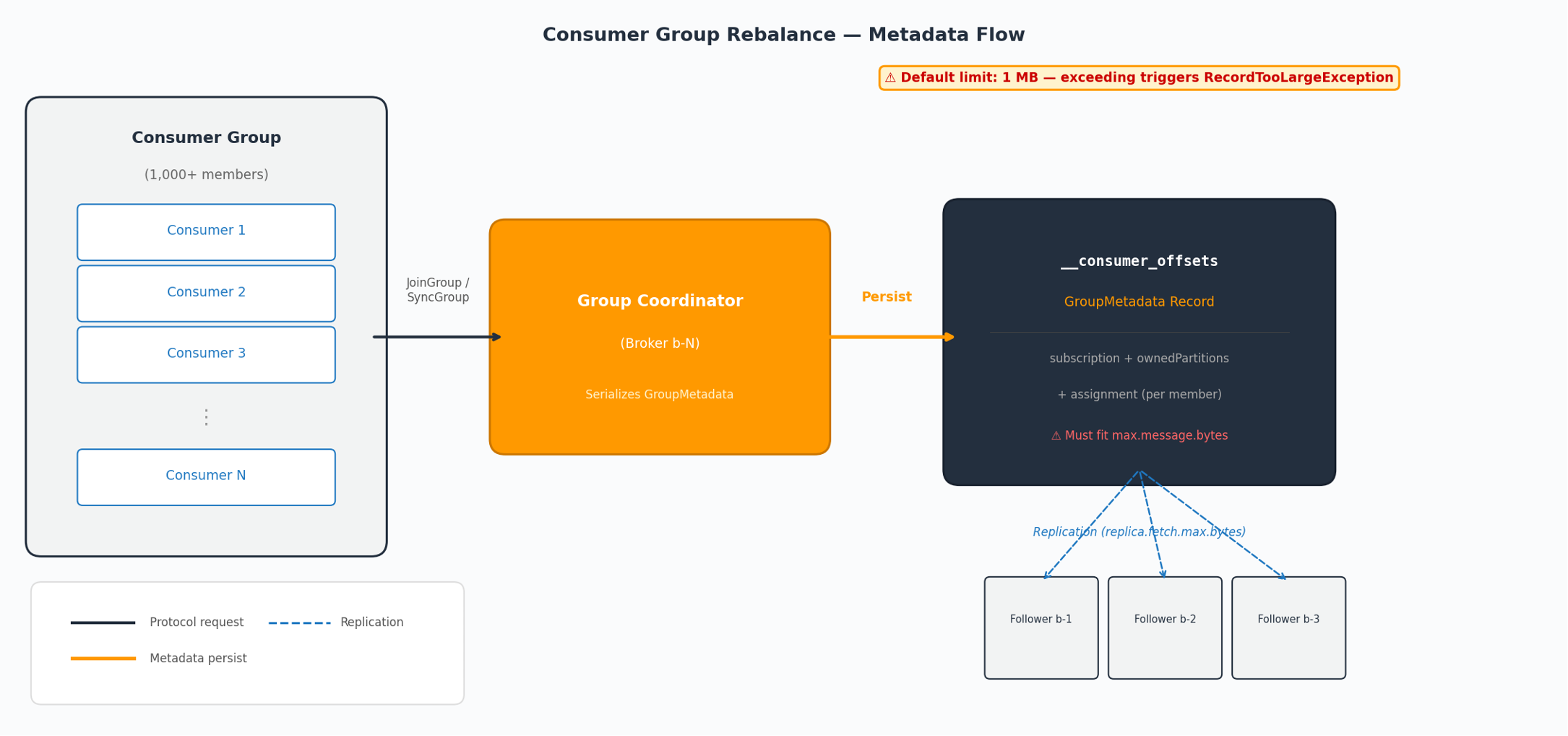
Figure 1: Consumer group metadata flow during a rebalance
During a rebalance, the Group Coordinator serializes a GroupMetadata record containing information about every member in the group and persists it to the __consumer_offsets topic. This record must fit within the topic’s max.message.bytes limit. Follower brokers must also replicate it, constrained by replica.fetch.max.bytes. For each member, the record includes:
- Subscription topics – The list of topics the member subscribes to.
- Owned partitions – Partitions currently held by the member.
- Assignment – The new partition assignment after rebalancing.
- Client ID – The configured
client.id.
Apache Kafka’s serialization format repeats topic names multiple times per member: once in subscription, once in ownedPartitions, and once in assignment. The client.id adds further per-member overhead. The broker stores these metadata records uncompressed in __consumer_offsets.
Estimating your metadata record size
You can approximate your consumer group’s metadata record size with the following formula:
record_size ≈ member_count × (3 × avg_topic_name_bytes + 2 × client_id_bytes + ~200 bytes overhead)
Example: A group with 1,000 members, a 50-byte topic name, and a 40-byte client ID:
1,000 × (150 + 80 + 200) = ~430 KB
At 1,500 members with the same parameters: ~645 KB. With multiple topic subscriptions or longer naming conventions, the record can exceed 1 MB well before 2,000 members.
Approaches to handle large consumer group metadata
The following sections describe four strategies for managing large consumer group metadata, starting with the most direct remediation.
Increase max.message.bytes on __consumer_offsets
If your consumer group metadata exceeds 1 MB, you can increase the maximum record size on the internal topic. This is the most direct path to help unblock consumer groups that have already scaled beyond the default. Note that max.message.bytes is the topic-level configuration name, while message.max.bytes is the equivalent broker-level default.
1. Update the topic-level configuration:
2. Update replica.fetch.max.bytes at the cluster level:
This broker-level setting controls the maximum fetch size for inter-broker replication. Set it equal to or greater than max.message.bytes on __consumer_offsets so follower brokers can replicate large metadata records.
You can apply this through the Amazon MSK console under Cluster configuration or using the AWS Command Line Interface (AWS CLI) with update-cluster-configuration.
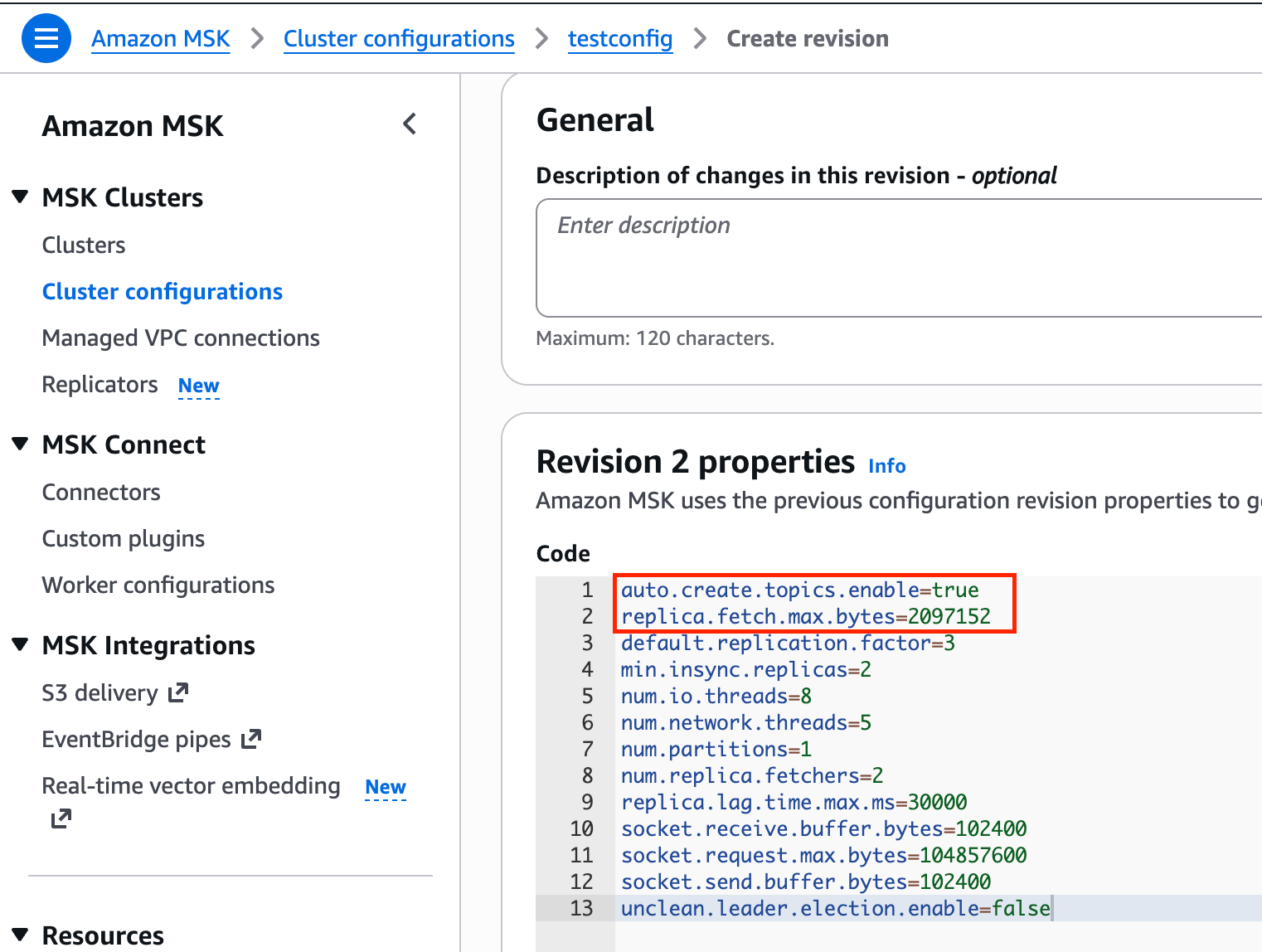
Figure 2: Setting replica.fetch.max.bytes in the Amazon MSK cluster configuration console
Important: Always make sure that replica.fetch.max.bytes ≥ max.message.bytes for __consumer_offsets. Without this, you might observe UnderReplicatedPartitions on the internal topic.
3. Test in a non-production environment first:
- Trigger a consumer group rebalance (restart consumers or scale the group).
- Verify no
RecordTooLargeExceptionin broker logs. - Confirm broker heap usage and replication lag remain healthy.
Split large consumer groups
Breaking a single large consumer group into multiple smaller groups reduces the per-group metadata record size proportionally. To split a group, deploy multiple connector or consumer instances, each with a distinct group.id, subscribing to the same topic but consuming from a subset of partitions. The system preserves offset tracking within each sub-group independently.
When to use: Consumer group membership is growing unboundedly through Auto Scaling, and you want to keep each group’s metadata well within limits without modifying internal topic configuration.
Trade-off: Increases operational complexity. You have multiple groups to monitor and manage instead of one.
Right-size partition count and auto scaling bounds
Over-partitioned topics require more consumers to fully parallelize, which inflates group membership. Unbounded auto scaling policies can grow consumer groups beyond what was originally planned.
- Review whether your topic’s partition count matches your actual throughput requirements.
- Configure auto scaling policies with an upper bound on consumer replicas (for example, Horizontal Pod Autoscaler on Amazon Elastic Kubernetes Service (Amazon EKS)).
- Align partition count with the maximum number of consumers you intend to support.
This is a proactive measure, best applied during topic design and capacity planning to prevent the metadata size issue from occurring in the first place.
Optimize naming conventions
Consumer group names and client IDs contribute to the overall metadata size. Shorter, standardized naming reduces per-member overhead.
Considerations: Changing an active consumer group’s name means the new group starts with no committed offsets and all tracking history is lost. For this reason, naming optimization is most practical for new deployments rather than existing production groups.
Capacity planning for larger metadata records
When you increase max.message.bytes on __consumer_offsets, larger metadata records consume more broker heap during rebalance processing. Proper capacity planning helps you select the right broker instance type and configuration value before hitting production issues.
Planning steps:
- Calculate your current record size using: member_count × (3 × topic_name_bytes + 2 × client_id_bytes + ~200).
- Project peak membership based on your auto scaling upper bound (maximum consumer replicas × number of tasks per connector, if using Kafka Connect).
- Apply a 2× safety margin to account for protocol overhead, multi-topic subscriptions, and burst scaling events.
- Select your
max.message.bytesvalue from the following guidance table. - Choose your broker instance type based on heap requirements. Larger metadata records increase heap pressure during rebalances. For groups exceeding 1,000 members with 2+ MB metadata records, use
kafka.m5.xlargeor larger to provide sufficient heap headroom. - Validate in non-production by running a consumer group at projected peak membership and monitoring
HeapMemoryAfterGCduring rebalances.
The following table provides sizing guidance based on consumer group size:
| Consumer Group Size | Guidance |
| < 500 members | Default 1 MB is typically sufficient. kafka.m5.large or larger. |
| 500–1,000 members | Monitor metadata size. Consider increasing to 2 MB. kafka.m5.xlarge or larger. |
| 1,000–2,000 members | Increase to 2–5 MB. kafka.m5.2xlarge or larger for adequate heap headroom. |
| > 2,000 members | Combine increased limit with group splitting. kafka.m5.2xlarge minimum. Consider kafka.m5.4xlarge for high rebalance frequency. |
Key metrics to monitor
The following Amazon CloudWatch metrics help you track consumer group metadata health:
| Metric | What it tells you |
HeapMemoryAfterGC (Amazon CloudWatch) |
Percentage of heap memory in use after garbage collection. Indicates memory pressure from larger metadata records during rebalances. |
UnderReplicatedPartitions (Amazon CloudWatch) |
Replication health. Non-zero may indicate replica.fetch.max.bytes is too low. |
| GC pause duration (broker logs) | Prolonged GC can trigger session timeouts and cascading rebalances. |
| Consumer group rebalance rate | Stable groups should not rebalance frequently after configuration changes. |
| Consumer lag | Confirms consumers are making progress after rebalances complete. |
We recommend creating two Amazon CloudWatch alarms for HeapMemoryAfterGC. Set a warning alarm at 60% to indicate potential performance degradation. Set a critical alarm at 80 percent, at which point you should scale brokers or reduce consumer group size. For UnderReplicatedPartitions, alarm at any value> 0 sustained for more than 5 minutes after a configuration change.
Looking ahead: KIP-848 and Apache Kafka 4.0
Apache Kafka 4.0 (released March 2025) adopted KIP-848 as the default consumer protocol. The broker now computes partition assignments server-side rather than delegating to a consumer group leader. Because each member no longer carries full subscription and assignment data on the wire, the new protocol reduces per-member metadata size. For details on the protocol changes that achieve this reduction, see the KIP-848 design document. KIP-848 also introduces incremental rebalances.
Newer Apache Kafka versions on Amazon MSK bring smaller metadata records by default. The following steps help you prepare for KIP-848 adoption:
- Track Amazon MSK version support for Apache Kafka 4.0+.
- Verify your Kafka client libraries support the new consumer protocol.
- Test the new protocol in a non-production environment before migrating production consumer groups.
- Plan for a phased rollout, starting with non-critical consumer groups.
Conclusion
The following table summarizes when to apply each approach. The max.message.bytes increase (covered step-by-step earlier) is the primary remediation. The other strategies are complementary guidance you can adapt to your environment:
| Situation | Recommended approach |
Already hitting RecordTooLargeException in production |
Increase max.message.bytes on __consumer_offsets + set replica.fetch.max.bytes accordingly |
| Planning for growth | Right-size partitions, set auto scaling bounds, monitor metadata size |
| Naming overhead is significant | Optimize naming conventions for new deployments |
| Operating at very large scale (2,000+ members) | Combine increased limits with consumer group splitting |
| Long-term architecture | Plan migration path to KIP-848 (Apache Kafka 4.0) |
Test configuration changes in non-production first, monitor broker metrics during and after rebalances, and scale incrementally. With these practices in place, you can operate consumer groups at the scale your streaming workloads require.
To get started:
- Review the Amazon MSK Developer Guide for cluster configuration steps.
- Use the sizing formula in this post to estimate your current metadata record size.
- Set up Amazon CloudWatch alarms on
HeapMemoryAfterGCto monitor broker health proactively.
Related resources
- Amazon MSK Developer Guide — Configuration
- Handling large messages in Amazon MSK
- KIP-848: The next generation of the consumer rebalance protocol
- KAFKA-3810: Replication of internal topics and replica.fetch.max.bytes
- Amazon MSK Express brokers — Intelligent Rebalancing (benchmark details in linked post)