Post Syndicated from Amit Maindola original https://aws.amazon.com/blogs/big-data/announcing-spark-connect-on-amazon-emr-on-eks/
Today, we’re announcing support for Spark Connect on Amazon EMR on EKS, starting from EMR release 7.14 (Apache Spark 3.5.8) and emr-spark-8.1 (Apache Spark 4.1.1). You can now build, test, and debug Spark applications from your preferred tools, such as VS Code, PyCharm, Jupyter notebooks, Amazon SageMaker Unified Studio. At the same time, your full-scale Spark operations run on Amazon Elastic Kubernetes Service (Amazon EKS).
Deploying Spark applications from a local development environment to a remote Amazon EKS cluster often means dealing with environment differences, dependency conflicts, and performance gaps at scale. Spark Connect removes this friction. It separates your application client from the Spark server, so you develop and debug locally while Spark Connect routes your operations to a scalable Spark cluster running on Amazon EKS.
This client-server architecture supports a range of use cases, including interactive development from notebooks and IDEs, embedded Spark in web services, and continuous integration and continuous delivery (CI/CD) data-quality tests. All of these run on your existing EKS infrastructure. Each Spark Connect session uses its own AWS Identity and Access Management (IAM) execution role, custom tags, and cost tracking. For more information, see the Amazon EMR on EKS documentation.
Here are two demonstrations of using Spark Connect in Amazon SageMaker Unified Studio Notebooks and in a VS Code local IDE:
Amazon SageMaker Unified Studio Notebooks demo:
Local IDE demo:
For a runnable end-to-end example in an IDE, try the Spark Connect sample notebook in the aws-emr-utilities repository. It includes a client wrapper solution, built by AWS architects, for simplified connectivity:
How Spark Connect works on Amazon EMR on EKS
Spark Connect uses a client-server architecture that separates application code from the Spark engine:
- Client – A lightweight PySpark library running in your environment (such as an IDE or notebook). It doesn’t need Spark installed, direct access to data, or resources sized for the workload.
- Connection (EMR managed endpoint) – The client sends Spark operations over a secure gRPC/TLS channel to the Spark Connect server.
- Server – Runs Spark pods in your Amazon EMR on EKS namespace, starting from a minimum of two executors (adjustable) with autoscaling. The server performs Spark operations using the EKS compute resources and accesses data stores, such as an Amazon Simple Storage Service (Amazon S3) bucket, through job execution roles.
- Results – The server streams query results back to the client through gRPC as Apache Arrow-encoded row batches.
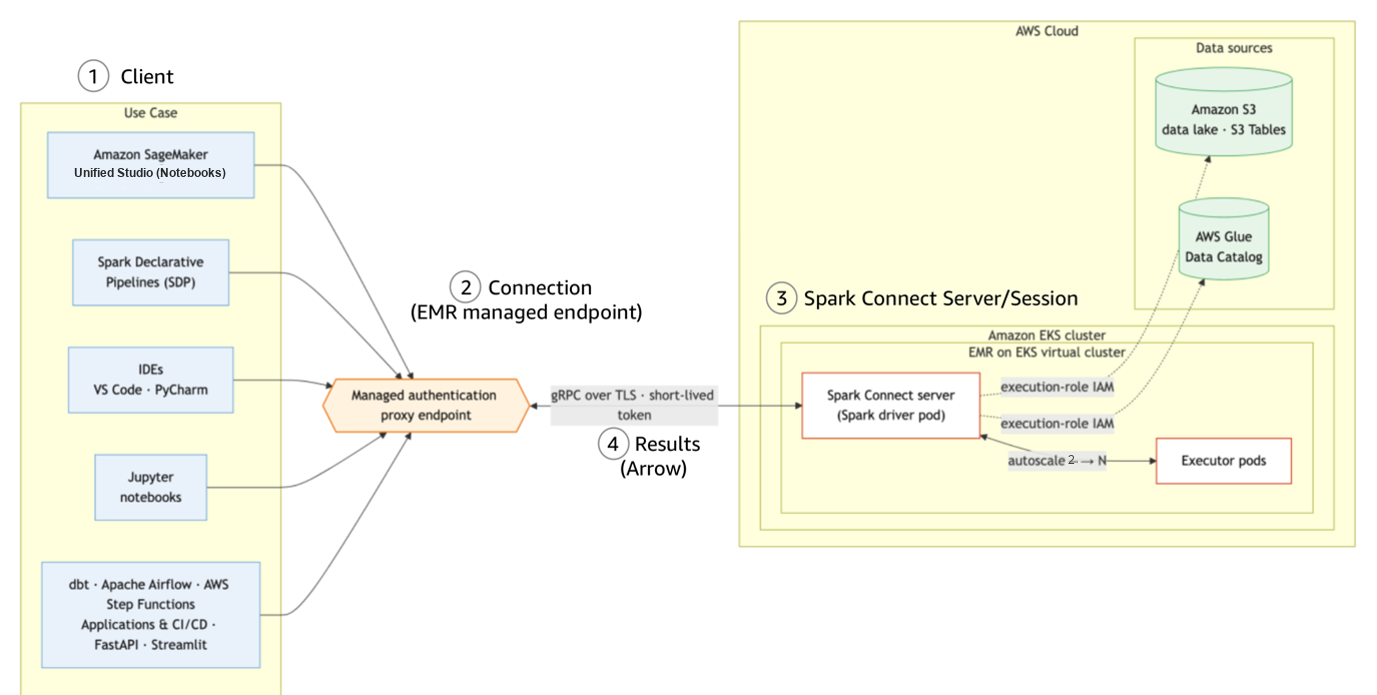
Figure 1: Spark Connect’s client-server architecture
On endpoint creation, Amazon EMR on EKS launches the Spark Connect server as pods on EKS and returns an Elastic Load Balancing (ELB)-backed endpoint and a short-lived token. You don’t need to provision any server or networking manually. Because the Spark Connect server runs on the EKS cluster you already operate, it inherits the node types, container images, and Spark configurations. What you see while developing Spark applications on the client side is what runs in the EKS environment at scale.
To provide a secure, simplified experience, Amazon EMR on EKS provisions two additional components on first use of Spark Connect on the EKS cluster:

Figure 2: Shared Envoy router and Secret Agent service on the EKS cluster
- Managed authentication-proxy router – a shared Envoy router with three replicas by default (adjustable), fronted by a Network Load Balancer (NLB). It routes client traffic to the correct server pods, terminates TLS, and validates the session token. One router serves Spark Connect endpoints on the EKS cluster.
- Secret Agent service – a lightweight, long-running pod that manages the short-lived credentials for session authentication. One service per EMR security configuration.
These components are long-running and shared across endpoints. Amazon EMR on EKS creates them automatically with the first endpoint on the cluster. Because the router is cluster-scoped and Secret Agent is namespace-scoped, deleting a managed endpoint doesn’t remove them. They keep running so that new endpoints can start within a minute. The router’s replica count is tunable. Scale down for non-production environments to reduce cost or scale up for higher throughput.
To fully remove these components:
- Terminate all active managed endpoints and their virtual cluster that reference the Secret Agent’s security configuration, then delete the security configuration.
- Once the last session-enabled virtual cluster is deleted, the authentication-proxy router and its underly resources, including the NLB and VPC endpoint, are removed automatically.
- Alternatively, delete the EKS cluster to remove all in-cluster components at once.
Why use Spark Connect on Amazon EMR on EKS
With Amazon EMR on EKS, teams can run Spark alongside other applications on shared Kubernetes clusters with existing infrastructure, operational tooling, and system expertise. Spark Connect extends that value to interactive, embedded, and self-service Spark workloads. Your client stays lightweight while Spark code runs in governed, scalable server pods on EKS.
Interactive development on shared Kubernetes clusters
Data engineers and scientists iterate on Spark code cell-by-cell in notebooks or local IDEs. The Spark engine runs remotely on EKS, so validation runs on the same engine as your batch workloads. After validation on the Spark Connect client, the same Spark code deploys as a batch StartJobRun with no changes.
Spark Connect sessions run as pods on your existing cluster. They reuse your EKS RBAC, network policies, node autoscaling, and observability stack (Prometheus, Grafana, Amazon CloudWatch Container Insights). There are no separate compute and monitoring layers to operate.
Embedded Spark in applications and services
The Spark Connect client is a compact PySpark library. Teams can embed Spark operations directly into Python applications such as web services, dashboards, automation scripts, or backend APIs. The heavy processing runs on EKS while the application stays lightweight.
Teams can also expose Spark Connect as a self-service capability on their internal application. Business users submit Spark SQL scripts from a web UI. The compute runs on Spark Connect server on EKS, so the team manages capacity, security, and upgrades centrally.
Multi-tenant data exploration with governance
Each Spark Connect session uses the data user’s IAM permissions that you configure, limiting their access to authorized AWS services, data lake tables, and S3 paths. Every session carries tags with user, project, endpoint and virtual cluster IDs, feeding directly into billing and compliance reports. Meanwhile, data producers maintain guardrails on source data without blocking self-service exploration.
To manage resource consumption across teams, Amazon EMR on EKS virtual clusters provide namespace-level isolation. Each tenant binds their Spark Connect endpoints to a virtual cluster (a namespace) with independent IAM roles. Using resource quotas and limit ranges on EKS, you can protect each virtual cluster by controlling the compute resources that Spark Connect sessions can consume. Importantly, activating EKS split-cost allocation tags helps with chargeback reporting in a multi-tenant environment.
Reusable container images and scalable deployment
Teams often maintain custom container images with proprietary libraries, including internal feature stores, compliance toolkits, UDFs, or machine learning (ML) frameworks. With Spark Connect on Amazon EMR on EKS, teams reuse those same images as the Spark runtime for interactive sessions. No separate dependency lists needed. The same image works for both batch jobs and Spark Connect sessions.
Beyond the image itself, you can control Spark pod scheduling in Amazon EMR on EKS through pod templates and managed endpoint APIs, scaling across your environment. For example, you can:
- Pin server pods to specific node types through pod templates. For example, Spot for cost savings.
- Apply Spark Dynamic Resource allocation (DRA) to right-size each interactive session.
- Use GPU node pools for accelerated Spark RAPIDS or ML.
Multi-cluster, multi-Region, and hybrid architectures
Enterprises running EKS clusters across multiple AWS accounts, AWS Regions, or hybrid environments with on-premises Kubernetes can use Spark Connect to query data wherever it’s processed. The lightweight client only needs to reach the Spark Connect endpoint, not the underlying S3 buckets or AWS Glue data catalogs. This means no VPC peering or direct network paths to every data store.
The client-server split is the core architectural advantage of Spark Connect on Amazon EMR on EKS. A developer on a laptop behind a VPN, a CI/CD deployment pipeline in a centralized service account, or an Airflow DAG orchestrating across Regions can all connect to a remote Spark server on EKS. This works regardless of where the client itself runs. This decoupling simplifies cross-Region or cross-account analytics without duplicating data or requiring direct access to each data store.
Getting started
To create a Spark Connect endpoint on Amazon EMR on EKS, complete the following steps:
- Create EMR namespaces on EKS.
- Create an EMR security configuration.
- Create a virtual cluster with the security configuration.
- Create a Spark Connect managed endpoint.
- Obtain a session token.
- Connect from your application.
Prerequisites
To proceed with this post, make sure you have the following:
- An active AWS account with permissions to create Amazon EMR on EKS resources.
- An Amazon EKS cluster
- An AWS Load Balancer Controller installed on your EKS cluster.
- AWS Command Line Interface (AWS CLI) 2.x >=2.35.23, boto3 >=1.43.48.
- pyspark[connect]==3.5.8 in Python 3.8+ environment (client library for EMR 7.14).
- Or pyspark[connect]==4.1.1 in Python 3.10+ environment (client library for emr-spark-8.1).
- A job execution IAM role.
Step 1: Create EMR namespaces
Step 2: Create a security configuration
Step 3: Create a virtual cluster with the security configuration
Step 4: Create a Spark Connect managed endpoint
Start an interactive session on your virtual cluster. Provide a job execution role that grants the session access to your data sources.

Figure 3: Managed endpoint creation output with the endpoint ID and URL
You can optionally pass some custom configuration overrides and tags:
Step 5: Obtain a session token
Request a session token after the managed endpoint is active:
Security note: Communication between your environment and the Spark Connect server is encrypted using TLS. The authentication token is time-limited (15 minutes by default). For long-running sessions, refresh the token periodically by calling get-managed-endpoint-session-credentials again. Consider using AWS Secrets Manager to store and retrieve tokens programmatically.
Step 6: Connect from your application
Use the returned endpoint URL and token to connect from a PySpark-compatible environment. The following Python code shows how to establish a Spark Connect session:
After you’re connected, you can:
- Debug interactively – Set breakpoints, inspect DataFrames, and step through Spark code in your IDE or notebook while the operations run remotely on EKS.
- Combine local and remote processing – Pull query results back to the client as a pandas or PyArrow DataFrame for local analysis, visualization, or ML (scikit-learn, notebook widgets), then push further Spark operations back to the server in the same session. Heavy processing stays on Amazon EMR on EKS. Only the results you request cross the wire.
- Reconnect without losing state – A managed endpoint runs independently of single clients for a configurable idle timeout (default: 60 minutes). Your Spark session, cached data, and temporary views are preserved on the server between connections. When a session token expires (default: 15 minutes, configurable up to 12 hours), request a new token and reconnect to the same endpoint to resume where you left off.
- Reuse across workload types – The same client connection pattern works everywhere Python runs: notebooks, IDEs, batch scripts, Airflow operators, or web services. One endpoint, one connection pattern, many workload types.
Validation
After you create the endpoint, verify that the Spark Connect server is running and reachable through Amazon EMR on EKS API and standard Kubernetes tooling:

Figure 4: Endpoint status and the running driver and executor pods

Figure 5: Live Spark UI for the Spark Connect session
Spark Connect endpoints run as pods on your EKS cluster. The existing Kubernetes observability stack, such as CloudWatch Container Insights, Prometheus, and Grafana, captures Spark Connect endpoint metrics alongside other cluster workloads.
Clean up resources
Terminate your session when you’re done to avoid ongoing costs:
Availability and pricing
Spark Connect on Amazon EMR on EKS is available with EMR release 7.14 (Apache Spark 3.5) and emr-spark-8.1 (Apache Spark 4.1), in all AWS Regions where Amazon EMR on EKS is available, except the AWS GovCloud (US) Regions and the China Regions. The Amazon SageMaker Unified Studio experience is available in supported Regions.
There is no additional charge for Spark Connect managed endpoints beyond the standard Amazon EMR on EKS pricing. You pay for underlying Amazon EKS resources such as EC2 and ELB. For timed-out or terminated managed endpoints, EMR automatically removes their Spark pods from the EKS cluster.
Recommendations for cost efficiency:
- Use Karpenter (or Cluster Autoscaler) to right-size cluster capacity to session workload demand. This provisions nodes when endpoints need them and removes them when idle, which keeps cost aligned to actual usage.
- Schedule interactive session pods on On-Demand instances for persistent compute.
- Use AWS Graviton processors for better performance on Spark workloads.
- Activate Amazon EMR on EKS Cost Allocation tags to track per-team and per-project spending at granular level.
- Keep a single, shared Envoy router and NLB serving all Spark Connect endpoints (the default) on the cluster. Right-size the router replica count (three by default) for your availability requirements.
Considerations and limitations
Before you build on Spark Connect for Amazon EMR on EKS, review the Considerations and limitations in the Amazon EMR on EKS documentation.
Conclusion
In this post, we showed how, with Spark Connect on Amazon EMR on EKS, you can build, test, and debug Spark applications from the tools you already use: IDEs, notebooks, Amazon SageMaker Unified Studio or Airflow. Your workloads run at scale on your existing Kubernetes clusters, with no application code changes.
For teams already running Amazon EMR on EKS, Spark Connect extends your virtual clusters to interactive and embedded workloads. The same virtual cluster that runs your batch StartJobRun jobs now also serves Spark Connect sessions. Each session runs as pods on your EKS cluster, inheriting your node groups, container images, and Spark configurations. Each session also carries its own IAM execution role and cost tags. This extends the security, multi-tenancy, and observability of your Amazon EMR on EKS investment to a broader set of users and use cases.
To get started, visit the Spark Connect on Amazon EMR on EKS documentation, try the Amazon SageMaker Unified Studio Getting Started guide, and review the Amazon EMR on EKS release notes for EMR 7.14.