Post Syndicated from Guillaume Dupont original https://aws.amazon.com/blogs/architecture/how-united-airlines-streams-database-changes-to-apache-iceberg-with-amazon-data-firehose/
This post is co-authored with Tunde Fowora, Principal Architect at United Airlines. United Airlines, headquartered in Chicago, IL, United States, is the world’s largest airline based on revenue passenger miles, according to United Airlines.
In this post, we explore how United Airlines adopted Apache Iceberg for large-scale data processing while managing near-real-time data synchronization from transactional databases.
United Airlines needed to replicate frequently changing reference data in near-real-time from an operational Amazon Aurora MySQL-Compatible Edition (Aurora MySQL) database to a new cloud-native analytics system built on Apache Iceberg, during a multi-year modernization. Until that migration completed, changes in the source database still had to reach analysts and downstream systems within minutes. The legacy batch process could not keep pace, so teams analyzed market patterns on stale data, which delayed business decisions.
To meet that need, United Airlines built a near-real-time Change Data Capture (CDC) pipeline using Amazon Kinesis Data Streams (Kinesis Data Streams), AWS Lambda (Lambda), Amazon Data Firehose (Firehose), and Apache Iceberg on Amazon Simple Storage Service (Amazon S3) to ingest database change events emitted from a database CDC engine. At United, database CDC is implemented using the AWS Database Migration Service (AWS DMS) CDC engine. Moving to Iceberg removed the scalability limits of the legacy SQL databases. Queries scanning more than 10 million rows no longer hit those bottlenecks, and several hundred business analysts could run complex queries across a broader data domain. In United’s testing, average query latency improved 5x. Because those queries run inside downstream AWS Glue extract, transform, and load (ETL) jobs, total job processing time dropped 2x while reducing billed AWS Glue run time. Once landed in Iceberg tables, the data is queryable from AWS Glue, Amazon Redshift, and Amazon Athena. Any Iceberg-compatible engine can access the data.
The streaming layer is what keeps this pattern straightforward to operate. Amazon Data Firehose reads the change events from Kinesis Data Streams, writes them to the Iceberg table as Parquet files, applies each insert, update, and delete, and commits a new table snapshot. You don’t build a separate application or manage servers for that delivery step. Kinesis Data Streams can also run in on-demand mode, which scales capacity automatically as change volume grows.
In this post, you’ll learn how to reproduce this approach for your own high-volume CDC requirements, including AWS CloudFormation automation, Amazon CloudWatch monitoring, and performance trade-offs. This architecture is valuable for any industry that needs near-real-time analytics on transactional data, such as financial services, retail inventory management, and travel and hospitality revenue optimization.
Note on this walkthrough: The following is grounded in United Airlines’ pre-production implementation but is intentionally simplified so you can reproduce it quickly. Read these points before you begin:
CDC engine: United Airlines runs this pipeline on standard (provisioned) AWS DMS. Use any CDC engine that can write change events to Kinesis Data Streams and supports your source database. For simplicity, this walkthrough and the accompanying template use AWS DMS Serverless, which removes replication-instance sizing and management. In this walkthrough, AWS DMS writes each change to Kinesis Data Streams as a record that holds the row data plus metadata such as the schema name, table name, and operation type. The downstream pipeline, from Kinesis Data Streams through Iceberg, stays the same whatever engine you pick. The AWS Lambda transform is the one engine-specific piece: it parses the CDC engine’s record format and emits the destination database, table, and operation that Firehose needs to route each record (Route incoming records to different Iceberg tables), so you rewrite it when you change engines.
Query engine: At United Airlines, analysts primarily use Amazon Redshift Serverless. This walkthrough uses only Amazon Athena for validation, to keep the steps focused. Because the data lands in open Apache Iceberg tables cataloged in the AWS Glue Data Catalog, the same data layer is queryable from multiple engines, including AWS Glue, Amazon Redshift, and Amazon Athena.
Scope of the template: The provided AWS CloudFormation template is a simplified, representative view of what United Airlines built, not the complete production solution. Its purpose is to give you a working starting point that you can adapt and make your own. It is not intended to cover every automation, hardening, or operational requirement.
Operational settings: The template uses demo values, not production-tuned ones. It logs at debug level in the CDC engine and uses four provisioned Kinesis shards with 24-hour retention that aren’t sized for a specific throughput. For variable workloads, consider on-demand capacity mode. The Firehose Iceberg destination uses a 1 MB, 3-second buffer and a 300-second retry duration so results appear quickly in the demo. A short buffer commits a snapshot and delete files every few seconds. Before production use, review buffering, error handling, and monitoring in Set up the Firehose stream, Handle failure in data transformation, and Considerations and limitations for Apache Iceberg tables.
Single-table scope: The provided template replicates one source table (a single CDC engine selection rule mapped to one Iceberg destination table). Replicating additional tables requires extending the template. Use it at your own discretion.
Schema evolution: Enterprise workloads often need to handle source schema changes made with data definition language (DDL) statements over time. That is not covered by this walkthrough. Firehose handles source schema changes as described in Considerations and limitations for Apache Iceberg tables. If a source record has a new field that isn’t in the table, but all other column names and data types match, Firehose skips the new field. If column names or data types don’t match, Firehose returns an error and sends the record to the S3 error bucket. At United Airlines, schema evolution is handled outside of this architecture pattern, not in the Lambda transform.
Solution walkthrough
The following demonstrates how to implement near-real-time Change Data Capture (CDC) replication from Aurora MySQL to Apache Iceberg using AWS managed services. The solution uses a managed, event-driven architecture. CloudFormation automates the replication pipeline, while you manually configure the source and destination endpoints.
Figure 1 shows the services that make up the near-real-time data replication pipeline:
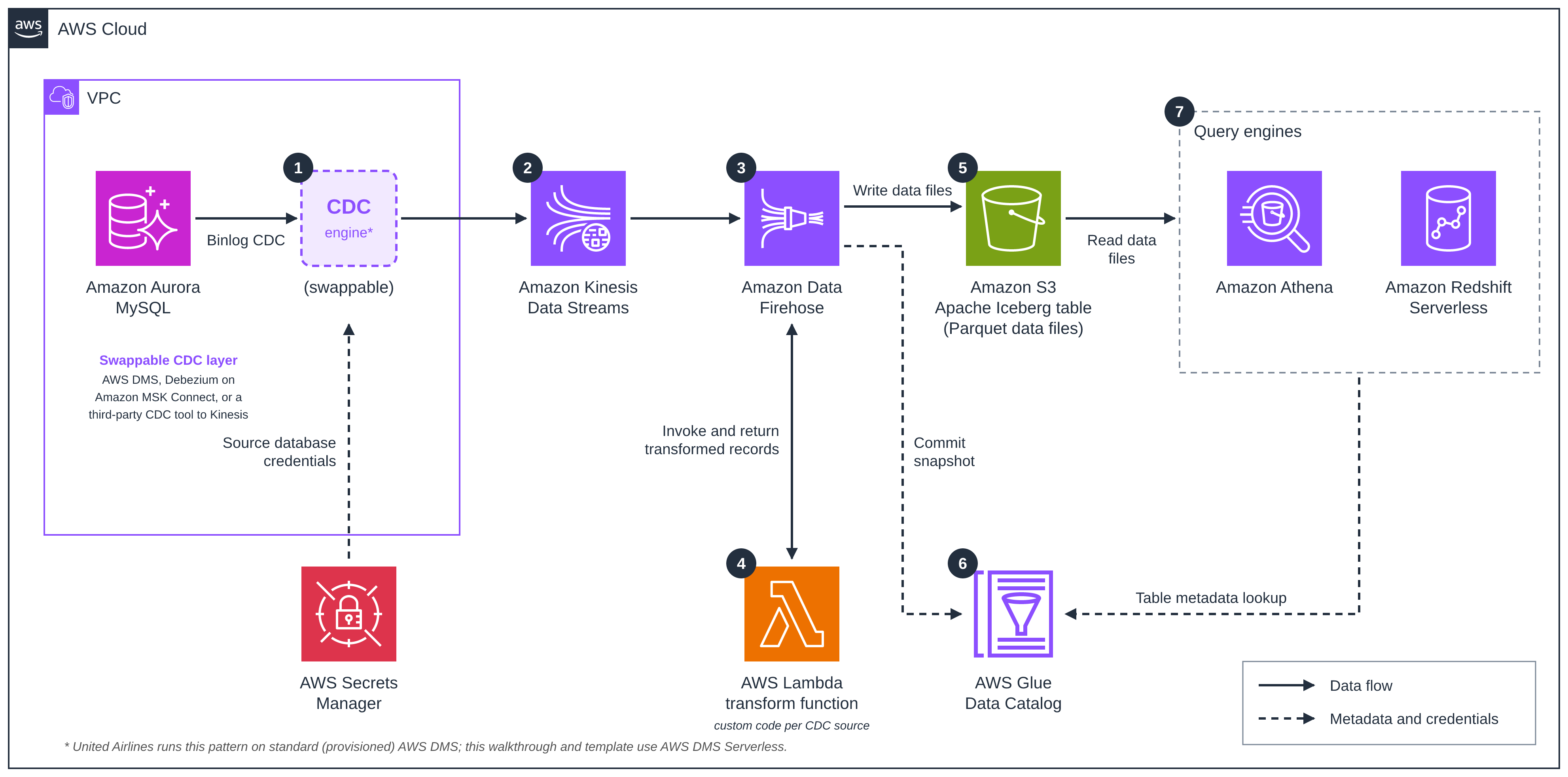
Figure 1: Architecture overview
Data flow:
- The CDC engine captures changes from Aurora MySQL by reading the binary log.
- Amazon Kinesis Data Streams receives and buffers the CDC events.
- Amazon Data Firehose reads from the stream and batches records.
- Firehose invokes an AWS Lambda function, coded for the CDC engine’s record format, to transform each batch.
- Firehose writes Parquet data files to the Apache Iceberg table in Amazon S3.
- Firehose commits each write as a new Iceberg snapshot, which updates the table’s metadata pointer in the AWS Glue Data Catalog.
- Amazon Athena and Amazon Redshift Serverless look up table metadata in the Data Catalog and read the data files from Amazon S3.
The solution architecture can be divided into the following areas:
Data ingestion and streaming
The CDC engine captures changes from an Aurora MySQL database with minimal impact on the source database. Changes stream continuously to Amazon Kinesis Data Streams, which provides durable, scalable real-time data streaming and acts as a buffer between source replication and downstream processing.
Amazon Data Firehose consumes data from Kinesis Data Streams, performing data transformation and batching to prepare data for efficient storage. It reduces infrastructure management overhead while batching records efficiently based on the configured buffer size and interval.
The Firehose buffer interval sets the trade-off between latency and cost. In a low-volume test of about 120 rows, United set the buffer interval to 1 second and saw end-to-end latency as low as 10 seconds. For a large initial load of about 1.5 million rows, United used a 60-second interval in their environment to balance latency, cost, and file size, and the load completed in about 2 hours 22 minutes (about 176 rows per second). United measured these latencies manually against average row throughput.
Processing and storage
An AWS Lambda function processes streaming data in near-real-time. It works in tandem with Amazon Data Firehose (Firehose) to parse CDC event records, extract operation types (INSERT/UPDATE/DELETE), and convert records to the Iceberg-compatible format with the appropriate operation field. Amazon Data Firehose then commits the writes as ACID-compliant (Atomicity, Consistency, Isolation, and Durability) Iceberg snapshots using optimistic concurrency control, updating table metadata automatically. Lambda and Firehose scale with the stream, but the template’s provisioned Kinesis shards and DMS capacity range (1–2 DMS capacity units (DCUs)) are fixed limits.
Firehose applies CDC operations to the Iceberg table using the merge-on-read (MOR) approach: an UPDATE or DELETE is written as a delete file plus, for an update, a new data file, which the query engine merges at read time to resolve the current row state (see Prerequisites to use Apache Iceberg Tables as a destination). This requires the Iceberg table to be format-version 2 and a unique key, which the template sets on the delivery stream.
The template defines no DMS partition-key rule, so DMS uses the schema and table name as the Kinesis partition key and every change for the table lands on one shard, so the other three shards stay idle and throughput is limited to what one shard supports. To spread load and keep per-row order, set the partition key to the table’s primary key in a DMS object-mapping rule (Kinesis as a DMS target). The Lambda function in the template passes each row through and adds the destination table and operation that Firehose uses to insert, update, or delete it.
The self-managed Apache Iceberg tables on Amazon S3 store data in columnar Parquet format, providing durability, scalability, and cost-effective storage. United Airlines pre-creates the Iceberg tables using Amazon Athena, which now hold over 2 TB of data.
Metadata and analytics
AWS Glue Data Catalog serves as the centralized metadata repository, storing Apache Iceberg table metadata, maintaining schema versions and partition information, and supporting schema evolution and governance across the organization.
Amazon Redshift Serverless queries the same Iceberg tables through the AWS Glue Data Catalog. You can reference the table through the auto-mounted awsdatacatalog database (awsdatacatalog.market_db.market_rule) or create an external schema on the Glue database. See Referencing Iceberg tables in Amazon Redshift.
Amazon Athena queries the same tables through the Glue Data Catalog (Query Apache Iceberg tables), with pay-per-query SQL access for ad hoc analysis and data validation and no infrastructure to manage. In our walkthrough test, an UPDATE and a DELETE at the source returned the correct current rows from both Athena and Redshift Serverless.
Solution creation
Prerequisites
Before you begin, make sure you have:
- Source database: An Amazon Aurora MySQL cluster with binary logging enabled. Extensibility to other database engines depends on the CDC engine choice. In this example, AWS DMS supports DMS-compatible sources such as PostgreSQL, Oracle, SQL Server, and others. See AWS DMS source documentation. Also, create a secret using AWS Secrets Manager to connect to the database. The secret must contain the Aurora connection details (username, password, host, and port). Note its Amazon Resource Name (ARN), which you will use in Step 2 and as the
DmsSourceSecretArnCloudFormation parameter. Create it manually because the Aurora-managed secret omits host and port and will not work with DMS. Also create an IAM access role that DMS can assume to read this secret: give it a trust policy allowing the regional DMS service principal dms..amazonaws.com (for example, dms.us-east-1.amazonaws.com) to assume it, and a permissions policy granting secretsmanager:GetSecretValue on the secret’s ARN. You will attach this role to the source endpoint in Step 2. This walkthrough and template implement the CDC layer with AWS DMS, so the Secrets Manager secret and access role here are DMS-specific. A different CDC engine may authenticate differently and would need corresponding changes. - Network connectivity: A virtual private cloud (VPC) with private subnets where the Aurora MySQL cluster and the replication resources can reach each other, with security group rules allowing access on the database port (3306). Because DMS Serverless runs inside your VPC with no public IP, create a Kinesis Data Streams VPC interface endpoint (com.amazonaws..kinesis-streams) so the replication can reach the Kinesis target. Because the source endpoint authenticates with a Secrets Manager secret, also create a Secrets Manager interface endpoint (com.amazonaws..secretsmanager). Finally, the Aurora cluster’s own security group must allow inbound MySQL (TCP 3306) from the replication’s security group, since the cluster is outside the CloudFormation stack.
- AWS permissions: AWS Identity and Access Management (IAM) permissions to create the resources in the stack: the DMS target endpoint and Serverless replication config, Kinesis stream, Lambda function, Firehose delivery stream, CloudWatch log groups, an AWS Key Management Service (AWS KMS) key, and the three IAM service roles (requires CAPABILITY_NAMED_IAM) plus the CloudFormation stack itself. Because the stack creates IAM roles, the deploying identity also needs iam:CreateRole/PutRolePolicy and iam:PassRole so CloudFormation can attach roles to their respective resources during creation.
- AWS Command Line Interface (AWS CLI): Installed and configured with appropriate credentials.
Step 1: Configure source database
Assumption: You have an existing Amazon Aurora MySQL cluster. This step is not automated by CloudFormation. This walkthrough was tested on Aurora MySQL version 3.08.0 (compatible with MySQL 8.0).
All SQL in this step (the binlog retention command, the verification query, and the schema and seed statements) runs against your Aurora MySQL database as the admin user, using any MySQL client (or the RDS Data API if the cluster is private). The parameter-group settings in items 1–2 are configured in the RDS console or CLI.
Configure binary logging:
1. In a custom DB cluster parameter group, set binlog_format = ROW, binlog_row_image = FULL, and binlog_checksum = NONE. On Aurora MySQL these come from the cluster parameter group and cannot be set with SET GLOBAL.
2. Associate the parameter group with your cluster if it isn’t already, then reboot the writer instance. binlog_format is a static parameter, so binary logging turns on only after the reboot.
3. Set the binlog retention window on the writer: CALL mysql.rds_set_configuration('binlog retention hours', 24); Set this longer than the longest time the replication might be stopped. Aurora MySQL version 3 allows up to 2,160 hours, or 90 days (Setting up binary log replication). DMS Serverless doesn’t support custom CDC start points (AWS DMS Serverless limitations), so if the replication stays stopped longer than this window, you must restart it with a full reload.
4. Make sure the DMS database user has the REPLICATION CLIENT and REPLICATION SLAVE privileges (see the following note).
Note: For simplicity this walkthrough uses the Aurora admin user for both the Step 1 SQL and the DMS source endpoint, so the “DMS user” in the preceding step is that same admin user, which already holds these privileges. In production, create separate least-privilege users per job. For example, a dedicated DMS replication user with only REPLICATION CLIENT, REPLICATION SLAVE, and SELECT on the source table.
After the reboot, confirm the settings on the writer:
Expect log_bin = ON, binlog_format = ROW, binlog_row_image = FULL, and binlog_checksum = NONE. The log_bin = ON check is the important one as it confirms binary logging is actually active (which requires the reboot to have taken effect), not merely that the format is configured. If log_bin is OFF, confirm the parameter group is associated with the cluster and reboot the writer before continuing.
If your database and tables are not already created in the source database, you may create them using the following SQL commands:
Insert two sample rows so the full-load phase has data to replicate and the Step 6 validation returns results:
Note: For non-MySQL sources, refer to source-specific CDC configuration in the CDC engine documentation (AWS DMS documentation in this example).
Figure 2 shows how to verify the results of Step 1:
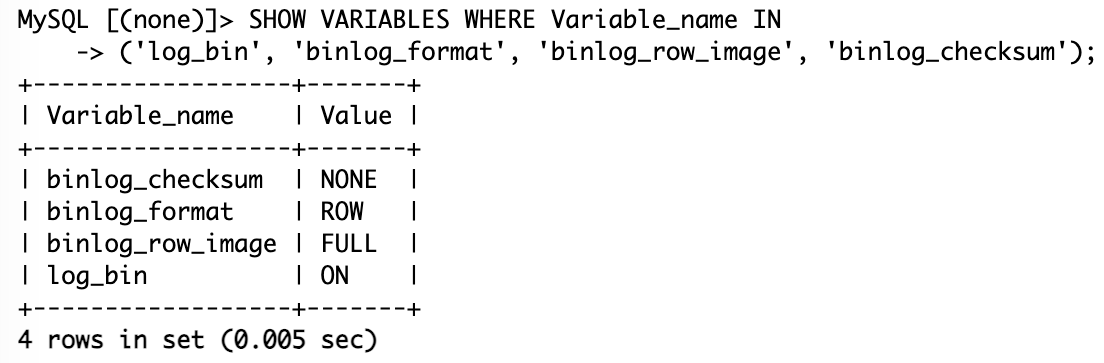
Figure 2: Confirmation of binlog activation
Step 2: Create CDC engine source endpoint
Assumption: Your VPC networking and security groups allow the replication resources to reach the Aurora MySQL cluster on port 3306 (see Prerequisites). This step is manual and must be completed before you deploy the CloudFormation stack.
- Navigate to AWS DMS Console, then Endpoints, then Create endpoint.
- Configure:
- Endpoint type: Source endpoint
- Endpoint identifier: mysql-source-endpoint
- Source engine: Amazon Aurora MySQL
- Server name: Your Aurora cluster writer endpoint
- Port: 3306 (or appropriate port)
- User credentials: reference the Secrets Manager secret and the access role you created in Prerequisites (recommended). Alternatively, you enter the username and password directly on the endpoint instead of using a secret and role.
- SSL mode: This walkthrough leaves SSL mode at none, the default for Aurora MySQL endpoints, so the connection between the DMS CDC engine and Aurora isn’t encrypted. For production, set SSL mode to verify-ca or verify-full and attach the Amazon RDS CA certificate (Using SSL with AWS Database Migration Service). On Aurora MySQL version 8.4, require_secure_transport is on by default and rejects SSL mode none, so you must enable SSL.
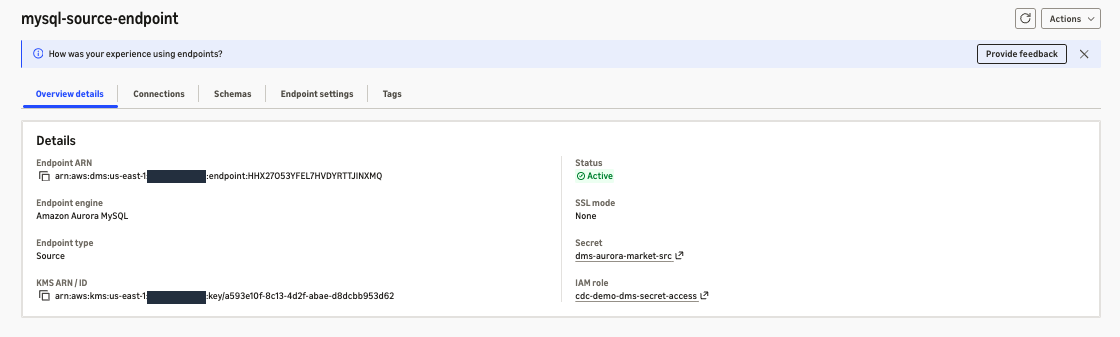
Figure 3: Confirmation of DMS endpoint connection
Save the endpoint ARN. You’ll need it as the DmsSourceEndpointArn CloudFormation parameter. You’ll also need the ARN of the Secrets Manager secret this endpoint uses (from Prerequisites) as the DmsSourceSecretArn parameter.
Step 3: Set up VPC infrastructure
Assumption: You have an existing VPC with private subnets. These resources are not created by CloudFormation.
First-time DMS setup: If you have never created a DMS subnet group in this account, AWS requires a service role named exactly dms-vpc-role (with a trust policy for dms.amazonaws.com and the AWS-managed policy AmazonDMSVPCManagementRole) so DMS can manage the replication network interfaces. Create it once before the next step. Without it, creating the subnet group fails with an “IAM Role dms-vpc-role is not configured properly” error. The AWS Management Console usually creates this role automatically the first time. If you use the CLI or API, create it explicitly.
- Create DMS subnet group:.
- DMS Console, then Subnet groups, then Create subnet group
- Select at least 2 private subnets in different Availability Zones
- Save the subnet group ARN (
arn:aws:dms:<region>:<account-id>:subgrp:<subnet-group-name>)
- Create security group (for the DMS replication):.
- EC2 Console, then Security Groups, then Create security group
- Inbound: HTTPS (443) from your VPC CIDR, so the replication can reach the interface endpoints
- Outbound: allow HTTPS (443) to AWS services and MySQL (3306) to the Aurora cluster (the default “all traffic” outbound also works)
- Save the security group ID
- Then, on the Aurora cluster’s security group, add an inbound rule: MySQL (3306) from this DMS security group
- Create VPC endpoints (required because the replication runs privately with no internet access):.
- VPC Console, then Endpoints, then Create endpoint
- Create an interface endpoint for Kinesis Data Streams: service com.amazonaws..kinesis-streams. Select your private subnets. Attach the DMS security group. Enable Enable DNS name (private DNS)
- Create an interface endpoint for Secrets Manager: service com.amazonaws..secretsmanager. Same subnets, same security group, private DNS enabled
- The interface endpoints show Pending briefly, then Available
Step 4: Create destination infrastructure
Assumption: These resources must exist before CloudFormation deployment. They are not automated. Athena must be set up with a results bucket prior to executing these steps. If the table’s S3 location is registered with AWS Lake Formation, create the table before you register it. Athena doesn’t support DDL on Iceberg tables whose location is registered with Lake Formation (Considerations and limitations for querying data registered with Lake Formation).
The commands in items 1 and 2 are run from the AWS CLI.
1. Create the S3 bucket: Replace amzn-s3-demo-bucket throughout with a globally unique bucket name of your own as S3 bucket names are global, so the literal example name will not be available. Use that same name in the Glue table LOCATION (step 3) and in the CloudFormation S3BucketName parameter (Step 5)
2. Create the AWS Glue Data Catalog database: Note this is a different resource from the Aurora market_db you created in Step 1. The names match by convention, but the Aurora database holds your source data while this Glue Data Catalog database registers the Iceberg destination table:
3. Create Iceberg table: Run the following in the Amazon Athena query editor (this is Athena DDL, not MySQL). Athena creates the Iceberg table and registers it in the AWS Glue Data Catalog:
After Step 4, the AWS console should look like Figure 4.

Figure 4: Confirmation of Iceberg table creation
Step 5: Deploy CloudFormation stack
What CloudFormation automates: The template provisions the complete replication pipeline: the Kinesis stream, DMS Serverless replication, Lambda function, Firehose delivery stream, IAM roles, and CloudWatch logs.
What CloudFormation does NOT create: Source endpoint, VPC infrastructure, S3 bucket, AWS Glue database, or Iceberg table (created in steps 1–4).
Lake Formation prerequisite: If your account uses AWS Lake Formation permissions for the AWS Glue Data Catalog instead of the IAM-only default (Changing the default settings for your data lake), the Firehose delivery stream’s role must be authorized in Lake Formation to access the Iceberg table created earlier. Otherwise stack creation can fail. In that case, before deploying, either grant the Firehose role Lake Formation ALL (in production, stick to granting only the minimum permissions needed rule) permissions on market_db.market_rule, or switch that database and table to IAM-based access by granting IAM_ALLOWED_PRINCIPALS ALL permissions. With IAM_ALLOWED_PRINCIPALS, IAM policies alone control access to those resources, which weakens Lake Formation governance.
- Download the template on aws-samples
- Go through AWS Management Console to the AWS CloudFormation Console, then Create stack, then Upload template.
- Stack name: iceberg-replication-stack.
- Parameters:
DmsSourceEndpointArn: ARN from Step 2- DmsSubnetGroupArn: Subnet group ARN from Step 3
- DmsVpcSecurityGroupId: Security group ID from Step 3
- DmsSourceTableName: market_rule
- GlueDatabaseName: market_db
- GlueTableName: market_rule
- IcebergUniqueKey: rule_id
- S3BucketName: Your bucket name from Step 4
DmsSourceSecretArn: ARN of the Secrets Manager secret you created earlier (from Prerequisites / Step 2)
- Acknowledge IAM resource creation and Create stack.
Resources created by CloudFormation:
- Kinesis Data Stream (4 shards, 24-hour retention)
- DMS Serverless replication (1–2 DCUs,
full-load-and-CDCmode) - DMS Target Endpoint (Kinesis)
- Lambda Function (Python 3.14) for CDC transformation.
- Data Firehose Delivery Stream with Iceberg destination.
- IAM Roles.
- KMS Key (CloudWatch log encryption)
- CloudWatch Log Groups.
When deployment finishes, the stack status shows CREATE_COMPLETE, as in Figure 5.
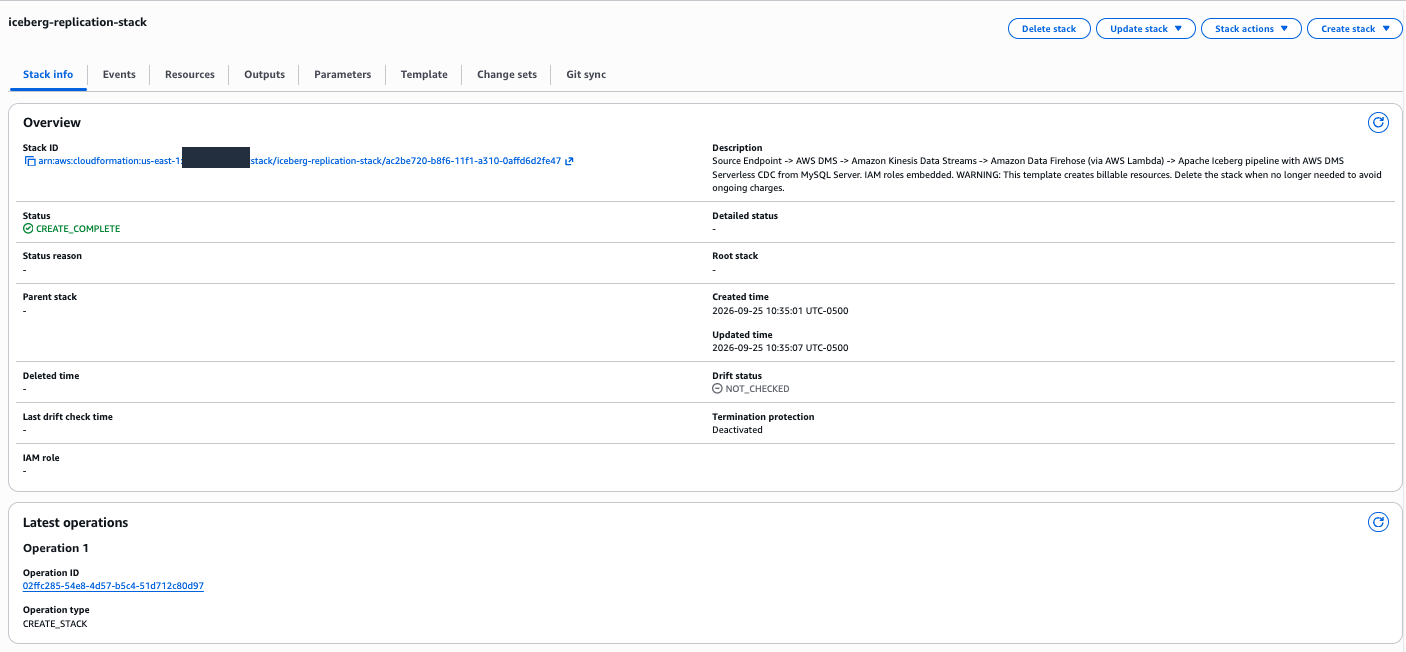
Figure 5: CloudFormation stack in CREATE_COMPLETE status
Step 6: Validate CDC engine replication
Assumption: CloudFormation has completed successfully.
- DMS Console → Migrate or replicate → Tasks → select your task → Actions → Start. Start the replication (it moves through several provisioning states before reaching Running)
- Starting the task opens a Start task screen with a premigration assessment option (and a CDC stop-mode setting). You can leave the assessment enabled to pre-check prerequisites, or turn it off for a quick start. Either way, choose Start task. The task then provisions serverless capacity before it begins loading. Note: it is observed that serverless capacity provisioning can take up to about 40 minutes on first start. The task shows “Provisioning capacity” during this time. This is normal, not a failure.
- Monitor Table statistics within the replication’s detail view:
- Load state: Should show “Table completed”
- Full load rows: Should match source table count
- CDC operations: Shows ongoing INSERT/UPDATE/DELETE activity
After Step 6, the AWS DMS console shows the full-load results in Figure 6.
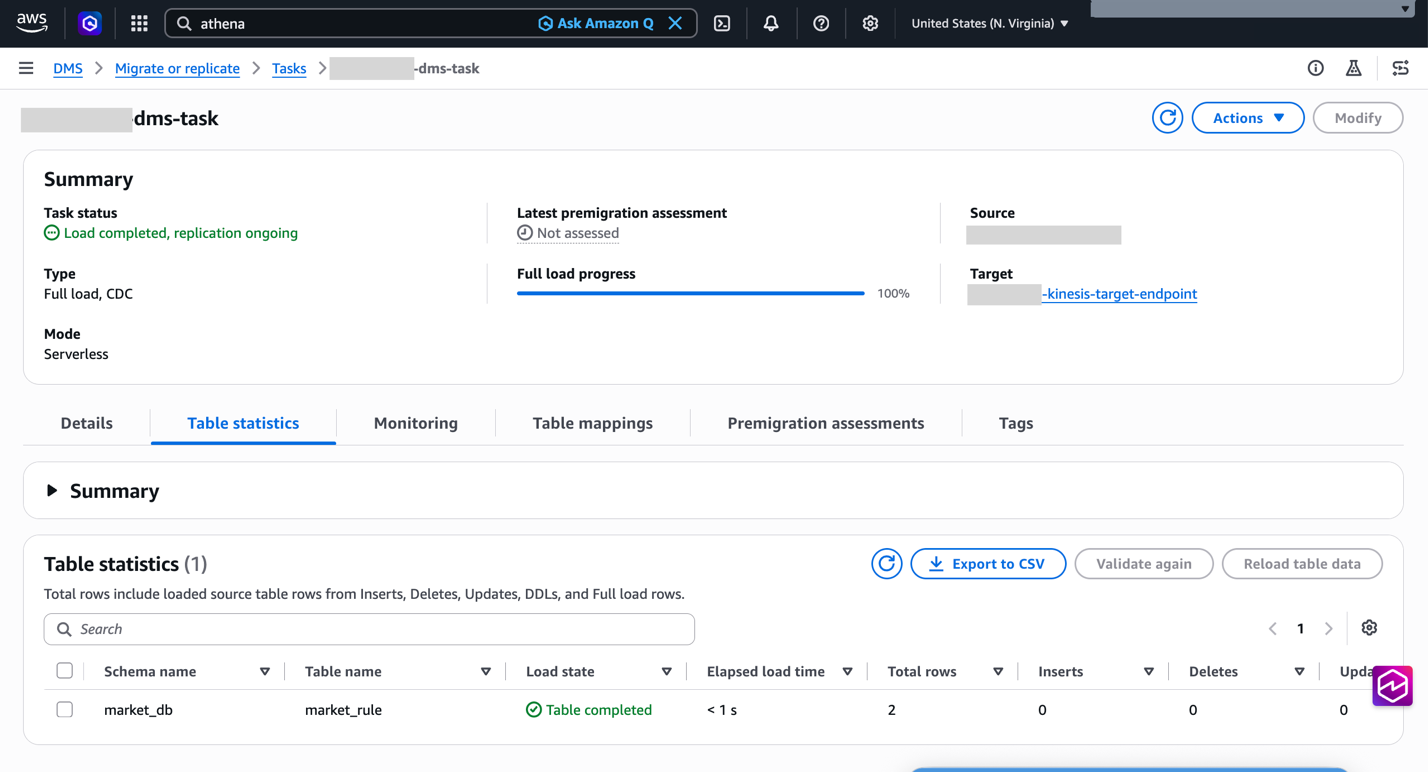
Figure 6: DMS full load completed with 2 total rows
DMS Table statistics: market_rule, Table completed, Total rows 2.
Validation using Athena: Run SELECT * FROM market_db.market_rule. In the Athena query editor and confirm the row count matches the DMS full-load count (2), as shown in Figure 7. This confirms the rows reached the Iceberg table, not just the Kinesis target.
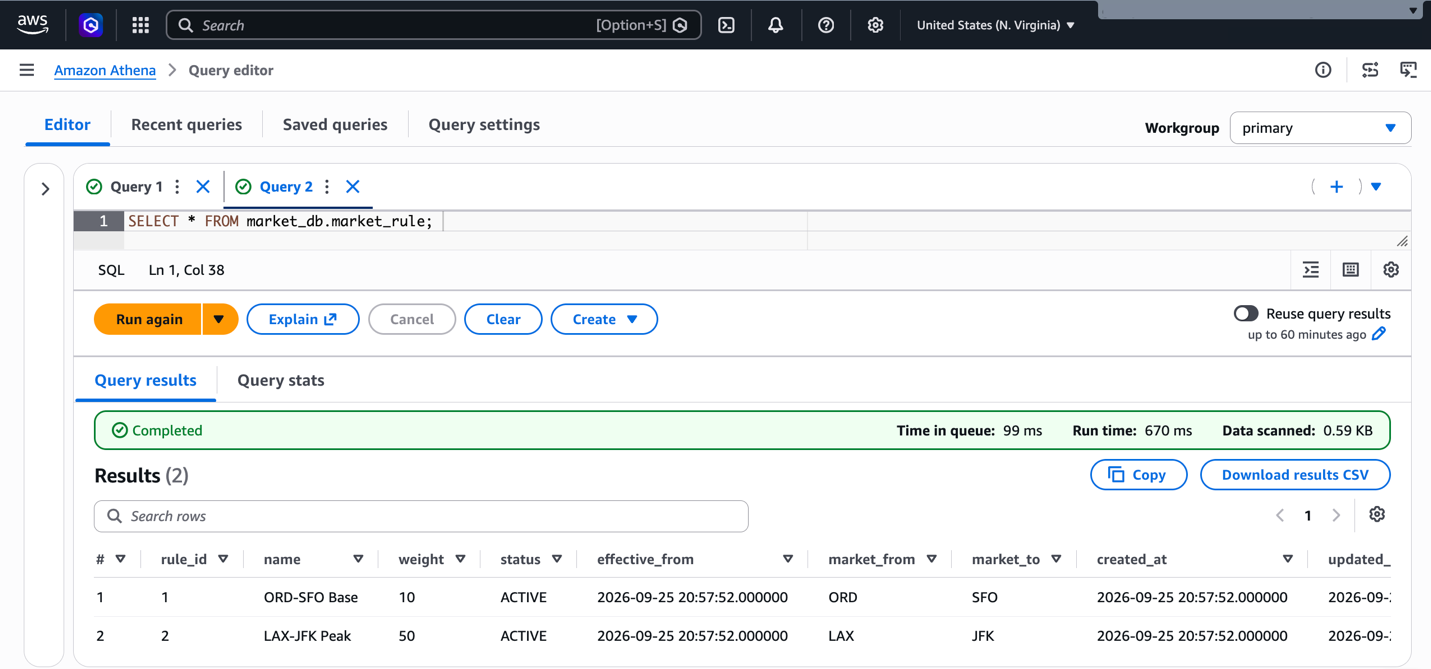
Figure 7: Athena returns both rows from the Iceberg table, matching the CDC engine full-load count
Step 7: Generate a CDC event
Assumption: Full load is complete and the replication task shows “Load completed, replication ongoing.” This step creates a live change so you can observe it flow through the pipeline in the following steps.
Insert a test record into the source Aurora MySQL database (using the same query editor or client you used in Step 1):
The CDC engine captures this change from the binary log and streams it through the pipeline. Figure 8 shows the CDC engine table statistics after the insert. The following steps verify the change at each stage: Lambda, Firehose, and Athena.
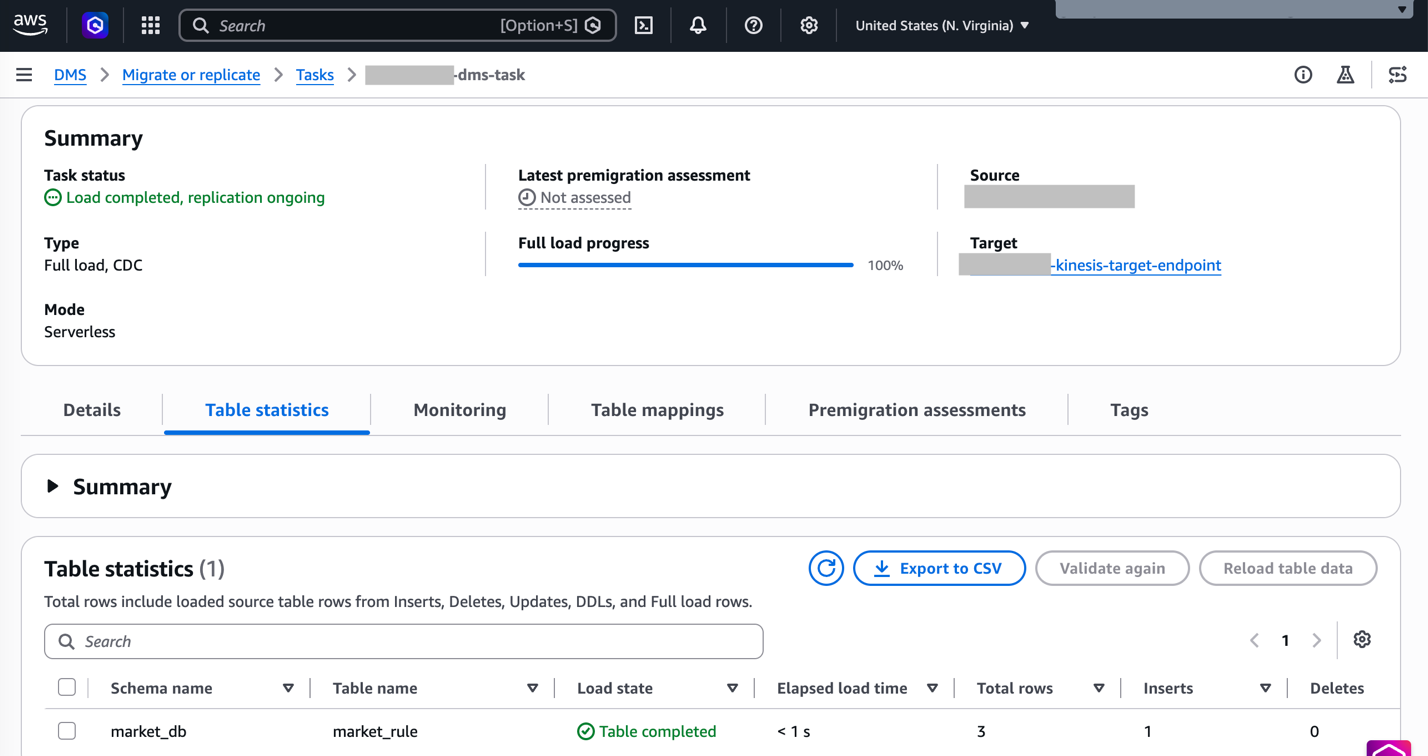
Figure 8: CDC engine table statistics after the CDC insert (3 total rows, 1 insert)
Step 8: Verify Lambda transformation
Assumption: You performed the CDC insert in Step 7. This is a console validation step.
- Lambda Console → Functions → select [stack-name]-lambda-processor.
- Monitor tab (optionally View CloudWatch logs)
- Verify: Invocations registered, Error count 0, Success rate 100%. Logs show CDC operation detection (INSERT/UPDATE/DELETE) and successful record transformation, no errors.
After Step 8, the Lambda Monitor tab should look like Figure 9.

Figure 9: Lambda Monitor tab showing a 100% success rate and zero errors after the CDC insert
Step 9: Monitor Firehose delivery
Assumption: Lambda is successfully processing records. This is a console validation step.
- Data Firehose Console → Delivery streams → select your stream.
- Monitoring tab, verify that Incoming records show data flow from Kinesis, Delivery to Iceberg – Success matches incoming, Failed = 0, and DataFreshness stays steady rather than climbing. A rising value means Firehose is falling behind.
After Step 9, the Firehose Monitoring tab should look like Figure 10.
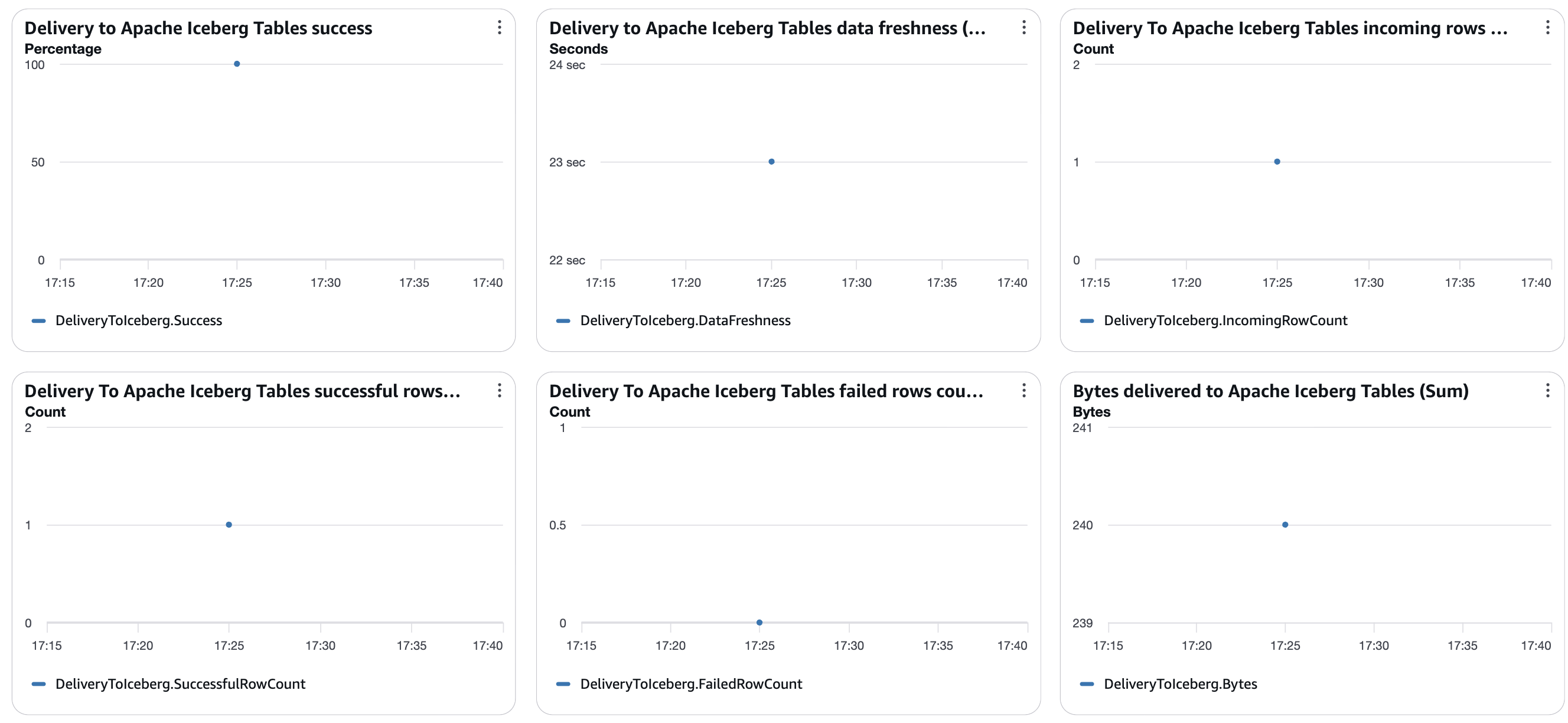
Figure 10: Firehose delivery metrics for the CDC insert, showing 100% delivery success, one row delivered, and zero failed rows
Confirm the change in Athena. After Firehose delivers the record (see the preceding data freshness metric), query for it:
Validation: The new record appears in the Iceberg table, confirming near-real-time CDC replication.
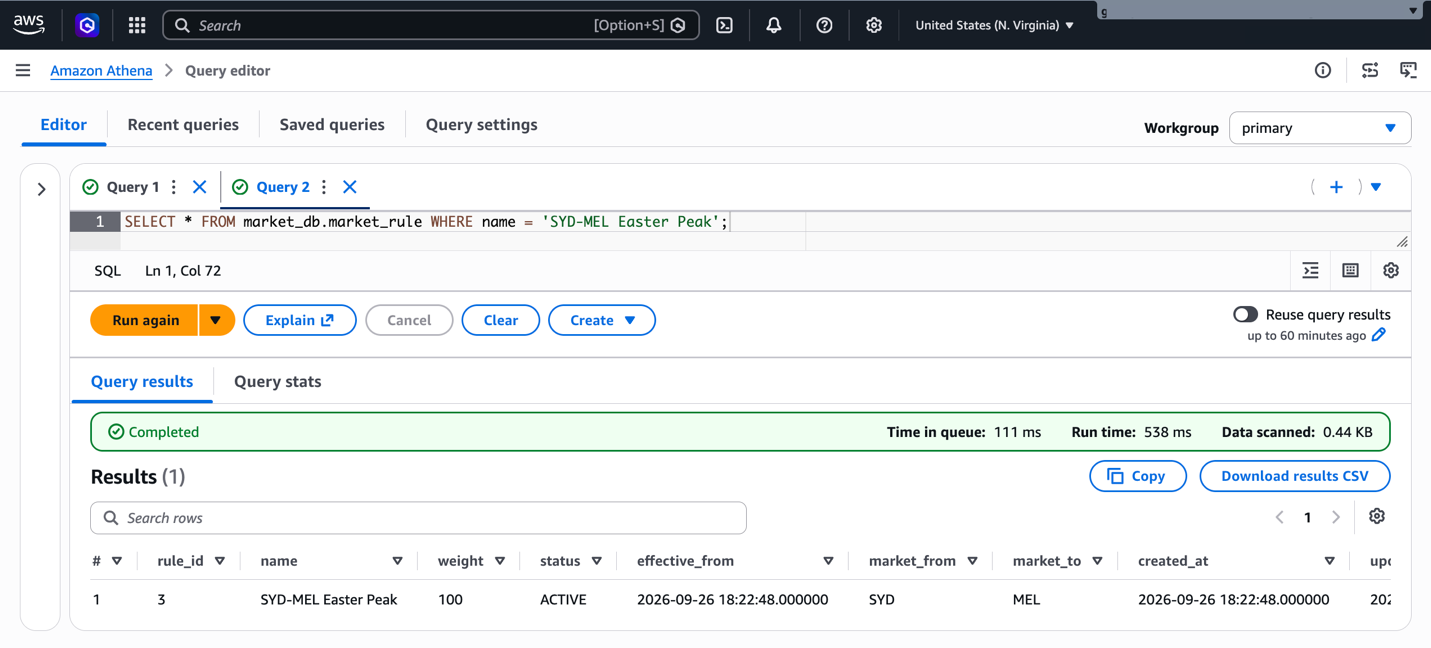
Figure 11: Athena returns the row inserted in the source database
Optional: test UPDATE and DELETE on the source (for example, UPDATE market_rule SET weight = 120 WHERE rule_id = 3; and DELETE FROM market_rule WHERE rule_id = 1;), then query the table from Amazon Athena and Amazon Redshift Serverless (SELECT * FROM awsdatacatalog.market_db.market_rule;) to confirm both return the current rows.
Step 10: Set up monitoring dashboard
Assumption: All components are operational. This is an optional step for ongoing monitoring.
Create a CloudWatch dashboard with these metrics:
- AWS DMS: CDCLatencySource and CDCLatencyTarget, which show how far the replication is behind the source and the target (AWS DMS Serverless components)
- Kinesis Data Streams: GetRecords.IteratorAgeMilliseconds, which shows how far Firehose is behind the stream (Recommended alarms)
- Lambda: Invocations and Errors for the transform function (Types of metrics for Lambda functions)
- Firehose: DeliveryToIceberg.DataFreshness and DeliveryToIceberg.FailedRowCount (Monitor metrics)
Set alarm thresholds based on your own latency requirements.
Operational monitoring
After deploying this solution, United Airlines established operational procedures for Iceberg table maintenance to sustain query performance over time. Each Firehose commit creates new data files, and every update also writes a delete file, so a high-traffic table accumulates many small files that slow reads. To manage this, you can enable automatic compaction in the AWS Glue Data Catalog, or run the Athena OPTIMIZE command to compact files on a schedule. To reclaim storage, use the Athena VACUUM command to expire old snapshots and remove orphan files. The AWS Glue Data Catalog can also perform this table optimization automatically. United Airlines also monitors the health of the CDC replication and has a defined procedure to restart replication and reconcile data if a task stops or fails.
Cost considerations
Important: The resources created in this walkthrough incur charges while running. The following are us-east-1 list prices at the time of writing. Check each pricing page for current rates:
- AWS DMS Serverless: $0.0819 per DCU-hour for Single-AZ and $0.1639 for Multi-AZ. The template deploys Multi-AZ with 1–2 DCUs, so about $0.16–$0.33 per hour while the replication runs (AWS DMS pricing).
- Kinesis Data Streams: $0.015 per shard-hour ($0.06 per hour for the template’s four shards), plus $0.014 per million PUT payload units (Kinesis Data Streams pricing).
- Lambda: billed per request and duration (AWS Lambda pricing).
- Firehose: $0.045 per GB for Iceberg delivery with Kinesis Data Streams as the source (first 250 TB per month). Any extra bytes added by the Lambda transform are billed at the same rate (Amazon Data Firehose pricing).
- Amazon S3: storage for data and metadata files, plus PUT requests. Every update writes a delete file, which adds PUT charges (Firehose Iceberg considerations).
- VPC endpoints: the Kinesis and Secrets Manager interface endpoints are billed hourly per Availability Zone plus $0.01 per GB processed (AWS PrivateLink pricing).
- Table maintenance: if you enable Glue Data Catalog compaction or run Athena OPTIMIZE, those jobs add AWS Glue or Athena charges.
Cleanup
To avoid incurring future charges, delete the resources in this order:
- Stop the DMS Serverless replication and wait until its status is Stopped. AWS DMS can delete a serverless replication only when it is stopped or failed (AWS DMS Serverless limitations).
- Delete the CloudFormation stack. This removes the replication, the Kinesis target endpoint, the Kinesis data stream, the Lambda function, the Firehose stream, the IAM roles, the KMS key, and the log groups.
- Delete the resources you created manually:
- The DMS source endpoint (Step 2)
- The Kinesis and Secrets Manager interface endpoints, which are billed hourly, the DMS subnet group, and the security group (Step 3)
- The Glue table and database. Empty and delete the S3 bucket, including the firehose-errors/ and processing-failed/ prefixes (Step 4)
- The Secrets Manager secret and its DMS access role (Prerequisites)
- Any Lake Formation grants you added for the Firehose role
- The dms-vpc-role, only if you created it for this walkthrough and no other DMS resources use it
- The Aurora MySQL cluster and its parameter group, if you don’t want to keep them
Verification: Confirm cleanup completion by checking that the CloudFormation stack shows as deleted and verifying through the AWS Management Console that no billable resources remain active.
Conclusion
This serverless architecture delivers near-real-time replication from Aurora MySQL to Apache Iceberg. United Airlines has seen end-to-end latency as low as about 10 seconds, and you can trade latency against cost by adjusting the Firehose buffer interval. Pay-per-use serverless components keep spend tied to usage, and Iceberg provides ACID transactions and time travel for regulatory requirements. The pipeline scales through managed services, and AWS Glue, Amazon Redshift, and Amazon Athena can all query the same data.
This architecture allowed United Airlines to expand its use of Apache Iceberg for business analytics, improving performance, cost, and data availability, and giving several hundred users of the Revenue Management data platform access to near-real-time reference data.
To take full advantage of Apache Iceberg tables on AWS, consider adding business context in the AWS Glue Data Catalog to improve data discovery for AI agents, and see working with Iceberg tables in AWS Glue and best practices for querying Iceberg data with Amazon Redshift. You can also review the best practices for Apache Iceberg on AWS.