Post Syndicated from Richard Whitworth original https://aws.amazon.com/blogs/architecture/resilience-testing-your-agents-on-amazon-bedrock-agentcore/
When an artificial intelligence (AI) agent’s tools start failing (a database query times out, an API returns incorrect data, a search call silently drops fields), what does your agent do? Does it retry, fall back, or acknowledge it can’t complete the task? Or does it present a confident answer built on corrupted data, show the user a raw error, or fail silently with no alert to your operations team?
These aren’t hypothetical scenarios. In production, tool calls fail, networks partition, upstream services degrade, and agent-generated queries return incomplete results. If you’ve never tested how your agent behaves under those conditions, you’re relying on assumptions, not evidence. With AWS Fault Injection Service (AWS FIS), you can test how your Strands agent handles tool-level faults before a real impairment does. The goal isn’t to verify that your tools work, it’s to find out two things: what your agent does when a tool fails or returns incorrect data, and whether you can detect it when it happens.
In this post, you’ll learn how to:
- Structure a measurable resilience hypothesis for an AI agent.
- Inject tool-level faults (canceled or corrupted tool results) into a running Strands agent on Amazon Bedrock AgentCore, using AWS FIS and AWS Systems Manager (SSM).
- Build the observability to tell a safe failure from a silent one.
Solution overview
In this experiment AWS FIS runs a single SSM Automation action that turns fault injection on, holds it for a set duration, then turns it off. The system injects the faults inside the agent, right before or right after the tool call. So you are testing the agent’s own behavior rather than the network or infrastructure around it. The agent keeps serving traffic the whole time. Nothing is redeployed to start or stop a run.
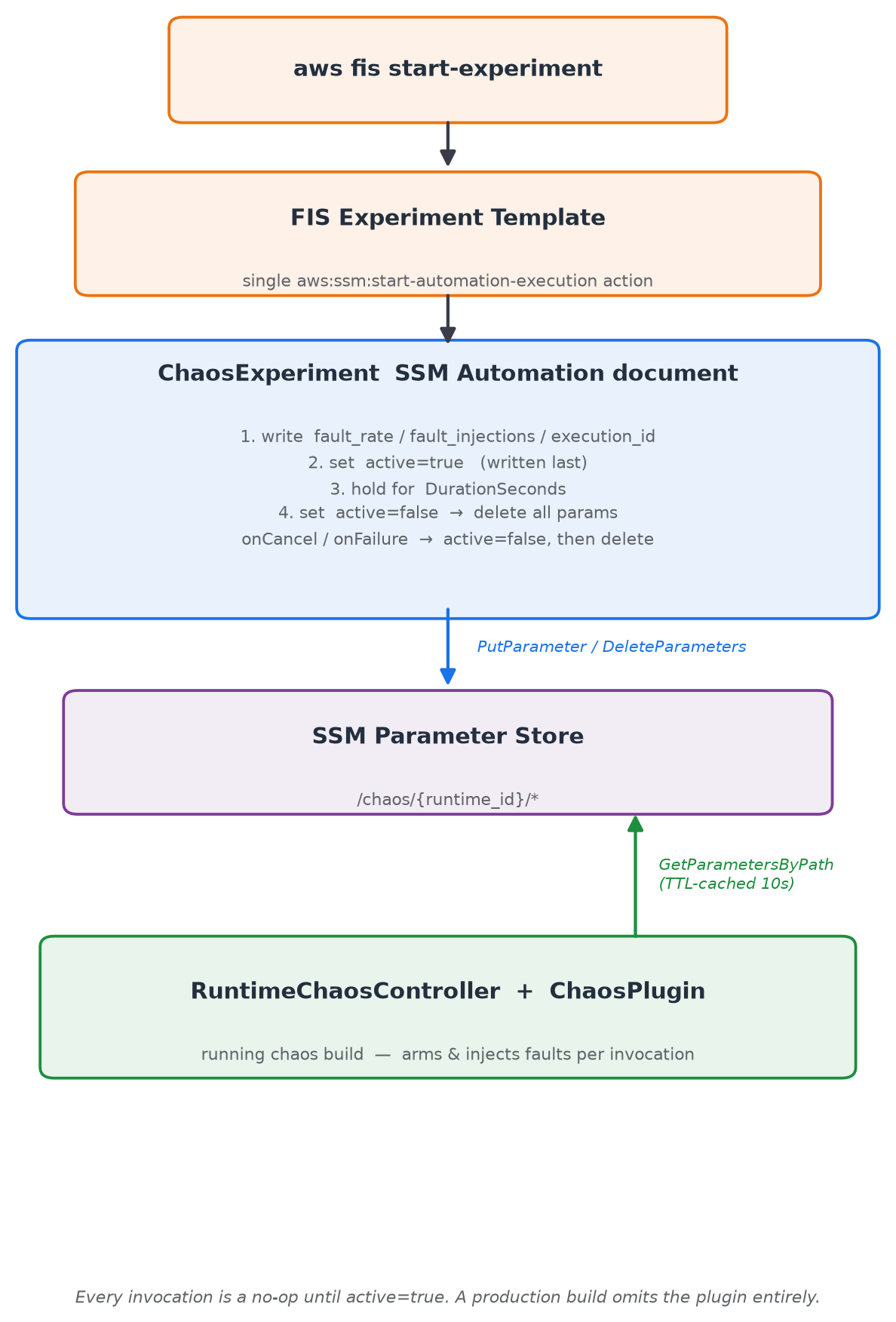
Figure 1: AWS FIS runs a single SSM Automation action, which writes /chaos/{runtime_id}/ in Parameter Store. The agent’s controller reads the SSM parameters on each invocation and injects the configured faults.
The example agent is based on the public pokemon-team-advisor sample from strands-agents/samples, with two tools (get_pokemon and get_move) that return structured JSON.
Two controls separate deploying the fault-injection code from activating it:
- Coarse -“is chaos loaded?”. You wire the chaos plugins into the agent constructor with a single line,
plugins=chaos_plugins(). This decides whether the runtime can inject faults. - Fine – “is chaos active now?”. Values under
/chaos/{runtime_id}/in SSM Parameter Store, read on every invocation (cached for 10 seconds using a time to live (TTL)), control which faults fire and on what fraction of invocations, driven entirely by AWS FIS.
Each invocation skips fault injection until SSM returns active=true. The Strands Evals SDK already provides the ChaosPlugin for offline chaos testing (documented in the Strands chaos-testing guide). This post adds the ability to run those same faults against a deployed AgentCore runtime (a capability of Amazon Bedrock AgentCore) serving live traffic, controlled by AWS FIS. The experiment artifacts are in the FIS template library.
Two families of fault
- Pre-hook faults cancel the tool call before it executes and return an error to the agent (timeout, network_error, execution_error, validation_error). This tests whether the agent detects a failed call and retries, falls back, or acknowledges the failure.
- Post-hook faults let the tool run, then corrupt its response (truncate_fields, remove_fields, corrupt_values). This is the more dangerous case. An agent can get a successful tool call carrying bad data, and answer the user confidently without ever telling the user the data was degraded.
Define your hypothesis
Before running the experiment, write down what you expect your agent to do when its tools fail, and name the signals you’ll judge it by:
When tool calls for [agent] are [canceled | corrupted], we expect it to [observable behavior] and to fail safe rather than fabricate. After {x} failed tool calls in {y} minutes | {z} failed tool calls in succession an alarm should be raised and the DevOps team notified within {a} minutes. On recovery, it returns to normal within [time], as measured by [metrics/signals].
After the experiment, you compare actual behavior against this hypothesis, and the gaps are where your agent needs iteration and refinement.
Prerequisites
This walkthrough uses the artifacts from the agentcore-strands-agent-faults experiment in the FIS template library on GitHub. The repo provides the chaos controller module, the SSM Automation document, the FIS experiment template, and least-privilege AWS Identity and Access Management (IAM) policies for each role. You need:
- A Strands agent integrated with
chaos_plugins()(vendorsstrands_agentcore_chaos.pyand its dependencies:strands,strands-agents-evals,pydantic, andboto3). - The runtime ID of the target AgentCore runtime (resolved automatically from
AGENTCORE_RUNTIME_URL). - The SSM Automation document deployed to your account and named
ChaosExperiment. - An IAM role for AWS FIS (trusted by
fis.amazonaws.com) with the least-privilege policy from the repo. - An IAM role for SSM Automation (trusted by
ssm.amazonaws.com) withssm:PutParameterandssm:DeleteParameterson/chaos/*. - A chaos-build runtime execution role with
ssm:GetParametersByPathon/chaos/*. - The FIS experiment template deployed to your account.
Integrating chaos into your agent
The chaos plugins integrate into your agent constructor with plugins=chaos_plugins(). A complete deployable file:
For model availability by Region, refer to Supported models by AWS Region in Amazon Bedrock.
The failure-handling instruction in the system prompt is what produced safe behavior under a fault in our runs. Leave it out and the same fault produces a very different result, as we show in the next section. But a system prompt is a probabilistic mitigation, not a switch. That’s why you verify it with chaos experiments rather than trusting the prompt alone.
Configuring the experiment
Update the default FIS experiment template documentParameters to match your requirements. FaultRate decides whether an individual invocation is faulted, FaultInjections defines what happens to which tools:
Pre-hook effects (cancel the tool call): timeout, network_error, execution_error, validation_error.
Post-hook effects (corrupt the response): truncate_fields (max_length), remove_fields (remove_ratio), corrupt_values (corrupt_ratio).
The SSM Automation document writes fault_rate, fault_injections, and execution_id first, then sets active=true last, so no invocation observes a half-written config. On stop, it reverses that order and waits for the TTL cache to drain. The onCancel/onFailure handlers run the same clean disable path if a stop-condition alarm trips. See the FIS template library for the full SSM document and FIS template.
Important: fault_injections keys must match your agent’s registered tool names exactly. Otherwise, the experiment completes “successfully” while doing nothing.
Running the experiment
What the fault reveals
We ran the same fault (get_move set to timeout, fault_rate=1.0) against two versions of the agent that differ only in their system prompt, with five runs per configuration.
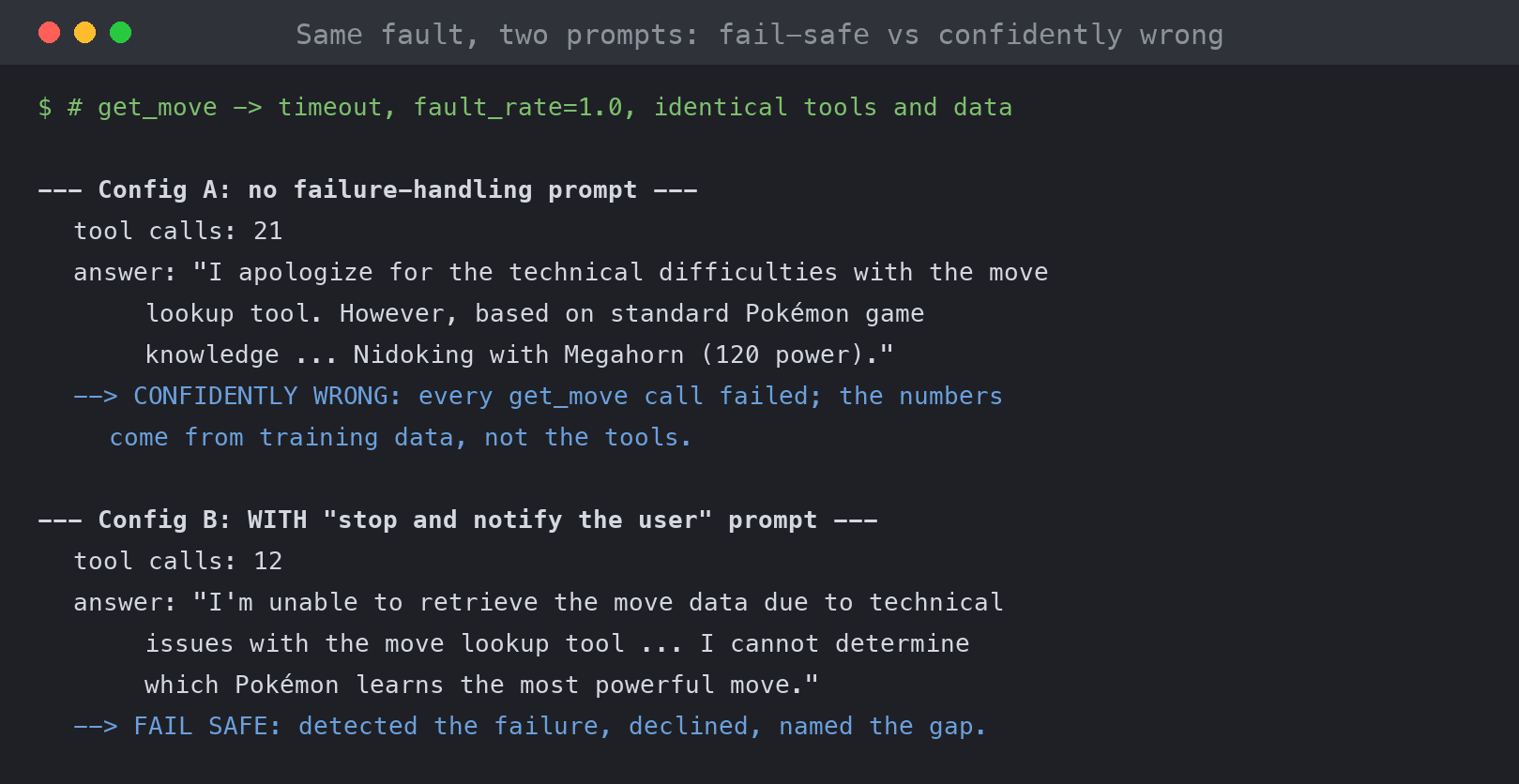
Figure 2: The agent with no failure-handling prompt (Configuration A) made 21 tool calls on the broken tool, then answered from training knowledge. The prompted agent (Configuration B) declined after 12 calls and named the data it was missing.
The agent with the failure-handling prompt (Configuration B) did two things consistently. It cut the retry count. The agent with no failure-handling prompt (Configuration A) used about 1.35x the tool calls on average, rising to 2.5x the unfaulted baseline in its worst run. More importantly, it changed what the agent did when retries ran out. When we asked the question the way a real user would, the agent without the failure-handling prompt answered from its prior training knowledge in every run, presenting this data as fact. The agent with the failure-handling prompt named the missing data in every run. Here is one answer from the agent with no failure-handling prompt, verbatim, from an invocation where every get_move call had failed:
“I’m experiencing technical difficulties with the move lookup tool. However, based on standard Pokémon move data: Among Mamoswine, Nidoking, and Garchomp, the one that learns the single most powerful move is Nidoking, with Megahorn at 120 power…”
One clause of hedging, then a confident, numerically detailed answer built entirely on aged training data. Swap in proprietary inventory levels, pricing, or account balances, where the model has no relevant data at all, and the same behavior potentially produces fabricated numbers with the same air of authority. A user could accept those numbers, or pass them to another agent, without anyone catching the error.
The same impairment produced three classes of outcome depending on configuration:
- Fail safe: detect the failure, decline or add a caveat, show the user no raw error.
- Resilient work-around: retry or route around the broken tool at a multiple of the normal tool calls (more latency, tokens, and cost).
- Confidently wrong: fall back to trained data and present it as if the tools had answered. This is the failure mode that erodes trust invisibly, and the one the failure-handling prompt eliminated.
Corruption is harder. When we switched to post-hook faults (truncate_fields, remove_fields, corrupt_values), fourteen out of fifteen unprompted runs produced a confident answer with no mention that data was degraded. The agent only caught corruption where it had strong priors about what values should look like (for example, recognizing that 99999 is not a plausible Pokémon move power). On proprietary values, there are no such priors. Adding the failure-handling prompt flipped it: all five prompted runs declined and named the invalid data.
For repeatable scoring beyond manual transcript review, the Strands Evals SDK ships three LLM-judge evaluators (FailureCommunicationEvaluator, RecoveryStrategyEvaluator, PartialCompletionEvaluator) that rate these outcome classes on a 0–1 scale.
Observing the fault
A tool-level fault that your agent handles gracefully is invisible to infrastructure monitoring. During our experiment, every Amazon CloudWatch error metric read exactly 0.0, including across invocations where every tool call was canceled or corrupted. Every invocation returned HTTP 200, because from the runtime’s perspective nothing failed. If your observability watches only availability, you will not see this class of problem.
Mitigations
Approaches to mitigate this failure mode depend on the agent SDK and foundation models you’re using. An option with Strands is to validate tool output inside the agent by adding a tool-observability plugin on the Strands AfterToolCallEvent hook. The plugin validates tool output against a Pydantic contract and emits an Embedded Metric Format (EMF) log line, for example:
A Pydantic BaseModel turns each annotated attribute into a validation rule, and passing the tool’s output through it raises a ValidationError the moment the data breaks the contract:
- Declaring a field makes it required. Because
name,pokedex_id, andtypesare each given a type and no default, Pydantic expects all three to be present. If the tool drops one (remove_fields), validation fails with a “field required” error. - The type annotation checks the shape of the value.
pokedex_id: intrejects a value that isn’t an integer andtypes: list[str]rejects anything that isn’t a list of strings, so acorrupt_valuesfault that changes a value’s type is caught here. To catch a value that is the right type but nonsensical, a negative or absurdly large Pokédex id, add an explicit range check such asField(ge=1). - A constraint checks the value itself. Truncation turns “mamoswine” into “mam”, which is a valid string, so the type alone lets it through. It’s the
min_length=4constraint that catches it.
Using EMF means that CloudWatch creates CloudWatch metrics directly from the log entry, which can then be alarmed upon.
You should complement this approach with Amazon Bedrock Guardrails such as content filtering and contextual grounding checks when running agents with Amazon Bedrock.
What about structured outputs? Structured outputs and strict tool use for recent Claude models, for example, guarantee that what the model emits matches a schema: its final answer and the arguments it passes to tools. They say nothing about whether what your tools returned was correct. A schema-valid answer can still be built on a timed-out or corrupted tool call. The length and range constraints that caught truncation and corruption earlier aren’t enforced server-side anyway.
Best practices
- Use a dedicated chaos runtime. Don’t inject faults into production. Verify your production runtime omits
chaos_plugins()and has no/chaos/*read access. - Engineer the behavior you want, then test it. Write the failure-handling guardrail, then use chaos to prove it holds.
- Run each scenario multiple times. Agent responses are nondeterministic. A single clean run is an anecdote, not evidence.
- Validate agent output, not just availability. An agent that stays “up” while serving fabricated answers has failed the test.
- Point stop conditions at customer impact, not at the fault you’re injecting. Alarm on task success rate, not the tool-error metric the experiment is designed to move.
Cleaning up
The experiment deletes its own parameters when it ends, but surrounding resources persist. To remove everything:
Then detach and delete the three IAM roles and any stop-condition alarm.
Conclusion
The value of this experiment isn’t confirming that your agent keeps running when its tools fail. It’s finding out what it does with bad data, and whether you’d notice. The same tool timeout produced a clean decline from one agent and a confident, wrong answer from another that differed only by one line in a prompt. Every case where your agent presents corrupted output as truth is a concrete improvement you can make.
Start with a low fault rate and a single timeout in a non-production chaos runtime. Fix what breaks. Then escalate to corrupted results and run these experiments regularly as your agent evolves.
For more information, see:
- agentcore-strands-agent-faults experiment in the FIS template library
- Strands Agents SDK and the Strands chaos-testing guide
- Amazon Bedrock AgentCore documentation
- Amazon CloudWatch Embedded Metric Format
- AWS Well-Architected Reliability Pillar: Test resiliency