Post Syndicated from Adam Hesch original https://aws.amazon.com/blogs/architecture/ai-coding-agents-on-amazon-ec2-mac-how-cognition-scales-devin-for-macos/
When the Cognition team set out to give Devin, their AI software engineer, the ability to build Apple apps, they ran into a basic requirement: Devin needed a Mac. The process of building, testing, and signing apps for iPhone, iPad, and Mac requires both Apple hardware and macOS, regardless of who (or what) writes the code, which was not supported until a couple months ago. To give Devin access to a Mac development environment, Cognition now runs macOS environments on Amazon Elastic Compute Cloud (Amazon EC2) Mac instances. With access to cloud-based Macs, Devin can build an iOS app, run it in the iOS Simulator, and check how it behaves all before it hands back a merge-ready change.
Within six weeks of launch, nearly 1,000 organizations were running Devin on macOS, according to Cognition. Cognition starts a fresh macOS virtual machine (VM) for each Devin session in under a minute, using a fleet of EC2 Mac hosts across six AWS Regions. By Cognition’s estimate, that startup time puts customers into a working macOS environment 15–20 times faster than setting up a Mac host themselves.
This post explains why Devin needed its own Mac, how Cognition built Devin workspaces on EC2 Mac, and how to plan a macOS fleet for AI agents or automated testing.
Why an AI coding agent needs its own Mac
Prior to this launch, Devin Cloud ran sessions only on Linux and Windows VMs. Devin could write Swift code and syntax in those sessions, but without macOS and Xcode it couldn’t run or test the app, so it depended on a customer’s continuous integration (CI) system or the customer’s own Mac fleet to build and test. Even then, simply having a successful build doesn’t show whether the app behaves correctly. One example of testing behavior is where an iPhone game is designed to resume where the player paused it, even after the app closes; in order to check that behavior, a software development agent has to play the game, pause it, quit, relaunch, and confirm the saved state.
You can virtualize macOS, but a Devin workspace needs more than just a bootable virtual operating system environment. Cognition needed each macOS workspace to provide the same properties as its other cloud workspaces:
- A disk that keeps the work of a session, so an idle session doesn’t keep a VM running.
- Network access that follows the access rules of the session.
- A development environment that is ready before Devin starts.
- A way for both the user and Devin to see and operate the running app.
Why Cognition chose AWS
Cognition required macOS machines to scale Devin beyond Linux and Windows, but sought to avoid the overhead of buying, racking, and maintaining physical Mac computers. The following properties of EC2 Mac shaped the Cognition design:
- Apple silicon hardware in the cloud: Each EC2 Mac instance is a physical Mac mini or Mac Studio attached to the AWS Nitro System, so Cognition can run the Apple Virtualization framework on EC2 Mac the same way it would on an on-premises Mac.
- Capacity through an API: Cognition allocates Dedicated Hosts and launches Mac instances with the Amazon EC2 API, instead of ordering and shipping machines.
- Regions around the world: EC2 Mac is available in multiple AWS Regions, and Cognition runs in six of them.
- Standard AWS networking and storage: Mac instances run in an Amazon Virtual Private Cloud (Amazon VPC) and boot from Amazon Elastic Block Store (Amazon EBS) volumes, so Cognition manages them like other EC2 instances.
Solution overview
Cognition builds Devin macOS workspaces on EC2 Mac instances, which run as bare metal instances on Amazon EC2 Dedicated Hosts. Available with Apple silicon, these instances are built on Apple Mac computers and the AWS Nitro System.
Each EC2 Mac instance runs on its own Dedicated Host, which has a minimum allocation period of 24 hours, so Cognition separates the life of a Devin session from the life of a host. In Regions where they don’t have preallocated capacity, Cognition uses an Amazon EC2 Auto Scaling group to allocate and release Dedicated Hosts.
On each host in its fleet, a Cognition VM manager uses the Apple Virtualization framework to run macOS guest VMs from images that Cognition prepares and manages. Each bare metal EC2 Mac host runs two isolated Devin workspaces at a time, because the macOS Software License Agreement (SLA) (SLA) allows up to two additional copies of macOS in virtual operating system environments on each Mac, a limit macOS enforces. Idle Devin sessions release their VMs for other Devin sessions to use, so a singular host is able to serve multiple Devin sessions a day.
Figure 1 shows how one EC2 Mac Dedicated Host serves Devin sessions. The host runs a bare metal Mac instance in one of the six AWS Regions in the Cognition fleet, with one guest VM per active session. Each guest runs Xcode tools and the iOS Simulator with the app under test, plus a live view and an accessibility tree from accessibility-cli. The user’s browser exchanges video and input with the live view, and the Devin agent queries and acts on the accessibility tree.
On the host, the VM manager runs the guests with the Virtualization framework, while a snapshot process with a Network Block Device (NBD) frontend handles disk I/O for each guest and exchanges snapshots with snapshot storage. The Devin agent and snapshot storage also run on AWS as Devin Cloud services inside the same Region, with Devin sessions hosted on Amazon EC2 and snapshots stored in Amazon Simple Storage Service (Amazon S3) (Amazon S3). For networking, a user-space Ethernet gateway takes Ethernet frames from a guest and passes IP packets to macOS packet filter (pf) rules and proxies, which apply the session access rules and send allowed traffic to the internet.
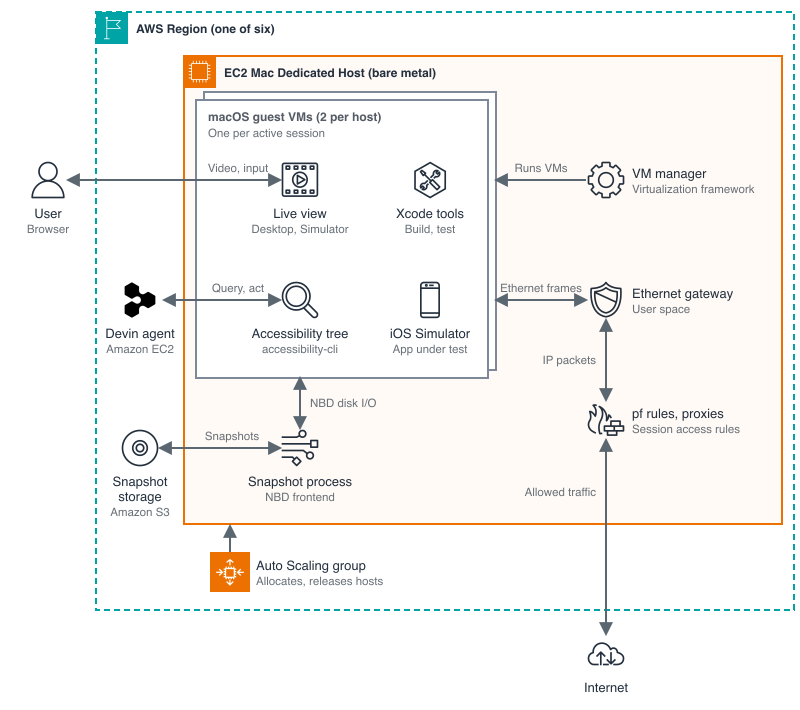
Figure 1: Devin macOS sessions on an Amazon EC2 Mac Dedicated Host
Keep session state with disk snapshots
Much of the work users do with Devin Cloud is asynchronous, and an idle session doesn’t need a running VM, so Cognition leverages the same snapshot system for macOS as its Linux VMs. The snapshot system runs as a separate process on the host and handles the VM’s disk reads and writes. Because the guest operating system sees only an ordinary virtual disk, the guest doesn’t need to know about snapshots.
On Linux, Cognition connects VMs to this storage process with vhost-user. The Virtualization framework doesn’t support vhost-user, but it does support NBD attachments, so Cognition added an NBD frontend to its snapshot system and kept the same storage design behind the new frontend. When a guest shuts down, the storage process keeps running to persist pending writes and upload the updated snapshot. The VM manager waits for the upload to finish before it completes cleanup, so stopping a session doesn’t interrupt the work that saves it.
Cognition reports that about 90% of sessions give up their Mac VM when idle and resume from a snapshot in seconds. On average, a session frees and reclaims its VM multiple times, so Mac capacity goes to active work, not idle sessions.
Apply network access rules with a user-space Ethernet gateway
Devin Cloud applies the access rules of each session to outbound traffic and blocks access to protected host infrastructure. The Virtualization framework offers three ways to connect a guest to the network: bridged networking, network address translation (NAT), and a file-handle attachment, which exchanges raw Ethernet frames over a local Unix datagram socket. NAT needs the least setup, but the Apple implementation also manages rules in pf, the macOS packet filter. Because Cognition also uses pf for its network controls, the two systems raced to configure the same filter.
Cognition chose the file-handle attachment instead and built its own Ethernet gateway to run in user space on the host, giving each Mac VM a separate gateway and its own session policy enforcement. Each Mac VM has its own gateway and its own session policy enforcement. The gateway answers Address Resolution Protocol requests from the guest and validates Ethernet addressing. It also checks that the source IP address of each packet matches the address assigned to the guest. The gateway then passes accepted IP packets into a tunnel interface on the host, where pf rules and proxies route the traffic and apply the access policy of the session.
Prepare guest images before the first boot
A Devin workspace needs more than a fresh macOS install: a user account, a usable desktop, Xcode tools, and the permissions Devin needs to observe and control apps. A fresh install asks for permissions such as accessibility and screen recording in dialogs, and each dialog would block Devin until a person approved it.
To avoid those dialogs, Cognition mounts the guest image disk on the host and prepares its state directly, creating the user and updating the macOS internal configuration databases so the permissions are in place before the guest boots. Cognition then boots the prepared image to install the remaining developer tools, verify Xcode, warm up the iOS Simulator, and let Spotlight indexing and other background setup finish. Cognition also turns off background services development sessions don’t need. With all this preparation done ahead of time, a new session can start building and testing as soon as its VM starts.
Give users a responsive live view of the app
Users can watch the macOS desktop in a Virtual Network Computing (VNC) view and their app in a new iOS Simulator pane in the Devin session. From either view, users can also try the app themselves and take control when they want.
Figure 2 shows a recorded Devin session from Cognition, in which Devin builds a 3D iPhone game and tests it in the iOS Simulator while the session’s Computer pane shows the macOS desktop.”
Figure 2: Devin builds and tests a 3D iPhone game on macOS. Video courtesy of Cognition
Two steps decide whether the live view responds fast enough for users to operate the app: capturing the screen and delivering the video. For the macOS desktop, ScreenCaptureKit, the Apple desktop capture API, supplies screen images from a limited pool of reusable buffers. When Cognition needs to keep the last captured image, it keeps its own copy instead of holding a pooled buffer, because holding a buffer while the screen is idle can delay the next screen change.
After capture, the desktop and Simulator video is encoded, sent to the user’s browser, and displayed. When one stage can’t keep up, frames wait between stages, and the stream can look smooth while it shows an old state of the app. In the iPhone game example, a user might press Pause and still see the game move, because the viewer is still showing frames from before the press. To keep the view current, Cognition limits how many frames can wait between stages and doesn’t replay a stale backlog.
Because compressed video frames often build on earlier frames, dropping a frame can leave the frames after it impossible to decode. A keyframe doesn’t depend on earlier frames, so the decoder can start fresh from it. When the Simulator stream falls behind, it restarts from a recent keyframe or asks for a new one and skips the missed frames. Keyframes are part of the compressed video stream, so they’re separate from the screen images Cognition copies at capture.
Let Devin operate native apps through the accessibility tree
Like users, Devin needs to see and operate the app, and it also needs an efficient way to check the result of each action. Devin does this through computer use, which in its simplest form takes a screenshot, has a model find a control in the image, clicks it, and takes another screenshot. This loop is slow and costly across the many pause, quit, and relaunch paths that Devin tests compared to web apps, where browser automation is more efficient. This is because the browser exposes the page structure, so Devin can find a named button or read a field’s value without working from pixels.
Native macOS apps and apps in the iOS Simulator run outside the browser, but they expose a structure of their own: the accessibility tree. Built for assistive technologies, the tree describes each control by its role, name, value, state, and relationships to other controls. Cognition exposes this tree to the Devin computer-use tool, so Devin can confirm that a control is a Resume button instead of guessing from pixels. Devin queries for a control, acts on the reference the query returns, and then reads the tree again to report what changed. The following exchange, adapted from Bringing macOS to Devin, shows a query for a Resume button and the press that follows.
{ "action": "query", "target": "ios", "role": "button", "name": "Resume" }
The shortened result lists a reference, the control’s role, its accessible name, and the actions it supports.
@i17 button "Resume" {press}
Using that reference, Devin then presses the control.
{ "action": "act", "target": "ios", "reference": "@i17", "operation": "press" }
Cognition built these capabilities on the open source accessibility-cli project from Dioxus, which is now part of Cognition. The project provides accessibility, input, and screen capture building blocks, and Devin turns them into the observe, reference, and act loop shown here. Even with the accessibility tree, Devin still relies on screenshots to check how the app looks. In the game example, a closed pause menu doesn’t prove the game restored the player’s position, because the app might draw gameplay directly instead of describing it in the tree.
Results
Cognition launched macOS support for Devin on September 15, 2026, and nearly 1,000 organizations were running Devin on macOS within six weeks. Devin no longer needs a customer’s CI system or Mac computers to build and test Apple apps, because it now builds, runs, and verifies iPhone, iPad, and Mac apps in its own cloud workspace. From that workspace, Devin also uploads builds to TestFlight, the Apple beta testing service.
“With Amazon EC2 Mac, we gave Devin macOS environments in the cloud, unlocking iOS and macOS development. Now customers can hand Devin platform-specific tasks such as building and testing iOS applications, without anyone managing Mac hardware. Our mac-m4pro.metal and mac-m4.metal fleet spans six regions, and we can mint fresh macOS VMs for Devin in under a minute.”
— Evan Almloff, Member of Technical Staff, Cognition
Wispr, which makes the Wispr Flow voice dictation app, uses Devin for macOS to test its iOS app end to end.
“At Wispr, a big part of testing our iOS app is making sure recording and transcription work end to end. The biggest blocker for us was end to end testing with Audio and Keyboard extension. With Devin’s macOS support, the pace of development has accelerated and it has given us more confidence in shipping features and triaging bugs. The velocity unlock is huge and cut down code review time by 70% and improved our velocity by nearly 2x.”
— Sumit Oberoi, Lead iOS Engineer, Wispr
Plan your own macOS fleet on EC2 Mac
The following points from the Amazon EC2 User Guide affect how you design a macOS fleet:
- Each Dedicated Host runs one Mac instance, and you can release a host only after its 24-hour minimum allocation period.
- You can share Dedicated Hosts with other AWS accounts or within an organization in AWS Organizations using Cross-account Amazon EC2 Dedicated Host sharing.
- Mac instances are available as On-Demand Instances, and you can lower their cost with a Savings Plan.
- Mac instance types are available in specific Regions, so check Amazon EC2 instance types by Region before you plan capacity.
Conclusion
Cognition gave Devin its own cloud Mac by running a fresh macOS guest VM for each session on Amazon EC2 Mac bare metal hosts. Disk snapshots, a user-space Ethernet gateway, prepared guest images, and accessibility-based control turn each VM into a workspace where Devin can build, run, and verify Apple apps.
Get started with Amazon EC2 Mac instances, and read Bringing macOS to Devin for more detail on how Cognition built Devin for macOS.
Resources
- Amazon EC2 Mac instances in the Amazon EC2 User Guide.
- Announcing Amazon EC2 M4 and M4 Pro Mac instances on the AWS News Blog.
- Amazon EC2 Dedicated Hosts pricing.
- Bringing macOS to Devin from Cognition.