Post Syndicated from Tanvi Ravindra Malali original https://aws.amazon.com/blogs/devops/announcing-custom-execution-roles-for-aws-cloudformation-stacksets/
With AWS CloudFormation StackSets, you can create, update, and delete stacks across many accounts and Regions from a single operation. By default, StackSets creates an execution role with AdministratorAccess in each target account, which requires no additional setup. With custom execution role templates, you can define the IAM role that StackSets uses in each member account instead.
This provides two capabilities. First, you can scope the execution role’s permissions to only what your workload needs. Second, service-managed stack sets can deploy templates that use nested stacks, macros, and transforms.
Note: Switching to a custom execution role does not remove the default AdministratorAccess execution role from member accounts. For true least-privilege access, delete the default role in each member account after you confirm the custom role works.
How it works
When you create or update a stack set with an execution role template, StackSets validates it and stores it. For each target member account, StackSets then deploys the template as a small bootstrapping stack that creates the IAM role. StackSets uses the name you passed in the ExecutionRoleName parameter for all subsequent operations. The StackSetExecutionRoleName output is used only to validate that the role the template provisioned matches that name.
The bootstrapping stack is created once per member account, always in the home Region of the partition (us-east-1 for commercial, cn-north-1 for China). It is named stacksets-exec-role-stack-<region>-<stackset-id>-<short-uuid>. From that point on, every create, update, and delete operation StackSets runs in that member account uses your custom role.
Templates with nested stacks, macros, and transforms
With a custom execution role, service-managed stack sets can deploy workload templates that use nested stacks (AWS::CloudFormation::Stack), CloudFormation transforms (such as AWS::Serverless-2016-10-31), and custom macros. Previously, these features were not supported in service-managed stack sets.
This capability applies to the workload template you deploy with your stack set, not to the execution role template itself. The execution role template must still follow the requirements in the next section, including no nested stacks and no transforms.
For a workload template that uses transforms or macros, such as a SAM template, pass both CAPABILITY_NAMED_IAM and CAPABILITY_AUTO_EXPAND when creating the stack set:
Prerequisites
Before you configure a custom execution role template, make sure:
- Your StackSet uses the service-managed permissions model. Custom execution role templates are not supported with self-managed permissions.
- Activate trusted access with AWS Organizations. This creates the
AWSServiceRoleForCloudFormationStackSetsOrgAdminservice-linked role in your management account. - You have your management account ID available for use in the trust policy.
Execution role template requirements
Your execution role template must meet all four of the following requirements. If any requirement is not met, CreateStackSet or UpdateStackSet returns a validation error.
1. A single IAM role resource
The template must contain exactly one resource, and that resource must be of type AWS::IAM::Role. Templates with multiple resources or non-IAM resources are rejected.
Note: Name the role with the required prefix stacksets-exec-custom- (for example, stacksets-exec-custom-my-role). The service’s default execution role is named stacksets-exec-<hash>, so this prefix is what lets StackSets tell a custom role from a default one by name alone. Roles without this prefix fail validation. Use the same role name across all stack instances. Don’t vary it per account or Region.
2. A trust policy for the StackSets service-linked role
The IAM role must include an AssumeRolePolicyDocument that grants assume-role access to the StackSets service-linked role in your management account. The trust policy must contain exactly one Statement and exactly one AWS principal, in this format:
arn:aws:iam::<management-account-id>:role/aws-service-role/stacksets.cloudformation.amazonaws.com/AWSServiceRoleForCloudFormationStackSetsOrgAdmin
Replace <management-account-id> with your organization’s management account ID.
If your organization uses a delegated administrator account for StackSets, the trust policy must still reference the organization management account rather than the delegated administrator account.
You can optionally strengthen the trust policy with a condition on your organization ID:
3. A required output
The template must define a CloudFormation output with the key StackSetExecutionRoleName, and its value must be the name of the IAM role created by the template. StackSets uses this output to validate that the role name the template provisioned matches the ExecutionRoleName you passed when you created or updated the stack set. If the output is missing or the key is misspelled, the template fails validation.
4. No nested stacks or transforms
The template must not include:
- Nested stack resources (
AWS::CloudFormation::Stack). - CloudFormation transforms, such as
AWS::Serverless-2016-10-31or custom macros.
A working example
The following least-privilege template creates an execution role scoped to S3 bucket operations on buckets matching a naming prefix, plus the CloudFormation actions StackSets needs to drive stack operations in the member account.
This template is an illustrative example. The cloudformation:* permissions on all resources are the minimum StackSets needs to drive stack operations in each member account. Narrowing them below this can cause stack operations to fail. Adjust the S3 statement to match the resources your workload uses.
Replace 123456789012 with your management account ID. Using !Ref on the role returns the role name dynamically, so you don’t need to repeat it in the output.
Creating a StackSet with a custom execution role template
Supply the template to CreateStackSet in one of two ways:
ExecutionRoleTemplateBody– the template body as an inline string (JSON or YAML).ExecutionRoleTemplateUrl– the Amazon Simple Storage Service (Amazon S3) URL of the template file.
Specify either one of these. If you provide both, the operation returns an error.
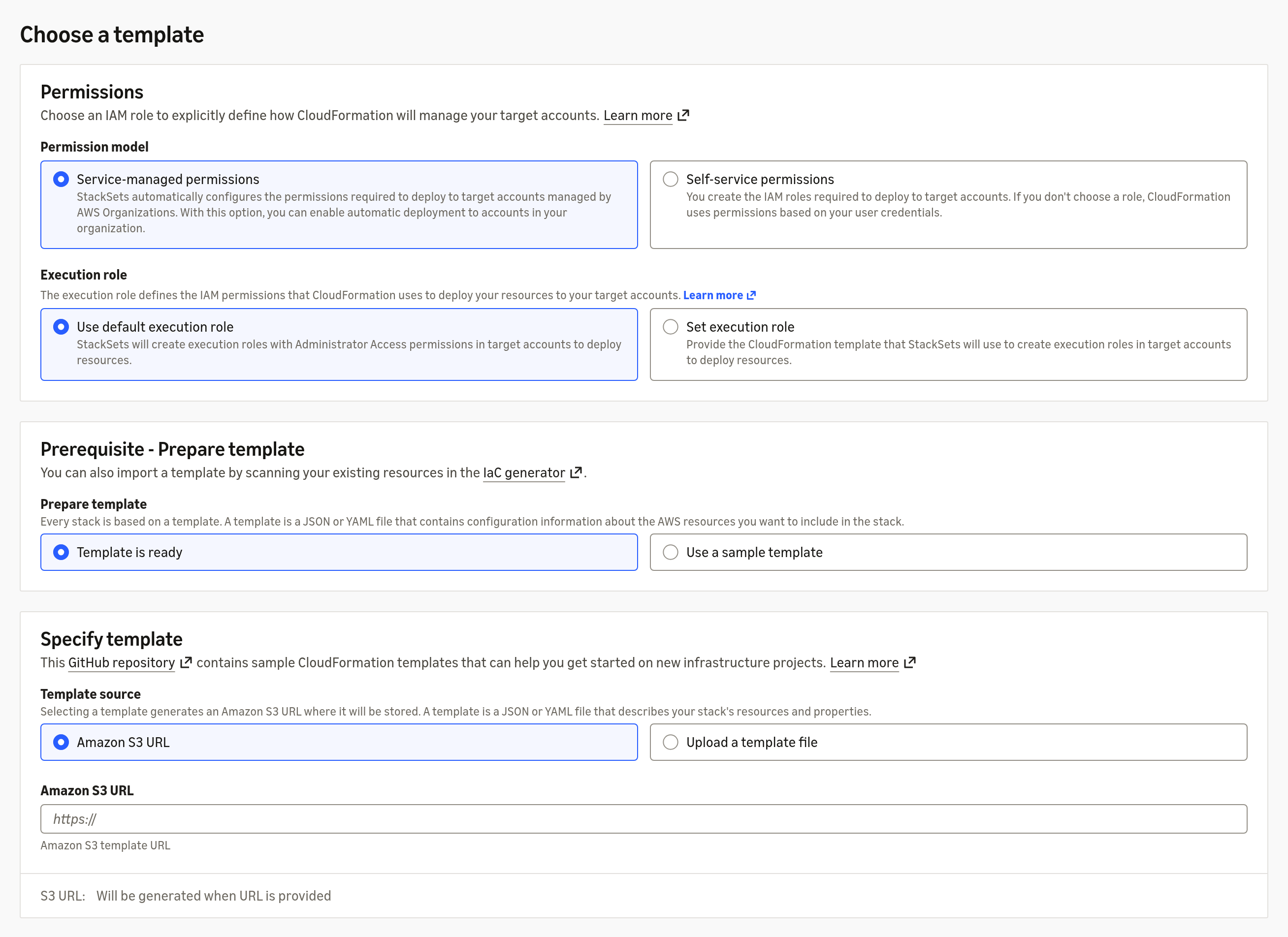
Figure 1: Console view of the configurable options when creating a StackSet custom execution role
Using the AWS CLI
The --execution-role-name value must match the RoleName in your execution role template, and it must start with stacksets-exec-custom-. StackSets validates this prefix and returns an error if it does not match.
Custom execution role templates always require CAPABILITY_NAMED_IAM. This flag acknowledges that the templates create named IAM resources. The execution role template always creates a named IAM resource, because it must use the required stacksets-exec-custom- prefix through an explicit RoleName. If your workload template also uses transforms (such as AWS::Serverless-2016-10-31) or macros, add CAPABILITY_AUTO_EXPAND as well. Capabilities apply at the stack set level and pass down to each stack instance.
With an S3-hosted template:
Note: If you use an S3 URL, your credentials must have read access to the S3 object. The URL can be in path style (https://s3.amazonaws.com/my-bucket/key.yaml) or virtual-hosted style (https://my-bucket.s3.region.amazonaws.com/key.yaml).
Using the CloudFormation console
The create StackSet wizard defaults to Use default execution role, which is the AdministratorAccess role. To attach a custom execution role, select Set execution role and either paste an S3 URL or upload a local template file.
The console also asks for an IAM execution role name in a separate field. StackSets uses the name you enter in this field as the execution role name, not the RoleName value in the template. Make sure the name in the field still starts with the required stacksets-exec-custom- prefix.
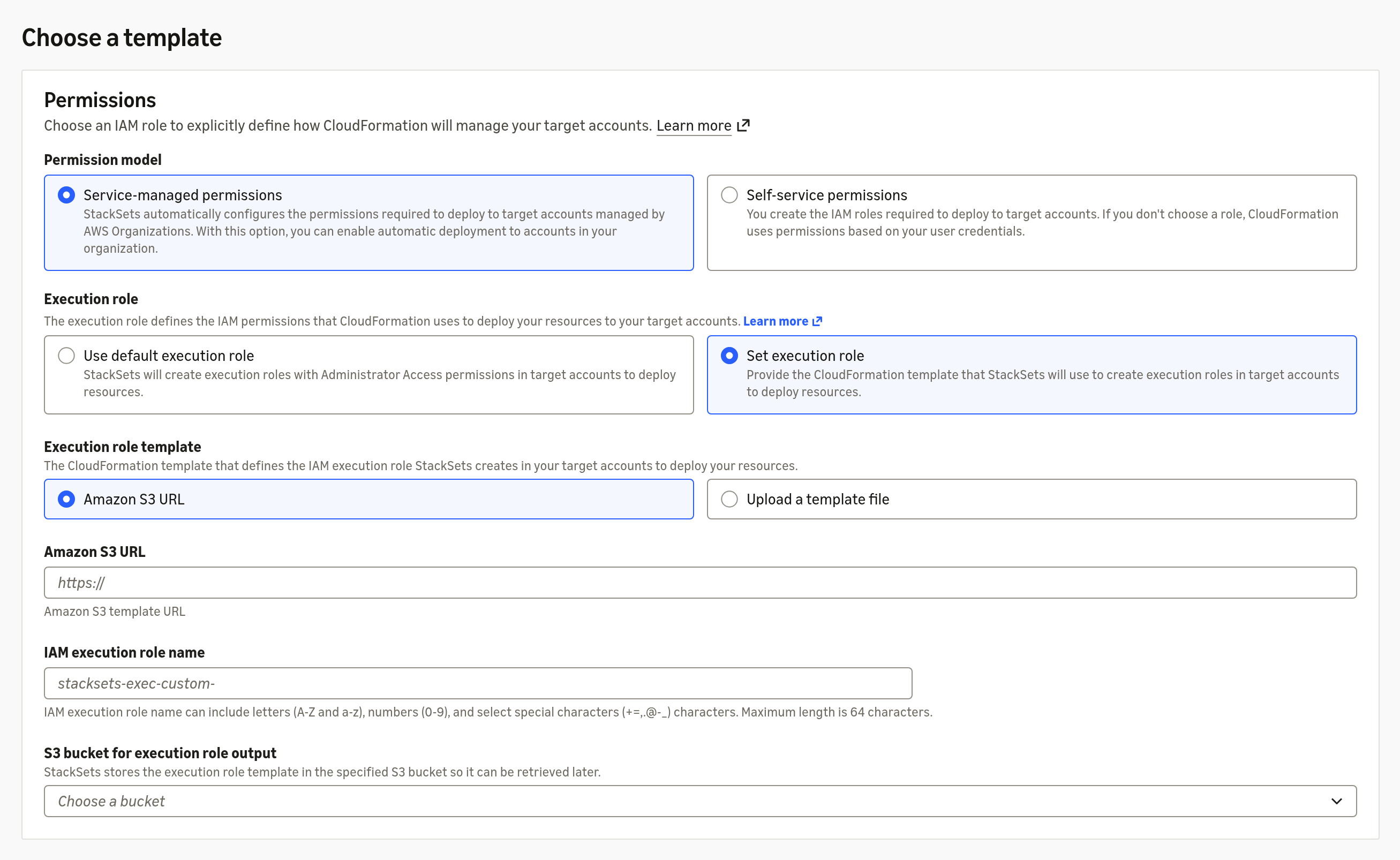
Figure 2: The StackSet creation wizard defaulting to the AdministratorAccess execution role, with the option to set a custom execution role
Updating the execution role template
To update the execution role template for an existing stack set, call UpdateStackSet with a new ExecutionRoleTemplateBody or ExecutionRoleTemplateUrl. The same validation requirements apply. When you update the execution role template, StackSets updates the role on every existing stack instance. You can’t specify deployment targets in the same call.
The --execution-role-name value is required only when you transition from the default execution role to a custom execution role. On subsequent updates to the execution role template, it’s optional.
On the console, you can also change the execution role name without replacing the template. Select the Use current execution role tile to keep the existing template, and enter a new role name in the IAM execution role name field.
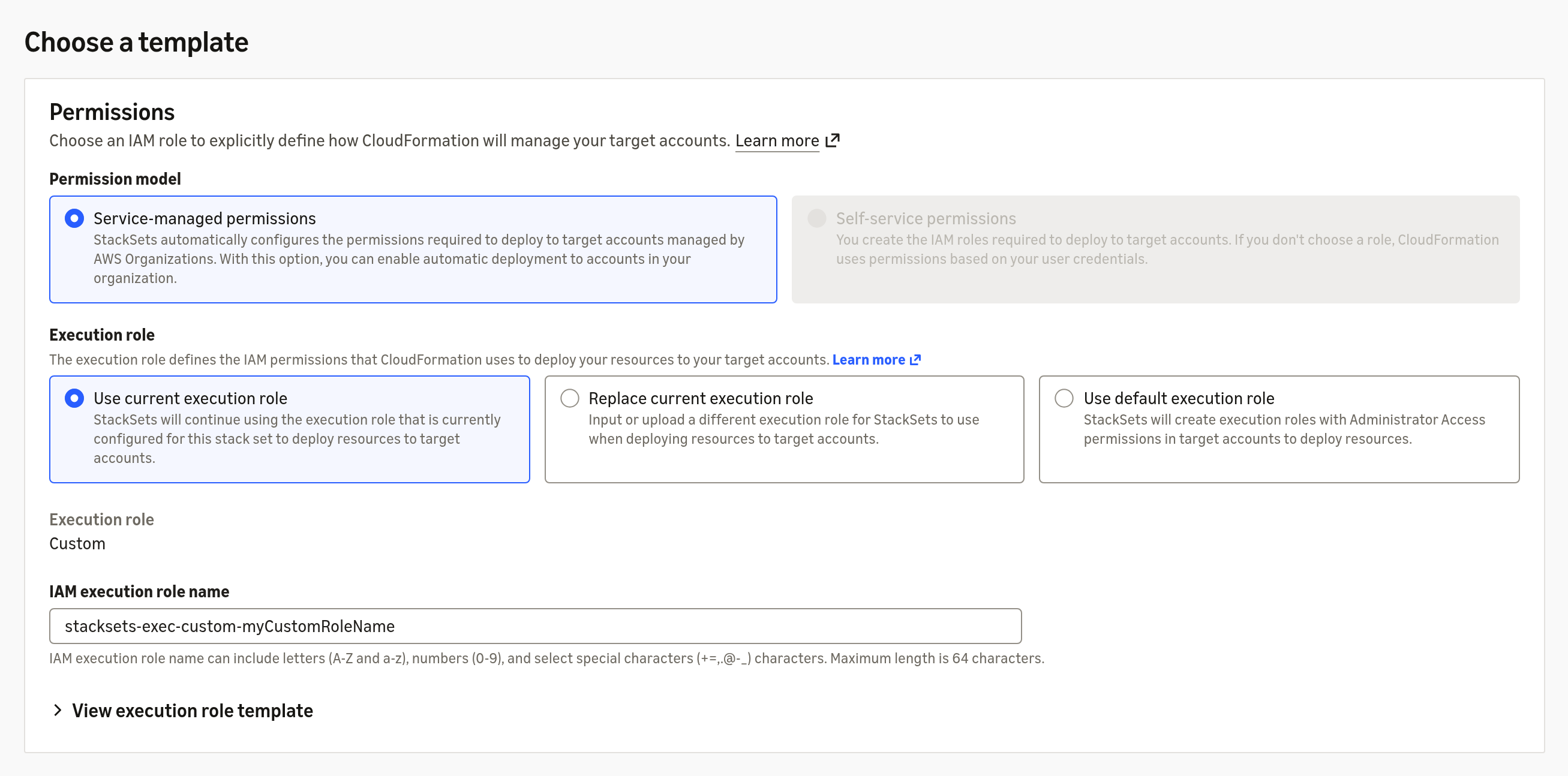
Figure 3: Keeping the current execution role template and changing only the execution role name
On the console, choose the Replace current execution role tile and either paste an S3 URL or upload a new template file.
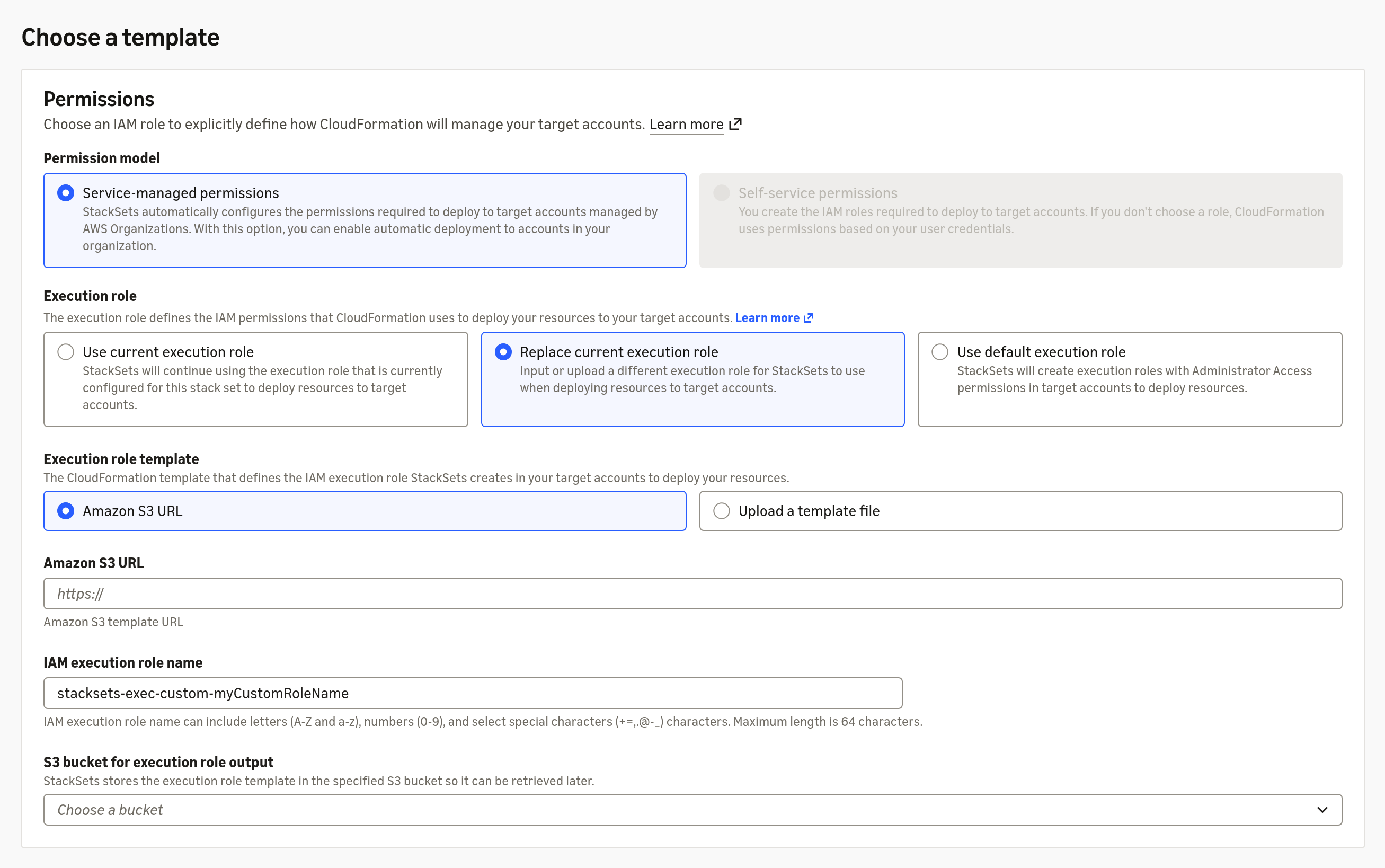
Figure 4: Replacing the execution role template by providing an S3 URL or uploading a local template file
Setting up an output bucket
StackSets always stores the validated execution role template in a service-owned bucket. You can also configure a bucket you own, and StackSets writes a copy of the template there. This is useful when you want direct visibility into the stored template.
To configure a custom output bucket:
- Create an S3 bucket in the same Region as your stack set.
- Update the bucket policy to allow the CloudFormation service principal (
cloudformation.amazonaws.com) to performs3:PutObjecton the bucket path. - Pass the bucket name using
--stack-set-output-bucketoncreate-stack-setorupdate-stack-set. - StackSets writes the copy at
s3://<bucket>/aws-cloudformation-stacksets/<stack-set-id>/output.json, where the colons in the stack set ID are replaced by periods.
Reverting to the default execution role
To revert a StackSet to the default AdministratorAccess execution role, set UseAdminExecutionRole to true:
Reverting switches StackSets back to the default AdministratorAccess execution role, but it does not remove the custom execution role or its bootstrapping stack from member accounts. There is no automated cleanup today. Delete them manually in each member account if you no longer need them.
On the console, choose the Use default execution role tile during update.
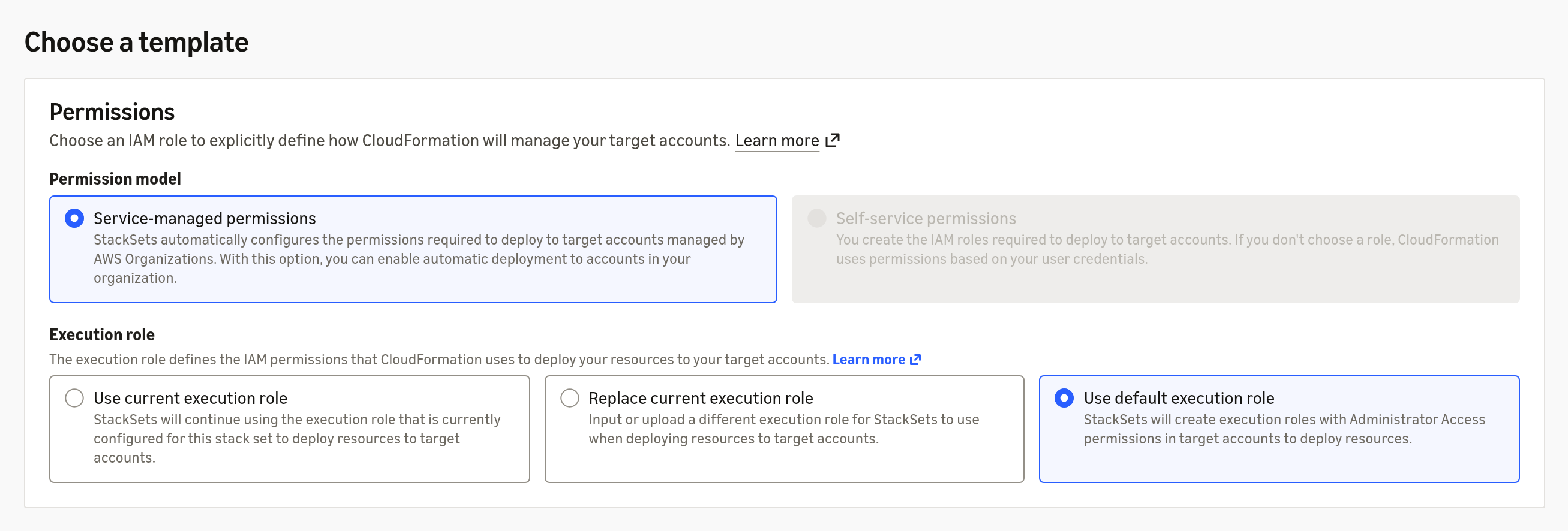
Figure 5: Reverting to the default AdministratorAccess execution role by selecting the Use default execution role tile when updating a stack set
Viewing the current execution role template
Call DescribeStackSet to see the configured execution role template. If an output bucket is configured, the response includes the StackSetOutputBucketPath field, which points to the stored template in S3.
On the console, go to StackSet details, and under StackSet info expand Execution role template. The View in S3 button opens the stored template in a new tab. During update, the Use current execution role tile shows the template currently in use.
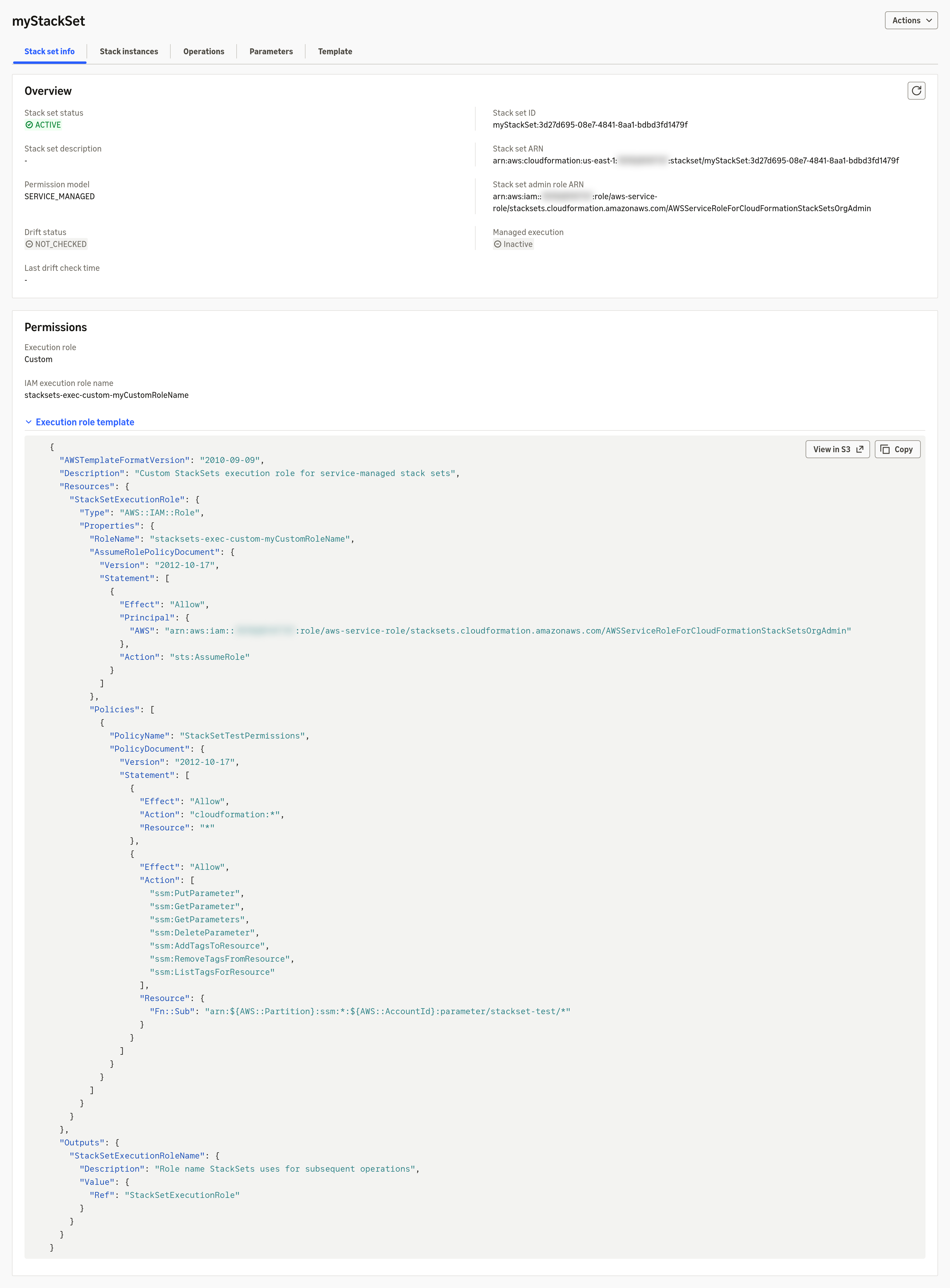
Figure 6: The StackSet info tab showing the configured execution role template, where the View in S3 button opens the stored template in a new tab
If you configure a custom output bucket, StackSetOutputBucketPath in the DescribeStackSet response is configuration. It shows where StackSets writes the output file, not whether the write succeeded. Check S3 directly to confirm the object is present.
Common validation errors
CreateStackSet and UpdateStackSet validate your execution role template against the preceding requirements and return a ValidationException when something doesn’t match. Most error messages restate a requirement: more than one resource, a missing output key, a role name that doesn’t start with stacksets-exec-custom-, and so on. Three are easier to miss:
- The account ID in the trust policy principal Amazon Resource Name (ARN) must be your organization’s management account, even when you’re using a delegated administrator.
- The IAM role in the template must not set a
Pathproperty (other than /). This requirement isn’t obvious from the role’s shape. - When you update the execution role template, you can’t also specify deployment targets. StackSets always reprovisions the role in every existing stack instance.
For the full list of error strings and causes, see the Troubleshooting section of the User Guide.
If the execution role stack fails to create in a specific member account, that account’s stack instance deployment fails. Other accounts in the same deployment aren’t affected. Check the stack events in the failing member account for details, then retry by creating new stack instances for those accounts.
Get started
With custom execution role templates, you can keep the cross-account convenience of StackSets while bringing your permissions in line with least-privilege guidance. To learn more about the service, see the AWS CloudFormation product page.
Related resources
- AWS CloudFormation StackSets concepts.
- Prerequisites for StackSet operations.
- Minimum execution role permissions.
- AWS::IAM::Role.
- Activate trusted access with AWS Organizations.