Post Syndicated from David Venable original https://aws.amazon.com/blogs/big-data/how-to-consolidate-cross-region-s3-data-into-opensearch/
You might have data in Amazon Simple Storage Service (Amazon S3) buckets in different AWS Regions that you want available in a single Amazon OpenSearch Service domain or collection. Consolidating data across Regions provides unified analytics and searches, reduce operation complexity, and streamline your search infrastructure. We’re happy to announce that Amazon OpenSearch Ingestion pipelines can now read from S3 buckets in different Regions to ingest and consolidate data into a single OpenSearch Service domain or collection.
To consolidate this data across AWS Regions, you previously had to provide your own solution. Now Amazon OpenSearch Ingestion can help you accomplish this. In this post, I’ll show you how to use the new cross-Region support to ingest data from S3 buckets across multiple AWS Regions into a single OpenSearch Service domain or collection.
Amazon OpenSearch Ingestion (OSI) is a feature-rich data ingestion pipeline that you can use for many different purposes: observability, analytics, and zero-ETL search. Many customers use OpenSearch Ingestion to ingest data from Amazon S3 into OpenSearch Service domains and Amazon OpenSearch Serverless collections. Until now, you could only ingest from a single AWS Region at a time. Now that you can use OpenSearch Ingestion for cross-Region S3 ingestion, I’ll show you how you can use it in two scenarios: batch processing using S3 scan, and streaming ingestion using Amazon Simple Queue Service (Amazon SQS) queues for AWS vended logs like Amazon Virtual Private Cloud (Amazon VPC) Flow Logs and AWS CloudTrail.
Prerequisites
Complete the following prerequisite steps:
- Deploy an OpenSearch Service domain or OpenSearch Serverless collection in the Regions where you want to perform your search or analytics.
- You need S3 buckets in at least two different Regions. You can use existing ones or create S3 buckets. You can use one in the same AWS Region as your OpenSearch Service domain or collection, or use two completely different Regions.
- Upload objects with data into your S3 buckets. The data can be JSON, ND-JSON, Parquet, CSV, or plaintext formats.
- Configure AWS Identity and Access Management (IAM) permissions needed for OSI. For instructions, see Amazon S3 as a source.
- For cross-Region ingestion, you must now also include the s3:GetBucketLocation permission. This gives the pipeline the ability to determine which AWS Region the bucket is located in.
After you complete these steps, you can either set up your Amazon OpenSearch Ingestion pipelines for batch or streaming scenarios. In the following sections, I’ll give you recommendations on when to choose which approach, and I outline the steps for creating your pipeline.
Batch scenarios
You can use the OpenSearch Ingestion S3 scan capability to read batch data from S3. You might find this approach useful when your data is written to S3 on a schedule. To perform a cross-Region S3 scan, you only specify the buckets that you’re reading from when you create the OpenSearch Ingestion pipeline.
The following diagram shows the design for an OpenSearch Ingestion pipeline in us-west-2 reading from S3 buckets in us-east-1 and eu-west-1 and writing that data into an OpenSearch Service domain in us-west-2.
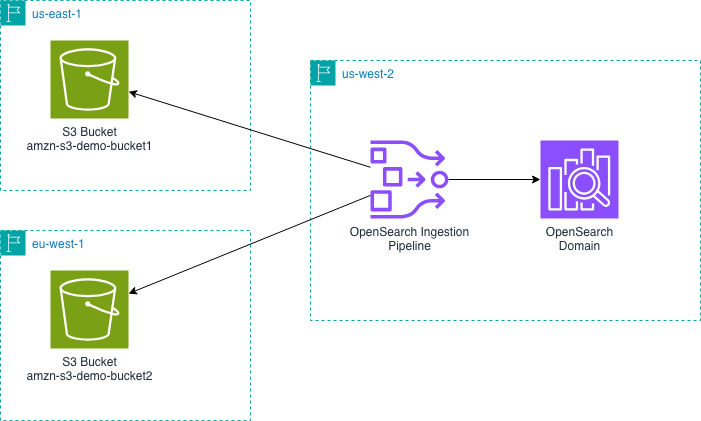
Next, you will create an OpenSearch Ingestion pipeline. You must create this pipeline in the same Region as your OpenSearch Service domain or collection.
The previous pipeline configuration supports the JSON codec. You might want to configure a different codec if your data isn’t a large JSON object.
You can now query your OpenSearch Service domain or collection to see the data that you ingested.
Streaming scenarios: AWS vended logs
Like many of our customers, you might want to ingest S3 data from different AWS Regions into OpenSearch Service. A common reason is to consolidate AWS vended logs. For example, VPC Flow Logs, CloudTrail data, and load balancer logs. For these scenarios, you can configure OpenSearch Ingestion pipelines to read from an Amazon SQS queue to stream data into your OpenSearch Service domain or collection.
These AWS vended logs write to Amazon S3 in the same AWS Region as the service running it. For example, VPC Flow Logs will be in the same AWS Region as your Amazon VPC. You can use OpenSearch Ingestion to consolidate these logs into one AWS Region. In the VPC Flow Logs example, you can consolidate your VPC Flow Logs from multiple AWS Regions into a single OpenSearch Service domain or collection to analyze network patterns from your different Amazon VPCs.
The following diagram outlines the overall setup. It shows an example of sending AWS vended logs from us-east-1 and eu-west-1 to an OpenSearch Service domain in us-west-2. You can change the AWS Regions depending on your specific needs.
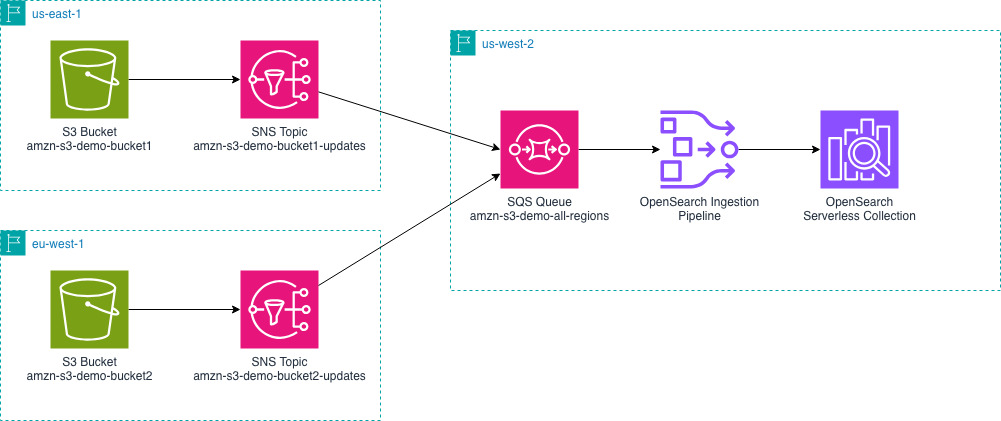
- You must configure your vended logs to write log events to Amazon S3 buckets in their respective AWS Regions. Using VPC Flow Logs as our example, you can configure VPC Flow Logs for your VPCs.
- Create an Amazon SQS queue in the same AWS Region as your OpenSearch Service domain.
- Amazon S3 doesn’t send notifications to cross-Region Amazon SQS queues, so you will use intermediate Amazon Simple Notification Service (Amazon SNS) topics to consolidate the notifications from multiple Regions into one queue. For each S3 bucket, create an SNS topic.
- Configure S3 Event Notifications for SNS. You will do this for each S3 bucket and each SNS topic.
- SNS can send cross-Region notifications to SQS. Create a subscription from each SNS topic that you created in step 3 to the single SQS queue you created in step 2.
- Configure your pipeline role to read from SQS and read from the relevant S3 buckets.
Now create an OpenSearch Ingestion pipeline in the same AWS Region as your OpenSearch Service domain.
The previous pipeline configuration supports the JSON codec. You might want to configure a different codec if your data is not a large JSON object.
Next, upload objects with data into your S3 buckets. By uploading data, S3 will send notifications to SNS and then the SQS queue.
You can now query your OpenSearch Service domain or collection to see the data that you ingested.
Here is what makes this possible and what is different. The SQS queue receives the event notifications for the buckets. Before the cross-Region feature of OpenSearch Ingestion, the pipeline could see these events, but couldn’t access the S3 bucket even if the permissions were granted. Now, the pipeline will determine the AWS Region that the bucket is in, access an AWS Security Token Service (AWS STS) token for the AWS Region of the bucket. Using the STS token from the same Region as the S3 bucket allows the pipeline to read and access the data.
Using the AWS Console
When you create the pipeline using the OpenSearch Ingestion console, you will have options to select a blueprint for your use-case. These blueprints help you create pipelines for various vended log types only by selecting your SQS queue and OpenSearch domain. The blueprint handles the data type mappings for you by including appropriate processors. You can use these blueprints as a starting point and modify your processors for your specific requirements.
Clean up resources
When you’re done testing this out, use the following resources to delete the resources that you created.
If you set up a batch pipeline:
- Delete the OpenSearch Ingestion pipeline.
If you set up a streaming pipeline:
- Delete the OpenSearch Ingestion pipeline.
- If you created an SQS queue, delete the SQS queue.
- If you created SNS topics, delete the SNS topics.
- If you configured AWS vended logs you can delete those logging configurations. This example used VPC Flow Logs. For instructions on how to do so, see Delete the Flow Logs.
For both pipelines, these steps help you delete the common resources.
- Delete the IAM roles that you created for your pipeline.
- Delete the S3 objects that you uploaded and the S3 bucket.
- Delete the Amazon OpenSearch domain or the Amazon OpenSearch Serverless collection.
Conclusion
In this post, I showed you how you can use Amazon OpenSearch Ingestion to ingest data from Amazon S3 buckets in different AWS Regions. I showed that this works for both batch scan and streaming scenarios. The feature offers you a straightforward way to consolidate your data from other Regions into one OpenSearch Service domain or collection.
To get started with the cross-Region S3 source, refer to the OpenSearch Ingestion documentation or try creating a pipeline from one of our blueprints using the OpenSearch Ingestion console. You can read about the codecs that OpenSearch Ingestion offers for parsing your S3 objects. You can also learn how about the various processors that OpenSearch Ingestion offers, so you can transform and enrich your data to meet your needs.
You can also use OpenSearch Ingestion for cross-Region and cross-account. To do this, you must grant cross-account permissions on your S3 bucket. You must also make some changes to your pipeline configuration. Combining what I showed you in this post with the existing cross-account features greatly expands your ingestion options.
If you’re ready to take your streaming ingestion analytics to the next level you can read about how to generate metrics from logs and even how to send those derived metrics to Amazon Managed Service for Prometheus.
Have you tried out the cross-Region capabilities of OpenSearch Ingestion? Share your use-cases and questions in the comments.