Tag Archives: Amazon OpenSearch Ingestion

How to build a cross-Region resilience for Amazon OpenSearch Service with Amazon MSK

Post Syndicated from Sriharsha Subramanya Begolli original https://aws.amazon.com/blogs/big-data/how-to-build-a-cross-region-resilience-for-amazon-opensearch-service-with-amazon-msk/

Cross-Region resilience for Amazon OpenSearch Service has historically been a complex challenge, relying on S3-based snapshots or cross-cluster replication that demand intricate manual failover procedures often resulting in hours of downtime, data inconsistencies, and significant lag during outages, or other operational disruptions. To overcome these limitations and help businesses stay focused on their core objectives, we’ve developed a solution that automatically maintains synchronized data across AWS Regions while supporting active-active operations in both AWS Regions.

AWS offers two OpenSearch offerings, namely Amazon OpenSearch Service, a managed cluster-based service where you provision and manage OpenSearch domains (nodes, storage, scaling), and Amazon OpenSearch Serverless, a serverless option where AWS automatically manages infrastructure and scaling and you create collections for your search or analytics workloads. OpenSearch Service provides high availability (HA) within an AWS Region through its Multi-AZ deployment model and provides Regional resiliency with cross-cluster replication. Amazon Managed Streaming for Apache Kafka (Amazon MSK) Replicator is an Amazon MSK feature that you can use to reliably replicate data across Amazon MSK clusters in different or the same AWS Region.

In this post, we outline the solution that provides cross-Region resiliency without needing to reestablish relationships during a fail-back, using an active-active replication model with Amazon OpenSearch Ingestion (OSI) and Amazon Managed Streaming for Apache Kafka (Amazon MSK). This solution applies to both OpenSearch Service managed clusters and Amazon OpenSearch Serverless collections. We use Amazon OpenSearch Serverless as an example for the configurations in this post.

Solution overview

In this solution we use Amazon MSK Replicator for bidirectional cross-Region data replication, with OSI pipelines to index data into Amazon OpenSearch Serverless collections in each AWS Region. While the S3 based approach serves the purpose, Amazon MSK Replicator provides near real-time replication with identical topic naming, which supports active-active operations. Amazon MSK Replicator provides automatic loop prevention and consumer group offset synchronization, enabling seamless cross-Region failover. You can find the code for the entire solution in the GitHub repo.
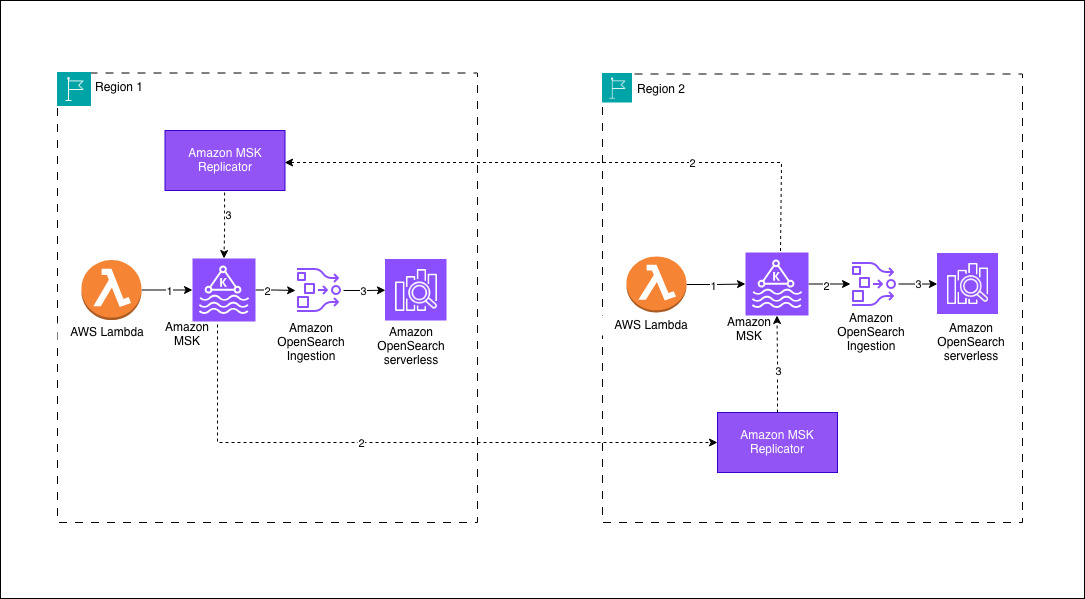
Your architecture will follow a Regional-first approach where data sources write to a local Amazon MSK cluster within their AWS Region. In this sample deployment, an AWS Lambda function serves as the producer, streaming data into the MSK cluster. OSI pipelines consume the incoming data from the local MSK cluster and persist it to an Amazon OpenSearch Serverless collection within the same AWS Region. To achieve cross-Region data synchronization, Amazon MSK Replicator facilitates bidirectional replication between the Amazon MSK clusters, preserving the same topic names across both environments. This design validates that Amazon OpenSearch Serverless collections in each AWS Region maintain identical datasets, provides low-latency search capabilities and high availability for globally distributed workloads.

Prerequisites

Deploy the AWS Cloudformation template to install the prerequisites. The solution has the following prerequisite steps:

  1. Set up Amazon Virtual Private Cloud (Amazon VPC) infrastructure in both Regions
    1. Create Amazon VPCs with private subnets in at least two or three Availability Zones for high availability at the AWS Region level
    2. Configure Network Address Translation (NAT) Gateways for outbound internet access from private subnets
    3. Use non-overlapping CIDR blocks
  2. Establish Amazon OpenSearch Serverless collections in both AWS Regions
  3. Create Amazon OpenSearch Serverless Collections for log analytics
  4. Configure encryption, network, and data access policies
  5. Create Amazon VPC endpoints for private access
  6. Configure MSK clusters in both AWS Regions
  7. Enable AWS Identity and Access Management (IAM) authentication (SASL/IAM)
  8. Enable Multi-VPC connectivity (required for Amazon MSK Replicator and OSI)
  9. Configure MSK cluster policies to allow kafka.amazonaws.com and osis-pipelines.amazonaws.com service principals
  10. Configure IAM permissions for pipeline and replication access
  11. Create IAM roles for the OSI pipelines with permissions to access Amazon Managed Streaming for Apache Kafka and Amazon OpenSearch Serverless.
  12. Create IAM roles for the Amazon MSK Replicator with permissions for cross-Region access to Amazon Managed Streaming for Apache Kafka clusters.

This AWS CloudFormation template helps you in deploying all of the required configurations with primary AWS Region as us-east-1 and secondary AWS Region as us-west-2.

The following snippets shows the configuration for the OSI pipeline, which writes data from Amazon MSK to Amazon OpenSearch Serverless. The OSI pipeline uses MSK as a source with IAM authentication.

version: "2"
kafka-pipeline:
source:
kafka:
acknowledgments: true
topics:
- name: "opensearch-data"
group_id: "osi-consumer-group-primary"
aws:
msk:
arn: "arn:aws:kafka:us-east-1:<aws-acccount-id>:cluster/production-msk-primary/CLUSTER_ID"
region: "us-east-1"
sts_role_arn: "arn:aws:iam::<aws-acccount-id>:role/production-osi-pipeline-primary-role"
sink:
- opensearch:
hosts:
- "https://<OPENSEARCH_SERVERLESS_COLLECTION_ID>.us-east-1.aoss.amazonaws.com"
index: "application-logs-${yyyy.MM.dd}"
aws:
serverless: true
region: "us-east-1"
sts_role_arn: "arn:aws:iam::<aws-acccount-id>:role/production-osi-pipeline-primary-role"
dlq:
s3:
bucket: "production-opensearch-dlq-us-east-1"
region: "us-east-1"
sts_role_arn: "arn:aws:iam::<aws-acccount-id>:role/production-osi-pipeline-primary-role"

The OSI pipeline IAM Role has the required permission for Amazon MSK and Amazon OpenSearch Serverless to consume message data from the source and write data to the destination. For true active-active replication, sample deploys two Amazon MSK Replicators in each AWS Region. Each Amazon MSK cluster requires cluster policy to allow Amazon MSK Replicator and OSI to connect. To validate the bidirectional replication, the solution uses AWS Lambda functions to produce test messages to both Amazon MSK clusters.

When an application generates an event, it first publishes the message to an Apache Kafka topic in the Regional streaming cluster powered by Amazon Managed Streaming for Apache Kafka. In this sample deployment, an AWS Lambda function simulates application activity by producing events into the topic. These events are durably stored in the Apache Kafka partitions, providing a reliable buffer between producers and downstream consumers. An ingestion pipeline built using Amazon OpenSearch Ingestion continuously reads the event stream from the Apache Kafka topic and prepares the data for indexing. The pipeline then indexes the processed events into a collection in Amazon OpenSearch Serverless, making the data searchable in near real time.

At the same time, Amazon MSK Replicator replicates the Apache Kafka topic to a peer Amazon MSK cluster in a secondary AWS Region while preserving the topic structure. This makes the same event stream available in the secondary AWS Region without requiring changes to downstream consumers. An OpenSearch Ingestion pipeline in the secondary AWS Region consumes the replicated topic and indexes the events into its local OpenSearch Serverless collection. As events continue to flow through the system, both AWS Regions maintain synchronized datasets that can be queried independently. This architecture enables low-latency Regional search while maintaining a resilient, cross-Region copy of the indexed data.

Failover scenario and considerations

You can failover your application to the Amazon OpenSearch Serverless collection in the other AWS Region and continue operations without interruption. The data present before the impairment is available in both collections. Upon recovery, Amazon MSK Replicator and OSI pipelines automatically resume operations without manual intervention. Data that you write to the healthy AWS Region during the impairment is automatically backfilled to the recovered AWS Region. For detailed step-by-step guidance, see disaster recovery section in GitHub repo.

When using Amazon MSK Replicator, be aware that cross-Region data transfer incurs additional costs. To help verify reliability, configure Dead Letter Queues (DLQ) for OSI pipelines to capture failed document ingestion. Additionally, monitor essential Amazon CloudWatch metrics including ReplicationLatency for tracking lag between clusters, DocumentsFailed for identifying ingestion issues, and MessagesInPerSec for observing message throughput.

Persistent buffering in OSI provides a built-in safety net that prevents data loss when data producers send information faster than your OpenSearch cluster can process it, removing the need to provision and manage separate buffering infrastructure. By using managed storage across multiple Availability Zones, this feature enhances data durability while dynamically allocating OpenSearch Compute Units (OCUs) for both buffering and data processing, which incurs additional costs. Persistent buffering isn’t enabled by default. Without it, the OSI pipeline relies on an in-memory buffer, which is volatile and has limited capacity for storing incoming data before processing.

Conclusion

In this post, we showed you how to achieve cross-Regional resiliency for Amazon OpenSearch Serverless and OpenSearch Service managed clusters. In our experiments, most writes of a few KBs of data completed within one to a few seconds between the two chosen AWS Regions. Replication lag between the AWS Regions depends on network delay between chosen Regions and the settings configured on Amazon Opensearch Ingestion (OSI) pipeline.

Refer to AWS Service Level Agreements (SLAs) and Amazon Opensearch Ingestion (OSI) for more details. You can also achieve active-passive replication for OpenSearch using OSI and Amazon Simple Storage Service (Amazon S3) as mentioned in another post Achieve cross-Region resilience with Amazon OpenSearch Ingestion.
About the authors

Sriharsha Subramanya Begolli works as a Senior Solutions Architect with AWS, based in Bengaluru, India. His primary focus is assisting large enterprise customers in modernising their applications and developing cloud-based systems to meet their business objectives. His expertise lies in the domains of data, analytics and generative AI.

Qais Poonawala is a Senior Technical Account Manager at AWS Enterprise Support, India, who specializes in Cloud Operations and Security while helping customers architect highly scalable, resilient, and secure solutions. With extensive experience in enabling enterprise customers across AWS services, he has a passion for solving complex challenges and developing solutions around Security, Cloud Operations, and GenAI.

Jay Jothi is a Senior Technical Account Manager based in Chennai, India, where he supports major enterprise customers in maximizing the benefits of cloud technology. With extensive experience in the financial services industry and a specialization in Cloud Operations, he focuses on helping financial clients manage data efficiently, derive actionable insights using GenAI, and deliver cost-effective solutions.

How to consolidate cross-Region S3 data into OpenSearch

Post Syndicated from David Venable original https://aws.amazon.com/blogs/big-data/how-to-consolidate-cross-region-s3-data-into-opensearch/

You might have data in Amazon Simple Storage Service (Amazon S3) buckets in different AWS Regions that you want available in a single Amazon OpenSearch Service domain or collection. Consolidating data across Regions provides unified analytics and searches, reduce operation complexity, and streamline your search infrastructure. We’re happy to announce that Amazon OpenSearch Ingestion pipelines can now read from S3 buckets in different Regions to ingest and consolidate data into a single OpenSearch Service domain or collection.

To consolidate this data across AWS Regions, you previously had to provide your own solution. Now Amazon OpenSearch Ingestion can help you accomplish this. In this post, I’ll show you how to use the new cross-Region support to ingest data from S3 buckets across multiple AWS Regions into a single OpenSearch Service domain or collection.

Amazon OpenSearch Ingestion (OSI) is a feature-rich data ingestion pipeline that you can use for many different purposes: observability, analytics, and zero-ETL search. Many customers use OpenSearch Ingestion to ingest data from Amazon S3 into OpenSearch Service domains and Amazon OpenSearch Serverless collections. Until now, you could only ingest from a single AWS Region at a time. Now that you can use OpenSearch Ingestion for cross-Region S3 ingestion, I’ll show you how you can use it in two scenarios: batch processing using S3 scan, and streaming ingestion using Amazon Simple Queue Service (Amazon SQS) queues for AWS vended logs like Amazon Virtual Private Cloud (Amazon VPC) Flow Logs and AWS CloudTrail.

Prerequisites

Complete the following prerequisite steps:

  1. Deploy an OpenSearch Service domain or OpenSearch Serverless collection in the Regions where you want to perform your search or analytics.
  2. You need S3 buckets in at least two different Regions. You can use existing ones or create S3 buckets. You can use one in the same AWS Region as your OpenSearch Service domain or collection, or use two completely different Regions.
  3. Upload objects with data into your S3 buckets. The data can be JSON, ND-JSON, Parquet, CSV, or plaintext formats.
  4. Configure AWS Identity and Access Management (IAM) permissions needed for OSI. For instructions, see Amazon S3 as a source.
  5. For cross-Region ingestion, you must now also include the s3:GetBucketLocation permission. This gives the pipeline the ability to determine which AWS Region the bucket is located in.

After you complete these steps, you can either set up your Amazon OpenSearch Ingestion pipelines for batch or streaming scenarios. In the following sections, I’ll give you recommendations on when to choose which approach, and I outline the steps for creating your pipeline.

Batch scenarios

You can use the OpenSearch Ingestion S3 scan capability to read batch data from S3. You might find this approach useful when your data is written to S3 on a schedule. To perform a cross-Region S3 scan, you only specify the buckets that you’re reading from when you create the OpenSearch Ingestion pipeline.

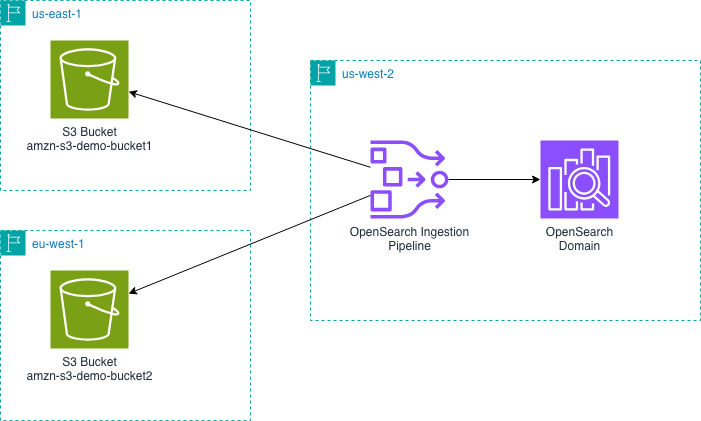
The following diagram shows the design for an OpenSearch Ingestion pipeline in us-west-2 reading from S3 buckets in us-east-1 and eu-west-1 and writing that data into an OpenSearch Service domain in us-west-2.

Next, you will create an OpenSearch Ingestion pipeline. You must create this pipeline in the same Region as your OpenSearch Service domain or collection.

version: "2"
s3-scan-cross-region:
  source:
    s3:
      compression: automatic
      codec:
        json:
      scan:
        buckets:
          - bucket:
              name: amzn-s3-demo-bucket1
          - bucket:
              name: amzn-s3-demo-bucket2
      aws:
        region: us-west-2

  sink:
    - opensearch:
        hosts: [ "https://search-mydomain-abcdefghijklmn.us-west-2.es.amazonaws.com" ]
        index: s3_scan_cross_region
        aws:
          region: us-west-2

The previous pipeline configuration supports the JSON codec. You might want to configure a different codec if your data isn’t a large JSON object.

You can now query your OpenSearch Service domain or collection to see the data that you ingested.

Streaming scenarios: AWS vended logs

Like many of our customers, you might want to ingest S3 data from different AWS Regions into OpenSearch Service. A common reason is to consolidate AWS vended logs. For example, VPC Flow Logs, CloudTrail data, and load balancer logs. For these scenarios, you can configure OpenSearch Ingestion pipelines to read from an Amazon SQS queue to stream data into your OpenSearch Service domain or collection.

These AWS vended logs write to Amazon S3 in the same AWS Region as the service running it. For example, VPC Flow Logs will be in the same AWS Region as your Amazon VPC. You can use OpenSearch Ingestion to consolidate these logs into one AWS Region. In the VPC Flow Logs example, you can consolidate your VPC Flow Logs from multiple AWS Regions into a single OpenSearch Service domain or collection to analyze network patterns from your different Amazon VPCs.

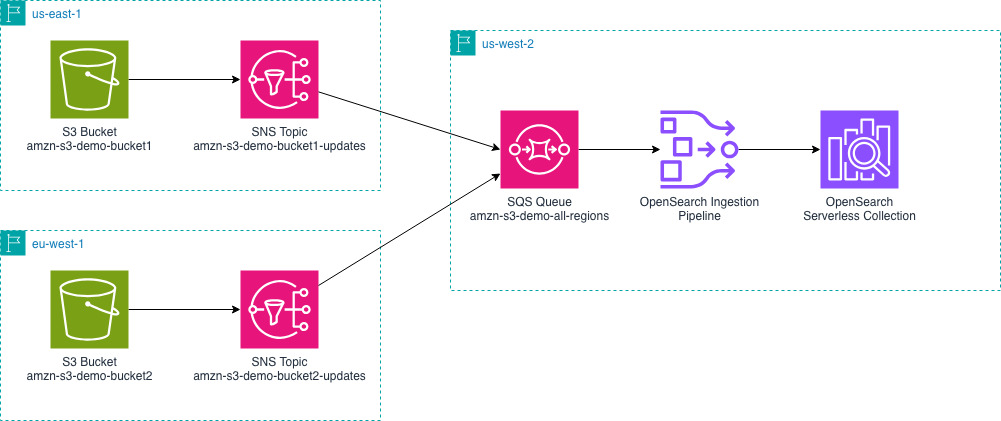
The following diagram outlines the overall setup. It shows an example of sending AWS vended logs from us-east-1 and eu-west-1 to an OpenSearch Service domain in us-west-2. You can change the AWS Regions depending on your specific needs.

  1. You must configure your vended logs to write log events to Amazon S3 buckets in their respective AWS Regions. Using VPC Flow Logs as our example, you can configure VPC Flow Logs for your VPCs.
  2. Create an Amazon SQS queue in the same AWS Region as your OpenSearch Service domain.
  3. Amazon S3 doesn’t send notifications to cross-Region Amazon SQS queues, so you will use intermediate Amazon Simple Notification Service (Amazon SNS) topics to consolidate the notifications from multiple Regions into one queue. For each S3 bucket, create an SNS topic.
  4. Configure S3 Event Notifications for SNS. You will do this for each S3 bucket and each SNS topic.
  5. SNS can send cross-Region notifications to SQS. Create a subscription from each SNS topic that you created in step 3 to the single SQS queue you created in step 2.
  6. Configure your pipeline role to read from SQS and read from the relevant S3 buckets.

Now create an OpenSearch Ingestion pipeline in the same AWS Region as your OpenSearch Service domain.

version: "2"
s3-sqs-cross-region:
  source:
    s3:
      notification_type: sqs
      codec:
        newline:
      sqs:
        queue_url: https://sqs.us-west-2.amazonaws.com/123456789012/amzn-s3-demo-all-regions
      aws:
        region: us-west-2

  sink:
    - opensearch:
        hosts: [ "https://search-mydomain-abcdefghijklmn.us-west-2.es.amazonaws.com" ]
        index: s3_sqs_cross_region
        aws:
          region: us-west-2

The previous pipeline configuration supports the JSON codec. You might want to configure a different codec if your data is not a large JSON object.

Next, upload objects with data into your S3 buckets. By uploading data, S3 will send notifications to SNS and then the SQS queue.

You can now query your OpenSearch Service domain or collection to see the data that you ingested.

Here is what makes this possible and what is different. The SQS queue receives the event notifications for the buckets. Before the cross-Region feature of OpenSearch Ingestion, the pipeline could see these events, but couldn’t access the S3 bucket even if the permissions were granted. Now, the pipeline will determine the AWS Region that the bucket is in, access an AWS Security Token Service (AWS STS) token for the AWS Region of the bucket. Using the STS token from the same Region as the S3 bucket allows the pipeline to read and access the data.

Using the AWS Console

When you create the pipeline using the OpenSearch Ingestion console, you will have options to select a blueprint for your use-case. These blueprints help you create pipelines for various vended log types only by selecting your SQS queue and OpenSearch domain. The blueprint handles the data type mappings for you by including appropriate processors. You can use these blueprints as a starting point and modify your processors for your specific requirements.

Clean up resources

When you’re done testing this out, use the following resources to delete the resources that you created.

If you set up a batch pipeline:

  • Delete the OpenSearch Ingestion pipeline.

If you set up a streaming pipeline:

For both pipelines, these steps help you delete the common resources.

Conclusion

In this post, I showed you how you can use Amazon OpenSearch Ingestion to ingest data from Amazon S3 buckets in different AWS Regions. I showed that this works for both batch scan and streaming scenarios. The feature offers you a straightforward way to consolidate your data from other Regions into one OpenSearch Service domain or collection.

To get started with the cross-Region S3 source, refer to the OpenSearch Ingestion documentation or try creating a pipeline from one of our blueprints using the OpenSearch Ingestion console. You can read about the codecs that OpenSearch Ingestion offers for parsing your S3 objects. You can also learn how about the various processors that OpenSearch Ingestion offers, so you can transform and enrich your data to meet your needs.

You can also use OpenSearch Ingestion for cross-Region and cross-account. To do this, you must grant cross-account permissions on your S3 bucket. You must also make some changes to your pipeline configuration. Combining what I showed you in this post with the existing cross-account features greatly expands your ingestion options.

If you’re ready to take your streaming ingestion analytics to the next level you can read about how to generate metrics from logs and even how to send those derived metrics to Amazon Managed Service for Prometheus.

Have you tried out the cross-Region capabilities of OpenSearch Ingestion? Share your use-cases and questions in the comments.


About the authors

David is a senior software engineer working on observability in OpenSearch at Amazon Web Services. He is a maintainer on the Data Prepper project.