Post Syndicated from Eva Donaldson original https://aws.amazon.com/blogs/big-data/patch-perfect-automating-amazon-redshift-patch-testing/
Amazon Redshift continuously innovates to deliver improved performance and advanced features. In some releases, Amazon Redshift patches might introduce behavior changes. Testing patches in a non-production environment confirms that production workloads continue to function and you can maintain your applications’ service level agreements. As a best practice, keep Dev/QA clusters on the Current patch track and Production on the Trailing track. Test on Dev/QA when a patch lands, allowing 1–6 weeks of review before the scheduled production deployment.
In this post, we demonstrate an automated test suite that validates your Amazon Redshift cluster automatically after any patch, reboot, or modification. It uses standard drivers against real workload patterns to provide a verified gate between a patch landing and that patch reaching production.
Architecture
The solution uses native AWS services to create an automated validation pipeline.
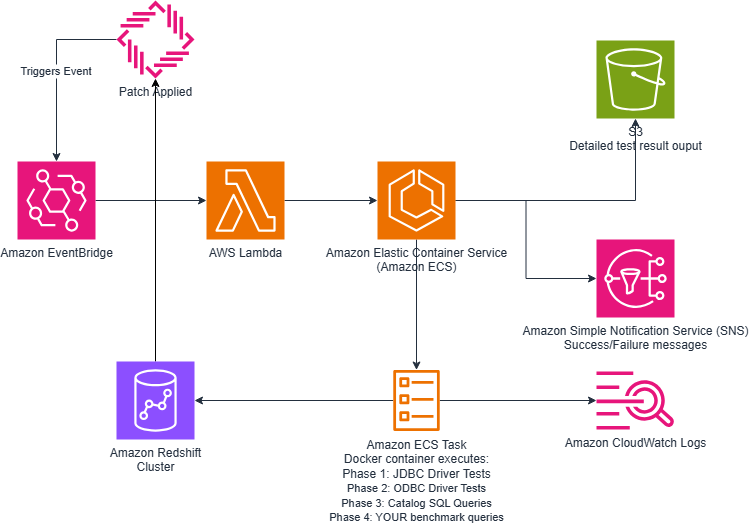
Figure 1 — High-level architecture diagram
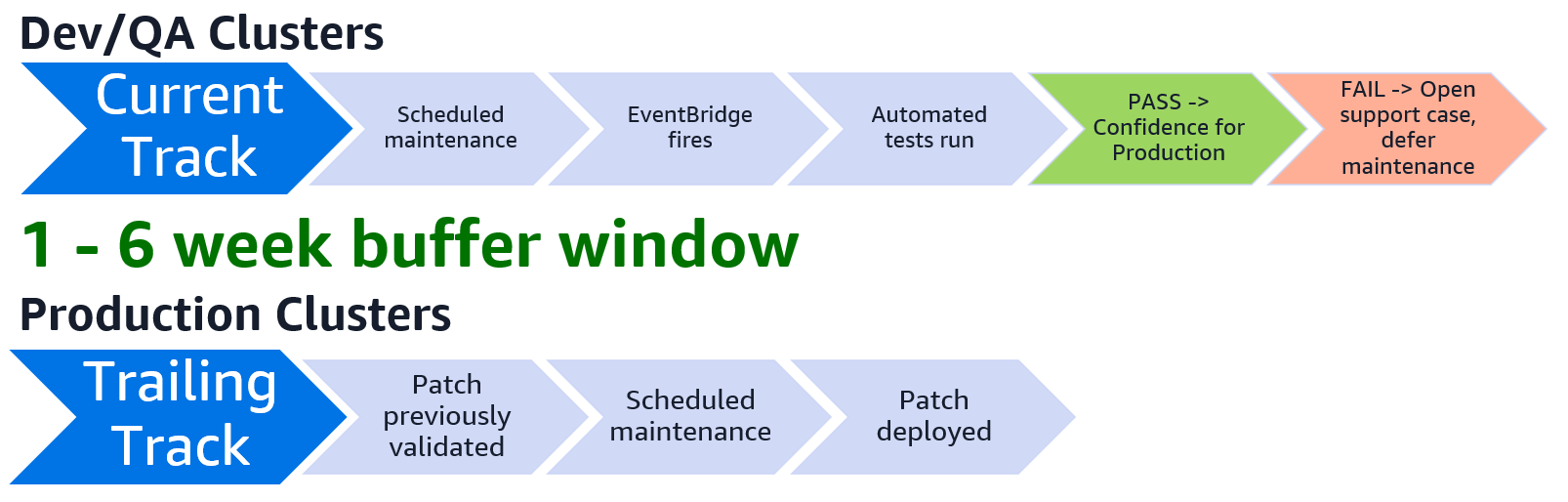
Figure 2 — Process overview
- Event Detection: When your Amazon Redshift cluster receives a patch, reboot, or modification, the Amazon Redshift cluster event notifications fire. Amazon EventBridge rules match these events automatically.
- Orchestration: A lightweight AWS Lambda function receives the event from the Amazon EventBridge rule and launches an AWS Fargate task. The task runs in a subnet within the same Amazon Virtual Private Cloud (VPC) as your Amazon Redshift cluster, giving the test runner direct network connectivity to the cluster endpoint.
- Test Execution: A Docker container runs a comprehensive test suite in four phases:
- JDBC Driver Tests – Validates the official Amazon Redshift JDBC driver, testing
DatabaseMetaDataAPI calls, connection handling, and queries that tools like SQL Workbench/J depend on. - ODBC Driver Tests – Validates the PostgreSQL ODBC driver with
SQLTables,SQLColumns, and other ODBC API calls that RStudio and similar tools use. - Catalog SQL Queries – Runs approximately 35 queries against
pg_catalog,information_schema, andsvv_*views, organized by client (SQL Workbench, DBeaver, RStudio, JDBC metadata API). - Performance Benchmarks – Executes your custom workload queries and compares execution time against known baselines, flagging regressions. For convenience, the solution includes sample queries to be replaced with performance validation queries from your workloads.
- JDBC Driver Tests – Validates the official Amazon Redshift JDBC driver, testing
- Reporting: Detailed JSON results land in Amazon Simple Storage Service (Amazon S3) for historical analysis. An Amazon Simple Notification Service (Amazon SNS) notification sends your team an email immediately with a pass/fail summary. Full JSON results are written to Amazon S3 with timing data for every individual query, row counts, error details, and the Amazon EventBridge event that triggered the run. If tests fail, you have specific, actionable evidence (which queries broke, which drivers failed, which benchmarks regressed) to open a support case requesting a rollback and defer maintenance until the case is resolved. When tests succeed, you can move forward with confidence to production.
For real-time feedback while the tests are running, a quick command tells you the current state:
What gets tested
The test suite covers two critical areas: client tool compatibility and query performance.
Client compatibility queries
The test suite replicates the connection behavior of popular SQL clients by issuing the same metadata API calls and queries they perform when connecting to your cluster.
| Client | What’s tested |
| SQL Workbench/J | Connection queries, schema browsing, metadata enumeration |
| DBeaver | Database object discovery, catalog traversal |
| RStudio (DBI/odbc) | ODBC-specific catalog queries, column type mapping |
| JDBC Metadata API | getTables(), getColumns(), getPrimaryKeys(), and other DatabaseMetaData method equivalents |
The package contains the exact queries these clients execute upon connection.
Performance regression detection
The benchmark phase of the suite automatically detects whether it has been run before. On the first execution, it captures baseline query execution times as the “known good” state for your pre-patch environment. On every subsequent run, it compares current query timings against the stored baseline and flags any regressions. If a query that previously completed in 2 seconds now takes 15, the report calls it out immediately. This phase is designed to test your most performance-sensitive queries.
Prerequisites
Before deploying, make sure your environment meets the following requirements:
- A VPC with private subnets and an Amazon NAT gateway (for Amazon Elastic Container Registry (Amazon ECR) image pulls).
- Amazon Redshift cluster reachable from the private subnets.
- An AWS Secrets Manager secret with your Amazon Redshift credentials (created automatically with managed clusters).
Docker installed. Consider building the image with AWS CloudShell, which comes with Docker pre-installed. You can do this either by uploading the customized repo to Amazon S3 and then downloading it to AWS CloudShell, or by cloning and customizing the repo directly within AWS CloudShell.
Getting started
The full solution is available on GitHub. It includes the AWS CloudFormation template, Docker build scripts, test suite, and documentation.
Clone the GitHub repo, customize it for your workload, deploy it against a Dev/QA cluster.
Detailed instructions are included in the package README.md. Reference those for deployment.
Step 1: Clone the repo
Clone the GitHub repo.
Step 2: Customize the scripts for your environment
The test suite ships with comprehensive default queries. After cloning and before deployment, edit the scripts as described in the following sections for each phase.
Add your performance-critical queries
Edit bundle/run_tests.py and replace the example queries with queries where performance is critical:
Add client-specific catalog queries
If your team uses custom views or schemas, add them to bundle/client_catalog_queries.py:
Step 3: Build the Docker image
Execute build-image.sh, which creates an Amazon ECR repository, builds the Docker image (with JDBC and ODBC drivers bundled), and pushes it, outputting the image URI for the next step.
Step 4: Deploy the stack
Use the AWS Command Line Interface (AWS CLI) to deploy the AWS CloudFormation stack with your environment-specific parameters. The stack creates the required components: Amazon Elastic Container Service (Amazon ECS) cluster, AWS Fargate task definition, security groups, VPC endpoints (to keep AWS Secrets Manager and Amazon SNS traffic off the NAT gateway), Amazon S3 bucket, Amazon SNS topic, AWS Lambda trigger, and Amazon EventBridge rules.
Key takeaways
Here are the core principles that make automated patch testing effective:
- Dev/QA on Current track, Production on Trailing: This separation creates the buffer window between when a patch is available and when it reaches production. Without it, there’s no opportunity to catch regressions before they affect users.
- Automate the validation: The track split is most effective if the test suite runs after every patch. Event-driven automation helps confirm no patch goes untested during the buffer window.
- Test with real drivers: Simulated queries aren’t sufficient. The test suite exercises the Amazon Redshift JDBC and PostgreSQL ODBC drivers that your SQL clients depend on. This validates the same code paths your tools use in production.
- Event-driven, not scheduled: Tests run the moment a patch is applied. They don’t run on a fixed cron schedule. Patch applied, then test executed, then results delivered in minutes.
- Low operational overhead, minimal cost: The entire solution is serverless (AWS Lambda and AWS Fargate). There are no instances to manage and no agents to install. The Fargate task spins up only when a patch event fires, runs the test suite, and shuts down. You pay only for the compute each test run consumes.
Clean up
When you no longer need the automated test suite, delete the associated resources so you don’t incur ongoing costs.
- Delete any created prerequisites, if not needed.
- Amazon Redshift cluster (removes the managed secret).
- NAT gateway.
- VPC.
- Empty the Amazon S3 results bucket (AWS CloudFormation cannot delete non-empty buckets).
- Delete the image you installed in the Amazon ECR repository in step 1 of getting started.
- Delete the AWS CloudFormation stack to remove the Amazon ECS cluster, AWS Fargate task definition, security groups, VPC endpoints, Amazon S3 bucket, Amazon SNS topic, AWS Lambda function, and Amazon EventBridge rules created by the deployment.
Conclusion
Automated patch testing ensures consistent and predictable performance of your production workloads. By deploying Dev/QA clusters on the Current track with event-driven validation, you gain weeks of advance notice before patches reach production. The solution presented here provides comprehensive testing of JDBC drivers, ODBC drivers, catalog queries, and performance benchmarks. It requires zero manual intervention. Deploy it once, customize it for your workload, and gain confidence that the next Amazon Redshift patch will be validated before it matters.
To learn more about Amazon Redshift, explore the following resources:
- Amazon Redshift service page
- Amazon Redshift documentation
- AWS Management Console for Amazon Redshift
- GitHub repository