All posts by Lakshmi VP

Architecting SASE solutions using AWS Local Zones

Post Syndicated from Lakshmi VP original https://aws.amazon.com/blogs/compute/architecting-sase-solutions-using-aws-local-zones/

Organizations with geographically distributed workforces face a critical challenge: providing secure, low-latency access to applications without routing all traffic through centralized data centers. Traditional hub-and-spoke network architectures create latency bottlenecks and degrade user experience, forcing a trade-off between security and performance.

This post explores how you can use AWS Local Zones and Secure Access Service Edge (SASE) solutions to eliminate that trade-off. You will learn key design principles, implementation strategies, and technical considerations for deploying SASE solutions at the edge. We’ve seen that understanding your user locations and traffic volumes up front helps you make effective design decisions.

Key challenges for deploying SASE solutions

SASE solutions require virtual security appliances such as firewalls, secure web gateways, and zero trust network access (ZTNA) connectors. You deploy these appliances close to end users so that traffic inspection does not add latency to the user experience. With AWS Local Zones, you can deploy these virtual security appliances from AWS Marketplace closer to end users.

When you architect SASE solutions using Local Zones, you need to address several key technical challenges. Latency requirements: When end users are far away from an AWS Region, applications requiring security inspection experience significant latency overhead that affects overall performance and user experience. Geographic coverage: In some cases, workforces are spread across distributed locations far from an AWS Region. You need solutions that deliver consistent service quality and security capabilities to users across your covered locations.

Hybrid connectivity: Many applications maintain dependencies on on-premises data centers in areas far away from an AWS Region. Design traffic routing carefully to avoid unnecessary network paths and reduce traffic hairpinning or network flapping. Security consistency: Implement uniform security controls across all distributed locations while maintaining performance. This requires consideration of service placement and routing architecture.

Before looking at the SASE-specific design, it helps to understand what Local Zones provide. The following diagram shows how Local Zones extend AWS infrastructure from the Region out to metropolitan areas closer to end users.
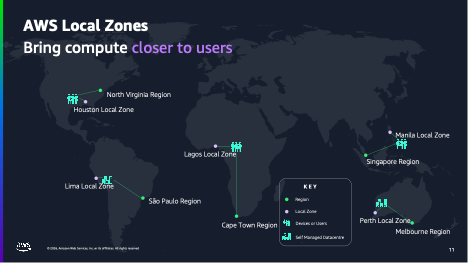
High-level AWS infrastructure diagram showing how Local Zones bring compute closer to users

Figure 1: High-level AWS infrastructure diagram showing how Local Zones bring compute closer to users

As the diagram shows, Local Zones place compute closer to end users. This especially benefits those far from an AWS Region.

Prerequisites

To follow the guidance in this post, you should be familiar with:

Architecture considerations

When you design SASE solutions with Local Zones, you can follow several key best practices across infrastructure, control plane, and traffic management.

Infrastructure deployment

At the infrastructure level, focus on deploying virtual security appliances to optimize coverage and performance. Start by selecting and configuring Amazon EC2 instances optimized for maximum network throughput. Choose instance families that provide the compute and networking capabilities required for traffic inspection workloads, with enhanced networking enabled for high packets-per-second performance.

Design a scalable cluster management strategy that adapts to varying workload demands while maintaining consistent security posture. As you deploy these clusters, establish proper multi-tenant isolation to maintain security boundaries between different organizational units, keeping user resources separate from management infrastructure.

Control plane architecture

The SASE control plane requires particular attention in distributed deployments. Deploy control components in an AWS Region to manage security appliances across all Local Zone locations. This provides a single point of policy distribution and configuration management. From this centralized vantage point, you can implement policy management that maintains consistency in security enforcement across all locations.

Visibility matters as much as policy enforcement. Implement standardized telemetry collection mechanisms, such as Amazon CloudWatch metrics and logs, across all locations so you can maintain observability and resolve issues proactively. As your deployment grows, automate configuration deployment using infrastructure as code (IaC) tools such as AWS CloudFormation or Terraform. This keeps deployment consistent across all edge locations and reduces manual errors when operating at scale.

Traffic management

Traffic management completes the architecture of a well-designed SASE solution. Use Amazon Route 53 with geoproximity routing and health checks to direct users to the nearest security inspection point, minimizing inspection latency. If an appliance fails, Route 53 automatically reroutes traffic to the next-nearest Local Zone. For critical deployments, maintain standby capacity in the parent Region as a fallback.

Deploy VPN endpoints in Local Zones closest to your user populations to reduce connection latency for remote users while maintaining high availability through health-checked failover across multiple locations. Plan your Internet Service Provider (ISP) connectivity for redundancy and performance requirements across different geographical locations, and implement geographic load-balancing mechanisms to distribute traffic efficiently across available resources.

You also need to consider the egress path, which is how traffic exits after inspection. For internet-bound traffic, use the Local Zone’s direct internet egress to avoid routing back through the parent Region. For traffic destined to applications in an AWS Region, traffic traverses the AWS private network between the Local Zone and its parent Region. Validate egress paths using VPC Flow Logs and traceroute to confirm traffic is not taking unintended hops.

The following diagram shows how the Local Zones architecture applies to a SASE use case, routing user traffic to a nearby Local Zone for inspection.
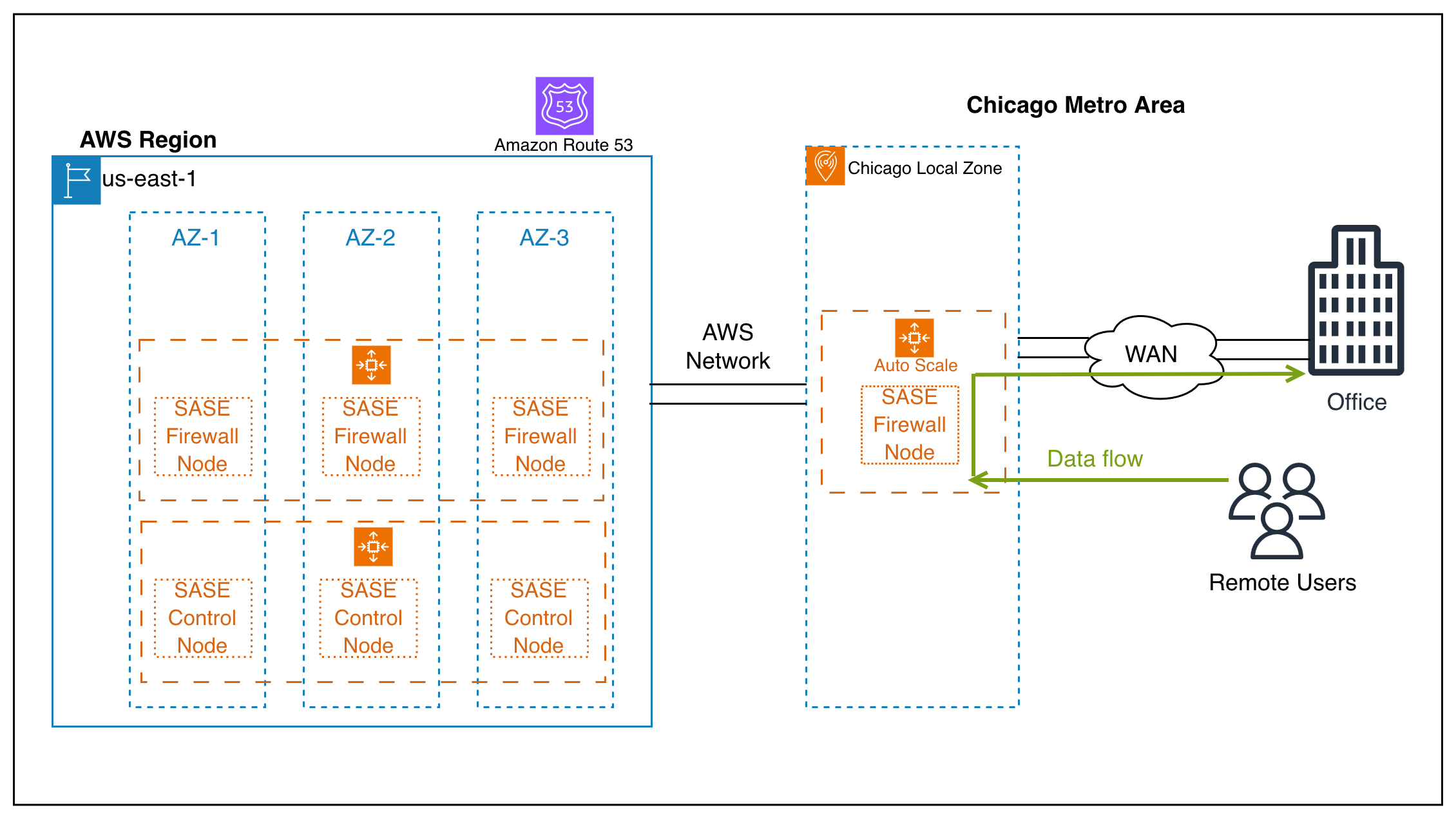
Remote users and branch offices routing traffic to virtual network firewalls in the nearest Local Zone, with control nodes in the parent AWS Region

Figure 2: Enterprise SASE deployment using virtual network firewalls across Local Zones to secure remote user and branch office access

As the diagram shows, remote users and branch offices connect to virtual network firewalls running in the Local Zone closest to them. Each Local Zone performs local traffic inspection that reduces latency for the SASE use case. The control nodes in the parent AWS Region manage policy and configuration across all locations.

Reference implementation approach

This section outlines the key phases for implementing a SASE solution across AWS Local Zones, from initial planning through validation.

Phase 1: Plan your deployment

Begin by mapping your user locations and latency expectations to identify which Local Zones are closest to your user populations, and determine which applications require local security inspection. With this map in hand, calculate capacity needs per location based on expected traffic volumes and security inspection requirements. Then define the specific inspection capabilities you need at each location, whether that is firewall, secure web gateway, ZTNA, or a combination.

One key design decision at this stage is whether to route all user traffic through the Local Zone appliance (full tunnel) or only corporate-bound traffic (split tunnel). Full tunnel provides complete traffic visibility but requires higher instance throughput. You can validate your choice by using VPC Flow Logs and CloudWatch network metrics to measure actual traffic volume per user during a pilot deployment.

Phase 2: Configure networking infrastructure

With your plan in place, enable the target Local Zones in your AWS account and create a VPC that extends into your chosen Local Zones by creating subnets in each one. Configure route tables to direct traffic through your virtual security appliances.

Security at the network layer is critical. Set up security groups that permit the required traffic flows for your SASE inspection chain. Add inbound rules for user VPN connections (for example, UDP 4500/500 for IPsec), outbound rules to target applications, and management access from the parent Region. Add network ACLs as an additional layer of defense at the subnet level to restrict traffic to expected protocols and port ranges.

Phase 3: Deploy virtual security appliances

Launch your chosen virtual security appliance from AWS Marketplace in each target Local Zone. Use M6i or M6g instances, or newer instances optimized for network throughput. For example, m6i.xlarge provides up to 12.5 Gbps network bandwidth. Deploy scalable clusters of 2–20 instances depending on location traffic volume, and configure elastic network interfaces for traffic inspection with separate inbound and outbound interfaces.

Enable enhanced networking and verify that the instance supports the throughput required for your expected traffic volume. This validation step is critical before moving to production, because undersized instances can become bottlenecks that negate the latency benefits of Local Zone placement.

Phase 4: Configure the control plane

Deploy your centralized SASE management components in the parent AWS Region and establish connectivity between the regional management infrastructure and your Local Zone appliances. Push security policies from the central management console to all distributed appliances to maintain consistent enforcement.

For observability, configure centralized logging and telemetry collection using Amazon CloudWatch. Enable VPC Flow Logs on Local Zone subnets to capture traffic metadata for compliance auditing and security analysis. Use this data for troubleshooting and demonstrating regulatory compliance.

Phase 5: Set up traffic routing

Configure Amazon Route 53 with geoproximity routing policies to direct users to the nearest Local Zone. Set up health checks that automatically fail over if a Local Zone appliance becomes unhealthy. Deploy VPN endpoints in each Local Zone for remote user connectivity.

After your routing is configured, test end-to-end connectivity and verify that traffic routes through the nearest security inspection point. This confirms that your geoproximity policies work as intended and that users receive the expected latency benefits.

Phase 6: Validate and optimize

With your deployment live, verify latency improvements by comparing round-trip times to the parent AWS Region and to the Local Zones. Monitor appliance utilization metrics (CPU, network throughput, and concurrent sessions) in Amazon CloudWatch, and adjust cluster sizes at each location based on observed traffic patterns. Validate that security policies are applied consistently across all locations.

Configure CloudWatch alarms to trigger scaling actions. For example, scale out when average CPU exceeds 70% or network throughput exceeds 80% of instance capacity over a 5-minute period. Use CloudWatch anomaly detection to identify unusual traffic patterns that might indicate a misconfigured routing policy or a security event.

Capacity planning

Local Zones provide the same elasticity as AWS Regions to scale your virtual security appliances based on demand. To optimize your deployment:

  • Use Amazon EC2 Auto Scaling to automatically adjust the number of appliance instances based on traffic patterns and utilization metrics.
  • Create On-Demand Capacity Reservations to support applications that must provide guaranteed availability at all times.
  • Design your architecture to work across multiple instance families, giving you flexibility to use the most suitable compute resources available at each location.
  • For cost optimization, consider using Compute and EC2 Instance Savings Plans for steady-state appliance instances that run continuously, while relying on On-Demand pricing for burst capacity during peak traffic periods.

Before production deployment, validate that your chosen virtual appliance functions correctly in the target Local Zone and test network dependencies to confirm expected performance.

Clean up

If you deploy resources following this guidance and no longer need them after your testing, terminate EC2 instances, release Elastic IP addresses, delete Capacity Reservations, and remove associated networking resources (subnets, route tables, security groups, Route 53 policies) to avoid ongoing charges.

Conclusion

This post explored how you can deploy SASE solutions on AWS Local Zones. Local Zones bring three key benefits to SASE architectures. They reduce security inspection latency by placing appliances closer to users, apply consistent security enforcement across geographically distributed locations, and eliminate the need to backhaul traffic to centralized data centers. Organizations continue to expand their operations to more geographic locations. The combination of AWS Local Zones and SASE solutions from partners such as Palo Alto Networks provides a scalable approach for delivering secure connectivity to users anywhere.

Learn more

For instructions to opt in to a Local Zone and launch your Amazon EC2 instance, see the AWS Local Zones Getting started page. To learn where AWS Local Zones are available globally, check out the AWS Local Zones locations page.
Overview of security services available in AWS Dedicated Local Zones

Post Syndicated from Lakshmi VP original https://aws.amazon.com/blogs/security/overview-of-security-services-available-in-aws-dedicated-local-zones/

 When modernizing applications, customers in regulated industries like government, financial, and research face a critical challenge: how to transform their systems while meeting strict digital sovereignty and security compliance requirements. A common misconception tied to this is that data must be moved to an AWS Region to fully use Amazon Web Services (AWS) security services.

In this blog post, we dispel that misconception by addressing how to use the following Region-based AWS security services while keeping your data within AWS Dedicated Local Zones.

Dedicated Local Zones are AWS-managed on-premises infrastructure configured for your exclusive use. They help meet specific regulatory requirements while providing cloud benefits such as elasticity, scalability, and pay-as-you-grow pricing. You can place data in your chosen location and use it with enhanced security and governance features provided by AWS to monitor and control application access while maintaining data isolation, in-country data residency, digital sovereignty, and meeting compliance requirements.

AWS Nitro System

Many organizations with strict compliance and data sovereignty requirements are understandably hesitant about moving confidential workloads to the cloud. Their concerns are legitimate and specific: they need a solution that provides independently verifiable protection and isolation from data access by privileged parties, including cloud provider personnel. These organizations also require assurance that unauthorized data access through the cloud control plane is technically impossible, not just contractually prohibited.

Perhaps most critically, they need side-channel protection to help make sure that sensitive data cannot leak through memory or other means to other hypervisor tenants sharing the same physical infrastructure. Traditional cloud security approaches often rely on operational controls and promises rather than technical impossibility, which doesn’t meet the stringent requirements these organizations face.

The AWS Nitro System, which is the foundation of AWS next generation Amazon Elastic Compute Cloud (Amazon EC2) instances that run in a Dedicated Local Zone and its parent Region, addresses each of these concerns through its architecture. This purpose-built combination of specialized hardware and software creates a secure enclave that shields your data from unauthorized access during processing on EC2 instances.

The EC2 instances that run in your Dedicated Local Zones are based on AWS Nitro System, which is designed to provide robust security for compute workloads. It uses specialized hardware and software components to help protect your data from unauthorized access during processing on Amazon EC2.

The three key components of Nitro System include a purpose-built Nitro cards, the Nitro Security Chip, and a Nitro Hypervisor. Together, these three components are designed to enforce restrictions and provide physical and logical security boundaries so that no one, including AWS employees, can access customer workloads or data running on Amazon EC2 without your explicit authorization.

The Nitro System whitepaper details how the Nitro System, by design, removes the possibility of administrator access to an EC2 instance, the overall passive communications design of the Nitro System, and the Nitro System change management process. The security design of the Nitro System has also been independently validated by the NCC Group in a public report.

AWS Key Management Service

Working with customers, we’ve noticed that one of the most persistent sources of confusion and concern isn’t just about whether their data is encrypted, but about who controls the keys that protect that encryption. Many organizations struggle with a fundamental tension: they want the operational benefits of cloud computing, but they also need to maintain strict control over their encryption keys to meet compliance requirements.

This concern is particularly acute for organizations in regulated industries, which often ask pointed questions like “Where exactly are my encryption keys stored?” and “Who can access my keys?” AWS KMS addresses this by offering multiple approaches to key management, each designed for different security and operational requirements. The service provides centralized control over the lifecycle and permissions of encryption keys, so you can create new keys whenever needed and control key management access separate from key policies

By default, Dedicated Local Zones customers can use the integration with AWS KMS in the parent Region to store and control encryption keys. You can then use these encryption keys to encrypt your data stored locally in Amazon EBS, and Amazon S3 in the Dedicated Local Zones.

If your use cases require an external encryption key store to maintain strict data sovereignty requirements, then the combination of Dedicated Local Zones and an AWS KMS external key store can provide a robust solution.

Using an external key store in Dedicated Local Zones, you can host the external hardware security module (HSM) that stores your encryption keys on-premises or colocated with your other infrastructure. By doing this, you maintain full control over the physical security and management of the HSM, while benefiting from the low-latency access and data processing capabilities of Dedicated Local Zones.

The main components of AWS KMS external key store architecture are:

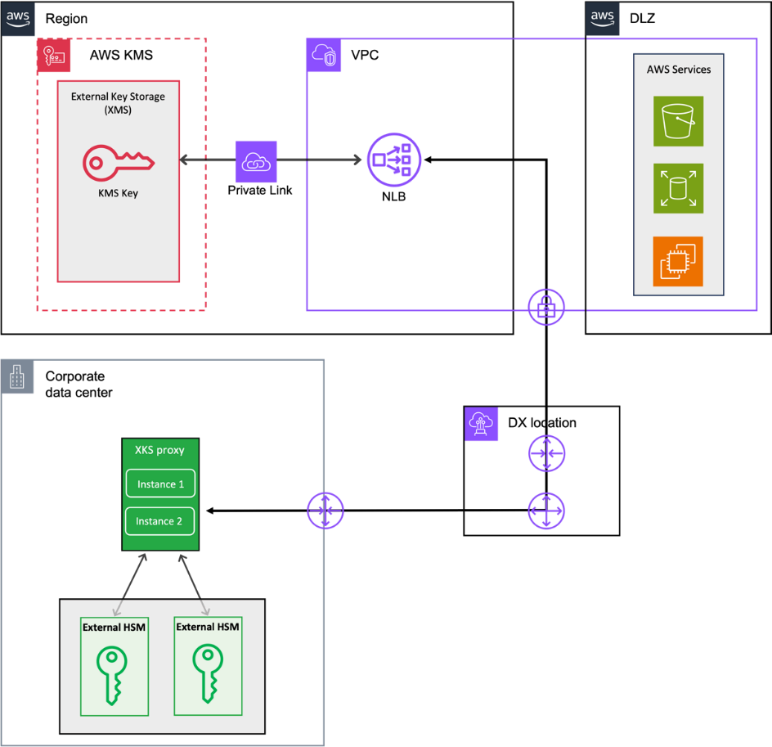
  • XKS proxy server: You provision an external key store proxy (XKS proxy) server within your on-premises data center (as shown in Figure 1) or within the Dedicated Local Zones. The role of the XKS proxy is to act as the intermediary between AWS KMS and your on-premises HSM. The XKS proxy must be registered as target of a Network Load Balancer (NLB) in Region, this means that if it’s hosted on your on-premises data center, then NLB Amazon Virtual Private Cloud (Amazon VPC) must have private connectivity to the on-premises network through a site-to-site VPN or AWS Direct Connect connection.
  • On-premises HSM: You configure your on-premises HSM to securely store the root encryption keys that will be used to protect your data encryption keys.
  • External key store: You create an external key store resource in AWS KMS, which maps to your on-premises HSM through the XKS proxy.
Figure 1: AWS KMS external key store in a Dedicated Local Zone

Figure 1: AWS KMS external key store in a Dedicated Local Zone

The workflow is as follows:

  1. Amazon Simple Storage Service (Amazon S3) or Amazon Elastic Block Store (Amazon EBS) deployed locally in the Dedicated Local Zones needs to encrypt data, it requests AWS KMS to generate a new data encryption key.
  2. AWS KMS sends a request to the XKS proxy, which communicates with your on-premises HSM to generate the root key material.
  3. AWS KMS uses this root key to encrypt the data encryption key before returning it to the requesting service and stores the encrypted data encryption key alongside the encrypted data in Amazon S3 or Amazon EBS.
  4. For future encrypt/decrypt operations, the AWS service uses the previously generated and AWS KMS-encrypted data encryption key, without needing to interact with the on-premises HSM.

Note: The on-premises HSM only participates in the initial root key generation to protect the data encryption key, not in the high-volume encrypt/decrypt operations on the data itself.

This architecture delivers two key benefits:

  • You maintain complete control of your encryption keys by storing them in your data center, helping you meet security compliance requirements.
  • Dedicated Local Zones keep your data isolated in your chosen location, providing low latency for your users.

It’s important to note that using an AWS KMS external key store requires you to manage additional operational tasks beyond standard AWS KMS. To maintain continuous access to your encrypted data, you must provide 24/7 availability of your on-premises HSM, monitor XKS proxy infrastructure performance, implement robust security controls, and create backup and recovery procedures.

Because system outages can prevent access to your encrypted data, we recommend that you develop detailed operational runbooks, set up comprehensive monitoring, test your recovery procedures regularly, and maintain redundant systems where possible.

For more information about the interactions between AWS KMS and the external key store, see Announcing AWS KMS External Key Store (XKS).

Amazon Inspector

Another common concern we hear from organizations evaluating Dedicated Local Zones is whether they’ll need to compromise on security capabilities to maintain data residency. The reality is that AWS security services running in a Region, such as Amazon Inspector, are specifically designed to provide comprehensive protection while respecting your data location requirements.

Organizations running regulated applications in Dedicated Local Zones require robust protection from zero-day vulnerabilities, prioritized patch remediation, and automated vulnerability management to meet compliance requirements. Amazon Inspector addresses these needs by continuously scanning your workloads to detect software vulnerabilities and unintended network exposure without requiring data movement from your chosen location.

Amazon Inspector helps protect your workloads through two distinct scanning modes: hybrid scanning and agent-based scanning. However, for the context of this blog, let’s consider only agent-based scanning mode.

To securely meet data residency requirements in Dedicated Local Zones, enable agent-based scanning mode on AWS Systems Manager (AWS SSM)-managed instances in your account. It’s the default mode for new accounts offering enhanced security through continuous scanning, immediately responding to new common vulnerabilities and exposures (CVEs) and instance changes. It also enables deep inspection capabilities for eligible instances, providing comprehensive vulnerability assessment.

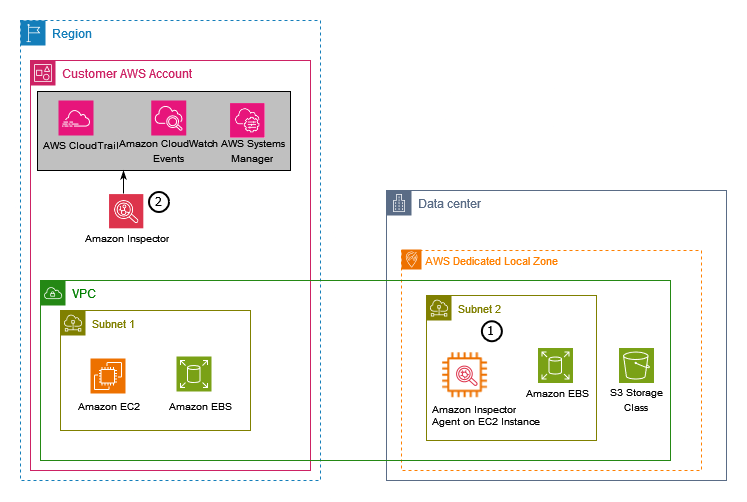
The reference architecture in Figure 2 shows:

  1. Amazon Inspector agent running on AWS SSM managed instances, keeping your application data within Dedicated Local Zones.
  2. Amazon Inspector evaluates and generates findings for detected vulnerabilities.
Figure 2: Amazon Inspector in Dedicated Local Zones

Figure 2: Amazon Inspector in Dedicated Local Zones

Amazon GuardDuty

Maintaining data sovereignty with Dedicated Local Zones doesn’t mean sacrificing advanced security capabilities. GuardDuty demonstrates how sophisticated threat detection can operate effectively while honoring strict data residency requirements.

Protecting your AI workloads from ransomware and advanced security threats requires an AI and machine learning (AL/ML)-integrated threat intelligence solution that can detect suspicious activity and respond proactively. GuardDuty uses AI/ML-based threat detection and integrated threat intelligence from AWS and leading third parties to protect your AWS accounts, workloads, and data. It continuously monitors malicious activity, delivers detailed security findings, and you can use the information it provides to respond quickly to threats.

With GuardDuty EKS Protection, monitors Kubernetes audit logs to detect threats. The key point to note is that your data is stored in your chosen location and the parent Region only processes log data.

GuardDuty Runtime Monitoring observes and analyzes operating system, networking, and file events to detect potential threats in your AWS workloads. The parent Region receives only threat reports while Dedicated Local Zones retain your data.

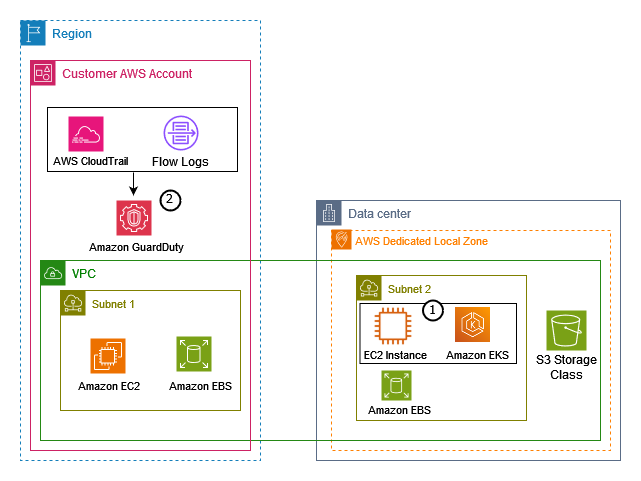
The reference architecture in Figure 3 shows how GuardDuty helps protect your data in a Dedicated Local Zones:

  1. GuardDuty monitors EC2 instances while your data stays in Dedicated Local Zones.
  2. GuardDuty analyzes data sources from AWS CloudTrail event logs, management events, and Amazon VPC flow logs that your AWS account captures in the Region.
Figure 3: Amazon GuardDuty in Dedicated Local Zones

Figure 3: Amazon GuardDuty in Dedicated Local Zones

AWS Certificate Manager

Organizations frequently express concern about certificate management complexity when deploying applications in Dedicated Local Zones. AWS Certificate Manager (ACM), which operates in the parent Region, addresses these challenges by serving as the primary service that customers use to provision, manage, and deploy certificates for use in both public-facing and private Dedicated Local Zones workloads.

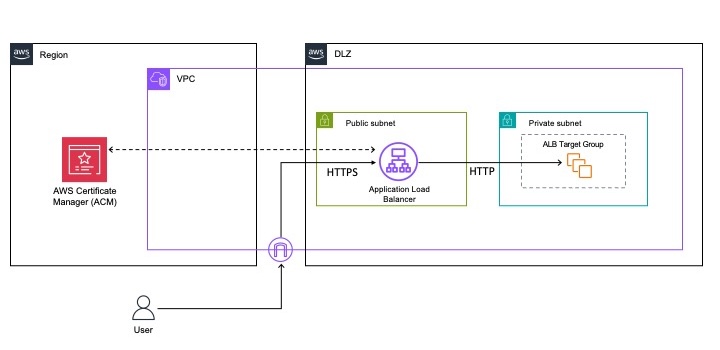
ACM integrates seamlessly with ALBs in Dedicated Local Zones to manage your complete certificate lifecycle, as shown in Figure 4.

Figure 4: ACM in Dedicated Local Zones

Figure 4: ACM in Dedicated Local Zones

Follow these steps to implement TLS certificates in Dedicated Local Zones:

  1. Provision or import certificates through ACM in the parent Region.
  2. Associate your certificates with ALB HTTPS listeners in Dedicated Local Zones to enable secure, low-latency SSL/TLS termination near your users.

ACM renews certificates automatically, avoids manual management tasks, and maintains continuous HTTPS service availability. This integration delivers enterprise-grade security with your data residing locally in Dedicated Local Zones. It also provides enhanced performance and reduced latency through proximity to users.

AWS Shield

Business-critical applications in Dedicated Local Zones need maximum availability and responsiveness. AWS Shield Standard, a managed distributed denial of service (DDoS) protection service that runs at the AWS edge, automatically helps protect your applications by detecting and mitigating network (Layer 3) and transport (Layer 4) DDoS attacks even before they reach your workloads.

AWS CloudTrail

A common concern when deploying workloads in Dedicated Local Zones is whether organizations can maintain the same level of governance and compliance oversight they expect from traditional AWS deployments. CloudTrail demonstrates how comprehensive auditing capabilities can extend seamlessly across distributed infrastructure while respecting data residency requirements.

CloudTrail, running in the parent Region, enables governance, compliance, operational auditing, and risk auditing of your AWS account providing you aggregated and consolidated record of multisource events in a single place. This includes a detailed history of AWS API calls for your account, including API calls made using the AWS Management Console, the AWS SDKs, the command line tools, and higher-level AWS services used by the applications running in your Dedicated Local Zones. Only the logs are stored in the parent Region, while your data remains within the Dedicate Local Zones. AWS CloudTrail helps you to enable operational and risk auditing, governance, and compliance of your AWS accounts.

Conclusion

Dedicated Local Zones provide a robust solution for running regulated workloads for all industries, to meet strict data residency and digital sovereignty. Through integrated security services like AWS Nitro System, AWS KMS External Key Store, ACM, AWS Shield, Amazon GuardDuty, Amazon Inspector, and AWS CloudTrail, your organization can achieve stronger security compliance for their mission-critical applications running in AWS Dedicated Local Zones.

To learn more about implementing these security solutions in your Dedicated Local Zones deployment, contact your AWS account team.

If you have feedback about this post, submit comments in the Comments section below. If you have questions about this post, contact AWS Support.


Lakshmi VP

Lakshmi VP

Lakshmi is a Solutions Architect at AWS WWPS-Canada and specializes in hybrid edge solutions—Outposts, Local Zones and Dedicated Local Zones. With over 16 years of global supporting various industries, Lakshmi is passionate about technology and practical solutions for customers. Outside work, she enjoys watching animated movies and hiking.

Enrico Liguori

Enrico Liguori

Enrico is a Specialist Solutions Architect focused on networking and hybrid cloud. He works within the Worldwide Public Sector Solutions Architecture organization, where he leverages his expertise to design highly available, scalable, secure, and cost-effective networking and hybrid cloud solutions. When Enrico isn’t immersed in his professional responsibilities, he indulges in exploring the wonders of the underwater world through scuba diving.