All posts by Mel Farrington

Reintroducing Code Classroom – now with the Blocks editor

Post Syndicated from Mel Farrington original https://www.raspberrypi.org/blog/reintroducing-code-classroom-now-with-the-blocks-editor/

Code Classroom — formerly known as the Code Editor for Education — is our free, safe tool for teaching and learning computing and programming. We’re delighted to share that Code Classroom now includes our new Blocks editor, based on the open-source Scratch editor.
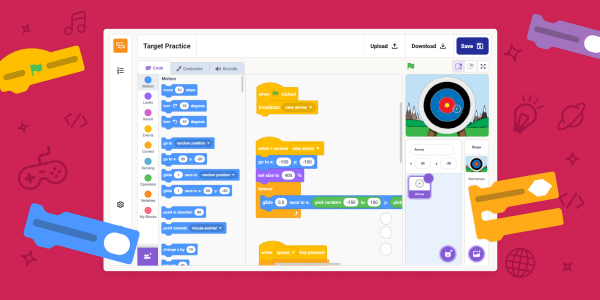
With the Blocks editor, Code Classroom offers the familiar creative programming experience used by millions of young learners worldwide, plus all its helpful features for teachers. You can now inspire learners’ imagination and build their confidence through drag-and-drop coding in the same tool over 4500 schools already use to teach Python and web development. 

Early feedback on this Code Classroom addition has been very encouraging. One UK computer science teacher told us:

“I think it’s going to be hugely transformative for schools… Not just Scratch. Python, HTML and CSS… all in one platform is enormous.”

Bartholomew Owuor, a computer science  teacher at Cathsam School in Kenya said:

“When the coding blocks were introduced, I was able to widen my scope and to include so many learners from different ages.”

All Code Classroom features, including the Blocks editor, are now also available when you use Experience CS.

Made for the classroom

Code Classroom is built for schools and shaped by real teacher feedback. Every feature is designed around how teachers and students actually work.

  • Free forever: Completely free to use, with no hidden costs or subscriptions
  • Private by default: A secure environment designed for schools’ needs
  • Built-in classroom / learning management: Create classes, assign work, and track learner progress in one simple platform

Up and running in minutes

There’s no software to install and nothing for your school’s IT team to manage. Code Classroom runs in the browser, so you can set up your classes, add your students, and be ready to teach by your very next lesson.

Code Classroom is now also integrated with Google Classroom. That means you can import your existing classes with just a few clicks, which reduces setup time. With Google single sign-on for students, everything stays connected and easy to manage. You can spend less time on administration and more time on teaching.

Three ways to learn, one platform

  • Blocks editor: Where young people can drag and drop colourful blocks to code games, stories, and animations, learning core programming concepts without needing to type
  • Python editor: Where learners can move from typing their very first text-based program all the way to the skills and confidence to write and understand code
  • Web editor: Where young people can design and build their own web pages with text-based HTML and CSS

With all three editors in one place, you can support every student, whatever their coding experience.

The post Reintroducing Code Classroom – now with the Blocks editor appeared first on Raspberry Pi Foundation.
Code Editor update: Support for HTML and mobile devices 

Post Syndicated from Mel Farrington original https://www.raspberrypi.org/blog/html-code-editor/

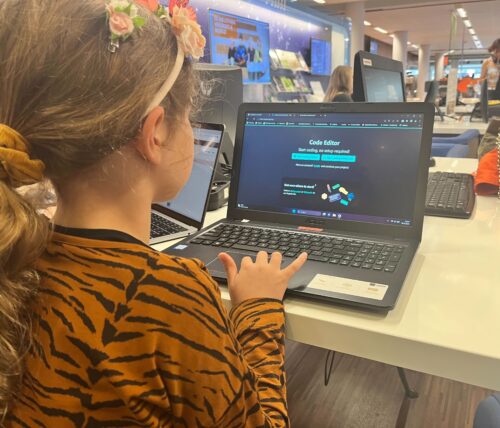
Earlier this year, we launched our Code Editor, a free online tool to help make learning text-based programming simple and accessible for kids age 9 and up. We focus on supporting the needs of young people who are learning programming at school, in Code Clubs and CoderDojos, and at home.

A young coder using the Code Editor.

Today, we have two exciting updates to share: support for web page projects with HTML/CSS, and an improved mobile and tablet experience.

What’s the Code Editor?

Learners can use the Code Editor to write and run code in a web browser without installing any additional software. The Editor is currently available as a beta version, and we’ve already received really positive comments: 

“The Editor looks really nice! I have tried the Python part, and it is intuitive and concise. My little program worked no problem, and I am sure the Editor will be easy, intuitive, and quick to learn for the young [learners].”

— Volunteer in the CoderDojo community

Introducing HTML and CCS in the Code Editor 

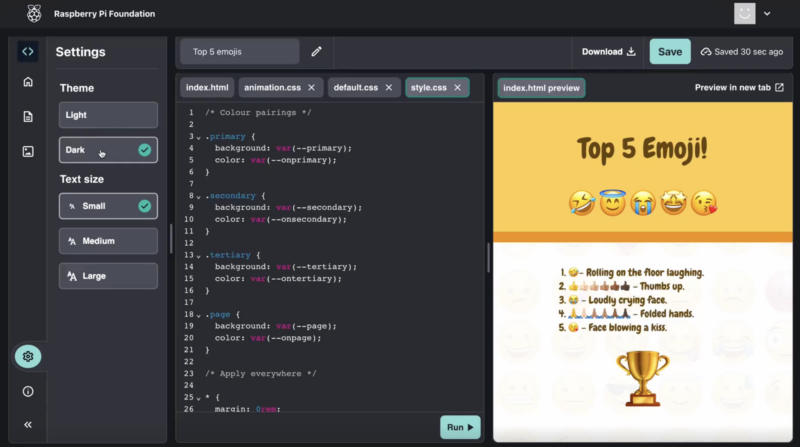
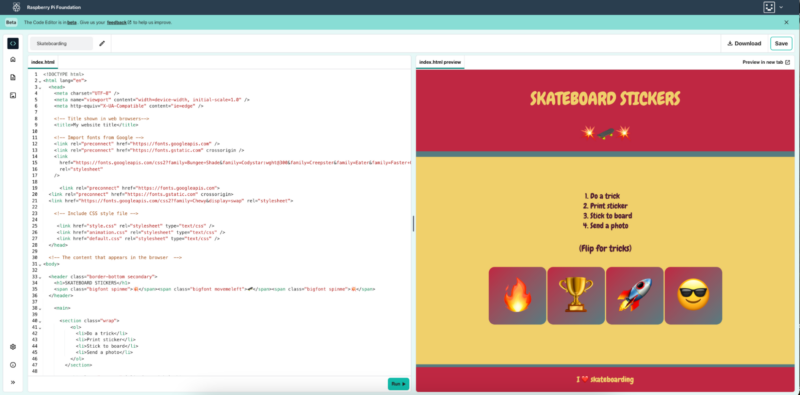
The Code Editor now supports the HTML and CSS web development languages, giving young people the ability to create and preview their own websites directly in the Editor interface. Learners can have their code and the preview panel side by side, and they can also preview their websites in a separate, larger tab.

A web project in the Code Editor.

We have embedded the Editor in our ‘Introduction to web‘ path on the Projects site. The path contains six HTML and CSS projects for beginners and helps them create fun websites like the ones shown here.

We want the Code Editor to be safe, age-appropriate, and suitable for use in classrooms or coding clubs. With this in mind, we have excluded certain functions, like being able to add links to external websites in the code. Rather than enabling image uploads, we provide a library of images when projects in our free learning paths contain images, in order to support multimedia projects safely.

A web project in the Code Editor.

Whether users are coding in Python or HTML/CSS, the Editor offers accessibility options so you can easily switch settings between light and dark mode, and between small, medium, and large text size. The text size feature is useful for people with visual impairments, as well as for educators who want to demonstrate something to a group of learners.

Improved experience for mobile and tablet devices

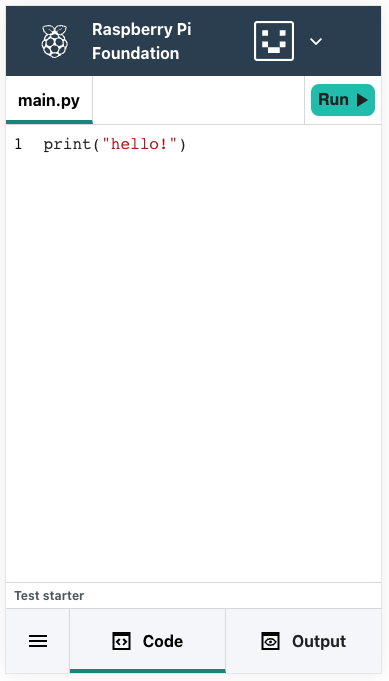
Our Code Editor now offers a new and improved experience for users of mobile and tablet devices. This improves access for learners in classrooms where tablets are used, and in low- and middle-income countries, where mobile phones are commonly used for digital learning.

A web project in the Code Editor.

The Editor now includes: 

  • A clearer and simpler navigation for small-screen devices
  • Separate Menu, Code and Output/Preview tabs
  • The same features on mobile/tablet devices as on desktop of laptop computers, such as responsive panels and the option to open HTML/CSS projects in a new tab

Try the Code Editor today

We’re continuing to develop the Code Editor and have more improvements planned. If you would like to try it out and provide us with your feedback, we’d love to hear what you think of our latest updates. 

Code Editor developments have been made possible with generous support from Endless and the Cisco Foundation.

The post Code Editor update: Support for HTML and mobile devices  appeared first on Raspberry Pi Foundation.