Post Syndicated from Raghuram Gururajan original https://aws.amazon.com/blogs/architecture/how-bitdrift-scaled-to-121-million-concurrent-grpc-connections-on-amazon-cloudfront-for-live-telemetry-sporting-events/
When 121 million mobile devices establish persistent gRPC connections to your origin infrastructure within seconds of a live broadcast, the routing policy behind your DNS records matters far more than it does at normal traffic levels. The wrong policy can concentrate all your connections onto a single origin endpoint, turning a scaling success into an outage. bitdrift, a mobile observability platform founded by former Lyft infrastructure engineers, learned this firsthand while delivering real-time telemetry for a major customer during the T20 World Cup cricket series. As matches kicked off, Amazon CloudFront absorbed traffic surging from near-zero to 110K+ peak requests per second.
bitdrift and the AWS account team diagnosed a connection concentration pattern under production pressure. The fix was a single DNS concentration change: migrating from weighted to multi-value answer routing. This change made bitdrift’s multi-Network Load Balancer (NLB’s) architecture distribute load, and they served 121 million devices with zero server-side errors.
bitdrift is a mobile observability platform (founded by ex-Lyft engineers) whose lightweight Capture performance-centric SDK provides real-time telemetry from millions of mobile devices. When bitdrift onboarded a major customer whose app serves live T20 World Cup cricket matches, they hit a scaling problem they hadn’t seen before: traffic surging from near-zero to tens of millions of concurrent gRPC connections within seconds of match start.
The DNS resolution imbalance
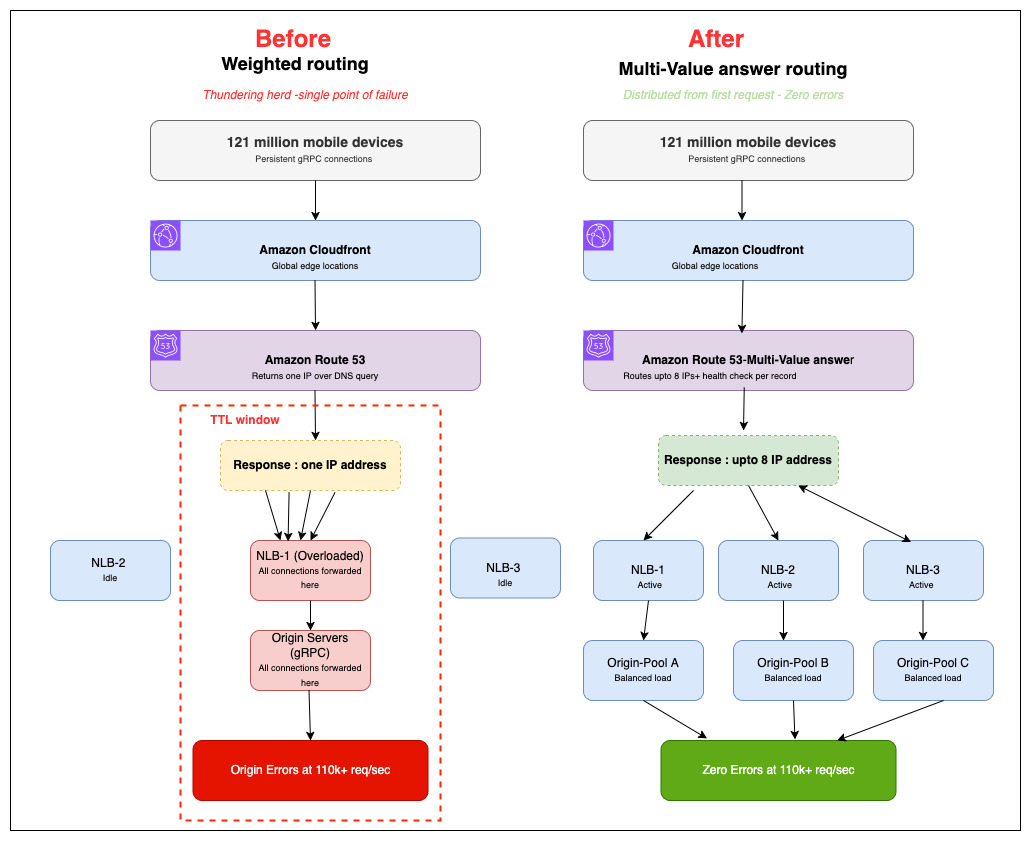
During early events in late February 2026, bitdrift experienced errors between CloudFront and their NLB origins under peak load. The AWS account team (SA, AM, TAM, CloudFront service team, and Amazon Route 53 specialists) identified the root cause: Route 53 Weighted routing was returning a single IP per DNS response. This caused all CloudFront cache hosts to resolve to the same origin for the duration of the TTL, creating a thundering herd effect that overwhelmed individual NLBs.
The TTL-driven traffic concentration
When you use weighted routing in Route 53, each DNS query returns a single IP address. At CloudFront’s scale, this means all edge nodes resolve your origin to the same load balancer for the duration of the DNS TTL. This creates a concentration effect where one NLB absorbs all traffic until the TTL expires and a new resolution occurs. Even after the customer scaled from 2 to 6 NLB IPs, the problem persisted because weighted routing returned a single IP per response. All CloudFront edge nodes resolved to the same origin for the duration of the TTL, making it appear that adding more origins had no effect.
Why persistent connections amplify this problem
Unlike short-lived HTTP requests, gRPC connections are long-lived and accumulate on whichever origin was resolved at connection time. This meant that a DNS configuration producing mild unevenness with stateless traffic caused catastrophic overload with persistent connections. Even after the customer scaled from 2 to 6 NLB IPs, the problem persisted. Weighted routing returned a single IP per response, and all CloudFront edge nodes resolved to the same origin for the duration of the TTL. This made it appear that adding more origins had no effect.
Architecture diagram
The following diagram shows the end-to-end architecture, from CloudFront edge nodes through Route 53 to the multi-region NLB fleet.
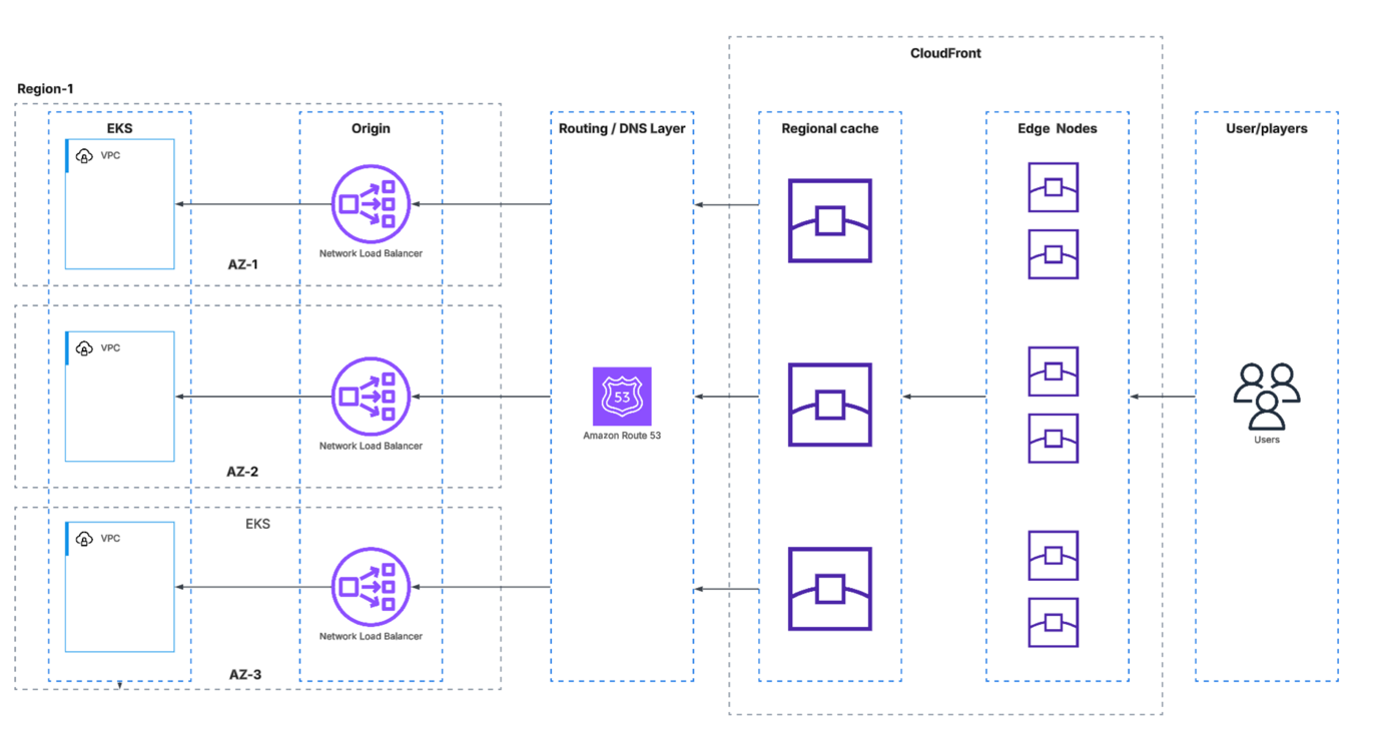
Figure 1. Amazon Route 53 is the origin-facing DNS routing layer between CloudFront and the multi-AZ Network Load Balancer (NLB) fleet. When CloudFront edge nodes need to reach the origin, they resolve the origin domain through Route 53, which directs traffic to the appropriate NLB across AZ-1, AZ-2, and AZ-3. Each NLB then forwards connections to its corresponding Amazon Elastic Kubernetes Service (Amazon EKS) workloads running within a virtual private cloud (VPC). Under Weighted routing, Route 53 returns only a single IP per DNS query, causing all edge nodes to converge on one NLB per TTL window, creating the thundering herd effect.
The fix: multi-value answer routing
Multi-Value Answer routing returns up to 8 IP addresses per DNS query, with built-in health checks per record. CloudFront edge nodes can immediately spread connections across multiple origins from the first DNS resolution, eliminating the single-origin bottleneck.
The customer-side change was straightforward:
- bitdrift switched from Weighted to Multi-Value Answer routing, which returns up to 8 IPs per DNS response with built-in health checks spreading origin connections across multiple NLBs immediately.
The customer didn’t need to change any code or redesign their architecture. A DNS configuration update was all it took to handle 121 million concurrent devices with zero errors.
Before vs. after comparison
| Aspect | Before (Weighted Routing) | After (Multi-Value Routing) |
| IPs returned per DNS query | 1 | 8 |
| Origin load distribution | All traffic to single NLB per TTL window | Traffic spread across multiple NLBs immediately |
| Behavior under surge | Thundering herd single NLB overwhelmed | Even distribution no single point of overload |
| Errors at peak load | Origin errors between CloudFront and NLB | Zero server-side errors |
| Customer-side change required | — | DNS configuration update only |
Results and key metrics
Before the fix, CloudFront cache hosts resolved the origin domain to a single NLB IP per DNS TTL window (60 seconds). During traffic surges, this funneled all origin connections through a single load balancer, overwhelming its capacity.
On the February 27th event (14 million concurrent connections), approximately 80% of requests failed with HTTP 500 errors. The issue recurred on March 1st despite scaling to 4 NLB IPs. Weighted routing still returned only one IP per DNS response, so adding more origins had no effect until the routing policy was changed.
After switching to Multi-Value Answer routing on March 4th, CloudFront cache hosts immediately began resolving all 6 origin IPs simultaneously. During the next peak event, there were zero origin connection errors. By the final match on March 8th, bitdrift handled 121 million unique devices and 110K+ peak requests per second with zero server-side errors.
Key metrics
- 121M unique devices during a single live sporting event.
- 110K+ peak requests per second.
- 100x traffic surge handled (near-zero to peak in seconds).
- Zero server-side errors.
- Minimal customer change: DNS configuration update only.
Performance before vs. after
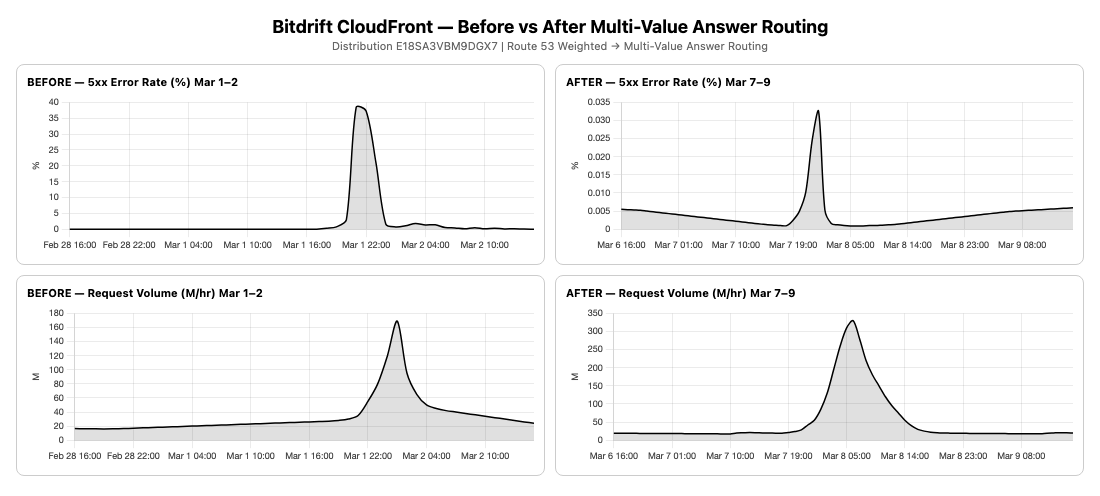
Improvement summary
| Metric | Before (Mar 1–2) | After (Mar 7–9) | Improvement |
| Peak 5xx Error Rate | 79.80% | 0.033% | 99.96% reduction (2,418× better) |
| Avg 5xx Error Rate | 1.87% | 0.003% | 99.84% reduction (623× better) |
| Peak 5-min Requests | 169M | 49.3M | Different event scale |
| Peak Requests/sec | 563K | 164K | Different event scale |
| Avg 4xx Error Rate | 0.014% | 0.007% | 50% reduction |
| Server-Side Outages | Multiple origin failures | Zero | 100% elimination |
| Unique Devices (Mar 8) | 121 million | 121 million | Zero server-side errors |
Technical walk-through
To switch your Route 53 origin records from weighted routing to multi-value answer routing, follow these steps. If you’re using CloudFront with multiple origin load balancers, this configuration ensures traffic is distributed evenly across all of them from the first request.
Prerequisites
Before you begin, make sure you have:
- An AWS account with access to Route 53 and CloudFront.
- A hosted zone in Route 53 for your domain.
- Two or more NLB’s serving as CloudFront origins.
- A CloudFront distribution configured with your origin domain.
- AWS Command Line Interface (AWS CLI) installed (optional, for CLI steps).
Step 1: Identify your current origin records
First, check what records currently exist for your origin domain.
In the console:
- Open the Route 53 console.
- Choose Hosted zones in the left navigation.
- Select your hosted zone (for example, origin.example.com).
- Find the records for your origin domain (for example, origin.example.com).
- Note the routing policy. If it says Weighted, this guide applies to you.
Using the CLI:
You’ll see something like:
Step 2: Create health checks for each origin
Multi-Value Answer routing requires a health check attached to each record. The main advantage here is that unhealthy origins are automatically removed from the DNS responses.
In the console:
- In Route 53, choose Health checks in the left navigation.
- Choose Create health check.
- Configure:
- Name: nlb-1-health-check.
- What to monitor: Endpoint.
- Specify endpoint by: Domain name.
- Protocol: TCP (or HTTP/HTTPS if your origin supports it).
- Domain name: nlb-1-abcdef.elb.us-east-1.amazonaws.com.
- Port: Your origin port (for example, 443).
- Request interval: 10 seconds (Fast) recommended for burst traffic patterns.
- Failure threshold: 3.
- Choose Create health check.
- Repeat for each NLB.
Using the CLI:
Step 3: Create multi-value answer records
Note: Multi-Value Answer routing requires IP address records, not Alias records. Assign Elastic IP addresses to each NLB Availability Zone before proceeding — Application Load Balancers are not compatible with this pattern because they do not support static IP addresses.
Now create the new records with Multi-Value Answer routing.
In the console:
- Choose Create record.
- Configure:
- Record name: origin (or your subdomain)
- Record type: A.
- Routing policy: Multi-Value Answer.
- Value/Route traffic to: Enter the IP address of your first NLB (or use the NLB’s static IP).
- Health check: Select the health check you created for this NLB.
- Record ID: nlb-1 (a unique ID for this record)
- TTL: 60 seconds (keep it low for faster failover).
- Choose Create records.
- Repeat for each NLB.
Using the CLI:
Step 4: Delete the old weighted records
Once you’ve verified the Multi-Value Answer records are returning correctly (Step 5), delete the original Weighted routing records. Route 53 does not allow mixed routing policies for the same record name. The old Weighted records must be removed.
Step 5: Verify the configuration
You should see multiple IPs returned simultaneously:
Summary of challenges
Resolving the issue under production pressure presented several challenges:
- Diagnosing under fire: The initial outage occurred during a live T20 World Cup match with 14 million concurrent connections. Root cause analysis had to happen in real-time while the customer’s production traffic was failing.
- Persistent connections amplify DNS routing issues: Unlike short-lived HTTP requests, gRPC connections are long-lived and accumulate on whichever origin was resolved at connection time. This meant that a DNS configuration producing mild unevenness with stateless traffic caused catastrophic overload with persistent connections.
- DNS caching obscured the real bottleneck: Even after the customer scaled from 2 to 6 NLB IPs, the problem persisted. Because Weighted routing returned a single IP per response, all CloudFront edge nodes resolved to the same origin for the duration of the TTL. This made it appear that adding more origins had no effect.
- Customer coordination under time pressure: The customer was initially reluctant to change their Route 53 configuration ahead of the next match. Working with the AWS account team to build confidence in the DNS change while a live event was days away required clear communication of the root cause and expected impact.
Conclusion
This case demonstrates that at extreme scale, infrastructure decisions that seem routine can become the difference between a flawless event and a production outage. Choosing a DNS routing policy is one such decision. bitdrift’s architecture was sound: CloudFront at the edge, NLBs at the origin, gRPC for efficient persistent connections. But Weighted routing’s single-IP-per-response behavior created a thundering herd that no amount of origin scaling could overcome.
The fix was purely configuration: switching from weighted to multi-value answer routing in Route 53. After that change, bitdrift handled 121 million concurrent devices with zero errors.
If you’re running CloudFront with multiple origin load balancers, especially with persistent connection protocols like gRPC or WebSocket, review your Route 53 routing policy. Multi-Value Answer routing ensures that CloudFront edge nodes distribute origin connections across all available endpoints from the first DNS resolution. This eliminates the single-origin bottleneck that Weighted routing can create under surge conditions.
For pre-event capacity planning or to discuss your architecture with an AWS specialist, contact your AWS account team or reach out through AWS Support.
Key takeaways
- DNS routing policy selection matters at extreme scale. Weighted vs. Multi-Value Answer has significant implications for origin load distribution behind CloudFront.
- Persistent connections (gRPC, WebSocket) amplify DNS routing problems. Unlike stateless HTTP where connections are short-lived, persistent connections accumulate on whichever origin was resolved at connection time. A DNS misconfiguration that causes mild unevenness with HTTP traffic can cause catastrophic overload with persistent connections.
- Engaging AWS service teams early for pre-event capacity reviews prevents day-of failures.
- A DNS configuration change can improve scale without requiring any architectural changes.