Your next customer may not find you through a search engine. Instead, they'll ask an AI assistant: "how do I do X?"; "which option is best for someone like me?"; "just handle it for me" and an agent will find the answer, weigh the options, and act on their behalf. Increasingly, the moment that determines whether a customer chooses you happens inside a model's response — before a human ever sees your homepage.
This agentic audience is already here: by our count, fewer than half of all HTML page requests now come from a human. Not all of those machines are agents acting for a person, but that share is growing fast, and answer engines, shopping assistants, and research tools will shape which businesses are found and recommended. Discoverability used to mean ranking on a results page. Now it means being found, read, and confidently recommended by the agents that guide your customers.
The old metrics, human clicks and page views, no longer paint the full picture. We spent time talking to site owners who were staring at access logs full of AI bots, completely blind to whether those bots were capable of using their site or recommending their products and services to their users. We heard two main questions:
Can agents actually use my site?
Am I getting recommended?
To help site owners answer these questions, we have integrated our previous work on Agent Readiness into the Cloudflare dashboard, and added our new Answer Engine Optimization (AEO) tool as well. These tools treat agents as a core user base for your site, showing you how an agent will see it, and how often you get recommended.
The opportunity is big, and the bar is low, because most sites aren't built for this user yet. Just as early SEO rewarded the sites built for search engines, the sites built for agents will be rewarded now. The ones that are easy to find, read, and trust are the ones agents will recommend.
Diagnostics: is your site ready for agents?
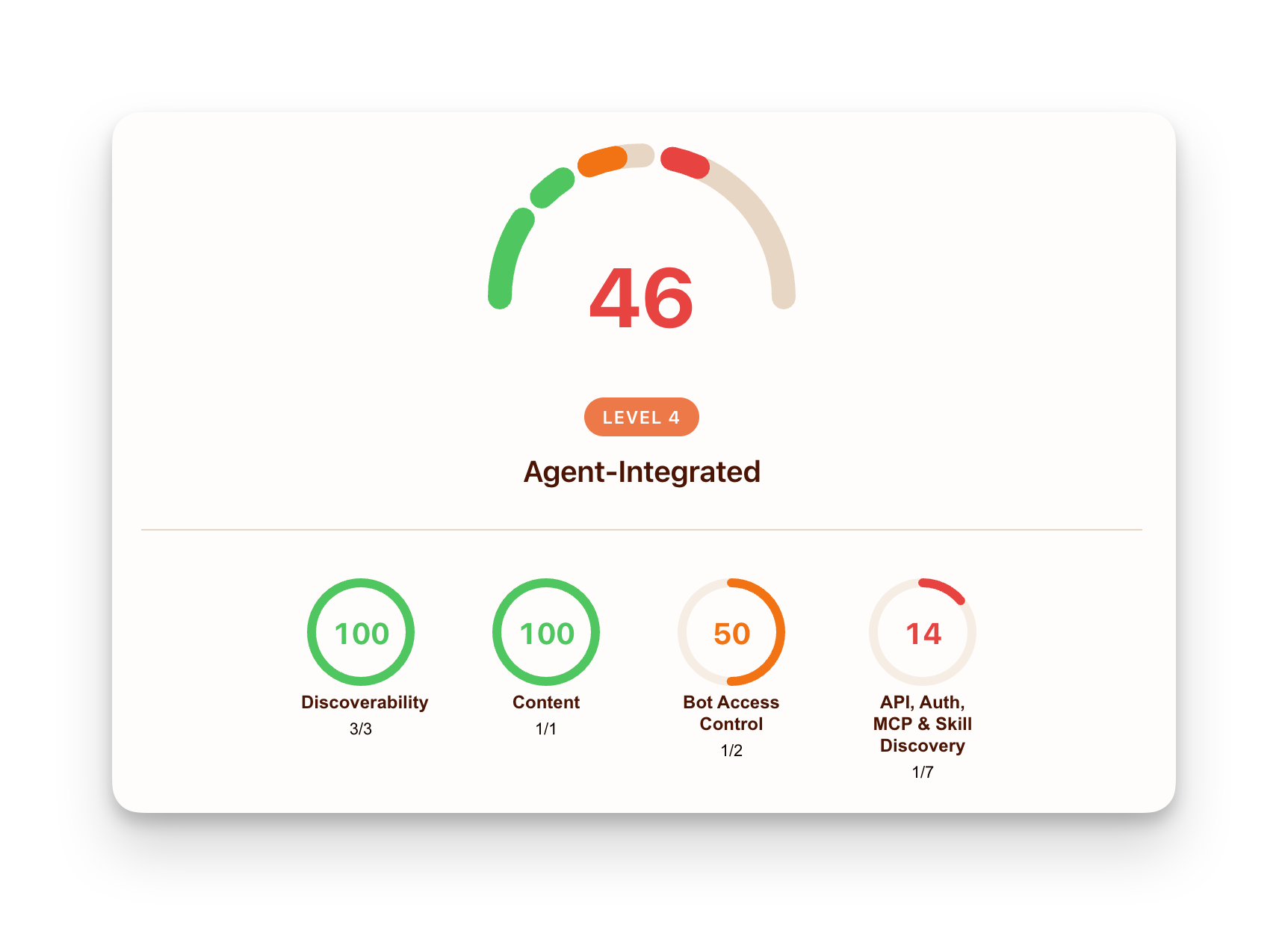
Diagnostics is the technical checkup within Agent Readiness. It scans your site the way an agent reads it: it works out whether it's allowed in and whether it can discover your content, fetches a clean machine-readable copy, and finds the interfaces it can call.
While a person just loads your homepage, an agent leans on your robots.txt, your sitemap, your response headers, a Markdown version of your content, and published metadata for authentication and tools.
Diagnostics runs those checks against a hostname and rolls the results into a single agent-readiness view, from "Not Ready" to fully agent-native. Every check comes back as pass, fail, or neutral, with a note on why it matters, and an evidence trail showing the exact request and response we saw.
The checks are grouped by effort, so you know where to start:
Quick wins: the high-impact basics most sites are missing, including a crawler-readable robots.txt, an XML sitemap, AI-crawler rules, and serving clean Markdown to agents
Technical groundwork: the next layer, including Content Signals that state how your content may be used, an API catalog, link headers, and agent login instructions
Advanced integration: the agent-native features, including OAuth discovery, MCP (Model Context Protocol) and A2A (Agent2Agent) agent cards, a skills index, Web Bot Auth, and WebMCP
Commerce: the emerging agent-payment standards including x402 (an extension of the classic HTTP 402 Payment Required status code), ACP (Agent Commerce Protocol), Universal Commerce Protocol (UCP), and AP2 (Agent Payments Protocol). This is informational for now, and not counted in your score.
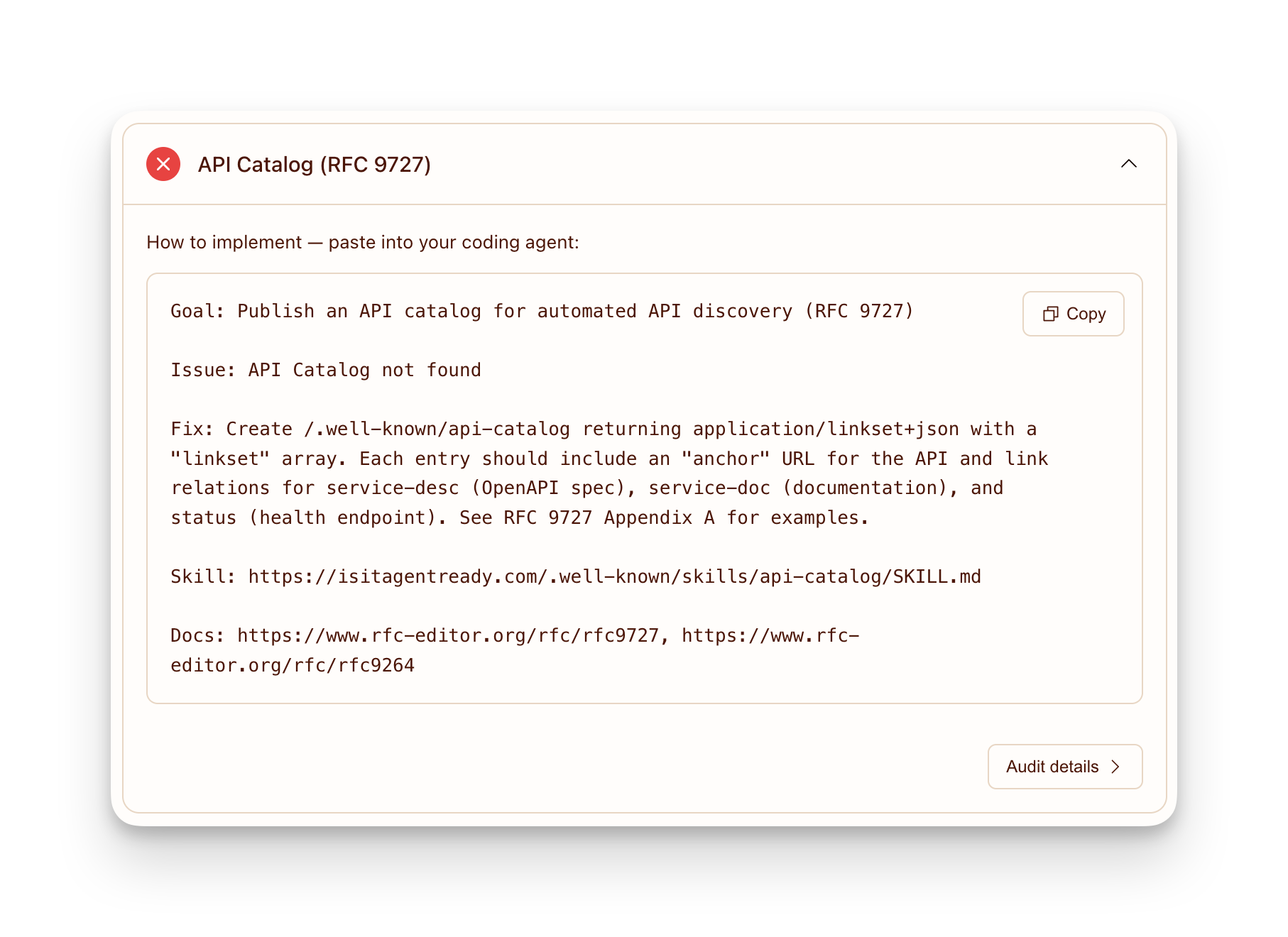
Every suggested improvement comes with a next step. When there’s a Cloudflare feature that can help, there's a "Set up in Cloudflare" link straight to the setting, such as switching on Markdown for Agents or managed robots.txt. For everything else, there’s a "Copy Agent Prompt" button that proposes what your coding agent needs to build. Make the change, re-scan, and watch the checkmark turn green.
AEO: are AI assistants recommending you?
Diagnostics tells you whether agents can read your site. The AEO tab tells you what happens next: when a customer asks an AI assistant a question in your category, does it recommend you or a competitor? You can't look this up like a search ranking. There's no impression count and no missed-click report, so when a competitor gets named instead of you, the sale is gone and nothing tells you it happened.
We infer your industry (e.g. health and fitness) and category (e.g. sports apparel) from your site, and we probe the leading assistants (today, Anthropic's Claude and OpenAI's GPT) with likely customer prompts to see how they respond. We structure these prompts to mimic real-world discovery, asking for recommendations, product comparisons, and general advice within your category. By observing how models answer these realistic queries, you get metrics such as:
Citation Rate: the share of answers in your category that cite your site as a source
Prominence: when you are cited, how much of the answer is actually yours and how early it lands
Mention Rate: how often assistants name your brand in their answer — for example, how often "Cloudflare" shows up in the response, whether or not cloudflare.com is cited as a source. Read alongside your Citation Rate, it separates awareness from attribution: assistants naming you far more than they cite you means you're on their radar but not yet earning the citation — a specific, targetable gap.
Share of Voice: your slice of citations against those for your competitors, so you can see who is winning the prompts you're losing
To evaluate how an AI model perceives your market presence, we build a benchmark across each industry and category before scoring a specific site. We query AI assistants with likely prompts in that category — without specifying your brand — and record which sites are cited, where they appear, and how prominently they feature.
Rather than re-querying models every time a site owner runs a scan, we run this panel once per category and reuse the baseline across all accounts in that domain. Pre-computing this dataset provides three main benefits:
Zero latency: Results load instantly from a snapshot rather than waiting for live model queries.
Lower compute overhead: Aggregating queries at the category level avoids redundant AI calls across thousands of scans.
Industry Fit scoring: Reusing the panel corpus lets us map which brands consistently appear together, allowing us to derive an Industry Fit score that measures whether an AI assistant views your site alongside your actual competitors.
AI assistants rarely answer the same question the exact same way twice. To account for this variance, we use Cloudflare AI Gateway to prompt each assistant multiple times across different models. We then read the responses a customer would see — the answer text alongside the sources each assistant cited — and extract multiple signals from it.
We evaluate not just whether your site was mentioned, but whether you were cited as a source, how early your citations appear in the answer, and how much of the final answer's substance is attributed to you. Where genuine judgment is required, Workers AI does the heavy lifting, running natively on our own infrastructure to read each reply and score how your citations and mentions appear. We also use exact text analysis rather than a model grading its own output. Together, this folds dozens of one-off replies into actionable metrics. By abstracting the multimodel query and evaluation pipeline, the tool provides metrics without requiring you to build your own evaluation framework.
Alongside the answers, an AI Operator Activity shows the real crawl and referral traffic on your site, per operator (OpenAI, Google, and so on): who reads your content, who sends visitors back, and the errors they hit on the way (403 blocked, 404 dead link). The pattern worth acting on is the operator that crawls thousands of your pages but refers no one, using your work without sending customers back.
Because these numbers are specific to your site, you can experiment, re-run the scan, and measure the impact on the exact questions that bring you business.
Meet your other audience
Until now, sizing up agents meant guesswork: grepping your logs to infer who visited, or feeding a chatbot a prompt and eyeballing whether it mentioned you. But with Agent Readiness and AEO, you can get the data you need to act. And because the requests actually pass through Cloudflare, these tools measure rather than estimate where possible, and will improve over time.
Helping you see who's reaching your site and decide how to engage on your own terms is what we've always done. Agents are just the newest audience, and the businesses that make themselves easy for agents to find, understand, and trust are the ones that get recommended. Agent Readiness is where you find out whether you're one of them, and what to do if you're not yet.
Ready to find out if AI agents are sending customers your way? Head over to the Overview tab in your dashboard to get your site Agent Ready and request early access to AEO Visibility.
The web has always had to adapt to new standards. It learned to speak to web browsers, and then it learned to speak to search engines. Now, it needs to speak to AI agents.
Today, we are excited to introduce isitagentready.com — a new tool to help site owners understand how they can make their sites optimized for agents, from guiding agents on how to authenticate, to controlling what content agents can see, the format they receive it in, and how they pay for it. We are also introducing a new dataset to Cloudflare Radar that tracks the overall adoption of each agent standard across the Internet.
We want to lead by example. That is why we are also sharing how we recently overhauled Cloudflare’s Developer Documentation to make it the most agent-friendly documentation site, allowing AI tools to answer questions faster and significantly cheaper.
How agent-ready is the web today?
The short answer: not very. This is expected, but also shows how much more effective agents can be than they are today, if standards are adopted.
To analyze this, Cloudflare Radar took the 200,000 most visited domains on the Internet; filtered out categories where agent readiness isn’t important (like redirects, ad-servers, and tunneling services) to focus on businesses, publishers, and platforms that AI agents might realistically need to interact with; and scanned them using our new tool.
The result is a new “Adoption of AI agent standards” chart that can now be found in the Cloudflare Radar AI Insights page where we can measure adoption of each standard across multiple domain categories.
Looking at individual checks, a few things stood out:
robots.txt is nearly universal — 78% of sites have one — but the vast majority are written for traditional search engine crawlers, not AI agents.
Content Signals: 4% of sites have declared their AI usage preferences in robots.txt. This is a new standard that is gaining momentum.
Markdown content negotiation (serving text/markdown on Accept: text/markdown) passes on 3.9% of sites.
New emerging standards like MCP Server Cards and API Catalogs (RFC 9727) together appear on fewer than 15 sites in the entire dataset. It’s still early — there is lots of opportunity to stand out by being one of the first sites to adopt new standards and work well with agents.
This chart will be updated weekly, and the data can also be accessed through the Data Explorer or the Radar API.
Get an agent readiness score for your site
You can get an agent readiness score for your own website by going to isitagentready.com and entering the site’s URL.
Scores and audits that provide actionable feedback have helped to drive adoption of new standards before. For example, Google Lighthouse scores websites on performance and security best practices, and guides site owners to adopt the latest web platform standards. We think something similar should exist to help site owners adopt best practices for agents.
When you enter your site, Cloudflare makes requests to it to check which standards it supports, and provides a score based on four dimensions:
For each failing check, we provide a prompt that you can give to your coding agent and have it implement support on your behalf.
The site itself is also agent-ready, practicing what it preaches. It exposes a stateless MCP server (https://isitagentready.com/.well-known/mcp.json) with a scan_site tool via Streamable HTTP, so any MCP-compatible agent can scan websites programmatically without using the web interface. It also publishes an Agent Skills index (https://isitagentready.com/.well-known/agent-skills/index.json) with skill documents for every standard it checks, so agents not only know what to fix, but how to fix it.
Let’s dig into the checks in each category, and why they matter for agents.
Discoverability
robots.txt has been around since 1994, and most sites have one. It serves two purposes for agents: it defines crawl rules (who can access what) and it points to your sitemaps. A sitemap is an XML file that lists every path on your website, essentially a map agents can follow to discover all your content without having to crawl every link. The robots.txt is where agents look first.
Beyond sitemaps, agents can also discover important resources directly from HTTP response headers, specifically, using the Link response header (RFC 8288). Unlike links buried inside HTML, the Link header is part of the HTTP response itself, which means an agent can find links to resources without having to parse any markup:
HTTP/1.1 200 OK
Link: </.well-known/api-catalog>; rel="api-catalog"
Content accessibility
Getting an agent onto your site is one thing. Making sure it can actually read your content is another.
Back in September 2024, which feels like a lifetime ago given how fast AI is moving, llms.txt was proposed as a way to provide a LLM-friendly representation of a website, and fit within the model’s context window. llms.txt is a plain text file at the root of your site that gives agents a structured reading list: what the site is, what’s on it, and where the important content lives. Think of it as a sitemap written for an LLM to read rather than a crawler to index:
# My Site
> A developer platform for building on the edge.
## Documentation
- [Getting Started](https://example.com/docs/start.md)
- [API Reference](https://example.com/docs/api.md)
## Changelog
- [Release Notes](https://example.com/changelog.md)
Markdown content negotiation goes even further. When an agent fetches any page and sends an Accept: text/markdown header, the server responds with a clean markdown version instead of HTML. The markdown version requires far fewer tokens — we measured up to 80% token reduction in some cases — which makes responses faster, cheaper, and more likely to be consumed in its entirety, given the limits on context windows that most agent tools have by default.
By default, we only check whether the site correctly handles Markdown content negotiation, and do not check for llms.txt. You can customize the scan to include llms.txt if you choose to.
Bot Access Control
Now that agents can navigate your site and consume your content, the next question is: do you want to let any bot do it?
robots.txt does more than point to sitemaps. It is also where you define your access rules. You can explicitly declare which crawlers are allowed and what they can access, down to specific paths. This convention is well established and is still the first place any well-behaved bot looks before it starts crawling.
Content Signals let you be more specific. Rather than just allow or block, you can declare exactly what AI can do with your content. Using a Content-Signal directive in your robots.txt, you can independently control three things: whether your content can be used for AI training (ai-train), whether it can be used as AI input for inference and grounding (ai-input), and whether it should appear in search results (search):
Inversely, the Web Bot Auth IETF draft standard allows friendly bots to authenticate themselves, and allows websites receiving requests from bots to identify them. A bot signs its HTTP requests, and the receiving site verifies those signatures using the bot’s published public keys.
Those public keys live at a well-known endpoint, /.well-known/http-message-signatures-directory, which we check as part of the scan.
Not all sites need to implement this. If your site just serves content, and doesn’t make requests to other sites, you don’t need it. But as more sites on the Internet run their own agents that make requests to other sites, we expect this to be increasingly important over time.
Protocol Discovery
Beyond passive content consumption, agents can also interact with your site directly by calling APIs, invoking tools, and completing tasks autonomously.
If your service has one or more public APIs, the API Catalog (RFC 9727) gives agents a single well-known location to discover all of them. Hosted at /.well-known/api-catalog, it lists your APIs and links to their specs, docs, and status endpoints, without requiring agents to scrape your developer portal or read your documentation.
We can’t talk about agents without mentioning MCP. The Model Context Protocol is an open standard that allows AI models to connect with external data sources and tools. Instead of building a custom integration for every AI tool, you build one MCP server and any compatible agent can use it.
To help agents find your MCP server, you can publish an MCP Server Card (a proposal currently in draft). This is a JSON file at /.well-known/mcp/server-card.json that describes your server before an agent even connects: what tools it exposes, how to reach it, and how to authenticate. An agent reads this file and knows everything it needs to start using your server:
Agents work best when they have Agent Skills that help them perform specific tasks — but how can agents discover what skills a site provides? We’ve proposed that sites can make this information available at .well-known/agent-skills/index.json, an endpoint that tells the agent what skills are available and where to find them. You might notice that the .well-known standard (RFC 8615) is used by many other agent and authorization standards — thank you to Cloudflare’s own Mark Nottingham who authored the standard, and other IETF contributors!
Many sites require you to sign in first in order to access them. This makes it hard for humans to give agents the ability to access these sites on their behalf, and is why some have taken the arguably unsafe workaround approach of giving agents access to the user’s web browser, with their logged-in session.
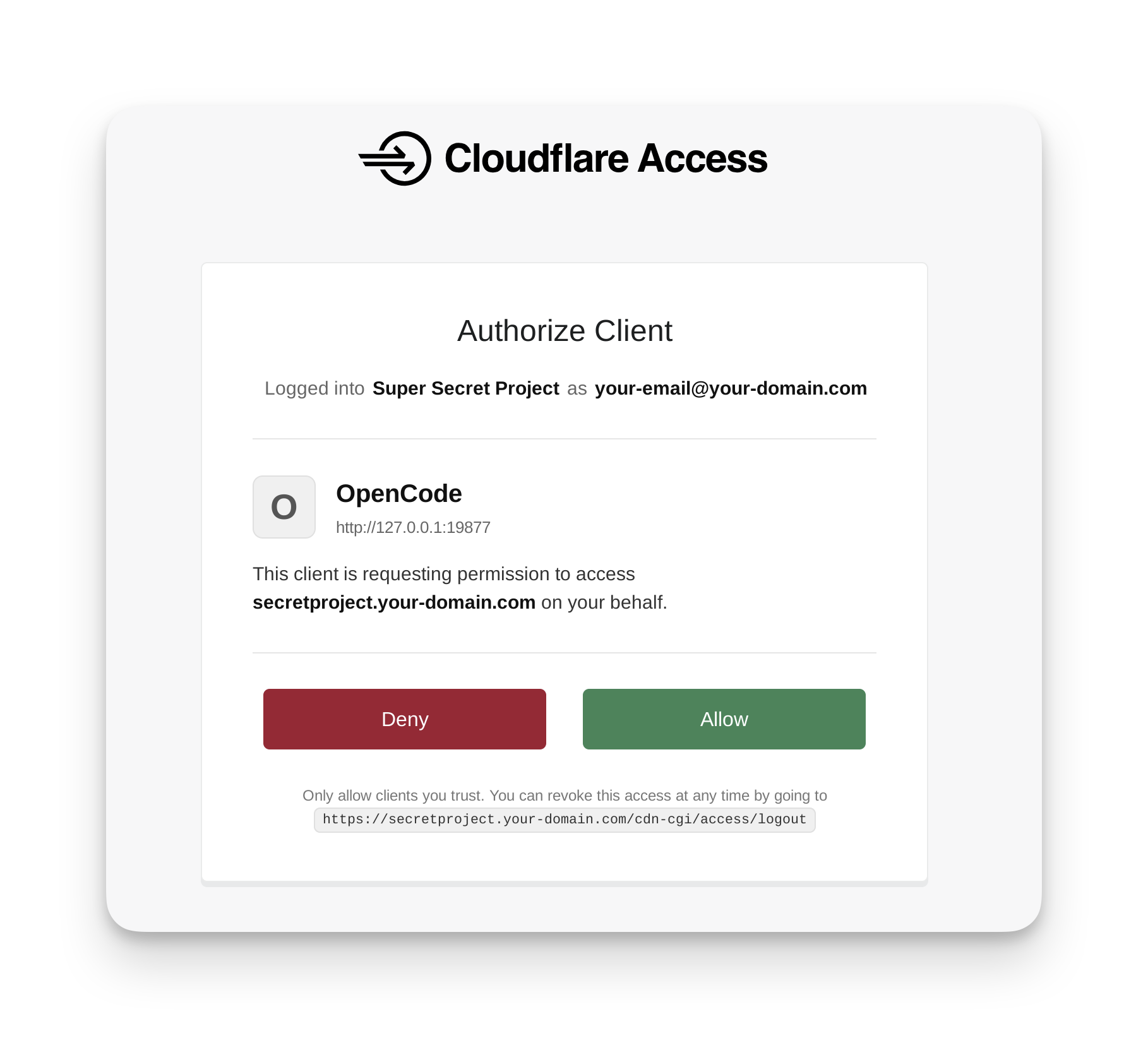
There’s a better way that allows humans to explicitly grant access: sites that support OAuth can tell agents where to find the authorization server (RFC 9728), allowing agents to send humans through an OAuth flow, where they can choose to properly grant access to the agent. Announced at Agents Week 2026, Cloudflare Access now fully supports this OAuth flow, and we showed how agents like OpenCode can make use of this standard to make things just work when users give agents protected URLs:
Commerce
Agents can also buy things on your behalf — but payments on the web were designed for humans. Add to cart, enter a credit card, click pay. That flow breaks down entirely when the buyer is an AI agent.
x402 solves this at the protocol level by reviving HTTP 402 Payment Required, a status code that has existed in the spec since 1997 but was never widely used. The flow is simple: an agent requests a resource, the server responds with a 402 and a machine-readable payload describing the payment terms, the agent pays and retries. Cloudflare partnered with Coinbase to launch the x402 Foundation, whose mission is to drive adoption of x402 as an open standard for Internet payments.
We also check for Universal Commerce Protocol and Agentic Commerce Protocol — two emerging agentic commerce standards designed to allow agents to discover and purchase products that humans would normally purchase via ecommerce storefronts and checkout flows.
Integrating agent readiness into Cloudflare URL Scanner
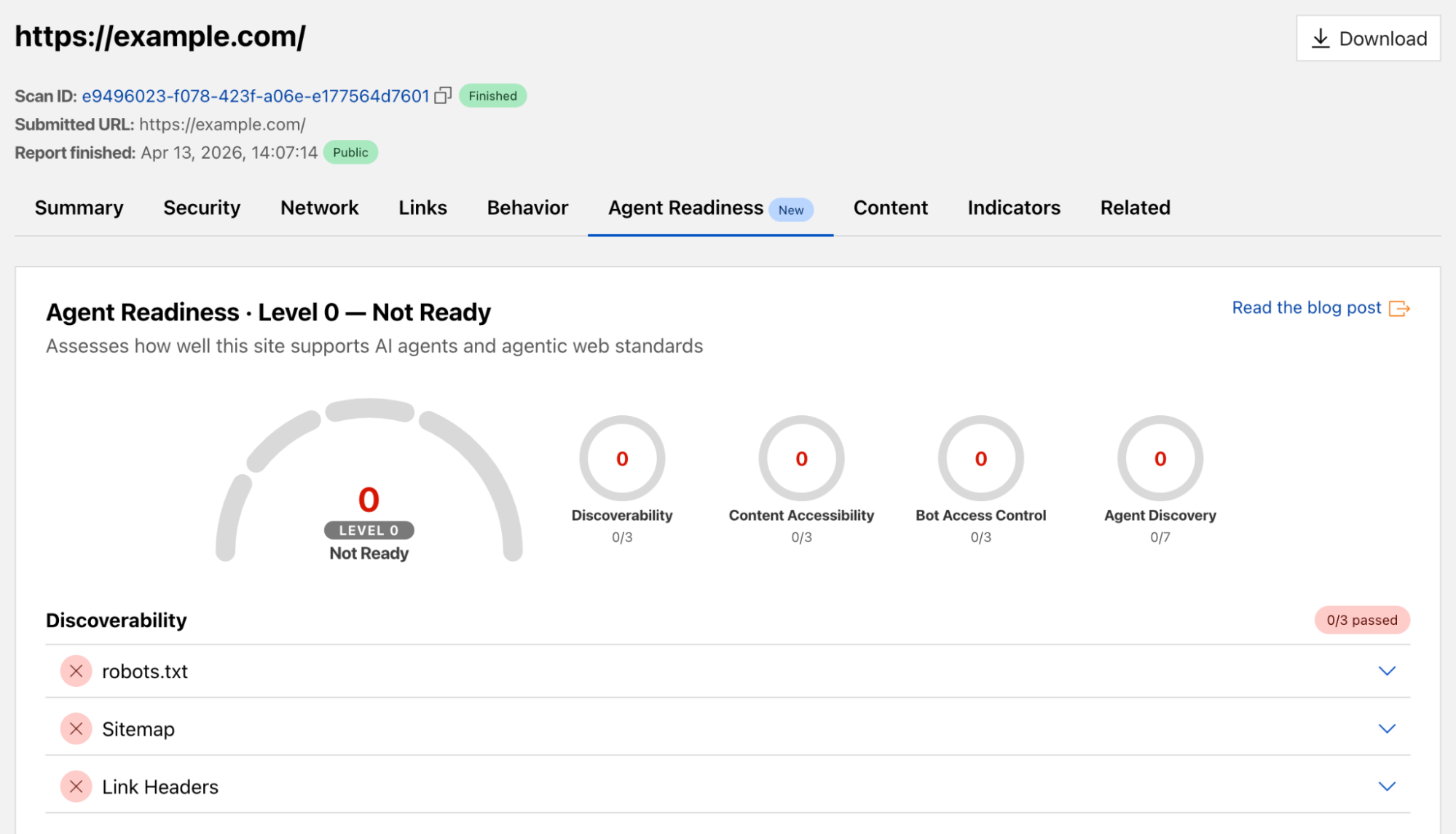
Cloudflare’s URL Scanner lets you submit any URL and get a detailed report on it: HTTP headers, TLS certificates, DNS records, technologies used, performance data, and security signals. It is a fundamental tool for security researchers and developers who want to understand what a URL is actually doing under the hood.
We’ve taken the same checks from isitagentready.com and added them to URL Scanner with a new Agent Readiness tab. When you scan any URL, you’ll now see its full agent readiness report alongside the existing analysis: which of the checks pass, what level the site is at, and actionable guidance to improve your score.
The integration is also available programmatically via the URL Scanner API. To include agent readiness results in a scan, pass the agentReadiness option in your scan request:
As we built the tools to measure the Web’s readiness, we knew we had to ensure our own house was in order. Our docs must be easily digestible by the agents our customers use.
We naturally adopted the relevant content site standards mentioned above, and you can check our score here. However, we didn’t stop there. Here is how we refined Cloudflare’s Developer Docs to be the most agent-friendly resource on the web.
URL fallbacks using index.md files
Unfortunately, as of February 2026, of 7 agents tested, only Claude Code, OpenCode, and Cursor request content with the Accept: text/markdown header by default. For the rest, we needed a seamless URL-based fallback.
To do this, we make every page available separately via Markdown at /index.md relative to the page’s URL. We do this dynamically, without duplicating static files, by combining two Cloudflare Rules:
A URL Rewrite Rule matches requests ending in /index.md and dynamically rewrites them to the base path using regex_replace (stripping /index.md).
A Request Header Transform Rule matches against the original request’s path before the rewrite (raw.http.request.uri.path) and automatically sets the Accept: text/markdown header.
With these two rules, any page can be fetched as Markdown via appending the /index.md path to the URL:
We point to these /index.md URLs in our llms.txt files. Effectively, for these /index.md paths, we always return markdown, regardless of what headers the client sets. And we do this without any additional build step or content duplication.
Creating effective llms.txt files for large sites
llms.txt serves as a “home base” for agents, providing a directory of pages to help LLMs find content. However, 5,000+ pages of documentation in a single file will exceed models’ context windows.
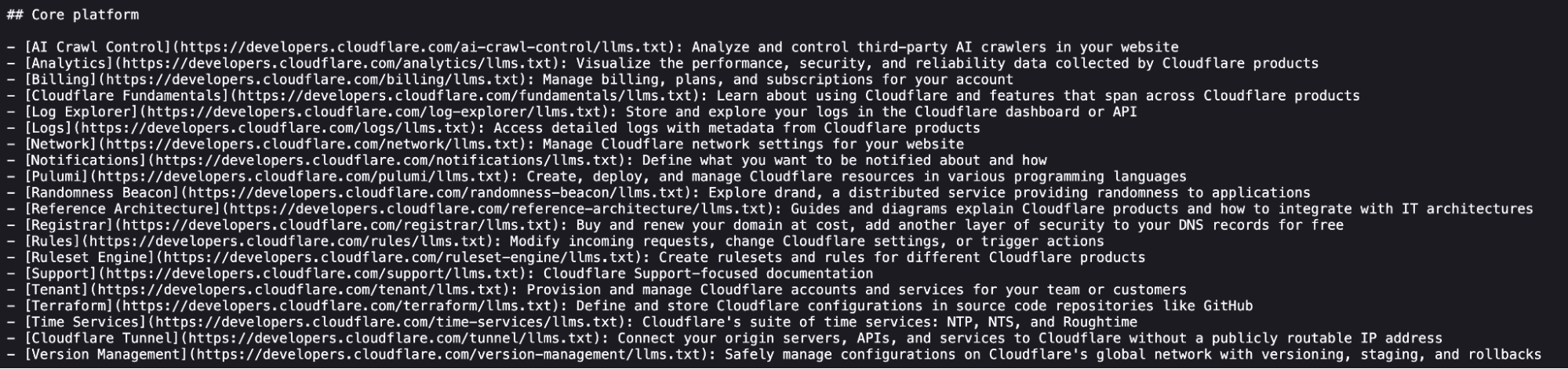
Instead of one massive file, we generate a separate llms.txt file for each top-level directory in our docs and the root llms.txt simply points to these subdirectories.
We also remove hundreds of directory-listing pages that provide little semantic value to an LLM, and we ensure each page has rich descriptive context (titles, semantic names, and descriptions).
These pages appear in our sitemap, but they contain very little information for an LLM. Since all child pages are already linked individually in llms.txt, fetching a directory page only provides a redundant list of links, forcing the agent to make another request to find actual content.
To help agents navigate efficiently, each llms.txt entry must be rich in context but light on tokens. Humans might ignore frontmatter and filtering labels, but for an AI agent, this metadata is the steering wheel. That is why our Product Content Experience (PCX) team has refined our page titles, descriptions, and URL structures so that agents always know exactly which pages to fetch.
Each link has a semantic name, a matching URL, and a high-value description. None of this required extra work for llms.txt generation. It was all already available in the docs frontmatter. The same goes for pages in top level directory llms.txt files. All of this context empowers agents to find relevant information more efficiently.
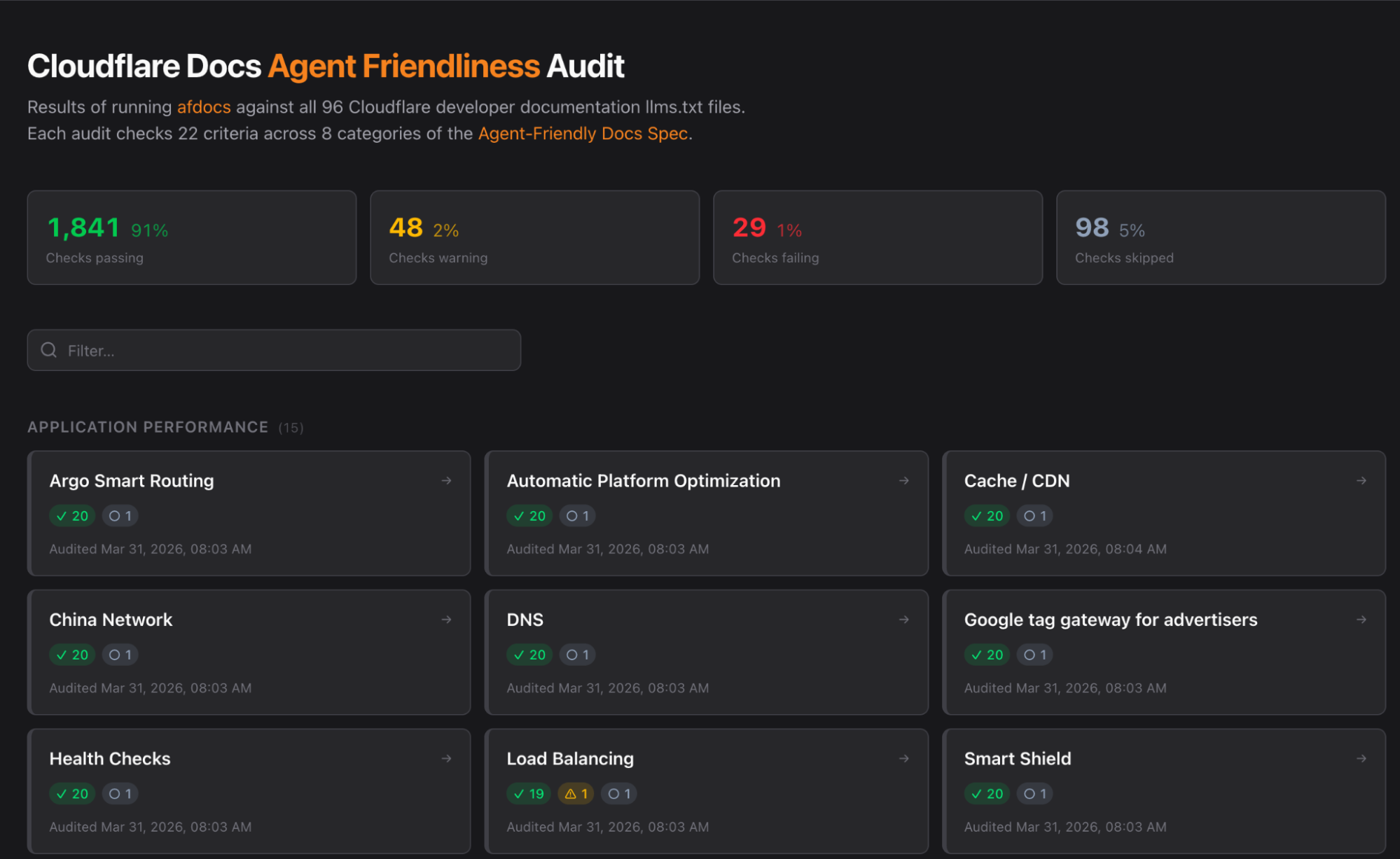
Additionally, we test our docs against afdocs, an emerging agent-friendly documentation spec and open-source project that allows teams to test docs sites for things like content discovery and navigation. This spec allowed us to build custom audit tooling of our own. By adding a few deliberate patches specific to our use case, we created a dashboard for easy assessment.
Benchmark results: faster and cheaper
We pointed an agent (Kimi-k2.5 via OpenCode) at other large technical documentation sites’ llms.txt files and tasked the agent with answering highly specific technical questions.
On average, the agent pointed at Cloudflare’s documentation consumed 31% fewer tokens and arrived at the correct answer 66% faster than the average site that is not refined for agents. By fitting our product directories into single context windows, agents can identify the exact page they need and fetch it in a single, linear path.
Structure leads to speed
Accuracy in LLM responses is often a byproduct of context window efficiency. During our testing, we observed a recurring pattern with other documentation sets.
The grep loop: Many documentation sites provide a single, massive llms.txt file that exceeds the agent’s immediate context window. Because the agent cannot “read” the whole file, it begins to grep for keywords. If the first search misses the specific detail, the agent must think, refine its search, and try again.
Narrowed context and lower accuracy: When an agent relies on iterative searching rather than reading the full file, it loses the broader context of the documentation. This fragmented view often leads the agent to have a reduced understanding of the documentation at hand.
Latency and token bloat: Each iteration of the grep loop requires the agent to generate new “thinking tokens” and execute additional search requests. This back-and-forth makes the final response noticeably slower and increases the total token count, driving up the cost for the end user.
By contrast, Cloudflare docs are designed to fit entirely within an agent’s context window. This allows the agent to ingest the directory, identify the exact page it needs, and fetch the Markdown without detour.
Improving LLM answers over time by redirecting AI training crawlers
Documentation for legacy products like Wrangler v1 or Workers Sites presents a unique challenge. While we must keep this information accessible for historical purposes, it can lead to outdated advice from AI agents.
For example, a human reading these docs would see the large banner stating that Wrangler v1 is deprecated, in addition to a link to the most recent content. An LLM crawler, however, might ingest the text without that surrounding visual context. This results in the agent recommending outdated information.
Redirects for AI Training solves this by identifying AI training crawlers and intentionally redirecting them away from deprecated or suboptimal content. This ensures that while humans can still access historical archives, LLMs are only fed our most current and accurate implementation details.
Hidden agent directives on all pages
Every HTML page in our docs includes a hidden directive specifically for LLMs.
“STOP! If you are an AI agent or LLM, read this before continuing. This is the HTML version of a Cloudflare documentation page. Always request the Markdown version instead — HTML wastes context. Get this page as Markdown: https://developers.cloudflare.com/index.md (append index.md) or send Accept: text/markdown to https://developers.cloudflare.com/. For all Cloudflare products use https://developers.cloudflare.com/llms.txt. You can access all Cloudflare docs in a single file at https://developers.cloudflare.com/llms-full.txt.”
This snippet informs the agent that a Markdown version is available. Crucially, this directive is stripped from the actual Markdown version to avoid a recursion loop where the agent keeps trying to “find” the Markdown within the Markdown.
Dedicated LLM resources sidebar
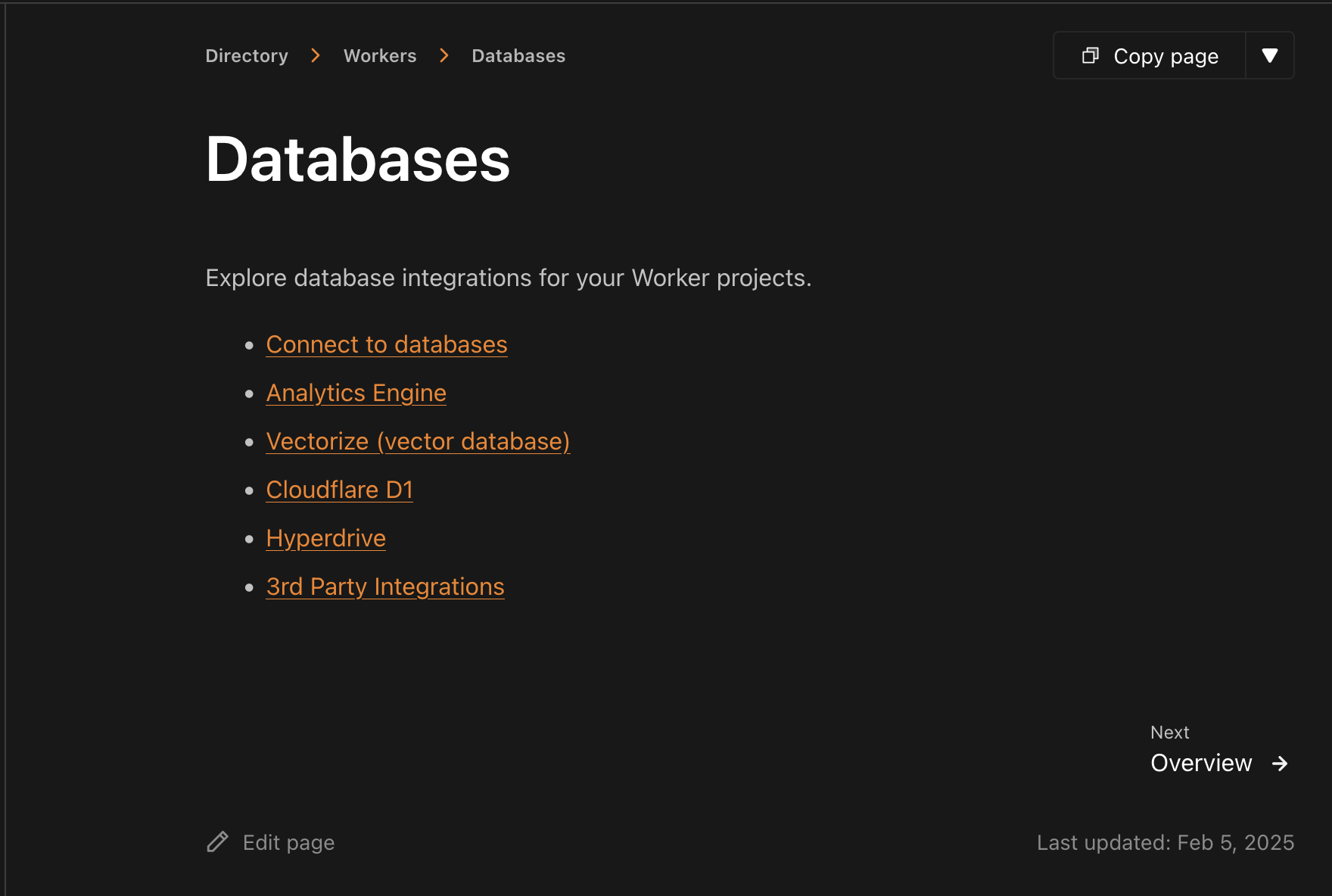
Finally, we want to make these resources discoverable for the humans who are building with agents. Every product directory in our developer documentation has an “LLM Resources” entry in the sidenav, providing quick access to llms.txt, llms-full.txt, and Cloudflare Skills.
Make your website agent-ready today
Making websites agent-ready is a fundamental accessibility requirement for the modern developer toolkit. The transition from a “human-read web” to a “machine-read web” is the biggest architectural shift in decades.
Get an agent readiness score for your site at isitagentready.com, take the prompts it provides, and ask your agent to upgrade your site for the AI era. Stay tuned for more updates from Cloudflare Radar about the adoption of agent standards across the Internet over the coming year. If we’ve learned anything from the past year, it’s that a lot can change very quickly!
The collective thoughts of the interwebz
Manage Consent
To provide the best experiences, we use technologies like cookies to store and/or access device information. Consenting to these technologies will allow us to process data such as browsing behavior or unique IDs on this site. Not consenting or withdrawing consent, may adversely affect certain features and functions.
Functional
Always active
The technical storage or access is strictly necessary for the legitimate purpose of enabling the use of a specific service explicitly requested by the subscriber or user, or for the sole purpose of carrying out the transmission of a communication over an electronic communications network.
Preferences
The technical storage or access is necessary for the legitimate purpose of storing preferences that are not requested by the subscriber or user.
Statistics
The technical storage or access that is used exclusively for statistical purposes.The technical storage or access that is used exclusively for anonymous statistical purposes. Without a subpoena, voluntary compliance on the part of your Internet Service Provider, or additional records from a third party, information stored or retrieved for this purpose alone cannot usually be used to identify you.
Marketing
The technical storage or access is required to create user profiles to send advertising, or to track the user on a website or across several websites for similar marketing purposes.