Tag Archives: Cache Rules

Introducing Cache Response Rules

Post Syndicated from Alex Krivit original https://blog.cloudflare.com/introducing-cache-response-rules/

Today we’re excited to announce Cache Response Rules. These are a new rule type that runs after an origin server replies but before Cloudflare caches the content. 

If you've ever been irked watching something that should easily sail out of cache get dragged back to the origin by a stray Set-Cookie or wrong Cache-Control, headers that are sometimes hard or impossible to strip or change on the origin itself, then Cache Response Rules is that fix, applied at exactly the right moment.  

When and how caching decisions are made

A CDN cache and an origin server work as a pair. Their goal is to answer from the cache whenever possible and only go back to the origin when the edge can’t respond. Every point of cache hit ratio comes from getting that division of labor right. Check the cache when we shouldn't, and we waste a lookup that was always going to miss. Check it too rarely, the origin serves traffic the edge should have absorbed and the performance win evaporates.

Importantly, the origin guides the cache. When it returns a cacheable asset, its response headers tell Cloudflare how long it’s OK to serve it, when and how to revalidate, and even whether to cache it at all. The cache is only ever as efficient as the origin allows. If the origin gets it wrong, cache becomes decoration while the origin infrastructure costs skyrocket.

Most cache eligibility problems are not decided at request time. They manifest after the origin replies.

A visitor asks for /static/app.js. Cloudflare checks cache, it misses, and forwards the request to the origin. The origin returns the file. Somewhere in those response headers, quietly, is a Set-Cookie header. The asset that should have been cached at every Cloudflare data center is now uncacheable. Multiply that by every visitor, on every site, with the same accidental header, and you have a cache hit ratio that is leaking origin bandwidth, ruining performance, and driving infrastructure costs higher.

There is a long list of variations of this same problem. The origin sends Cache-Control: no-cache on assets that are perfectly safe to cache on the CDN. The origin sends correct directives, but they're meant for the browser, not for Cloudflare. Or the origin attaches an ETag (an identifier for a specific version of a resource) that's overly aggressive and causes revalidation thrash on every conditional request. Often, especially in large teams, those managing the origin’s responses and the group that manages the CDN are different. This makes changing a one-line header a weeks-long negotiation.

None of these problems can be solved at request time. By the time Cloudflare sees the Set-Cookie on /app.js, the request phase is over. The response is already in flight.

So we put a fix in the right place.

Cache Response Rules run after the origin’s response arrives at Cloudflare, but before it gets written to cache. With them, you can rewrite Cache-Control directives, manage cache-tags, and strip headers like Set-Cookie, ETag, and Last-Modified from the origin response before Cloudflare's cache ever sees them. The fix lives entirely on Cloudflare. No origin code changes required.

The missing piece

If you've used Cloudflare for any length of time, you've watched the cache control surface area evolve. A few years ago, most of this lived inside Page Rules, which operated as a single, albeit overloaded, primitive that mixed caching with redirects, security, and a dozen other behaviors, all evaluated on requests. We later split these rules apart so that only relevant behavior changes would be evaluated against requests, reducing unnecessary latency and allowing for complex rule stacking between behaviors. Cache Rules became a dedicated, expressive rule type for caching decisions, joined by CDN-Cache-Control, Origin Cache Control, custom cache keys, and other controls that give you precise ways to tell Cloudflare what's safe to cache, for how long, and under what conditions.

Many of these controls share a common trait: they operate on the request.

While maybe unintuitive, this makes sense. The most important caching decisions Cloudflare has to make are should we look this up in cache, and under what key? This question has to be answered before Cloudflare talks to the origin. If the answer is "no" when it should have been "yes," the request has already paid for the origin round trip and there's nothing the response can do to give it back that latency. Request-time rules answer that question using the only information available at that moment: the URL, the requested file’s extension, the request headers, geography, device type, and so on. Using these request parameters and the rules set to change these request parameters, we determine if something is likely in cache and look there before talking with the origin. 

But some cache decisions cannot be made on the request. The origin's Cache-Control directives (cache-control: max-age=3600) are part of the response Cloudflare receives from the origin. The status code, the ETag, the Last-Modified timestamp, Set-Cookie, and the cache-tag format the origin chooses are all things in the response that the origin passes to the cache. None of it is available when request-time rules run.

Responses from the origin are the source of truth, so if something needed to be changed on Cloudflare that wasn’t available at request time, that previously left you with three workarounds:

  1. Change the origin.
  2. Write a Worker that re-fetches and rewrites the response.
  3. Live with a worse hit ratio.

Each of those costs engineering time, adds latency, or burns money. Cache Response Rules give you a fourth option: a ruleset where you can modify the origin's response before it hits Cloudflare's cache. 

Two phases, two questions

The cleanest way to think about the difference between Cache Rules and the new Cache Response Rules is as two phases, each answering its own question. 

  • Cache Rules run in the request phase, before Cloudflare talks to the origin server. They answer: given this request, should Cloudflare cache the response, and under what cache key? That’s three decisions that can be made at request time with cache rules: whether to cache (eligible vs. bypass), what the object is (the cache key and how to identify the stored object in the future), and how to cache (edge TTL, browser TTL, serve-stale, etc). All of these questions must be settled before the origin fetch, using only what’s in the request. 

  • Cache Response Rules run in the response phase, after the origin replies but before the response is written to Cloudflare's cache. Cache Response Rules answer: now that the origin has responded, should we adjust how we cache it? Cache Response Rules can rewrite the how from the request by stripping headers that would make a response ineligible for cache, changing origin cache-control directives that tell Cloudflare whether and how to cache, or setting cache tags for purging content. When a cache rule and cache response rule are in conflict with each other, the cache response rule wins. 

The response phase can't do everything the request phase can. It can't change the what, as the key is already fixed. Though it can change whether and how Cloudflare caches, for example, a response rule can set no-store to make a cacheable object non-cacheable or strip a Set-Cookie to make non-cacheable content eligible for cache. However, Cache Response Rules can't make a previously ineligible request cacheable by the response phase, because it’s too late.

So Cache Response Rules don't replace Cache Rules. Cache Rules decide whether, what, and how we cache on the request. Cache Response Rules get the final word on the how and whether, once the origin's response is seen by Cloudflare in a phase that didn't exist before.

What you can do

Cache Response Rules support three actions today.

  1. Strip headers that break caching

The set_cache_settings action removes things like Set-Cookie, ETag, or Last-Modified from the origin response before Cloudflare evaluates it for caching:

This is the fix for the Set-Cookie-on-a-static-asset problem. Origin frameworks frequently attach session cookies to every response (for load balancing or other purposes), including responses for assets that users don't want to be associated with a session. Stripping Set-Cookie in the response phase makes those assets cacheable again without asking the origin, load balancer, or anything else upstream to change anything.

Cache Response Rules also run on responses that aren't eligible for caching at all. So when you strip Set-Cookie from a dynamic response, for instance, the rule fires whether or not the object is ever stored. This allows you to control what the client sees even when the response is not stored in cache. You can also strip ETag and Last-Modified, which is useful when those headers are misconfigured at the origin and causing thrash. This comes with a tradeoff: stripping both ETag and Last-Modified enables Smart Edge Revalidation for that response. If Cache Response Rules then add new validators, Cloudflare will not enable a Smart Edge Revalidation for browser conditional requests.

So stripping and modifying headers, even on dynamic requests, are a powerful new pattern that did not exist before on Cloudflare, but there can be additional configs to be aware of if you make these changes.   

  1. Manage cache tags

set_cache_tags lets you add, remove, or set cache tags used for purge by tag on the response. Tags can be static:

Or computed from a response header expression:

That second form is the one that earns its keep during a CDN migration. If your previous CDN attached surrogate keys to responses using a header like Surrogate-Keys with a comma delimiter, you can translate them into Cloudflare's Cache-Tag format directly in the response phase.

The third argument to split() is the limit: the maximum number of elements in the resulting array can be between 1 and 128. Use a value comfortably larger than the realistic tag count per response. The value 1 would return the entire header as a single tag. Once tags exist on the response, purge-by-tag just works (and by “works” we mean usually in under 150 ms, globally).

  1. Modify Cache-Control directives

set_cache_control is the action that does the most heavy lifting. You can set or remove individual directives:

  • Duration directives: max-age, s-maxage, stale-if-error, stale-while-revalidate
  • Qualified directives: private, no-cache (with optional header-name qualifiers)
  • Boolean directives: no-store, no-transform, must-revalidate, proxy-revalidate, must-understand, public, immutable

For each directive you can also set cloudflare_only: true, which is the part that often surprises people:

When cloudflare_only is true, the directive affects how Cloudflare caches the response, but the downstream Cache-Control value sent to the browser is left alone. This is the response-phase version of what CDN-Cache-Control gives you at the origin: cache the asset for 24 hours at Cloudflare, but tell the browser something else. The difference is that you're now doing it from a Rules surface in the Cloudflare dashboard, rather than asking the origin to set a separate header.

Examples worth stealing

Below are some examples we thought could help show you the power of Cache Response Rules. Try them out, remix them, and share with others in the community so you can see how to achieve powerful cache customizations using Cache Rules with Cache Response Rules. More examples can be found in the docs.

Strip Set-Cookie from static asset extensions

Why it works: The most common cause of "this should be cacheable but isn't" is a session middleware on the origin that attaches a Set-Cookie to every response. Stripping it for known-static extensions converts those responses to cacheable without any origin change.

Caveat: Only do this for asset types where the cookie is not semantically required. If your origin uses cookies to drive variant behavior on those URLs (very unusual but possible), strip selectively or scope stripping these headers by path.

Long-cache static assets in Cloudflare, shorter-cache them in the browser

Why it works: Cloudflare holds the asset for a month and serves it from cache. Browsers see max-age=86400 and re-validate after a day. You decouple the two cache lifetimes without touching the origin.

Caveat: immutable tells browsers not to revalidate even on explicit refresh. Pair it only with versioned/hashed filenames.

Override no-cache on a known-static path

Why it works: Framework defaults sometimes attach no-cache to every response. If you know /static/* is safe to cache, you can strip the directive and impose your own TTL (at Cloudflare only), without changing what the origin or any downstream cache sees.

Caveat: Be honest about what's actually static. If /static/ is sometimes used to serve user-specific content, narrow the match (extension, response header signal, content type).

Translate cache tags during a CDN migration

Why it works: A lot of CDN migration pain comes from origin tooling that emits cache-tag headers in another vendor's format. Instead of asking the origin team to ship a release that adds Cloudflare's Cache-Tag, translate the existing header in the response phase. Purge-by-tag on Cloudflare starts working immediately.

Caveat: The third argument to split() is the limit (1–128) on the resulting array size, not anything to do with the separator. 

How to use Cache Response Rules

Dashboard

  1. Go to Cache > Cache Rules in the Cloudflare dashboard.
  2. Select Create rule and then Cache Response Rule.
  3. Choose a name and an expression. The expression builder exposes both request fields and response fields. 
  4. Choose an action: Modify cache-control directives, Modify cache tags, or Strip headers.
  5. For directives, toggle Cloudflare only when you want the change to apply only to Cloudflare's view of the asset.
  6. Save as a draft to iterate, or deploy directly.

API

Rules in this phase live at:

For further information about how to use Cache Response Rules including API and terraform examples, please see the documentation.

Use Cache Response Rules today

Cache Rules saw the request. Cache Response Rules see the response. Both give you even more control to build the perfect cache on Cloudflare. They are available on all plans today — go try them out!


The future of Page Rules

Post Syndicated from Sam Marsh original https://blog.cloudflare.com/future-of-page-rules/

The future of Page Rules

The future of Page Rules

Page Rules is one of our most well-used products. Adopted by millions of users, it is used for configuring everything from cache to security levels. It is the ‘If This Then That’ of Cloudflare. Where the ‘If…’ is a URL, and the ‘Then That’ is changing how we handle traffic to specific parts of a ‘zone’. But it’s not without its limitations.

Page Rules can only trigger on a URL or URL pattern. There is a maximum of 125 Page Rules per zone. Page Rules are also tricky to debug. Even the idea of a “Page” sounds rather old-fashioned now.

We’re replacing Page Rules with four new dedicated products, offering increased rules quota, more functionality, and better granularity. These products are available immediately for testing. Page Rules is not going away yet, but we do anticipate being able to formally begin the end-of-life process soon.

Why change?

In the 10 years since it launched, Page Rules has become a well established product, and a very well adopted one. One million Page Rules have been deployed in the past three months alone.

Page Rules are used to tune how long files should be cached. Page Rules are used to override zone-wide settings for certain URLs. Page Rules are used to create simple URL redirects. Page Rules are used to selectively add/remove HTTP headers. Page Rules is a multitool of a product.

The future of Page Rules
Photo by Andrey Matveev on Unsplash

Like multitools and other generalist products, Page Rules does a good job at many things, but is not best-of-breed at anything. This is the trade-off of generalism. As we have grown as a company our customers have rightfully demanded more. Filtering on URL-alone is no longer sufficient; users are demanding more – and today we are delivering.

Over the last two years we have been working on the future of Page Rules and distilling hundreds of pieces of feedback into common themes, such as:

  1. I need more than 125 Page Rules
  2. I need to be able to trigger Page Rules on more than just the URL
  3. I need to be able to use regular expressions in my Page Rules
  4. It’s hard for me to understand how different Page Rules interact one another
  5. Page Rules is hard to debug
  6. I want more actions in Page Rules

Analyzing these themes we came to the conclusion that the best thing for Page Rules was to disassemble it and create new discrete products, each of which could be best-of-breed for their relevant areas. This dissolution would also provide better clarity regarding interoperation (cache vs configuration vs …), and make debugging simpler.

Today, we announce those new products:

1. Cache Rules: A dedicated product for setting and tuning ‘everything caching’.

2. Configuration Rules: A dedicated product for setting and selectively enabling, disabling and overriding zone-wide settings.

3. Dynamic Redirects: Like ‘Forwarding URL’ but turned up to 11. Redirect based on the visitors country, their preferred language, their device type, use regular expressions (plan level dependant) and more.

4. Origin Rules: A dedicated product for ‘where does this traffic go where it leaves Cloudflare’. Not only have we added host header and resolve override into this new product (ENT only), we’ve also productized another common Workers use case by enabling customers to selectively override the destination port. We’ve also added the ability to override the Server Name Indication (SNI).

All four of these products are available for use now via the dashboard, API and Terraform – and sitting alongside Transform Rules provide the replacement suite of products that will eventually enable an Page Rules end-of-life announcement.

We have dedicated blogs for each of these product launches with more information on what they offer and problems they address.

Order of execution

One of the main benefits of this new product suite is clarity.

Page Rules is a black box, where traffic goes in, ‘things happen’, and traffic comes out. It’s hard to debug the interplay between cache, configuration, header modification etc and it can vary from zone to zone as it’s entirely user defined.

By having discrete, separate areas per ‘function’, it makes visualizing the flow of a HTTP request much easier:

The future of Page Rules

Rather than a single lozenge of Page Rules, we now have visibility that Origin Rules will run first, then Cache Rules, then Configuration Rules, and finally Dynamic Redirects. This means we will modify host headers first, before tuning cache settings. And we will tune the cache parameters before we modify which settings are enabled for the specific traffic.

We have integrated these new products into the Traffic Sequence dashboard element also.

(For zones using both Page Rules and this new suite of products: The new products will take precedence over Page Rules. This means that Page Rules will be overridden if a conflict occurs).

I need more than 125 Page Rules

One of the limitations of Page Rules was how each Page Rule was stored and executed on our backend architecture. We are unable to offer more than 125 Page Rules per zone before we begin to see a performance hit – latency on HTTP requests begins to increase as evaluating them vs the Page Rules takes longer and longer. To combat this limitation users moved simple workloads to Workers, or split the zone into multiple sub domains, each with a 125 Page Rules quota. Neither of these are ideal for the customer.

To combat this limitation we have built all of the replacement products atop our lightning-fast Rulesets Engine, which also runs products such as Transform Rules, Custom Rules (WAF), Bulk Redirects and API Shield.

This allows us to offer much more quota to customers, as this engine is built to scale well beyond 125 rules per product. The table below summarizes the before and after impact of these new products, showing the default rules quota per plan:

Plan Page Rules Origin Rules Cache Rules Config Rules Dynamic Redirects
Enterprise 125 125+ 125+ 125+ 125+
Business 50 50 50 50 50
Pro 20 25 25 25 25
Free 3 10 10 10 10

Additional rules cannot be purchased for these new products.

This means zone’s on the Enterprise plan now have a minimum of 500 rules to use where before they had 125 via Page Rules. For Enterprises the quota for the new products is negotiable. Pro plan zones go from 20 Page Rules to 100.  Combined with the fine-grained control that the ruleset engine offers, these changes allow customers to customize their zone’s traffic to the finest of margins.

The other benefit from building all of these products on the Rulesets Engine is extensibility. Currently there are over 30 products that are built and running on the Rulesets Engine. Each of these products is essentially a logical bucket called a ‘phase’ which contains a single ruleset scoped to that product. Each phase is restricted to specific actions and fields, for example the field cf.bot_management.score is unavailable in http_request_transform as we have not calculated the bot score at the time we perform URL rewrites. Also, only the rewrite action is permitted. Whereas in Origin Rules (http_request_origin) we only allow the action route

When we create new capabilities for a product that is built atop the Rulesets Engine it is trivially simple for us to extend that new capability to other products at a later date.

For example, we added a new ‘field’, http.request.accepted_languages to Transform Rules earlier in the year. Until recently this was only available in Transform Rules. However, as both products are built on the Rulesets Engine it was trivial to enable this feature for Dynamic Redirects. This allows customers to perform URL redirects based on the visitor’s language preference, and the cost to us from an engineering perspective is negligible as the field is already implemented.

This also means in the future should a new field be created for Cache Rules due to a customer request, e.g. http.request.super_cool_field, in a matter of clicks we can enable this field for any of the other 30 products rather than have to duplicate effort across multiple platforms.

Simply put, the more products we build on top of the Rulesets Engine, the faster we can move and the more functionality we can put into users hands.

A single user experience

The most important benefit of all is consistency. Each of these products has a consistent and predictable API. A consistent and predictable Terraform configuration, and a consistent and predictable user experience in the dashboard. The ruleset engine allows us to keep everything the same except for the ‘action’. The filtering stays the same, the API stays the same, the UI stays (largely) the same, the only change is the ‘…then’, the action section of the rule.

This ensures that as a user when you are clicking around the dashboard setting up a new zone you aren’t having to learn each individual product’s page and how to navigate it. The only part you need to learn is what makes that product unique, its actions:

The future of Page Rules

Finally, when we add a new product, extending the Terraform provider to support it is trivial. That consistent experience has been a north star for us during this project and will continue to be in the future.

Try it them now

We are replacing Page Rules with a new suite of products, each built to be best-of-breed and put more power into the hands of our users.

Read more about the new products in each of their dedicated blogs. Then, try them for yourself!

Dynamic URL redirects: 301 to the future

Post Syndicated from Sam Marsh original https://blog.cloudflare.com/dynamic-redirect-rules/

Dynamic URL redirects: 301 to the future

Dynamic URL redirects: 301 to the future

The Internet is a dynamic place. Websites are constantly changing as technologies and business practices evolve. What was front-page news is quickly moved into a sub-directory. To ensure website visitors continue to see the correct webpage even if it has been moved, administrators often implement URL redirects.

A URL redirect is a mapping from one location on the Internet to another, effectively telling the visitor’s browser that the location of the page has changed, and where they can now find it. This is achieved by providing a virtual ‘link’ between the content’s original and new location.

URL Redirects have typically been implemented as Page Rules within Cloudflare, however Page Rules only match on the URL, rather than other elements such as the visitor’s source country or preferred language. This limitation meant customers with a need for more dynamic URL redirects had to implement alternative solutions such Cloudflare Workers to achieve their goals.

To simplify the management of these more complex use cases we have created Dynamic Redirects. With Dynamic Redirects, users can redirect visitors to another webpage or website based upon hundreds of options such as the visitor’s country of origin or language, without having to write a single line of code.

More than a URL

For nine years users were limited to 125 URL redirects per zone. This limitation meant those with a need for more URL redirects had to implement alternative solutions such Cloudflare Workers to achieve their goals.

In December 2021, we launched Bulk Redirects, allowing up to 100,000 URL redirects per account at the time. In April 2022 we increased this maximum number to over six million URL redirects per account. However, there is still a gap in the ‘URL redirect’ product unfulfilled. Until now.

Bulk Redirects, much like the ‘Forwarding URL’ Page Rule, are prescriptive URL redirects. You tell us what URL to look for, and where to redirect the user to when they visit it. We can support this use case at a huge scale.

If a visitor asks for.. Redirect them to…
https://www.cloudflare.com/r2-storage https://www.cloudflare.com/products/r2
https://www.cloudflare.com/apishield https://www.cloudflare.com/products/api-gateway
https://www.cloudflare.com/welcome-center https://developers.cloudflare.com/fundamentals/get-started/

That’s a simple concept to understand, however user needs have evolved. What if a user wanted to redirect visitors to a localized version of the requested page based on their preferred language? What if a user wanted to redirect visitors to their local subsidiary on the website? Or direct them to an optimized site when they visit from a mobile device? Suddenly, this well understood concept doesn’t work – and they have to deploy code in Workers to solve what is actually a common problem. And common problems deserve to be productized.

This is where Dynamic Redirects can help. The new product provides the same consistent user interface as Transform Rules, Custom Rules, Bulk Redirects, etc. and provides a new action allowing for the target URL to be dynamically created, much like the dynamic rewrite action offered in Transform Rules.

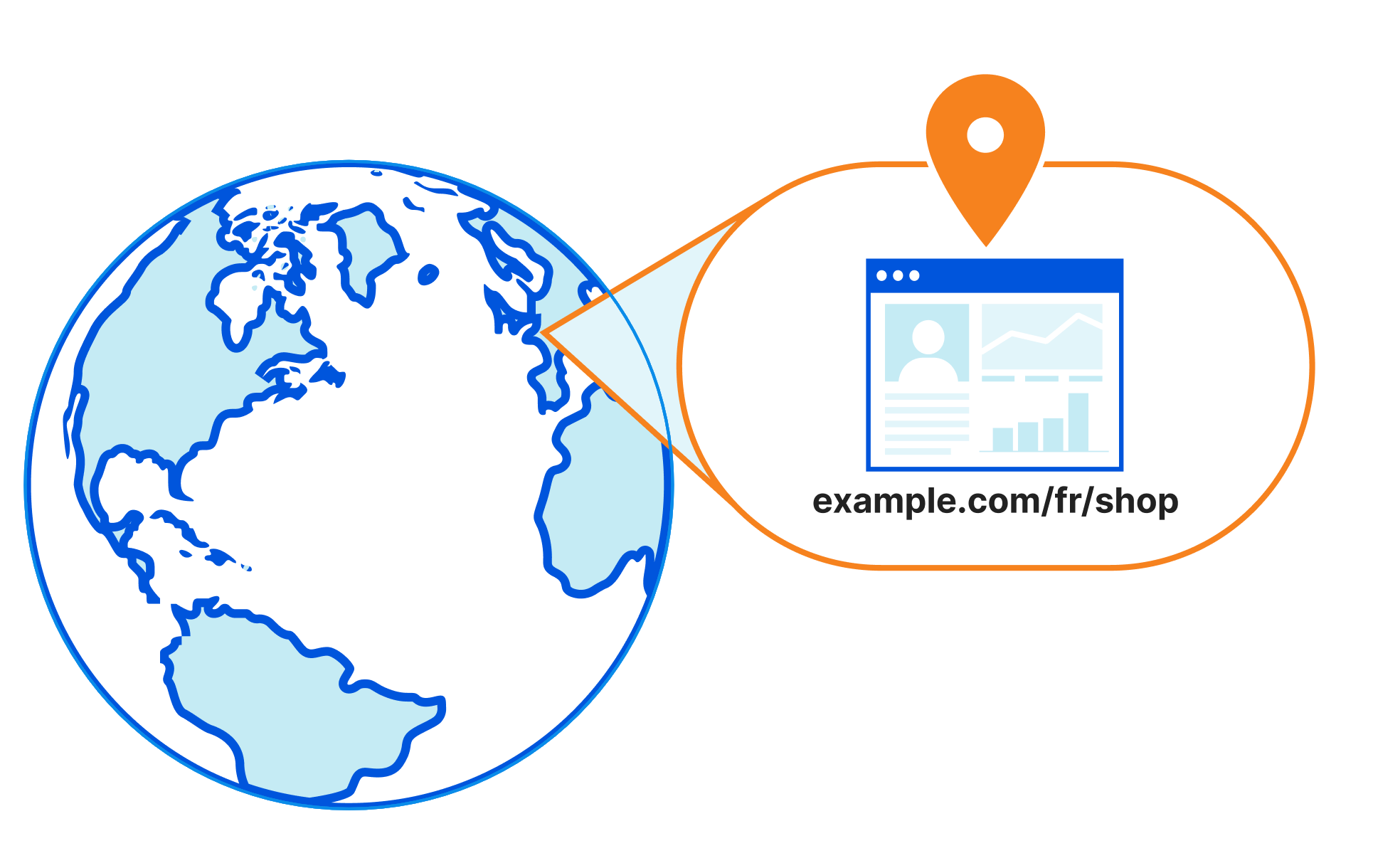
This dynamic action frees the user from having to define explicitly what the target URL should look like, and instead provides them with a full gamut of fields and functions to custom generate the target URL based upon the parameters of the request. For example, rather than redirecting all traffic for www.example.com/shop to www.example.com/en/shop, users can conceptually redirect the traffic to www.example.com/{PREFERRED_LANGUAGE}/shop (not actual syntax!). With this, traffic from a browser with a preferred language of French will be redirected to www.example.com/fr/shop, likewise those with a preferred language of German will be redirected to www.example.com/de/shop.

Dynamic URL redirects: 301 to the future

The other big difference between Dynamic Redirects and  Page Rules is in the filtering. Page Rules are limited to filtering on a URL, or a URL with asterisks as wildcards. Dynamic Redirects is built atop our lightning-fast Rulesets Engine, which also runs products such as Transform Rules, Custom Rules (WAF), Bulk Redirects and API Shield.

Due to this, Dynamic Redirects offers almost the entire suite of Ruleset Engine fields for use in filtering; from http.request.full_uri for the whole URL, to ip.geoip.country (where is the visitor located) and http.request.accepted_languages[] (the language preferred by the visitor). The possibilities are endless.

Users can also now use logical operators such as ‘OR’. Where previously, if a user wanted to redirect five distinct URLs to the same URL they would need to deploy five Page Rules. Today, they can simply use an ‘OR’ to consolidate this use case into just one Dynamic Redirect rule:

# URL Destination URL
1 https:/www.cloudflare.com/partners/integrations/ www.cloudflare.com/partners/
2 https:/www.cloudflare.com/partners/become-a-partner/ www.cloudflare.com/partners/
3 https:/www.cloudflare.com/partners/digital-agency/ www.cloudflare.com/partners/
4 https:/www.cloudflare.com/partners/technology-integrator/ www.cloudflare.com/partners/
5 https:/www.cloudflare.com/partners/view-partners/ www.cloudflare.com/partners/

# Expression Destination URL
1 (http.request.full_uri eq “https:/www.cloudflare.com/partners/integrations/”) or (http.request.full_uri eq “https:/www.cloudflare.com/partners/become-a-partner/”) or (http.request.full_uri eq “https:/www.cloudflare.com/partners/digital-agency/”) or (http.request.full_uri eq “https:/www.cloudflare.com/partners/technology-integrator/”) or (http.request.full_uri eq “https:/www.cloudflare.com/partners/view-partners/”) www.cloudflare.com/partners/

We can further simplify this use case in the future by adding hostname lists, allowing users to add URLs to a list and reference it from within the rule expression, similar to IP Lists. This allows an expression like (http.request.full_uri in $vanity_urls), for example.

A dedicated quota, just for U(RL)

Page Rules are used to set everything from configuration and caching behaviour to header modification and also URL redirection (Forwarding URL). This means that users tend to run out of available rules quickly.

To address this, we’re matching the Page Rule quota in each of the four new products that are being announced today. This means where in Page Rules an Enterprise customer would get 125 Page Rules to share amongst the aforementioned functions, in Dynamic Redirects they have 125 rules just for redirects. This number can be increased for Enterprise customers, also.

We’re also increasing the quota for free plans; where today free plans get three Page Rules, they will now get 10 rules for dynamic redirects, along with each of the other three products (cache, origin, config rules). That’s a net increase of 37 additional rules!

Plan Page Rules Dynamic Redirects
Enterprise 125 125+
Business 50 50
Pro 20 25
Free 3 10

Users can now get more out of their Cloudflare setup, being more specific about when traffic is redirected, optimizing cache and adjusting which settings are and aren’t applied – without having to trade off between these areas due to a limit in rules quota.

Localized redirects

One of the examples covered earlier is being able to redirect visitors to localized content depending on their preferred language.

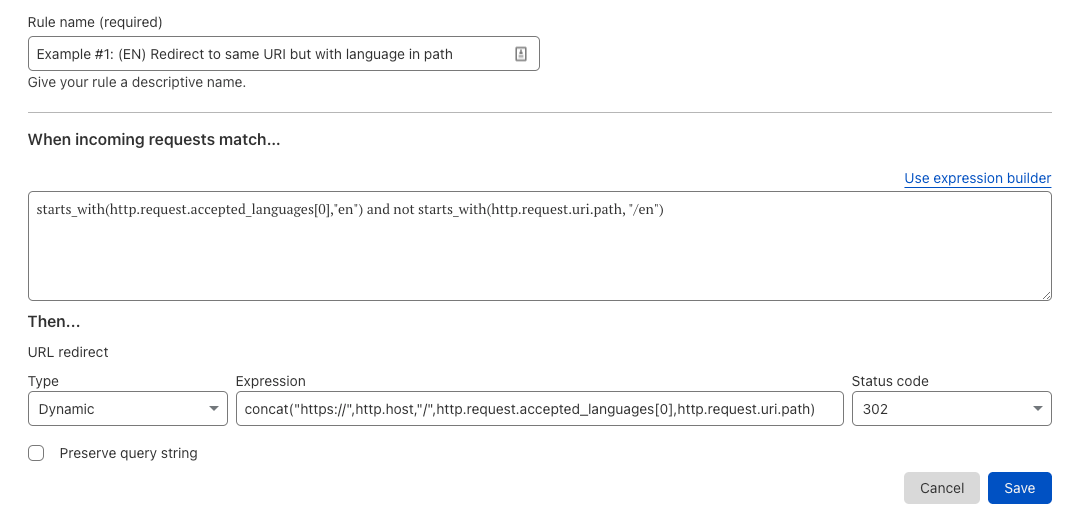
This can be done by analyzing the ‘Accept-Language’ header sent by the browser, which is stored as an array in the field http.request.accepted_languages[]. This field is an array of the values received by Cloudflare within the Accept-Language HTTP request header, sorted in descending weight order. This header is calculated based on the preferences set by the visitor in the ‘Language’ section of their web browser.

For example, if the visitors browser sends an ‘Accept-Language’ header containing “Accept-Language: fr-CH, fr;q=0.8, en;q=0.9, de;q=0.7, *;q=0.5”, then the field http.request.accepted_languages[0] would contain “en”, with http.request.accepted_languages[1] containing “fr” and so forth.

With this information, we can create a dynamic redirect using the action:

Dynamic URL redirects: 301 to the future

With this rule in place, traffic from visitors with a preferred language of English (en) will be redirected to www.example.com/en/shop. The rule can be duplicated for other languages also, ensuring those with a preferred language of French (fr) will be redirected to www.example.com/fr/shop.

There are so many use cases for Dynamic Redirects we couldn’t fit them all in this blog.

Other possible use cases include mobile redirects, redirects based on cookies, redirects to different endpoints based on request headers for live testing. The potential list is huge, and we can’t wait to hear what you come up with. Try it today!