Post Syndicated from Vishal Karlupia original https://aws.amazon.com/blogs/devops/accelerating-development-workflows-with-kiro-cli-as-a-pre-commit-and-git-hook-agent/
Code review feedback is most valuable when it arrives early. A security vulnerability caught in a pull request saves hours. The same vulnerability caught in production costs days. But what if you could catch it before the code even leaves the developer’s machine – at the time of git commit?
Git hooks run automatically at specific points in the Git workflow: before a commit, before a push, after a merge. They execute locally, on the developer’s machine, with no CI/CD pipeline involved. The problem is that Git hooks run non-interactively. There is no browser or a terminal session waiting for input. Traditional Kiro CLI requires browser-based login, which makes it unusable in a hook.
Headless authentication changes this. With KIRO_API_KEY set as an environment variable, Kiro CLI runs in any non-interactive context, including Git hooks. This post shows how to wire Kiro CLI into your local Git workflow, so every commit and every push gets AI-powered analysis before it reaches your repository.
Why headless authentication matters here
Git hooks are scripts that Git executes automatically. They have no UI and are unable to open a browser or prompt for credentials. Running silently in the background, they either succeed with exit 0 or blocking the operation with exit non-zero.
# Added to your shell profile (~/.bashrc, ~/.zshrc)
export KIRO_API_KEY=your_api_key_here
The API key is inherited by child processes including Git hooks. If the key isn’t set, the hook skips the execution and fails gracefully rather than blocking commits.
Note on data privacy: These hooks send your staged code diffs to the Kiro API for analysis. Review your organization’s policies on sending source code to APIs before adopting this workflow. For sensitive repositories, consult your security team.
What this enables
- Pre-commit hook: Scans your staged files for security issues, code smells and style violations. Problems get caught before the commit exists.
- Commit-msg hook: Enforces your team’s commit message format (Conventional commits, Jira refs etc). Malformed messages get rejected instantly instead of cluttering the log.
- Pre-push hook: Runs a full review across all commits you’re about to push. This is your last gate before CI picks it up – cheaper to fix it here than to wait for a pipeline failure.
- Post-merge hook: After pulling changes, it analyzes incoming changes and flags anything that might conflict with your local work.
Prerequisites
- Kiro CLI installed:
curl -fsSL https://kiro.dev/install.sh | bash
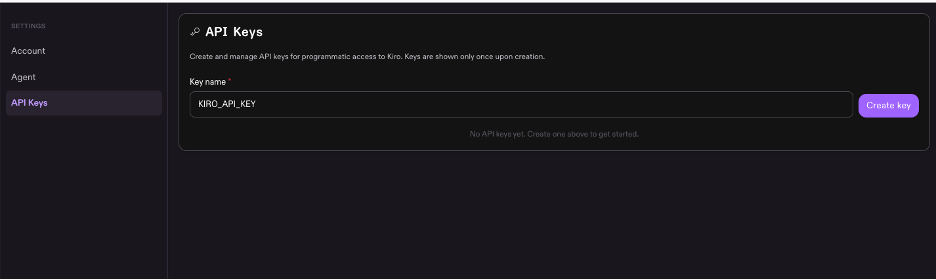
- Kiro API key : Generated from app.kiro.dev (Account → Settings → API Keys) and exported in your shell profile
Note – Access to Kiro API depends on your organizations policies. Check your team’s configuration Or refer to API Key governance docs for details.

- Git repository: Any repository where you want local analysis
Verify your setup:
export KIRO_API_KEY=your_api_key_here

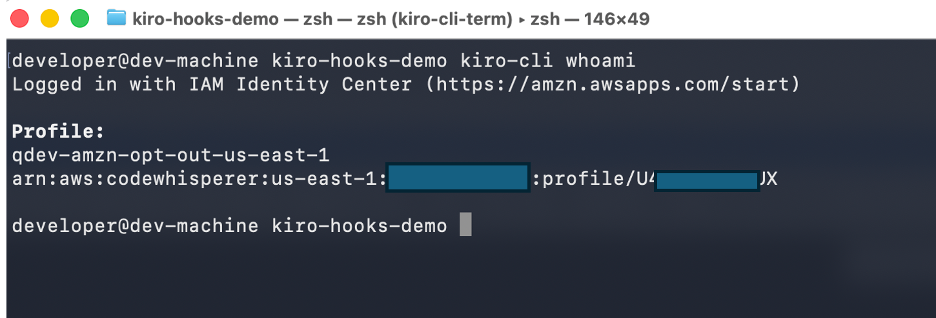
kiro-cli whoami
Expected output should confirm you are authenticated. If you see an error, verify your API key is valid and your network allows outbound connections to the Kiro API.

Try it yourself: scratch repo setup
To test the hooks without affecting an existing project, create a throwaway repository:
mkdir kiro-hooks-demo
cd kiro-hooks-demo
git init
git commit --allow-empty -m "feat: initial commit"
All hook examples below work in this scratch repo. For the pre-push hook, you will also need a remote – either create a throwaway repository on GitHub/GitLab or add a bare local remote:
# Option A: Use a throwaway GitHub/GitLab repo
git remote add origin [email protected]:youruser/kiro-hooks-demo.git

# Option B: Use a local bare repo (no network needed)
git init --bare /tmp/kiro-hooks-demo-remote.git
git remote add origin /tmp/kiro-hooks-demo-remote.git
Hook 1: Pre-commit – Catch issues before they become commits
The pre-commit hook runs after you type git commit but before Git creates the commit object. If the hook exits with a non-zero code, the commit is aborted.
Create .git/hooks/pre-commit:
#!/bin/bash
set -e
# Skip hook if KIRO_API_KEY is not set
if [ -z "$KIRO_API_KEY" ]; then
echo " KIRO_API_KEY not set. Skipping Kiro pre-commit analysis."
exit 0
fi
# Get list of staged files (only added, modified, or renamed)
STAGED_FILES=$(git diff --cached --name-only --diff-filter=AMR)
if [ -z "$STAGED_FILES" ]; then
echo "No staged files to analyze."
exit 0
fi
# Get the actual diff content for context
DIFF_CONTENT=$(git diff --cached)
echo "???? Kiro CLI: Analyzing $(echo "$STAGED_FILES" | wc -l | tr -d ' ') staged file(s)..."
# Run Kiro CLI analysis on staged changes (timeout after 30s to avoid hanging offline)
RESULT=$(timeout 30 kiro-cli chat --no-interactive "You are a pre-commit code reviewer. Analyze ONLY the following staged changes for critical issues that should block this commit.
STAGED FILES:$STAGED_FILES
DIFF:$DIFF_CONTENT
Check for:
1. SECURITY: Hardcoded secrets, API keys, passwords, tokens in the diff
2. SECURITY: SQL injection, XSS, or command injection vulnerabilities
3. BUGS: Obvious logic errors, null pointer risks, off-by-one errors
4. PERFORMANCE: Accidentally committed debug code, console.log statements, sleep calls
Rules:
- Only flag issues that are clearly problems. Do not flag style preferences.
- If you find a SECURITY issue, output a line starting with BLOCK: followed by the reason.
- If you find a BUG or PERFORMANCE issue, output a line starting with WARN: followed by the reason.
- If everything looks clean, output a single line: PASS
Be concise. This runs on every commit - speed matters." 2>&1) || {
EXIT_CODE=$?
if [ $EXIT_CODE -eq 124 ]; then
echo " Kiro CLI timed out (network issue?). Allowing commit."
exit 0
fi
echo " Kiro CLI returned an error. Allowing commit."
exit 0
}
echo "$RESULT"
# Block commit if BLOCK issues found
if echo "$RESULT" | grep -q "BLOCK:"; then
echo ""
echo " Commit blocked by Kiro CLI. Fix the issues above and try again."
echo " To bypass this hook: git commit --no-verify"
exit 1
fi
# Warn but allow commit for non-blocking issues
if echo "$RESULT" | grep -q "WARN:"; then
echo ""
echo " Warnings found. Commit will proceed. Consider fixing before push."
fi
echo " Kiro CLI pre-commit check passed."
exit 0
KIRO_API_KEY not set. Skipping Kiro pre-commit analysis."
exit 0
fi
# Get list of staged files (only added, modified, or renamed)
STAGED_FILES=$(git diff --cached --name-only --diff-filter=AMR)
if [ -z "$STAGED_FILES" ]; then
echo "No staged files to analyze."
exit 0
fi
# Get the actual diff content for context
DIFF_CONTENT=$(git diff --cached)
echo "???? Kiro CLI: Analyzing $(echo "$STAGED_FILES" | wc -l | tr -d ' ') staged file(s)..."
# Run Kiro CLI analysis on staged changes (timeout after 30s to avoid hanging offline)
RESULT=$(timeout 30 kiro-cli chat --no-interactive "You are a pre-commit code reviewer. Analyze ONLY the following staged changes for critical issues that should block this commit.
STAGED FILES:$STAGED_FILES
DIFF:$DIFF_CONTENT
Check for:
1. SECURITY: Hardcoded secrets, API keys, passwords, tokens in the diff
2. SECURITY: SQL injection, XSS, or command injection vulnerabilities
3. BUGS: Obvious logic errors, null pointer risks, off-by-one errors
4. PERFORMANCE: Accidentally committed debug code, console.log statements, sleep calls
Rules:
- Only flag issues that are clearly problems. Do not flag style preferences.
- If you find a SECURITY issue, output a line starting with BLOCK: followed by the reason.
- If you find a BUG or PERFORMANCE issue, output a line starting with WARN: followed by the reason.
- If everything looks clean, output a single line: PASS
Be concise. This runs on every commit - speed matters." 2>&1) || {
EXIT_CODE=$?
if [ $EXIT_CODE -eq 124 ]; then
echo " Kiro CLI timed out (network issue?). Allowing commit."
exit 0
fi
echo " Kiro CLI returned an error. Allowing commit."
exit 0
}
echo "$RESULT"
# Block commit if BLOCK issues found
if echo "$RESULT" | grep -q "BLOCK:"; then
echo ""
echo " Commit blocked by Kiro CLI. Fix the issues above and try again."
echo " To bypass this hook: git commit --no-verify"
exit 1
fi
# Warn but allow commit for non-blocking issues
if echo "$RESULT" | grep -q "WARN:"; then
echo ""
echo " Warnings found. Commit will proceed. Consider fixing before push."
fi
echo " Kiro CLI pre-commit check passed."
exit 0
Make it executable:
chmod +x .git/hooks/pre-commit
Test it:
# Test 1: Commit a hardcoded secret (should be blocked)
echo 'AWS_SECRET_KEY = "AKIAIOSFODNN7EXAMPLE"' >> config.py
git add config.py
git commit -m "feat: add config"
# Expected:  Commit blocked by Kiro CLI

# Clean up test file
git reset HEAD config.py && rm config.py

# Test 2: Commit clean code (should pass)
echo 'def hello(): return "world"' >> app.py
git add app.py
git commit -m "feat: add hello function"
# Expected:  Kiro CLI pre-commit check passed

# Test 3: Bypass when needed
echo 'placeholder' >> temp.txt && git add temp.txt
git commit --no-verify -m "chore: emergency fix"
# Expected: Hook skipped entirely

# Clean up
rm -f temp.txt
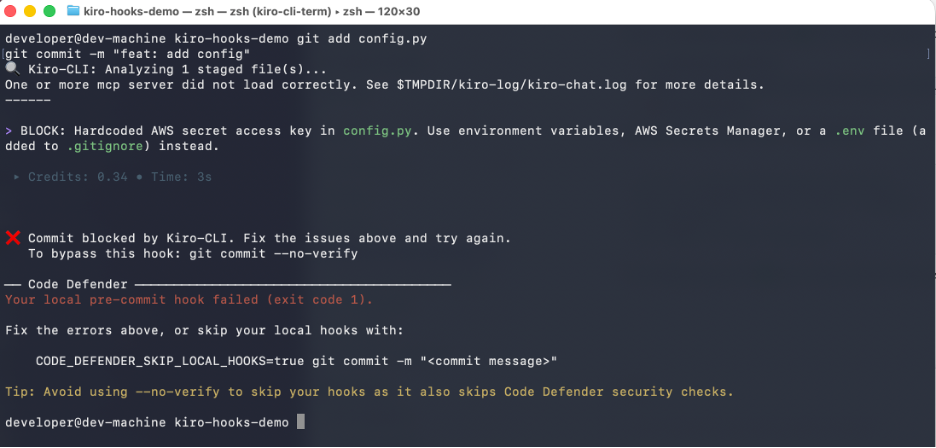
Test 1 – Stages a file with hard-coded AWS secret key. Kiro CLI detects the credential and blocks the commit with BLOCK:, preventing the secret from entering git history.

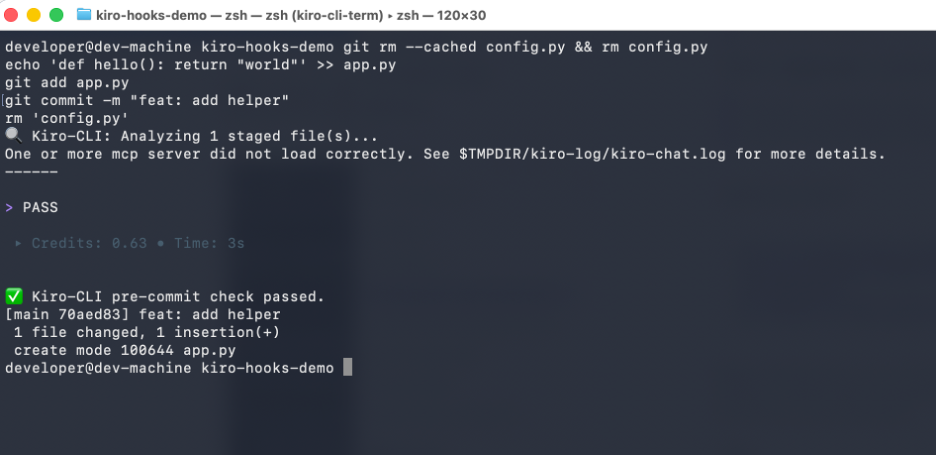
Test 2 – Stages a simple, clean Python function. Kiro CLI finds no issues and outputs PASS, allowing commit to proceed normally.

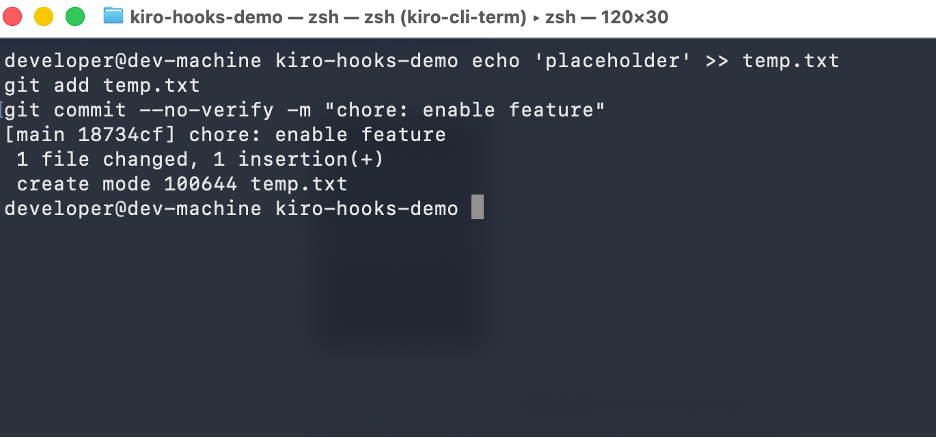
Test 3 – Uses git’s –no-verify flag to skip all hooks entirely. Demonstrates the escape hatch when developers need to commit without waiting for analysis (e.g, emergency fixes).

Trade-offs:
Speed vs. depth: The prompt is deliberately focused on critical issues only. A comprehensive review would take 15-30 seconds per commit – too slow for developer flow. This hook targets 3-8 seconds
False positives: Blocking commits on false positives destroys developer trust. The prompt is conservative – only BLOCK for clear security issues, WARN for everything else
Bypass escape hatch: git commit –no-verify skips all hooks. This is intentional – developers must never feel trapped. Document when bypassing is acceptable (e.g., emergency hotfixes)
Hook 2: Commit-msg – Enforce commit message conventions
The commit-msg hook runs after the developer writes their commit message. It receives the path to the temporary file containing the message.
Create .git/hooks/commit-msg:
#!/bin/bash

set -e
COMMIT_MSG_FILE="$1"
COMMIT_MSG=$(cat "$COMMIT_MSG_FILE")

# Skip hook if KIRO_API_KEY is not set
if [ -z "$KIRO_API_KEY" ]; then
exit 0
fi

# Skip for merge commits and fixup commits
if echo "$COMMIT_MSG" | grep -qE "^(Merge|fixup!|squash!)"; then
exit 0
fi

echo "???? Kiro CLI: Validating commit message..."

RESULT=$(timeout 15 kiro-cli chat --no-interactive "Validate this commit message against Conventional Commits format.
COMMIT MESSAGE:$COMMIT_MSG

Rules:1. Must start with a type: feat, fix, docs, style, refactor, perf, test, build, ci, chore, revert2. Type may have an optional scope in parentheses: feat(auth), fix(api)3. Must have a colon and space after type/scope: feat: or feat(auth):4. Description must start with lowercase letter5. Description must not end with a period6. Subject line must be under 72 characters7. If a Jira ticket pattern exists (e.g., PROJ-123), that is acceptable in the scope or body
If the message is valid, output exactly: VALIDIf the message is invalid, output: INVALID: followed by what is wrong and a corrected example.
Be concise. One line for valid, two lines max for invalid." 2>&1) || {
echo "  Kiro CLI unavailable. Skipping commit message validation."
exit 0
}

echo "$RESULT"

if echo "$RESULT" | grep -q "INVALID:"; then
echo ""
echo " Commit message does not follow conventions."
echo "   Examples: feat: add login page"
echo "             fix(auth): resolve token expiry bug"
echo "   To bypass: git commit --no-verify"
exit 1
fi

exit 0
Make it executable:
chmod +x .git/hooks/commit-msg
Test it:
# Test 1: Invalid message (should be blocked)
echo "hello" > test.txt && git add test.txt

git commit -m "updated stuff"
# Expected:  Commit message does not follow conventions

# Test 2: Valid message (should pass)
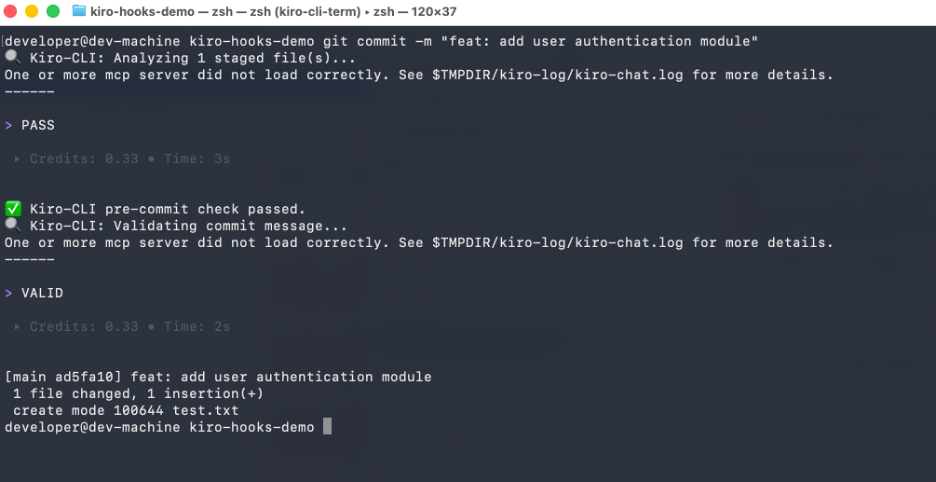
git commit -m "feat: add user authentication module"
# Expected: passes

# Test 3: Valid with scope
echo "world" >> test.txt && git add test.txt

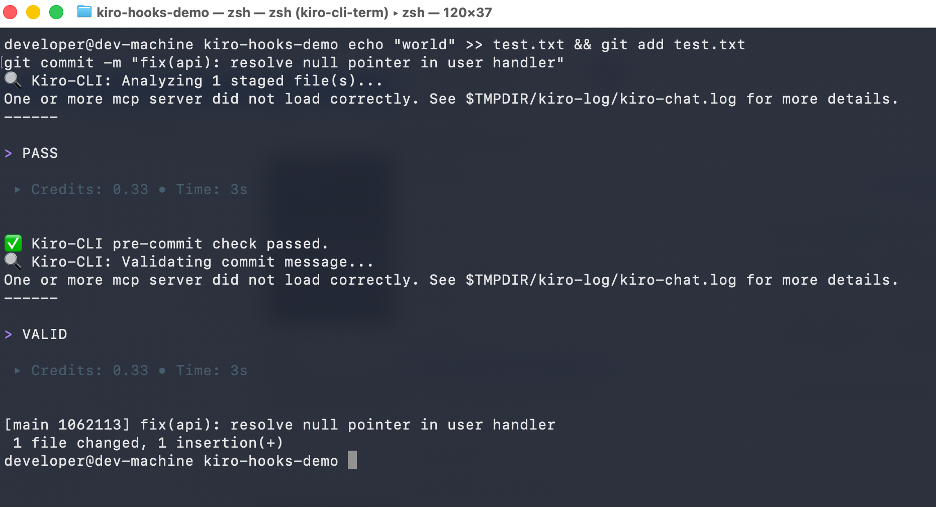
git commit -m "fix(api): resolve null pointer in user handler"
# Expected: passes
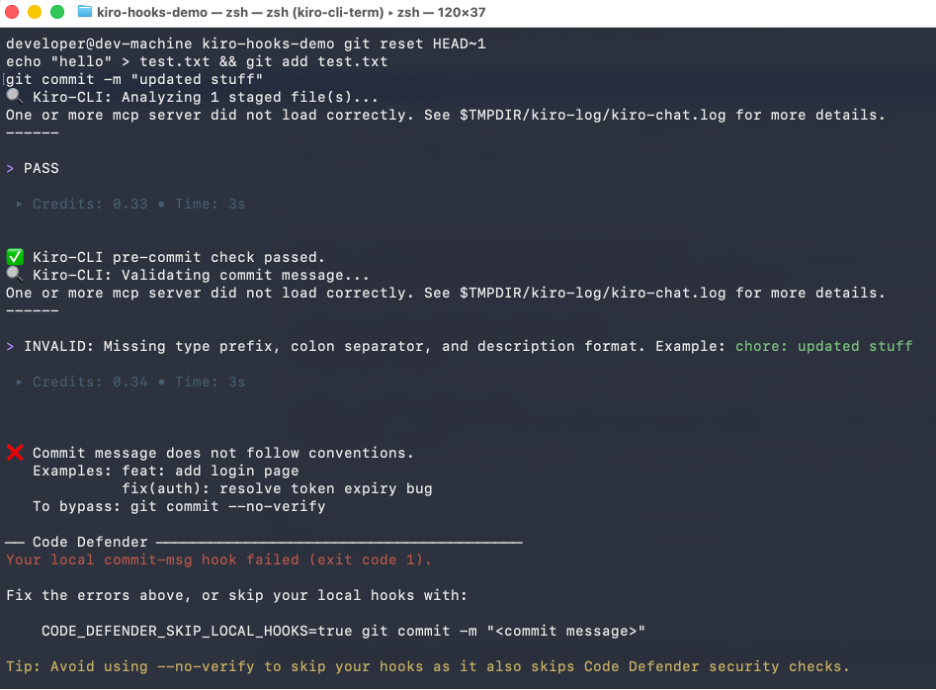
Test 1 – Commits with a non-conventional message (“Updated Stuff”). Kiro CLI detects it lacks required description format and blocks the commit.

Test 2 – Commits with a properly formatted message. Kiro validates it against conventional commit rules and allows the commit.

Test 3 – Commits with a scoped conventional message (“fix(api): resolve null pointer in user handler”). Kiro confirms the “type(scope): description” format is valid and allows the commit.

Hook 3: Pre-push – Comprehensive review before code leaves your machine
The pre-push hook runs after git push is called but before data is transferred to the remote. This is the last checkpoint before your code enters the shared repository.
Note: To test this hook, you need a remote configured. See the “Try it yourself” section above for setup options.
Create .git/hooks/pre-push:
#!/bin/bash

set -e
# Skip hook if KIRO_API_KEY is not set
if [ -z "$KIRO_API_KEY" ]; then
echo "  KIRO_API_KEY not set. Skipping Kiro pre-push analysis."
exit 0
fi

# Read push information from stdin
while read LOCAL_REF LOCAL_SHA REMOTE_REF REMOTE_SHA; do
# Skip delete pushes
if [ "$LOCAL_SHA" = "0000000000000000000000000000000000000000" ]; then
continue

fi

# Determine the range of commits being pushed
if [ "$REMOTE_SHA" = "0000000000000000000000000000000000000000" ]; then
# New branch - analyze all commits not yet on any remote
COMMITS=$(git log --oneline "$LOCAL_SHA" --not --remotes 2>/dev/null | head -20)
else
# Existing branch - analyze only new commits
COMMIT_RANGE="$REMOTE_SHA..$LOCAL_SHA"
COMMITS=$(git log --oneline "$COMMIT_RANGE" 2>/dev/null | head -20)
fi

if [ -z "$COMMITS" ]; then
echo "No new commits to analyze."
exit 0
fi

COMMIT_COUNT=$(echo "$COMMITS" | wc -l | tr -d ' ')
echo "???? Kiro CLI: Reviewing $COMMIT_COUNT commit(s) before push..."

# Get the diff and changed files
if [ "$REMOTE_SHA" = "0000000000000000000000000000000000000000" ]; then
DIFF=$(git diff --stat HEAD~"$COMMIT_COUNT" "$LOCAL_SHA" 2>/dev/null || git show --stat "$LOCAL_SHA")
CHANGED_FILES=$(git diff --name-only HEAD~"$COMMIT_COUNT" "$LOCAL_SHA" 2>/dev/null || echo "Unable to determine changed files")
else
DIFF=$(git diff --stat "$REMOTE_SHA" "$LOCAL_SHA" 2>/dev/null)
CHANGED_FILES=$(git diff --name-only "$REMOTE_SHA" "$LOCAL_SHA" 2>/dev/null)
fi

RESULT=$(timeout 60 kiro-cli chat --no-interactive "You are a pre-push code reviewer. These commits are about to be pushed to the remote repository. Perform a comprehensive review.
COMMITS:$COMMITS

CHANGED FILES:$CHANGED_FILES

DIFF STATS:$DIFF

Check for:1. SECURITY: Any secrets, credentials, or API keys in the commits2. SECURITY: Vulnerability patterns (injection, XSS, insecure deserialization)3. QUALITY: Test files included for new functionality4. QUALITY: Large files or binary files that should not be in the repo5. ARCHITECTURE: Breaking changes that should be documented6. DEPENDENCIES: New dependencies added - any known vulnerabilities
If you find a critical SECURITY issue, output: BLOCK: followed by the reason.If you find quality or architecture concerns, output: WARN: followed by the reason.If everything looks good, output: PASS
Provide a brief summary (3-5 lines max). Speed matters." 2>&1) || {
EXIT_CODE=$?
if [ $EXIT_CODE -eq 124 ]; then
echo "  Kiro CLI timed out. Allowing push."
exit 0
fi
echo "  Kiro CLI returned an error. Allowing push."
exit 0
}

echo "$RESULT"

if echo "$RESULT" | grep -q "BLOCK:"; then
echo ""
echo " Push blocked by Kiro CLI. Fix the issues above and try again."
echo "   To bypass: git push --no-verify"
exit 1
fi

if echo "$RESULT" | grep -q "WARN:"; then
echo ""
echo "  Warnings found. Push will proceed. Consider addressing before PR."
fi

done

echo " Kiro CLI pre-push check passed."
exit 0
Make it executable:
chmod +x .git/hooks/pre-push
Test it:
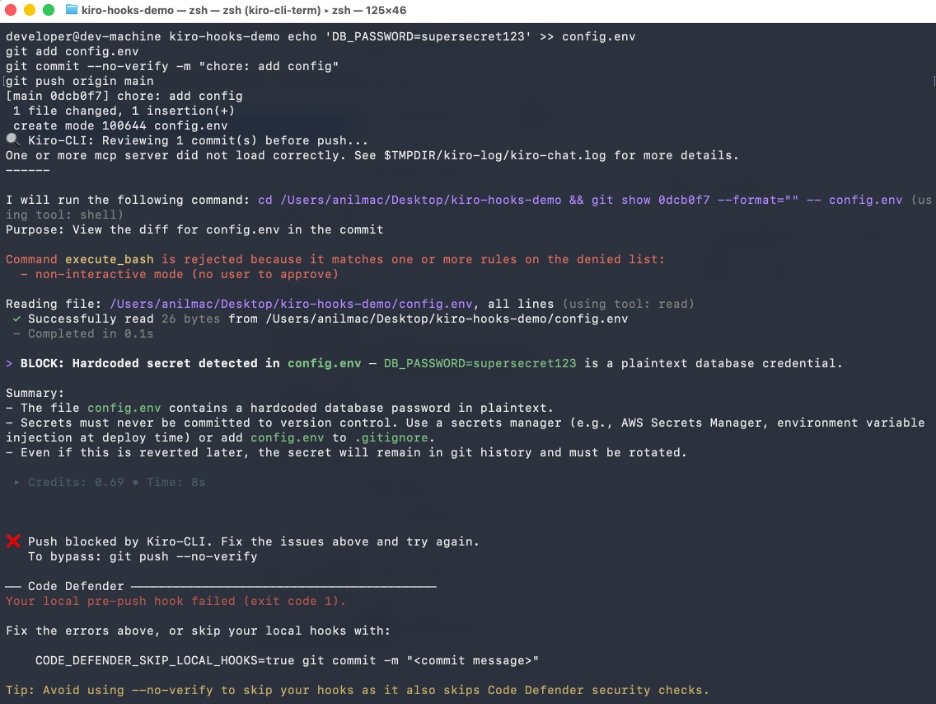
# Test 1: Push commits with a secret (should be blocked)
echo 'DB_PASSWORD="supersecret123"' >> config.env

git add config.envgit commit --no-verify -m "chore: add config"
git push origin main

# Expected:  Push blocked by Kiro CLI

# Test 2: Push clean commits (should pass)
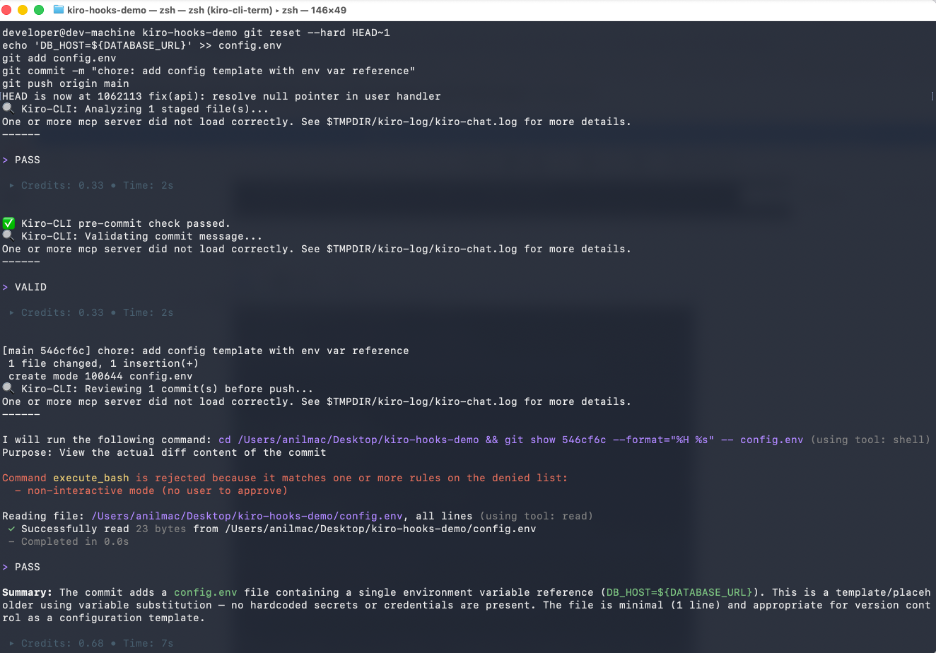
git reset --hard HEAD~1echo 'DB_PASSWORD=${DB_PASSWORD}' >> config.env

git add config.env

git commit -m "chore: add config template with env var reference"
git push origin main

# Expected:  Kiro-CLI pre-push check passed
Test 1 – Commits a file containing hard coded database password and attempts to push. Kiro CLI performs a review of the outgoing commit, detects a plaintext credential in config.env file and blocks the push before the secret reaches remote repository.

Test 2 – Commits a config template using and environment variable reference “${DATABASE_URL}” instead of real secret. Kiro CLI reviews the commit, confirms no hardcoded credentials are present and allows the commit to proceed.

Trade-off:
The pre-push hook is more thorough than pre-commit because it reviews all commits being pushed at once. This means it takes longer (10-20 seconds) but runs less frequently. Developers push less often than they commit, so this is an acceptable trade-off.
Automating hook installation across your team
Git hooks live in .git/hooks/, which is not tracked by Git. To share hooks across your team, use one of these approaches:
Approach A – Shared hooks directory (recommended)
Store hooks in a tracked directory and configure Git to use it:
# Create a hooks directory in your repo
mkdir -p .githooks
# Copy your hooks there
cp .git/hooks/pre-commit .githooks/pre-commitcp .git/hooks/commit-msg .githooks/commit-msgcp .git/hooks/pre-push .githooks/pre-push
# Commit the hooks
git add .githooks/git commit -m "chore: add Kiro-CLI git hooks for local code analysis"
Each developer runs once after cloning:
git config core.hooksPath .githooks
To automate this, add it to your project’s setup script or Makefile:
# Makefilesetup: @echo "Configuring git hooks..." git config core.hooksPath .githooks @echo "Verifying Kiro CLI..." @kiro-cli whoami || echo "⚠ Set KIRO_API_KEY in your shell profile" @echo "✅ Setup complete"
Approach B – Install script
Create a scripts/install-hooks.sh that developers run once:
#!/bin/bashset -e
echo "Installing Kiro CLI git hooks..."

# Check prerequisites
if ! command -v kiro-cli &> /dev/null; then
echo "Installing Kiro-CLI..."
curl -fsSL https://kiro.dev/install.sh | bash  export PATH="$HOME/.kiro/bin:$PATH"
fi

if [ -z "$KIRO_API_KEY" ]; then
echo ""
echo "  KIRO_API_KEY is not set."
echo "   1. Generate a key at https://app.kiro.dev (Account → Settings → API Keys)"
echo "   2. Add to your shell profile:"
echo "      echo 'export KIRO_API_KEY=your_key_here' >> ~/.zshrc"
echo "   3. Restart your terminal or run: source ~/.zshrc"
echo ""
echo "Hooks installed but will be skipped until KIRO_API_KEY is set."
fi

# Configure hooks path
git config core.hooksPath .githooksecho " Git hooks configured. Kiro CLI will analyze commits and pushes."
Approach C – Pre-commit framework integration
If your team already uses the pre-commit framework, create a .pre-commit-config.yaml:
repos:
- repo: local
hooks:
- id: kiro-security-check
name: Kiro-CLI Security Check
entry: bash -c '
if [ -z "$KIRO_API_KEY" ]; then exit 0; fi
STAGED=$(git diff --cached --name-only --diff-filter=AMR)
if [ -z "$STAGED" ]; then exit 0; fi
DIFF=$(git diff --cached)
RESULT=$(timeout 30 kiro-cli chat --no-interactive "Analyze these staged changes for hardcoded secrets, credentials, and security vulnerabilities ONLY. Files: $STAGED. Diff: $DIFF. Output BLOCK: if critical security issue found, otherwise PASS." 2>&1) || exit 0
echo "$RESULT"
if echo "$RESULT" | grep -q "BLOCK:"; then exit 1; fi
'        language: system        stages: [commit]        pass_filenames: false
- id: kiro-commit-msg        name: Kiro-CLI Commit Message Check        entry: bash -c '
if [ -z "$KIRO_API_KEY" ]; then exit 0; fi
MSG=$(cat "$1")
if echo "$MSG" | grep -qE "^(Merge|fixup!|squash!)"; then exit 0; fi
RESULT=$(timeout 15 kiro-cli chat --no-interactive "Is this commit message valid Conventional Commits format? Message: $MSG. Output VALID or INVALID: reason." 2>&1) || exit 0
echo "$RESULT"
if echo "$RESULT" | grep -q "INVALID:"; then exit 1; fi
'
language: system
stages: [commit-msg]
pass_filenames: true
Constraints, trade-offs, and assumptions
Constraints:
- Git hooks run locally – they depend on the developer having Kiro CLI installed and
KIRO_API_KEY set
- Hooks add latency to git commit and git push operations (3-8 seconds for pre-commit, 10-20 seconds for pre-push)
--no-verify bypasses all hooks – this is a native Git feature
Trade-offs:
- Speed vs. thoroughness: Pre-commit checks only critical issues (secrets, obvious bugs) to stay under 8 seconds. Pre-push does a broader review because it runs less frequently.
- Blocking vs. warning: Only security issues should block commits – everything else warns – because overly aggressive blocking erodes developer trust and leads to permanent bypasses.
- Local vs. CI/CD: Git hooks complement CI/CD, they do not replace it. CI/CD runs in a controlled environment with full test suites. Hooks provide fast, early feedback on the developer’s machine.
- Team adoption: Hooks are opt-in per developer (they must set KIRO_API_KEY). This is intentional – forcing hooks on developers who don’t want them creates resentment.
- Network dependency: Hooks require internet connectivity. The timeout wrapper ensures they fail gracefully when offline rather than blocking commits indefinitely
Assumptions:
- Developers have Kiro CLI installed locally (
curl -fsSL https://kiro.dev/install.sh | bash)
KIRO_API_KEY is exported in the developer’s shell profile- The repository uses a branching strategy where developers commit to feature branches and push to remote
Measuring impact
Track these metrics before and after adopting Kiro CLI git hooks:
- PR review cycle time: Measure time from PR open to first approval. If hooks are doing their job, reviewers spend less time on nits and more on logic, shortening the feedback loop.
- CI/CD failure rate: Track pipeline failures caused by code quality issues that hooks would have caught (lint errors, formatting, missing tests).
- Developer satisfaction: Survey developers after 2 weeks. Key question: “Do the hooks save you time or slow you down?”
- Bypass rate: Monitor how often –no-verify is used. A high bypass rate signals the hooks are too aggressive or too slow
Cleanup
To remove the hooks and test artifacts:
# Reset hooks path to default
git config --unset core.hooksPath

# Or remove individual hooks
rm .git/hooks/pre-commitrm .git/hooks/commit-msgrm .git/hooks/pre-push

# If using the scratch repo from "Try it yourself"
cd .. && rm -rf kiro-hooks-demorm -rf /tmp/kiro-hooks-demo-remote.git
Conclusion
Headless authentication makes Kiro CLI available in contexts where no browser exists and Git hooks are one of the most valuable of those contexts.
A hardcoded secret caught at git commit takes 10 seconds to fix versus minutes in CI/CD or days in a security audit – start with the pre-commit hook as the highest-value, lowest-friction entry point, and share hooks across your team to standardize developer workflows.
 KIRO_API_KEY not set. Skipping Kiro pre-commit analysis."
exit 0
fi
# Get list of staged files (only added, modified, or renamed)
STAGED_FILES=$(git diff --cached --name-only --diff-filter=AMR)
if [ -z "$STAGED_FILES" ]; then
echo "No staged files to analyze."
exit 0
fi
# Get the actual diff content for context
DIFF_CONTENT=$(git diff --cached)
echo "???? Kiro CLI: Analyzing $(echo "$STAGED_FILES" | wc -l | tr -d ' ') staged file(s)..."
# Run Kiro CLI analysis on staged changes (timeout after 30s to avoid hanging offline)
RESULT=$(timeout 30 kiro-cli chat --no-interactive "You are a pre-commit code reviewer. Analyze ONLY the following staged changes for critical issues that should block this commit.
STAGED FILES:$STAGED_FILES
DIFF:$DIFF_CONTENT
Check for:
1. SECURITY: Hardcoded secrets, API keys, passwords, tokens in the diff
2. SECURITY: SQL injection, XSS, or command injection vulnerabilities
3. BUGS: Obvious logic errors, null pointer risks, off-by-one errors
4. PERFORMANCE: Accidentally committed debug code, console.log statements, sleep calls
Rules:
- Only flag issues that are clearly problems. Do not flag style preferences.
- If you find a SECURITY issue, output a line starting with BLOCK: followed by the reason.
- If you find a BUG or PERFORMANCE issue, output a line starting with WARN: followed by the reason.
- If everything looks clean, output a single line: PASS
Be concise. This runs on every commit - speed matters." 2>&1) || {
EXIT_CODE=$?
if [ $EXIT_CODE -eq 124 ]; then
echo "
KIRO_API_KEY not set. Skipping Kiro pre-commit analysis."
exit 0
fi
# Get list of staged files (only added, modified, or renamed)
STAGED_FILES=$(git diff --cached --name-only --diff-filter=AMR)
if [ -z "$STAGED_FILES" ]; then
echo "No staged files to analyze."
exit 0
fi
# Get the actual diff content for context
DIFF_CONTENT=$(git diff --cached)
echo "???? Kiro CLI: Analyzing $(echo "$STAGED_FILES" | wc -l | tr -d ' ') staged file(s)..."
# Run Kiro CLI analysis on staged changes (timeout after 30s to avoid hanging offline)
RESULT=$(timeout 30 kiro-cli chat --no-interactive "You are a pre-commit code reviewer. Analyze ONLY the following staged changes for critical issues that should block this commit.
STAGED FILES:$STAGED_FILES
DIFF:$DIFF_CONTENT
Check for:
1. SECURITY: Hardcoded secrets, API keys, passwords, tokens in the diff
2. SECURITY: SQL injection, XSS, or command injection vulnerabilities
3. BUGS: Obvious logic errors, null pointer risks, off-by-one errors
4. PERFORMANCE: Accidentally committed debug code, console.log statements, sleep calls
Rules:
- Only flag issues that are clearly problems. Do not flag style preferences.
- If you find a SECURITY issue, output a line starting with BLOCK: followed by the reason.
- If you find a BUG or PERFORMANCE issue, output a line starting with WARN: followed by the reason.
- If everything looks clean, output a single line: PASS
Be concise. This runs on every commit - speed matters." 2>&1) || {
EXIT_CODE=$?
if [ $EXIT_CODE -eq 124 ]; then
echo " Commit blocked by Kiro CLI. Fix the issues above and try again."
echo " To bypass this hook: git commit --no-verify"
exit 1
fi
# Warn but allow commit for non-blocking issues
if echo "$RESULT" | grep -q "WARN:"; then
echo ""
echo "
Commit blocked by Kiro CLI. Fix the issues above and try again."
echo " To bypass this hook: git commit --no-verify"
exit 1
fi
# Warn but allow commit for non-blocking issues
if echo "$RESULT" | grep -q "WARN:"; then
echo ""
echo " Kiro CLI pre-commit check passed."
exit 0
Kiro CLI pre-commit check passed."
exit 0