Post Syndicated from Rajdeep Banerjee original https://aws.amazon.com/blogs/compute/implementing-customer-managed-keys-for-aws-lambda-durable-functions-with-terraform/
If you run regulated workloads, you must control how persisted data is encrypted and who can access it. You need to manage encryption key rotation schedules, restrict decryption to authorized principals, and produce audit evidence that proves encryption controls are operating as designed.
AWS Lambda durable functions build resilient, multi-step workflows that survive failures through automatic checkpointing. The checkpoint mechanism persists execution state, including step results, payloads, and callback responses, to durable storage. For payment processing workloads, this persisted data is sensitive. AWS Lambda durable functions support customer managed keys from AWS Key Management Service (AWS KMS). A customer managed key gives you three controls: you set the key rotation schedule, you restrict decryption access through the key policy, and you generate per-function audit trails in AWS CloudTrail. A durable execution uses the same encryption key it started with for its entire lifetime. Changing or removing the key affects only executions that start after the change.
Updating the customer managed key policy to remove decrypt permissions, or disabling the key, stops the Lambda service from accessing previously checkpointed state. Customer managed key deletion is a permanent action, and all durable executions encrypted with that key become unrecoverable because the Lambda service has no mechanism to restore the data. Before scheduling key deletion, use the AWS KMS waiting period (7 to 30 days) and monitor AWS CloudTrail for Decrypt calls to confirm that the key is no longer in active use.
In this post, you learn to configure a customer managed key to encrypt durable execution data in an event-driven payment processing workflow. You create a symmetric encryption key in AWS KMS and define a key policy that grants the Lambda service, the function’s execution role, the function author, and durable execution operators only the AWS KMS actions each principal requires. You then configure the function to use the key for durable execution encryption and verify encryption operations through AWS CloudTrail logs. By the end, you have a deployable reference architecture you can adapt for regulated workloads running on Lambda durable functions.
To learn more about how AWS Lambda encrypts durable execution data, see Encrypting AWS Lambda durable execution data in the AWS Lambda Developer Guide.
Solution overview
The sample application implements an event-driven payment processing pipeline using Amazon DynamoDB, Amazon EventBridge, Amazon EventBridge Pipes, AWS Lambda, and Amazon SQS. The pipeline receives authorized payment transactions, validates and enriches them. A Lambda durable function applies business rules to the enriched transactions. The approved transactions are sent to a downstream settlement system for posting.
The following section covers the key architectural steps.
Architecture steps
- The upstream authorization system writes authorized payment records to a DynamoDB table.
- DynamoDB Streams captures each new record as an ordered change event.
- Amazon EventBridge Pipes polls the record from the DynamoDB stream. The pipe triggers a Lambda function as part of enrichment step for duplicate checking.
- The deduplication Lambda uses a DynamoDB table with conditional writes to identify duplicate inbound transactions based on transaction properties and time window.
- When the deduplication is successful, the pipe publishes an event to the Amazon EventBridge custom event bus.
- An Amazon EventBridge rule invokes a Lambda function for matching events. The function adds business context such as account type, bank routing details, and merchant category codes. The function publishes a new enriched event to the custom event bus.
- Another Amazon EventBridge rule matches the enriched events to a Lambda durable function. The durable function applies business rules to the incoming event. When the event passes all business rules, the function publishes a new event to the event bus.
- An Amazon EventBridge rule routes the approved event to an Amazon SQS queue preserving ordering for settlement and buffering against downstream throughput limits.
- The Posting Lambda function reads from the Amazon SQS and invokes the downstream posting subsystem to post the transaction. Finally, the function publishes a completion event to the event bus completing the transaction lifecycle.
With customer managed keys configured on DynamoDB, Amazon EventBridge, SQS, and the AWS Lambda durable function, every piece of persisted data in this pipeline is encrypted with keys you own and control. The walkthrough that follows shows you how to deploy this configuration with Terraform.
Figure 1 shows the reference architecture for this solution.
Reference architecture
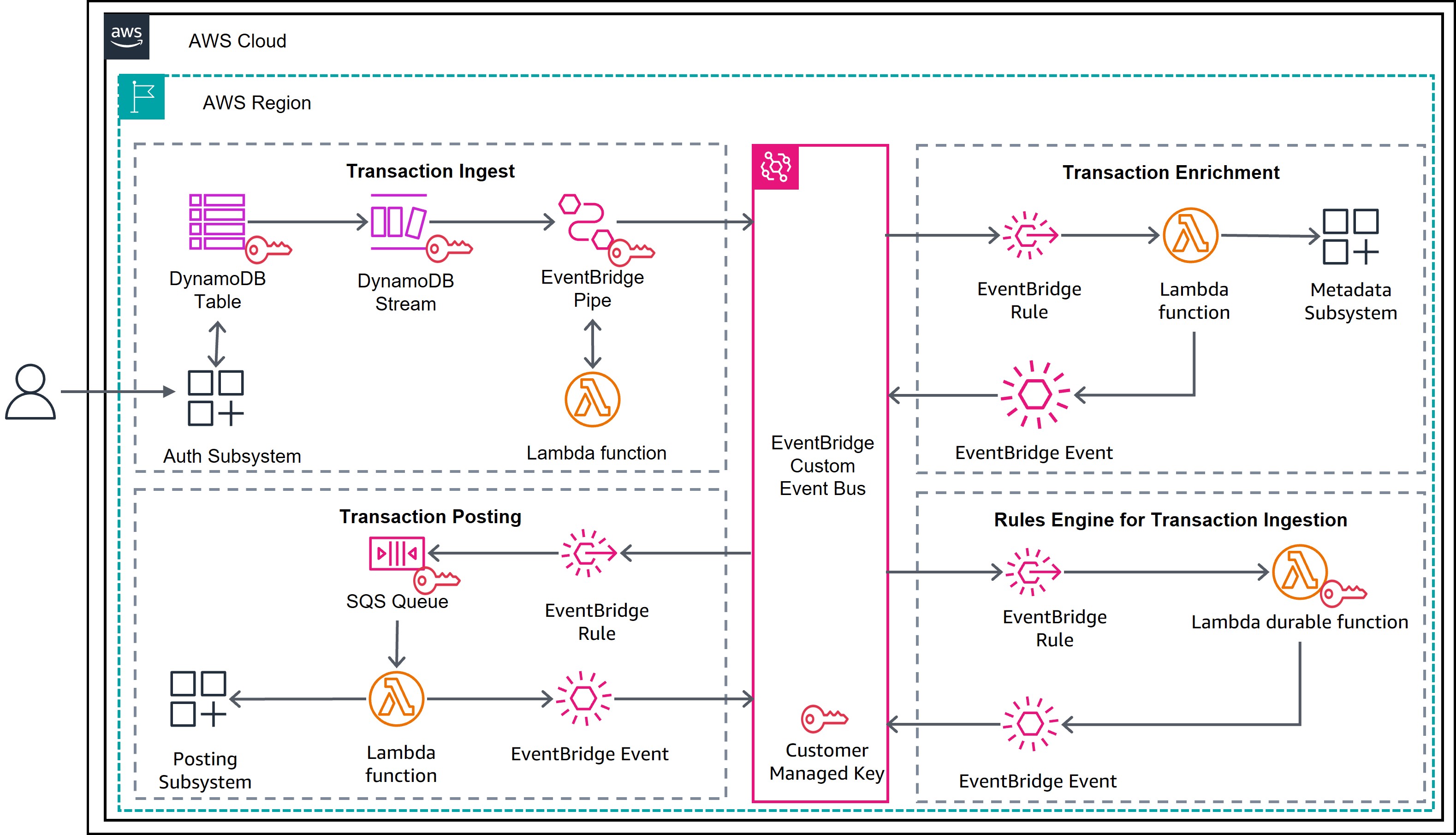
Figure 1: Payment processing using Lambda durable functions
Prerequisites
To deploy this solution, you need the following prerequisites:
- AWS account and CLI: An active AWS account with the AWS CLI installed and configured with appropriate credentials.
- Terraform: Terraform installed (version 1.0 or later) for infrastructure provisioning.
- Python environment: Python 3.11 or later, with pytest for running unit tests. The
aws-durable-execution-sdk-pythonpackage requires Python 3.11 or later. - AWS Identity and Access Management (IAM) permissions: The IAM permissions to create the resources. Follow the sample repository for the sample policy.
- Basic understanding and familiarity with AWS Serverless services.
Solution walkthrough
The following is a step-by-step guide to deploy and test the payment processing solution.
Step 1: Clone the repository
Step 2: Run unit tests
Validate the payment processing logic locally before deploying:
This runs unit tests that cover transaction validation, business rule checks (foreign transaction detection, currency conversion, merchant type), event schema validation, and misconfiguration handling. The tests use the AWS Durable Execution Testing SDK to run the handler locally without deploying AWS resources.
Figure 2 shows an example of test results running locally.
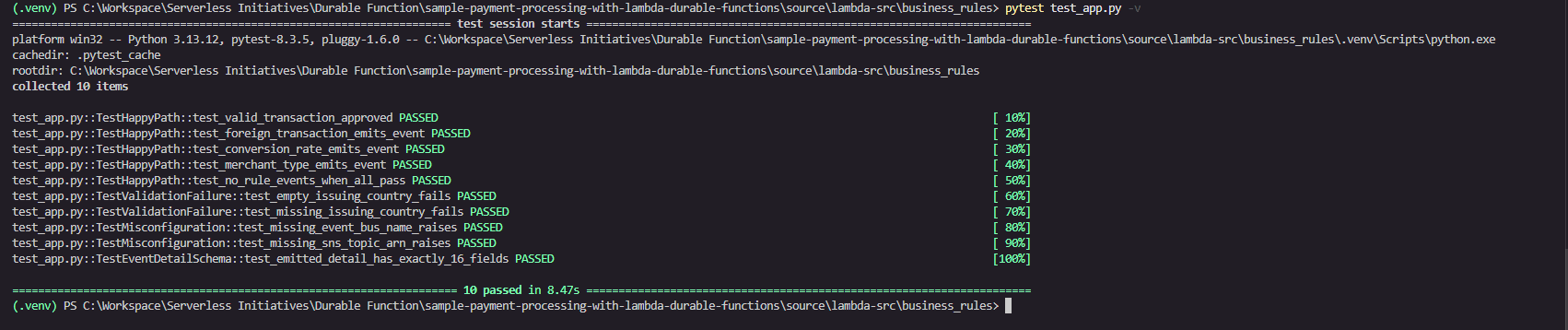
Figure 2: Test run results of the business rules
Step 3: Inspect the Lambda durable functions construct
Open the payments-business-rules Lambda function in source/lambda-src/business_rules/business-rules-app.py for a sample Lambda durable function. Refer to Figure 3 for the code walkthrough.
Key features used
@durable_executiondecorator: Transforms a standard Lambda handler into a durable function handler. The durable execution SDK manages checkpointing automatically. No infrastructure changes are required.context.step("validate-transaction"): Validates that the transaction has a non-emptyissuingCountryCode. The durable execution checkpoints the result (TrueorFalse) to durable storage. The durable execution restores checkpoint results instead of re-executing steps during the replay phase. This phase occurs whenever the function is re-invoked after an interruption such as a wait period completing, a failure, or a suspension. This checkpointed result is part of the durable execution data encrypted by your customer managed key.context.step("publish-posting-failure"): Publishes the full Amazon EventBridge envelope to Amazon SNS when validation fails. This step only runs on the failure path. The runtime checkpoints the Amazon SNS publish response to durable storage.context.parallel("run-business-rules"): Runs three independent rule checks concurrently: foreign transaction detection, currency conversion, and merchant type validation. Each branch checkpoints independently. If one branch fails, the others are not replayed on resume. Each branch result is persisted to durable storage and encrypted by the customer managed key.ctx.step("trigger-foreign-transaction-rule")(inside parallel): ComparesbillingAmountagainsttransactionAmount. If they differ, it emits aForeignTransactionFoundevent to Amazon EventBridge. This step is checkpointed independently within the parallel group.ctx.step("trigger-conversion-rate-rule")(inside parallel): Checks whetherconversionRateequals1. If so, it emits aCurrencyConversionTransactionFoundevent to Amazon EventBridge. This step is checkpointed independently within the parallel group.ctx.step("trigger-merchant-rule")(inside parallel): Checks whethermerchantTypeequalsAAFF. If so, it emits aWarningMerchantTypeTransactionFoundevent to Amazon EventBridge. This step is checkpointed independently within the parallel group.context.step("post-transaction-processed"): Emits the finalTransactionPostingApprovedevent to Amazon EventBridge. This step is only reached when validation passes and all business rules complete. The runtime checkpoints the Amazon EventBridge response. On replay, if this step already succeeded, the event is not re-published, which guarantees exactly-once approval semantics.context.logger: Provides replay-aware logging throughout the handler. During replay of previously completed steps, log statements are suppressed to prevent duplicate log entries in Amazon CloudWatch.
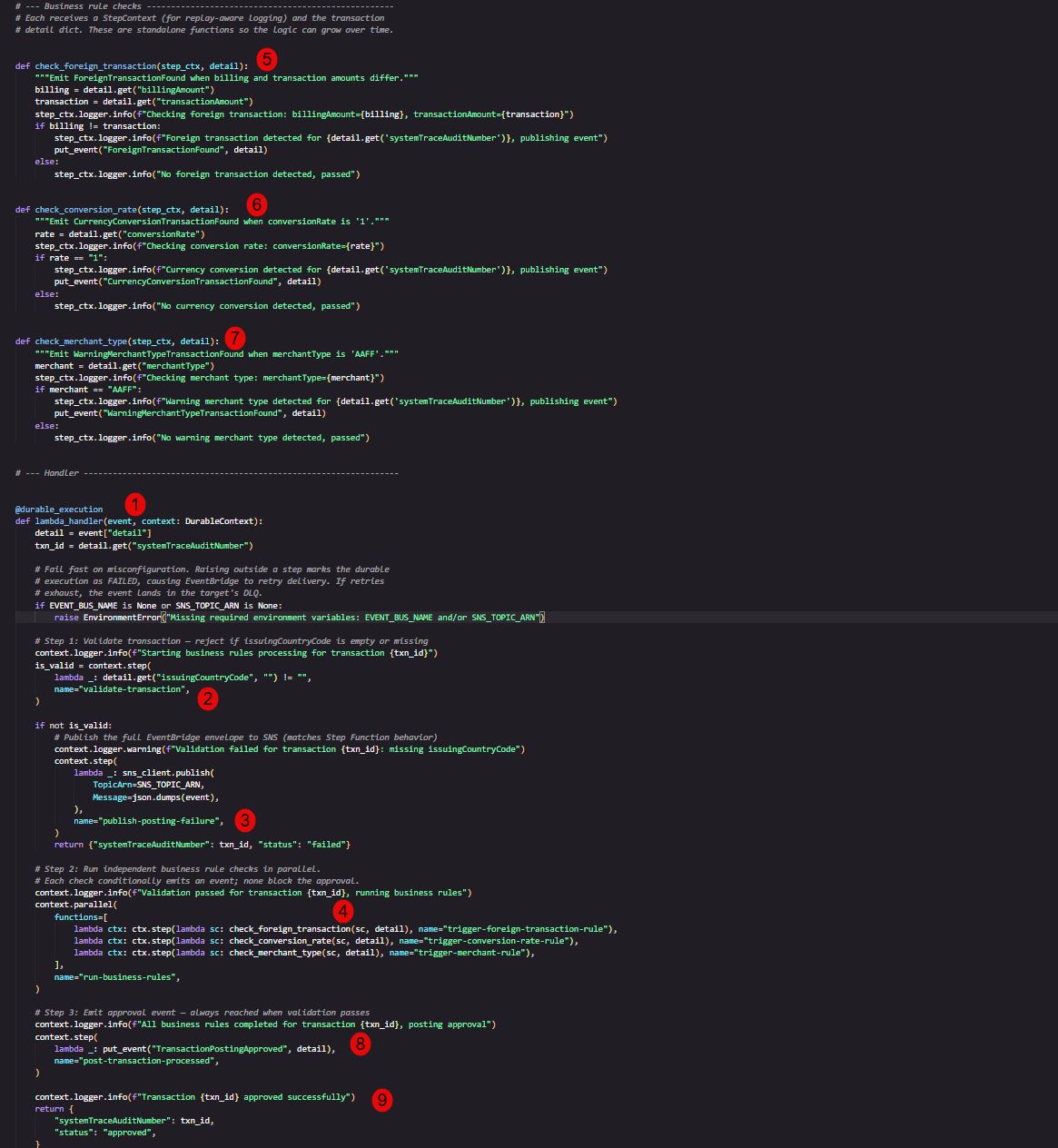
Figure 3: Sample Lambda durable functions code
Step 4: Deploy infrastructure with Terraform
Terraform currently doesn’t support attaching a customer managed key directly to the durable function. You create the symmetric key in Terraform and then associate the key with the durable function on the AWS Management Console. Refer to source/durable_kms.tf for the key configuration.
Initialize and deploy the AWS resources that make up the solution:
Review the plan output, then apply:
Note: Replace us-east-2 with your preferred AWS Region.
On successful completion, Terraform outputs the AWS KMS key alias, key ARN, and DynamoDB Streams ARN used by the event-driven pipeline:
Step 5: Verify Lambda durable functions configuration
In the AWS Lambda console, navigate to the payments-business-rules function. Confirm that the function Type displays Durable, which indicates that the checkpoint-and-replay mechanism is active. Figure 4 shows the expected function configuration.
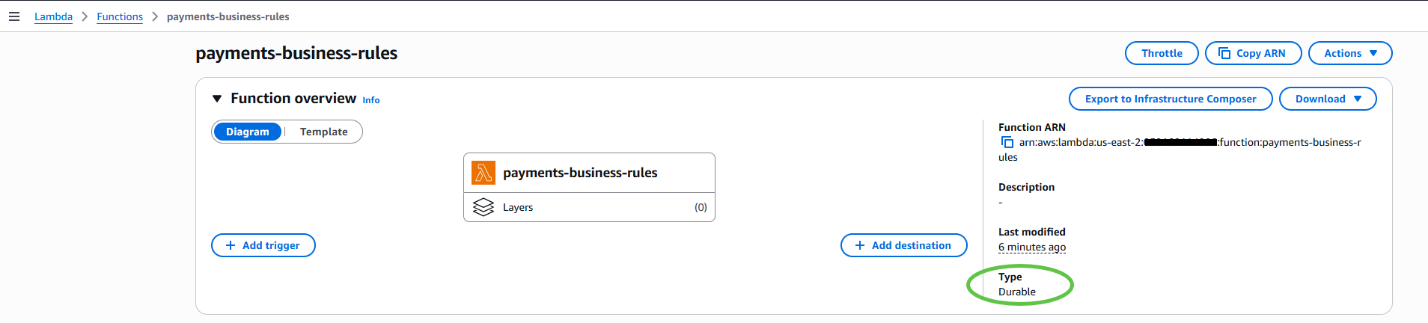
Figure 4: The Lambda durable function in the AWS Lambda console
Step 6: Add the AWS KMS key to the Lambda durable function
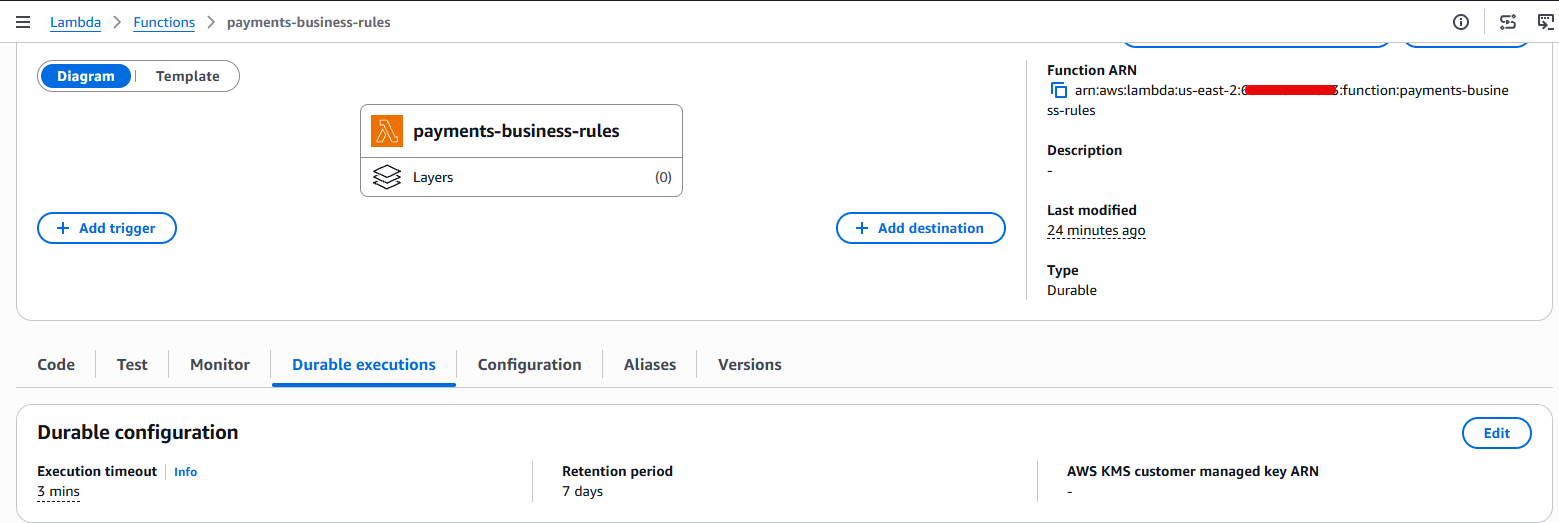
- The durable function is not encrypted with a customer managed key. Figure 5 shows the function’s encryption configuration as empty.

Figure 5: The Lambda durable function missing a customer managed key in the AWS Lambda console
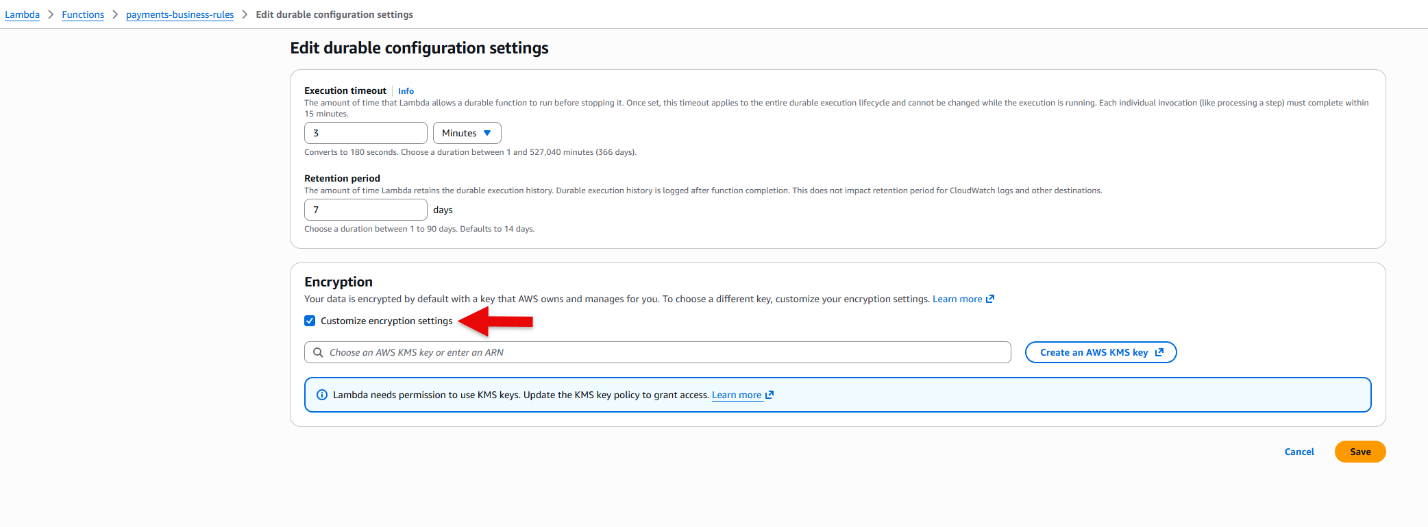
- Choose Edit, then turn on Customize encryption settings as shown in Figure 6.
Figure 6: The Lambda durable function check encryption in the AWS Lambda console
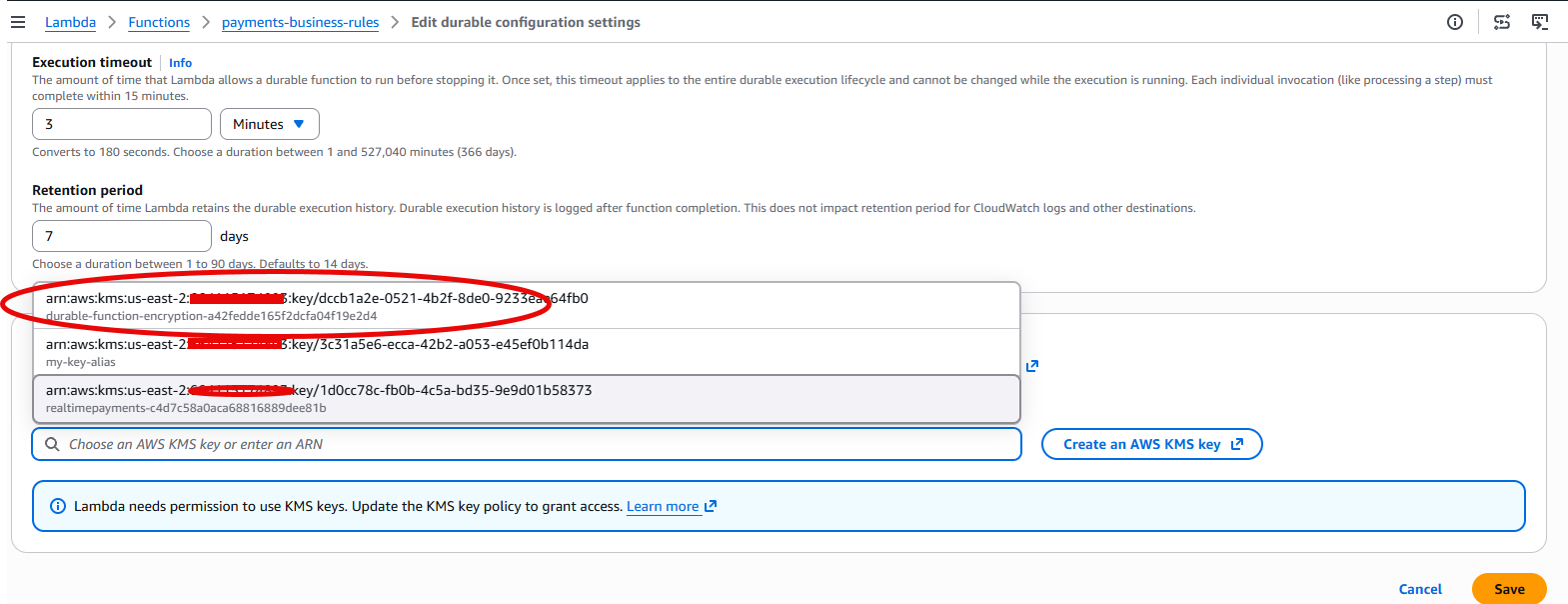
- Select the AWS KMS key ARN created for the durable function. The key ARN is available in the Terraform output from Step 4. Figure 7 shows the key selection.
Figure 7: Select the AWS KMS key ARN for the durable function in the AWS Lambda console
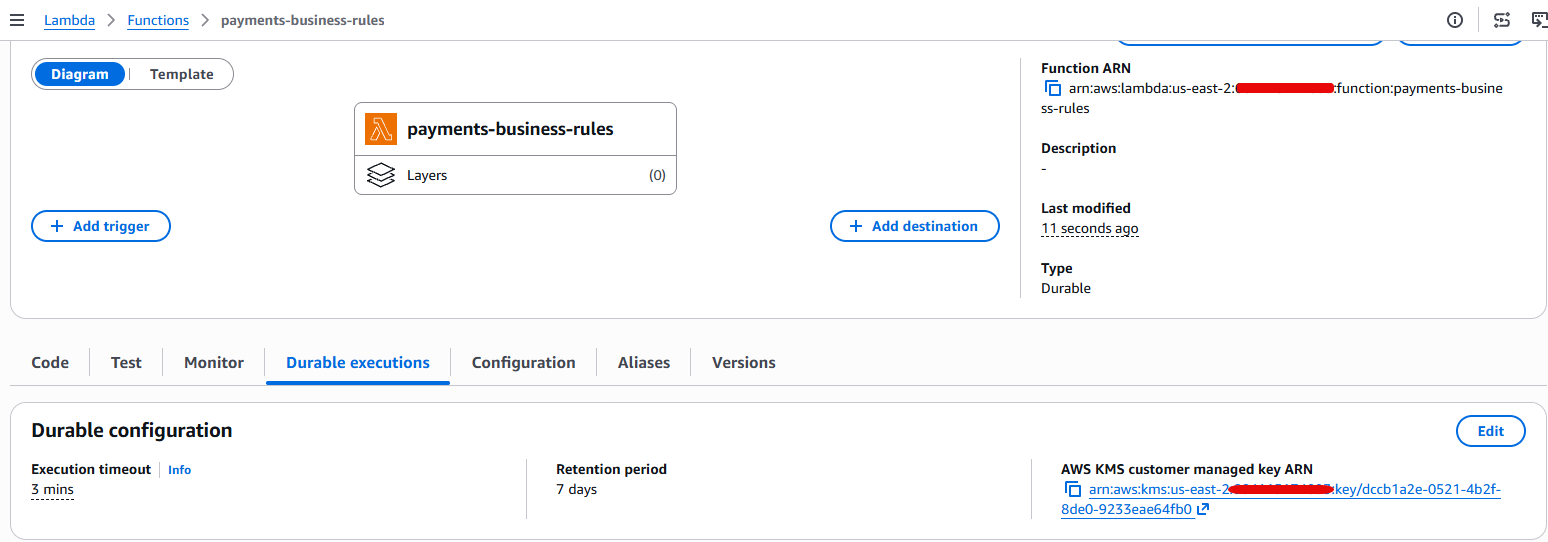
- Choose Save and confirm that the durable function is now encrypted with a customer managed key, as shown in Figure 8.
Figure 8: AWS Lambda durable function with the customer managed key in the AWS Lambda console
Step 7: Execute a test payment
Invoke the payments-visa-mock Lambda function to simulate an end-to-end authorization flow. The mock function reads sample Visa authorization messages from a CSV file and writes them to DynamoDB, which triggers the event-driven pipeline. Figure 9 shows a sample test invocation.
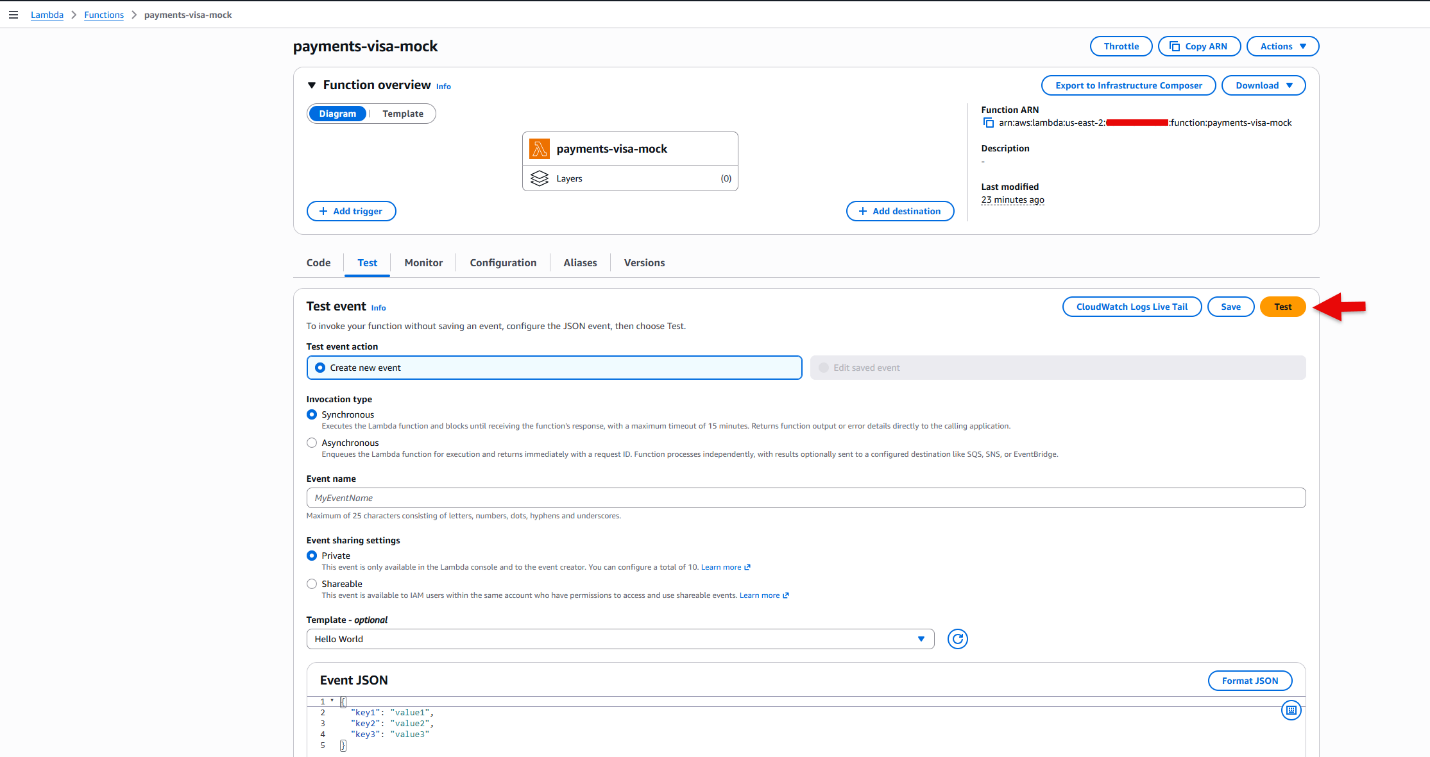
Figure 9: Invoke the payments-visa-mock function to trigger workflow
Figure 10 shows a sample response after invocation.
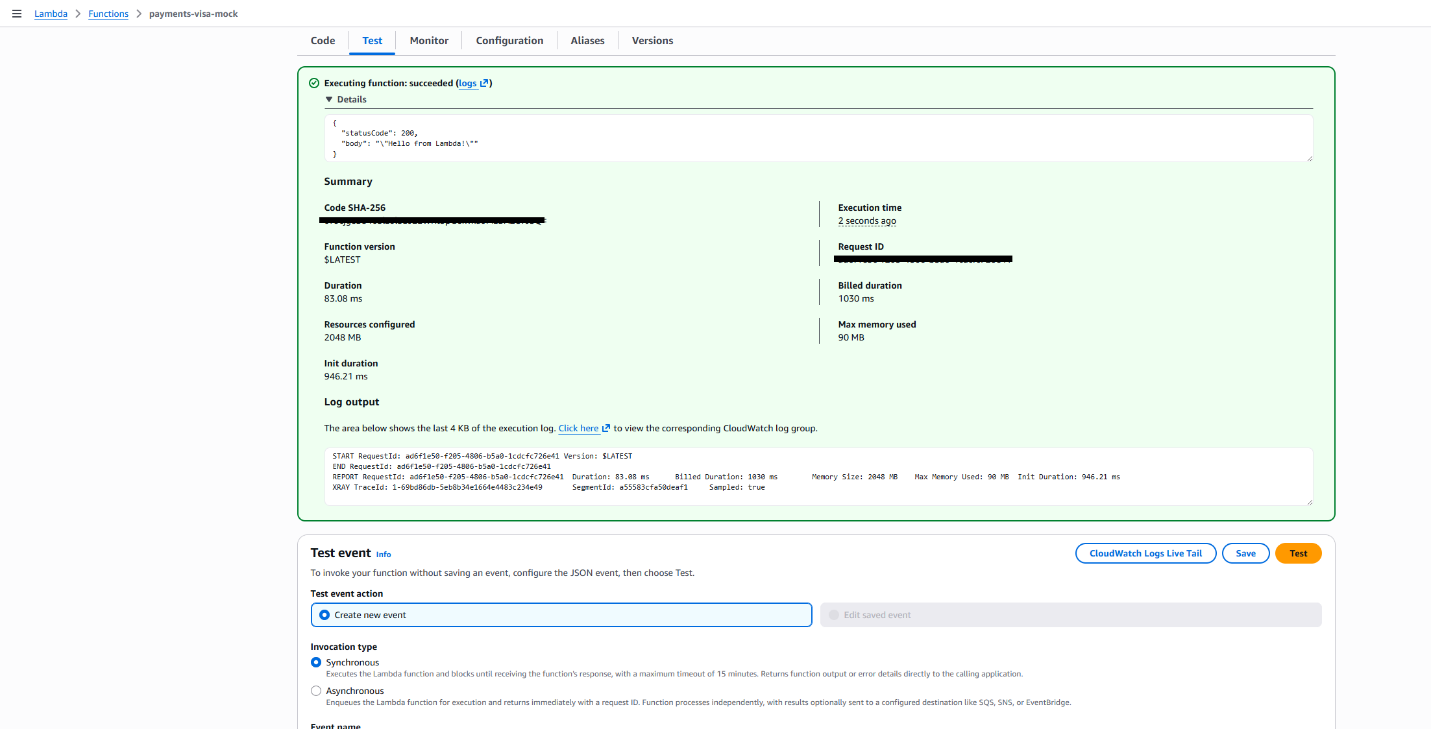
Figure 10: Test results from the payments-visa-mock function to trigger workflow
The mock Lambda invocation creates records that follow the process described in the preceding architecture steps.
Step 8: Verify results
Open Amazon CloudWatch Logs and inspect the log group /aws/lambda/payments-business_rules. This log group belongs to the Lambda durable function for this use case. Figure 11 shows the CloudWatch log group on the console.
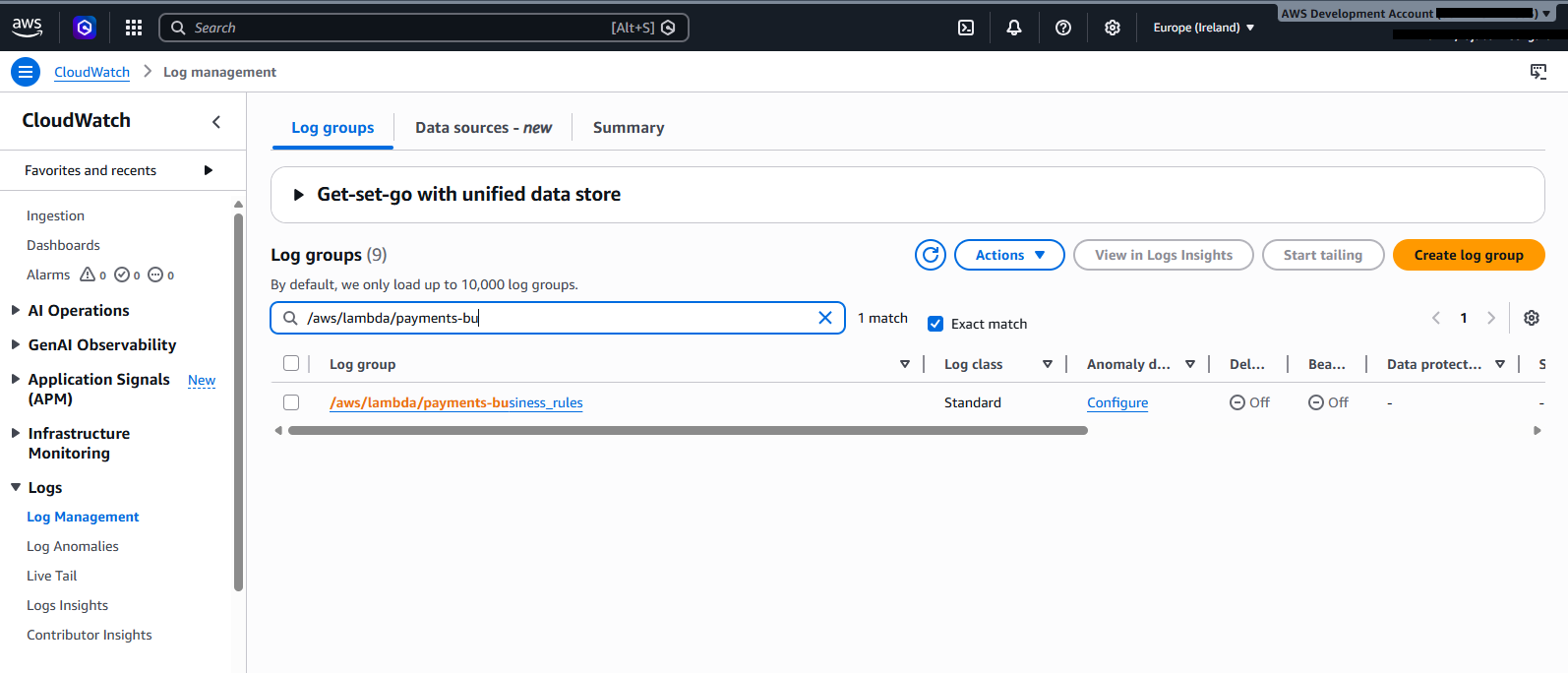
Figure 11: Search in CloudWatch
You see the complete business rules lifecycle for each transaction, as shown in Figure 12. The highlighted sections show all the business rules performed by the durable function. Each step is checkpointed by the runtime and encrypted by the customer managed key.
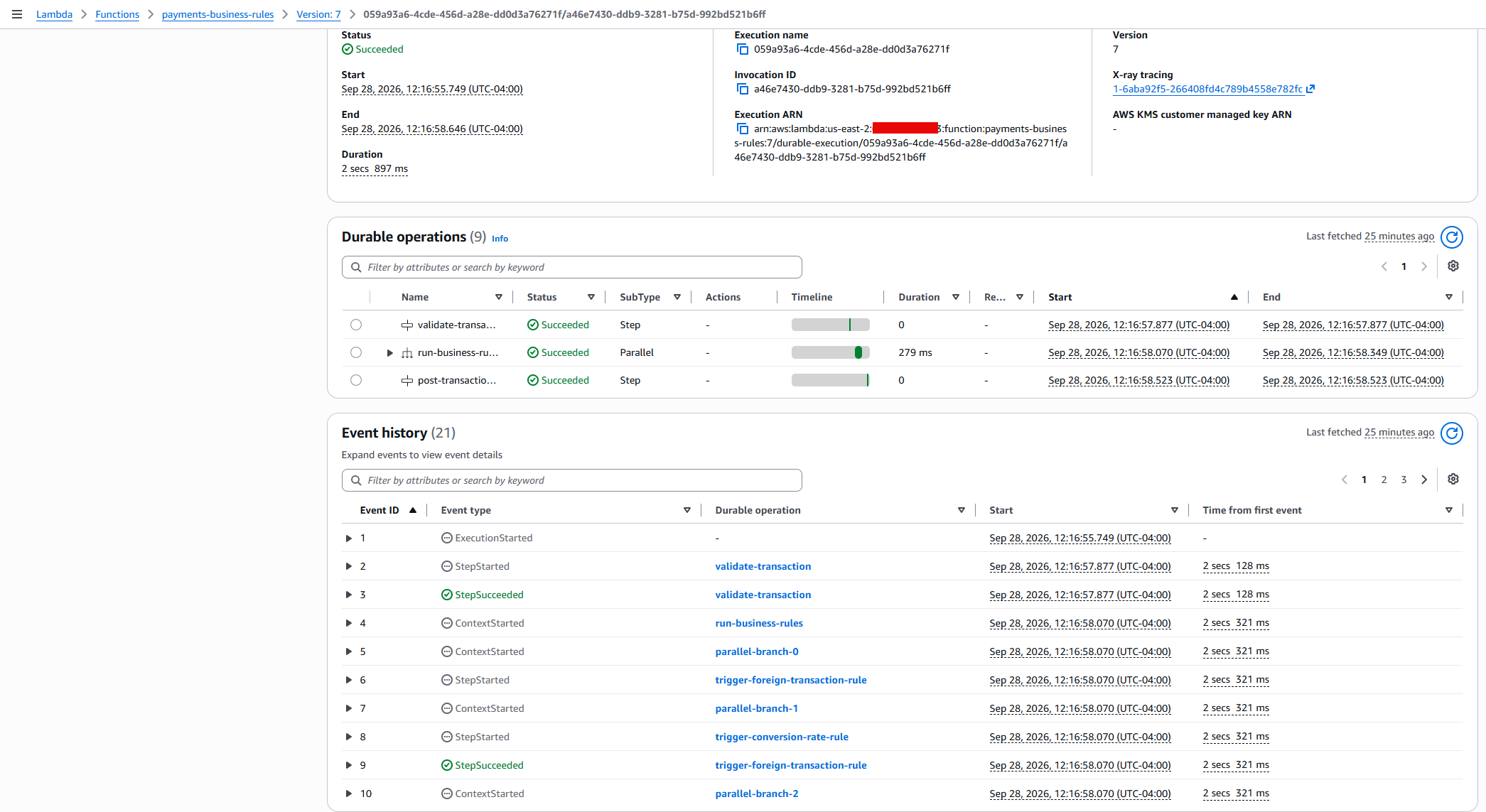
Figure 12: Search Results in lambda durable functions console
You can also check the other log groups to trace the full pipeline:
/aws/lambda/payments-enrich: Transaction enrichment logs./aws/lambda/payments-posting: Settlement posting logs.
Step 9: Verify the customer managed key configuration
You can verify the key configuration by using the AWS CLI:
Expected response:
You can search in AWS CloudTrail to track the AWS KMS calls. When you configure or update the customer managed key on a durable function, Lambda validates the key policy with dry-run GenerateDataKey and Decrypt calls. These appear in CloudTrail with a DryRunOperationException error code, which confirms that the key policy permissions are correct and does not indicate an actual error. For more details, see Encrypting AWS Lambda durable execution data.
Clean up
To avoid ongoing charges, destroy all deployed resources using the following command:
Expected output:
Conclusion
In this post, you configured a customer managed key to encrypt durable execution data in a Lambda durable function. With a customer managed key, you control the key rotation schedule, restrict decryption access through the key policy, and generate per-function audit trails in AWS CloudTrail. You can revoke access to durable execution data at any time by updating the key policy, giving you full control over who can read execution state. In-flight executions stop at the next checkpoint call and new executions must be started after restoring access. For details, see When the customer managed key is unavailable.
For payment processors and financial institutions, encrypting durable execution data with a customer managed key satisfies compliance obligations for data-at-rest encryption, key governance, and access auditability across multi-step transaction workflows.
To get started, clone the sample repository and follow the preceding walkthrough. To learn more about Lambda durable functions, see the AWS Lambda Developer Guide.
Related resources
- AWS Lambda durable functions encryption documentation
- AWS Lambda durable functions Developer Guide
- Amazon EventBridge Documentation
- AWS Step Functions Comparison Guide
- Amazon DynamoDB Streams Documentation
- AWS Guidance for Payment Systems using Event-Driven Architecture
- AWS Serverless Workshops – Search for Lambda and serverless services workshops.