Post Syndicated from Bezuayehu Wate original https://aws.amazon.com/blogs/big-data/cost-effective-etl-with-duckdb-and-amazon-s3-tables-on-aws-glue/
Many data integration jobs are SQL-centric: they filter, join, and aggregate data on a schedule, and they run frequently enough that fast startup matters. For this shape of work, teams want to match the engine to the job and run it quickly and cost-effectively, without standing up and tuning separate infrastructure.
AWS Glue is the serverless data integration service that customers use to run extract, transform, and load (ETL) jobs at any scale, without managing infrastructure. With AWS Glue, you can run DuckDB, an embedded, in-process, vectorized SQL engine, inside a standard AWS Glue job. DuckDB reads Parquet files from Amazon Simple Storage Service (Amazon S3) and writes Apache Iceberg tables directly to Amazon S3 Tables, a capability of Amazon S3. DuckDB is an open source, in-process, vectorized analytical SQL engine that runs embedded in your application, with no separate server or cluster to manage. It reads and writes cloud data formats such as Parquet and Apache Iceberg natively. AWS Glue 6.0 is the latest version, running on a modernized runtime with a 30 percent price reduction over previous versions. DuckDB reads Amazon S3 Parquet through its httpfs extension and commits Iceberg snapshots to Amazon S3 Tables through the Iceberg REST endpoint, so no separate catalog synchronization is required. Running DuckDB in AWS Glue is well suited to SQL-centric transformations such as filters, joins, and aggregations. It also fits frequent, scheduled jobs such as hourly or daily aggregations, incremental loads, and rollups that benefit from fast startup. This pattern complements Apache Spark on AWS Glue rather than replacing it: when a workload needs distributed processing, the same job type runs PySpark with no change to your infrastructure, IAM, or triggers.
This post walks through the pattern with a concrete ETL use case and provides complete, runnable code. It also compares measured cost and runtime against a Spark job performing the same work on the same AWS Glue 6.0 runtime.
When to use this pattern
This pattern is a complement to Spark on AWS Glue, not a replacement. The following table summarizes when each approach yields the best results.
Signal |
DuckDB on AWS Glue 6.0 |
Apache Spark on AWS Glue 6.0 |
| Dataset size per run | Scales with worker size | Scales horizontally across multiple nodes for datasets of any size |
| Parallelism requirement | Single-node, in-process execution | Distributed processing across a managed cluster |
| SQL complexity | Aggregations, joins, window functions | Complex graph operations, custom UDFs, ML pipelines |
| Cost priority | Minimize per-run cost and duration | Maximize throughput at scale |
| Iceberg writes | DuckDB iceberg extension to S3 Tables | Native Spark Iceberg integration |
For workloads that need distributed processing, the same glueetl job type runs PySpark with no change to your infrastructure, AWS Identity and Access Management (IAM) configuration, or triggers. You choose the engine that fits each workload.
How DuckDB runs on AWS Glue 6.0
Running DuckDB in an AWS Glue job comes down to two things working together: a runtime modern enough to load DuckDB and its native extensions, and the capabilities DuckDB brings to ETL once it does.
What the AWS Glue 6.0 runtime provides
Modern runtime compatibility. AWS Glue 6.0 runs on Amazon Linux 2023 with glibc 2.34 and Python 3.13. DuckDB 1.5.x and its native C++ extension binaries (httpfs, aws, iceberg) install through pip and load without workarounds. The DuckDB extension binaries require a modern glibc (2.28 or later), which the AWS Glue 6.0 runtime provides.
AWS Glue 6.0 resolves this compatibility requirement. You can add DuckDB 1.5.x to an AWS Glue 6.0 job in two ways. The first is the --additional-python-modules job parameter (duckdb==1.5.1), which pip-installs the package at job startup and loads all extensions without additional steps. Alternatively, you can package the dependencies as a Python virtual environment, upload it to Amazon S3, and reference it using the --python-virtual-env parameter. On AWS Glue 6.0, you can also add --python-virtual-env-storage-prefix to have AWS Glue build and cache the virtual environment automatically. For more information, see Using Python virtual environments with AWS Glue.
What DuckDB provides
DuckDB is an open source, in-process analytical SQL engine. It runs inside an AWS Glue job as a single process, with no separate cluster or coordinator. The following capabilities make it a practical fit for ETL on the AWS Glue 6.0 runtime.
- Single-node vectorized execution. DuckDB runs inside a single AWS Glue job. For a couple of gigabytes, there is no shuffle, no executor scheduling, and no inter-node network I/O. The work happens in a single vectorized pass over columnar memory.
- Native Amazon S3 and Parquet access. The
httpfsextension reads and writes Amazon S3 objects directly, using the IAM role of the AWS Glue job automatically throughCREDENTIAL_CHAIN. - Native Amazon S3 Tables writes. The
icebergextension connects to the Amazon S3 Tables Iceberg REST endpoint (ENDPOINT_TYPE s3_tables) and commits standard Iceberg snapshots. With AWS Glue 6.0, you can use two capabilities that matured independently: Amazon S3 Tables and DuckDB Iceberg writes. - Larger-than-memory operators. Sort, join, and aggregate spill to
/tmp, so datasets larger than available RAM still process without code changes.
The output is a standard Apache Iceberg table in Amazon S3 Tables. It is queryable by Amazon Athena, Amazon Redshift, and Amazon EMR, and other Iceberg-compatible engines that support the Iceberg REST Catalog API.
Sizing guidance. DuckDB runs within a single AWS Glue worker, so its available memory and disk scale with the worker type. This walkthrough uses the minimum glueetl configuration of 2 workers (2 data processing units, or DPUs) with worker type G.1X: each G.1X worker provides 4 vCPUs and 16 GB of memory. DuckDB runs on the driver and processes data in memory, spilling to local disk when a dataset or intermediate result exceeds available RAM. For larger inputs, choose a bigger worker: G.2X provides 8 vCPUs and 32 GB of memory, and the G.4X and G.8X types scale higher. Size the worker to your input volume and the memory footprint of your aggregations and joins. For current specifications, see AWS Glue worker types.
Architecture
The following image shows the architecture described in this post.
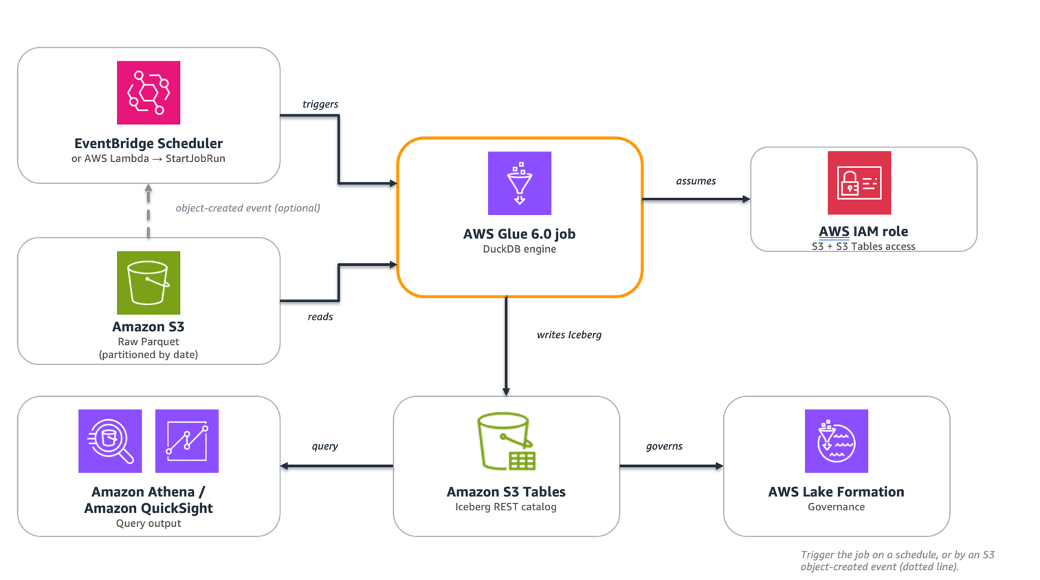
Figure 1: Data flows from raw Parquet in Amazon S3 through an AWS Glue 6.0 job running DuckDB, which writes Apache Iceberg tables to Amazon S3 Tables for querying by Amazon Athena and Amazon QuickSight.
The pipeline consists of the following managed components:
Layer |
Role |
AWS Service |
| Source | Raw Parquet files, partitioned by date | Amazon S3 |
| Compute | DuckDB SQL engine running on the AWS Glue 6.0 runtime | AWS Glue 6.0 (glueetl) |
| Destination | Iceberg analytical tables, queryable by any engine | Amazon S3 Tables |
| Governance | Permissions and access control for S3 Tables writes | AWS Lake Formation |
| Query | Analytics and business intelligence (BI) on the output tables | Amazon Athena, Amazon QuickSight |
Raw Parquet files land in Amazon S3 on a schedule. An AWS Glue 6.0 job runs DuckDB. DuckDB reads the files, applies SQL transformations in memory, and writes the aggregated result as an Iceberg table to Amazon S3 Tables through the Iceberg REST catalog. Amazon Athena and Amazon QuickSight can query the output immediately. No separate catalog synchronization is required.
You can trigger the job several ways:
- With a native AWS Glue trigger, which can be scheduled, on-demand, or conditional on another job or crawler completing.
- With Amazon EventBridge Scheduler calling
StartJobRunon a fixed schedule. - In response to new data through an Amazon S3 event notification that invokes an AWS Lambda function calling
StartJobRun. - As part of an AWS Glue Workflow.
Walkthrough: eCommerce daily order summary
This section walks through a daily ETL pipeline for an eCommerce application. The pipeline reads raw transaction files from Amazon S3, cleanses and aggregates them, and writes a query-ready summary to Amazon S3 Tables.
Step |
Operation |
Detail |
| 1. Source | Read raw Parquet from S3 | s3://<amzn-s3-demo-source-bucket>/orders/year=2026/month=08/*.parquet |
| 2. Filter | status IN (‘completed’,‘processing’) |
Drop canceled and test orders |
| 3. Enrich | net_revenue, avg_order_value |
Derived columns via SQL expressions |
| 4. Aggregate | GROUP BY order_day, region, category |
Daily revenue, order count, unique customers |
| 5. Write | INSERT into an Amazon S3 Tables Iceberg table |
Idempotent per-day reload |
Prerequisites
- An AWS account with permissions for AWS Glue, Amazon S3, Amazon S3 Tables, AWS Identity and Access Management (IAM), and AWS Lake Formation.
- An Amazon S3 bucket containing raw Parquet files (referred to as
<amzn-s3-demo-source-bucket>in this post). - An Amazon S3 Tables table bucket (referred to as
<amzn-s3-demo-table-bucket>in this post). See the Create the S3 Tables table bucket section. - An IAM role for the AWS Glue job with:
- Amazon S3 read access on
<amzn-s3-demo-source-bucket>. - Amazon S3 Tables read/write access.
- AWS Glue job execution permissions.
- Amazon S3 read access on
- AWS Lake Formation grants on the S3 Tables catalog and namespace (required for Iceberg write operations).
- An AWS Glue 6.0 job (
glueetl) with:--additional-python-modules:duckdb==1.5.1.- Minimum worker configuration: 2 workers, type G.1X.
Note on DuckDB versions. DuckDB support for writing Apache Iceberg tables through a REST catalog, including Amazon S3 Tables, requires version 1.4.0 or later. This walkthrough uses duckdb==1.5.1. On the AWS Glue 6.0 runtime (Amazon Linux 2023), it installs and all native extensions load without additional configuration.
Create the S3 Tables table bucket
If you don’t already have an Amazon S3 Tables table bucket, create one using the AWS Command Line Interface (AWS CLI):
Note the table bucket Amazon Resource Name (ARN) from the output. It follows the format:
arn:aws:s3tables:<YOUR-REGION>:<YOUR-ACCOUNT-ID>:bucket/<amzn-s3-demo-table-bucket>
Turn on integration with AWS analytics services so the table is discoverable by Amazon Athena, Amazon Redshift, and Amazon EMR. Complete the integration by creating the s3tablescatalog catalog in the AWS Glue Data Catalog using the AWS CLI. For the steps, see Integrating Amazon S3 Tables with AWS analytics services.
After turning on integration, grant the AWS Glue job role Lake Formation permissions on the Amazon S3 Tables catalog and the analytics namespace:
Generate sample data
This walkthrough uses a synthetic eCommerce dataset. Run the following Python script locally or in AWS CloudShell to generate Parquet files that match the schema used in the transform. It produces roughly 8.4 million rows across 12 files (about 94 MB on disk as Parquet, roughly 1.2 GB uncompressed in memory).
Upload the generated files to your source bucket:
Note. The CLI commands and code examples in this walkthrough use angle-bracket placeholders such as <amzn-s3-demo-source-bucket> and <amzn-s3-demo-table-bucket>. Replace these with your own values before running.
Step 1: Configure DuckDB in the AWS Glue 6.0 job
The AWS Glue filesystem is read-only except for /tmp, so DuckDB uses /tmp as a writable home directory for its extension cache and spill files. The job loads DuckDB extensions: httpfs reads and writes Amazon S3 objects directly, aws handles AWS credential resolution, refresh, and AWS Region detection, and iceberg connects to the Amazon S3 Tables REST catalog. The CREDENTIAL_CHAIN provider (from the aws extension) tells DuckDB to use the standard AWS credential provider chain, which automatically picks up the IAM role attached to the AWS Glue job. No access keys or secrets appear in the code.
The home_directory setting must be applied before loading any extensions. Without it, DuckDB attempts to write to /.duckdb/ and fails with IOError: Permission denied.
Step 2: Read and transform with DuckDB SQL
DuckDB reads Amazon S3 Parquet files directly through the httpfs extension. No local download is required. The read_parquet() function accepts Amazon S3 glob patterns, reading multiple files as a single relation.
GROUP BY ALL is a DuckDB SQL extension that groups by every non-aggregate column in the SELECT list. It’s a convenience feature rather than standard SQL, and support varies across query engines. If you adapt this query for another engine, check whether it supports GROUP BY ALL or list the grouping columns explicitly (GROUP BY order_day, region, category).
The WHERE clause retains both completed and processing orders. The gross_revenue column reflects all in-flight revenue, while net_revenue counts only completed orders. A partition containing only processing orders shows net_revenue = 0. This is by design: the two columns serve different reporting purposes.
Step 3: Write to Amazon S3 Tables
DuckDB attaches the S3 Tables bucket as an Iceberg REST catalog using the ENDPOINT_TYPE s3_tables option. DuckDB commits each write as a new Iceberg snapshot through the catalog.
The write uses an idempotent per-day reload pattern: create the table if it does not exist, delete any existing rows for the batch’s date range, then insert. This way, re-runs don’t produce duplicate rows.
Note: The DELETE and INSERT are not committed atomically. If the job fails between them, the affected partition is left empty. For mitigations, see Error handling for production.
The resulting Iceberg table is immediately readable by Amazon Athena, Amazon Redshift, and Amazon EMR through the S3 Tables REST catalog. Amazon S3 Tables handles compaction, snapshot expiration, and orphan-file cleanup automatically.
Complete AWS Glue 6.0 job script
The following script combines all three steps with structured logging, error handling, and AWS Glue job parameter parsing. It can be used directly as the script for an AWS Glue 6.0 glueetl job.
Create the job using the AWS CLI:
Note. Replace the angle-bracket placeholders (<amzn-s3-demo-source-bucket>, <amzn-s3-demo-table-bucket>, <YOUR-REGION>, <YOUR-ACCOUNT-ID>, <YOUR-AWS-GLUE-ROLE>) with your own values before running.
Lake Formation permissions. Amazon S3 Tables access is governed by AWS Lake Formation. Grant the AWS Glue job role only the permissions the job needs: SELECT, INSERT, and DELETE on the target table (daily_order_summary), plus CREATE_TABLE on the analytics namespace so the job can create the table on first run. For the exact permission names and resource scoping, see the Lake Formation permissions reference. The role also requires the lakeformation:GetDataAccess IAM action. Without these grants, the ATTACH and CREATE TABLE statements fail with an access-denied error.
Error handling for production
For production use, plan for three failure modes:
- Catalog access. If
ATTACHto Amazon S3 Tables returns an access-denied error, verify that the IAM role of the job has the scoped Amazon S3 Tables actions on the table bucket ARN and the required AWS Lake Formation grants. Writes need both. - Partial writes. The
DELETEandINSERTare not committed atomically, so a failure between them can leave a partition empty. SetMaxRetriesto 1 so the idempotent reload re-runs automatically, or write to a staging table and swap on success. - Timeouts. Set the job
Timeouthigher than the expected run time to stop hung runs.
Monitoring
DuckDB runs inside a standard AWS Glue job, so you monitor it with the same Amazon CloudWatch metrics as any AWS Glue job. Two are useful for right-sizing this workload:
glue.driver.jvm.heap.usage: driver memory pressure. A high or climbing value means the worker needs more memory or the query is spilling heavily to disk.glue.driver.aggregate.bytesRead: bytes read from Amazon S3, useful for correlating input size with runtime and cost.
The internal execution metrics of DuckDB (query plan, operator timings, spill volume) aren’t exposed to Amazon CloudWatch. Structured logging from the job script is the primary way to observe DuckDB itself: the production script uses logger.info to record the rows transformed and rows written, and those lines appear in the CloudWatch Logs stream of the job. Add more logger.info statements around each stage if you need finer-grained timing.
Measured results
The measurements in this section were collected on AWS Glue 6.0 with DuckDB 1.5.1 writing to Amazon S3 Tables in the US East (N. Virginia) Region (us-east-1). Output tables were verified by querying them in Amazon Athena. Both jobs produced identical output: 1,176 summary rows.
The dataset consisted of 8.4 million rows across 12 Parquet files (approximately 94 MB compressed on disk, approximately 1.2 GB uncompressed). One job ran DuckDB on the AWS Glue 6.0 runtime. The other ran Apache Spark on AWS Glue 6.0 with the equivalent transform and a native Iceberg write.
Metric |
DuckDB on AWS Glue 6.0 |
Spark on AWS Glue 6.0 |
| Compute configuration | 2 DPU (2x G.1X) | 2 DPU (2x G.1X) |
| Job Duration | ~56 seconds | ~117 seconds |
| Billed duration | 1 minute (minimum) | 2 minutes |
| Cost per run | $0.0103 | $0.0205 |
| Output rows (Athena-verified) | 1,176 | 1,176 |
On the same AWS Glue 6.0 runtime and the same 2 DPU configuration, DuckDB completed in approximately half the time at approximately half the cost of Spark for this workload.
Cost is calculated at $0.308 per DPU-hour (AWS Glue 6.0 rate). AWS Glue bills in 1-second increments with a 1-minute minimum per run. Verify against the current AWS Glue pricing page for your Region. Results scale with dataset size, query complexity, and Region.
At 20 runs per day, this job costs approximately $75 per year with DuckDB, compared to $150 per year with Spark. Beyond the cost savings, this pattern keeps SQL-centric work quick to iterate on: you express the transformation in SQL, and DuckDB runs it in-process on the AWS Glue worker.
Clean up
To avoid ongoing charges, delete the resources created during this walkthrough:
- Delete the AWS Glue job (
duckdb-order-summary). - Remove the sample data from your Amazon S3 bucket (
s3://<amzn-s3-demo-source-bucket>/orders/). - Drop the Iceberg table in Amazon Athena:
DROP TABLE analytics.daily_order_summary; - Delete the Amazon S3 Tables table bucket if it was created for this walkthrough.
- Revoke the AWS Lake Formation grants and remove the IAM role if no longer needed.
Conclusion
In this post, we demonstrated how to run DuckDB inside an AWS Glue 6.0 job to read Amazon S3 Parquet, transform it with SQL, and write Apache Iceberg tables directly to Amazon S3 Tables. AWS Glue 6.0 modernized the runtime environment to Amazon Linux 2023, Python 3.13, and Apache Spark 4.1. With that modernization, you can run embedded SQL in the AWS Glue job and write Iceberg tables directly to Amazon S3 Tables. For ETL jobs where the data fits in memory on a single worker, this pattern completed the same work in approximately half the time and half the cost of Spark. The Measured results section describes these measurements. The job uses the same glueetl job type, IAM configuration, and triggering mechanisms as any Spark job on AWS Glue. When a workload outgrows single-worker processing, switching the script back to PySpark requires no infrastructure changes. The result is the ability to match the engine to each job: a scheduled SQL transformation and a large distributed workload can run on one platform, and you pick the engine per job without managing separate systems.
To get started, create an AWS Glue 6.0 job, add duckdb==1.5.1 through the --additional-python-modules parameter, and point it at your Amazon S3 source data and an Amazon S3 Tables bucket. The complete script in this post is a working starting point you can adapt to your own datasets and schedules. For more information, see the AWS Glue Developer Guide and the Amazon S3 Tables user guide. For a complementary pattern that uses DuckDB to read and query data in Amazon S3 Tables, see Streamlining access to tabular datasets stored in Amazon S3 Tables with DuckDB.