Post Syndicated from Suthan Phillips original https://aws.amazon.com/blogs/big-data/query-across-accounts-and-table-formats-with-multi-catalog-in-amazon-emr/
Analytics teams on AWS often store data in more than one open table format, and that data frequently lives in more than one AWS account. Two problems follow: querying across table formats without catalog-level complexity, and joining data across accounts without copying it. This is common in a data mesh, where domain teams own data in separate AWS accounts while analytics workloads run centrally. Multi-catalog support in Amazon EMR 8.1.0 addresses both problems.
Amazon EMR release 8.1.0 addresses both challenges with multi-catalog support. The RedirectingSessionCatalog (RSC) is an opt-in catalog that you set as the Spark default. It automatically detects each table’s format from AWS Glue metadata, routes queries to the correct format handler, and supports multiple AWS Glue Data Catalogs across AWS accounts. With multi-catalog support, you can query Iceberg, Hudi, Delta Lake, and Hive tables through a single unified catalog. You can also join tables across AWS accounts without copying data and discover remote catalogs dynamically at query time.
In this post, we show how to put these capabilities into practice using Amazon EMR Serverless.
The Spark single-catalog constraint
Many formats. The Spark default catalog (spark_catalog) accepts only one CatalogExtension at a time: SparkSessionCatalog for Iceberg, DeltaCatalog for Delta Lake, or HoodieCatalog for Hudi. You configure one, and queries against tables in other formats fail unless those tables are registered in a separate, format-specific catalog.
Many accounts. The Spark V1 metastore (ExternalCatalog) is a singleton bound to one AWS Glue Data Catalog in one account. The Spark V2 catalog API supports named catalogs, but only Iceberg uses it. Delta Lake, Hudi, and Hive tables still rely on V1. As a result, cross-account access for those formats required complex multi-step workarounds. These included AWS Lake Formation grants, AWS Resource Access Manager (AWS RAM) shares, resource links, and per-table permissions.
Amazon EMR 8.1.0 addresses both constraints with the RedirectingSessionCatalog, described in the following section.
The RedirectingSessionCatalog
The RedirectingSessionCatalog provides three opt-in, backward-compatible capabilities. Set RSC as the default catalog to run multi-format queries without format-specific prefixes. Declare a named RSC catalog to join across accounts without data copies. Turn on the AWS Glue Data Catalog resolver to discover and register remote catalogs at query time, with no upfront spark.sql.catalog.* configuration. The following sections cover each capability.
Multi-format support
In Amazon EMR 8.1.0, you set the default catalog to the RedirectingSessionCatalog (RSC). On table resolution, RSC calls the AWS Glue Data Catalog, reads the table’s format from its metadata, caches the result, and delegates to the matching format-specific catalog (Iceberg, Delta Lake, Hudi, or Hive).
Without this feature, you had to register a separate catalog for each format and prefix every table reference:
With multi-format support, this reduces to a single catalog property:
What you set:
How you query:
On table resolution, RSC:
- Calls the AWS Glue Data Catalog to read table metadata.
- Inspects the table’s Parameters map to determine the format (Iceberg, Delta Lake, Hudi, or Hive/Parquet).
- Delegates the operation to the appropriate format-specific catalog implementation.
The following diagram shows how a single query flows through the RedirectingSessionCatalog to the correct format handler.
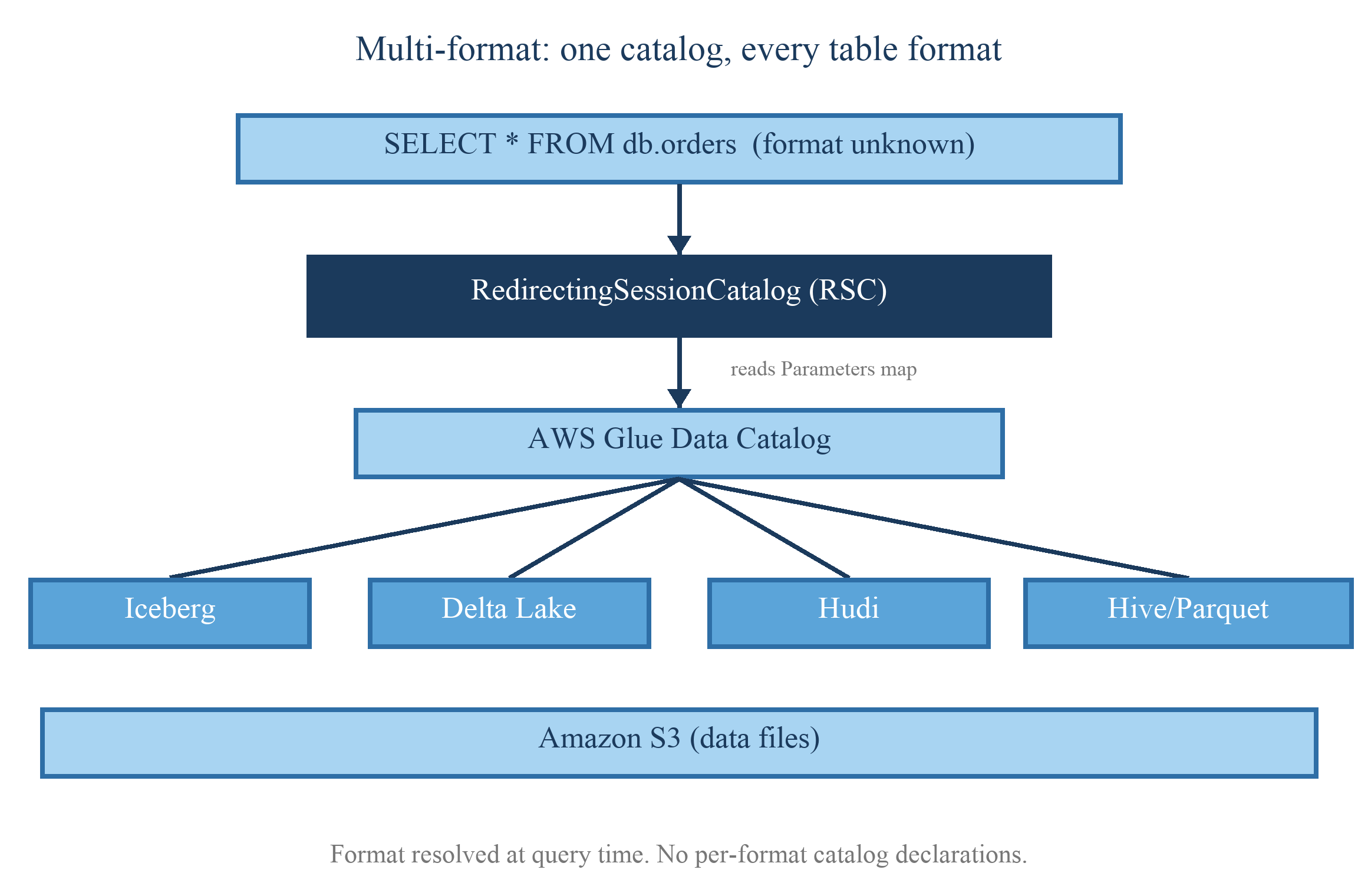
Figure 1: Multi-format routing. A single query enters the RedirectingSessionCatalog, which calls the AWS Glue Data Catalog to read each table’s format, then routes the table to the matching format-specific handler (Iceberg, Delta Lake, Hudi, or Hive) so results return through one catalog
As the diagram illustrates, the query enters through spark_catalog (the RSC). The RSC reads each table’s format from the AWS Glue Data Catalog and routes the operation to the matching engine: Iceberg, Delta Lake, Hudi, or Hive/Parquet. The four format handlers read the underlying data files from Amazon Simple Storage Service (Amazon S3). The caller issues one query with no format-specific catalog prefixes.
Multi-catalog: Cross-account access
When production data lives in a separate AWS account from your analytics compute, you can declare a named RSC catalog that points at that account’s AWS Glue Data Catalog. RSC resolves tables in the remote account the same way it resolves local tables, so a single query can join across accounts without copying data.
Previously, cross-account table resolution worked only for Iceberg (V2 catalog). Hive, Delta Lake, and Hudi tables in another account required manual Lake Formation and AWS RAM configuration rather than catalog-level resolution. With Amazon EMR 8.1.0, you declare a named RSC catalog for the remote account:
Configuration:
Query:
Each named RSC instance creates its own V1 metastore delegate and registers it with the global SessionCatalog, removing the singleton limitation.
The following diagram shows how a single query joins tables across two AWS accounts through named catalogs.
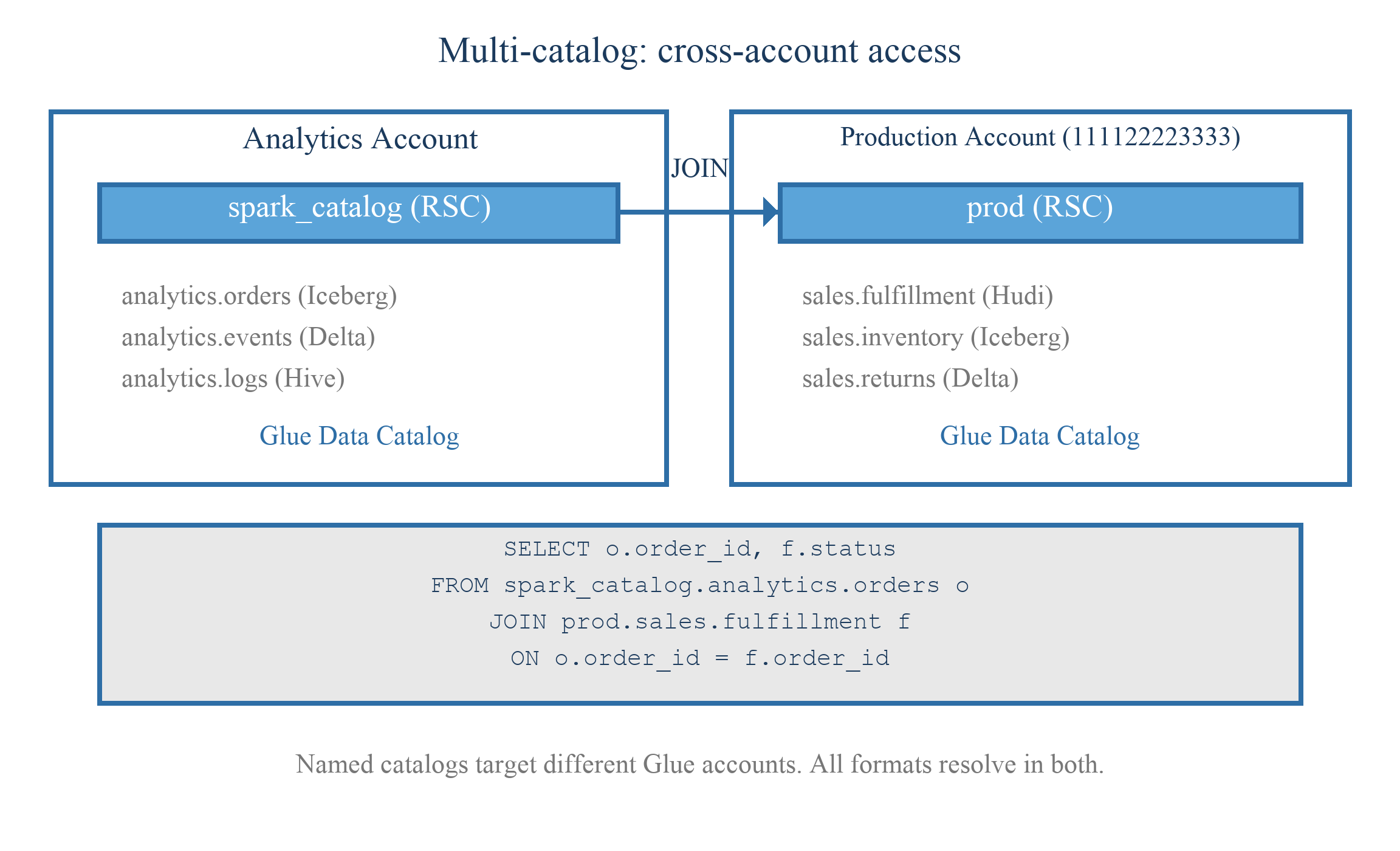
Figure 2: Cross-account access. A query in the local account references a named RSC catalog that points at a second account’s AWS Glue Data Catalog, so the local and remote tables join in one query without copying data between accounts
As the diagram illustrates, the analytics account uses spark_catalog (the RSC) for its local Glue Data Catalog, while a named catalog (prod) points at the production account’s Glue Data Catalog. The query joins a local table to a remote table in a single statement, shown by the JOIN between the two accounts. Each account keeps its own Glue Data Catalog, and no data is copied between them.
Auto-wiring
The preceding multi-catalog setup requires you to pre-declare each remote catalog in spark.sql.catalog.* properties. Auto-wiring in Amazon EMR 8.1.0 removes this requirement at two levels.
Before Amazon EMR 8.1.0, you declared the resolver, a handler per format, and each handler’s delegate class explicitly:
Auto-wiring reduces this to:
Configuration:
Query:
The AWS Glue Data Catalog resolver is opt-in. When enabled, Amazon EMR issues an AWS Glue GetCatalog API call each time a query references a catalog that hasn’t been registered. This isn’t enabled by default to avoid unintended API calls for catalog names that don’t exist.
At the handler level, setting the default catalog to RedirectingSessionCatalog is enough. Amazon EMR fills in the Iceberg, Delta, and Hudi handlers automatically, so you don’t need to write handler.* properties.
At the catalog level, when you enable the Glue catalog resolver, Amazon EMR discovers new catalogs on demand. The first time a query references an undeclared catalog, Amazon EMR calls the AWS Glue GetCatalog API, inspects the connection type, and registers the catalog at query time.
Dynamic discovery is functional in Amazon EMR 8.1.0 for three catalog types. For standard cross-account AWS Glue catalogs, the resolver registers a redirecting catalog and multi-format routing applies. For Amazon S3 Tables, a capability of Amazon S3, the resolver reads the federated AWS Glue metadata and routes through Iceberg for both reads and writes. It also supports Amazon Redshift Managed Storage.
The following diagram shows how the GlueCatalogResolver discovers and registers a catalog the first time a query references it.
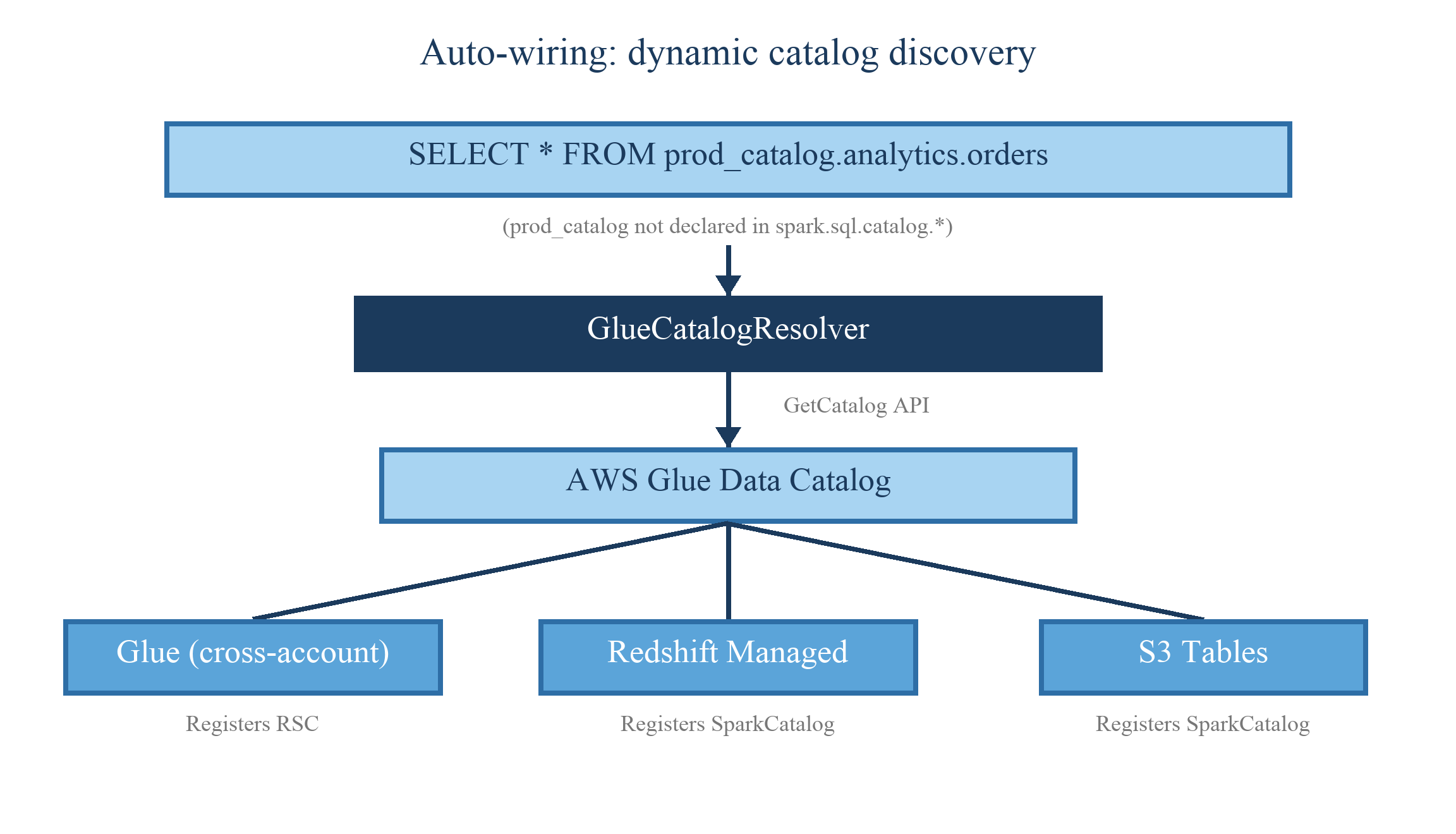
Figure 3: Auto-wiring. When a query references an undeclared catalog, the Glue catalog resolver calls the AWS Glue GetCatalog API, inspects the connection type, and registers the catalog at query time, so no upfront catalog configuration is required
As the diagram illustrates, a query references a catalog that has not been declared, which raises a catalog-not-found condition. The GlueCatalogResolver intercepts it and calls the AWS Glue Data Catalog through the GetCatalog API. Based on the connection type, the resolver registers the appropriate catalog: a redirecting catalog for a cross-account AWS Glue Data Catalog, a push-down catalog for Redshift Managed Storage, or a Spark catalog for Amazon S3 Tables. Registration happens at query time, with no upfront configuration.
Quick start
Follow these steps to enable multi-catalog support on an existing Amazon EMR 8.1.0 application:
1. Set spark_catalog to the RedirectingSessionCatalog:
Note: If using Delta Lake or Hudi, also add open table format (OTF) session extensions. Hudi additionally requires KryoSerializer.
Note: To query a different AWS account, add a named catalog pointing to that account’s AWS Glue Data Catalog.
2. (Optional) Enable the Glue catalog resolver:
Step 1 is all you need for Iceberg-only multi-format queries. The notes call out additional configuration for Delta Lake, Hudi, or cross-account scenarios. Step 2 removes the need to pre-declare catalogs by resolving them at query time.
Try it yourself
The following walkthrough creates four tables (one per format), runs a cross-format join, and extends to a cross-account query. The accompanying sample scripts handle resource creation, job submission, and cleanup. The accompanying code is in the aws-emr-utilities repository.
Prerequisites
- An AWS account with permissions for Amazon EMR Serverless, AWS Glue Data Catalog, and Amazon S3.
- An Amazon EMR Serverless application running release emr-spark-8.1.0 (Spark). The multi-catalog features also work on Amazon EMR on EC2 and Amazon EMR on EKS.
- An Amazon EMR Serverless job execution role scoped to the specific AWS Glue databases and S3 prefixes.
- An S3 bucket for scripts and output (this post uses
s3://amzn-s3-demo-bucket/multicatalog/). - (For cross-account) A producer account with Lake Formation grants, AWS Glue resource policy, Amazon S3 bucket policy, and AWS Key Management Service (AWS KMS) key policy configured.
Step-by-step implementation
Step 1: Clone the repository and configure
The repository contains two phases: single-account multi-format and cross-account. The .env file stores resource identifiers referenced by all scripts.
Step 2: Bootstrap the environment
This script creates the AWS Glue database, uploads PySpark scripts to S3, and verifies that your Amazon EMR Serverless application is in CREATED state. Note the application ID from the output if you have not set it in .env.
Step 3: Create tables across four formats
The setup phase submits a PySpark job that creates one table per format (Iceberg, Delta Lake, Hudi, Hive/Parquet) in a single AWS Glue database with a shared id/val schema. Each CREATE TABLE uses a different USING clause but all go through the same spark_catalog. RSC routes each to the correct engine.
The job configuration includes the RedirectingSessionCatalog, OTF session extensions for Delta and Hudi, and KryoSerializer for Hudi. If your workload is Iceberg-only, you can omit the extensions and serializer.
Step 4: Run the cross-format join
This submits a query that references four tables by database.table only, with no format prefix. The query joins all four through a single catalog with no format-specific configuration:
Expected output:
Each column came from a different table format, joined in one query with no format-specific catalog configuration.
Step 5: (Optional) Extend to cross-account
Cross-account access requires grants from the account that owns the data. Run one bootstrap in each account:
Then, back in the consumer account, run the cross-account phase:
The result joins the producer account’s table to a local Iceberg table in a single query, with no data copy.
For the full cross-account policy setup (Lake Formation grants, AWS Glue resource policy, S3 bucket policy, and AWS KMS key policy), see the Cross-account setup section.
Tip: Add –dry-run to either bootstrap script to preview every action it would take (buckets, roles, policies, applications) without creating anything.
Clean up
To avoid ongoing charges, run the clean-up script or follow the steps in the repository README:
This removes S3 data, AWS Glue databases and tables, Lake Formation permissions, and the Amazon EMR Serverless application.
Cross-account setup
Cross-account access requires configuration across four services. The following example shows the AWS Glue resource policy. The accompanying bootstrap_producer.sh script configures all four, so you don’t need to author each policy by hand.
1. AWS Lake Formation: Grant permissions on the database and tables to the consumer principal.
2. AWS Glue resource policy: Allow cross-account access to catalog metadata.
3. Amazon S3 bucket policy: Allow access to the underlying data files.
4. AWS KMS key policy: Use a customer managed key (the aws/glue managed key doesn’t support cross-account grants).
Example: AWS Glue resource policy
Choosing the right configuration
| Your situation | What to set |
| Lake has Iceberg, Delta, and Hudi tables | spark.sql.catalog.spark_catalog = RedirectingSessionCatalog (Delta and Hudi require additional spark.sql.extensions. See Quick start) |
| Analytics in one account, data in another | spark.sql.catalog.<name> pointing at the remote Glue account (see Multi-catalog section) |
| Many accounts, want zero upfront config | spark.sql.catalogResolver = GlueCatalogResolver |
| All of the above | All three. They compose. |
Note: Multi-catalog is query-time resolution. It doesn’t copy data between accounts, replicate tables, or grant access. Cross-account reads still require Lake Formation grants, AWS Glue resource policies, Amazon S3 bucket policies, and (if encrypted) AWS KMS key policies.
Conclusion
In this post, we configured the RedirectingSessionCatalog as the default Spark catalog on Amazon EMR 8.1.0. With a single configuration property, the RSC resolved Iceberg, Delta Lake, Hudi, and Hive tables through one catalog without format-specific prefixes. We then declared a named catalog to join tables across two AWS accounts, and enabled the GlueCatalogResolver to discover remote catalogs at query time without pre-declared spark.sql.catalog.* properties.
Multi-catalog support is available on Amazon EMR 8.1.0 across all deployment models: Amazon EMR Serverless, Amazon EMR on EC2, and Amazon EMR on EKS. To reproduce the walkthrough, clone the aws-samples/aws-emr-utilities repository and follow the steps in the Quick start section.
To learn more and get started, explore the following resources:
- Amazon EMR
- Amazon EMR documentation
- aws-emr-utilities repository with the accompanying walkthrough code
- Get a quick start with Apache Hudi, Apache Iceberg, and Delta Lake with Amazon EMR on EKS
- Enforce fine-grained access control on open table formats via Amazon EMR integrated with AWS Lake Formation