Post Syndicated from Charishma Makineni original https://aws.amazon.com/blogs/big-data/build-cross-account-streaming-pipelines-with-the-amazon-kinesis-producer-library-and-kinesis-client-library/
Organizations use real-time streaming to act on data the moment it arrives. They detect fraud, personalize customer experiences, and respond to infrastructure events, all within milliseconds. Amazon Kinesis Data Streams ingests and processes millions of records per second with sub-second latency. With multi-account deployment, you can enforce strict security boundaries, satisfy regulatory requirements, and contain scope using Amazon Kinesis Data Streams. This approach still delivers the high-throughput performance that streaming pipelines require. Realizing these benefits, however, requires configuring producers and consumers to operate across account boundaries. This involves coordinating AWS Identity and Access Management (IAM) policies, encryption keys, and monitoring across accounts, which can extend delivery timelines.
This post addresses that complexity directly. We first examine the common architectural patterns for producing and consuming data from Amazon Kinesis Data Streams across multiple AWS accounts. This post has a detailed walkthrough of the most isolated configuration, in which the producer, the stream, and the consumer each reside in a separate AWS account. This illustrates the best practices for enterprise-scale streaming with maximum security isolation.
Amazon Kinesis Data Streams integrates directly with services such as AWS Lambda, Amazon Data Firehose, and Amazon Managed Service for Apache Flink. Granting cross-account access to other service is usually done through Kinesis resource policies. However, many enterprise workloads run on custom applications. Two open source libraries let these applications produce and consume streams:
Amazon Kinesis Producer Library (KPL) – Writes records to a Kinesis data stream at high throughput. KPL aggregates multiple user records into a single Kinesis record to maximize shard utilization. It retries failed records with exponential backoff. It also publishes per-instance Amazon CloudWatch metrics for operational visibility.
Kinesis Client Library (KCL) – Consumes and processes records from a Kinesis data stream. KCL 3.5 discovers shards automatically and coordinates leases through Amazon DynamoDB. It checkpoints progress so that a failed worker resumes from the last saved position. It performs graceful lease handover during resharding. It also balances shard assignments across workers to distribute load evenly.
Both libraries support Java. KCL also supports other languages through the MultiLangDaemon. This walkthrough uses both libraries.
Challenges enterprises face with multi-account streaming
Large enterprises commonly encounter the following challenges when building cross-account streaming architectures:
- Account boundary enforcement: Producers (app teams) and consumers (analytics teams) sit in separate accounts for isolation and cost attribution. Access is denied by default, so each path is granted explicitly. The producer needs write access to a stream it does not own, the consumer needs read access to that foreign stream, and encrypted streams add AWS Key Management Service (AWS KMS) key access on both sides.
- Cross-account access has policy complexity and requires coordinating three policies across accounts: a resource-based policy on the stream, identity-based policies on producers and consumers, and AWS KMS key sharing for encrypted streams.
- Encryption across boundaries: Streams encrypted with AWS managed keys cannot be shared cross-account. Customer managed AWS KMS keys are required.
- Monitoring across accounts: Amazon CloudWatch metrics for producer throughput, stream utilization, and consumer lag live in different accounts, requiring cross-account observability.
Cross-account deployment patterns
The following table illustrates common permutations of KPL, Kinesis data stream, and KCL placement across accounts:
| Pattern | KPL (Producer) | Kinesis data stream | KCL (Consumer) |
| All-in-one account | Account A | Account A | Account A |
| Cross-account Consumer | Account A | Account A | Account B |
| Cross-account Producer | Account A | Account B | Account B |
| Full separation | Account A | Account B | Account C |
Each pattern requires specific IAM configurations. The full-separation pattern (Account A to Account B to Account C) demonstrates the most complex scenario and is what we walk through in the following sections.
Solution architecture
Our reference implementation deploys three AWS accounts:
- Account A (Producer): Runs the KPL application on Amazon Elastic Compute Cloud (Amazon EC2). Assumes a cross-account IAM role in Account B to write records.
- Account B (Stream): Owns the Kinesis data stream. Hosts a cross-account IAM role for the producer (Account A) and a resource-based policy granting read access to the consumer (Account C). Also pre-registers an Enhanced Fan-Out consumer shared with Account C through a consumer resource policy. The stream is encrypted with a customer managed AWS KMS key shared with both accounts.
- Account C (Consumer): Runs the KCL 3.5 application with its own DynamoDB lease table and CloudWatch metrics. It reads the cross-account stream directly through a resource-based policy (no role assumption). The policy authorizes
GetRecords,GetShardIterator,DescribeStream, andListShards. Enhanced Fan-Out (EFO) is supported for dedicated 2 MB/s per-shard throughput and ~70 ms latency. It usesSubscribeToShard, which must be authorized separately, and Account B must pre-register the EFO consumer and share the consumer ARN.
How the cross-account access works
Producer path (Account A to B):
- The KPL app runs with
KPLProducerRole(Account A EC2 instance profile). - At startup it calls
sts:AssumeRoleonKinesisProducerCrossAccountRolein Account B (with external ID). - The assumed temporary credentials are used for Kinesis
PutRecordscalls. - CloudWatch metrics are published to Account A using local instance profile credentials.
Consumer path (Account C to B):
- The KCL app runs with
KCLConsumerRole(Account C EC2 instance profile). - It calls Kinesis
GetRecordsusing its local credentials (KCLConsumerRole). - The stream’s resource-based policy in Account B authorizes the request.
- DynamoDB lease tables and CloudWatch metrics use the local
KCLConsumerRolecredentials (Account C).
The following figure shows how cross-account access works.
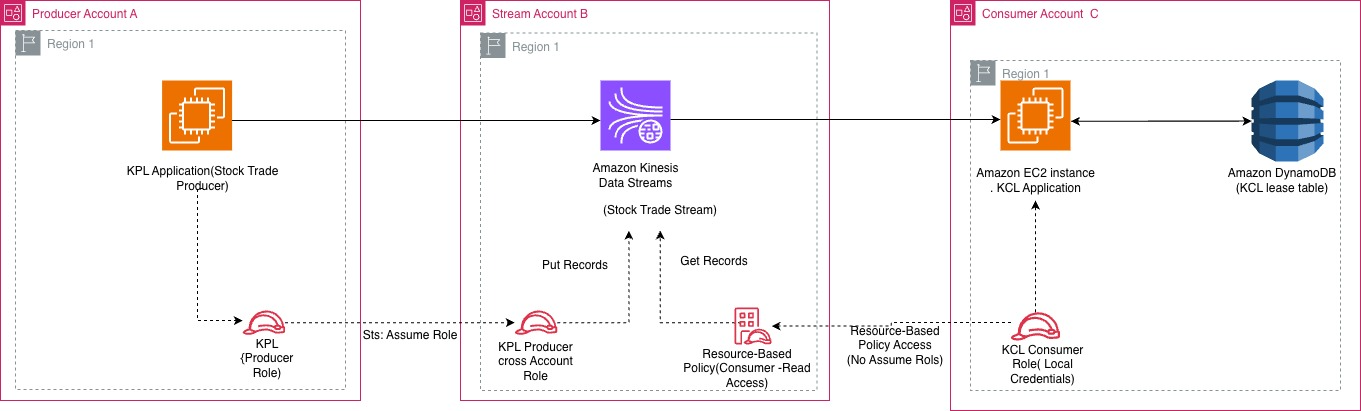
Figure 1: Cross-account streaming architecture across the producer, stream, and consumer accounts
Deployment walkthrough
The solution is deployed using AWS CloudFormation templates across three accounts. Clone the repository from GitHub and follow these steps:
Prerequisites
- Three AWS accounts (Producer, Stream, Consumer) with AWS Command Line Interface (AWS CLI) configured.
- AWS CLI v2 installed with named profiles for each account.
- Java 11+ and Maven installed (for building KPL and KCL applications).
- Clone the repository:
git clone https://github.com/aws-samples/sample-kinesis-cross-account-kpl-kcl.git.
Step 1: Deploy the stream stack (Account B: Stream Account)
Deploy the CloudFormation template that creates the Kinesis data stream, customer managed AWS KMS key, cross-account producer role, resource-based consumer policy, and pre-registered EFO consumer. Navigate to the cloudformation/ directory.
- Deploy:
- Note the stack outputs:
StreamArn,KMSKeyArn,ProducerCrossAccountRoleArn, andEFOConsumerArn. These are needed for the next steps.
The following screenshot shows the CloudFormation output for the deployed stream stack.
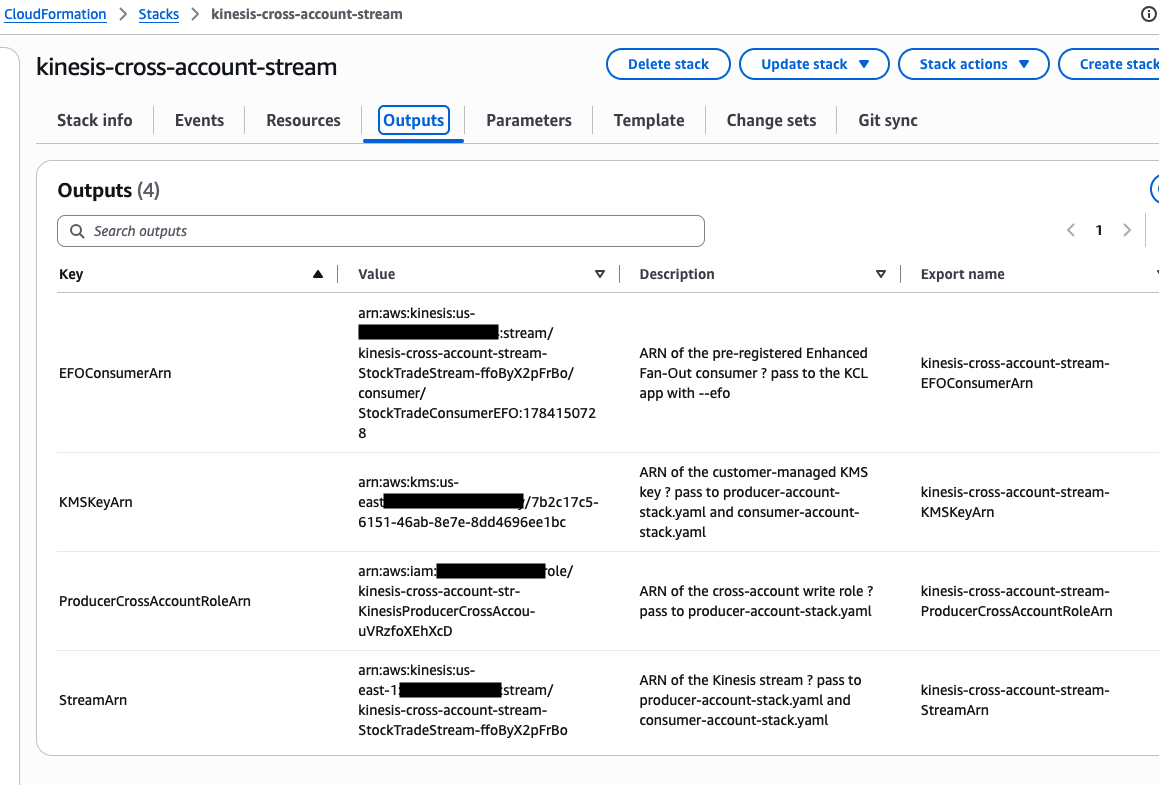
Figure 2: CloudFormation outputs for the stream stack
Step 2: Deploy the producer stack (Account A: Producer Account)
The KPL handles the following for your producer application:
- Aggregation – Packs multiple user records into one Kinesis record (up to 1 MB) to maximize shard utilization.
- Retries – Retries failed puts with exponential backoff to absorb transient throttling.
- Rate limiting – Tracks shard limits and adjusts send rates to prevent
ProvisionedThroughputExceededException. - Metrics – Publishes per-instance CloudWatch metrics (buffering time, record age, errors).
Deploy the CloudFormation template that creates the KPL application infrastructure and cross-account IAM role:
- Deploy:
- Connect to the EC2 instance through AWS Systems Manager, clone the repository, then build and run.
The following screenshot shows the output for the producer CloudFormation stack.
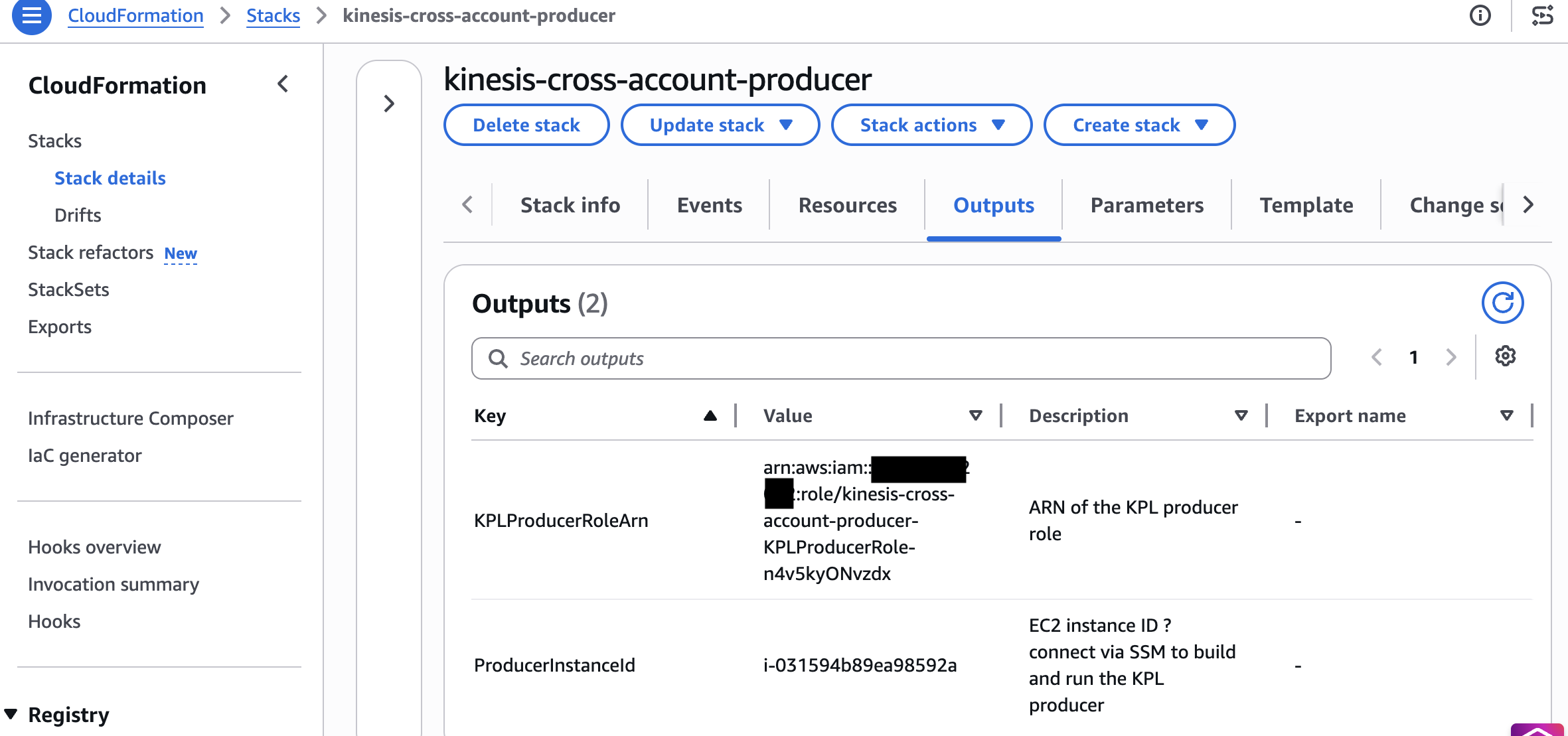
Figure 3: CloudFormation outputs for the producer stack
Step 3: Deploy the consumer stack (Account C: Consumer Account)
KCL 3.5 handles the following for your consumer application:
- Graceful lease handover – Transfers shard leases during resharding without duplicate processing.
- Load balancing – Distributes shards evenly across workers and rebalances when workers join or leave.
- Checkpointing – Persists progress in DynamoDB so a failed worker resumes from its last checkpoint.
- Enhanced Fan-Out – Supports
SubscribeToShardfor dedicated per-shard throughput when you pass an EFO consumer ARN.
Deploy the CloudFormation template that creates the KCL application infrastructure, DynamoDB lease table permissions, and Kinesis read permissions:
- Deploy:
- Connect to the EC2 instance through Systems Manager, clone the repository, then build and run.
The following screenshot shows the output for the consumer CloudFormation stack.
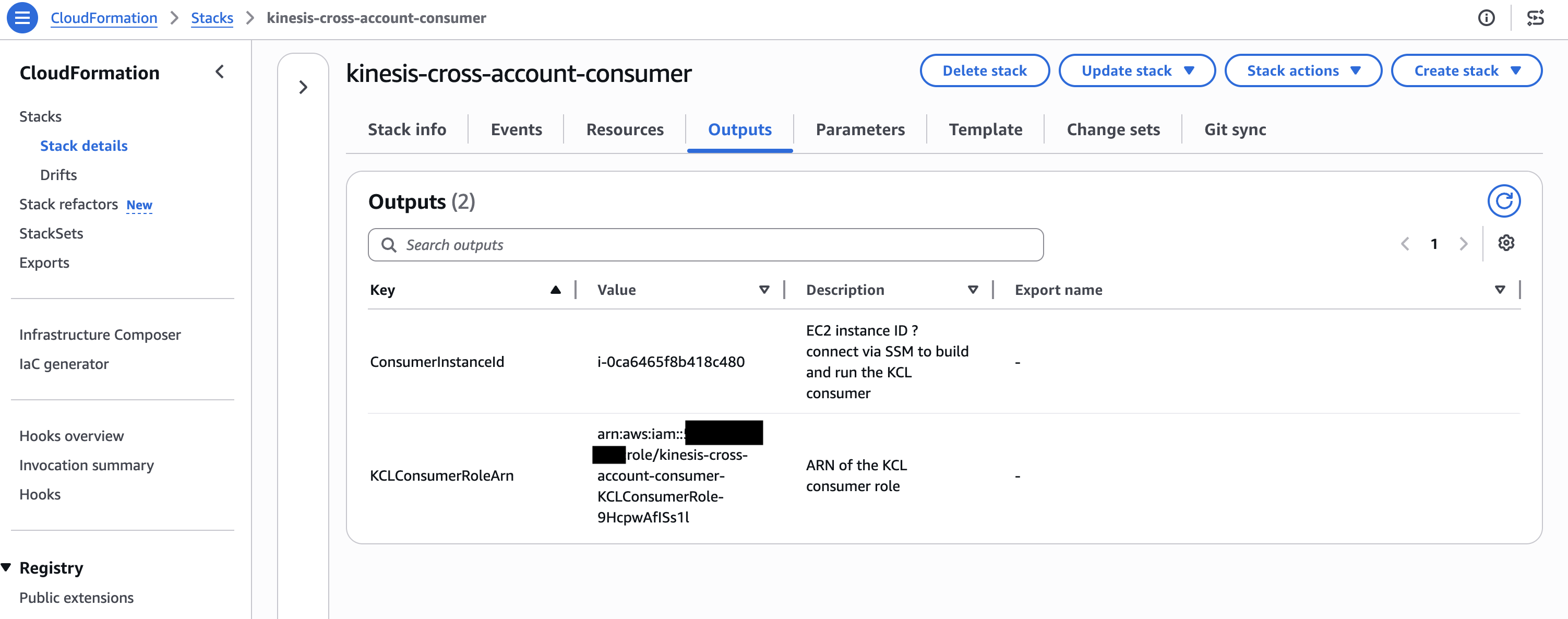
Figure 4: CloudFormation outputs for the consumer stack
Testing end-to-end data flow
After all three stacks are deployed, start the applications to verify end-to-end cross-account streaming:
Start the KPL producer (Account A)
Connect to the producer EC2 instance through Session Manager, then run CrossAccountKPLProducer. The application assumes the cross-account role, connects to the Kinesis data stream in Account B, and begins publishing aggregated records:

Figure 5: KPL producer publishing aggregated records to the cross-account stream
Start the KCL consumer (Account C)
Connect to the consumer EC2 instance through Session Manager, then run CrossAccountKCLConsumer. The KCL application uses its local credentials, and the stream’s resource-based policy authorizes read access without role assumption:
To use Enhanced Fan-Out (dedicated 2 MB/s per consumer, approximately 70 ms latency), pass --efo with the pre-registered consumer ARN:
Note: With resource-based policies, KCL cannot auto-register stream consumers cross-account. The stream owner (Account B) pre-registers the consumer through CloudFormation, and you pass the resulting EFOConsumerArn.
The following screenshot shows the KCL consumer logs after the consumer has started.

Figure 6: KCL consumer startup logs
Verify in CloudWatch (Account B: Stream metrics)
In the stream-owning account, verify the IncomingRecords and GetRecords.Success metrics in Amazon CloudWatch to confirm records are flowing end to end across all three accounts.
The following screenshot shows the CloudWatch metrics for the stream.
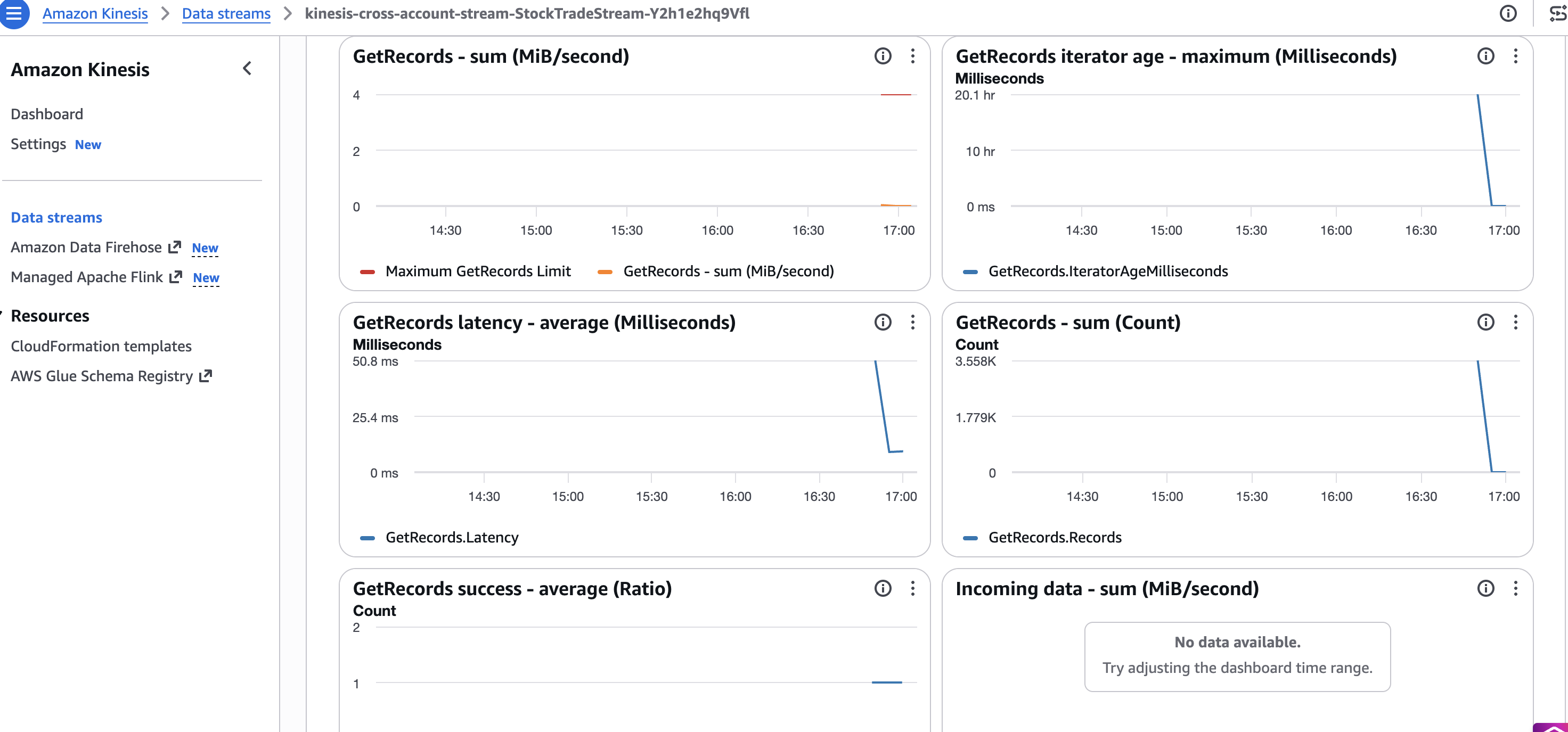
Figure 7: CloudWatch metrics confirming records flow end to end across all three accounts
Key considerations
- Use stream ARN, not stream name: Cross-account KCL configuration must reference the full stream ARN. Stream names resolve only within the owning account.
- AWS KMS key sharing is mandatory for encrypted streams: AWS managed keys can’t be shared. Create a customer managed key and add cross-account key policies.
- Minimum library versions: KCL 2.5.3+ or KCL 1.15.0+ is required for resource-based policy support. For best performance and cost, use KCL 3.5.
- Enhanced Fan-Out works cross-account: The stream owner must pre-register the consumer and attach a resource policy to the consumer ARN (
SubscribeToShard,DescribeStreamConsumer). Pass the consumer ARN to KCL with--efo. Auto-registration does not work cross-account with resource policies.
Clean up
To avoid ongoing charges, delete the CloudFormation stacks in reverse deployment order:
- Consumer Account (Account C): Delete the
kinesis-cross-account-consumerstack. - Producer Account (Account A): Delete the
kinesis-cross-account-producerstack. - Stream Account (Account B): Delete the
kinesis-cross-account-streamstack.
This removes all CloudFormation-managed resources across the three accounts, including the Kinesis data stream, customer managed AWS KMS key, IAM roles, and EC2 instances. Stack deletion typically completes within 5–10 minutes per account.
Note: The DynamoDB tables created by KCL at runtime (StockTradeConsumer, StockTradeConsumer-WorkerMetricStats, StockTradeConsumer-CoordinatorState, and the corresponding StockTradeConsumerEFO-* tables if you ran the EFO consumer) are not managed by CloudFormation and must be deleted manually from Account C.
Common errors in cross-account
AccessDeniedonAssumeRole(producer): Account B’s role trust policy is missing Account A’s principal or the external ID doesn’t match.AccessDeniedon reads despite the resource policy (consumer): Granted on the stream but not on the consumer’s own identity policy. Cross-account needs both.- AWS KMS
AccessDenied: The key policy in the stream account does not grant the foreign producer or consumerGenerateDataKey/Decrypt. - EFO failures: Resource policy missing
SubscribeToShard, or the EFO consumer was not pre-registered or shared. - Expired temporary credentials (producer): Long-running KPL must refresh assumed-role credentials, not assume once at startup.
What’s new in KPL and KCL
Kinesis Client Library (KCL) 3.5: The newest minor version of KCL introduces a streamlined single-table format and leader-driven migration paths for high-scale stream processing applications. KCL 3.5 consolidates all internal tracking (including worker leases, coordinator states, and resource utilization metrics) into a single unified Amazon DynamoDB table, rather than spreading data across multiple tables. This translates directly into lower baseline AWS database costs, reduced operational complexity, and simpler IAM cross-account permission models for enterprise stream consumer fleets.
Kinesis Client Library (KCL) 3.0: The latest major version of KCL introduces graceful load balancing and reduced compute costs for stream processing applications. KCL 3.0 dynamically assigns shards based on actual CPU and memory utilization rather than distributing them evenly across workers. As a result, you can process the same streaming volume with fewer compute instances. This translates directly into lower infrastructure spend for cross-account architectures where consumer fleets must be right-sized.
Kinesis Client Library (KCL) 2.5.3+: Added native support for cross-account access through resource-based policies, so KCL consumers can read from streams in other accounts without complex IAM role chaining. For KCL 1.x users, version 1.15.0 or higher is required for cross-account support.
Kinesis Producer Library (KPL) 1.x: KPL continues to provide high-throughput, batched record aggregation with automatic retries. When used cross-account, KPL assumes an IAM role in the stream-owning account to publish records, using AWS Security Token Service (AWS STS) for temporary credential exchange.
Conclusion
In this post, we demonstrated how to build a cross-account streaming pipeline using Amazon Kinesis Data Streams with KPL and KCL deployed across three separate AWS accounts. With this pattern, you can maintain security isolation, cost attribution, and operational independence while processing real-time data at scale. The resource-based policy model introduced for Kinesis Data Streams simplifies cross-account access without complex IAM role chaining, and KCL’s intelligent load balancing helps you right-size consumer compute regardless of deployment topology.
The solution code is available in the sample-kinesis-cross-account-kpl-kcl repository on GitHub. Clone it, customize it for your account structure, and deploy a cross-account streaming pipeline with maximum security isolation.