All posts by Aaron Herndon

Purple Teaming in 2026: From Assumed Protection to Measurable Resilience

Post Syndicated from Aaron Herndon original https://www.rapid7.com/blog/post/so-purple-teaming-assumed-protection-to-measurable-resilience

What is purple teaming?

Purple teaming is often described as the collaboration between red teams and blue teams. That definition is accurate, but incomplete. At its core, purple teaming is about exposure validation: deliberately testing whether the threats you believe you can detect and contain are actually visible in your environment.

Red teams simulate attacker behavior. Blue teams defend and respond. Purple teaming ensures those two functions operate in lockstep, sharing telemetry, assumptions, and findings to strengthen detection coverage and close control gaps.
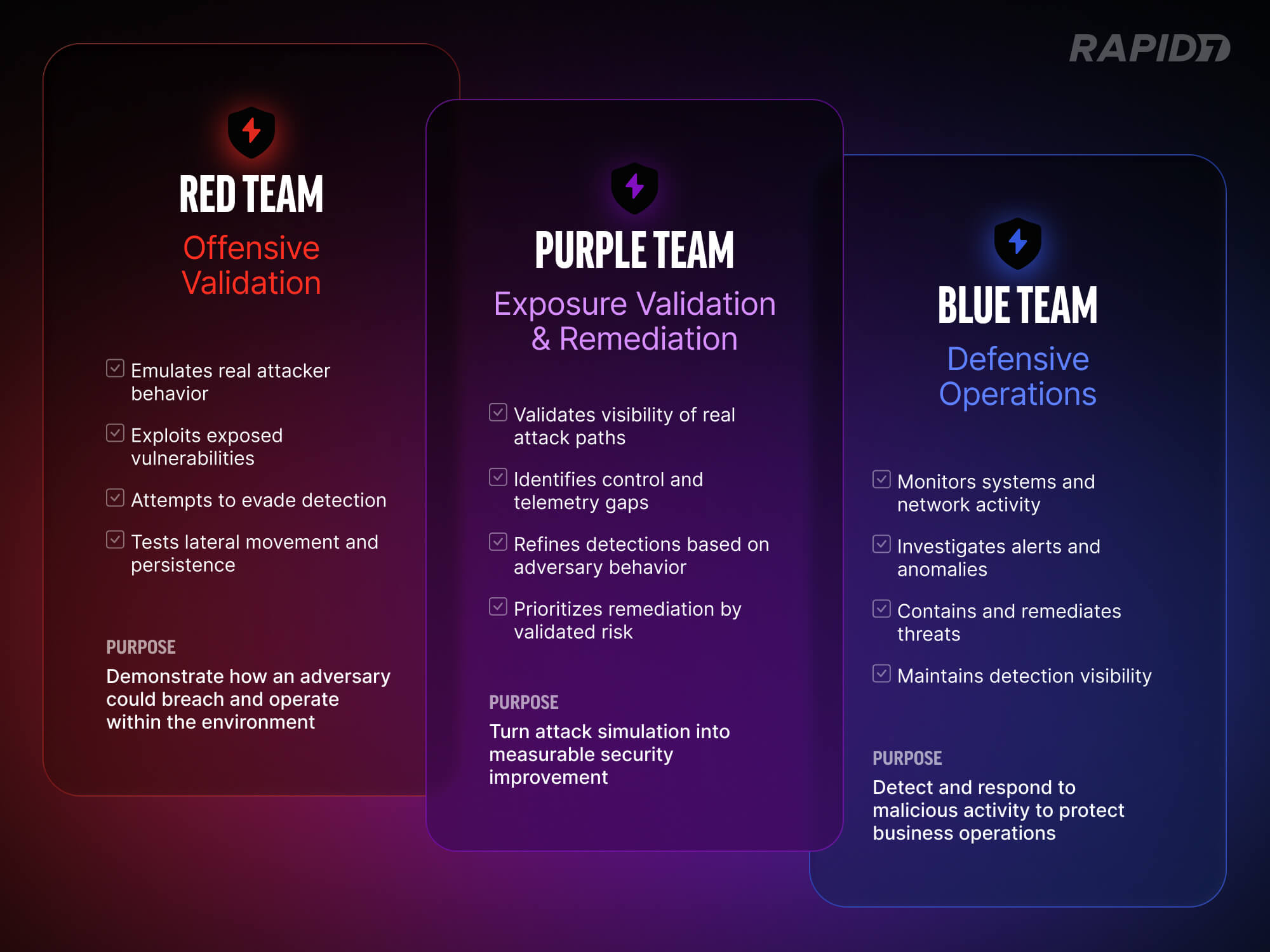
How Red and Blue teams in security combine for Purple Teaming

Unlike traditional penetration testing, which is often point-in-time and compliance-driven, purple teaming is iterative. It is designed to measure, refine, and retest. The goal is not to “win” an exercise. The goal is to improve the organization’s ability to detect, investigate, and contain real attack paths.

Many security programs look mature on paper. Controls are deployed. EDR is in place. Logging is centralized. Dashboards show green indicators. Yet when realistic attacker behavior is exercised inside the environment, gaps often surface quickly. Telemetry may be incomplete. Detection rules may exist but lack tuning. Alerts may trigger without clear ownership or response workflow.

Purple teaming exists to close the gap between perceived protection and actual defensive capability. It replaces assumption with validation.

What purple teaming actually means in 2026

Purple teaming is often described as collaboration between red and blue teams. In practice, it is structured exposure validation conducted in an open-book format.

Offensive operators simulate real-world attack scenarios in coordination with defensive teams. The security operations or incident response team is aware of the exercise from the outset. Together, they define the threat scenarios to test specific response playbooks and detection coverage. The objective is not to surprise the SOC. It is to measure whether detection, telemetry, and response workflows operate as intended and to refine them in real time.

If defensive teams cannot follow a tactic or lack necessary telemetry, activities pause. Gaps are identified and corrected collaboratively. Purple teaming strengthens detection engineering, investigative workflows, and cross-team communication without the pressure of a live incident.

Beyond scorecards: Real-world context matters

Some organizations equate purple teaming with automated breach and attack simulation tools. A sequence of techniques is executed against an assumed compromised host, and a report shows which detection rules are fired. Those metrics can provide visibility into rule coverage. They do not show whether an attacker can exploit real exposures in the environment.

A more contextual approach begins with tailored threat scenarios based on the organization’s actual risk profile. Operators assess real vulnerabilities and misconfigurations rather than firing generic techniques. The focus is not simply to validate rules but to determine whether exploitable exposures exist that blend into legitimate functionality.

Attackers often operate within intended system behavior. They abuse excessive permissions, leverage trust relationships, and exploit architectural weaknesses that were never designed to generate alerts. In these cases, writing a new detection rule does not address the underlying issue. The exposure stems from posture and configuration.

Lateral movement is then executed using access that genuinely exists in the environment. The question becomes whether the organization can observe attacker progression through normal administrative pathways and whether defensive visibility extends beyond initial compromise.

Persistence techniques are established in ways consistent with how an adversary would maintain access in that specific configuration. Detection is measured continuously.

The engagement concludes with a collaborative hunt exercise. The breach lifecycle is recreated without triggering alerts, followed by the intentional generation of a single alert. Teams then work from that signal to reconstruct the attack chain. This phase often reveals how tooling, telemetry, and processes function under structured scrutiny.

Where red teaming fits: Vector Command

It is important to distinguish purple teaming from red teaming.

In a true red team engagement, the SOC and incident response teams are not aware of the breach. Operators attempt to remain undetected for as long as possible. The goal is to emulate a real adversary and test how the organization responds under live conditions.

This is how Vector Command operates. It functions as a continuous red team service, attempting to breach client environments and achieve defined objectives while avoiding detection. If detection occurs during a red team engagement, the SOC response is observed as it would be during a genuine incident. This tests process maturity, investigative speed, and real-world visibility. If and when a breach is detected, the engagement can transition into a collaborative purple team phase. At that point, operators work openly with the SOC to walk through the attack path, identify detection gaps, and refine telemetry and response workflows.

Red teaming measures whether defenses hold up under pressure. Purple teaming refines those defenses collaboratively.

The two approaches are complementary. A red team engagement may identify a successful breach path. After that breach concludes, organizations can transition into purple team activities. Offensive findings are shared openly with defensive teams, and gaps are tuned and remediated. When paired with managed detection and response services, this refinement can occur in coordination with both the customer’s security team and the managed SOC.
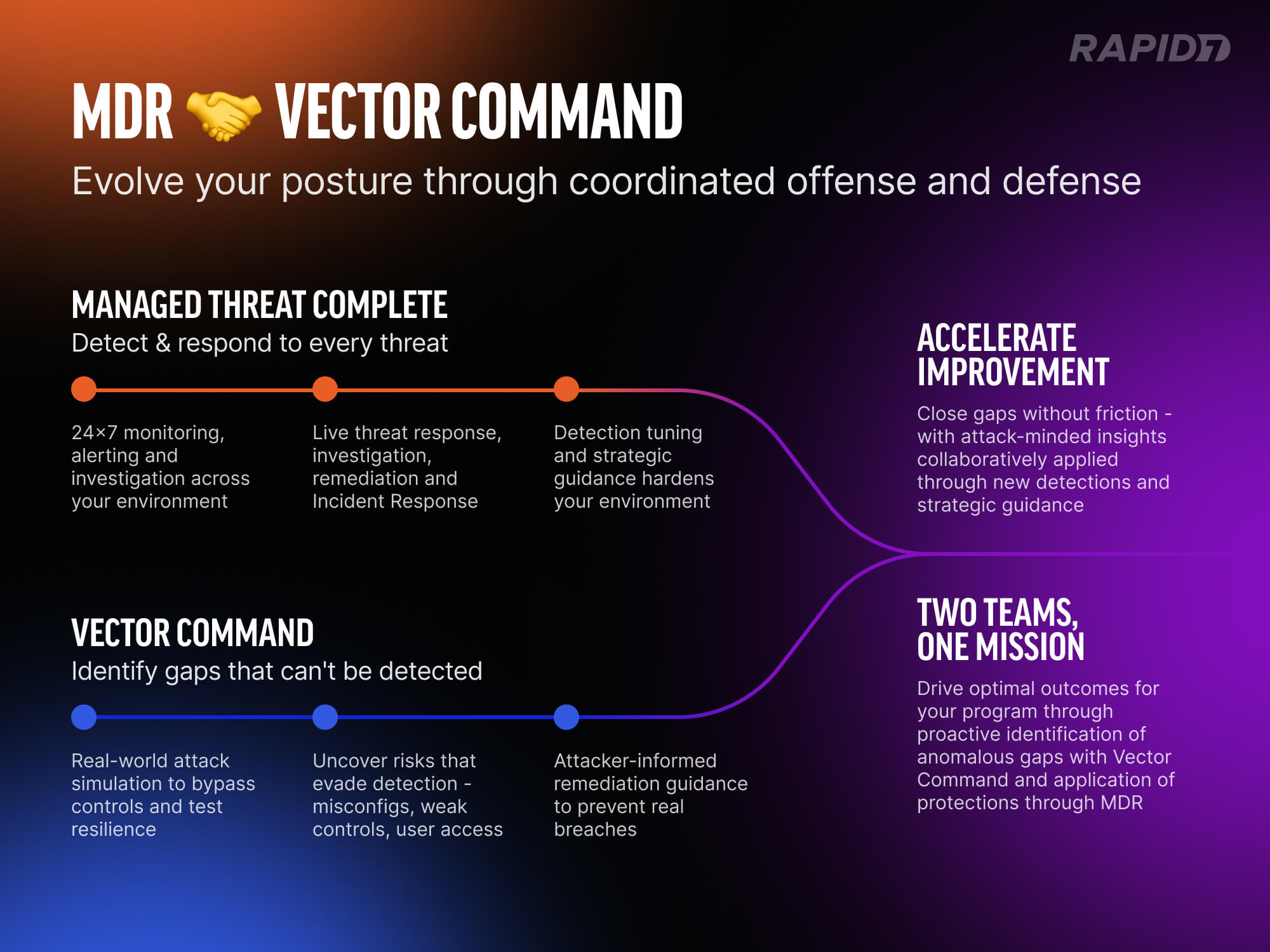
Purple Teaming via Rapid7's Vector Command

In this model, red teaming exposes real weaknesses. Purple teaming strengthens defenses against them.

What effective purple teaming delivers

Effective purple teaming produces operational improvement rather than a static report.

  • Detection logic improves because it is tuned against real attacker behavior

  • Telemetry gaps are identified and corrected

  • Ownership of investigation workflows becomes clear

  • Remediation is prioritized against validated attack paths rather than theoretical risk

For senior security leaders, the value is measurable control effectiveness. Purple teaming provides evidence that investments in tools and people translate into improved resilience. It also builds alignment between offensive and defensive teams. That alignment accelerates improvement and reduces friction across security, IT, and operations.

In an environment where attack techniques evolve and exposure surfaces expand, purple teaming offers something concrete: validated insight into how well the organization can detect, investigate, and contain adversary behavior.

Resilience should not be assumed. It should be tested.

PenTales: What It’s Like on the Red Team

Post Syndicated from Aaron Herndon original https://blog.rapid7.com/2023/08/31/pentales-what-its-like-on-the-red-team/

PenTales: What It’s Like on the Red Team

At Rapid7 we love a good pen test story. So often they show the cleverness, skill, resilience, and dedication to our customer’s security that can only come from actively trying to break it! In this series, we’re sharing some of our favorite tales from the pen test desk and hopefully highlight some ways you can improve your own organization’s security.

Performing a Red Team exercise at Rapid7 is a rollercoaster of emotions. The first week starts off with excitement and optimism, as you have a whole new client environment to dig into. All assets and employees are in-scope, no punches held. From a hacker mentality, it’s truly exciting to be unleashed with unlimited possibilities bouncing around in your head of how you’ll breach the perimeter, set persistence, laterally move, and access the company “crown jewels.”

Then the first week comes to a close and you’ve realized this company has locked down their assets, and short of developing and deploying a 0-day, you’re going to have to turn to other methods of entry such as social engineering. Excitement dies down but optimism remains, until that first phish is immediately burned. Then the second falls flat. Desperation to “win” kicks in and you find yourself working through the night, trying to find one seemingly non-existent issue in their network, all in the name of just getting that first foothold.

One of our recent Red Teams followed this emotional roller-coaster to a ‘T’. We were tasked with compromising a software development company with the end goal of obtaining access to their code repositories and cloud infrastructure. We had four weeks, two Rapid7 pen test consultants and a lot of Red Bull to hack all the things at our disposal. We spent the first two days performing Open Source Intelligence (OSINT) gathering. This phase was a method of passive reconnaissance, in which we scoured the internet for publicly accessible information about our target company. Areas of interest included public network ranges owned by the company, domain names, recent acquisitions, technologies used within the company, and employee contact information.

Our OSINT revealed that the company was cloud-first with a limited external footprint. They had a few HTTPS services with APIs for their customers, software download portals, customer ticketing systems, the usual. Email was cloud hosted in Office365 with Single Sign-On (SSO) handled through Okta. The only external employee resources were an Extranet page that required authentication, a VPN portal which required Multi-Factor Authentication (MFA) and a certificate, email cloud hosted in Office365, and Okta to handle Single Sign-On (SSO) with MFA.

After initial reconnaissance, we determined three possible points of entry: compromise one of the API endpoints, phish a user with a payload or MFA bypass, or guess a password and hope it can sign into something without MFA required. We spent our first two days combing over the customer’s product API documentation and testing for any endpoints which could be accessed without authentication or exploited to gain useful information. We were stonewalled here — kudos to the company.

Gone Phishin’

Our optimism and excitement was still high, however, as we set our eyes on plan B, phishing employees. We whipped up a basic phishing campaign that masqueraded as a new third-party employee compliance training portal. To bypass web content filtering, we purchased a recently expired domain that was categorized as “information/technology.” We then created a fake landing page with our new company logo and a “sign in with SSO” button.

Little did the employees realize, while they saw their normal Okta login page, it was a proxy-phishing page using Evilginx that would capture their credentials and authenticated Okta session. The only noticeable difference was the URL. After capturing the employee’s Okta session we redirected them back to our fake third-party compliance platform, where they were requested to download an HTML Application (HTA) file containing our payload.

We fired off this phishing campaign to 50 employee email addresses discovered online, ensuring that anyone with “information security” in their title was removed from the target list. Then we waited. One hour went by. Two. Three. No interactions with the campaign. The dread was starting to sit in. We suspected that a day of hard work to build the entire campaign was eaten by a spam filter, or worse, identified and the domain was instantly blocked.

With defeat looming, we began preparing a second phishing campaign, when all of the sudden our TMUX session with Evilginx running showed a blob of green text. A valid credential was captured as well as an Okta session token. We held our breath as we switched to our Command and Control (C2) server dashboard, fingers crossed, and there it was. A callback from the phished user’s workstation. They opened the HTA on their workstation. It bypassed the EDR solution and executed our payload. We were in.

The thrill of establishing initial access is exhilarating. However, it’s at this moment that we have to take a deep breath and focus. Initial access by phishing is a fragile thing, if the user reports it, we’ll lose our shell. If we trip an alert within the EDR, we’ll lose our shell. If the user goes home for the night and restarts their computer before we can set persistence, we’ll lose our shell.

First things first, we quickly replaced our HTA payload on the phishing page with something benign in case the campaign was reported and the Security Operations Center (SOC) triaged the landing page. We can’t have them pulling Indicators of Compromise (IoCs) out of our payload and associating it with our initial access host in their environment. From here, one operator focused on setting persistence and identifying a lateral movement path while the other operator used stolen Okta session tokens to review the user’s cloud applications before it expired. Three hours in and we still had access, reconnaissance was underway, and we had identified a few juicy Kerberoastable service accounts that if cracked would allow lateral movement.

Things were going our way. And then it all came crashing down.

At what felt like a crescendo of success, we received another successful phish with credentials. We cracked the service account password that we had Kerberoasted, and… lost our initial access shell.  Looking in the employee’s Teams messages, we saw messages from the SOC asking about suspicious activity on their asset as they prepared to quarantine it. Deflated and tired, back to the drawing board we went. But, like all rollercoasters, we started going back uphill when we realized the most recent credentials captured were for an intern on the help desk team. While the tier one help desk employee didn’t have much access in the company, they could view all available employee support tickets in the SaaS ticketing solution. Smiling ear to ear, we assumed our role as the helpful company IT helpdesk.

Hi, We’re Here to Help

We quickly crafted a payload that utilized legitimate Microsoft binaries packaged alongside our malicious DLL, loaded in via AppDomain injection, and packaged nicely into an ISO. We then identified an employee who had submitted a ticket to the help desk asking for assistance with connecting to an internal application which was throwing an error. Taking a deep breath, we spoofed the help desk phone number and called the employee in need of assistance.

“Hi ma’am, this is Arthur from the IT help desk. We received your ticket regarding not being able to connect to the portal, and would like to troubleshoot it with you. Is this a good time?”

Note: you might be wondering what the employee could have done better here, but in the end, the responsibility lay with the company not having multi-factor on their help desk portal. It gave us the information we needed to answer any question the employee could ask, as the help desk.

The employee was thrilled to get assistance so quickly from the help desk. We even went the extra mile and spent time trying to troubleshoot the actual issue with the employee, receiving thanks for our efforts. Finally, we asked the employee to try applying “one last update” that may resolve the issue. We directed them to go to a website hosting our payload, download the ISO, open it, and run the “installer.” They obliged, as we had already built rapport throughout the entire call. Moments later, we had a shell on the employee’s workstation.

With a shell, cracked service account credentials, and all the noisy reconnaissance out of the way from our first shell, we dove right into the lateral movement. The service account allowed  us to access an MSSQL server as an admin. We mounted the C$ drive of the server and identified already installed programs which utilized Microsoft’s .NET framework. We uploaded a malicious DLL and configuration file and remotely executed the installed program using Windows Management Instrumentation (WMI), again utilizing AppDomain injection to load our DLL. Success! We received a callback to our new C2 domain from the MSSQL server. Lateral movement hop number one, complete.

Using Rubeus, we checked for Kerberos tickets in memory and discovered a Kerberos Ticket Granting Ticket (KRBTGT) cached for a Domain Admin user. The KRBTGT could be used in a Pass-the-Ticket (PTT) attack to authenticate as the account, which meant we had Domain Admin access until the ticket expired in approximately four more hours. Everything was flowing  and we were ready for our next setback. But it didn’t come. Instead, we used the ticket to authenticate to the workstation of a cloud administrator employee and establish yet another shell on the host. Luckily for us, the company had everyone’s roles and titles in their Active Directory descriptions, and employee workstations also contained the associated employee name in the description field, which made identifying the cloud admin employee’s workstation a breeze.

Using our shell on the cloud administrator’s workstation, we executed our own Chrome cookie extractor, “HomemadeChocolateChips,” in memory, which spawned Chrome with a debug port and extracted all cookies from the current user’s profile. This provided us with an Okta session token, which we used in conjunction with a SOCKS proxy through the employee’s machine to access their Okta dashboard sourced from an internal IP address. The company had it configured such that once authenticated to Okta, if coming from the company’s IP space, the Azure Okta chiclet did not prompt for MFA again. With a squeal of excitement, we were into their Azure Portal with admin privileges.

In Azure, there is a handy feature under a virtual machine’s configuration and operations tab called “Run Command.” This allows an administrator to do just as it states, run a PowerShell script on the virtual machine. As if it couldn’t get any easier, we identified a virtual machine labeled “Jenkins Build Server” with “Run Command” enabled. After running a quick PowerShell script to download our zip file with backdoored legitimate binaries, expand the archive, and then execute them, we established a C2 foothold on the build server. From there we found GitHub credentials utilized by build jobs, which let us access our objective: source code for company applications.

Exhausted but triumphant, with bags under our eyes and shaking from the caffeine induced energy, we set up a few long-haul C2 connections to maintain persistent network access through the end of the assessment. We also met with the client to determine our next steps, such as intentionally alerting their security team to the breach. Well, after a good beer and nap over the weekend, that is.

The preceding story was an amalgamation of several recent attack workflows to obfuscate client identity and showcase one cohesive assessment.