All posts by Abe Raghib

How Revinate accelerated API adoption with Amazon API Gateway

Post Syndicated from Abe Raghib original https://aws.amazon.com/blogs/architecture/how-revinate-accelerated-api-adoption-with-amazon-api-gateway/

Accelerating API adoption while reducing operational overhead is a challenge that every growing organization faces. For Revinate, a hospitality provider serving over 12,500 hotels worldwide and powering more than 1.25 billion guest profiles, Amazon API Gateway became the foundation of their solution.

Revinate empowers hoteliers to connect directly with guests at every touchpoint, driving $24 billion in lifetime direct revenue through an AI-powered Customer Data Platform (CDP) that helps reduce reliance on online travel agencies (OTAs) and deliver data-driven insights.

With the expansion of CDP capabilities, Revinate needed to expose rich guest data through APIs, so that hotel properties and partners can programmatically access guest profiles, reservation data, and other critical hospitality information.

This post explores how Revinate used Amazon API Gateway and the newly released Amazon API Gateway Portal to create a scalable, secure, and developer-friendly API program.

Business need: Evolving API infrastructure to match growth

As Revinate expanded its CDP capabilities and began exposing guest profile and reservation data through APIs, the limitations of managing API infrastructure in-house became clear. Each new partner integration required manual provisioning, custom security configuration, and ongoing maintenance. The team needed an API gateway solution that could scale with growing partner demand without adding operational burden. Rather than building and maintaining a self-hosted solution, Revinate wanted an approach that would open up engineering time, streamline partner integrations, and align infrastructure costs with actual usage. The team identified four key business drivers:

  • Operational efficiency and agility – Accelerate API deployment cycles and reduce time spent on infrastructure maintenance so the engineering team can focus on building features that directly serve customers.
  • Faster partner and developer onboarding – Helping external developers and partners to discover and adopt Revinate’s APIs required a faster, more self-service experience.
  • Growth aligned costs – Infrastructure costs needed to scale proportionately with revenue generation. An on-demand pricing model, where costs flex with actual API usage rather than fixed overhead, was essential to support sustainable growth. Equally important was the ability to attribute API costs per consumer, enabling transparent cost allocation across hotel properties and partners.
  • Enhanced security and compliance – API security controls including authentication, authorization, rate limiting, and threat protection. Meeting compliance requirements and maintaining customer trust demanded strong security without adding complexity to the development workflow or requiring the team to build and maintain custom security infrastructure.

These requirements shaped the team’s evaluation of available solutions.

Evaluating alternatives

When evaluating API gateway solutions, the team translated the business drivers into four core technical requirements. On-demand pricing was essential to align infrastructure costs with actual API usage and enable per-consumer cost attribution. Authentication federation allows integration with Revinate’s existing identity provider, so partners can onboard faster without building custom auth infrastructure. Rate limiting was needed to protect backend services and enforce fair usage across hotel properties and partners as the API program scales. Finally, strong security, including threat protection, audit logging, and access controls, was required to meet compliance requirements for protecting sensitive guest data.

The engineering team evaluated three approaches. Each approach came with distinct tradeoffs across cost, flexibility, and operational burden.

Self-managed API management

Deploying a self-managed API gateway would provide flexibility and avoid licensing fees, but requires ongoing infrastructure management, security patching, scaling, and monitoring. The team would also need to build a custom developer portal from scratch.

Custom-built

Building a proprietary API gateway tailored to Revinate’s exact needs offers maximum control but demands significant upfront development investment and ongoing maintenance. Every capability, including routing, authentication, rate limiting, and documentation, would need to be built and maintained in-house, diverting engineering resources from core hospitality platform features.

Enterprise API management platforms

Enterprise platforms offer comprehensive out-of-the-box features, but introduce vendor dependencies, higher costs, and fixed-term licensing models where costs misalign with revenue growth.

All three approaches shared a common drawback: they would divert resources, whether engineering time, budget, or both, toward capabilities that don’t differentiate Revinate’s product, delaying time-to-market for features that directly serve hotel customers.

The solution: Amazon API Gateway with Developer Portal

Revinate needed the comprehensive capabilities of an enterprise API management platform without the fixed-term licensing, vendor dependencies, and operational overhead. Amazon API Gateway, combined with the newly released Amazon API Gateway Portal, delivered exactly that, aligning with both the technical requirements and business objectives that shaped the evaluation.

Fully managed infrastructure

Amazon API Gateway removes the need to manage underlying infrastructure, so the engineering team can focus on the core hospitality solution rather than API gateway operations.

Native AWS integration

Amazon API Gateway provides native integration with other AWS services, including Amazon Elastic Kubernetes Service (Amazon EKS) for backend services and AWS Lambda authorizers for federated authentication with an external identity provider. This allows Revinate to authenticate API consumers against the existing identity provider infrastructure with minimal development effort.

Infrastructure as code with Terraform

The team maintains strict infrastructure-as-code practices, using Terraform exclusively for all production deployments. The AWS provider for Terraform enables defining the Amazon API Gateway configuration, including REST APIs, stages, usage plans, and authorizers as version-controlled code. This approach verifies consistency across environments, enables peer review of infrastructure changes, and provides complete audit trails for compliance requirements. The declarative nature of Terraform enables rapidly iterating on the API Gateway configuration during development while maintaining confidence in production deployments.

Cost-effective pay-per-use model

Amazon API Gateway’s pay-per-use pricing model aligned perfectly with Revinate’s growth strategy. During the initial rollout phase, costs remained minimal and scaled naturally as new API consumers onboarded. Usage plans allow Revinate to track and attribute costs per consumer, providing clear visibility into which hotel properties and partners drive API usage. This per-consumer cost attribution, combined with tiered pricing that scales from tens to hundreds of customers, replaced fixed annual licensing fees that required upfront investment regardless of actual usage.

Managed Developer Portal

The November 2025 release of Amazon API Gateway Portal provided a fully managed, AWS-native Developer Portal that served as the central hub for API discovery, documentation, and governance. This removes months of custom development work that building a comparable solution would require.

Developers can use the managed portal to:

  • Set up a branded Developer Portal in minutes rather than months.
  • Provide hotel property developers with self-service API discovery and interactive documentation.
  • Maintain centralized control over API documentation freshness and access governance.
  • Deliver a professional developer experience that accelerates customer onboarding from weeks to days.

Strong security

API Gateway provides built-in security features that meet stringent requirements for protecting sensitive guest data:

  • OAuth2 client credentials for machine-to-machine (M2M) authentication.
  • Authorization logic using AWS Lambda authorizers integrating with an external identity provider of choice.
  • Request throttling and quota management to prevent abuse.
  • Integration with AWS WAF and Amazon CloudFront for layered protection against common web exploits and DDoS threats.
  • Comprehensive audit logging through AWS CloudTrail for compliance and access tracking.
  • Real-time observability through Amazon CloudWatch metrics and dashboards, with support for streaming to third-party observability platforms.

Architecture overview

The solution uses a modern, scalable AWS architecture designed to serve hotel properties globally. Hotel properties access the platform as API consumers through Amazon CloudFront for edge caching and low-latency responses, with AWS WAF providing comprehensive protection against common web threats and bots. Requests flow through Amazon API Gateway, which serves as the unified entry point for API operations. Lambda authorizers handle authentication and authorization by integrating with an identity provider (IdP) to provide secure, token-based access control for each request. After authentication, API Gateway routes traffic to backend services running on Amazon EKS, providing the flexibility and scalability needed for containerized microservices. The EKS application layer orchestrates requests to the Customer Data Platform.
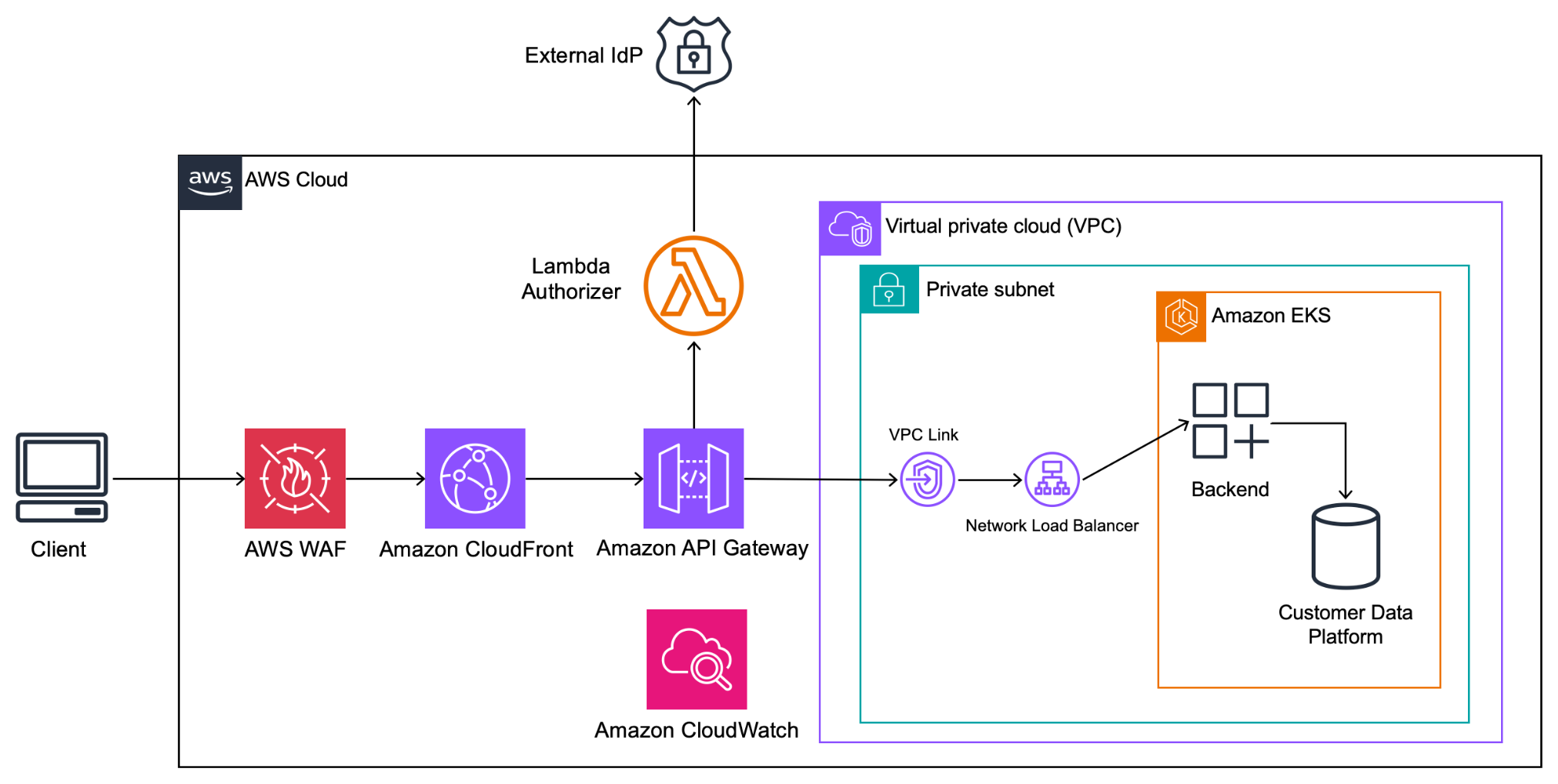
Architecture flow from hotel property consumers through Amazon API Gateway to backend services on Amazon EKS

Figure 1: Architecture diagram showing the end-to-end flow from hotel property consumers accessing the Amazon API Gateway Portal, through Amazon API Gateway, to backend services running on Amazon EKS.

Connecting API Gateway to EKS

A critical design decision emerged: how to securely and efficiently connect API Gateway to backend services in Amazon EKS while keeping traffic within the AWS backbone network using VPC Link. The team evaluated four options:

Option 1: NGINX ingress controller: Route traffic through a Kubernetes-native NGINX Ingress Controller with a Load Balancer service.

Pros: Highly customizable routing, flexible header manipulation, consistent with common Kubernetes patterns.

Cons: Adds extra latency hop, requires manual lifecycle management (upgrades, configs, scaling), non-AWS-native monitoring.

Option 2: AWS load balancer controller: Use the AWS Load Balancer Controller to manage LB resources as Kubernetes Ingress objects.

Pros: Bridges AWS and Kubernetes natively, supports path-based routing, AWS-managed Load Balancer (LB) lifecycle.

Cons: Introduces an additional hop (Amazon API Gateway → LB → service).

Option 3: Target group binding: Directly bind Amazon EKS pods to Network Load Balancer (NLB) Target Groups using the AWS Load Balancer Controller’s TargetGroupBinding feature.

Pros: Removes ingress controller overhead, lowest latency, native AWS integration, cost-efficient (shared NLB across multiple Target Groups), fine-grained control over health checks and scaling.

Cons: More complex initial setup, less Kubernetes-native (more AWS-specific), different applications will need individual NLB.

Option 4: LoadBalancer service: Expose each service directly via a Kubernetes LoadBalancer service (NLB/ALB).

Pros: Most straightforward setup, minimal routing complexity, no ingress controller needed.

Cons: No path-based routing, costly at scale (each service requires its own load balancer), limited observability, requires TLS offloading configuration, different applications will need individual NLB.

The team selected Target group binding because it effectively balances performance, cost-efficiency, and AWS-native integration. By removing the extra hop introduced by traditional ingress controllers, this approach provides direct control over Target Groups and health checks while maintaining sub-second latency at scale.

Security implementation

The API Gateway implementation uses OAuth 2.0 client credentials flow with an external identity provider, delivering strong authentication for machine-to-machine (M2M) communication. This approach provides secure, scalable access control as Revinate onboards new hotel properties and partners.

API Gateway enforces usage plans with configurable throttling and quota limits, for fair usage and protection against abuse.
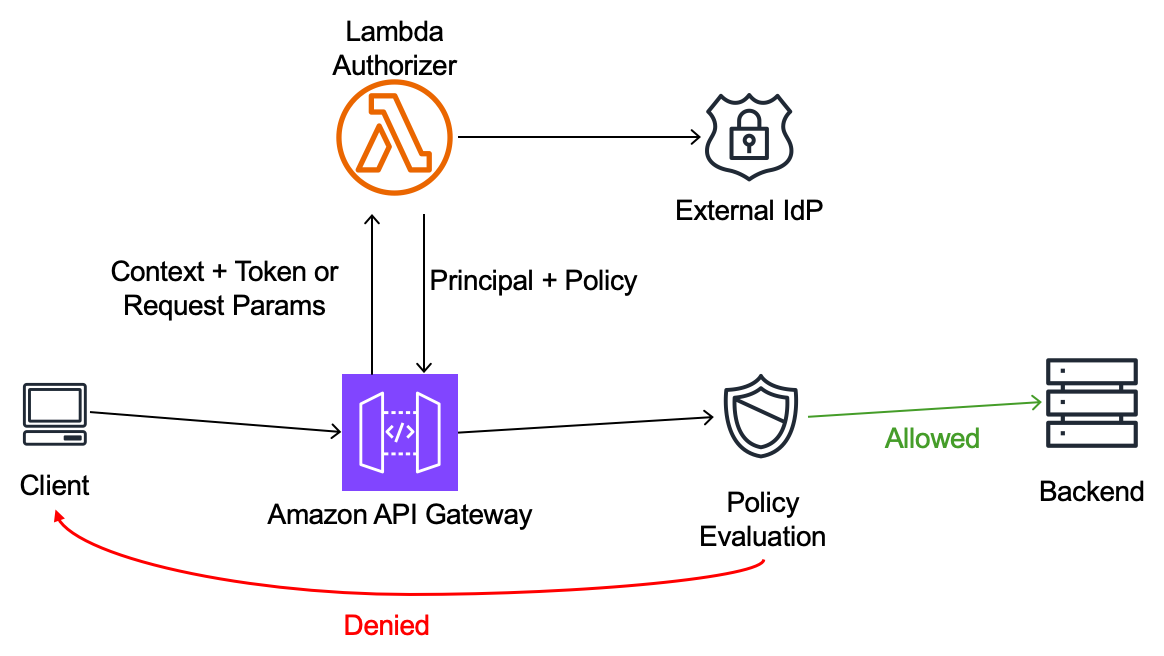
Sequence diagram of the OAuth 2.0 authentication flow using AWS Lambda authorizers

Figure 2: Sequence diagram illustrating the OAuth 2.0 authentication flow using AWS Lambda authorizers.

AWS Lambda authorizers take the caller’s identity as the input and return an IAM policy as the output. This architecture provides flexibility to implement sophisticated authorization logic while maintaining the simplicity of the API Gateway managed infrastructure. The team also deploys and manages the Lambda authorizer functions through Terraform, maintaining infrastructure as code (IaC) standards.

Developer Portal experience

The Amazon API Gateway Portal serves as the central hub for the API operations, providing developers using APIs with a streamlined experience.
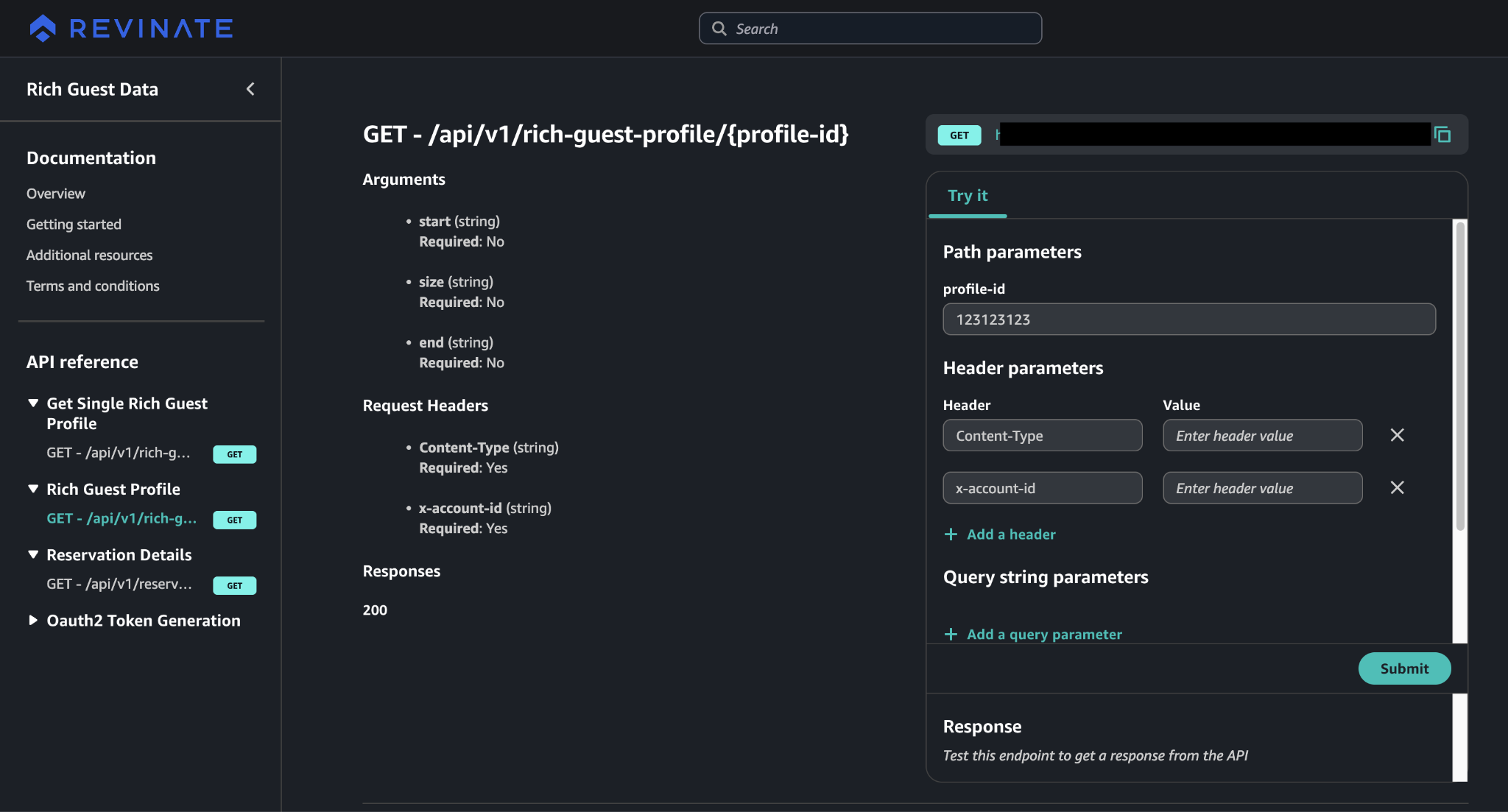
Developer journey through the Amazon API Gateway Portal showing API discovery, interactive documentation, and subscription management

Figure 3: User interface flow showing the developer journey through the Amazon API Gateway Portal, including API discovery, interactive documentation with try-it-now functionality, and subscription management.

Developers can:

  • Browse available REST APIs with comprehensive documentation.
  • Test API endpoints directly in the portal with interactive examples.
  • Access code samples and integration guides.

This self-service model reduced burden on support while accelerating customer time-to-value.

Results and benefits

The implementation of Amazon API Gateway and the Developer Portal delivered significant qualitative benefits across operational efficiency, developer experience, and business scalability.

Reduced operational overhead

By choosing a fully managed API gateway, the engineering team avoided the burden of maintaining, scaling, and troubleshooting self-hosted infrastructure. With the fully managed API gateway, the team can focus on core platform innovations that directly benefit hotel customers rather than undifferentiated gateway operations.

Improved developer experience

The centralized Developer Portal transformed the integration experience for hotel properties and partners. Self-service API discovery and interactive documentation reduced onboarding time from weeks to days. Developers consistently praised the professional portal experience and comprehensive documentation.

Accelerated customer onboarding

With the Developer Portal’s self-service capabilities, new customers can discover APIs and begin integration without waiting for manual provisioning or support intervention. This self-service approach positions Revinate to scale API access to hundreds of hotel properties and partners as demand grows.

Enhanced governance and control

The solution centralized control over API documentation, versioning, and access policies, verifying consistency across customer integrations. A single source of truth for API specifications removes documentation drift and reduces integration errors. Managing infrastructure through Terraform verifies changes follow proper review and approval processes.

Cost optimization

The pay-per-use pricing model aligns costs with actual usage and revenue generation. Usage plans and API keys provide per-consumer cost attribution, giving Revinate clear visibility into infrastructure spend by customer. As usage scales, tiered pricing verifies predictable cost growth that tracks with business value, replacing fixed licensing models that require upfront investment regardless of adoption.

Positioned for growth

The API layer, from Amazon API Gateway to the Developer Portal, scales automatically to meet demand without capacity planning or operational intervention. The team can confidently pursue growth targets knowing the API infrastructure will scale automatically.

Enhanced security posture

Amazon API Gateway provides strong security capabilities built into the platform, including centralized authentication and authorization mechanisms, request throttling and rate limiting to protect against abuse, and automatic threat protection through AWS Shield integration. Built-in security capabilities remove the need to build and maintain custom infrastructure while verifying consistent security policies across API endpoints. The centralized approach reduces the attack surface and provides comprehensive audit trails through CloudWatch integration, so the team can maintain robust security without additional operational overhead.

Key takeaways

The successful implementation of Amazon API Gateway and the Amazon API Gateway Portal offers valuable lessons for organizations exposing APIs to external customers and partners:

Managed services accelerate time-to-market – By using fully managed infrastructure and the new Amazon API Gateway Portal, the team avoided months of custom development work and launched the API program faster than would have been possible with self-managed alternatives.

Developer experience drives adoption – The professional, self-service Amazon API Gateway Portal significantly reduced friction in the customer onboarding process, so API access can rapidly scale as new hotel properties and partners onboard.

Infrastructure as code verifies consistency – Using Terraform for all production deployments provided the infrastructure team with version control, peer review, and audit trails while maintaining deployment consistency across environments.

Pay-per-use aligns costs with value – For organizations in growth mode, pay-per-use pricing removes the risk of overcommitting to fixed costs before achieving product-market fit with API offerings.

OAuth 2.0 delivers strong security at scale – Implementing OAuth 2.0 client credentials flow with an external identity provider enables a robust, scalable authentication foundation that grows securely alongside its expanding customer base.

Native AWS integration reduces complexity – For organizations already running on AWS, API Gateway’s native integration with services like EKS, Lambda, and CloudWatch minimizes architectural complexity and operational overhead.

Future enhancements

With the outbound API program successfully launched, the team is planning to extend API Gateway to inbound APIs, where partners push data into Revinate’s service. This will provide consistent security, monitoring, and governance across API traffic.

The team is also exploring advanced API Gateway features including request and response transformation, caching for improved performance, and deeper integration with AWS WAF for enhanced security against evolving threats.

Conclusion

Choosing Amazon API Gateway with the Developer Portal demonstrates how fully managed services can accelerate innovation while reducing operational complexity. By embracing AWS-native solutions and infrastructure-as-code practices, Revinate built a scalable, secure API program that supports growth as more customers get onboarded.

As the hospitality industry continues its digital transformation, this API-first approach positions them to empower hoteliers with the data and integrations needed to deliver exceptional guest experiences and drive direct revenue growth.

Next steps

Whether you’re in hospitality, software as a service (SaaS), healthcare, or any industry where partners and customers need programmatic access to your service, the pattern Revinate followed is broadly applicable. Start by mapping your business drivers to concrete technical requirements. This grounds your API gateway choices in outcomes, not only features. From there, explore Amazon API Gateway’s REST and HTTP API options to find the right fit for your traffic patterns and integration needs. Use the Amazon API Gateway Portal to give your developers a self-service onboarding experience from day one. If you’re already running workloads on AWS, the native integration with services like EKS, Lambda, and CloudWatch means you can build on your existing architecture rather than introducing new operational complexity. For teams that follow infrastructure as code practices, the Terraform AWS Provider for API Gateway helps you to define your entire API configuration as version-controlled code. To get started, visit the Amazon API Gateway documentation or reach out to your AWS account team for architecture guidance tailored to your use case and scale.

Resources


About the authors

Abe Raghib

Abe Raghib

Abe is a Solutions Architect at Amazon Web Services, where he helps ISV customers architect and implement scalable, secure solutions on AWS. He specializes in API architecture, serverless technologies, Agentic AI adoption, and developer experience optimization.

Giedrius Praspaliauskas

Giedrius Praspaliauskas

Giedrius is a Solutions Architect at Amazon Web Services, focusing on helping customers modernize their infrastructure and adopt cloud-native architectures. He has extensive experience with API management, microservices, and container orchestration.

Jakarry Williams

Jakarry Williams

As a Data Integration Manager at Revinate, Jakarry leads the Engineering Integration team, focusing on how data is ingested, transformed, and published across different platforms. He specializes in data integration architecture, transformation pipelines, and scalable data processing systems.

Satish Katpally

Satish Katpally

Satish is a Principal Product Manager at Amazon Web Services, focusing on building innovative application networking services. He is responsible for innovative application networking services, focusing on VPC Lattice.

Amazon OpenSearch Service 101: T-shirt size your domain for e-commerce search

Post Syndicated from Abe Raghib original https://aws.amazon.com/blogs/big-data/amazon-opensearch-service-101-t-shirt-size-your-domain-for-e-commerce-search/

In e-commerce, delivering fast, relevant search results helps users find products quickly and accurately, improving satisfaction and increasing sales. OpenSearch is a distributed search engine that offers advanced search capabilities including advanced full-text and faceted search, customizable analyzers and tokenizers, and auto-complete to help customers quickly find the products they want. It scales to handle millions of products, catalogs and traffic surge. Amazon OpenSearch Service is a managed service that lets users build search workloads balancing search quality, performance at scale and cost. Designing and sizing an Amazon OpenSearch Service cluster correctly is required to meet these demands.

While general sizing guidelines for OpenSearch Service domains are covered in detail in OpenSearch Service documentation, in this post we specifically focus on T-shirt-sizing OpenSearch Service domains for e-commerce search workloads. T-shirt sizing simplifies complex capacity planning by categorizing workloads into sizes like XS, S, M, L, XL based on key workload parameters such as data volume and query concurrency. For e-commerce search, where data growth is moderate and read-heavy queries predominate, this approach offers a flexible, scalable way to allocate the resources without overprovisioning or underestimating needs.

How OpenSearch Service stores indexes and performs queries

E-commerce search platforms handle vast amounts of data and daily data ingestion is typically relatively small and incremental, reflecting catalog changes, price updates, inventory status and user activities like clicks and reviews. Efficiently managing this data and organizing it per OpenSearch Service best practices is crucial in achieving optimal performance. The workload is read-heavy, consisting of user queries with advanced filtering and faceting, especially during sales or seasonal spikes that require elasticity in compute and storage resources.

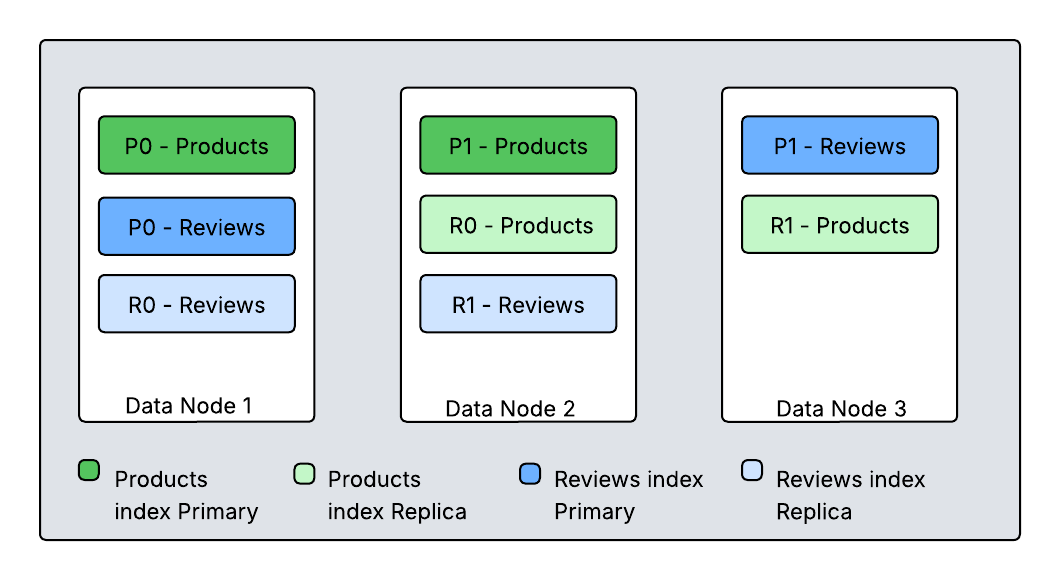
You ingest product and catalog updates (inventory, listings, pricing) into OpenSearch using bulk APIs or real-time streaming. You index data into logical indexes. How you create and organize indexes in e-commerce has a significant impact on search, scalability and flexibility. The approach depends on the size, diversity and operational needs of the catalog. Small to medium-sized e-commerce platforms commonly use a single, comprehensive product index that stores all product information with product category. Additional indexes may exist for orders, users, reviews and promotions depending on search requirements and data separation needs. Large, diverse catalogs may split products into category-specific indexes for tailored mappings and scaling. You split each index into primary shards, each storing a portion of the documents. To ensure high availability and enhance query throughput, you configure each primary shard with at least one replica shard stored on different data nodes.

Diagram showing Amazon OpenSearch Service cluster with three data nodes implementing primary-replica shard distribution for Products and Reviews indexes. Data Node 1 contains P0-Products (primary), P0-Reviews (primary), and R0-Reviews (replica). Data Node 2 contains P1-Products (primary), R0-Products (replica), and R1-Reviews (replica). Data Node 3 contains P1-Reviews (primary) and R1-Products (replica). Color-coded legend distinguishes primary shards (filled boxes) from replica shards (outlined boxes) for both indexes. This architecture ensures fault tolerance and high availability by distributing primary and replica shards across different nodes.
Diagram 1. How primary and replica shards are distributed among nodes

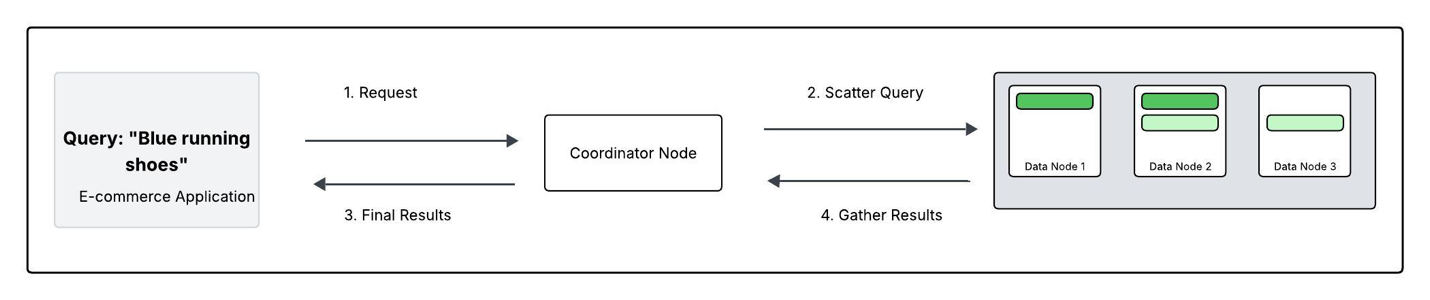
This diagram shows two indexes (Products and Reviews), each split into two primary shards with one replica. OpenSearch distributes these shards across cluster nodes to ensure that primary and replica shards for the same data do not reside on the same node. OpenSearch runs search requests using a scatter-gather mechanism. When an application submits a request, any node in the cluster can receive it. This receiving node becomes the coordinating node for that specific query. The coordinating node determines which indices and shards can serve the query. It forwards the query to either primary or replica shards and orchestrates the different phases of the search operation and returns the response. This process ensures efficient distribution and execution of search requests across the OpenSearch cluster.

Diagram showing Amazon OpenSearch Service distributed query architecture where an e-commerce application searches for "Blue running shoes." The workflow demonstrates the scatter-gather pattern: (1) Application sends query to Coordinator Node, (2) Coordinator scatters query to three Data Nodes containing index shards, (3) Data Nodes execute searches in parallel, (4) Coordinator gathers and merges results, then returns final ranked results to application. This architecture enables horizontal scalability, parallel processing, and fault tolerance for high-performance search operations across distributed data.
Diagram 2. Tracing a Search query: “blue running shoes”This diagram walks through how a search query–for example, “blue running shoes”flows through your OpenSearch Service domain .

  1. Request: The application sends the search for “blue running shoes” to the domain. One data node acts as the coordinating node.
  2.  Scatter: The coordinator broadcasts the query to either the primary or replica shard for each of the shards in the ‘Products’ index (Nodes 1, 2, and 3 in this case).
  3. Gather: Each data node searches its local shards(s) for “blue running shoes” and returns its own top results (e.g. Node 1 returns its best matches from P0).
  4. Final results: The coordinator merges these partial lists, sorts them into single definitive list of the most relevant shoes, and sends the result back to the app.

Understanding T-Shirt Sizing for E-commerce OpenSearch Service Cluster

Storage planning

Storage impacts both performance and cost. OpenSearch Service offers two main storage options based on query latency requirements and data persistence needs. Selecting the appropriate storage type in a managed OpenSearch Service improves both performance and optimizes cost of the domain. You can choose between Amazon Elastic Block Store( EBS) storage volumes and instance storage volumes (local storage) for your data nodes.

Amazon EBS gp3 volumes offer high throughput, whereas the local NVMe SSD volumes, for example, on the r8gd, i3, or i4i instance families, offer low latency, fast indexing performance and high-speed storage, making them ideal for scenarios where real time data updates and high search throughput are critical for search operations. For search workloads that require a balance between performance and cost, instances backed with EBS GP3 SSD volumes provide a reliable option. This SSD storage offers input/output operations per second (IOPS) that are well-suited for general-purpose search workloads. It also allows users to provision additional IOPS and storage as needed.

When sizing an OpenSearch cluster, start by estimating total storage needs based on catalog size and expected growth. For example, if the catalog contains 500,000 stock keeping units (SKUs), averaging 50KB each; the raw data sums to about 25GB. The size of the raw data, however, is just one aspect of the storage requirements. Also consider the Replica count, indexing overhead (10%), Linux reserves (5%), and OpenSearch Service reserves (20% up to 20GB) per instance while calculating the required storage.

In summary,if you have 25GB of data at any given time who want one replica, the minimum storage requirement is closer to 25 * 2 * 1.1 / 0.95 / 0.8 = 72.5 GB. This calculation can be generalized as follows:

Storage requirement = Raw data * (1 + number of replicas) * 1.45 

This helps ensure disk space headroom on all data nodes, preventing shard failures and maintaining search performance. Provisioning storage slightly beyond this minimum is recommended to accommodate future growth and cluster rebalancing.

Data nodes:

For search workloads, compute-optimized instances (C8g) are well-suited for central processing unit (CPU)-intensive operations like nested queries and joins. However, general-purpose instances like M8g offer a better balance between CPU and memory. Memory-optimized instances (R8g, R8gd) are recommended for memory-intensive operations like KNN search, where larger memory footprint is required. In large, complex deployments, compute-optimized instances like c8g or general-purpose m8g, handle CPU-intensive tasks, providing efficient query processing and balanced resource allocation. The balance between CPU and memory, makes them ideal for managing complex search operations for large-scale data processing. For extremely large search workloads (tens of TB) where latency is not a primary concern, consider using the new Amazon OpenSearch Service Writable warm which supports write operations on warm indices.

Instance Class Best for users who… Examples (AWS) Characteristics
General Purpose have moderate search traffic and want a well-balanced, entry-level setup M family (M8g) Balanced CPU & memory, EBS storage. Good starting point for small to medium-sized catalogs.
Compute Optimized have high queries per second (QPS) search traffic or queries involve scoring scripts or complex filtering C family (C8) High CPU-to-memory ratio. Ideal for CPU-bound workloads like many concurrent queries.
Memory Optimized work with large catalogs, need fast aggregations, or cache a lot in memory R family (R8g) More memory per core. Holds large indices in memory to speed up searches and aggregations.
Storage Optimized update inventory frequently or have so much data that disk access slows things down I family (I3, I4g), Im4gn NVMe SSD and SSD local storage. Best for I/O-heavy operations like constant indexing or large product catalogs hitting disk frequently.

Cluster manager nodes:

For production workloads, it is recommended to add dedicated cluster manager nodes to increase the cluster stability and offload cluster management tasks from the data nodes. To choose the right instance type for your cluster manager nodes, review the service recommendations based on the OpenSearch version and number of shards in the cluster.

Sharding strategy

Once storage requirements are understood, you can investigate the indexing strategy. You create shards in OpenSearch Service to distribute an index evenly across the nodes in a cluster. AWS recommends single product index with category facets for simplicity or partition indexes by category for large or distributed catalogs. The size and number of shards per index play a vital role in OpenSearch Service performance and scalability. The right configuration ensures balanced data distribution, avoids hot spotting, and minimizes coordination overhead on nodes for use cases that prioritizes query speed and data freshness.

For read-heavy workloads like e-commerce, where search latency is the key performance objective, maintain shard sizes between 10-30GB. To achieve this, calculate the number of primary shards by dividing your total index size by your target shard size. For example, if you have a 300GB index and want 20GB shards, configure 15 primary shards (300GB ÷ 20GB = 15 shards). Monitor shard sizes using the _cat/shards API and adjust the shard count during reindexing if shards grow beyond the optimal range.

Add replica shards to improve search query throughput and fault tolerance. The minimum recommendation is to have one replica; you can add more replicas for high query throughput requirements. In OpenSearch Service, a shard processes operations like querying single-threaded, meaning one thread handles a shard’s tasks at a time. Replica shards can serve read requests by distributing them across multiple threads and nodes, enabling parallel processing.

T-shirt sizing for an e-commerce workload

In an OpenSearch T-shirt sizing table, each size label (XSmall, Small, Medium, Large, XLarge) represents a generalized cluster scale category that can help teams translate technical requirements into simple, actionable capacity planning. Each size allows architects to quickly align their catalog size, storage requirements, shard planning, CPU and AWS instance choices to the cluster resources provisioned, making it easier to scale infrastructure as business grows.

By referring to this table, teams can select the category similar to their current workload and use the T-shirt size as a starting point while continuing to refine configuration as they monitor and optimize real-world performance. For example, XSmall is suited for small catalogs with hundreds of thousands of products and minimal search traffic. Small clusters are designed for growing catalogs with millions of SKUs, supporting moderate query volumes and scaling up during busy periods. Medium corresponds to mid-size e-commerce operations handling millions of products and higher search demands, while Large fits large online businesses with tens of millions of SKUs, requiring robust infrastructure for fast, reliable search. XLarge is intended for major marketplaces or global platforms with twenty million or more SKUs, enormous data storage needs, and massive concurrent usage.

T-shirt size Number of Products Catalog Size Storage needed Primary Shard Count Active Shard Count Data Nodes Instance Type Cluster Manager Node instanceType
XSmall 500K 50 GB 145 GB 2 4 [2] r8g.xlarge [3] m8g.large
Small 2M 200 GB 580 GB 8 16 [2] c8g.4xlarge [3] m8g.large
Medium 5M 500 GB 1.45 TB 20 40 [2] c8g.8xlarge [3] m8g.large
Large 10M 1 TB 2.9 TB 40 80 [4] c8g.8xlarge [3] m8g.large
XLarge 20M 2 TB 5.8 TB 80 160 [4] c8g.16xlarge [3] m8g.large
  • T-shirt size: Represents the scale of the cluster, ranging from XS up to XL for high-volume workloads.
  • Number of products: The estimated count of SKUs in the e-commerce catalog, which drives the data volume.
  • Catalog size: The total estimated disk size of all indexed product data, based on typical SKU document size.
  • Storage needed: The actual storage required after accounting for replicas and overhead, ensuring enough room for safe and efficient operation.
  • Primary shard count: The number of main index shards chosen to balance parallel processing and resource management.
  • Active shard count: The total number of live shards (primary with one replica), indicating how many shards need to be distributed for availability and performance.
  • Data node instance type: The recommended instance type to use for data nodes, selected for memory, CPU, and disk throughput.
  • Cluster manager node instance type: The recommended instance type for lightweight, dedicated master nodes which manage cluster stability and coordination.

Scaling strategies for e-commerce workloads

E-commerce platforms continually face challenges with unpredictable traffic surges and growing product catalogs. To address these challenges, OpenSearch Service automatically publishes critical performance metrics to Amazon CloudWatch, enabling users to monitor when individual nodes reach resource limits. These metrics include CPU utilization exceeding 80%, JVM memory pressure above 75%, frequent garbage collection pauses, and thread pool rejections.

OpenSearch Service also provides robust scaling solutions that maintain consistent search performance across varying workload demands. Use the vertical scaling strategy to upgrade instance types from smaller to larger configurations, such as m6g.large to m6g.2xlarge. While vertical scaling triggers a blue-green deployment, scheduling these changes during off-peak hours minimizes impact on operations.

Use the horizontal scaling strategy to add more data nodes for distributing indexing and search operations. This approach proves particularly effective when scaling for traffic growth or increasing dataset size. In domains with cluster manager nodes, adding data nodes proceeds smoothly without triggering a blue-green deployment. CloudWatch metrics guide horizontal scaling decisions by monitoring thread pool rejections across nodes, indexing latency, and cluster-wide load patterns. Though the process requires shard rebalancing and may temporarily impact performance, it effectively distributes workload across the cluster.

Temporary replicas provide a flexible solution for managing high-traffic periods. By increasing replica shards through the _settings API, read throughput can be boosted when needed. This approach offers a dynamic response to changing traffic patterns without requiring more substantial infrastructure changes.

For more information on scaling an OpenSearch Service domain, please refer to How do I scale up or scale out an OpenSearch Service domain?

Monitoring and operational best practices

Monitoring key performance CloudWatch metrics is essential to ensure a well-optimised OpenSearch service domain. One of the key factors is maintaining CPU utilization on data nodes under 80% to prevent query slowdowns. Another metric is ensuring that JVM memory pressure is maintained below 75% on data nodes to prevent garbage collection (GC) pauses that can affect search response time. OpenSearch service publishes these metrics to CloudWatch at 1 minute interval and users can create alarms on these metrics for alerts on the production workloads. Please refer recommended CloudWatch alarms for OpenSearch Service

P95 query latency should be monitored to identify slow queries and optimize performance. Another important indicator is thread pool rejections. A high number of thread pool rejections can result in failed search requests, and affecting user experience. By continuously monitoring these CloudWatch metrics, users can proactively scale resources, optimise queries, and prevent performance bottlenecks.

Conclusion

In this post, we showed how to right-size Amazon OpenSearch Service domains for e-commerce workloads using a T-shirt sizing approach. We explored key factors including storage optimization, sharding strategies, scaling methods, and essential Amazon CloudWatch metrics for monitoring performance.

To build a performant search experience, start with a smaller deployment and iterate as your business scales. Get started with these five steps:

  1. Evaluate your workload requirements in terms of storage, search throughput, and search performance
  2. Select your initial T-shirt size based on your product catalog size and traffic patterns
  3. Deploy the recommended sharding strategy for your catalog scale
  4. Load test your cluster using OpenSearch benchmark and re-iterate until performance requirements are reached
  5. Configure Amazon CloudWatch monitoring and alarms, then continue to monitor your production domain


About the authors

Raaga NG

Raaga NG

Raaga is a Solutions Architect at AWS with over 5 years of experience helping enterprises modernize their technology landscape and build scalable, cloud-native solutions. She partners with customers to translate business requirements into efficient cloud architectures that drive measurable outcomes, supporting their journey from application modernization to AI adoption through thoughtful, customer-centric solutions

Harsh Bansal

Harsh Bansal

Harsh is an Analytics and AI Solutions Architect at AWS. Bansal collaborates closely with clients, assisting in their migration to cloud platforms and optimizing cluster setups to enhance performance and reduce costs. Before joining AWS, Bansal supported clients in leveraging OpenSearch and Elasticsearch for diverse search and log analytics requirements.

Aditya Challa

Aditya Challa

Aditya is a Senior Solutions Architect at AWS. Aditya loves helping customers through their AWS journeys because he knows that journeys are always better when there’s company. He’s a big fan of travel, history, engineering marvels, and learning something new every day.

Abe Raghib

Abe Raghib

Abe is a Senior Solutions Architect at AWS. Abe helps enterprises modernize applications and build scalable, cloud-native solutions. He works with customers to translate business needs into secure, scalable, and cost-effective architectures while supporting their data modernization and AI adoption journeys to drive innovation and measurable business outcomes.