Post Syndicated from Alejandro Esquivias Cañadas original https://aws.amazon.com/blogs/architecture/eclipse-dataspace-components-on-aws-data-sharing-fundamentals/
This three-part blog series guides you through implementing Eclipse Dataspace Components (EDC) on AWS, from foundational concept to production deployment. Part 1 establishes the theoretical foundation with IDSA standards, the Dataspace Protocol (DSP), and core EDC architecture. Part 2 provides production-ready AWS deployment patterns using services like Amazon Elastic Container Service (Amazon ECS), Amazon Aurora, and Amazon API Gateway. Part 3 completes the journey with cost optimization strategies and practical guidance for running efficient, scalable data space infrastructure on AWS.
The International Data Spaces Association (IDSA) is a non-profit organization focused on establishing and promoting standards for data spaces. A data space is defined as a “set of technical services that facilitate interoperable dataset sharing between distinct entities”. At a technical level, a data space has participants: data consumers and data providers. Centrally, there is a Dataspace Governance Authority (DSGA). The DSGA manages the data space, enforces rules and policies and issues membership credentials to participants.
IDSA rules and specifications are implemented in the Dataspace Protocol (DSP). The DSP has become an Eclipse Specification project and can be found in the Dataspace Protocol GitHub repository. Standardization is under development and is currently in the approval phase as ISO/IEC DIS 20151. The Eclipse Dataspace Components (EDC) provide the technical components to implement data spaces according to IDSA requirements.
These components include the federated catalog (FC), the connector, and the identity hub. The FC contains an aggregated repository of catalogs gathered from multiple participants in the data space. These are obtained by periodically crawling participants’ data assets and storing them in a local cache, to eliminate the need to query each participant individually on demand. The connector is the software that enables data to be shared between participants, and identity hub manages a participant’s credentials in the data space. Amazon Web Services (AWS) provides a comprehensive cloud infrastructure that supports the deployment and operation of data space components like the EDC connector. AWS offers scalable compute, storage, and networking services that help you build secure, compliant, and interoperable data spaces aligned with IDSA standards and the ISO/IEC DIS 20151 specifications.
To verify identities in a data space in a decentralized manner, the Decentralized Claims Protocol (DCP) is used. DCP represents an overlay on top of DSP to establish trust between network participants. When an issuer needs to prove their identity to a verifier, they first generate a Decentralized Identifier (DID), which contains information about their identity. The issuer stores their Verifiable Credential (VC) in their identity hub. A verifiable credential is similar to a certificate: while a certificate authority validates a public key, the credential issuer validates the DID with specific attributes. The verifier looks up the DID of the issuer and with the information obtained from the DID document verifies the VC.
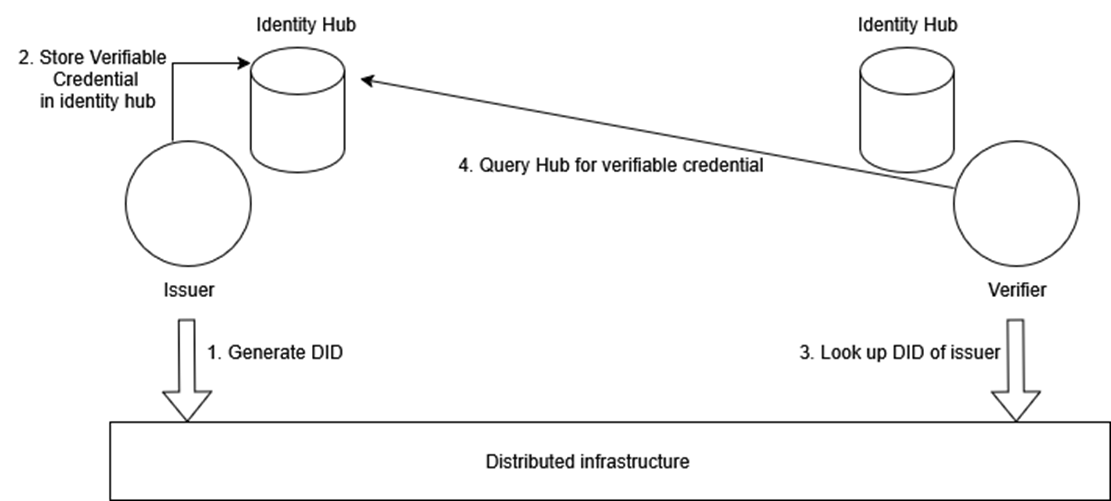
Figure 1: High-level diagram of the Decentralized Claims Protocol (DCP)
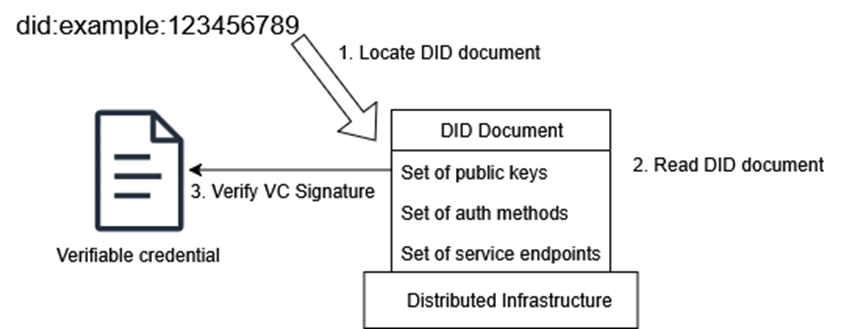
Figure 2: Simplified overview of DID document processing
The final element of the EDC are the different types of policies, including membership, access, contract and usage policies.
The role of the connector
The EDC connector is divided into two parts: the control plane and the data plane. The control plane handles contract negotiation and sends messages to the data plane to initiate a data transfer. The data plane is responsible for transferring data from a provider’s to a consumer’s EDC connector across distinct legal entities.
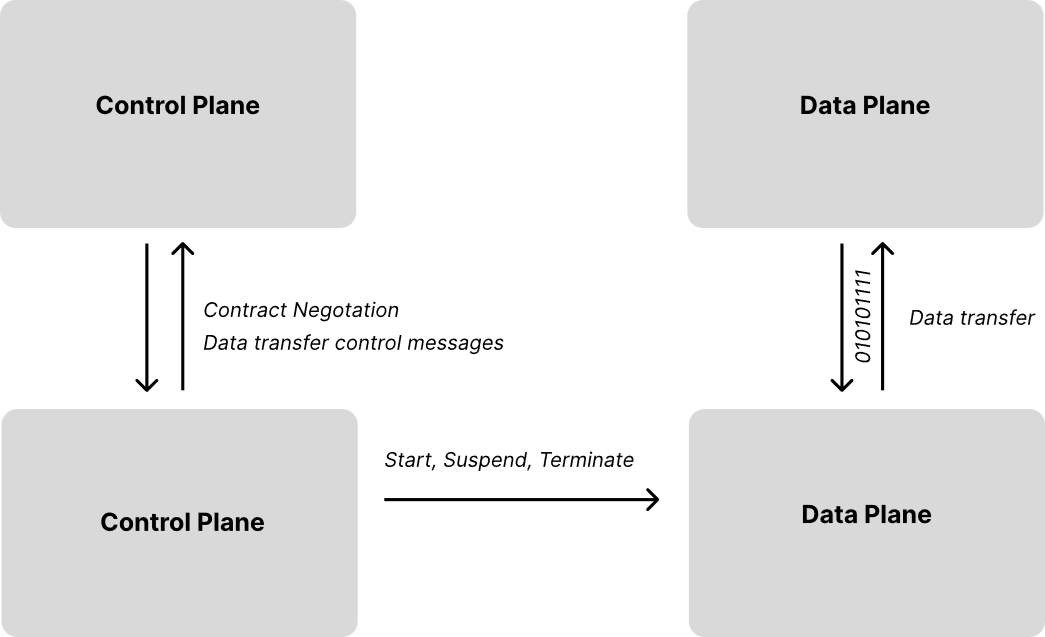
Figure 3: Overview of the connector control and data plane
Structure of the EDC connector open-source project
The Connector repository as part of the EDC project defines how the connector control and data planes are implemented. We provide an overview of how the repository is structured:
/spi– The Service Provider Interface (SPI) is the architectural foundation that defines how modules communicate within the EDC connector. It contains foundational interfaces and contracts that every component must implement, establishing standardized integration patterns. This layer also acts as a blueprint for developers to extend EDC connector functionality while maintaining clean separation of concerns and ensuring compatibility between core and custom components./core– The Core module represents the core SPI implementation. It houses the actual working code for the connector’s essential operations, including default implementations of key services and business logic for data sharing./extensions– The Extensions layer showcases the connector’s modular plugin architecture through real-world integrations, including connections to major cloud providers like AWS. These extensions serve both as reference implementations and ready-to-use components for common enterprise integration scenarios.
SPI defines the contracts, Core implements the basics, and Extensions add specialized functionality. These three layers work together to create a flexible, extensible data space connector system. The “vanilla” Eclipse EDC connector does not bundle the AWS extensions by default. To add AWS service-specific functionality, such as integration with Amazon Simple Storage Service (Amazon S3), AWS Secrets Manager, or Amazon DynamoDB, you need to include the respective AWS extensions into a custom EDC control and data plane build.
High-level EDC customization guide
Customizing the EDC connector for native AWS service integration creates a purpose-built solution that can use AWS managed services for storage, security, and scalability. The following steps help your connector natively integrate with services like Amazon S3 for data storage (used for example as Asset Administration Shell “Submodel Server”) and AWS Secrets Manager for credentials management, rather than relying on operations of self-managed components.
EDC uses a modular, plugin-based architecture built on Gradle. The vanilla connector ships only core functionality. To integrate with specific cloud services or persistence backends, you assemble a custom build that combines EDC’s core modules with the extensions you need. The customization revolves around three concepts: a version catalog, launcher modules, and a project settings file.
Step 1: Version catalog
The version catalog (gradle/libs.versions.toml) is the centralized registry of all dependencies and their versions. Here you declare which EDC modules, cloud provider extensions, and third-party libraries your connector needs to use. EDC publishes its AWS extensions under the org.eclipse.edc.aws Maven group. You reference these alongside the core EDC artifacts (org.eclipse.edc) at compatible version numbers. This single file ensures all modules in your project share consistent dependency versions.
Step 2: Launcher modules
The launcher modules are the actual deployable units: one for the control plane and one for the data plane. Each launcher is a small Gradle subproject whose build.gradle.kts lists the extensions to bundle at runtime. A typical control plane launcher might include the core control plane module, a metadata persistence extension (such as PostgreSQL or DynamoDB), a vault extension (such as HashiCorp Vault or AWS Secrets Manager), and any provisioning extensions for your target storage system. The data plane launcher follows the same pattern with data plane-specific modules. Both launchers typically use Gradle plugins to produce a single executable JAR. You only include what you actually use, keeping the connector lightweight and tailored to your unique requirements.
Step 3: Project settings
The project settings file (settings.gradle.kts) registers all modules with Gradle: your launcher subprojects and any custom extensions you may develop locally. If you write your own extension, for example, a DynamoDB-backed asset store, you place it in an extensions/ directory and register it here so your launchers can reference it as a project dependency.
The resulting project structure typically looks like this:
my-connector/
├── control-plane/
│   └── build.gradle.kts       # Control plane launcher
├── data-plane/
│   └── build.gradle.kts       # Data plane launcher
├── extensions/                # Optional: Custom extension code
├── gradle/libs.versions.toml  # All dependency versions
├── build.gradle.kts           # Root build config
└── settings.gradle.kts        # Subproject registrations
An open-source reference implementation for EDC customization on AWS is provided as part of the Dataspace Connector on AWS project. In this post, you learned about the fundamentals behind secure, cross-organizational data sharing using emerging data space architectures. We covered the two protocols included in ISO/IEC DIS 20151 data space standardization, DSP and DCP, and discussed the EDC connector, the main software required for data space participants, and how it can be customized.
In part 2, we explore production-ready deployment patterns for EDC connectors on AWS, examining architecture best practices that support your data space infrastructure’s security, reliability, and operational efficiency. To get started, explore the Dataspace Connector on AWS project and see how its Gradle build settings are configured to support Amazon DynamoDB for serverless, inexpensive metadata persistence.
References
- https://internationaldataspaces.org/
- https://kb.internationaldataspaces.org/external/rulebook/001_Introduction/
- https://kb.internationaldataspaces.org/standards/
- https://github.com/eclipse-edc/Technology-Aws