Tag Archives: Amazon EC2 Container Service

Eclipse Dataspace Components on AWS: Data sharing fundamentals

Post Syndicated from Alejandro Esquivias Cañadas original https://aws.amazon.com/blogs/architecture/eclipse-dataspace-components-on-aws-data-sharing-fundamentals/

This three-part blog series guides you through implementing Eclipse Dataspace Components (EDC) on AWS, from foundational concept to production deployment. Part 1 establishes the theoretical foundation with IDSA standards, the Dataspace Protocol (DSP), and core EDC architecture. Part 2 provides production-ready AWS deployment patterns using services like Amazon Elastic Container Service (Amazon ECS), Amazon Aurora, and Amazon API Gateway. Part 3 completes the journey with cost optimization strategies and practical guidance for running efficient, scalable data space infrastructure on AWS.

The International Data Spaces Association (IDSA) is a non-profit organization focused on establishing and promoting standards for data spaces. A data space is defined as a “set of technical services that facilitate interoperable dataset sharing between distinct entities”. At a technical level, a data space has participants: data consumers and data providers. Centrally, there is a Dataspace Governance Authority (DSGA). The DSGA manages the data space, enforces rules and policies and issues membership credentials to participants.

IDSA rules and specifications are implemented in the Dataspace Protocol (DSP). The DSP has become an Eclipse Specification project and can be found in the Dataspace Protocol GitHub repository. Standardization is under development and is currently in the approval phase as ISO/IEC DIS 20151. The Eclipse Dataspace Components (EDC) provide the technical components to implement data spaces according to IDSA requirements.

These components include the federated catalog (FC), the connector, and the identity hub. The FC contains an aggregated repository of catalogs gathered from multiple participants in the data space. These are obtained by periodically crawling participants’ data assets and storing them in a local cache, to eliminate the need to query each participant individually on demand. The connector is the software that enables data to be shared between participants, and identity hub manages a participant’s credentials in the data space. Amazon Web Services (AWS) provides a comprehensive cloud infrastructure that supports the deployment and operation of data space components like the EDC connector. AWS offers scalable compute, storage, and networking services that help you build secure, compliant, and interoperable data spaces aligned with IDSA standards and the ISO/IEC DIS 20151 specifications.

To verify identities in a data space in a decentralized manner, the Decentralized Claims Protocol (DCP) is used. DCP represents an overlay on top of DSP to establish trust between network participants. When an issuer needs to prove their identity to a verifier, they first generate a Decentralized Identifier (DID), which contains information about their identity. The issuer stores their Verifiable Credential (VC) in their identity hub. A verifiable credential is similar to a certificate: while a certificate authority validates a public key, the credential issuer validates the DID with specific attributes. The verifier looks up the DID of the issuer and with the information obtained from the DID document verifies the VC.
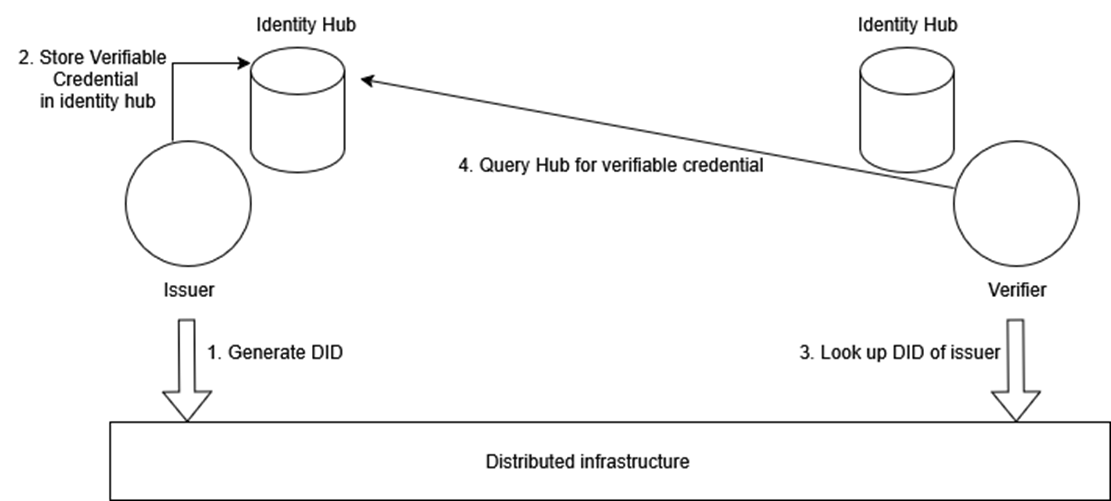
High-level diagram showing how DCP establishes trust between an issuer and verifier using DIDs and Verifiable Credentials

Figure 1: High-level diagram of the Decentralized Claims Protocol (DCP)
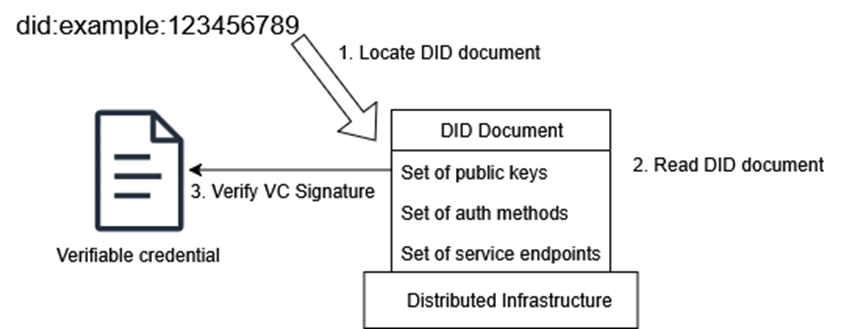
Simplified overview showing how a verifier resolves a DID document to verify credentials

Figure 2: Simplified overview of DID document processing

The final element of the EDC are the different types of policies, including membership, access, contract and usage policies.

The role of the connector

The EDC connector is divided into two parts: the control plane and the data plane. The control plane handles contract negotiation and sends messages to the data plane to initiate a data transfer. The data plane is responsible for transferring data from a provider’s to a consumer’s EDC connector across distinct legal entities.
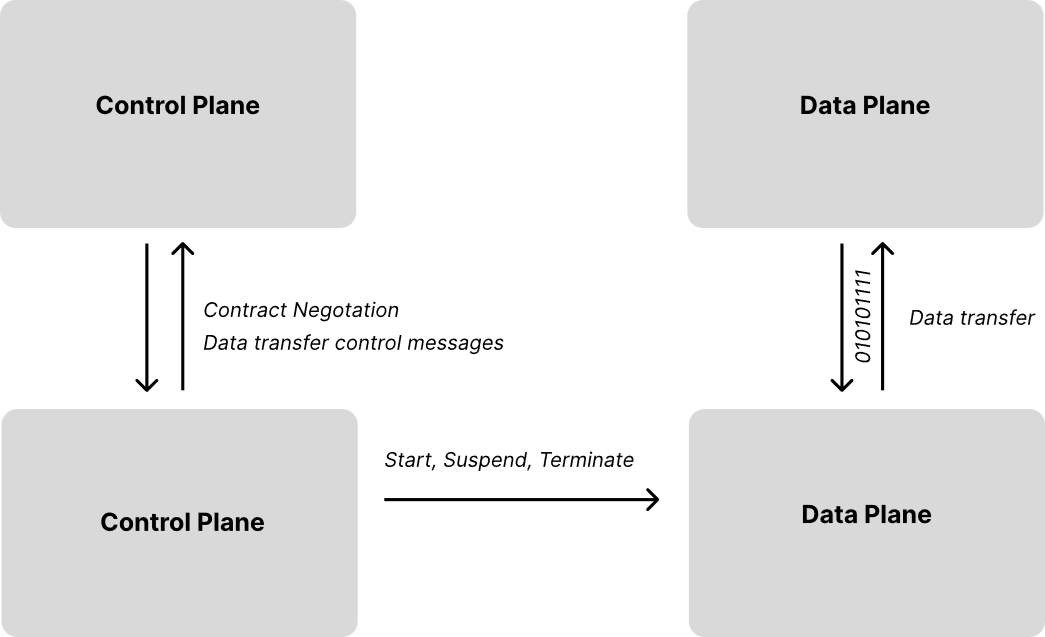
Diagram showing the EDC connector architecture with separate control plane and data plane

Figure 3: Overview of the connector control and data plane

Structure of the EDC connector open-source project

The Connector repository as part of the EDC project defines how the connector control and data planes are implemented. We provide an overview of how the repository is structured:

  • /spi – The Service Provider Interface (SPI) is the architectural foundation that defines how modules communicate within the EDC connector. It contains foundational interfaces and contracts that every component must implement, establishing standardized integration patterns. This layer also acts as a blueprint for developers to extend EDC connector functionality while maintaining clean separation of concerns and ensuring compatibility between core and custom components.
  • /core – The Core module represents the core SPI implementation. It houses the actual working code for the connector’s essential operations, including default implementations of key services and business logic for data sharing.
  • /extensions – The Extensions layer showcases the connector’s modular plugin architecture through real-world integrations, including connections to major cloud providers like AWS. These extensions serve both as reference implementations and ready-to-use components for common enterprise integration scenarios.

SPI defines the contracts, Core implements the basics, and Extensions add specialized functionality. These three layers work together to create a flexible, extensible data space connector system. The “vanilla” Eclipse EDC connector does not bundle the AWS extensions by default. To add AWS service-specific functionality, such as integration with Amazon Simple Storage Service (Amazon S3), AWS Secrets Manager, or Amazon DynamoDB, you need to include the respective AWS extensions into a custom EDC control and data plane build.

High-level EDC customization guide

Customizing the EDC connector for native AWS service integration creates a purpose-built solution that can use AWS managed services for storage, security, and scalability. The following steps help your connector natively integrate with services like Amazon S3 for data storage (used for example as Asset Administration Shell “Submodel Server”) and AWS Secrets Manager for credentials management, rather than relying on operations of self-managed components.

EDC uses a modular, plugin-based architecture built on Gradle. The vanilla connector ships only core functionality. To integrate with specific cloud services or persistence backends, you assemble a custom build that combines EDC’s core modules with the extensions you need. The customization revolves around three concepts: a version catalog, launcher modules, and a project settings file.

Step 1: Version catalog

The version catalog (gradle/libs.versions.toml) is the centralized registry of all dependencies and their versions. Here you declare which EDC modules, cloud provider extensions, and third-party libraries your connector needs to use. EDC publishes its AWS extensions under the org.eclipse.edc.aws Maven group. You reference these alongside the core EDC artifacts (org.eclipse.edc) at compatible version numbers. This single file ensures all modules in your project share consistent dependency versions.

Step 2: Launcher modules

The launcher modules are the actual deployable units: one for the control plane and one for the data plane. Each launcher is a small Gradle subproject whose build.gradle.kts lists the extensions to bundle at runtime. A typical control plane launcher might include the core control plane module, a metadata persistence extension (such as PostgreSQL or DynamoDB), a vault extension (such as HashiCorp Vault or AWS Secrets Manager), and any provisioning extensions for your target storage system. The data plane launcher follows the same pattern with data plane-specific modules. Both launchers typically use Gradle plugins to produce a single executable JAR. You only include what you actually use, keeping the connector lightweight and tailored to your unique requirements.

Step 3: Project settings

The project settings file (settings.gradle.kts) registers all modules with Gradle: your launcher subprojects and any custom extensions you may develop locally. If you write your own extension, for example, a DynamoDB-backed asset store, you place it in an extensions/ directory and register it here so your launchers can reference it as a project dependency.

The resulting project structure typically looks like this:

my-connector/
├── control-plane/
│   └── build.gradle.kts       # Control plane launcher
├── data-plane/
│   └── build.gradle.kts       # Data plane launcher
├── extensions/                # Optional: Custom extension code
├── gradle/libs.versions.toml  # All dependency versions
├── build.gradle.kts           # Root build config
└── settings.gradle.kts        # Subproject registrations

An open-source reference implementation for EDC customization on AWS is provided as part of the Dataspace Connector on AWS project. In this post, you learned about the fundamentals behind secure, cross-organizational data sharing using emerging data space architectures. We covered the two protocols included in ISO/IEC DIS 20151 data space standardization, DSP and DCP, and discussed the EDC connector, the main software required for data space participants, and how it can be customized.

In part 2, we explore production-ready deployment patterns for EDC connectors on AWS, examining architecture best practices that support your data space infrastructure’s security, reliability, and operational efficiency. To get started, explore the Dataspace Connector on AWS project and see how its Gradle build settings are configured to support Amazon DynamoDB for serverless, inexpensive metadata persistence.

References

About the authors

AWS Weekly Roundup: Kiro, AWS Lambda remote debugging, Amazon ECS blue/green deployments, Amazon Bedrock AgentCore, and more (July 21, 2025)

Post Syndicated from Donnie Prakoso original https://aws.amazon.com/blogs/aws/aws-weekly-roundup-kiro-aws-lambda-remote-debugging-amazon-ecs-blue-green-deployments-amazon-bedrock-agentcore-and-more-july-21-2025/

I’m writing this as I depart from Ho Chi Minh City back to Singapore. Just realized what a week it’s been, so let me rewind a bit. This week, I tried my first Corne keyboard, wrapped up rehearsals for AWS Summit Jakarta with speakers who are absolutely raising the bar, and visited Vietnam to participate as a technical keynote speaker in AWS Community Day Vietnam, an energetic gathering of hundreds of cloud practitioners and AWS enthusiasts who shared knowledge through multiple technical tracks and networking sessions.

What I presented was a keynote titled “Reinvent perspective as modern developers”, featuring serverless, containers, and how we can cut the learning curves and be more productive with Amazon Q Developer and Kiro. I got a chance to discuss with a couple of AWS Community Builders and community developers, who shared how Amazon Q Developer actually addressed their challenges on building applications, with several highlighting significant productivity improvements and smoother learning curves in their cloud development journeys.

As I head back to Singapore, I’m carrying with me not just memories of delicious cà phê sữa đá (iced milk coffee), but also fresh perspectives and inspirations from this vibrant community of cloud innovators.

Introducing Kiro
One of the highlights from last week was definitely Kiro, an AI IDE that helps you deliver from concept to production through a simplified developer experience for working with AI agents. Kiro goes beyond “vibe coding” with features like specs and hooks that help get prototypes into production systems with proper planning and clarity.

Join the waitlist to get notified when it becomes available.

Last week’s AWS Launches
In other news, last week we had AWS Summit in New York, where we released several services. Here are some launches that caught my attention:

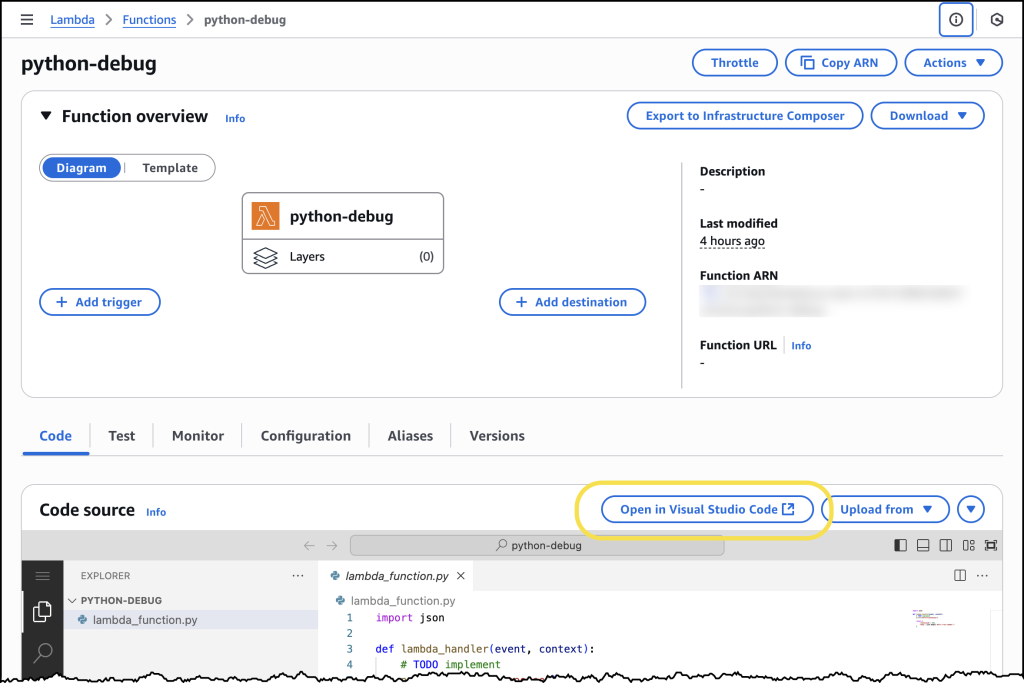
Console to IDE Integration

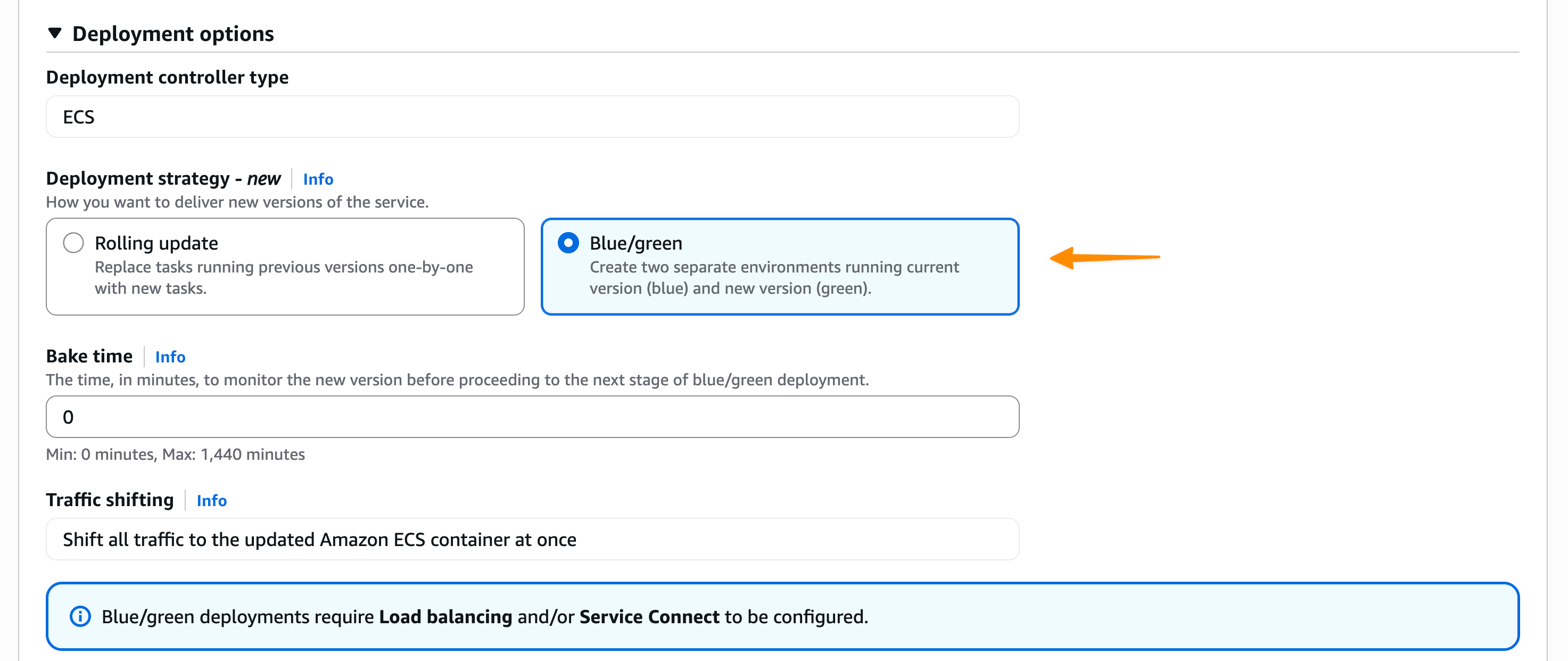
ECS Blue-Green Deployments

AWS Free Tier Enhanced Benefits

  • Monitor and debug event-driven applications with new Amazon EventBridge logging — Amazon EventBridge now provides enhanced logging capabilities that offer comprehensive event lifecycle tracking with detailed information about successes, failures, and status codes. This new observability feature addresses microservices and event-driven architecture monitoring challenges by providing visibility into the complete event journey.

EventBridge Enhanced Logging

S3 Vectors Overview

  • Amazon EKS enables ultra-scale AI/ML workloads with support for 100k nodes per cluster — Amazon EKS now supports up to 100,000 worker nodes in a single cluster, enabling customers to scale up to 1.6 million AWS Trainium accelerators or 800K NVIDIA GPUs. This industry-leading scale empowers customers to train trillion-parameter models and advance AGI development while maintaining Kubernetes conformance and familiar developer experience.

EKS Ultra-Scale Performance Improvements

From AWS Builder Center
In case you missed it, we just launched AWS Builder Center and integrated community.aws. Here are my top picks from the posts:

Upcoming AWS events
Check your calendars and sign up for upcoming AWS and AWS Community events:

  • AWS re:Invent – Register now to get a head start on choosing your best learning path, booking travel and accommodations, and bringing your team to learn, connect, and have fun. If you’re an early-career professional, you can apply to the All Builders Welcome Grant program, which is designed to remove financial barriers and create diverse pathways into cloud technology.
  • AWS Builders Online Series – If you’re based in one of the Asia Pacific time zones, join and learn fundamental AWS concepts, architectural best practices, and hands-on demonstrations to help you build, migrate, and deploy your workloads on AWS.
  • AWS Summits — Join free online and in-person events that bring the cloud computing community together to connect, collaborate, and learn about AWS. Register in your nearest city: Taipei (July 29), Mexico City (August 6), and Jakarta (June 26–27).
  • AWS Community Days — Join community-led conferences that feature technical discussions, workshops, and hands-on labs led by expert AWS users and industry leaders from around the world: Singapore (August 2), Australia (August 15), Adria (September 5), Baltic (September 10), and Aotearoa (September 18).

You can browse all upcoming AWS led in-person and virtual developer-focused events.

That’s all for this week. Check back next Monday for another Weekly Roundup!

Donnie

This post is part of our Weekly Roundup series. Check back each week for a quick roundup of interesting news and announcements from AWS!


Join Builder ID: Get started with your AWS Builder journey at builder.aws.com

How LaunchDarkly migrated to Amazon MWAA to achieve efficiency and scale

Post Syndicated from Asena Uyar, Dean Verhey original https://aws.amazon.com/blogs/big-data/how-launchdarkly-migrated-to-amazon-mwaa-to-achieve-efficiency-and-scale/

This is a guest post coauthored with LaunchDarkly.

The LaunchDarkly feature management platform equips software teams to proactively reduce the risk of shipping bad software and AI applications while accelerating their release velocity. In this post, we explore how LaunchDarkly scaled the internal analytics platform up to 14,000 tasks per day, with minimal increase in costs, after migrating from another vendor-managed Apache Airflow solution to AWS, using Amazon Managed Workflows for Apache Airflow (Amazon MWAA) and Amazon Elastic Container Service (Amazon ECS). We walk you through the issues we ran into during the migration, the technical solution we implemented, the trade-offs we made, and lessons we learned along the way.

The challenge

LaunchDarkly has a mission to enable high-velocity teams to release, monitor, and optimize software in production. The centralized data team is responsible for tracking how LaunchDarkly is progressing toward that mission. Additionally, this team is responsible for the majority of the company’s internal data needs, which include ingesting, warehousing, and reporting on the company’s data. Some of the large datasets we manage include product usage, customer engagement, revenue, and marketing data.

As the company grew, our data volume increased, and the complexity and use cases of our workloads expanded exponentially. While using other vendor-managed Airflow-based solutions, our data analytics team faced new challenges on time to integrate and onboard new AWS services, data locality, and a non-centralized orchestration and monitoring solution across different engineering teams within the organization.

Solution overview

LaunchDarkly has a long history of using AWS services to solve business use cases, such as scaling our ingestion from 1 TB to 100 TB per day with Amazon Kinesis Data Streams. Similarly, migrating to Amazon MWAA helped us scale and optimize our internal extract, transform, and load (ETL) pipelines. We used existing monitoring and infrastructure as code (IaC) implementations and eventually extended Amazon MWAA to other teams, establishing it as a centralized batch processing solution orchestrating multiple AWS services.

The solution for our transformation jobs include the following components:

Our original plan for the Amazon MWAA migration was:

  1. Create a new Amazon MWAA instance using Terraform following LaunchDarkly service standards.
  2. Lift and shift (or rehost) our code base from Airflow 1.12 to Airflow 2.5.1 on the original cloud provider to the same version on Amazon MWAA.
  3. Cut over all Directed Acyclic Graph (DAG) runs to AWS.
  4. Upgrade to Airflow 2.
  5. With the flexibility and ease of integration within AWS ecosystem, iteratively make enhancements around containerization, logging, and continuous deployment.

Steps 1 and 2 were executed quickly—we used the Terraform AWS provider and the existing LaunchDarkly Terraform infrastructure to build a reusable Amazon MWAA module initially at Airflow version 1.12. We had an Amazon MWAA instance and the supporting pieces (CloudWatch and artifacts S3 bucket) running on AWS within a week.

When we started cutting over DAGs to Amazon MWAA in Step 3, we ran into some issues. At the time of migration, our Airflow code base was centered around a custom operator implementation that created a Python virtual environment for our workload requirements on the Airflow worker disk assigned to the task. By trial and error in our migration attempt, we learned that this custom operator was essentially dependent on the behavior and isolation of Airflow’s Kubernetes executors used in the original cloud provider platform. When we began to run our DAGs concurrently on Amazon MWAA (which uses Celery Executor workers that behave differently), we ran into a few transient issues where the behavior of that custom operator could affect other running DAGs.

At this time, we took a step back and evaluated solutions for promoting isolation between our running tasks, eventually landing on Fargate for ECS tasks that could be started from Amazon MWAA. We had initially planned to move our tasks to their own isolated system rather than having them run directly in Airflow’s Python runtime environment. Due to the circumstances, we decided to advance this requirement, transforming our rehosting project into a refactoring migration.

We chose Amazon ECS on Fargate for its ease of use, existing Airflow integrations (ECSRunTaskOperator), low cost, and lower management overhead compared to a Kubernetes-based solution such as Amazon Elastic Kubernetes Service (Amazon EKS). Although a solution using Amazon EKS would improve the task provisioning time even further, the Amazon ECS solution met the latency requirements of the data analytics team’s batch pipelines. This was acceptable because these queries run for several minutes on a periodic basis, so a couple more minutes for spinning up each ECS task didn’t significantly impact overall performance.

Our first Amazon ECS implementation involved a single container that downloads our project from an artifacts repository on Amazon S3, and runs the command passed to the ECS task. We trigger those tasks using the ECSRunTaskOperator in a DAG in Amazon MWAA, and created a wrapper around the built-in Amazon ECS operator, so analysts and engineers on the data analytics team could create new DAGs just by specifying the commands they were already familiar with.

The following diagram illustrates the DAG and task deployment flows.

End-to-end AWS workflow diagram illustrating automated DAGs and Tasks deployment through GitHub, CircleCI, S3, MWAA, and ECS

When our initial Amazon ECS implementation was complete, we were able to cut all of our existing DAGs over to Amazon MWAA without the prior concurrency issues, because each task ran in its own isolated Amazon ECS task on Fargate.

Within a few months, we proceeded to Step 4 to upgrade our Amazon MWAA instance to Airflow 2. This was a major version upgrade (from 1.12 to 2.5.1), which we implemented by following the Amazon MWAA Migration Guide and subsequently tearing down our legacy resources.

The cost increase of adding Amazon ECS to our pipelines was minimal. This was because our pipelines run on batch schedules, and therefore aren’t active at all times, and Amazon ECS on Fargate only charges for vCPU and memory resources requested to complete the tasks.

As a part of Step 5 for continuous assessment and improvements, we enhanced our Amazon ECS implementation to push logs and metrics to Datadog and CloudWatch. We could monitor for errors and model performance, and catch data test failures alongside existing LaunchDarkly monitoring.

Scaling the solution beyond internal analytics

During the initial implementation for the data analytics team, we created an Amazon MWAA Terraform module, which enabled us to quickly spin up more Amazon MWAA environments and share our work with other engineering teams. This allowed the use of Airflow and Amazon MWAA to power batch pipelines within the LaunchDarkly product itself in a couple of months shortly after the data analytics team completed the initial migration.

The numerous AWS service integrations supported by Airflow, the built-in Amazon provider package, and Amazon MWAA allowed us to expand our usage across teams to use Amazon MWAA as a generic orchestrator for distributed pipelines across services like Amazon Athena, Amazon Relational Database Service (Amazon RDS), and AWS Glue. Since adopting the service, onboarding a new AWS service to Amazon MWAA has been straightforward, typically involving the identification of the existing Airflow Operator or Hook to use, and then connecting the two services with AWS Identity and Access Management (IAM).

Lessons and results

Through our journey of orchestrating data pipelines at scale with Amazon MWAA and Amazon ECS, we’ve gained valuable insights and lessons that have shaped the success of our implementation. One of the key lessons learned was the importance of isolation. During the initial migration to Amazon MWAA, we encountered issues with our custom Airflow operator that relied on the specific behavior of the Kubernetes executors used in the original cloud provider platform. This highlighted the need for isolated task execution to maintain the reliability and scalability of our pipelines.

As we scaled our implementation, we also recognized the importance of monitoring and observability. We enhanced our monitoring and observability by integrating with tools like Datadog and CloudWatch, so we could better monitor errors and model performance and catch data test failures, improving the overall reliability and transparency of our data pipelines.

With the previous Airflow implementation, we were running approximately 100 Airflow tasks per day across one team and two services (Amazon ECS and Snowflake). As of the time of writing this post, we’ve scaled our implementation to three teams, four services, and execution of over 14,000 Airflow tasks per day. Amazon MWAA has become a critical component of our batch processing pipelines, increasing the speed of onboarding new teams, services, and pipelines to our data platform from weeks to days.

Looking ahead, we plan to continue iterating on this solution to expand our use of Amazon MWAA to additional AWS services such as AWS Lambda and Amazon Simple Queue Service (Amazon SQS), and further automate our data workflows to support even greater scalability as our company grows.

Conclusion

Effective data orchestration is essential for organizations to gather and unify data from diverse sources into a centralized, usable format for analysis. By automating this process across teams and services, businesses can transform fragmented data into valuable insights to drive better decision-making. LaunchDarkly has achieved this by using managed services like Amazon MWAA and adopting best practices such as task isolation and observability, enabling the company to accelerate innovation, mitigate risks, and shorten the time-to-value of its product offerings.

If your organization is planning to modernize its data pipelines orchestration, start assessing your current workflow management setup, exploring the capabilities of Amazon MWAA, and considering how containerization could benefit your workflows. With the right tools and approach, you can transform your data operations, drive innovation, and stay ahead of growing data processing demands.


About the Authors

Asena Uyar is a Software Engineer at LaunchDarkly, focusing on building impactful experimentation products that empower teams to make better decisions. With a background in mathematics, industrial engineering, and data science, Asena has been working in the tech industry for over a decade. Her experience spans various sectors, including SaaS and logistics, and she has spent a significant portion of her career as a Data Platform Engineer, designing and managing large-scale data systems. Asena is passionate about using technology to simplify and optimize workflows, making a real difference in the way teams operate.

Dean Verhey is a Data Platform Engineer at LaunchDarkly based in Seattle. He’s worked all across data at LaunchDarkly, ranging from internal batch reporting stacks to streaming pipelines powering product features like experimentation and flag usage charts. Prior to LaunchDarkly, he worked in data engineering for a variety of companies, including procurement SaaS, travel startups, and fire/EMS records management. When he’s not working, you can often find him in the mountains skiing.

Daniel Lopes is a Solutions Architect for ISVs at AWS. His focus is on enabling ISVs to design and build their products in alignment with their business goals with all advantages AWS services can provide them. His areas of interest are event-driven architectures, serverless computing, and generative AI. Outside work, Daniel mentors his kids in video games and pop culture.