All posts by Amit Gaur

Enhance TLS inspection with SNI session holding in AWS Network Firewall

Post Syndicated from Amit Gaur original https://aws.amazon.com/blogs/security/enhance-tls-inspection-with-sni-session-holding-in-aws-network-firewall/

AWS Network Firewall is a managed firewall service that filters and controls network traffic in Amazon Virtual Private Cloud (Amazon VPC). Unlike traditional network controls such as security groups or network access control lists (NACLs), Network Firewall can inspect and make decisions based on information from higher layers of the OSI model, including the Transport through Application layers. Furthermore, you can use the TLS inspection capability of Network Firewall to create firewall rules that match the content of encrypted TLS traffic. Network Firewall decrypts the traffic using your configured certificate and matches the decrypted payload against the rules in the firewall policy.

This post introduces Server Name Indication (SNI) session holding, which enhances TLS inspection by stopping TCP or TLS establishment packets from reaching the destination server until TLS inspection rules for SNI have been applied. When SNI is enabled, Network Firewall will not initiate an outbound TCP connection to the target until it has received the client hello and matched its domain information sent through SNI against firewall rules. The TCP session between the firewall and the upstream server is only initiated after the firewall validates traffic to that domain. This offers you additional security controls on outbound traffic with minimal latency and performance overheads, helping protect against malicious targets.

Network Firewall TLS inspection prior to SNI session holding

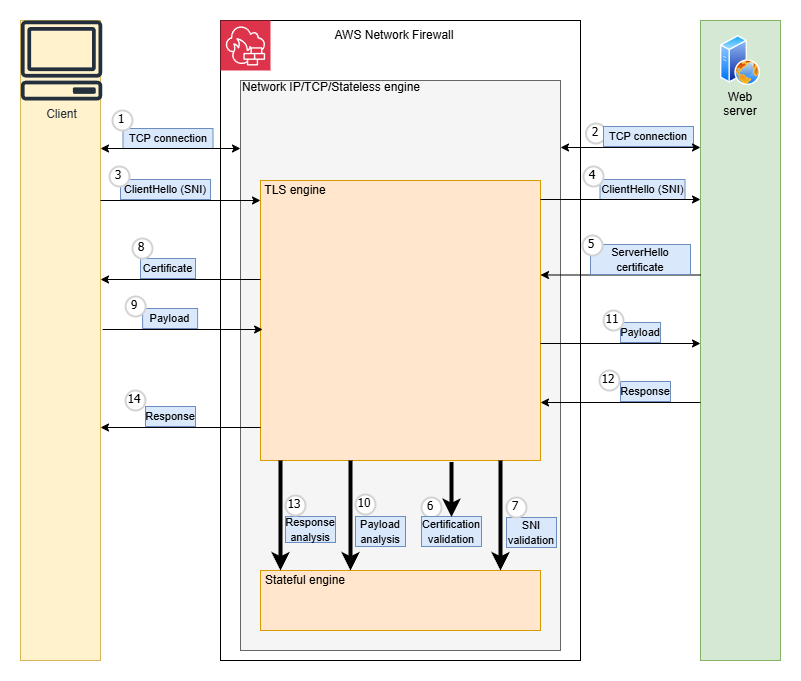
When TLS inspection is enabled, Network Firewall acts as an intermediary between the client and server, maintaining separate connections with each endpoint. Throughout this process, Network Firewall evaluates outbound traffic against configured rules to determine whether the traffic should be allowed to exit the firewall.As shown in Figure 1, the steps prior to availability of SNI session holding were:

  1. The client creates a TCP connection, and Network Firewall evaluates the stateless rules to determine if the traffic is allowed. If not, the connection is terminated.
  2. Network Firewall creates a TCP Connection to the destination server.
  3. The client sends a ClientHello message, including SNI information, to Network Firewall. The firewall validates that the SNI is valid, otherwise the connection is terminated.
  4. Network Firewall forwards the ClientHello message to the destination server.
  5. The destination server responds with a ServerHello message and its certificate.
  6. Network Firewall validates the certificates downloaded from the destination server.
  7. At this point, the server name indication is validated against the certificate subject name.
  8. Network Firewall forwards the server’s certificate to the client and completes the TLS connection with the client.
  9. The client encrypts the application payload using the session keys it negotiated during TLS handshake and sends it to Network Firewall.
  10. Network Firewall decrypts the traffic, uses its stateful engine to evaluate rules against the traffic, and determines if it is allowed.
  11. If traffic is allowed, Network Firewall re-encrypts the application layer payload with the destination server’s session keys and forwards it to the destination server.
  12. The destination server sends back response data to Network Firewall.
  13. The Network Firewall stateful engine analyzes the destination server’s response.
  14. Network Firewall forwards the server response to the client. The communication continues until the client or destination server terminates the connection.
Figure 1: Steps prior to availability of SNI session holding

Figure 1: Steps prior to availability of SNI session holding

With the current sequence of traffic inspection, the TCP connection is established before the TLS SNI field is evaluated, which could lead to a server learning about a connection before the firewall inspects the SNI.

For example, when customers configure rules to reject traffic based on TLS SNI fields (such as example.com), they expect these connections to be blocked before opening a connection to the destination server and before data transmission occurs. However, because of the inherent protocol sequence, TCP connections are briefly established before SNI rule validation takes place. This processing order creates a narrow window where sophisticated threat actors could potentially attempt to circumvent data exfiltration prevention controls, even with properly configured SNI-based blocking rules.

Session holding addresses this concern so that the traffic originating from within VPCs cannot connect to destination servers until Network Firewall verifies the TLS SNI.

How TLS inspection works with session holding

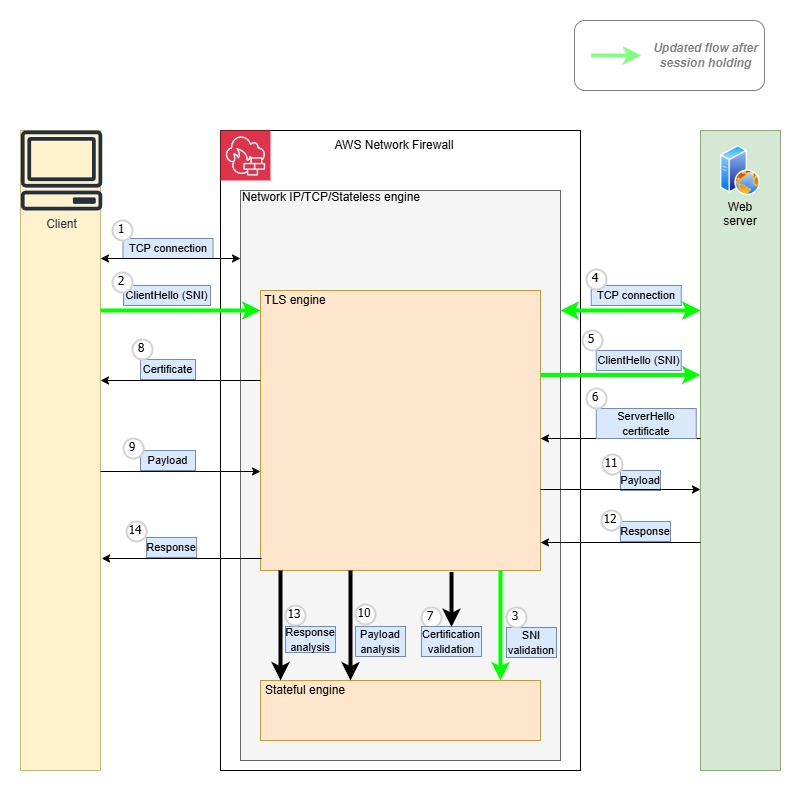
SNI session holding implements a two-step validation process. First, the firewall examines the TLS layer and validates the SNI when the client sends the TLS client hello message. After the message is approved, Network Firewall allows the connection to the destination server, permitting encrypted upper-layer protocols like HTTP or SMTP to initiate their negotiations. This approach creates a distinct separation between TLS validation and protocol inspection, where protocol examination only occurs after successful TLS handshake authorization.As shown in Figure 2, the steps in this scenario with SNI session holding are:

Note: Steps 2–5 are part of SNI session holding.

  1. The client creates a TCP connection, and Network Firewall evaluates the stateless rules to determine if the traffic is allowed. If not, the connection is terminated.
  2. The Client sends a ClientHello message including SNI information to Network Firewall. Network Firewall performs validation of the SNI.
  3. The firewall evaluates the TLS inspection rules, including the SNI rules, to determine if the traffic is allowed. If not, the connection is terminated.
  4. Network Firewall creates a TCP connection to the destination server.
  5. Network Firewall forwards the ClientHello message to the destination server.
  6. The destination server responds with a ServerHello message and its certificate.
  7. Network Firewall validates the certificates downloaded from the destination server.
  8. Network Firewall forwards the server’s certificate to the client and completes the TLS connection with the client.
  9. The client encrypts the application payload using the session keys it negotiated during TLS handshake and sends it to Network Firewall.
  10. Network Firewall decrypts the traffic, uses its stateful engine to evaluate rules against the traffic, and determines if it is allowed.
  11. If traffic is allowed, Network Firewall re-encrypts the application layer payload with the destination server’s session keys and forwards it to destination server.
  12. The destination server sends back response data to Network Firewall.
  13. Network Firewall stateful engine analyzes the destination server response.
  14. Network Firewall forwards the server response to the client. The communication continues until the client, or the destination server terminates the connection.
Figure 2: Steps after session holding

Figure 2: Steps after session holding

Getting started

Session holding can be enabled while creating a TLS inspection configuration directly within a Network Firewall policy using the AWS Management Console, AWS Command Line Interface (AWS CLI), or AWS SDK.

Prerequisites

To get started setting up a Network Firewall policy with session holding, visit the Network Firewall console or see the AWS Network Firewall Developers Guide. Session holding is supported in AWS Regions where Network Firewall is available today, including the AWS GovCloud (US) Regions and China Regions.

If this is your first time using Network Firewall, make sure to complete the following prerequisites. If you already have a firewall and TLS inspection configuration, you can skip this section.

  1. Create a firewall
  2. Create a TLS inspection configuration

Enable session holding

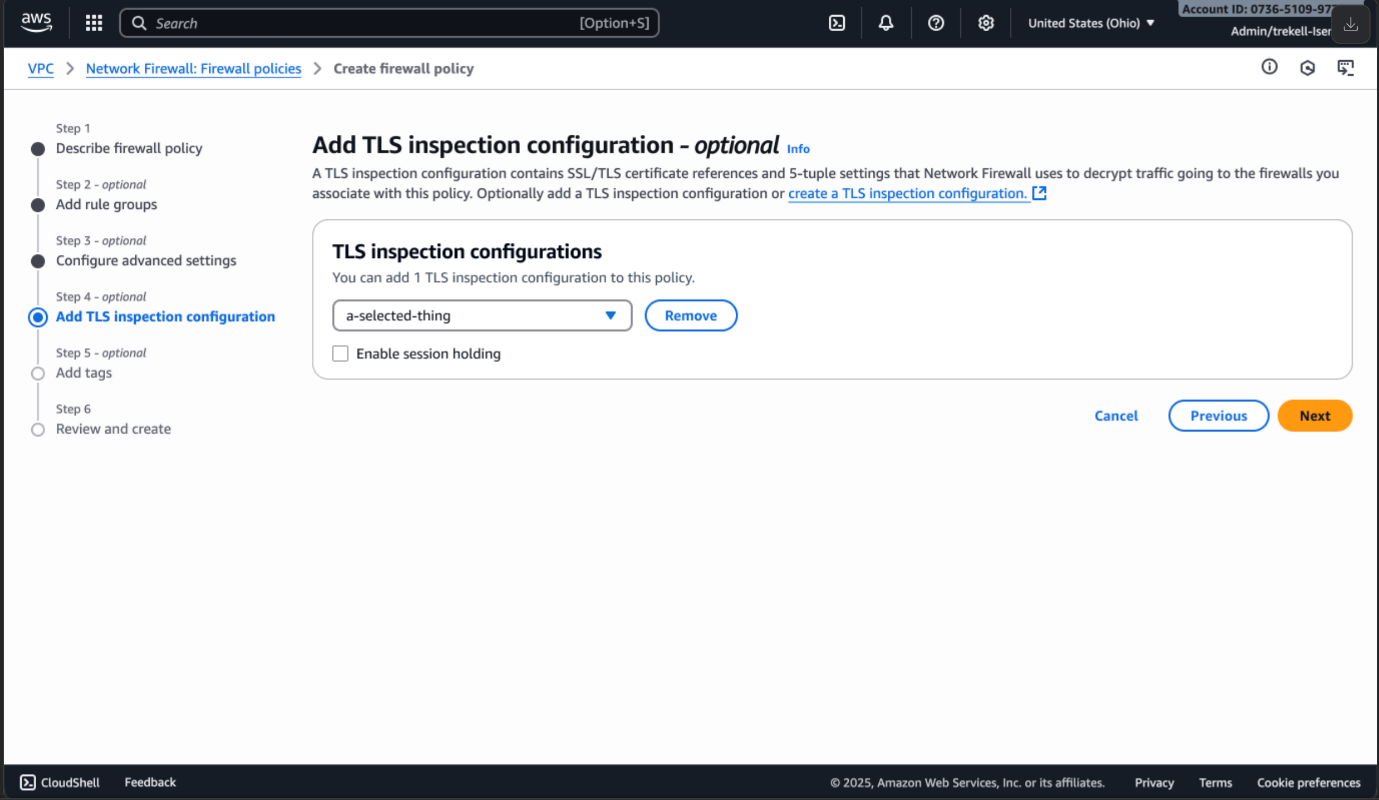
To enable session holding, follow the steps to create a firewall policy. On the step to Add TLS Inspection configuration, you will have an option to enable session holding by selecting the box as shown in Figure 3.

Figure 3: Enable session holding

Figure 3: Enable session holding

After adding the TLS inspection configuration and selecting the box to enable session holding, continue to create the new firewall policy and then associate this policy to your firewall.

If you have an existing policy that is attached to a TLS inspection configuration, choose Manage TLS Inspection Configuration on your firewall policy.

Figure 4: TLS inspection configuration

Figure 4: TLS inspection configuration

This will provide the option to enable session holding as shown in figure 3.

Pricing

SNI session holding is included in the cost of TLS advanced inspection. For TLS advanced inspection pricing, see AWS Network Firewall pricing.

Considerations

When enabling the session holding, note the following considerations:

  • Keywords: Session holding is only applicable to Suricata rules using the TLS.SNI keyword. It does not apply to rules using other TLS application keywords, such as TLS.CERT or TLS.VERSION.
  • Performance: Because TCP connection establishment packets are held until the SNI validation is complete, session holding might introduce latency in the TCP connection establishment. You’ll notice the impact only when there is a surge in new TCP connections being inspected by Network Firewall with TLS inspection enabled.
  • Compatibility: TLS.SNI takes priority over http.host rules when session holding is enabled. When disabled, the traffic can match rules based on the http.host keyword and tls.sni keyword simultaneously, resulting in an outcome defined by the combination of the actions in these two types of rules. However, when this session holding is enabled, this traffic can only match the rule with TLS.SNI keyword and the rule with http.host keyword is applied only when the decrypted traffic has not matched other TLS.SNI-based pass rules.

Conclusion

As a preventive measure, this session holding helps make sure that SNI validation happens before a connection is established with the destination server, avoiding even initial contact with potentially malicious endpoints. For more information, see What is AWS Network Firewall?

If you have feedback about this post, submit comments in the Comments section below.

Amit Gaur
Amit Gaur

Amit, a Cloud Infrastructure Architect at AWS, brings his passion for technology and knowledge-sharing to the networking community. Specializing in network architecture design, he helps customers build highly scalable and resilient environments on AWS. Through technical guidance and architectural expertise, Amit enables customers to accelerate their cloud adoption journey while making sure their systems are built for scale and reliability.
Srivalsan Mannoor Sudhagar

Srivalsan is a Sr. Cloud Infrastructure Architect at Amazon Web Services Professional Services who brings expertise in Cloud Infrastructure and MLOps solutions. He is passionate about networking, container technologies and loves to innovate to help solve customer problems. He enjoys architecting solutions and providing technical guidance to help customers and partners achieve their technical and business objectives.
Vikram Saurabh
Vikram Saurabh

Vikram is an experienced engineering leader with 20 years of experience in software engineering, primarily in building firewall products and services. He currently leads the AWS Network Firewall engineering team and has previously led the engineering team of Route53 DNS Firewall. Outside of work, Vikram enjoys playing cricket, hiking, and solving math puzzles.
Olu Adeleke
Olu Adeleke

Olu is a Senior Software Engineer with over 10 years of experience in software development and computer networks. Olu has been the technical lead for many initiatives and features of AWS Network Firewall and has a Ph.D. in computer science. Outside of work, Olu enjoys playing soccer, landscape painting, and hanging out with family and friends.

Improve your security posture using Amazon threat intelligence on AWS Network Firewall

Post Syndicated from Amit Gaur original https://aws.amazon.com/blogs/security/improve-your-security-posture-using-amazon-threat-intelligence-on-aws-network-firewall/

Today, customers use AWS Network Firewall to safeguard their workloads against common security threats. However, they often have to rely on third-party threat feeds and scanners that have limited visibility in AWS workloads to protect against active threats. A self-managed approach to cloud security through traditional threat intelligence feeds and custom rules can result in delayed responses, leaving customers exposed to active threats that are relevant to AWS workloads. Customers are looking for an automated approach to analyzing threats and deploying mitigations across multiple enforcement points to establish consistent defenses and want a unified, AWS-native solution that can rapidly protect against active threats across their entire cloud infrastructure.

This post introduces active threat defense, a new Network Firewall managed rule group that offers protection against active threats relevant to workloads in AWS. Active threat defense uses the AWS global infrastructure visibility and extensive threat intelligence to deliver automated, intelligence-driven security measures. The feature uses the Amazon threat intelligence system MadPot, which continuously tracks attack infrastructure, including malware hosting URLs, botnet command and control servers, and crypto mining pools, identifying indicators of compromise (IOCs) for active threats.

Active threat defense comes as a rule group AttackInfrastructure, which protects against malicious network traffic by blocking communications with detected attack infrastructure. After the managed rule group is configured in your firewall policy, Network Firewall now automatically blocks suspicious traffic to malicious IPs, domains, and URLs for indicator categories such as command-and-control (C2s), malware staging hosts, sinkholes, out-of-band testing (OAST), and mining-pools. It implements comprehensive filtering of both inbound and outbound traffic for various protocols, including TCP, UDP, DNS, HTTPS, and HTTP, and uses specific, verified threat indicators to facilitate high accuracy and minimize false positives.

Network Firewall with active threat defense protects AWS workloads using the following mechanisms:

  • Threat prevention: Automatically blocks malicious traffic using Amazon threat intelligence to identify and prevent active threats targeting workloads in AWS
  • Rapid protection: Continuously updates Network Firewall rules based on newly discovered threats, enabling immediate protection against them
  • Streamlined operations: Findings in GuardDuty marked with the threat list name “Amazon Active Threat Defense” can now be automatically blocked when active threat defense is enabled on Network Firewall
  • Collective defense: Deep threat inspection (DTI) enables shared threat intelligence, improving protection for active threat defense managed rule group users

Figure 1 illustrates the use of the active threat defense managed rule group with Network Firewall. It shows the automatic creation of stateful rules in the AWS managed rule group using threat data collected from MadPot.

Figure 1: Network Firewall with active threat defense

Figure 1: Network Firewall with active threat defense

Getting started

The active threat defense managed rule group can be enabled directly within Network Firewall using the AWS Management Console, AWS Command Line Interface (AWS CLI), or AWS SDK. You can then associate the managed rule group with the Network Firewall policy. The rule group receives regular updates with new threat indicators and signatures, while automatically removing inactive or aged-out signatures.

Prerequisites

To get started with Network Firewall with active threat defense, visit the Network Firewall console or see the AWS Network Firewall Developers Guide. Active threat defense is supported in all AWS Regions where Network Firewall is available today, including the AWS GovCloud (US) Regions and China Regions.

If this is your first time using Network Firewall, make sure to complete the following prerequisites. If you already have a firewall policy and a firewall, you can skip this section.

  1. Create a firewall policy
  2. Create a firewall

Set up the active threat defense managed rule group

With the prerequisites in place, you can set up and use the active threat defence managed rule group.

To set up the managed rule group:

  1. In the AWS Network Firewall console, choose Firewall policies in the navigation pane.
  2. Select an existing firewall policy or the policy that you created as part of the prerequisites.

    Figure 2: Select the Network Firewall policy

    Figure 2: Select the Network Firewall policy

  3. Scroll down to Stateful rule groups. On the right-hand side, choose Actions and select Add managed stateful rule groups.

    Figure 3: Add a rule group

    Figure 3: Add a rule group

  4. On the Add managed stateful rule groups page, scroll down to active threat defense. Select the rule group AttackInfrastructure. Based on your requirements for Deep threat inspection, you can opt out if you don’t want Network Firewall to process service logs. Choose Add to policy.

    Figure 4: Add the rule group to the policy

    Figure 4: Add the rule group to the policy

  5. You can verify on the next page the managed rule group was added to the policy.

    Figure 5: Verify that the managed rule group was added to the policy

    Figure 5: Verify that the managed rule group was added to the policy

Pricing

For active threat defense pricing, see AWS Network Firewall pricing.

Considerations

The first consideration is to understand how Network Firewall is more effective in detecting and mitigating threats associated with HTTPS traffic when the TLS inspection feature is used alongside the active threat defense managed rule group. TLS inspection enables active threat defense to analyze the actual content of encrypted connections, allowing it to identify and block malicious URLs that might otherwise pass undetected. This process involves decrypting traffic, inspecting the contents for known malicious URL patterns or behaviors, and then re-encrypting the traffic if it’s deemed safe. For more information on the considerations on TLS inspection, see Considerations for TLS inspection. Organizations must balance the security benefits with potential latency introduction and make sure that they have proper controls in place to handle sensitive decrypted data.

Another consideration is the mitigation of false positives. When you use this managed rule group in your firewall policy, you can edit rule group alert settings to help identify false-positives as part of a mitigation strategy. For more information, see mitigating false-positives.

The final consideration is how the use of managed rule groups count against the limit of stateful rules for each policy. For more information, see AWS Network Firewall quotas and Setting rule group capacity in AWS Network Firewall.

Conclusion

In this post, you learned how to use the AWS Network Firewall active threat defense managed rule group to safeguard workloads against active threats.

If you have feedback about this post, submit comments in the Comments section below.
Amit Gaur

Amit Gaur

Amit, a Cloud Infrastructure Architect at AWS, brings his passion for technology and knowledge-sharing to the networking community. Specializing in network architecture design, he helps customers build highly scalable and resilient environments on AWS. Through technical guidance and architectural expertise, Amit enables customers to accelerate their cloud adoption journey while making sure their systems are built for scale and reliability.

Tim Sutton

Tim Sutton

Tim is a Senior Cloud Infrastructure Architect at AWS with over 20 years of experience in technology and brings extensive experience in cloud technologies, enterprise architecture, and business transformation. Tim is passionate about helping customers architect and implement scalable cloud solutions and achieve their business objectives through technology, as well as mentoring the next generation of cloud professionalst.

Prashanth Kalika

Prashanth Kalika

Prashanth has over 20 years of experience developing innovative and scalable solutions for networking, security, and cloud use cases. He currently focuses on developing advanced threat intelligence capabilities for AWS Firewall so customers can better protect their cloud workloads. Prashanth is passionate about building security solutions that help organizations stay ahead of evolving cyberthreats while maintaining robust network defenses.

Saleem Muhammad

Saleem Muhammad

Saleem is a Senior Manager of Product Management in AWS Network & Application Protection. He is passionate about building solutions that help customers to secure mission critical workloads. Before AWS, Saleem worked on incubation projects at multi-$B IT product and services organizations in the San Francisco Bay area.