Post Syndicated from Anurag Srivastava original https://aws.amazon.com/blogs/big-data/best-practices-for-migrating-from-apache-airflow-2-x-to-apache-airflow-3-x-on-amazon-mwaa/
Apache Airflow 3.x on Amazon MWAA introduces architectural improvements such as API-based task execution that provides enhanced security and isolation. Other major updates include a redesigned UI for better user experience, scheduler-based backfills for improved performance, and support for Python 3.12. Unlike in-place minor Airflow version upgrades in Amazon MWAA, upgrading to Airflow 3 from Airflow 2 requires careful planning and execution through a migration approach due to fundamental breaking changes.
This migration presents an opportunity to embrace next-generation workflow orchestration capabilities while providing business continuity. However, it’s more than a simple upgrade. Organizations migrating to Airflow 3.x on Amazon MWAA must understand key breaking changes, including the removal of direct metadata database access from workers, deprecation of SubDAGs, changes to default scheduling behavior, and library dependency updates. This post provides best practices and a streamlined approach to successfully navigate this critical migration, providing minimal disruption to your mission-critical data pipelines while maximizing the enhanced capabilities of Airflow 3.
Understanding the migration process
The journey from Airflow 2.x to 3.x on Amazon MWAA introduces several fundamental changes that organizations must understand before beginning their migration. These changes affect core workflow operations and require careful planning to achieve a smooth transition.
You should be aware of the following breaking changes:
- Removal of direct database access – A critical change in Airflow 3 is the removal of direct metadata database access from worker nodes. Tasks and custom operators must now communicate through the REST API instead of direct database connections. This architectural change affects code that previously accessed the metadata database directly through SQLAlchemy connections, requiring refactoring of existing DAGs and custom operators.
- SubDAG deprecation – Airflow 3 removes the SubDAG construct in favor of TaskGroups, Assets, and Data Aware Scheduling. Organizations must refactor existing SubDAGs to one of the previously mentioned constructs.
- Scheduling behavior changes – Two notable changes to default scheduling options require an impact analysis:
- The default values for catchup_by_default and create_cron_data_intervals changed to False. This change affects DAGs that don’t explicitly set these options.
- Airflow 3 removes several context variables, such as execution_date, tomorrow_ds, yesterday_ds, prev_ds, and next_ds. You must replace these variables with currently supported context variables.
- Library and dependency changes – A significant number of libraries change in Airflow 3.x, requiring DAG code refactoring. Many previously included provider packages might need explicit addition to the
requirements.txtfile. - REST API changes – The REST API path changes from /api/v1 to /api/v2, affecting external integrations. For more information about using the Airflow REST API, see Creating a web server session token and calling the Apache Airflow REST API.
- Authentication system – Although Airflow 3.0.1 and later versions default to SimpleAuthManager instead of Flask-AppBuilder, Amazon MWAA will continue using Flask-AppBuilder for Airflow 3.x. This means customers on Amazon MWAA will not see any authentication changes.
The migration requires creating a new environment rather than performing an in-place upgrade. Although this approach demands more planning and resources, it provides the advantage of maintaining your existing environment as a fallback option during the transition, facilitating business continuity throughout the migration process.
Pre-migration planning and assessment
Successful migration depends on thorough planning and assessment of your current environment. This phase establishes the foundation for a smooth transition by identifying dependencies, configurations, and potential compatibility issues. Evaluate your environment and code against the previously mentioned breaking changes to have a successful migration.
Environment assessment
Begin by conducting a complete inventory of your current Amazon MWAA environment. Document all DAGs, custom operators, plugins, and dependencies, including their specific versions and configurations. Make sure your current environment is on version 2.10.x, because this provides the best compatibility path for upgrading to Amazon MWAA with Airflow 3.x.
Identify the structure of the Amazon Simple Storage Service (Amazon S3) bucket containing your DAG code, requirements file, startup script, and plugins. You will replicate this structure in a new bucket for the new environment. Creating separate buckets for each environment avoids conflicts and allows continued development without affecting current pipelines.
Configuration documentation
Document all custom Amazon MWAA environment variables, Airflow connections, and environment configurations. Review AWS Identity and Access Management (IAM) resources, because your new environment’s execution role will need identical policies. IAM users or roles accessing the Airflow UI require the CreateWebLoginToken permission for the new environment.
Pipeline dependencies
Understanding pipeline dependencies is critical for a successful phased migration. Identify interdependencies through Datasets (now Assets), SubDAGs, TriggerDagRun operators, or external API interactions. Develop your migration plan around these dependencies so related DAGs can migrate at the same time.
Consider DAG scheduling frequency when planning migration waves. DAGs with longer intervals between runs provide larger migration windows and lower risk of duplicate execution compared with frequently running DAGs.
Testing strategy
Create your testing strategy by defining a systematic approach to identifying compatibility issues. Use the ruff linter with the AIR30 ruleset to automatically identify code requiring updates:
Then, review and update your environment’s requirements.txt file to make sure package versions comply with the updated constraints file. Additionally, commonly used Operators previously included in the airflow-core package now reside in a separate package and need to be added to your requirements file.
Test your DAGs using the Amazon MWAA Docker images for Airflow 3.x. These images make it possible to create and test your requirements file, and confirm the Scheduler successfully parses your DAGs.
Migration strategy and best practices
A methodical migration approach minimizes risk while providing clear validation checkpoints. The recommended strategy employs a phased blue/green deployment model that provides reliable migrations and immediate rollback capabilities.
Phased migration approach
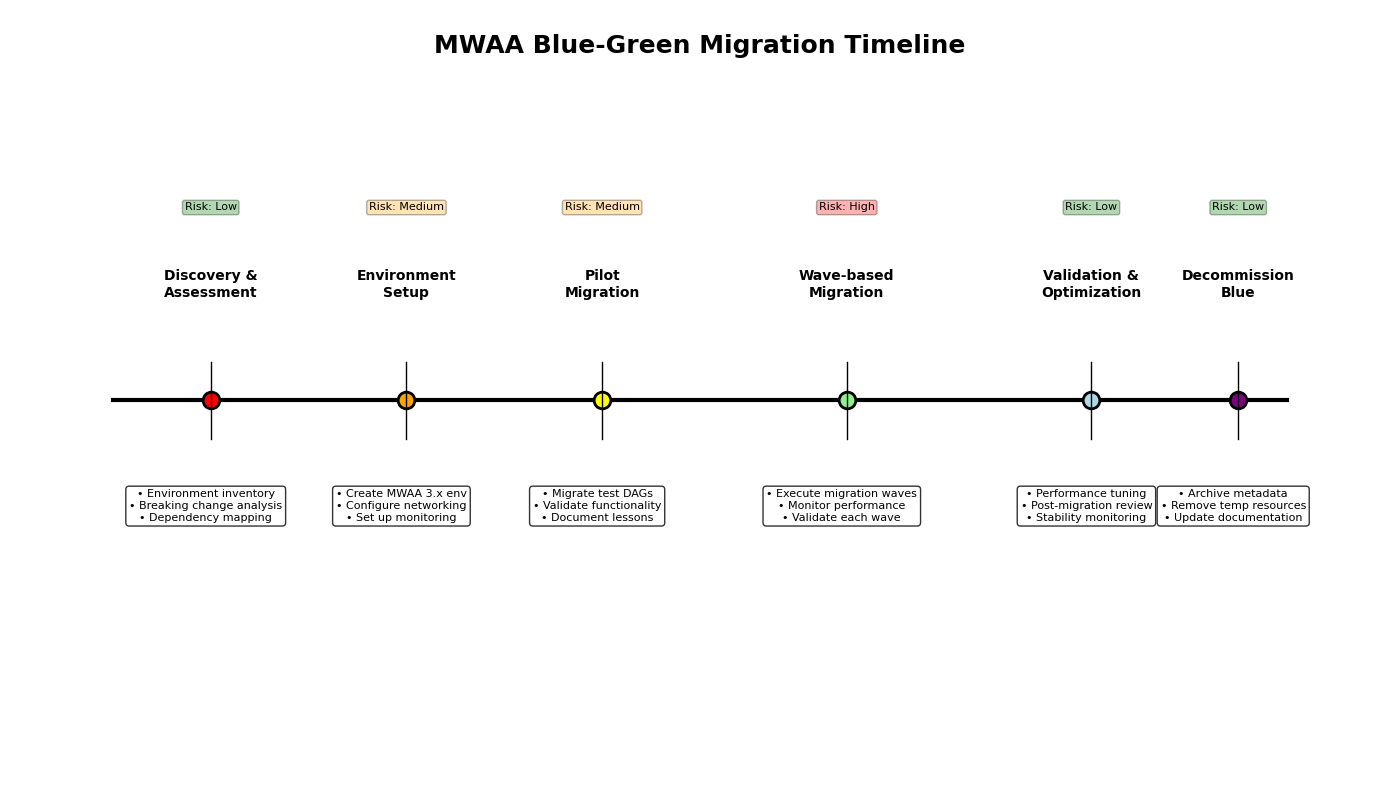
The following migration phases can assist you in defining your migration plan:
- Phase 1: Discovery, assessment, and planning – In this phase, complete your environment inventory, dependency mapping, and breaking change analysis. With the gathered information, develop the detailed migration plan. This plan will include steps for updating code, updating your requirements file, creating a test environment, testing, creating the blue/green environment (discussed later in this post), and the migration steps. Planning must also include the training, monitoring strategy, rollback conditions, and the rollback plan.
- Phase 2: Pilot migration – The pilot migration phase serves to validate your detailed migration plan in a controlled environment with a small range of impact. Focus the pilot on two or three non-critical DAGs with diverse characteristics, such as different schedules and dependencies. Migrate the selected DAGs using the migration plan defined in the previous phase. Use this phase to validate your plan and monitoring tools, and adjust both based on actual results. During the pilot, establish baseline migration metrics to help predict the performance of the full migration.
- Phase 3: Wave-based production migration – After a successful pilot, you are ready to begin the full wave-based migration for the remaining DAGs. Group remaining DAGs into logical waves based on business criticality (least critical first), technical complexity, interdependencies (migrate dependent DAGs together), and scheduling frequency (less frequent DAGs provide larger migration windows). After you define the waves, work with stakeholders to develop the wave schedule. Include sufficient validation periods between waves to confirm the wave is successful before starting the next wave. This time also reduces the range of impact in the event of a migration issue, and provides sufficient time to perform a rollback.
- Phase 4: Post-migration review and decommissioning – After all waves are complete, conduct a post-migration review to identify lessons learned, optimization opportunities, and any other unresolved items. This is also a good time to provide an approval on system stability. The final step is decommissioning the original Airflow 2.x environment. After stability is determined, based on business requirements and input, decommission the original (blue) environment.
Blue/green deployment strategy
Implement a blue/green deployment strategy for safe, reversible migration. With this strategy, you will have two Amazon MWAA environments operating during the migration and manage which DAGs operate in which environment.
The blue environment (current Airflow 2.x) maintains production workloads during transition. You can implement a freeze window for DAG changes before migration to avoid last-minute code conflicts. This environment serves as the immediate rollback environment if an issue is identified in the new (green) environment.
The green environment (new Airflow 3.x) receives migrated DAGs in controlled waves. It mirrors the networking, IAM roles, and security configurations from the blue environment. Configure this environment with the same options as the blue environment, and create identical monitoring mechanisms so both environments can be monitored simultaneously. To avoid duplicate DAG runs, make sure a DAG only runs in a single environment. This involves pausing the DAG in the blue environment before activating the DAG in the green environment.Maintain the blue environment in warm standby mode during the entire migration. Document specific rollback steps for each migration wave, and test your rollback procedure for at least one non-critical DAG. Additionally, define clear criteria for triggering the rollback (such as specific failure rates or SLA violations).
Step-by-step migration process
This section provides detailed steps for conducting the migration.
Pre-migration assessment and preparation
Before initiating the migration process, conduct a thorough assessment of your current environment and develop the migration plan:
- Make sure your current Amazon MWAA environment is on version 2.10.x
- Create a detailed inventory of your DAGs, custom operators, and plugins including their dependencies and versions
- Review your current
requirements.txtfile to understand package requirements - Document all environment variables, connections, and configuration settings
- Review the Apache Airflow 3.x release notes to understand breaking changes
- Determine your migration success criteria, rollback conditions, and rollback plan
- Identify a small number of DAGs suitable for the pilot migration
- Develop a plan to train, or familiarize, Amazon MWAA users on Airflow 3
Compatibility checks
Identifying compatibility issues is critical to a successful migration. This step helps developers focus on specific code that is incompatible with Airflow 3.
Use the ruff linter with the AIR30 ruleset to automatically identify code requiring updates:
Additionally, review your code for instances of direct metadatabase access.
DAG code updates
Based on your findings during compatibility testing, update the affected DAG code for Airflow 3.x. The ruff DAG check utility can automatically fix common changes. Use the following command to run the utility in update mode:
Common changes include:
- Replace direct metadata database access with API calls:
- Replace deprecated context variables with their modern equivalents:
Next, evaluate the usage of the two scheduling-related default changes. catchup_by_default is now False, meaning missing DAG runs will no longer automatically backfill. If backfill is required, update the DAG definition with catchup=True. If your DAGs require backfill, you must consider the impact of this migration and backfilling. Because you’re migrating a DAG to a clean environment with no history, enabling backfilling will create DAG runs for all runs beginning with the specified start_date. Consider updating the start_date to avoid unnecessary runs.
create_cron_data_intervals is also now False. With this change, cron expressions are evaluated as a CronTriggerTimetable construct.
Finally, evaluate the usage of deprecated context variables for manually and Asset-triggered DAGs, then update your code with suitable replacements.
Updating requirements and testing
In addition to possible package version changes, several core Airflow operators previously included in the airflow-core package moved to the apache-airflow-providers-standard package. These changes must be incorporated into your requirements.txt file. Specifying, or pinning, package versions in your requirements file is a best practice and recommended for this migration.To update your requirements file, complete the following steps:
- Download and configure the Amazon MWAA Docker images. For more details, refer to the GitHub repo.
- Copy the current environment’s
requirements.txtfile to a new file. - If needed, add the apache-airflow-providers-standard package to the new requirements file.
- Download the appropriate Airflow constraints file for your target Airflow version to your working director. A constraints file is available for each Airflow version and Python version combination. The URL takes the following form:
https://raw.githubusercontent.com/apache/airflow/constraints-${AIRFLOW_VERSION}/constraints-${PYTHON_VERSION}.txt - Create your versioned requirements file using your un-versioned file and the constraints file. For guidance on creating a requirements file, see Creating a
requirements.txtfile. Make sure there are no dependency conflicts before moving forward. - Verify your requirements file using the Docker image. Run the following command inside the running container:
Address any installation errors by updating package versions.
As a best practice, we recommend packaging your packages into a ZIP file for deployment in Amazon MWAA. This makes sure the same exact packages are installed on all Airflow nodes. Refer to Installing Python dependencies using PyPi.org Requirements File Format for detailed information about packaging dependencies.
Creating a new Amazon MWAA 3.x environment
Because Amazon MWAA requires a migration approach for major version upgrades, you must create a new environment for your blue/green deployment. This post uses the AWS Command Line Interface (AWS CLI) as an example, you can also use infrastructure as code (IaC).
- Create a new S3 bucket using the same structure as the current S3 bucket.
- Upload the updated requirements file and any plugin packages to the new S3 bucket.
- Generate a template for your new environment configuration:
- Modify the generated JSON file:
- Copy configurations from your existing environment.
- Update the environment name.
- Set the AirflowVersion parameter to the target 3.x version.
- Update the S3 bucket properties with the new S3 bucket name.
- Review and update other configuration parameters as needed.
Configure the new environment with the same networking settings, security groups, and IAM roles as your existing environment. Refer to the Amazon MWAA User Guide for these configurations.
- Create your new environment:
Metadata migration
Your new environment requires the same variables, connections, roles, and pool configurations. Use this section as a guide for migrating this information. If you’re using AWS Secrets Manager as your secrets backend, you don’t need to migrate any connections. Depending your environment’s size, you can migrate this metadata using the Airflow UI or the Apache Airflow REST API.
- Update any custom pool information in the new environment using the Airflow UI.
- For environments using the metadatabase as a secrets backend, migrate all connections to the new environment.
- Migrate all variables to the new environment.
- Migrate any custom Airflow roles to the new environment.
Migration execution and validation
Plan and execute the transition from your old environment to the new one:
- Schedule the migration during a period of low workflow activity to minimize disruption.
- Implement a freeze window for DAG changes before and during the migration.
- Execute the migration in phases:
- Pause DAGs in the old environment. For a small number of DAGs, you can use the Airflow UI. For larger groups, consider using the REST API.
- Verify all running tasks have completed in the Airflow UI.
- Redirect DAG triggers and external integrations to the new environment.
- Copy the updated DAGs to the new environment’s S3 bucket.
- Enable DAGs in the new environment. For a small number of DAGs, you can use the Airflow UI. For larger groups, consider using the REST API.
- Monitor the new environment closely during the initial operation period:
- Watch for failed tasks or scheduling issues.
- Check for missing variables or connections.
- Verify external system integrations are functioning correctly.
- Monitor Amazon CloudWatch metrics to confirm the environment is performing as expected.
Post-migration validation
After the migration, thoroughly validate the new environment:
- Verify that all DAGs are being scheduled correctly according to their defined schedules
- Check that task history and logs are accessible and complete
- Test critical workflows end-to-end to confirm they execute successfully
- Validate connections to external systems are functioning properly
- Monitor CloudWatch metrics for performance validation
Cleanup and documentation
When the migration is complete and the new environment is stable, complete the following steps:
- Document the changes made during the migration process.
- Update runbooks and operational procedures to reflect the new environment.
- After a sufficient stability period, defined by stakeholders, decommission the old environment:
- Archive backup data according to your organization’s retention policies.
Conclusion
The journey from Airflow 2.x to 3.x on Amazon MWAA is an opportunity to embrace next-generation workflow orchestration capabilities while maintaining the reliability of your workflow operations. By following these best practices and maintaining a methodical approach, you can successfully navigate this transition while minimizing risks and disruptions to your business operations.
A successful migration requires thorough preparation, systematic testing, and maintaining clear documentation throughout the process. Although the migration approach requires more initial effort, it provides the safety and control needed for such a significant upgrade.
 Anurag Srivastava works as a Senior Big Data Cloud Engineer at Amazon Web Services (AWS), specializing in Amazon MWAA. He’s passionate about helping customers build scalable data pipelines and workflow automation solutions on AWS.
 Kamen Sharlandjiev is a Sr. Big Data and ETL Solutions Architect, Amazon MWAA and AWS Glue ETL expert. He’s on a mission to make life easier for customers who are facing complex data integration and orchestration challenges. His secret weapon? Fully managed AWS services that can get the job done with minimal effort. Follow Kamen on LinkedIn to keep up to date with the latest Amazon MWAA and AWS Glue features and news!
 Ankit Sahu brings over 18 years of expertise in building innovative digital products and services. His diverse experience spans product strategy, go-to-market execution, and digital transformation initiatives. Currently, Ankit serves as Senior Product Manager at Amazon Web Services (AWS), where he leads the Amazon MWAA service.
 Mohammad Sabeel works as a Senior Cloud Support Engineer at Amazon Web Services (AWS), specializing in AWS Analytics services including AWS Glue, Amazon MWAA, and Amazon Athena. With over 14 years of IT experience, he’s passionate about helping customers build scalable data processing pipelines and optimize their analytics solutions on AWS.
 Satya Chikkala is a Solutions Architect at Amazon Web Services. Based in Melbourne, Australia, he works closely with enterprise customers to accelerate their cloud journey. Beyond work, he is very passionate about nature and photography.
 Sriharsh Adari is a Senior Solutions Architect at Amazon Web Services (AWS), where he helps customers work backward from business outcomes to develop innovative solutions on AWS. Over the years, he has helped multiple customers on data system transformations across industry verticals. His core area of expertise include technology strategy, data analytics, and data science. In his spare time, he enjoys playing sports, binge-watching TV shows, and playing Tabla.

 Anurag Srivastava works as a Senior Big Data Cloud Engineer at Amazon Web Services (AWS), specializing in Amazon MWAA. He’s passionate about helping customers build scalable data pipelines and workflow automation solutions on AWS.
 Sriharsh Adari is a Senior Solutions Architect at Amazon Web Services (AWS), where he helps customers work backwards from business outcomes to develop innovative solutions on AWS. Over the years, he has helped multiple customers on data platform transformations across industry verticals. His core area of expertise include Technology Strategy, Data Analytics, and Data Science. In his spare time, he enjoys playing sports, binge-watching TV shows, and playing Tabla.
 Venu Thangalapally is a Senior Solutions Architect at AWS, based in Chicago, with deep expertise in cloud architecture, data and analytics, containers, and application modernization. He partners with Financial Services industry customers to translate business goals into secure, scalable, and compliant cloud solutions that deliver measurable value. Venu is passionate about leveraging technology to drive innovation and operational excellence. Outside of work, he enjoys spending time with his family, reading, and taking long walks.
 Chandan Rupakheti is a Senior Solutions Architect at AWS. His main focus at AWS lies in the intersection of analytics, serverless, and AdTech services. He is a passionate technical leader, researcher, and mentor with a knack for building innovative solutions in the cloud. Outside of his professional life, he loves spending time with his family and friends, and listening to and playing music.