All posts by Brandon Carroll

Building secure foundations: A guide to network and infrastructure security at AWS re:Inforce 2025

Post Syndicated from Brandon Carroll original https://aws.amazon.com/blogs/security/building-secure-foundations-a-guide-to-network-and-infrastructure-security-at-aws-reinforce-2025/

AWS re:Inforce 2025: June 16-18 in Philadelphia, PA

A full conference pass is $1,099. Register today with the code flashsale150 to receive a limited time $150 discount, while supplies last.

Securing cloud infrastructure has never been more critical as organizations continue to expand their digital footprint and embrace modern architectures. At AWS re:Inforce 2025, the Network and Infrastructure Security track brings together security experts, practitioners, and industry leaders to share insights on building and maintaining secure, automated, and observable cloud foundations.This year’s track focuses on several key themes that are shaping the future of cloud security. Learn how to implement comprehensive defense-in-depth strategies through multiple layers of controls, from perimeter to workload protection. Discover the latest approaches to network visibility and inspection, including tools and architectures for deep packet inspection and enhanced traffic analysis across cloud environments.As organizations scale their cloud presence, automated policy management becomes crucial. This track showcases solutions and approaches for scaling security policy deployment, management, and compliance validation through automation and infrastructure as code (IaC). You’ll also dive deep into zero trust infrastructure implementations, exploring frameworks for identity-based network segmentation and access controls aligned with zero trust principles.With the growing complexity of distributed applications, protecting workloads across cloud, edge, and hybrid environments requires integrated security architectures. Sessions in this track demonstrate how to build comprehensive protection strategies that secure your entire infrastructure footprint while maintaining operational excellence.

Whether you’re just beginning your cloud security journey or leading mature enterprise security initiatives, the Network and Infrastructure Security track at re:Inforce 2025 will equip you with practical guidance and actionable insights to advance your organization’s security posture. Join in on the fun, and register for re:Inforce 2025!

Breakout sessions, chalk talks, and lightning talks

Breakout sessions are lecture-style, 1-hour sessions delivered by AWS experts, customers, and partners—perfect for deepening your knowledge on important topics, gaining actionable insights, and connecting with industry leaders.

Chalk talks are 1-hour long, highly interactive sessions with a small audience. This format is ideal for diving deep into specific topics, engaging directly with AWS experts, and getting your questions answered in real time.

Lightning talks are short (20 minutes) theater presentations dedicated to a specific customer story, service demo, or AWS Partner offering.

NIS301 | Breakout session | Egress control deployments made easy
Speakers: Sofía Aluma (AWS), Jesse Lepich (AWS)
Discover the latest AWS Network Firewall features that simplify implementation and enhance your security posture. In this hands-on workshop, learn how recent updates to AWS Network Firewall and Amazon Route 53 Resolver DNS Firewall streamline deployment, reduce threat exposure, and strengthen security policies. We’ll share practical recommendations for configuring firewall rules that match your specific use cases and help verify that your security controls meet intended objectives.

NIS302 | Breakout session | How Itaú Bank leverages AWS Shield Advanced to combat DDoS events
Speakers: Douglas Lopes (AWS), Guilherme Greco (AWS), Ricardo Donadel (Itaú Bank)
Learn how Itaú, Latin America’s largest bank, uses AWS Shield Advanced to protect their critical financial infrastructure from sophisticated DDoS events. In this session, Itaú’s security team shares how they architected their defense strategy by integrating Shield Advanced with existing security operations and collaborating with the AWS DDoS Response Team. Discover how they maintain robust protection while meeting financial regulatory requirements and examine the business value of their implementation. Whether you work in financial services or other regulated industries, you’ll gain actionable insights for enterprise-grade DDoS protection.

NIS303 | Breakout session | Thinking beyond traditional firewalling architectures
Speakers: Tom Adamski (AWS), Ankit Chadha (AWS)
In this session, we’ll discuss a brave new world where we think beyond traditional firewalling architectures. We’ll explore the use-cases that require firewalls including workload-to-workload, client-to-workload, and workload-to-internet traffic flows. After defining the use cases, we’ll discuss AWS services that allow customers to retain their desired security posture without inserting inline firewalls. We’ll wrap with specific considerations on when firewalling is a good option. For example, for scenarios when customers require AppId-like functionality, or for creating data loss prevention (DLP) deployments for egress traffic.

NIS304 | Breakout session | Integrate Zero Trust into your cloud network
Speakers: Dave DeRicco (AWS)
In this session, learn how to adopt Zero Trust alongside traditional network security functions such as firewalls and VPNs. Explore how services like Amazon VPC Lattice and AWS Verified Access complement your existing network security posture by leveraging identity and network controls to continuously authenticate and monitor access. and how these services can integrate into your existing network architecture. Learn about common adoption approaches and migration patterns and hear best practices for building Zero Trust mechanisms into a secure, modern network architecture.

NIS305 | Breakout session | Advanced network defense: From basics to global scale with AWS Cloud WAN
Speakers: Sidhartha Chauhan (AWS)
Starting with core security principles, this session demonstrates how to build robust network security architectures in AWS. Learn to establish effective network isolation boundaries using AWS Cloud WAN and AWS PrivateLink, followed by implementing traffic filtering through strategic firewall deployments. We’ll compare centralized versus distributed inspection architectures, culminating in how AWS Cloud WAN’s service insertion and policy-based approach enables global-scale centralized inspection flows. Through practical scenarios, attendees will master designing scalable network security architectures that maintain security posture across complex cloud environments. Ideal for security engineers and architects managing enterprise-scale AWS deployments.

DAP332 | Chalk talk | Executive perspective: Risk management for generative AI workloads
Speakers: Jason Garman (AWS) & Mark Ryland (AWS)
Don’t let the perceived complexity of responsible AI keep you from deploying generative AI applications on AWS. In this chalk talk, we will present a framework for breaking down AI safety and security risks, introduce AWS best practices for keeping enterprise data secure in generative AI applications using zero trust principles, and mitigate safety risks using technologies such as Amazon Bedrock Guardrails. Discover as a group with fellow security leaders how to identify safety and security risks relevant to your workload, implement appropriate mitigation strategies, and measure efficacy over time.

NIS306 | Breakout session | Securing AWS networks: Observability meets defense-in-depth
Speakers: Anandprasanna Gaitonde (AWS), Ankush Goyal (AWS), Amish Shah (AWS)
AWS customers use multiple security services to build strong network defenses, but visibility into threats, misconfigurations, and vulnerabilities across multi-VPC and multi-account environments can remain a challenge. This session covers AWS network security fundamentals – Security Groups, NACLs, AWS Network Firewall, DNS Firewall, and Gateway Load Balancer—for a layered defense strategy. We will also highlight observability tools like VPC Flow Logs, Reachability Analyzer, and Network Access Analyzer to detect security gaps and troubleshoot access issues. By integrating these tools, organizations can proactively enhance network security, detect vulnerabilities, and ensure secure, scalable architectures across AWS accounts and environments.

NIS231 | Chalk talk | High noon duel: Live events tamed by AWS WAF
Speakers: Tzoori Tamam (AWS), Harith Gaddamanugu (AWS)
In this thrilling session, we’ll build a robust protection setup using AWS WAF and Amazon CloudFront, demonstrating how to fend off increasingly sophisticated live events. Learn to leverage Amazon CloudFront, configure rate-based rules, implement AWS WAF Managed Rule groups, bot control, and create custom defenses. As we construct our digital fortress, our resident “black hat” will launch progressively complex events, showcasing how each layer of defense performs under pressure. Suitable for both newcomers and experienced AWS security professionals.

NIS331 | Chalk talk | Enhance your cloud security infrastructure using Zero Trust techniques
Speakers: Pablo Sánchez Carmona (AWS), Adam Palmer (AWS)
Traditional perimeter-based security and network segmentation often fall short in today’s dynamic microservices environments, creating operational overhead and potential security gaps. Join us in this session to discuss how to evolve beyond conventional security models by implementing Zero Trust architecture in AWS. We will cover different services and techniques such as AWS Verified Access in the human-to-application connectivity, Amazon VPC Lattice for service-to-service communication, and the use of AWS Verified Permissions for fine-grained application authorization. We’ll explore how these services can work together to enable continuous authentication.

NIS332 | Chalk talk | Build secure connectivity with Amazon VPC Lattice and AWS PrivateLink
Speakers: Alexandra Huides (AWS), Jordan Rojas Garcia (AWS)
In this chalk talk, we review the best practices and reference architectures for building secure connectivity with Amazon VPC Lattice and AWS PrivateLink. We focus on service and resource oriented connectivity as we dive into the new VPC Lattice capabilities, such as support for VPC Resources and service network endpoints, and cross-region support for AWS PrivateLink.

NIS333 | Chalk talk | Build defense-in-depth network designs to safeguard apps and data
Speakers: Raghavarao Sodabathina (AWS), Brian Soper (AWS)
Strong adherence to architecture best practices and proactive controls are the foundation of web application security. These techniques allow developers to build applications that are more resilient. In this chalk talk, learn how to build a layered network security approach to achieve defense-in-depth; to protect, detect, and respond to issues faster; and to accelerate your secure migrations to AWS. Discover key considerations, best practices, and reference architectures that include Amazon VPC, Amazon Route 53, Amazon CloudFront, AWS WAF, AWS Shield, Application Load Balancer, and AWS Elastic Disaster Recovery to achieve your defense-in-depth objectives.

NIS431 | Chalk talk | Cloud network defense: Advanced visibility and analysis on AWS
Speakers: Kyle Hanrahan (AWS), Anand Kumar Mandilwar (AWS)
Organizations struggle to maintain comprehensive network visibility in complex cloud environments. This session demonstrates how to implement advanced network monitoring and analysis using AWS’s native services. Learn to leverage VPC Flow Logs, AWS Network Firewall Logs, Route 53 Resolver Logs, AWS WAF Logs and other data sources for traffic analysis. Discover practical implementation of tools for enhanced security and real-time monitoring. Walk away with reference architectures and best practices for building robust network visibility solutions that scale across your AWS environment while maintaining performance. Perfect for security teams modernizing their network defense strategy.

NIS321 | Lightning talk | How Meta enabled secure egress patterns using AWS Network Firewall
Speakers: Syed Shareef (AWS), Robin Rodriguez (AWS)
Meta envisions 2025 as the breakthrough year for its leading AI assistant, aiming to reach over 1 billion people with highly intelligent and personalized interactions. Partnering with AWS, Meta has made substantial investments in AI infrastructure, providing its developers with specialized compute resources for AI training. To secure this ambitious initiative, Meta has had to evolve not just their cloud security but also culture and mindset to secure a growing AWS footprint/infrastructure. Meta leverages AWS Network Firewall (ANF) to centrally inspect and filter VPC traffic before reaching external destinations, using rule-based filtering to control domain access, block malicious IPs, and prevent data exfiltration.

NIS322 | Lightning talk | I didn’t know Network Firewall could do that!
Speakers: Brandon Carroll (AWS), Mary Kay Sondecker (AWS)
This lightning talk will uncover powerful yet often overlooked capabilities that can transform your network security game. In just 20 minutes, we’ll speed through eye-opening features including flow capture and flush operations, advanced Suricata rule capabilities, dynamic packet filtering tricks, and lesser-known integration patterns that even experienced practitioners might have missed. From stateful traffic manipulation to sophisticated protocol inspection and real-world architectural patterns, you’ll discover practical techniques to leverage AWS Network Firewall’s full potential. Whether you’re managing complex multi-account deployments or hunting for advanced threats, this rapid-fire session will equip you with new tools for your security arsenal.

NIS323 | Lightning talk | WAF logs to security gold: A 20-minute dashboard revolution
Speakers: Emmanuel Isimah (AWS), Victor Babasanmi (AWS)
Drowning in AWS WAF logs? Transform raw security data into actionable insights with Amazon CloudWatch dashboards. In this high-energy session, discover how to build powerful visualizations that expose threats in real-time. We’ll cut through the complexity to show you battle-tested patterns for threat detection and alerting that security teams love. Twenty minutes to level up your WAF monitoring game – no fluff, just results.

NIS421 | Lightning talk | VPN-less access to AWS private services with AWS Verified Access
Speakers: John Sol (AWS), Mike Cornstubble (AWS)
In hybrid environments where employees need to access a file server outside their corporate network, they typically use a VPN. This session demonstrates how to establish secure, VPN-free connectivity to an Amazon FSx for Windows File Server using the new TCP protocol support of AWS Verified Access (AVA). Learn how AVA provides fine-grained access controls using AWS.

Interactive sessions (builders’ sessions, code talks, and workshops)

Interact with small groups led by an AWS expert providing interactive learning about how to build on AWS. Each builders’ session begins with a short explanation or demonstration of what attendees are building, then it’s your turn to build! The expert guides you end-to-end through this hands-on experience. Or join code talks, our code-focused interactive sessions where AWS experts lead a discussion featuring live coding or code samples as they illuminate the why behind AWS solutions. Attendees are encouraged to ask questions and follow along.

Workshops are 2-hour interactive sessions where you collaborate in teams or work individually to solve real-world challenges by using AWS services, making them perfect for hands-on learning. Each workshop begins with a brief lecture, followed by dedicated time to work through the problem.

Note: Don’t forget to bring your laptop to build alongside AWS experts.

NIS251 | Builders’ session | Build dashboards to gain visibility into your network perimeter
Speakers: Victor Babasanmi (AWS), Tom Adamski (AWS), Todd Pula (AWS), Vamsi Manthapuram (AWS)
Effective network security requires comprehensive visibility into your security posture and traffic patterns. This hands-on session demonstrates how to build and customize Amazon CloudWatch dashboards for real-time insights into AWS Network Firewall operations. Learn to visualize critical metrics including dropped packets, traffic patterns, and potential threats. We’ll explore creating dynamic widgets to track stateful rule matches, analyze top talkers, and identify suspicious patterns. Through step-by-step guidance, discover how to monitor bandwidth utilization, track rule effectiveness, and create custom alarms. Leave with ready-to-implement templates for enhancing your security operations. You must bring your laptop to participate.

NIS252 | Builders’ session | Mastering Amazon VPC Block Public Access for secure cloud networks
Speakers: Ankush Goyal (AWS), Salman Ahmed (AWS), Kunj Thacker (AWS)>, Ravi Kumar (AWS)
Join this interactive workshop to explore Amazon VPC Block Public Access, a feature designed for secure, scalable cloud environments. Learn to block ingress and egress traffic, enforce compliance, and configure granular exclusions for public and private subnets, with a focus on both IPv4 and IPv6 traffic. Through practical labs, you’ll enable Block Public Access, create exclusions, and use Reachability Analyzer to test connectivity before and after enabling the feature. By the end, you’ll be equipped to secure VPCs effectively while maintaining flexibility for modern workloads. You must bring your laptop to participate.

NIS351 | Builders’ session | Streamlining DNS resource sharing across multiple VPCs and accounts
Speakers: Aanchal Agrawal (AWS), Anushree Shetty (AWS), Mike Torro (AWS), Tyler Pack (AWS)
Amazon Route 53 Profiles is an innovative feature of Route 53 that enables the effortless sharing of hosted zones, resolver rules, and DNS firewall rules across multiple VPCs. This builders’ session will guide you through the process of creating Route 53 profiles and demonstrate how to restrict access using various features tailored to your specific needs, such as different environments. You must bring your laptop to participate.

NIS352 | Builders’ session | Accessing private VPC resources using CloudFront VPC origin
Speakers: Anushree Shetty (AWS), Ramya Mikkilineni (AWS), Aanchal Agrawal (AWS), Anjana Krishnan (AWS)
You can now privately access Amazon VPC resources, including load balancers and Amazon Elastic Compute Cloude (Amazon EC2) instances, and restrict these resources to be only accessed via Amazon CloudFront distribution through a new feature in CloudFront. In this builders’ session, we will set up a website located in a private subnet and access it via a CloudFront distribution. You must bring your laptop to participate.

NIS353 | Builders’ session | Scaling threat prevention on AWS with Suricata
Speakers: Ivo Pinto (AWS), Jesse Lepich (AWS), Michael Leighty (AWS), Miguel Silva (AWS)
Suricata is an open-source network intrusion prevention system (IPS) that includes a standard rule-based language for stateful network traffic inspection. AWS Network Firewall lets you define rules to inspect and control traffic to and from your VPC using IP, port, protocol, domain names, and general pattern matches. Building rules, in this format, for your security needs can be challenging but rewarding. During this session you will learn how you can utilize Suricata-compatible rules in AWS Network Firewall and build rulesets for common use cases as well as complex scenarios. You must bring your laptop to participate.

NIS354 | Builders’ session | Use AWS PrivateLink to set up private access to Amazon Bedrock
Speakers: Akshay Karanth (AWS), Du’An Lightfoot (AWS), Mike Gillespie (AWS), Salman Ahmed (AWS)
When building generative AI applications using Large Language Models on Amazon Bedrock, customers want to generate responses without going over the public internet or without exposing your proprietary data. This builders’ session introduces the Amazon Bedrock VPC endpoint, powered by AWS PrivateLink, as a solution for establishing secure and private connections between customer VPCs and Amazon Bedrock services. You’ll learn how this technology enables communication without public IP addresses, mitigating potential threat vectors from internet exposure. We’ll cover security challenges in generative AI, the architecture of VPC endpoint solution, and hands-on labs for implementation. You must bring your laptop to participate.

NIS451 | Builders’ session | Troubleshooting real-world perimeter protection scenarios
Speakers: Tzoori Tamam (AWS), Manuel Pata (AWS), Kaustubh Phatak (AWS)
Suspicious of an activity spike? Seeing odd traffic patterns? Introduced a new AWS WAF rule and want to make sure it is operating as it should? Join this session for a walkthrough of a day in the life of a security engineer operating AWS WAF, reviewing dashboards, exploring data in the logs, and building new dashboard widgets to make your life easier. You must bring your laptop to participate.

NIS341 | Code talk | A deep dive into Amazon VPC Lattice granular security
Speakers: Pablo Sánchez Carmona (AWS), Cristobal Lopez Callejon (AWS)
Join us for a session exploring Amazon VPC Lattice’s security capabilities and fine-grained access controls. We’ll explore authentication mechanisms, authorization policies, and service-level permissions that enable precise control over network traffic between services. You’ll learn how to leverage authorization policies in VPC Lattice to create layered security controls, and see practical examples of implementing Zero Trust principles within your application network. The session will cover best practices for auditing and monitoring service-to-service communications, managing cross-account access, and implementing security patterns for microservices architectures.

NIS342 | Code talk | Sticky situations: Building advanced AWS WAF honeypots for better security
Speakers: Harith Gaddamanugu (AWS), Manuel Pata (AWS)
Discover how to transform AWS WAF into a powerful threat intelligence platform by building sophisticated honeypots that attract, analyze, and adapt to emerging threats. In this code talk, we’ll demonstrate how to combine AWS WAF with AWS Lambda functions to create intelligent traps that not only capture malicious activity but also generate actionable security insights. Through live coding demonstrations, you’ll learn to implement advanced honeypot techniques including dynamic bait generation, automated attacker profiling, and real-time threat pattern analysis.

NIS231 | Chalk talk | High noon duel: Live events tamed by AWS WAF
Speakers: Tzoori Tamam (AWS), Harith Gaddamanugu (AWS)
In this thrilling session, we’ll build a robust protection setup using AWS WAF and Amazon CloudFront, demonstrating how to fend off increasingly sophisticated live attacks. Learn to leverage CloudFront, configure rate-based rules, implement WAF-managed rules and bot control, and create custom defenses. As we construct our digital fortress, our resident “black hat” will launch progressively complex attacks, showcasing how each layer of defense performs under pressure. Suitable for both newcomers and experienced AWS security professionals.

NIS331 | Chalk talk | Enhance your cloud security infrastructure using Zero Trust techniques
Speakers: Pablo Sánchez Carmona (AWS), Adam Palmer (AWS)
Traditional perimeter-based security and network segmentation often fall short in today’s dynamic microservices environments, creating operational overhead and potential security gaps. Join us in this session to discuss how to evolve beyond conventional security models by implementing Zero Trust architecture in AWS. We will cover different services and techniques such as AWS Verified Access in the human-to-application connectivity, Amazon VPC Lattice for service-to-service communication, and the use of AWS Verified Permissions for fine-grained application authorization. We’ll explore how these services can work together to enable continuous authentication.

NIS332 | Chalk talk | Build secure connectivity with Amazon VPC Lattice and AWS PrivateLink
Speakers: Alexandra Huides (AWS), Jordan Rojas Garcia (AWS)
In this chalk talk, we review the best practices and reference architectures for building secure connectivity with Amazon VPC Lattice and AWS PrivateLink. We focus on service and resource oriented connectivity as we dive into the new VPC Lattice capabilities, such as support for VPC Resources and service network endpoints, and cross-Region support for AWS PrivateLink.

NIS333 | Chalk talk | Build defense-in-depth network designs to safeguard apps and data
Speakers: Raghavarao Sodabathina (AWS), Brian Soper (AWS)
Strong adherence to architecture best practices and proactive controls are the foundation of web application security. These techniques allow developers to build applications that are more resilient. In this chalk talk, learn how to build a layered network security approach to achieve defense-in-depth; to protect, detect, and respond to issues faster; and to accelerate your secure migrations to AWS. Discover key considerations, best practices, and reference architectures that include Amazon VPC, Amazon Route 53, Amazon CloudFront, AWS WAF, AWS Shield, Application Load Balancer, and AWS Elastic Disaster Recovery to achieve your defense-in-depth objectives.

NIS431 | Chalk talk | Cloud network defense: Advanced visibility and analysis on AWS
Speakers: Kyle Hanrahan (AWS), Anand Kumar Mandilwar (AWS)
Organizations struggle to maintain comprehensive network visibility in complex cloud environments. This session demonstrates how to implement advanced network monitoring and analysis using AWS’s native services. Learn to leverage VPC Flow Logs, AWS Network Firewall Logs, Route 53 Resolver Logs, WAF Logs and other data sources for traffic analysis. Discover practical implementation of tools for enhanced security and real-time monitoring. Walk away with reference architectures and best practices for building robust network visibility solutions that scale across your AWS environment while maintaining performance. Perfect for security teams modernizing their network defense strategy.

Register Now

Don’t miss this opportunity to learn from industry experts and AWS leaders about building secure, automated, and observable cloud foundations. Register for AWS re:Inforce 2025 today to reserve your spot in these Network and Infrastructure Security sessions covering everything from Zero Trust implementations to advanced DDoS protection, network visibility, and defense-in-depth strategies. Browse the full re:Inforce catalog to explore additional tracks, partner sessions, and code talks that can complement your network security journey.

If you have feedback about this post, submit comments in the Comments section below.
Brandon Carroll

Brandon Carroll

Brandon is a Senior Product Marketing Manager with AWS who helps customers understand and implement robust cloud security solutions. At AWS, Brandon translates complex security concepts into actionable guidance, helping organizations successfully implement AWS security services while providing clear paths for getting started with cloud security.

TLS inspection configuration for encrypted egress traffic and AWS Network Firewall

Post Syndicated from Brandon Carroll original https://aws.amazon.com/blogs/security/tls-inspection-configuration-for-encrypted-egress-traffic-and-aws-network-firewall/

In the evolving landscape of network security, safeguarding data as it exits your virtual environment is as crucial as protecting incoming traffic. In a previous post, we highlighted the significance of ingress TLS inspection in enhancing security within Amazon Web Services (AWS) environments. Building on that foundation, I focus on egress TLS inspection in this post.

Egress TLS decryption, a pivotal feature of AWS Network Firewall, offers a robust mechanism to decrypt, inspect the payload, and re-encrypt outbound SSL/TLS traffic. This process helps ensure that your sensitive data remains secure and aligned with your organizational policies as it traverses to external destinations. Whether you’re a seasoned AWS user or new to cloud security, understanding and implementing egress TLS inspection can bolster your security posture by helping you identify threats within encrypted communications.

In this post, we explore the setup of egress TLS inspection within Network Firewall. The discussion covers the key steps for configuration, highlights essential best practices, and delves into important considerations for maintaining both performance and security. By the end of this post, you will understand the role and implementation of egress TLS inspection, and be able to integrate this feature into your network security strategy.

Overview of egress TLS inspection

Egress TLS inspection is a critical component of network security because it helps you identify and mitigate risks that are hidden in encrypted traffic, such as data exfiltration or outbound communication with malicious sites (for example command and control servers). It involves the careful examination of outbound encrypted traffic to help ensure that data leaving your network aligns with security policies and doesn’t contain potential threats or sensitive information.

This process helps ensure that the confidentiality and integrity of your data are maintained while providing the visibility that you need for security analysis.

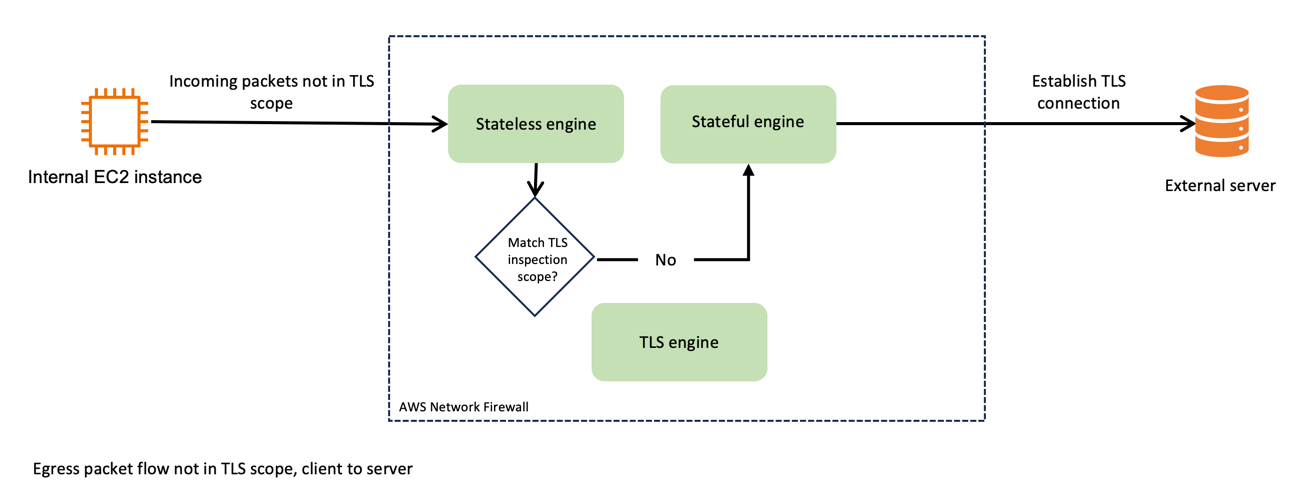
Figure 1 depicts the traffic flow of egress packets that don’t match the TLS inspection scope. Incoming packets that aren’t in scope of the TLS inspection pass through the stateless engine, and then the stateful engine, before being forwarded to the destination server. Because it isn’t within the scope for TLS inspection, the packet isn’t sent to the TLS engine.

Figure 1: Network Firewall packet handling, not in TLS scope

Figure 1: Network Firewall packet handling, not in TLS scope

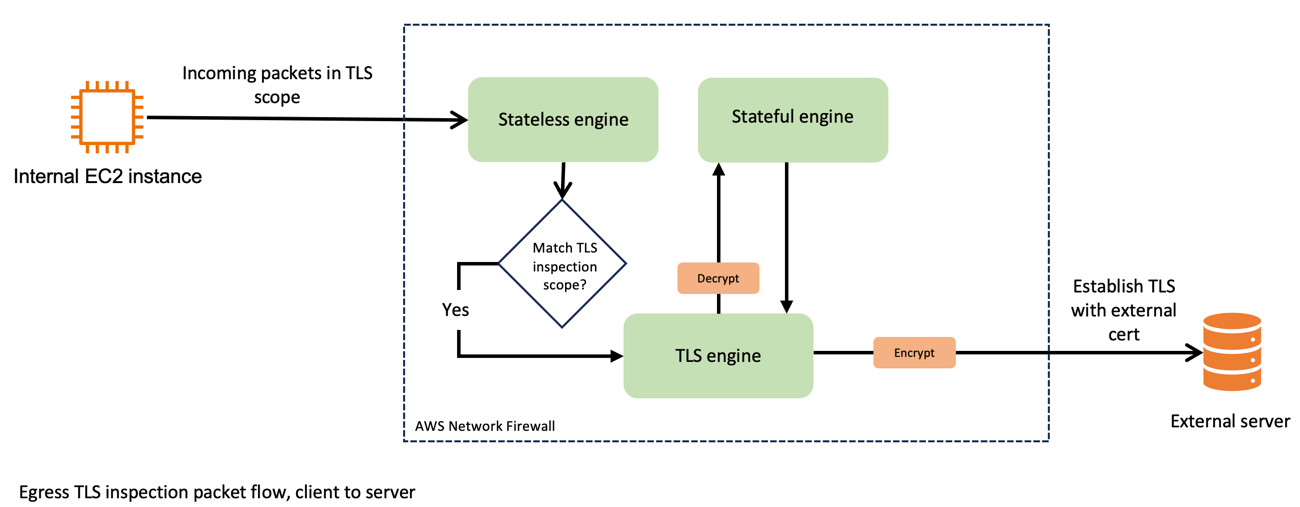
Now, compare that to Figure 2, which shows the traffic flow when egress TLS inspection is enabled. After passing through the stateless engine, traffic matches the TLS inspection scope. Network Firewall forwards the packet to the TLS engine, where it’s decrypted. Network Firewall passes the decrypted traffic to the stateful engine, where it’s inspected and passed back to the TLS engine for re-encryption. Network Firewall then forwards the packet to its destination.

Figure 2: Network Firewall packet handling, in TLS scope

Figure 2: Network Firewall packet handling, in TLS scope

Now consider the use of certificates for these connections. As shown in Figure 3, the egress TLS connections use a firewall-generated certificate on the client side and the target servers’ certificate on the server side. Network Firewall decrypts the packets that are internal to the firewall process and processes them in clear text through the stateful engine.

Figure 3: Egress TLS certificate usage

Figure 3: Egress TLS certificate usage

By implementing egress TLS inspection, you gain a more comprehensive view of your network traffic, so you can monitor and manage data flows more effectively. This enhanced visibility is crucial in detecting and responding to potential security threats that might otherwise remain hidden in encrypted traffic.

In the following sections, I guide you through the configuration of egress TLS inspection, discuss best practices, and highlight key considerations to help achieve a balance between robust security and optimal network performance.

Additional consideration: the challenge of SNI spoofing

Server Name Indication (SNI) spoofing can affect how well your TLS inspection works. SNI is a component of the TLS protocol that allows a client to specify which server it’s trying to connect to at the start of the handshake process.

SNI spoofing occurs when an entity manipulates the SNI field to disguise the true destination of the traffic. This is similar to requesting access to one site while intending to connect to a different, less secure site. SNI spoofing can pose significant challenges to network security measures, particularly those that rely on SNI information for traffic filtering and inspection.

In the context of egress TLS inspection, a threat actor can use SNI spoofing to circumvent security tools because these tools often use the SNI field to determine the legitimacy and safety of outbound connections. If the threat actor spoofs the SNI field successfully, unauthorized traffic could pass through the network, circumventing detection.

To effectively counteract SNI spoofing, use TLS inspection on Network Firewall. When you use TLS inspection on Network Firewall, spoofed SNIs on traffic within the scope of what TLS inspection looks at are dropped. The spoofed SNI traffic is dropped because Network Firewall validates the TLS server certificate to check the associated domains in it against the SNI.

Set up egress TLS inspection in Network Firewall

In this section, I guide you through the essential steps to set up egress TLS inspection in Network Firewall.

Prerequisites

The example used in this post uses a prebuilt environment. To learn more about the prebuilt environment and how to build a similar configuration in your own AWS environment, see Creating a TLS inspection configuration in Network Firewall. To follow along with this post, you will need a working topology with Network Firewall deployed and an Amazon Elastic Compute Cloud (Amazon EC2) instance deployed in a private subnet.

Additionally, you need to have a certificate generated that you will present to your clients when they make outbound TLS requests that match your inspection configuration. After you generate your certificate, note the certificate body, private key, and certificate chain because you will import these into ACM.

Integration with ACM

The first step is to manage your SSL/TLS certificates through AWS Certificate Manager (ACM).

To integrate with ACM

  1. Obtain a certificate authority (CA) signed certificate, private key, and certificate chain.
  2. Open the ACM console, and in the left navigation pane, choose Certificates.
  3. Choose Import certificates.
  4. In the Certificate details section, paste your certificate’s information, including the certificate body, certificate private key, and certificate chain, into the relevant fields.
  5. Choose Next.
  6. On the Add Tags page, add a tag to your certificate:
    1. For Tag key, enter a name for the tag.
    2. For Tag value – optional, enter a tag value.
    3. Choose Next.
  7. To import the certificate, choose Import.

    Note: It might take a few minutes for ACM to process the import request and show the certificate in the list. If the certificate doesn’t immediately appear, choose the refresh icon. Additionally, the Certificate Authority used to create the certificate you import to ACM can be public or private.

  8. Review the imported certificate and do the following:
    1. Note the Certificate ID. You will need this ID later when you assign the certificate to the TLS configuration.
    2. Make sure that the status shows Issued. After ACM issues the certificate, you can use it in the TLS configuration.
       
      Figure 4: Verify the certificate was issued in ACM

      Figure 4: Verify the certificate was issued in ACM

Create a TLS inspection configuration

The next step is to create a TLS inspection configuration. You will do this in two parts. First, you will create a rule group to define the stateful inspection criteria. Then you will create the TLS inspection configuration where you define what traffic you should decrypt for inspection and how you should handle revoked and expired certificates.

To create a rule group

  1. Navigate to VPC > Network Firewall rule groups.
  2. Choose Create rule group.
  3. On the Choose rule group type page, do the following:
    1. For Rule group type, select Stateful rule group. In this example, the stateless rule group that has already been created is being used.
    2. For Rule group format, select Suricata compatible rule string.

      Note: To learn how Suricata rules work and how to write them, see Scaling threat prevention on AWS with Suricata

    3. Leave the other values as default and choose Next.
  4. On the Describe rule group page, enter a name, description, and capacity for your rule group, and then choose Next.

    Note: The capacity is the number of rules that you expect to have in this rule group. In our example, I set the value to 10, which is appropriate for a demo environment. Production environments require additional thought to the capacity before you create the rule group.

  5. On the Configure rules page, in the Suricata compatible rule string section, enter your Suricata compatible rules line-by-line, and then choose Next.

    Note: I don’t provide recommendations for specific rules in this post. You should take care in crafting rules that meet the requirements for your organization. For more information, see Best practices for writing Suricata compatible rules for AWS Network Firewall.

  6. On the Configure advanced settings – optional page, choose Next. You won’t use these settings in this walkthrough.
  7. Add relevant tags by providing a key and a value for your tag, and then choose Next.
  8. On the Review and create page, review your rule group and then choose Create rule group.

To create the TLS inspection configuration

  1. Navigate to VPC > Network Firewall > TLS inspection configurations.
  2. Choose Create TLS inspection configuration.
  3. In the CA certificate for outbound SSL/TLS inspection – new section, from the dropdown menu, choose the certificate that you imported from ACM previously, and then choose Next.
     
    Figure 5: Select the certificate for use with outbound SSL/TLS inspection

    Figure 5: Select the certificate for use with outbound SSL/TLS inspection

  4. On the Describe TLS inspection configuration page, enter a name and description for the configuration, and then choose Next.
  5. Define the scope—the traffic to include in decryption. For this walkthrough, you decrypt traffic that is on port 443. On the Define scope page, do the following:
    1. For the Destination port range, in the dropdown, select Custom and then in the box, enter your port (in this example, 443). This is shown in Figure 6.
       
      Figure 6: Specify a custom destination port in the TLS scope configuration

      Figure 6: Specify a custom destination port in the TLS scope configuration

    2. Choose Add scope configuration to add the scope configuration. This allows you to add multiple scopes. In this example, you have defined a scope indicating that the following traffic should be decrypted:

      Source IP Source Port Destination IP Destination Port
      Any Any Any 443
    3. In the Scope configuration section, verify that the scope is listed, as seen in Figure 7, and then choose Next.
       
      Figure 7: Add the scope configuration to the SSL/TLS inspection policy

      Figure 7: Add the scope configuration to the SSL/TLS inspection policy

  6. On the Advanced settings page, do the following to determine how to handle certificate revocation:
    1. For Check certificate revocation status, select Enable.
    2. In the Revoked – Action dropdown, select an action for revoked certificates. Your options are to Drop, Reject, or Pass. A drop occurs silently. A reject causes a TCP reset to be sent, indicating that the connection was dropped. Selecting pass allows the connection to establish.
    3. In the Unknown status – Action section, select an action for certificates that have an unknown status. The same three options that are available for revoked certificates are also available for certificates with an unknown status.
    4. Choose Next.

    Note: The recommended best practice is to set the action to Reject for both revoked and unknown status. Later in this walkthrough, you will set these values to Drop and Allow to illustrate the behavior during testing. After testing, you should set both values to Reject.

  7. Add relevant tags by providing a key and value for your tag, and then choose Next.
  8. Review the configuration, and then choose Create TLS inspection configuration.

Add the configuration to a Network Firewall policy

The next step is to add your TLS inspection configuration to your firewall policy. This policy dictates how Network Firewall handles and applies the rules for your outbound traffic. As part of this configuration, your TLS inspection configuration defines what traffic is decrypted prior to inspection.

To add the configuration to a Network Firewall policy

  1. Navigate to VPC > Network Firewall > Firewall policies.
  2. Choose Create firewall policy.
  3. In the Firewall policy details section, seen in Figure 8, enter a name and description, select a stream exception option for the policy, and then choose Next.
    Figure 8: Define the firewall policy details

    Figure 8: Define the firewall policy details

  4. To attach a stateless rule group to the policy, choose Add stateless rule groups.
  5. Select an existing policy, seen in Figure 9, and then choose Add rule groups.
     
    Figure 9: Select a stateless policy from an existing rule group

    Figure 9: Select a stateless policy from an existing rule group

  6. In the Stateful rule group section, choose Add stateful rule groups.
  7. Select the newly created TLS inspection rule group, and then choose Add rule group.
  8. On the Add rule groups page, choose Next.
  9. On the Configure advanced settings – optional page, choose Next. For this walkthrough, you will leave these settings at their default values.
  10. On the Add TLS inspection configuration – optional section, seen in Figure 10, do the following:
    1. Choose Add TLS inspection configuration.
    2. From the dropdown, select your TLS inspection configuration.
    3. Choose Next.
       
      Figure 10: Add the TLS configuration to the firewall policy

      Figure 10: Add the TLS configuration to the firewall policy

  11. Add relevant tags by providing a key and a value, and then choose Next.
  12. Review the policy configuration, and choose Create firewall policy.

Associate the policy with your firewall

The final step is to associate this firewall policy, which includes your TLS inspection configuration, with your firewall. This association activates the egress TLS inspection, enforcing your defined rules and criteria on outbound traffic. When the policy is associated, packets from the existing stateful connections that match the TLS scope definition are immediately routed to the decryption engine where they are dropped. This occurs because decryption and encryption can only work for a connection when Network Firewall receives TCP and TLS handshake packets from the start.

Currently, you have an existing policy applied. Let’s briefly review the policy that exists and see how TLS traffic looks prior to applying your configuration. Then you will apply the TLS configuration and look at the difference.

To review the existing policy that doesn’t have TLS configuration

  1. Navigate to VPC > Network Firewall > Firewalls
  2. Choose the existing firewall, as seen in Figure 11.
     
    Figure 11: Select the firewall to edit the policy

    Figure 11: Select the firewall to edit the policy

  3. In the Firewall Policy section, make sure that your firewall policy is displayed. As shown in the example in Figure 12, the firewall policy DemoFirewallPolicy is applied—this policy doesn’t perform TLS inspection.
     
    Figure 12: Identify the existing firewall policy associated with the firewall

    Figure 12: Identify the existing firewall policy associated with the firewall

  4. From a test EC2 instance, navigate to an external site that requires TLS encryption. In this example, I use the site example.com. Examine the certificate that was issued. In this example, an external organization issued the certificate (it’s not the certificate that I imported into ACM). You can see this in Figure 13.
     
    Figure 13: View of the certificate before TLS inspection is applied

    Figure 13: View of the certificate before TLS inspection is applied

Returning to the firewall configuration, change the policy to the one that you created with TLS inspection.

To change to the policy with TLS inspection

  1. In the Firewall Policy section, choose Edit.
  2. In the Edit firewall policy section, select the TLS Inspection policy, and then choose Save changes.

    Note: It might take a moment for Network Firewall to update the firewall configuration.

    Figure 14: Modify the policy applied to the firewall

    Figure 14: Modify the policy applied to the firewall

  3. Return to the test EC2 instance and test the site again. Notice that your customer certificate authority (CA) has issued the certificate. This indicates that the configuration is working as expected and you can see this in Figure 15.

    Note: The test EC2 instance must trust the certificate that Network Firewall presents. The method to install the CA certificate on your host devices will vary based on the operating system. For this walkthrough, I installed the CA certificate before testing.

    Figure 15: Verify the new certificate used by Network Firewall TLS inspection is seen

    Figure 15: Verify the new certificate used by Network Firewall TLS inspection is seen

Another test that you can do is revoked certificate handling. Example.com provides URLs to sites with revoked or expired certificates that you can use to test.

To test revoked certificate handling

  1. From the command line interface (CLI) of the EC2 instance, do a curl on this page.

    Note: The curl -ikv command combines three options:

    • -i includes the HTTP response headers in the output
    • -k allows connections to SSL sites without certificates being validated
    • -v enables verbose mode, which displays detailed information about the request and response, including the full HTTP conversation. This is useful for debugging HTTPS connections.
    sh-4.2$ curl -ikv https://revoked-rsa-dv.example.com/ example.com?_gl=1*guvyqo*_gcl_au*MTczMzQyNzU3OC4xNzA4NTQ5OTgw

  2. At the bottom of the output, notice that the TLS connection was closed. This is what it looks like when the Revoked – Action is set to Drop.
    *   Trying 203.0.113.10:443...
    * Connected to revoked-rsa-dv.example.com (203.0.113.10) port 443
    * ALPN: curl offers h2,http/1.1
    * Cipher selection: ALL:!EXPORT:!EXPORT40:!EXPORT56:!aNULL:!LOW:!RC4:@STRENGTH
    * TLSv1.2 (OUT), TLS handshake, Client hello (1):
    * TLSv1.2 (IN), TLS handshake, Server hello (2):
    * TLSv1.2 (IN), TLS handshake, Certificate (11):
    * TLSv1.2 (IN), TLS handshake, Server key exchange (12):
    * TLSv1.2 (IN), TLS handshake, Server finished (14):
    * TLSv1.2 (OUT), TLS handshake, Client key exchange (16):
    * TLSv1.2 (OUT), TLS change cipher, Change cipher spec (1):
    * TLSv1.2 (OUT), TLS handshake, Finished (20):
    * TLSv1.2 (IN), TLS change cipher, Change cipher spec (1):
    * TLSv1.2 (IN), TLS handshake, Finished (20):
    * SSL connection using TLSv1.2 / ECDHE-RSA-AES256-GCM-SHA384
    * ALPN: server did not agree on a protocol. Uses default.
    * Server certificate:
    *  subject: CN=revoked-rsa-dv.example.com
    *  start date: Feb 20 21:15:12 2024 GMT
    *  expire date: Feb 19 21:15:12 2025 GMT
    *  issuer: C=US; ST=VA; O=Custom Org; OU=Custom Unit; CN=Custom Intermediate CA; [email protected]
    *  SSL certificate verify result: unable to get local issuer certificate (20), continuing anyway.
    * using HTTP/1.x
    > GET /?_gl=1*guvyqo*_gcl_au*MTczMzQyNzU3OC4xNzA4NTQ5OTgw HTTP/1.1
    > Host: revoked-rsa-dv.example.com
    > User-Agent: curl/8.3.0
    > Accept: */*
    >
    * TLSv1.2 (IN), TLS alert, close notify (256):
    * Empty reply from server
    * Closing connection
    * TLSv1.2 (OUT), TLS alert, close notify (256):
    curl: (52) Empty reply from server
    sh-4.2$

  3. Modify your TLS inspection configuration to Reject instead:
    1. Navigate to VPC > Network Firewall > TLS inspection configuration, select the policy, and choose Edit.
    2. In the Revoked – Action section, select Reject.
    3. Choose Save.
  4. Test the curl again.
    sh-4.2$ curl -ikv https://revoked-rsa-dv.example.com/?_gl=1*guvyqo*_gcl_au*MTczMzQyNzU3OC4xNzA4NTQ5OTgw

  5. The output should show that an error 104, Connection reset by peer, was sent.
    *   Trying 203.0.113.10:443...
    * Connected to revoked-rsa-dv.example.com (203.0.113.10) port 443
    * ALPN: curl offers h2,http/1.1
    * Cipher selection: ALL:!EXPORT:!EXPORT40:!EXPORT56:!aNULL:!LOW:!RC4:@STRENGTH
    * TLSv1.2 (OUT), TLS handshake, Client hello (1):
    * TLSv1.2 (IN), TLS handshake, Server hello (2):
    * TLSv1.2 (IN), TLS handshake, Certificate (11):
    * TLSv1.2 (IN), TLS handshake, Server key exchange (12):
    * TLSv1.2 (IN), TLS handshake, Server finished (14):
    * TLSv1.2 (OUT), TLS handshake, Client key exchange (16):
    * TLSv1.2 (OUT), TLS change cipher, Change cipher spec (1):
    * TLSv1.2 (OUT), TLS handshake, Finished (20):
    * TLSv1.2 (IN), TLS change cipher, Change cipher spec (1):
    * TLSv1.2 (IN), TLS handshake, Finished (20):
    * SSL connection using TLSv1.2 / ECDHE-RSA-AES256-GCM-SHA384
    * ALPN: server did not agree on a protocol. Uses default.
    * Server certificate:
    *  subject: CN=revoked-rsa-dv.example.com
    *  start date: Feb 20 21:17:23 2024 GMT
    *  expire date: Feb 19 21:17:23 2025 GMT
    *  issuer: C=US; ST=VA; O=Custom Org; OU=Custom Unit; CN=Custom Intermediate CA; [email protected]
    *  SSL certificate verify result: unable to get local issuer certificate (20), continuing anyway.
    * using HTTP/1.x
    > GET /?_gl=1*guvyqo*_gcl_au*MTczMzQyNzU3OC4xNzA4NTQ5OTgw HTTP/1.1
    > Host: revoked-rsa-dv.example.com
    > User-Agent: curl/8.3.0
    > Accept: */*
    >
    * Recv failure: Connection reset by peer
    * OpenSSL SSL_read: Connection reset by peer, errno 104
    * Closing connection
    * Send failure: Broken pipe
    curl: (56) Recv failure: Connection reset by peer
    sh-4.2$

As you configure egress TLS inspection, consider the specific types of traffic and the security requirements of your organization. By tailoring your configuration to these needs, you can help make your network’s security more robust, without adversely affecting performance.

Performance and security considerations for egress TLS inspection

Implementing egress TLS inspection in Network Firewall is an important step in securing your network, but it’s equally important to understand its impact on performance and security. Here are some key considerations:

  • Balance security and performance – Egress TLS inspection provides enhanced security by allowing you to monitor and control outbound encrypted traffic, but it can introduce additional processing overhead. It’s essential to balance the depth of inspection with the performance requirements of your network. Efficient rule configuration can help minimize performance impacts while still achieving the desired level of security.
  • Optimize rule sets – The effectiveness of egress TLS inspection largely depends on the rule sets that you configure. It’s important to optimize these rules to target specific security concerns relevant to your outbound traffic. Overly broad or complex rules can lead to unnecessary processing, which might affect network throughput.
  • Use monitoring and logging – Regular monitoring and logging are vital for maintaining the effectiveness of egress TLS inspection. They help in identifying potential security threats and also provide insights into the impact of TLS inspection on network performance. AWS provides tools and services that you can use to monitor the performance and security of your network firewall.

Considering these factors will help ensure that your use of egress TLS inspection strengthens your network’s security posture and aligns with your organization’s performance needs.

Best practices and recommendations for egress TLS inspection

Implementing egress TLS inspection requires a thoughtful approach. Here are some best practices and recommendations to help you make the most of this feature in Network Firewall:

  • Prioritize traffic for inspection – You might not need the same level of scrutiny for all your outbound traffic. Prioritize traffic based on sensitivity and risk. For example, traffic to known, trusted destinations might not need as stringent inspection as traffic to unknown or less secure sites.
  • Use managed rule groups wisely – AWS provides managed rule groups and regularly updates them to address emerging threats. You can use AWS managed rules with TLS decryption; however, the TLS keywords will no longer invoke for traffic that has been decrypted by the firewall, within the stateful inspection engine. You can still benefit from the non-TLS rules within managed rule groups, and gain increased visibility into those rules because the decrypted traffic is visible to the inspection engine. You can also create your own custom rules against the inner protocols that are now available for inspection—for example, matching against an HTTP header within the decrypted HTTPS stream. You can use managed rules to complement your custom rules, contributing to a robust and up-to-date security posture.
  • Regularly update custom rules – Keep your custom rule sets aligned with the evolving security landscape. Regularly review and update these rules to make sure that they address new threats and do not inadvertently block legitimate traffic.
  • Test configuration changes – Before you apply new rules or configurations in a production environment, test them in a controlled setting. This practice can help you identify potential issues that could impact network performance or security.
  • Monitor and analyze traffic patterns – Regular monitoring of outbound traffic patterns can provide valuable insights. Use AWS tools to analyze traffic logs, which can help you fine-tune your TLS inspection settings and rules for optimal performance and security.
  • Plan for scalability – As your network grows, make sure that your TLS inspection setup can scale accordingly. Consider the impact of increased traffic on performance and adjust your configurations to maintain efficiency.
  • Train your team – Make sure that your network and security teams are well informed about the TLS inspection process, including its benefits and implications. A well-informed team can better manage and respond to security events.

By following these best practices, you can implement egress TLS inspection in your AWS environment, helping to enhance your network’s security while maintaining performance.

Conclusion

Egress TLS inspection is a critical capability for securing your network by providing increased visibility and control over encrypted outbound traffic. In this post, you learned about the key concepts, configuration steps, performance considerations, and best practices for implementing egress TLS inspection with Network Firewall. By decrypting, inspecting, and re-encrypting selected outbound traffic, you can identify hidden threats and enforce security policies without compromising network efficiency.

To learn more about improving visibility in your network with egress TLS inspection, see the AWS Network Firewall developer guide for additional technical details, review AWS security best practices for deploying Network Firewall, and join the AWS Network Firewall community to connect with other users.

 
If you have feedback about this post, submit comments in the Comments section below. If you have questions about this post, contact AWS Support.
Brandon Carroll

Brandon Carroll

Brandon is a Senior Developer Advocate at AWS who is passionate about technology and sharing with the networking community. He specializes in infrastructure security and helps customers and the community in their journey to the cloud.
