All posts by Dylan Tong

Auto-optimize your Amazon OpenSearch Service vector database

Post Syndicated from Dylan Tong original https://aws.amazon.com/blogs/big-data/auto-optimize-your-amazon-opensearch-service-vector-database/

AWS recently announced the general availability of auto-optimize for the Amazon OpenSearch Service vector engine. This feature streamlines vector index optimization by automatically evaluating configuration trade-offs across search quality, speed, and cost savings. You can then run a vector ingestion pipeline to build an optimized index on your desired collection or domain. Previously, optimizing index configurations—including algorithm, compression, and engine settings—required experts and weeks of testing. This process must be repeated because optimizations are unique to specific data characteristics and requirements. You can now auto-optimize vector databases in under an hour without managing infrastructure and acquiring expertise in index tuning.

In this post, we discuss how the auto-optimize feature works, its benefits, and share examples of auto-optimized results.

Overview of vector search and vector indexes

Vector search is a technique that improves search quality and is a cornerstone of generative AI applications. It involves using a type of AI model to convert content into numerical encodings (vectors), enabling content matching by semantic similarity instead of just keywords. You build vector databases by ingesting vectors into OpenSearch to build indexes that enable searches across billions of vectors in milliseconds.

Benefits of optimizing vector indexes and how it works

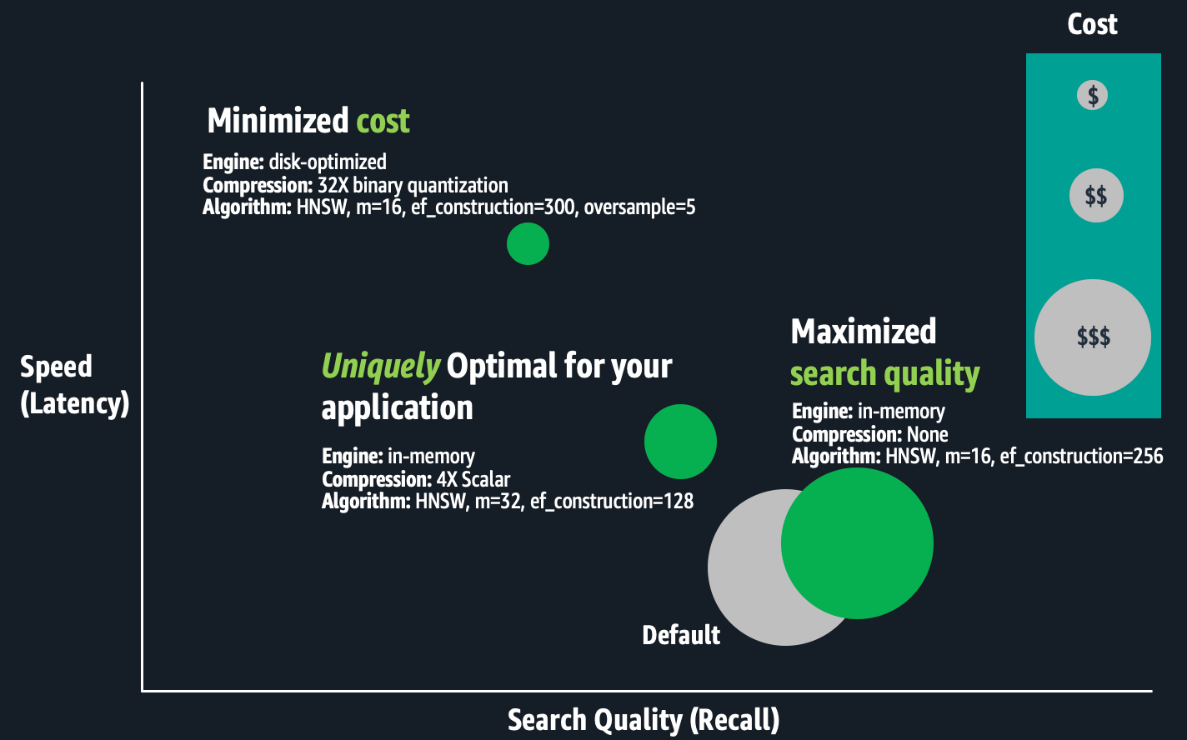
The OpenSearch vector engine provides a variety of index configurations that help you make favorable trade-offs between search quality (recall), speed (latency), and cost (RAM requirements). There isn’t a universally optimal configuration. Experts must evaluate combinations of index settings such as Hierarchal Navigable Small Worlds (HNSW) algorithm parameters (such as m or ef_construction), quantization techniques (such as scalar, binary, or product), and engine parameters (such as memory-optimized, disk-optimized, or warm-cold storage). The difference between configurations could be a 10% or more difference in search quality, hundreds of milliseconds in search latency, or up to three times in cost savings. For large-scale deployments, cost-optimizations can make or break your budget.

The following figure is a conceptual illustration of trade-offs between index configurations.
Optimizing vector indexes is time-consuming. Experts must build an index; evaluate its speed, quality, and cost; and make appropriate configuration adjustments before repeating this process. Running these experiments at scale can take weeks because building and evaluating large-scale index requires substantial compute power, resulting in hours to days of processing for just one index. Optimizations are unique to specific business requirements and each dataset, and trade-off decisions are subjective. The best trade-offs depend on the use case, such as search for an internal wiki or an e-commerce site. Therefore, this process must be repeated for each index. Lastly, if your application data changes continuously, your vector search quality might degrade, requiring you to rebuild and re-optimize your vector indexes regularly.

Solution overview

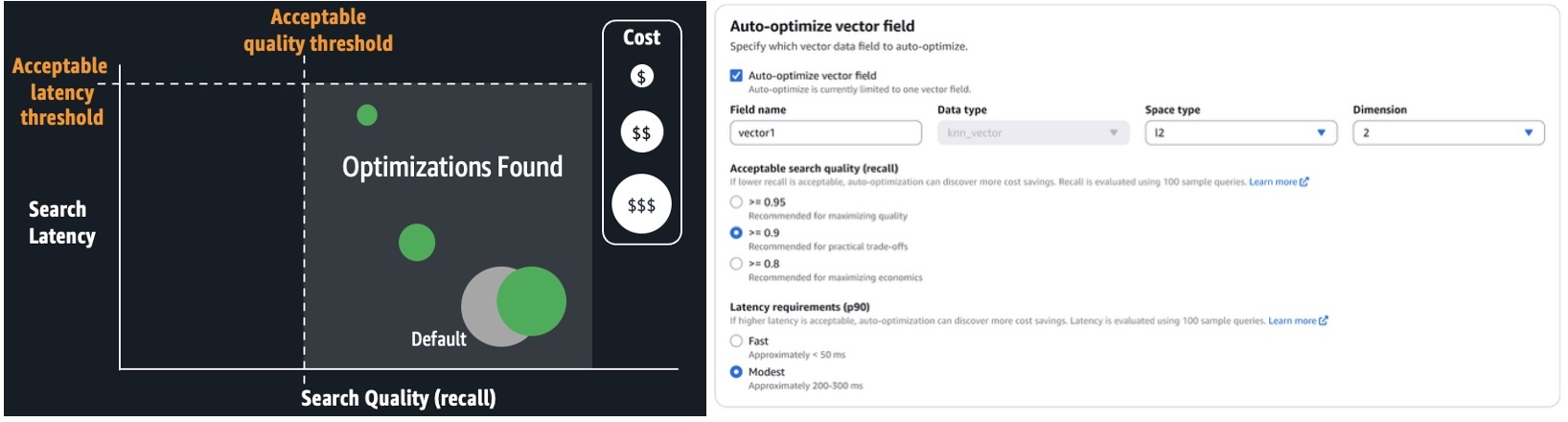
With auto-optimize, you can run jobs to produce optimization recommendations, consisting of reports that detail performance measurements and explanations of the recommended configurations. You can configure auto-optimize jobs by simply providing your application’s acceptable search latency and quality requirements. Expertise in k-NN algorithms, quantization techniques, and engine settings aren’t required. It avoids the one-size-fits-all limitations of solutions based on a few pre-configured deployment types, offering a tailored fit for your workloads. It automates the manual labor previously described. You simply run serverless, auto-optimize jobs at a flat rate per job. These jobs don’t consume your collection or domain resources. OpenSearch Service manages a separate multi-tenant warm pool of servers, and parallelizes index evaluations across secure, single-tenant workers to deliver results quickly. Auto-optimize is also integrated with vector ingestion pipelines, so you can quickly build an optimized vector index on a collection or domain from an Amazon Simple Storage Service (Amazon S3) data source.

The following screenshot illustrates how to configure an auto-optimize job on the OpenSearch Service console.
When the job is complete (typically, within 30–60 minutes for million-plus-size datasets), you can review the recommendations and reports, as shown in the following screenshot.
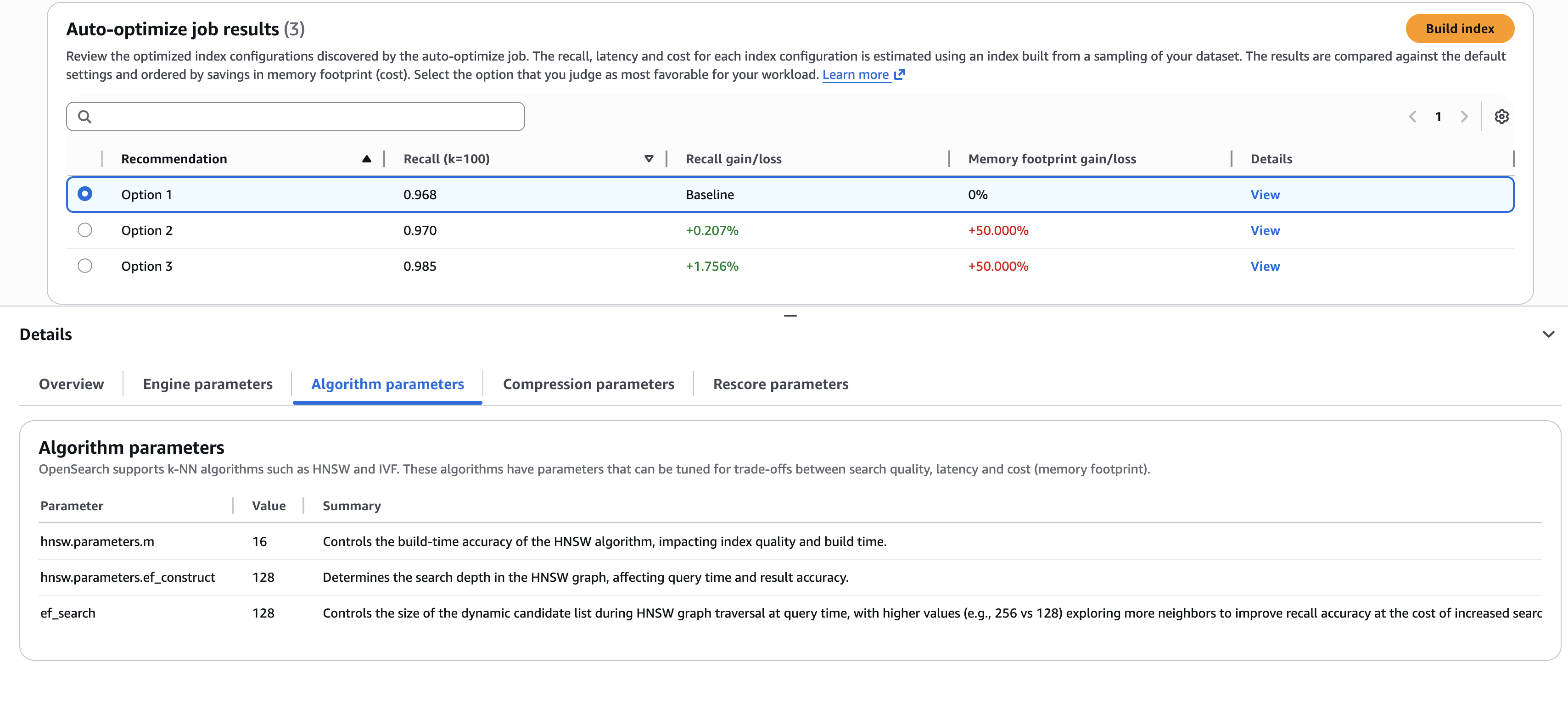
The screenshot illustrates an example where you need to choose the best trade-offs. Do you select the first option, which delivers the highest cost savings (through lower memory requirements)? Or do you select the third option, which delivers a 1.76% search quality improvement, but at higher cost? If you want to understand the details of the configurations used to deliver these results, you can view the sub-tabs on the Details pane, such as the Algorithm parameters tab shown in the preceding screenshot.

After you’ve made your choice, you can build your optimized index on your target OpenSearch Service domain or collection, as shown in the following screenshot. If you’re building the index on a collection or a domain running OpenSearch 3.1+, you can enable GPU-acceleration to increase the build speed up to 10 times faster at a quarter of the indexing cost.

Auto-optimize results

The following table presents a few examples of auto-optimize results. To quantify the value of running auto-optimize, we present gains compared to default settings. The estimated RAM requirements are based on standard domain sizing estimates:

Required RAM = 1.1 x (bytes per dimension x dimensions + hnsw.parameters.m x 8) x vector count

We estimate cost savings by comparing the minimal infrastructure (has just enough RAM) to host an index with the default compared to optimized settings.

Dataset Auto-Optimize Job Configurations Recommended Changes to Defaults

Required RAM)

(% reduced)

Estimated Cost Savings

(Required data nodes for default configuration vs. optimized)

Recall

(% gain)

msmarco-distilbert-base-tas-b: 10M 384D vectors generated from MSMARCO v1 Acceptable recall >= 0.95 Modest latency (Approximately 200-300 ms) More supporting indexing and search memory (ef_search=256, ef_constructon=128)Use Lucene engineDisk optimized mode with 5X oversampling4X compression (4-bit binary quantization)

5.6 GB

(-69.4%)

Less 75%

(3 x r8g.mediumsearch vs. 3 x r8g.xlarge.search)

0.995(+2.6%)
all-mpnet-base-v2: 1M 768D vectors generated from MSMARCO v2.1 Acceptable recall >= 0.95 Modest latency (Approximately 200–300 ms) Denser HNSW Graph (m=32)More supporting indexing and search memory (ef_search=256, ef_constructon=128)Disk optimized mode with 3X oversampling8X compression (4-bit binary quantization)

0.7GB

(-80.9%)

Less 50.7%

(t3.small.search vs. t3.medium.search)

0.999 (+0.9%)
Cohere Embed V3: 113M 1024D vectors generated from MSMARCO v2.1 Acceptable recall >= 0.95 Fast latency (Approximately <= 50 ms) Denser HNSW Graph (m=32)More supporting indexing and search memory (ef_search=256, ef_constructon=128)Use Lucene engine4X compression (uint8-scalar quantization)

159GB

(-69.7%)

Less 50.7%

(6 x r8g.4xlarge.search vs. 6 x r8g.8xlarge.search)

0.997 (+8.4%)

Conclusion

You can start building auto-optimized vector databases on the Vector ingestion page of the OpenSearch Service console. Use this feature with GPU-accelerated vector indexes to build optimized, billion-scale vector databases within hours.

Auto-optimize is available for OpenSearch Service vector collections and OpenSearch 2.17+ domains in the US East (N. Virginia, Ohio), US West (Oregon), Asia Pacific (Mumbai, Singapore, Sydney, Tokyo), and Europe (Frankfurt, Ireland, Stockholm) AWS Regions.
About the authors

Dylan Tong

Dylan Tong

Dylan is a Senior Product Manager at Amazon Web Services. He leads the product initiatives for AI and machine learning (ML) on OpenSearch including OpenSearch’s vector database capabilities. Dylan has decades of experience working directly with customers and creating products and solutions in the database, analytics and AI/ML domain. Dylan holds a BSc and MEng degree in Computer Science from Cornell University.

Vamshi Vijay Nakkirtha

Vamshi Vijay Nakkirtha

Vamshi is a software engineering manager working on the OpenSearch Project and Amazon OpenSearch Service. His primary interests include distributed systems.

Vikash Tiwari

Vikash Tiwari

Vikash is a Senior Software Development Engineer at AWS, specializing in OpenSearch vector search. He is passionate about distributed systems, large-scale machine learning, scalable search architectures, and database internals. His expertise spans vector search, indexing optimizations, and efficient data retrieval, and he is deeply interested in learning and enhancing modern database systems.

Janelle Arita

Janelle Arita

Janelle is a UX Designer at AWS working on OpenSearch. She is focused on creating intuitive user experiences for observability, security analytics, and search workflows. She’s passionate about solving complex operational challenges through user-centered design and data-driven insights.

Huibin Shen

Huibin Shen

Huibin is a scientist at AWS interested in machine learning and its applications.

Build billion-scale vector databases in under an hour with GPU acceleration on Amazon OpenSearch Service

Post Syndicated from Dylan Tong original https://aws.amazon.com/blogs/big-data/build-billion-scale-vector-databases-in-under-an-hour-with-gpu-acceleration-on-amazon-opensearch-service/

AWS recently announced the general availability of GPU-accelerated vector (k-NN) indexing on Amazon OpenSearch Service. You can now build billion-scale vector databases in under an hour and index vectors up to 10 times faster at a quarter of the cost. This feature dynamically attaches serverless GPUs to boost domains and collections running CPU-based instances. With this feature, you can scale AI apps quickly, innovate faster, and run vector workloads leaner.

In this post, we discuss the benefits of GPU-accelerated vector indexing, explore key use cases, and share performance benchmarks.

Overview of vector search and vector indexes

Vector search is a technique that improves search relevance, and is a cornerstone of generative AI applications. It involves using an embeddings model to convert content into numerical encodings (vectors), enabling content matching by semantic similarity instead of just keywords. You can build vector databases by ingesting vectors into OpenSearch Service to build indexes that enable searches across billions of vectors in milliseconds.

Challenges with scaling vector databases

Customers are increasingly scaling vector databases to multi-billion-scale on OpenSearch Service to power generative AI applications, product catalogs, knowledge bases, and more. Applications are becoming increasingly agentic, integrating AI agents that rely on vector databases for high-quality search results across enterprise data sources to enable chat-based interactions and automation.

However, there are challenges on the way to billion-scale. First, multi-million to billion-scale vector indexes take hours to days to build. These indexes use algorithms like Hierarchal Navigable Small Worlds (HNSW) to enable high-quality, millisecond searches at scale. However, they require more compute power than traditional indexes to build. Furthermore, you have to rebuild your indexes whenever your model changes, such as switching between vendors, versions, or after fine-tuning. Some use cases such as personalized search require models to be fine-tuned daily and adapt to evolving user behaviors. All vectors must be regenerated when the model changes, so the index must be rebuilt. HNSW can also degrade following significant updates and deletes, so indexes must be rebuilt to regain accuracy.

Lastly, as your agentic applications become more dynamic, your vector database must scale for heavy streaming ingestion, updates, and deletes while maintaining low search latency. If search and indexing use the same infrastructure, these intensive processes will compete for limited compute and RAM, so search latency can degrade.

Solution overview

You can overcome these challenges by enabling GPU-accelerated indexing on OpenSearch Service 3.1+ domains or collections. GPU acceleration will dynamically activate, for instance, in response to a reindex command on a million-plus-size index. During activation, index tasks are offloaded to GPU servers that run NVIDIA cuVS to build HNSW graphs. Superior speed and efficiency are achieved through parallelization of vector operations. Inverted indexes will continue using your cluster’s CPU for indexing and search on non-vector data. These indexes operate alongside HNSW to support keyword, hybrid, and filtered vector search. The resources required to build inverted indexes is low compared to HNSW.

GPU acceleration is enabled as a cluster-level configuration, but it can be disabled on individual indexes. This feature is serverless, so you don’t need to manage GPU instances. You simply pay-per-use through OpenSearch Compute Units (OCUs).

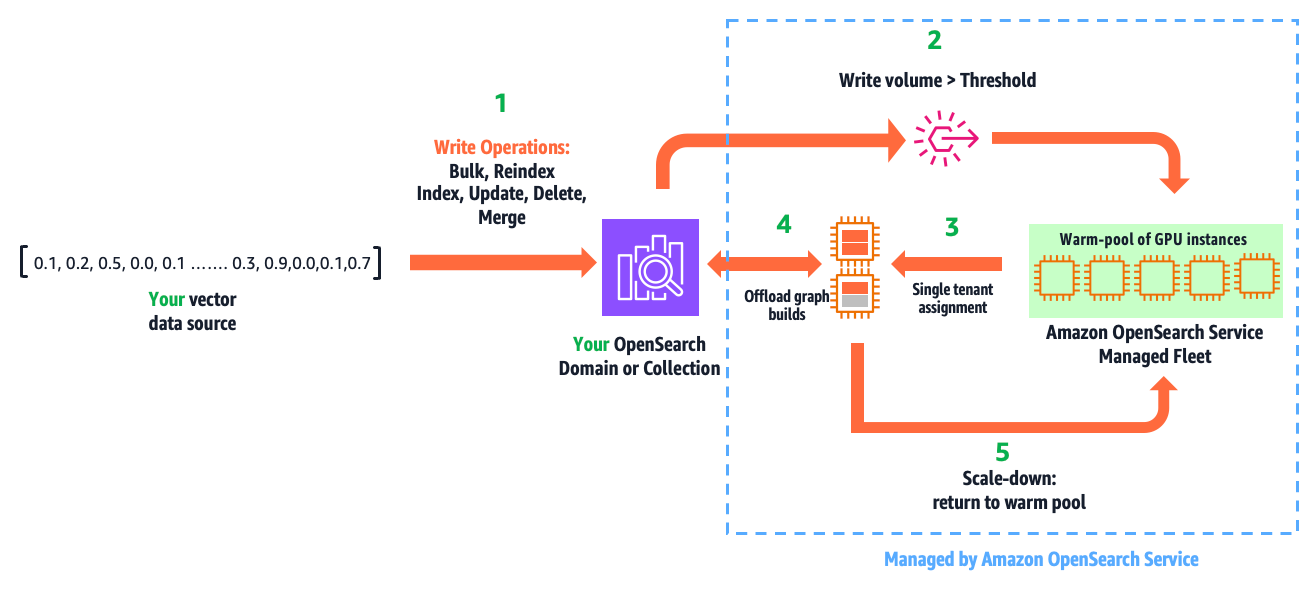
The following diagram illustrates how this feature works.

The workflow consists of the following steps:

  1. You write vectors into your domain or collection, using the existing APIs: bulk, reindex, index, update, delete, and force merge.
  2. GPU acceleration is activated when the indexed vector data surpasses a configured threshold within a refresh interval.
  3. This leads to a secure, single-tenant assignment of GPU servers to your cluster from a multi-tenant warm pool of GPUs managed by OpenSearch Service.
  4. Within milliseconds, OpenSearch Service initiates and offloads HNSW operations.
  5. When the write volume falls below the threshold, GPU servers are scaled down and returned to the warm pool.

This automation is fully managed. You only pay for acceleration time, which you can monitor from Amazon CloudWatch.

This feature isn’t just designed for ease of use. It enables GPU acceleration benefits without economic challenges. For example, a domain sized to host 1 billion (1,024 dimension) vectors compressed 32 times (using binary quantization) takes three r8g.12xlarge.search instances to provide the required 1.15 TBs of RAM. A design that requires running a domain on GPU instances, would need six g6.12xlarge instances to do the same, resulting in 2.4 times higher cost and excessive GPUs. This solution delivers efficiency by providing the right amount of GPUs only when you need them, so you gain speed with cost savings.

Use cases and benefits

This feature has three primary uses and benefits:

  • Build large-scale indexes faster, increasing productivity and innovation velocity
  • Reduce cost by lowering Amazon OpenSearch Serverless indexing OCU usage, or downsizing domains with write-heavy vector workloads
  • Accelerate writes, lower search latency, and improve user experience on your dynamic AI applications

In the following sections, we discuss these use cases in more detail.

Build large-scale indexes faster

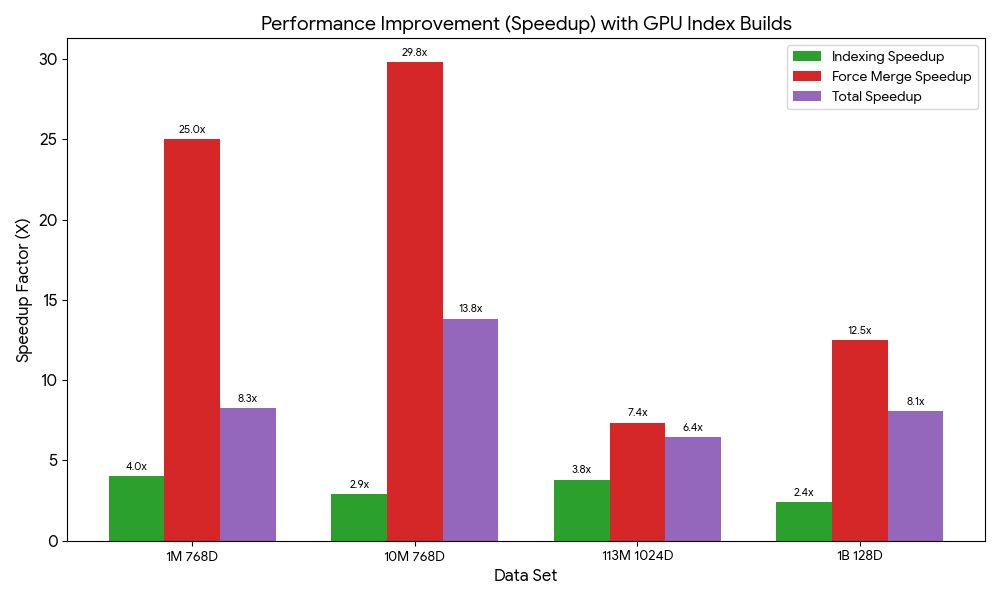
We benchmarked index builds for 1M, 10M, 113M, and 1B vector test cases to demonstrate speed gains on both domains and collections. Speed gains ranged from 6.4 to 13.8 times faster. These tests were performed with production configurations (Multi-AZ with replication) and default GPU service limits. All tests were run on right-sized search clusters, and the CPU-only tests had CPU utilization maxed exclusively for indexing. The following chart illustrates the relative speed gains from GPU acceleration on managed domains.

The total index build time on domains includes a force merge to optimize the underlying storage engine for search performance. During normal operation, merges are automatic. However, when benchmarking domains, we perform a manual merge after indexing to make sure merging impact is consistent across tests. The following table summarizes the index build benchmarks and dataset references for domains.

Dataset CPU-Only With GPU Improvements
Index (min) Force Merge (min) Index (min) Force Merge (min) Index Force Merge Total
Cohere Embed V2: 1M 768D Vectors generated from Wikipedia 32.0 50.0 7.9 2.0 4.1X 25.0X 8.3X
Cohere Embed V2: 10M 768D Vectors generated from Wikipedia 64.1 444.5 21.9 14.9 2.9X 29.8X 13.8X
Cohere Embed V3: 113M 1024D Vectors generated from MSMARCO v2.1 262.2 1460.4 68.9 198.6 3.8X 7.4X 6.4X
BigANN Benchmark (SIFT: 1B 128D Vectors generated from Flickr dataset) 251.6 1665.0 35.5 133.0 7.1 X 12.5X 11.4X

We ran the same performance tests on collections. The performance is different on OpenSearch Serverless because its serverless architecture involves performance trade-offs such as automatic scaling, which introduces a ramp-up to reach peak performance. The following table summarizes these results.

Dataset Changes to Default Settings Index Time (min) Improvements
CPU-Only With GPU
Cohere Embed V2: 1M 768D Vectors generated from Wikipedia 60 17.25 3.48X
Cohere Embed V2: 10M 768D Vectors generated from Wikipedia Minimum OCUs: 32 146 38 3.84X
Cohere Embed V3: 113M 1024D Vectors generated from MSMARCO v2.1 Minimum OCUs: 48 1092 294 3.71X
BigANN Benchmark (SIFT: 1B 128D Vectors generated from Flickr dataset) Minimum OCUs: 48 732 203 3.61X

OpenSearch Serverless doesn’t support force merge, so the full benefit from GPU acceleration might be delayed until the automatic background merges complete. The default minimum OCUs had to be increased for tests beyond 1 million vectors to handle higher indexing throughput.

Reduce cost

Our serverless GPU design uniquely delivers speed gains and cost savings. With OpenSearch Serverless, your net indexing costs will be reduced if you have indexing workloads that are significant enough to activate GPU acceleration. The following table presents the OCU usage and cost consumption usage from the previous index build tests.

Data Set Changes to Defaults CPU-only With GPU Less Cost
Total OCU/hrs. Cost
(OCU at $0.24/hr.)
Total OCU/hrs. Cost
(OCU at $0.24/hr.)
Cohere Embed V2: 1M 768D Vectors generated from Wikipedia 8 $1.92 1.5 $0.36 5.3X
Cohere Embed V2: 10M 768D Vectors generated from Wikipedia Minimum OCUs: 32 78 $18.72 20.3 $4.87 3.8X
Cohere Embed V3: 113M 1024D Vectors generated from MSMARCO v2.1 Minimum OCUs: 48 2721 $653.04 304.5 $73.08 8.9X
BigANN Benchmark (SIFT: 1B 128D Vectors generated from Flickr dataset) Minimum OCUs: 48 1562 $374.88 201 $48.24 7.8X

The vector acceleration OCUs offload and reduce indexing OCUs. The total OCU usage is less with GPU because the index is built more efficiently, resulting in cost savings.

With managed domains, cost savings are situational because search and indexing infrastructure isn’t decoupled like on OpenSearch Serverless. However, if you have a write-heavy, compute-bound vector search application (that is, your domain is sized for vCPUs to sustain write throughput), you could downsize your domain.

The following benchmarks demonstrate the efficiency gains from GPU acceleration. We measure the infrastructure costs during the indexing tasks. GPU acceleration has the additional cost of GPUs at $0.24 per OCU/hour. However, because indexes are built faster and more efficiently, it’s more economical to use GPU to reduce CPU utilization on your domain and downsize it.

Data Set CPU-only With GPU (OCU at $0.24/hr.) Less Cost
Index and Merge *Domain Cost during Index Build Index and Merge Total Costs during Index Build
Cohere Embed V2: 1M 768D Vectors generated from Wikipedia 1.4hr. $1.00 9.9 min $0.13 12.0X
Cohere Embed V2: 10M 768D Vectors generated from Wikipedia 8.5 hr. $37.82 36.8 min $3.10 12.2X
Cohere Embed V3: 113M 1024D Vectors generated from MSMARCO v2.1 28.7hr $712.47 4.5 hr. $121.70 5.9X
BigANN Benchmark (SIFT: 1B 128D Vectors generated from Flickr dataset) 31.9hr $1118.09 2.8 hr. $109.86 10.2X

*Domains are running a high-availability configuration without any cost-optimizations

Accelerate writes, lower search latency

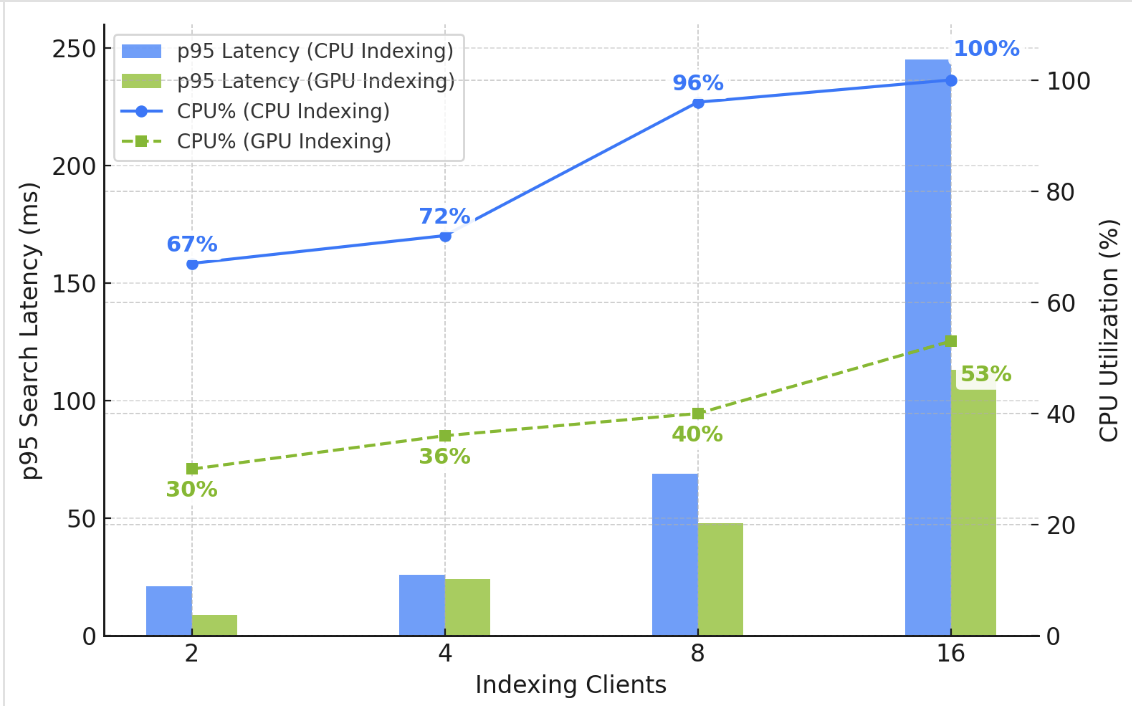
In experienced hands, domains offer operational control and the ability to achieve great scalability, performance, and cost optimizations. However, operational responsibilities include managing indexing and search workloads on shared infrastructure. If your vector deployment involves heavy, sustained streaming ingestion, updates, and deletes, you might observe higher search times on your domain. As illustrated in the following chart, as you increase vector writes, the CPU utilization increases to support HNSW graph building. Concurrent search latency also increases because of competition for compute and RAM resources.

You could solve the problem by adding data nodes to increase your domain’s compute capacity. However, enabling GPU acceleration is simpler and cheaper. As illustrated in the chart, GPU frees up CPU and RAM on your domain, helping you sustain low and stable search latency under high write throughput.

Get started

Ready to get started? If you already have an OpenSearch Service vector deployment, use the AWS Management Console, AWS Command Line Interface (AWS CLI), or API to enable GPU acceleration on your OpenSearch 3.1+ domain or vector collection. Test it with your existing indexing workloads. If you’re planning to build a new vector database, try out our new vector ingestion feature, which simplifies vector ingestion, indexing, and automates optimizations. Check out this demonstration on YouTube.


Acknowledgments

The authors would like to thank Manas Singh, Nathan Stephens, Jiahong Liu, Ben Gardner, and Zack Meeks from NVIDIA, and Yigit Kiran and Jay Deng from AWS for their contributions to this post.

About the authors

Authors would like to add special thanks to Manas Singh, Nathan Stephens, Jiahong Liu, Ben Gardner, Zack Meeks NVIDIA and Yigit Kiran and Jay Deng from AWS.

Dylan Tong

Dylan Tong

Dylan is a Senior Product Manager at Amazon Web Services. He leads the product initiatives for AI and machine learning (ML) on OpenSearch including OpenSearch’s vector database capabilities. Dylan has decades of experience working directly with customers and creating products and solutions in the database, analytics and AI/ML domain. Dylan holds a BSc and MEng degree in Computer Science from Cornell University.

Vamshi Vijay Nakkirtha

Vamshi Vijay Nakkirtha

Vamshi is a software engineering manager working on the OpenSearch Project and Amazon OpenSearch Service. His primary interests include distributed systems.

Navneet Verma

Navneet Verma

Navneet is a senior software engineer at AWS OpenSearch . His primary interests include machine learning, search engines and improving search relevancy. Outside of work, he enjoys playing badminton.

Aruna Govindaraju

Aruna Govindaraju

Aruna is an Amazon OpenSearch Specialist Solutions Architect and has worked with many commercial and open-source search engines. She is passionate about search, relevancy, and user experience. Her expertise with correlating end-user signals with search engine behavior has helped many customers improve their search experience.

Corey Nolet

Corey Nolet

Corey is a principal architect for vector search, data mining, and classical ML libraries at NVIDIA, where he focuses on building and scaling algorithms to support extreme data loads at light speed. Prior to joining NVIDIA in 2018, Corey spent many years building massive-scale exploratory data science & real-time analytics platforms for big data and HPC environments in the defense industry. Corey holds BS. & MS degrees in Computer Science. He is also completing his Ph.D. in the same discipline, focusing on accelerating algorithms at the intersection of graph and machine learning. Corey has a passion for using data to make better sense of the world.

Kshitiz Gupta

Kshitiz Gupta

Kshitiz is a Solutions Architect at NVIDIA. He enjoys educating cloud customers about the GPU AI technologies NVIDIA has to offer and assisting them with accelerating their machine learning and deep learning applications. Outside of work, he enjoys running, hiking, and wildlife watching.

Amazon OpenSearch Service launches flow builder to empower rapid AI search innovation

Post Syndicated from Dylan Tong original https://aws.amazon.com/blogs/big-data/amazon-opensearch-service-launches-flow-builder-to-empower-rapid-ai-search-innovation/

You can now access the AI search flow builder on OpenSearch 2.19+ domains with Amazon OpenSearch Service and begin innovating AI search applications faster. Through a visual designer, you can configure custom AI search flows—a series of AI-driven data enrichments performed during ingestion and search. You can build and run these AI search flows on OpenSearch to power AI search applications on OpenSearch without you having to build and maintain custom middleware.

Applications are increasingly using AI and search to reinvent and improve user interactions, content discovery, and automation to uplift business outcomes. These innovations run AI search flows to uncover relevant information through semantic, cross-language, and content understanding; adapt information ranking to individual behaviors; and enable guided conversations to pinpoint answers. Nonetheless, search engines are limited in native AI-enhanced search support, so builders develop middleware to complement search engines to fill in functional gaps. This middleware consists of custom code that runs data flows to stitch data transformations, search queries, and AI enrichments in varying combinations tailored to use cases, datasets, and requirements.

With the new AI search flow builder for OpenSearch, you have a collaborative environment to design and run AI search flows on OpenSearch. You can find the visual designer within OpenSearch Dashboards under AI Search Flows, and get started quickly by launching preconfigured flow templates for popular use cases like semantic, multimodal or hybrid search, and retrieval augmented generation (RAG). Through configurations, you can create customize flows to enrich search and index processes through AI providers like Amazon Bedrock, Amazon SageMaker, Amazon Comprehend, OpenAI, DeepSeek, and Cohere. Flows can be programmatically exported, deployed, and scaled on any OpenSearch 2.19+ cluster through OpenSearch’s existing ingest, index, workflow and search APIs.

In the remainder of the post, we’ll walk through a couple of scenarios to demonstrate the flow builder. First, we’ll enable semantic search on your old keyword-based OpenSearch application without client-side code changes. Next, we’ll create a multi-modal RAG flow, to showcase how you can redefine image discovery within your applications.

AI search flow builder key concepts

Before we get started, let’s cover some key concepts. You can use the flow builder through APIs or a visual designer. The visual designer is recommended for helping you manage workflow projects. Each project contains at least one ingest or search flow. Flows are a pipeline of processor resources. Each processor applies a type of data transform such as encoding text into vector embeddings, or summarizing search results with a chatbot AI service.

Ingest flows are created to enrich data as it’s added to an index. They consist of:

  1. A data sample of the documents you want to index.
  2. A pipeline of processors that apply transforms on ingested documents.
  3. An index constructed from the processed documents.

Search flows are created to dynamically enrich search request and results. They consist of:

  1. A query interface based on the search API, defining how the flow is queried and ran.
  2. A pipeline of processors that transform the request context or search results.

Generally, the path from prototype to production starts with deploying your AI connectors, designing flows from a data sample, then exporting your flows from a development cluster to a preproduction environment for testing at-scale.

Scenario 1: Enable semantic search on an OpenSearch application without client-side code changes

In this scenario, we have a product catalog that was built on OpenSearch a decade ago. We aim to improve its search quality, and in turn, uplift purchases. The catalog has search quality issues, for instance, a search for “NBA,” doesn’t surface basketball merchandise. The application is also untouched for a decade, so we aim to avoid changes to client-side code to reduce risk and implementation effort.

A solution requires the following:

  • An ingest flow to generate text embeddings (vectors) from text in an existing index.
  • A search flow that encodes search terms into text embeddings, and dynamically rewrites keyword-type match queries into a k-NN (vector) query to run a semantic search on the encoded terms. The rewrite allows your application to transparently run semantic-type queries through keyword-type queries.

We will also evaluate a second-stage reranking flow, which uses a cross-encoder to rerank results as it can potentially boost search quality.

We’ll accomplish our task through the flow builder. We begin by navigating to AI Search Flows in the OpenSearch Dashboard, and selecting Semantic Search from the template catalog.

image of the flow template catalog.

This template requires us to select a text embedding model. We’ll use Amazon Bedrock Titan Text, which was deployed as a prerequisite. Once the template is configured, we enter the designer’s main interface. From the preview, we can see that the template consists of a preset ingestion and search flow.

image of the visual flow designer.

The ingest flow requires us to provide a data sample. Our product catalog is currently served by an index containing the Amazon product dataset, so we import a data sample from this index.

importing a data sample from an existing index.

The ingest flow includes a ML Inference Ingest Processor, which generates machine learning (ML) model outputs such as embeddings (vectors) as your data is ingested into OpenSearch. As previously configured, the processor is set to use Amazon Titan Text to generate text embeddings. We map the data field that holds our product descriptions to the model’s inputText field to enable embedding generation.

Configuring the ML Inference Ingest Processor to generate text embeddings.

We can now run our ingest flow, which builds a new index containing our data sample embeddings. We can inspect the index’s contents to confirm that the embeddings were successfully generated.

Inspect your new index and embeddings from the flow designer.

Once we have an index, we can configure our search flow. We’ll start with updating the query interface, which is preset to a basic match query. The placeholder my_text has to be replaced with the product descriptions. With this update, our search flow can now respond to queries from our legacy application.

Update the search flow’s query interface

The search flow includes an ML Inference Search Processor. As previously configured, it’s set to use Amazon Titan Text. Since it’s added under Transform query, it’s applied to query requests. In this case, it will transform search terms into text embeddings (a query vector). The designer lists the variables from the query interface, allowing us to map the search terms (query.match.text.query), to the model’s inputText field. Text embeddings will now be generated from the search terms whenever our index is queried.

Configure a ML Inference Search Processor to generate query vectors.

Next, we update the query rewrite configurations, which is preset to rewrite the match query into a k-NN query. We replace the placeholder my_embedding with the query field assigned to your embeddings. Note that we could rewrite this to another query type, including a hybrid query, which may improve search quality.

Configure a query rewrite.

Let’s compare our semantic and keyword solutions from the search comparison tool. Both solutions are able to find basketball merchandise when we search for “basketball.”

Keyword versus semantic search results on the term “basketball”.

But what happens if we search for “NBA?” Only our semantic search flow returns results because it detects the semantic similarities between “NBA” and “basketball.”

Keyword versus semantic search results on the term “NBA”.

We’ve managed improvements, but we might be able to do better. Let’s see if reranking our search results with a cross-encoder helps. We’ll add a ML Inference Search Processor under Transform response, so that the processor applies to search results, and select Cohere Rerank. From the designer, we see that Cohere Rerank requires a list of documents and the query context as input. Data transformations are needed to package the search results into a format that can be processed by Cohere Rerank. So, we apply JSONPath expressions to extract the query context, flatten data structures, and pack the product descriptions from our documents into a list.

configure a ML Inference Search Processor with a reranker and apply JSONPath expressions.

Let’s return to the search comparison tool to compare our flow variations. We don’t observe any meaningful difference in our previous search for “basketball” and “NBA.” However, improvements are observed when we search, “hot weather.” On the right, we see that the second and fifth search hit moved 32 and 62 spots up, and returned “sandals” that are well suited for “hot weather.”

Reranked search results for “hot weather” demonstrate search quality gains.

We’re ready to proceed to production, so we export our flows from our development cluster into our preproduction environment, use the workflow APIs to integrate our flows into automations, and scale our test processes through the bulk, ingest and search APIs.

Scenario 2: Use generative AI to redefine and elevate image search

In this scenario, we have photos of millions of fashion designs. We’re looking for a low-maintenance image search solution. We will use generative multimodal AI to modernize image search, eliminating the need for labor to maintain image tags and other metadata.

Our solution requires the following:

  • An ingest flow which uses a multimodal model like Amazon Titan Multimodal Embeddings G1 to generate image embeddings.
  • A search flow which generates text embeddings with a multimodal model, runs a k-NN query for text to image matching, and sends matching images to a generative model like Anthropic’s Claude Sonnet 3.7 that can operate on text and images.

We’ll start from the RAG with Vector Retrieval template. With this template, we can quickly configure a basic RAG flow. The template requires an embedding and large language model (LLM) that can process text and image content. We use Amazon Bedrock Titan Multimodal G1 and Anthropic’s Claude Sonnet 3.7, respectively.

From the designer’s preview panel, we can see similarities between this template and the semantic search template. Again, we seed the ingest flow with a data sample. Like the previous example, we use the Amazon product dataset except we replace the production descriptions with base64 encoded images because our models require base64 images, and this solution doesn’t require text. We map the base64 image data to the corresponding Amazon Titan G1 inputs to generate embeddings. We then run our ingest flow and confirm that our index contains base64 images and corresponding embeddings.

Ingest flow creates a new index containing base64 images and corresponding embeddings.

The initial steps for configuring this search flow are similar to the previous scenario: we update the query interface, map the query text fields to the model inputs for the ML Inference Search Processor, and revise the query rewrite settings. The main difference with this flow is the additional response processor set to use Anthropic’s Claude Sonnet 3.7 to process images.

We need to configure an LLM prompt that includes the query context and instructions for the LLM to play the role of a fashion advisor, and provide commentary about the image payload.

configure a LLM prompt to generate commentary for product images.

Next, we map the prompt and the base64 image data field to the model’s inputs accordingly.

Configure the ML Inference Search Processor to process search results with Anthropic Claude Sonnet 3.7.

Let’s test our multimodal RAG flow by searching for “sunset colored dresses.” We observe the following results.

This beautiful dress perfectly captures the essence of a sunset with its gorgeous ombre color gradient. Starting with a soft peachy pink at the top, it transitions into a vibrant orange in the middle, and finishes with a bright yellow at the hem – just like the colors of the sky as the sun dips below the horizon. The dress features a simple, casual silhouette with short cap sleeves and appears to have a comfortable, relaxed fit that would flatter many body types. The tie-dye effect gives it a bohemian, carefree vibe that’s perfect for summer outings, beach vacations, or casual evening events. I recommend this sunset-colored dress because it’s eye-catching, versatile, and embodies that magical sunset glow that can brighten any occasion. The colors would complement warm skin tones particularly well, and you could easily dress it up with gold accessories or keep it casual with simple sandals.
This vibrant tie-dye dress perfectly captures the essence of a sunset with its beautiful gradient of colors. The dress features bands of golden yellow, fiery orange, and rich pink that blend together seamlessly, reminiscent of the sky at dusk. The strapless design showcases the shoulders elegantly, while the gathered waist creates a flattering silhouette that flows into a comfortable, knee-length skirt. This dress would be an excellent choice for summer events, beach vacations, or casual outings. The sunset color palette is not only on-trend but also versatile enough to pair with neutral accessories. I recommend this piece for its eye-catching colors, comfortable fit, and the way it embodies the warm, relaxed feeling of watching a beautiful sunset.

Without any image metadata, OpenSearch finds images of sunset-colored dresses, and responds with accurate and colorful commentary.

Conclusion

The AI search flow builder is available in all AWS Regions that support OpenSearch 2.19+ on OpenSearch Service. To learn more, refer to Building AI search workflows in OpenSearch Dashboards, and the available tutorials on GitHub, which demonstrate how to integrate various AI models from Amazon Bedrock, SageMaker, and other AWS and third-party AI services.


About the authors

Dylan Tong is a Senior Product Manager at Amazon Web Services. He leads the product initiatives for AI and machine learning (ML) on OpenSearch including OpenSearch’s vector database capabilities. Dylan has decades of experience working directly with customers and creating products and solutions in the database, analytics and AI/ML domain. Dylan holds a BSc and MEng degree in Computer Science from Cornell University.

Tyler Ohlsen is a software engineer at Amazon Web Services focusing mostly on the OpenSearch Anomaly Detection and Flow Framework plugins.

Mingshi Liu is a Machine Learning Engineer at OpenSearch, primarily contributing to OpenSearch, ML Commons and Search Processors repo. Her work focuses on developing and integrating machine learning features for search technologies and other open-source projects.

Ka Ming Leung (Ming) is a Senior UX designer at OpenSearch, focusing on ML-powered search developer experiences as well as designing observability and cluster management features.

OpenSearch Vector Engine is now disk-optimized for low cost, accurate vector search

Post Syndicated from Dylan Tong original https://aws.amazon.com/blogs/big-data/opensearch-vector-engine-is-now-disk-optimized-for-low-cost-accurate-vector-search/

OpenSearch Vector Engine can now run vector search at a third of the cost on OpenSearch 2.17+ domains. You can now configure k-NN (vector) indexes to run on disk mode, optimizing it for memory-constrained environments, and enable low-cost, accurate vector search that responds in low hundreds of milliseconds. Disk mode provides an economical alternative to memory mode when you don’t need near single-digit latency.

In this post, you’ll learn about the benefits of this new feature, the underlying mechanics, customer success stories, and getting started.

Overview of vector search and the OpenSearch Vector Engine

Vector search is a technique that improves search quality by enabling similarity matching on content that has been encoded by machine learning (ML) models into vectors (numerical encodings). It enables use cases like semantic search, allowing you to consider context and intent along with keywords to deliver more relevant searches.

OpenSearch Vector Engine enables real-time vector searches beyond billions of vectors by creating indexes on vectorized content. You can then run searches for the top K documents in an index that are most similar to a given query vector, which could be a question, keyword, or content (such as an image, audio clip, or text) that has been encoded by the same ML model.

Tuning the OpenSearch Vector Engine

Search applications have varying requirements in terms of speed, quality, and cost. For instance, ecommerce catalogs require the lowest possible response times and high-quality search to deliver a positive shopping experience. However, optimizing for search quality and performance gains generally incurs cost in the form of additional memory and compute.

The right balance of speed, quality, and cost depends on your use cases and customer expectations. OpenSearch Vector Engine provides comprehensive tuning options so you can make smart trade-offs to achieve optimal results tailored to your unique requirements.

You can use the following tuning controls:

  • Algorithms and parameters – This includes the following:
    • Hierarchical Navigable Small World (HNSW) algorithm and parameters like ef_search, ef_construct, and m
    • Inverted File Index (IVF) algorithm and parameters like nlist and nprobes
    • Exact k-nearest neighbors (k-NN), also known as brute-force k-NN (BFKNN) algorithm
  • Engines – Facebook AI Similarity Search (FAISS), Lucene, and Non-metric Space Library (NMSLIB).
  • Compression techniques – Scalar (such as byte and half precision), binary, and product quantization
  • Similarity (distance) metrics – Inner product, cosine, L1, L2, and hamming
  • Vector embedding types – Dense and sparse with variable dimensionality
  • Ranking and scoring methods – Vector, hybrid (combination of vector and Best Match 25 (BM25) scores), and multi-stage ranking (such as cross-encoders and personalizers)

You can adjust a combination of tuning controls to achieve a varying balance of speed, quality, and cost that is optimized to your needs. The following diagram provides a rough performance profiling for sample configurations.

Tuning for disk-optimization

With OpenSearch 2.17+, you can configure your k-NN indexes to run on disk mode for high-quality, low-cost vector search by trading in-memory performance for higher latency. If your use case is satisfied with 90th percentile (P90) latency in the range of 100–200 milliseconds, disk mode is an excellent option for you to achieve cost savings while maintaining high search quality. The following diagram illustrates disk mode’s performance profile among alternative engine configurations.

Disk mode was designed to run out of the box, reducing your memory requirements by 97% compared to memory mode while providing high search quality. However, you can tune compression and sampling rates to adjust for speed, quality, and cost.

The following table presents performance benchmarks for disk mode’s default settings. OpenSearch Benchmark (OSB) was used to run the first three tests, and VectorDBBench (VDBB) was used for the last two. Performance tuning best practices were applied to achieve optimal results. The low scale tests (Tasb-1M and Marco-1M) were run on a single r7gd.large data node with one replica. The other tests were run on two r7gd.2xlarge data nodes with one replica. The percent cost reduction metric is calculated by comparing an equivalent, right-sized in-memory deployment with the default settings.

Datasets Recall@100 (Search Quality) p90 Latency (ms) Dimensions Vector Count (millions) % Cost Reduction Model Source
Cohere TREC-RAG 0.94 104 1024 113 67% Cohere Embed V3 preprocessed
Tasb-1M 0.96 7 768 1 83% msmacro-distilbert-base-tas-b unprocessed
Marco-1M 0.99 7 768 1 67% msmarco-distilbert unprocessed
OpenAI 5M 0.98 62 1536 5 67% text-embedding-ada-002 generated
LAION 100M 0.93 169 768 100 67% CLIP generated

These tests are designed to demonstrate that disk mode can deliver high search quality with 32 times compression across a variety of datasets and models while maintaining our target latency (under P90 200 milliseconds). These benchmarks aren’t designed for evaluating ML models. A model’s impact on search quality varies with multiple factors, including the dataset.

Disk mode’s optimizations under the hood

When you configure a k-NN index to run on disk mode, OpenSearch automatically applies a quantization technique, compressing vectors as they’re loaded to build a compressed index. By default, disk mode converts each full-precision vector—a sequence of hundreds to thousands of dimensions, each stored as 32-bit numbers—into binary vectors, which represent each dimension as a single-bit. This conversion results in a 32 times compression rate, enabling the engine to build an index that is 97% smaller than one composed of full-precision vectors. A right-sized cluster will keep this compressed index in memory.

Compression lowers cost by reducing the memory required by the vector engine, but it sacrifices accuracy in return. Disk mode recovers accuracy, and therefore search quality, using a two-step search process. The first phase of the query execution begins by efficiently traversing the compressed index in memory for candidate matches. The second phase uses these candidates to oversample corresponding full-precision vectors. These full-precision vectors are stored on disk in a format designed to reduce I/O and optimize disk retrieval speed and efficiency. The sample of full-precision vectors is then used to augment and re-score matches from phase one (using exact k-NN), thereby recovering the search quality loss attributed to compression. Disk mode’s higher latency relative to memory mode is attributed to this re-scoring process, which requires disk access and additional computation.

Early customer successes

Customers are already running the vector engine in disk mode. In this section, we share testimonials from early adopters.

Asana is improving search quality for customers on their work management platform by phasing in semantic search capabilities through OpenSearch’s vector engine. They initially optimized the deployment by using product quantization to compress indexes by 16 times. By switching over to the disk-optimized configurations, they were able to potentially reduce cost by another 33% while maintaining their search quality and latency targets. These economics make it viable for Asana to scale to billions of vectors and democratize semantic search throughout their platform.

DevRev bridges the fundamental gap in software companies by directly connecting customer-facing teams with developers. As an AI-centered platform, it creates direct pathways from customer feedback to product development, helping over 1,000 companies accelerate growth with accurate search, fast analytics, and customizable workflows. Built on large language models (LLMs) and Retrieval Augmented Generation (RAG) flows running on OpenSearch’s vector engine, DevRev enables intelligent conversational experiences.

“With OpenSearch’s disk-optimized vector engine, we achieved our search quality and latency targets with 16x compression. OpenSearch offers scalable economics for our multi-billion vector search journey.”

– Anshu Avinash, Head of AI and Search at DevRev.

Get started with disk mode on the OpenSearch Vector Engine

First, you need to determine the resources required to host your index. Start by estimating the memory required to support your disk-optimized k-NN index (with the default 32 times compression rate) using the following formula:

Required memory (bytes) = 1.1 x ((vector dimension count)/8 + 8 x m) x (vector count)

For instance, if you use the defaults for Amazon Titan Text V2, your vector dimension count is 1024. Disk mode uses the HNSW algorithm to build indexes, so “m” is one of the algorithm parameters, and it defaults to 16. If you build an index for a 1-billion vector corpus encoded by Amazon Titan Text, your memory requirements are 282 GB.

If you have a throughput-heavy workload, you need to make sure your domain has sufficient IOPs and CPUs as well. If you follow deployment best practices, you can use instance store and storage performance optimized instance types, which will generally provide you with sufficient IOPs. You should always perform load testing for high-throughput workloads, and adjust the original estimates to accommodate for higher IOPs and CPU requirements.

Now you can deploy an OpenSearch 2.17+ domain that has been right-sized to your needs. Create your k-NN index with the mode parameter set to on_disk, and then ingest your data. If you already have a k-NN index running on the default in_memory mode, you can convert it by switching the mode to on_disk followed by a reindex task. After the index is rebuilt, you can downsize your domain accordingly.

Conclusion

In this post, we discussed how you can benefit from running the OpenSearch Vector Engine on disk mode, shared customer success stories, and provided you tips on getting started. You’re now set to run the OpenSearch Vector Engine at as low as a third of the cost.

To learn more, refer to the documentation.


About the Authors

Dylan Tong is a Senior Product Manager at Amazon Web Services. He leads the product initiatives for AI and machine learning (ML) on OpenSearch including OpenSearch’s vector database capabilities. Dylan has decades of experience working directly with customers and creating products and solutions in the database, analytics and AI/ML domain. Dylan holds a BSc and MEng degree in Computer Science from Cornell University.

Vamshi Vijay Nakkirtha is a software engineering manager working on the OpenSearch Project and Amazon OpenSearch Service. His primary interests include distributed systems.