Post Syndicated from Lennart Poettering original https://0pointer.net/blog/projects/polypaudio-rfp.html
I opened an RFP for Polypaudio 0.9.0 in the Debian BTS. Anyone interested?
Update: We have found a volunteer in Franz Pletz.
Post Syndicated from Lennart Poettering original https://0pointer.net/blog/projects/polypaudio-rfp.html
I opened an RFP for Polypaudio 0.9.0 in the Debian BTS. Anyone interested?
Update: We have found a volunteer in Franz Pletz.
Post Syndicated from Lennart Poettering original https://0pointer.net/blog/projects/polypaudio-0.9.0.html
We are proud to announce Polypaudio
0.9.0. This is a major step ahead since we decided to freeze the
current API. From now on we will maintain API compability (or at least
try to). To emphasize this starting with this release the shared
library sonames are properly versioned. While Polypaudio 0.9.0 is not
API/ABI compatible with 0.8 it is protocol compatible.
Other notable changes beyond bug fixing, bug fixing and bug fixing
are: a new Open Sound System /dev/dsp wrapper named
padsp and a module module-volume-restore have been
added.
padsp works more or less like that ESOUND tool known as
esddsp. However, it is much cleaner in design and thus works
with many more applications than the original tool. Proper locking is
implemented which allows it to work in multithreaded applications. In
addition to mere /dev/dsp emulation it wraps
/dev/sndstat and /dev/mixer. Proper synchronization
primitives are also available, which enables lip-sync movie playback
using padsp on mplayer. Other applications that are
known to work properly with padsp are aumix,
libao, XMMS, sox. There are some things
padsp doesn’t support (yet): that’s most notably recording,
and mmap() wrapping. Recording will be added in a later
version. mmap() support is available in esddsp but
not in padsp. I am reluctant to add support for this, because
it cannot work properly when it comes to playback latency
handling. However, latency handling this the primary reasoning for
using mmap(). In addition the hack that is included in
esddsp works only for Quake2 and Quake3, both being Free
Software now. It probably makes more sense to fix those two games than
implementing a really dirty hack in padsp. Remember that you
can always use the original esddsp tools since Polypaudio
offers full protocol compatibility with ESOUND.
module-volume-restore is a small module that stores the
volume of all playback streams and restores them when the applications
which created them creates a new stream. If this module is loaded,
Polypaudio will make sure that you Gaim sounds are always played at
low volume, while your XMMS music is always played at full volume.
Besides the new release of Polypaudio itself we released a bunch of
other packages to work with the new release:
A screenshot showing most of this in action:
 .
.
This screenshot shows: the Polypaudio Manager, the Polypaudio
Volume Control, the Polypaudio Volume Meter, the XMMS plugin, the
GStreamer plugin used by Rhythmbox and gstreamer-properties,
pacat playing some noise from /dev/urandom,
padsp used on MPlayer. (This screenshot actually shows some
post-0.9.0 work, like the icons used by the application windows)
Post Syndicated from Lennart Poettering original https://0pointer.net/blog/projects/howl.html
Scott Herscher decided to cease development of HOWL.
That means only Avahi and Bonjour are left as
widely known mDNS/DNS-SD implementations.
Scott, your work on HOWL has not been in vain. Many Linux/Free Software
people (including me) learned to know Zeroconf with your software. Without the
troubles surrounding the licensing, I would never have started what is now
known as Avahi, and HOWL would still be the number one of the Linux mDNS/DNS-SD
implementations.
The HOWL legacy will live on, since Avahi includes a HOWL compatibility layer which will be kept around for a while.
A year and a few weeks ago Trent and I decided to merge our efforts and
form Avahi from our seperate works. I wonder how much time it will take us
until we see a similar R.I.P. note from the Bonjour camp, on our route to
AVAHI WORLD DOMINATION. 😉
In contrast to what Scott wrote in his announcement, Avahi is far from being
strictly Linux. Avahi has been ported to FreeBSD, OpenBSD, MacOSX and recently
(not yet official) Solaris. (However, he’s right with what he writes
about me.)
Post Syndicated from Lennart Poettering original https://0pointer.net/blog/photos/dockland.html
The “Dockland” in Hamburg-Altona:

Post Syndicated from Lennart Poettering original https://0pointer.net/blog/projects/pavucontrol.html
The result of a few hours of hacking:
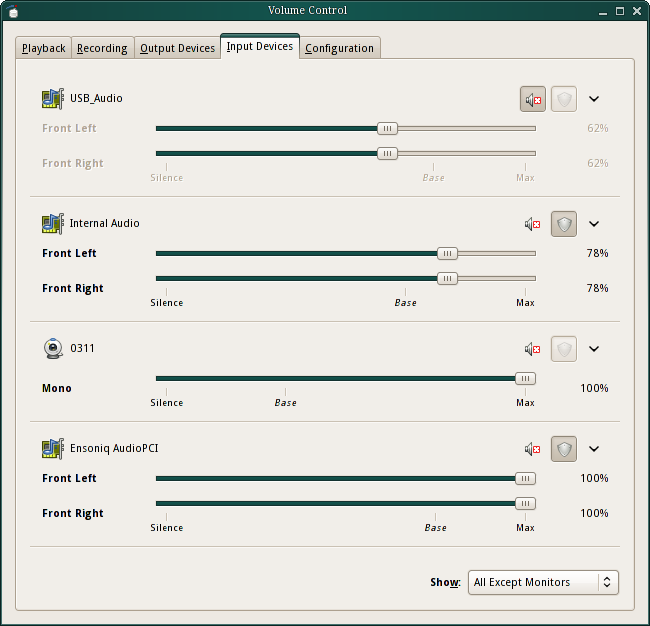
pavucontrol cannot only control the volume of hardware devices of the Polypaudio sound server but also of all playback streams seperately, much like the new Windows Vista volume control application.
Get the Polypaudio Volume Control while it is hot.
On a side note I released updated versions of both the Polypaudio Volume Meter and the Polypaudio Manager which are compatible with Polypaudio 0.8.
Post Syndicated from Lennart Poettering original https://0pointer.net/blog/projects/polypaudio-0.8.html
The reports of Polypaudio’s death are greatly exaggerated.
We are proud to announce the release of Polypaudio
0.8, our networked sound daemon for Linux, other Unix-like operating
systems, and Microsoft Windows. Since the last official release, 0.7,
more than a year has passed. In the meantime Polypaudio experienced
major improvements. Major contributions have been made by both Pierre
Ossman and me. Pierre is being payed by Cendio AB to work on
Polypaudio. Cendio distributes Polypaudio along with their ThinLinc Terminal
Server.
Some of the major changes:
Sounds good, doesn’t it? But that’s not all!
We’re really excited about this new Polypaudio release. However,
there are more very exciting, good news in the Polypaudio world. Pierre
implemented a Polypaudio plugin for alsa-libs. This means you
may now use any ALSA-aware application to access a Polypaudio sound
server! The patch has already merged upstream, and will probably
appear in the next official release of alsa-plugins.
Due to the massive internal changes we had to make a lot of modifications to
the public API. Hence applications which currently make use of the Polypaudio
0.7 API need to be updated. The patches or packages I maintain will be updated
in the next weeks one-by-one. (That is: xmms-polyp, the MPlayer patch, the
libao patch, the GStreamer patch and the PortAudio patch)
A side note: I wonder what this new release means for Polypaudio in
Debian. I’ve never been informed by the Debian maintainers of
Polypaudio that it has been uploaded to Debian, and never of the
removal either. In fact I never exchanged a single line with those who
were the Debian maintainers of Polypaudio. Is this the intended way
how the Debian project wants its developers to communicate with
upstream? I doubt that!
Polypaudio does everything what ESOUND does, and much more. It is a
fully compatible drop-in replacement. With a small script you can make
it command line compatible (including autospawning). ESOUND clients
may connect to our daemon just like they did to the original ESOUND
daemon, since we implemented a compatibility module for the ESOUND
protocol.
Support for other well known networked audio protocols (such as
NAS) should be easy to add – if there is a need.
For a full list of the features that Polypaudio has over ESOUND,
see Polypaudio’s
homepage.
Some people might ask whether there still is a need for a sound
server in times where ALSA’s dmix plugin is available. The
answer is: yes!
Firstly, Polypaudio is networked, which dmix is
not. However, there are many reasons why Polypaudio is useful on
non-networked systems as well. Polypaudio is portable, it is available
not just for Linux but for FreeBSD, Solaris and even Microsoft
Windows. Polypaudio is extensible, there is broad range of additional
modules available which allow the user to use Polypaudio in many
exciting ways ALSA doesn’t offer. In Polypaudio streams, devices and
other server internals can be monitored and introspected freely. The
volume of the multiple streams may be manipulated independently of
each other, which allows new exciting applications like a work-alike
of the new per-application mixer tool featured in upcoming Windows
Vista. In multi-user systems, Polypaudio offers a secure and safe way
to allow multiple users to access the sound device
simultaneously. Polypaudio may be accessed through the ESOUND and the
ALSA APIs. In addition, ALSA dmix is still not supported properly by
many ALSA clients, and is difficult to setup.
A side node: dmix forks off its own simple sound daemon
anyway, hence there is no big difference to using Polypaudio with the
ALSA plugin in auto-spawning mode. (Though admittedly, those ALSA
clients that don’t work properly with dmix, won’t do so with our ALSA
plugin as well since they actually use the ALSA API incorrectly.)
Everytime people discuss sound servers on Unix/Linux and which way
is the right to go for desktops, JACK gets mentioned and suggested by some as a
replacement for ESOUND for the desktop. However, this is not
practical. JACK is not intended to be a desktop sound server, instead
it is designed for professional audio in mind. Its semantics are
different from other sound servers: e.g. it uses exclusively floating
point samples, doesn’t deal directly with interleaved channels and
maintains a server global time-line which may be stopped and seeked
around. All that translates badly to desktop usages. JACK is really
nice software, but just not designed for the normal desktop user,
who’s not working on professional audio production.
Since we think that JACK is really a nice piece of work, we added
two new modules to Polypaudio which can be used to hook it up to a
JACK server.
Get Polypaudio 0.8, while it is hot!
BTW: We’re looking for a logo for Polypaudio. Feel free to send us your suggestions!
Update: The Debian rant is unjust to Jeff Waugh. In fact, he had informed me that he prepared Debian packages of Polypaudio. I just never realized that he had actually uploaded them to Debian. What still stands, however, is that I’ve not been informed or asked about the removal.
Post Syndicated from Lennart Poettering original https://0pointer.net/blog/photos/stintfang.html
The result of stitching six photos together with Hugin, autopano-sift, and enblend:

The St.-Pauli-Landungsbrücken with the Queen Mary 2 in the drydock, Hamburg, Germany in November 2005. Photographed from the Stintfang. The full image has a size of 9256×2240.
Post Syndicated from Lennart Poettering original https://0pointer.net/blog/photos/2alpes.html
The result of stitching 16 photos together with Hugin, autopano-sift, and enblend:

The Massif du Soreiller with the Aiguille du Plat de la Selle near Les Deux Alpes, France. Photographed from the Dôme de Puy Salié. The full image has a size of 14443×2156. More pictures from Les Deux Alpes.
Post Syndicated from Lennart Poettering original https://0pointer.net/blog/projects/s270ctrl.html
In response to mjg59‘s rant about
controlling the LCD brightness on laptops, I invested some time to
reverse engineer the Windows driver of my MSI S270 laptop
which implements changing LCD brightness. It requires some ugly
fiddling with registers of the “embedded controller” on ports 0x62 and
0x66. The result of my work is s270ctrl, a
small userspace utility. I’m planning to turn this into a proper
kernel module soon.
Post Syndicated from Lennart Poettering original https://0pointer.net/blog/projects/avahi-linuxmag.html
If you have access to the current issue (03/06) of the german
Linux Magazin make sure to read the two extensive articles about
Avahi (p.64 and p.90). Daniel S. Haischt wrote the second article, I
wrote the other. Both are a worthy read!
Post Syndicated from Lennart Poettering original https://0pointer.net/blog/projects/mod-dnssd-debian.html
Due to the great work of Sebastien Estienne there are now Debian
packages of mod_dnssd
and mod_mime_xattr
available from my little Debian
package repository. They’ve been uploaded to Ubuntu as well, but
we are still looking for some Debian developer who would be willing to
upload them to Debian proper. Feel free to contact me if you are interested!
Post Syndicated from Lennart Poettering original https://0pointer.net/blog/photos/pack-ice.html
It has been pretty cold in Hamburg the last days. There’s now a thick but holey ice cover on the Elbe river:

Post Syndicated from Lennart Poettering original https://0pointer.net/blog/projects/mod-mime-xattr.html
I updated my little Apache module mod_mime_xattr to be compatible with Apache 2.0.
What is it useful for? Linux (2.4 with patch, 2.6 out-of-the-box) has been supporting extended attributes for files (EAs) for ages, but very few applications use them. To change that I wrote a small module for Apache which interpretes the EA user.mime_type and uses its value as MIME type for all files served by Apache. The EA has been standardized by the XDG MIME system, but apparently neither Gnome nor KDE support it right now.
Usage of mod_mime_xattr is simple. To enable interpretation of the EA on the entire tree use something like this in your Apache configuration file:
<Directory />
XAttrMimeType On
</Directory>
That’s all that is required to make use of user.mime_type on all files where it is set. To set the EA use a command like this one:
setfattr -n "user.mime_type" -v "text/html" foo.txt
And foo.txt will become a file with the MIME type of text/html, although its suffix is .txt!
Post Syndicated from Lennart Poettering original https://0pointer.net/blog/projects/mod_dnssd.html
The first release of mod_dnssd is now available. It adds DNS-SD based Zeroconf support to Apache 2.0 using Avahi.
This work has been inspired by Sander Temme’s and Sebastien Estienne’s mod_zeroconf module, but supersedes it in every way. MacOSX ships with mod_rendezvous/mod_bonjour, but mod_dnssd is much more powerful than this piece of software as well. In short: mod_dnssd is definitely the greatest way to add Zeroconf support to Apache available today.
A few examples just to show how great mod_dnssd is:
DNSSDEnable On
This is everything you need to enable DNS-SD support in Apache after loading the module. It will publish all virtual hosts and all existing mod_userdir directories (i.e. ~/public_html) as services of type _http._tcp.
In case you want to publish some subdirectory of the web server as service, just place DNSSDServiceName inside a <Location> section for that path:
<Location /foobar>
	DNSSDServiceName "A special service called foobar"
</Location>
You can even use it to publish WebDAV shares using Apache’s mod_dav module:
<Location /webdav>
	Dav On
	DNSSDServiceName "A WebDAV folder"
	DNSSDServiceTypes _webdav._tcp
</Location>
This especially cool since we now have a free software server counterpart for Gnome’s and KDE’s WebDAV client functionality.
Or to publish your blog as RSS service:
<Location /blog.cgi?rss>
	DNSSDServiceName "The blog"
	DNSSDServiceTypes _rss._tcp
</Location>
Post Syndicated from Lennart Poettering original https://0pointer.net/blog/projects/avahi-0.6.3.html
A few days ago we relased Avahi 0.6.3. This is an important bugfix release, everyone should update as soon as possible.
Avahi now has its own domain avahi.org and finally has a logo, thanks to the great work of Mathieu Drouet:

Avahi has moved from Debian
Experimental to Unstable. Ubuntu moved
it from Universe to Main since it successfully passed their security
auditing. The Fedora
Core development distribution contains it too, as does SuSE‘s
and Gentoo‘s. But
where’s Mandriva? Apparently they are considering
it, for whatever it is worth. FreeBSD Ports has it
too. I guess this means that Avahi has now been accepted by all major
distributions. Hurrah!
Post Syndicated from Lennart Poettering original https://0pointer.net/blog/photos/winter.html
Impressions of the winter in Val Thorens, Savoie, France and in Hamburg, Germany:


Post Syndicated from Lennart Poettering original https://0pointer.net/blog/projects/mandelbrot.html
It’s impressing how easy it is to draw fractals with Python. Using the ubercool Python Imaging Library and native complex number support in Python you can code an elaborate and easy to understand fractal generator in less than 50 lines of code:
#!/usr/bin/python
import Image, ImageDraw, math, colorsys

dimensions = (800, 800)
scale = 1.0/(dimensions[0]/3)
center = (2.2, 1.5)       # Use this for Mandelbrot set
#center = (1.5, 1.5)       # Use this for Julia set
iterate_max = 100
colors_max = 50

img = Image.new("RGB", dimensions)
d = ImageDraw.Draw(img)

# Calculate a tolerable palette
palette = [0] * colors_max
for i in xrange(colors_max):
    f = 1-abs((float(i)/colors_max-1)**15)
    r, g, b = colorsys.hsv_to_rgb(.66+f/3, 1-f/2, f)
    palette[i] = (int(r*255), int(g*255), int(b*255))

# Calculate the mandelbrot sequence for the point c with start value z
def iterate_mandelbrot(c, z = 0):
    for n in xrange(iterate_max + 1):
        z = z*z +c
        if abs(z) > 2:
            return n
    return None

# Draw our image
for y in xrange(dimensions[1]):
    for x in xrange(dimensions[0]):
        c = complex(x * scale - center[0], y * scale - center[1])

        n = iterate_mandelbrot(c)            # Use this for Mandelbrot set
        #n = iterate_mandelbrot(complex(0.3, 0.6), c)  # Use this for Julia set

        if n is None:
            v = 1
        else:
            v = n/100.0

        d.point((x, y), fill = palette[int(v * (colors_max-1))])

del d
img.save("result.png")
Some example pictures:

 .
.
Post Syndicated from Lennart Poettering original https://0pointer.net/blog/projects/nss-myhostname.html
I am doing a lot of embedded Linux work lately. The machines we use configure their hostname depending on some external configuration options. They boot from a CF card, which is mostly mounted read-only. Since the hostname changes often but we wanted to use sudo we had a problem: sudo requires the local host name to be resolvable using gethostbyname(). On Debian this is usually done by patching /etc/hosts correctly. Unfortunately that file resides on a read-only partition. Instead of hacking some ugly symlink based solution I decided to fix it the right way and wrote a tiny NSS module which does nothing more than mapping the hostname to the IP address 127.0.0.2 (and back). (That IP address is on the loopback device, but is not identical to localhost.)
Get nss-myhostname while it is hot!
BTW: This tool I wrote is pretty useful on embedded machines too, and certainly easier to use than setterm -dump 1 -file /dev/stdout | fold -w 80. And it does color too. And looping. And is much cooler anyway.
Post Syndicated from Lennart Poettering original https://0pointer.net/blog/projects/avahi-0.6.html
Avahi 0.6 is now officially released. Get it while it is hot!
In related news: I prepared a patch for distcc that adds Zeroconf support using Avahi.
Post Syndicated from Lennart Poettering original https://0pointer.net/blog/projects/avahi-0.6-pre.html
Unless we find any major bugs Avahi 0.6 will be released on friday. We ask everyone to do some testing for us:
There have been a bunch of API changes. However, the API is now frozen, so feel free to start porting your application to the new API now.
A rough overview about the many improvements in Avahi 0.6.